

Blog
TCRT5000 Infrared Reflective Sensor – How It Works and Example circuit and code based on Arduino
What is TCRT5000?
TCRT5000 is a very common and inexpensive infrared reflective sensor.It is composed of an infrared emitter tube and an infrared receiver tube arranged side by side, and is encapsulated in a compact plastic casing.

Its core function is to detect whether there are objects within a very close range in front by emitting and receiving infrared light, or to distinguish the reflectivity of object surfaces (such as black and white). It has wide applications in education, maker projects (especially in tracking robots), simple industrial inspections and automation.
The working principle of TCRT500
The core working principle of the TCRT5000 infrared sensor mainly consists of four steps.
- Launch:The infrared emitter continuously emits a continuous beam of invisible infrared light.
- Reflection:When there is an object within the detection range of the sensor, the emitted infrared light beam will encounter the object, and some of the infrared light will be reflected back by the surface of the object.
- Reception:The infrared receiving tube is responsible for receiving and detecting the intensity of the reflected infrared rays.
- Process and output data: The infrared sensor module outputs an electrical signal (usually a digital signal HIGH/LOW or an analog signal voltage value) based on the intensity of the received infrared rays.

TCRT5000-Sensor-Module-Circuit-Diagram

Components and working principle of the circuit:
- Power indicator section: It consists of a light-emitting diode (LED) and a 1KΩ current-limiting resistor. When the circuit is connected to the power supply VCC, current flows through the current-limiting resistor and the LED, causing it to light up, indicating that the circuit is powered on. Capacitor 104 (0.1μF) functions as a power filter, stabilizing the power supply voltage and reducing the impact of power supply noise on the circuit.
- TCRT5000 Infrared Sensor Module:The TCRT5000 sensor module consists of an infrared emitting diode and an infrared receiving transistor. The diode continuously emits infrared light, which, upon encountering an object in front of the sensor, is reflected back and detected by the receiving transistor. The intensity of the reflected infrared light varies depending on the proximity and reflectivity of the object. This variation affects the degree of conduction in the receiving transistor, resulting in corresponding changes in the voltage signal at its output terminal.
- Potentiometer VR1 section: The 10 kΩ potentiometer VR1 establishes the reference voltage at the comparator's inverting input. Adjustment of VR1 modulates this reference voltage, enabling precise calibration of the LM393 operational amplifier's detection sensitivity threshold.
Operational Amplifier LM393 Section: The LM393 dual differential comparator processes analog voltage signals from the TCRT5000 infrared sensor through its inverting input, contrasting them against the reference potential established at the non-inverting input by potentiometer VR1.
When the voltage output by the sensor is higher than the reference voltage, the output terminal (DO) of LM393 outputs a high level; when the sensor's output voltage is lower than the reference voltage, the DO terminal outputs a low level. Through this comparison, LM393 converts the continuous changing analog signal output by the TCRT5000 receiving tube into a neat and clear digital signal, which is convenient for the microcontroller to directly read and process.
- Simulation output section: The simulation output circuit is very simple and does not require the LM393. It mainly consists of an infrared receiving tube (photoresistor) and a load resistor. The core principle is to utilize the characteristics of the photoresistor to convert the light signal into an electrical signal, and then convert the current signal into a voltage signal for output through the load resistor.
- Switch indication section: Another light-emitting diode and a 1KΩ current-limiting resistor form the switch indication circuit. When the DO terminal outputs a high voltage, this LED may light up (depending on the circuit design logic, here it is assumed that a high voltage indicates illumination), to visually display that the sensor has detected the condition that meets the requirements (i.e., the reflected light intensity is higher than the set threshold).
Circuit parameters of TCRT500
| Parameter | Value |
|---|---|
| Detect distance | 1mm-8mm ( the central point is about 2.5mm) |
| Supply Voltage | 3.3V~5V |
| Working current | 20mA |
| Working temperature | -25℃~+85℃ |
| Response time | <10µs |
Introduction to the Pin Interface of TCRT500
| PIN | Function | Connection Instructions |
|---|---|---|
| VCC | Positive terminal of the power supply | Connect to the 3.3V or 5V of the MCU |
| GND | Power negative terminal | Connect to the GND of the MCU |
| AO | Simulation output | Connect to the analog I/O of the MCU |
| DO | Digital output | Connect to the digital I/O of the MCU |
Use the serial port monitor to display the analog and digital outputs of the TCRT5000 in real time.
The wiring diagram is as follows

The sample code is as follows
					//Circuit
// Arduino Uno  -->   TCRT5000
// 5v           --->   VCC
// Grnd         --->   Grnd
// A0           --->   A0
// D8           --->   D0


const int pinIRd = 8;
const int pinIRa = A0;
const int pinLED = 13;
int IRvalueA = 0;
int IRvalueD = 0;

void setup()
{
  Serial.begin(9600);
  pinMode(pinIRd,INPUT);
  pinMode(pinIRa,INPUT);
  pinMode(pinLED,OUTPUT);

}

void loop()
{
  Serial.print("Analog Reading=");
  Serial.print(IRvalueA);
  Serial.print("\t Digital Reading=");
  Serial.println(IRvalueD);

    if (IRvalueD == LOW) {
    digitalWrite(LED_BUILTIN, HIGH);
  }
  else {
    digitalWrite(LED_BUILTIN, LOW);
}


  delay(500);

  IRvalueA = analogRead(pinIRa);
  IRvalueD = digitalRead(pinIRd);


}
The display effect is as follows

From the serial monitor, we can see the analog output and digital output. Measure the intensity of the infrared light for the simulation of the sensor's operation. When an object approaches the infrared sensor, the reflected light is strong; when the object moves away from the infrared sensor, the reflected light is weak. The onboard LED indicators on the Arduino development board and sensor board display the reading status of the digital pins. When the reflectance does not reach the threshold, the digital pin is at a high level and the LED lights up. When an object approaches and exceeds the threshold, the digital pin becomes a low level and the LED goes out.
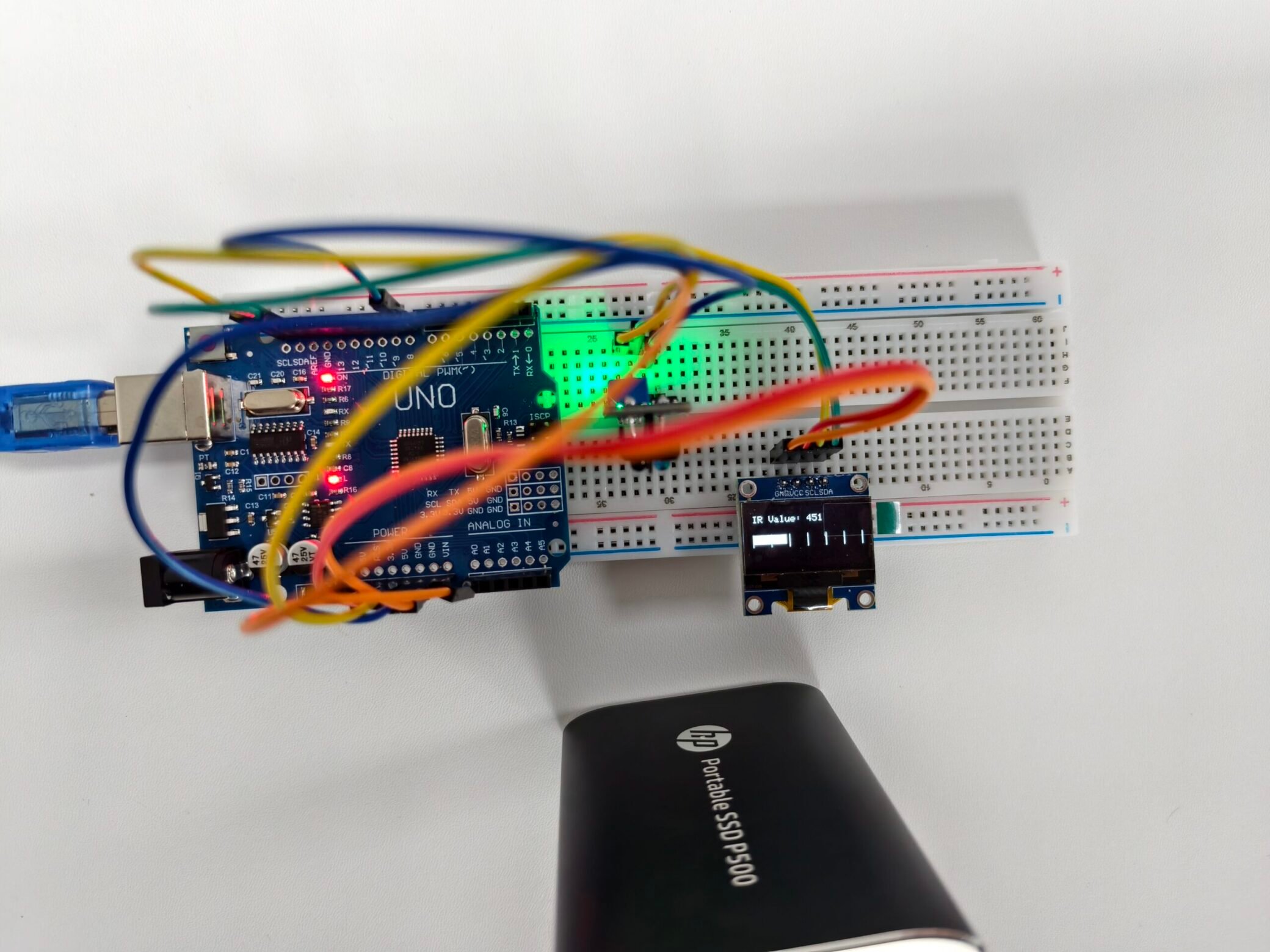
Use OLED screens to visually represent reflectivity
The wiring diagram is as follows

The sample code is as follows
					#include <Adafruit_GFX.h>
#include <Adafruit_SSD1306.h>
#define SCREEN_WIDTH 128
#define SCREEN_HEIGHT 64
#define OLED_RESET    -1
Adafruit_SSD1306 display(SCREEN_WIDTH, SCREEN_HEIGHT, &Wire, OLED_RESET);
const int sensorPin = A0; // IR sensor analog output pin
void setup() {
  Serial.begin(9600);
  pinMode(sensorPin, INPUT);
  if (!display.begin(SSD1306_SWITCHCAPVCC, 0x3C)) {
    Serial.println(F("OLED init failed"));
    for (;;);
  }
  display.clearDisplay();
  display.setTextColor(SSD1306_WHITE);
}
void loop() {
  int sensorValue = analogRead(sensorPin);
  int barLength = map(sensorValue, 640, 30, 0, 120); // Closer = longer bar
  barLength = constrain(barLength, 0, 120);
  display.clearDisplay();
  // Draw bar graph
  display.fillRect(4, 30, barLength, 10, SSD1306_WHITE);

  // Display numeric value
  display.setCursor(4, 10);
  display.setTextSize(1);
  display.print("IR Value: ");
  display.println(sensorValue);
  // Optional scale lines
  for (int i = 0; i <= 120; i += 20) {
    display.drawLine(4 + i, 28, 4 + i, 42, SSD1306_WHITE);
  }
  display.display();
  delay(100);
}
The display effect is as follows


When an object approaches the sensor, the reflectivity increases, causing the indicator bar to lengthen.
Demonstration video
Related content
FAQ
What are the differences between infrared sensors and ultrasonic sensors?
The ultrasonic sensor measures the distance between you and an object by using sound waves (echo location). On the other hand, the infrared sensor determines the presence of an object by using infrared light.
Can infrared sensors work in sunlight?
Yes, but the infrared sensor may be affected by other infrared sources (such as sunlight or fluorescent lights). These interferences will weaken the infrared signal, making it difficult for the infrared receiver to detect the original signal.
