

Blog
AS7341 11-Channel Spectral Sensor Redefines Precision
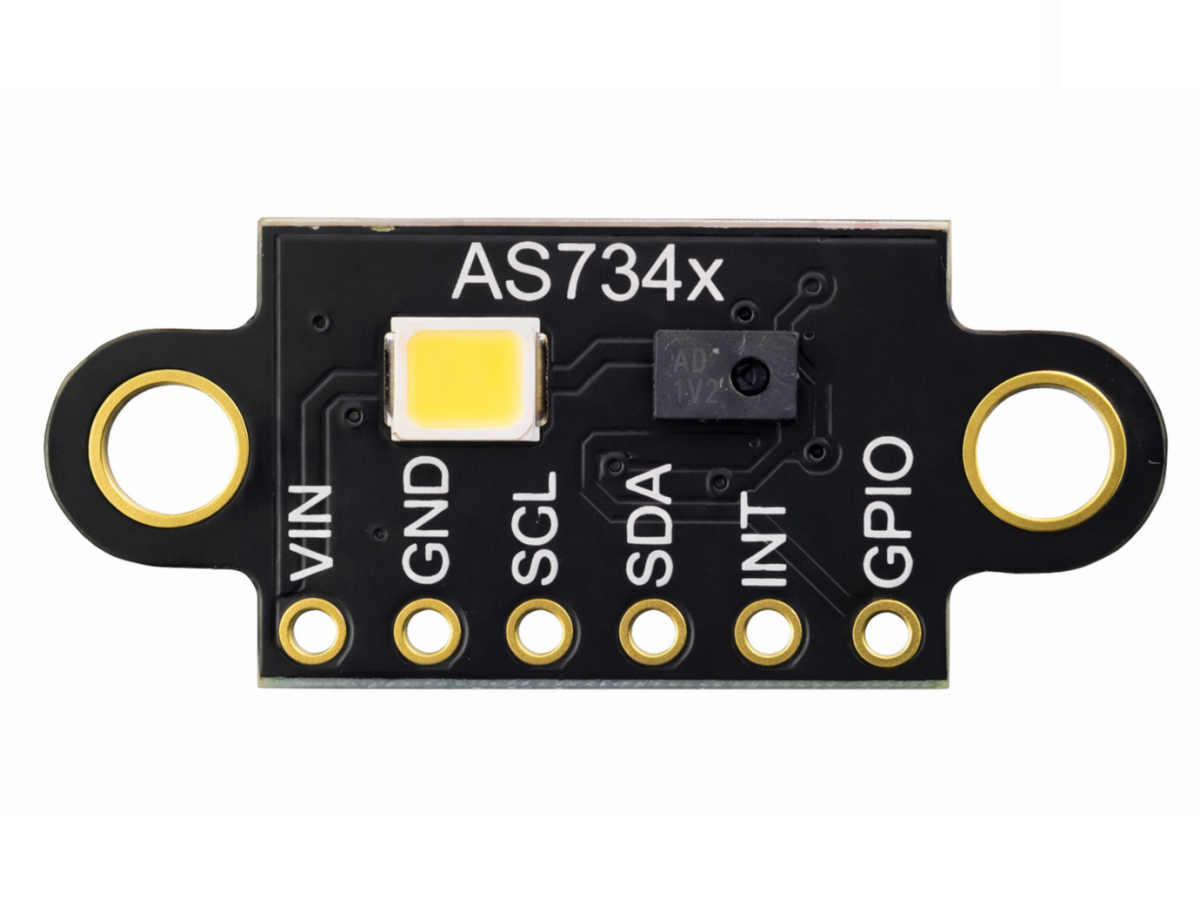
Introduction
In a world where color accuracy and spectral data drive innovation—from smartphone cameras to agricultural monitoring—generic color sensors often fall short. They capture basic RGB values but miss the nuanced spectral details that separate good results from exceptional ones. Enter the AS7341 Visible Spectrum Sensor module: a compact, feature-packed solution designed to deliver lab-grade spectral analysis in a tiny, easy-to-integrate form factor. Whether you’re optimizing display color calibration, developing smart agriculture tools, or building industrial quality control systems, this module turns complex spectral data into actionable insights—without the need for bulky, expensive equipment.
What is the AS7341 Spectral Sensor Module?
At its core, the AS7341 is an 11-channel multi-spectral sensor that goes far beyond standard RGB detection. Unlike basic sensors that only measure red, green, and blue, it splits light into 8 dedicated visible light channels (spanning 350 nm to 1000 nm), plus 3 specialized channels: a Near-Infrared (NIR) channel, a “Clear” channel (no optical filter for unobstructed light measurement), and a dedicated Flicker Detection channel.
This design lets it not just “see” color, but analyze the exact spectral composition of light—whether from natural sunlight, LED bulbs, or reflective surfaces. It uses nano-optic deposited interference filters integrated into CMOS silicon, ensuring precise wavelength separation, and 6 parallel ADCs for fast signal processing, so you get real-time data without lag. The module communicates via the I2C interface, making it compatible with most microcontrollers and single-board computers, and comes in an ultra-low-profile package—perfect for space-constrained projects like wearables or portable devices.
AS7341 vs. TCS3472 vs. APDS-9960: Which Spectral Sensor Wins?
Choosing the right spectrum sensor means matching it to your project’s needs. Let’s break down how the AS7341 stacks up against two popular alternatives:
| Feature | AS7341 | TCS3472 | APDS-9960 |
|---|---|---|---|
| Channel Count | 11 (8 visible + NIR + Clear + Flicker) | 4 (RGB + Clear) | 4 (RGB + Clear) + Proximity |
| Core Strength | Spectral analysis, flicker detection, NIR measurement | Basic color sensing, low cost | Color + proximity + gesture sensing |
| Use Case | Precision applications (calibration, agriculture, QC) | Simple color detection (like RGB LED control) | Consumer devices (gesture-enabled gadgets) |
| Data Depth | Detailed spectral composition data | RGB values + color temperature | RGB values + proximity data |
The TCS3472 is great for budget projects needing basic color recognition, but it can’t provide the spectral detail required for accuracy-critical tasks. The APDS-9960 adds gesture and proximity sensing, making it ideal for interactive devices, but lacks spectral analysis capabilities. The AS7341, by contrast, is built for precision: its multi-channel design and flicker detection make it the only choice for projects like display color calibration, material quality inspection, or plant health monitoring—where generic RGB data just isn’t enough.
How to use the AS7341 Module?
Using the AS7341 is straightforward, even for intermediate hobbyists. Here’s a step-by-step overview:
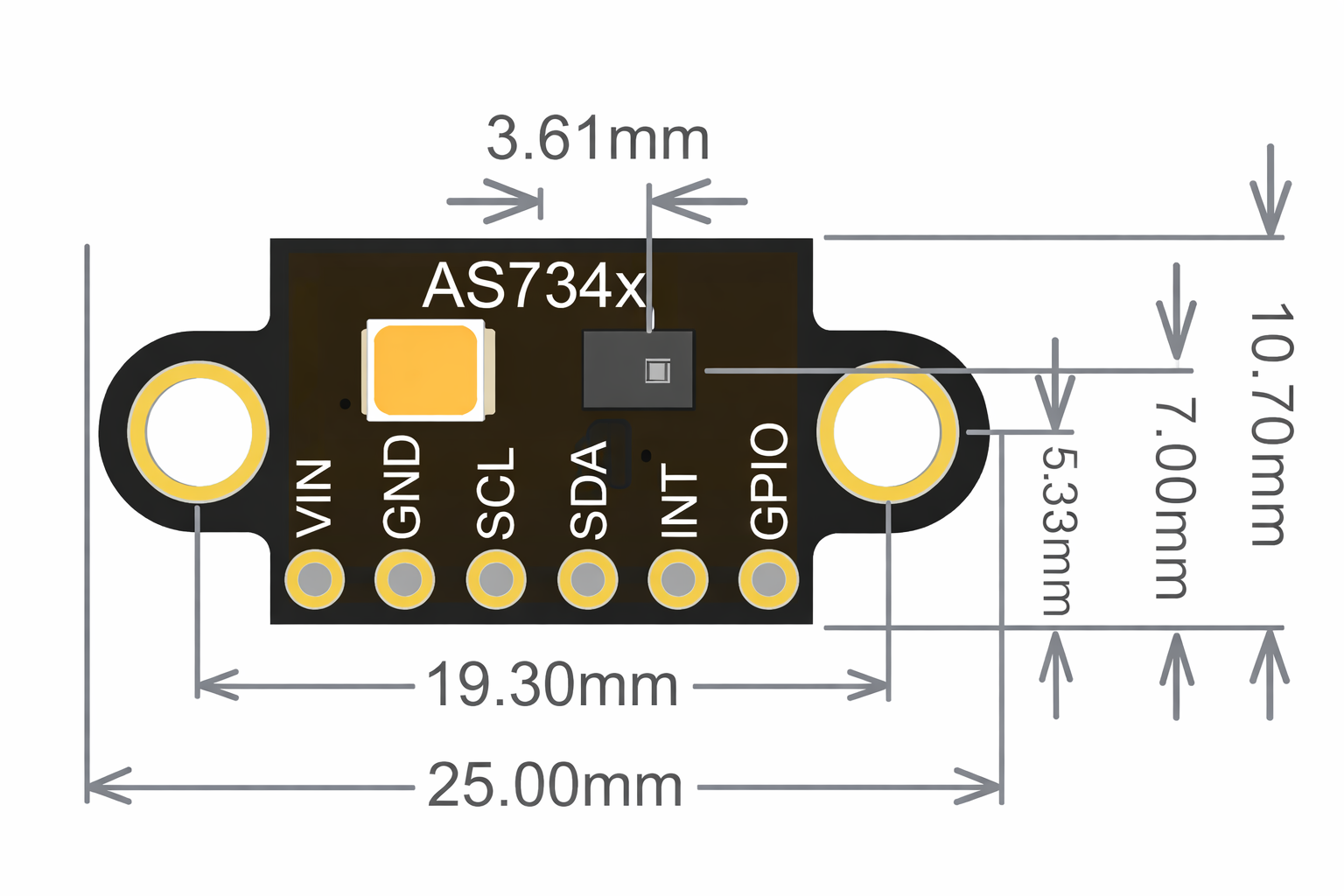
1.Identify the AS7341 Module Pins and Hardware Connection
- VIN: Power input (3.3V, as this breakout board includes an on-board LDO to convert 3.3V to the sensor’s required 1.8V)
- GND: Ground
- SCL: I2C clock pin
- SDA: I2C data pin
- INT: Interrupt pin (optional, for trigger-based measurements)
- GPIO: General-purpose I/O pin (optional)
2.Library Installation: Install the official AS7341 library (available from ams OSRAM or community repositories like GitHub) for your platform (Arduino, ESP32, Raspberry Pi).
3.Configuration: Use the library to set up measurement modes (like spectral scanning, flicker detection), adjust integration time, and enable desired channels (like NIR or flicker).
4.Data Reading: Trigger measurements and read raw spectral data, which you can process into color temperature (CCT), illuminance (lux), or custom spectral profiles.
5.Calibration: For precision applications, calibrate the sensor against a known reference (like a standard white tile) to account for ambient light variations.
Key Components of the AS7341 Module

The module’s performance comes from its carefully engineered internal components, as outlined in its datasheet:
- 11-Channel Sensor Array: 8 visible light channels (350–1000 nm), 1 NIR channel, 1 Clear channel, and 1 Flicker Detection channel.
- Nano-Optic Filters:Deposited interference filters that precisely isolate specific wavelengths for accurate spectral analysis.
- 6 Parallel ADCs:Process signals from 6 channels simultaneously, enabling fast measurement speeds.
- I2C Communication Interface: 400 kHz bus speed for high-speed data transfer to microcontrollers.
- Voltage Regulator (LDO):Converts external power (e.g., 3.3V) to the 1.8V required by the AS7341 chip.
- GPIO Pin: Supports synchronization with external signals (e.g., camera triggers) for coordinated measurements.
Hardware Specifications
| Parameter | Specification |
|---|---|
| I2C Interface | 400 kHz |
| GPIO | Available |
| Spectral Response Range | 350 nm to 1000 nm (±35° FOV) |
| Optical Channels | 11 channels (8 visible + 3 special channels + clear channel + flicker detection + NIR channel) |
| Photodiode Type | External photodiode (InGaP/Si) |
| Measurement Trigger | External trigger for spectral measurement |
| Ambient Light Flicker Detection | Up to 1.5 kHz |
| Power Consumption (Typical) | 210 μA (active mode), 0.7 μA (sleep mode) |
| Response Range | 500 to 3500 counts/μW/cm² |
| Integration Time (Typical) | T11 ch = 2 * tint = 2 * 500 ms = 100 ms |
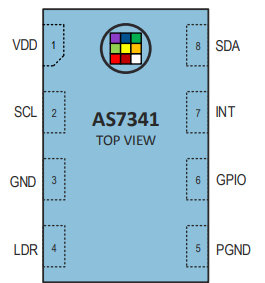
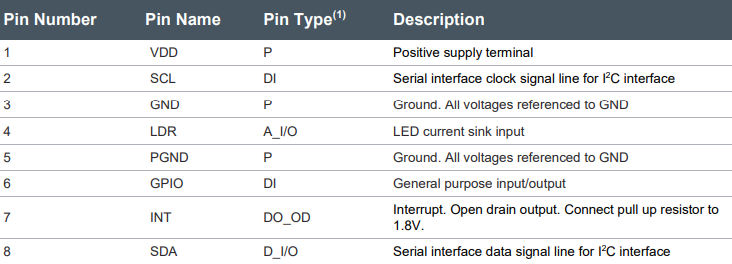
AS7341 Datasheet And Pinout
If you want to learn more AS7341 Visible spectrum sensor details, you can refer to this datasheet.
Practical Example: AS7341 + Arduino for Plant Health Monitoring
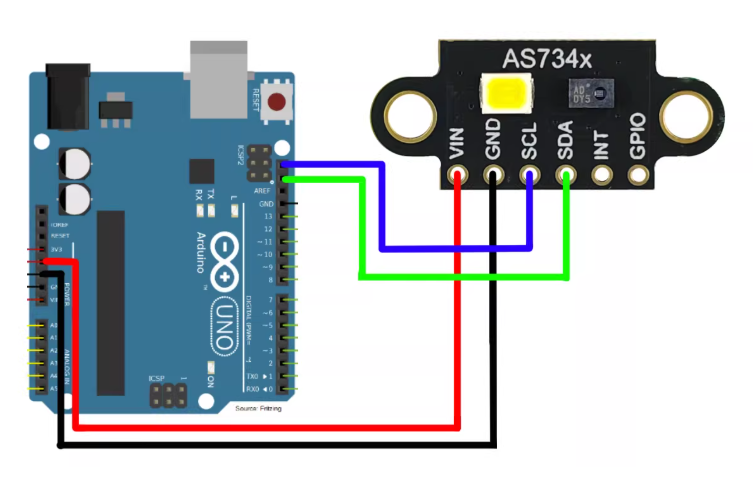
Using the AS7341 module (paired with Arduino, as per the connection diagram), we’ll build a system to measure plant health via the Normalized Difference Vegetation Index (NDVI)—a metric that uses NIR and red light data to assess plant vitality.
Step 1: Gather Materials
- AS7341 spectral sensor module
- Arduino Uno
- Jumper wires
- Breadboard
Step 2: Wire the Components
Follow the wiring in your image to connect the AS7341 to Arduino Uno:
Step 3: Upload the Plant Health Monitoring Code
This code reads red (630nm) and NIR (910nm) channel data, calculates NDVI, and prints results to the Serial Monitor:
					#include <Wire.h>
#include <Adafruit_AS7341.h>

Adafruit_AS7341 as7341;

void setup() {
  Serial.begin(9600);
  while (!Serial) delay(10); // Wait for Serial Monitor to open

  // Initialize the AS7341 (check connection)
  if (!as7341.begin()) {
    Serial.println("Error: AS7341 not found!");
    while (1); // Halt if sensor is missing
  }
  Serial.println("AS7341 connected — Plant Health Monitor Ready");

  // Set mode to spectral scan (enables red + NIR channels)
  as7341.setMode(AS7341_MODE_SPECTRAL);
}

void loop() {
  // Read raw data from all channels
  if (as7341.readAllChannels()) {
    // Get red (630nm) and NIR (910nm) values
    uint16_t red = as7341.getChannel(AS7341_CHANNEL_630nm);
    uint16_t nir = as7341.getChannel(AS7341_CHANNEL_NIR);

    // Calculate NDVI (Normalized Difference Vegetation Index)
    // Healthy plants have NDVI ≈ 0.5–0.9; dry/dead plants have NDVI < 0.3
    float ndvi = (float)(nir - red) / (nir + red);

    // Print results
    Serial.print("Red (630nm): ");
    Serial.print(red);
    Serial.print(" | NIR (910nm): ");
    Serial.print(nir);
    Serial.print(" | Plant NDVI: ");
    Serial.println(ndvi);
  } else {
    Serial.println("Failed to read sensor data");
  }

  delay(3000); // Update every 3 seconds
}
FAQS
Can the AS7341 detect non-visible light?
Yes! It includes a dedicated NIR channel for near-infrared light (up to 1000 nm), making it suitable for applications like plant health monitoring or material composition analysis.
Do I need a voltage regulator to power the AS7341?
Yes. The sensor operates at 1.7V–2.0V (typical 1.8V). If your microcontroller (like Arduino) outputs 3.3V or 5V, use a low-dropout (LDO) regulator to avoid damaging the chip.
How does the AS7341 handle ambient light flicker?
It has a dedicated Flicker Detection channel that automatically detects 50Hz/60Hz flicker (common in artificial lights). It can also buffer data for custom flicker frequency analysis, making it ideal for display calibration or camera optimization.
Is the AS7341 compatible with ESP32 or Raspberry Pi?
Absolutely. It uses the universal I2C interface, so it works with ESP32, Raspberry Pi, Arduino, and most other microcontrollers. Libraries are available for all major platforms.