

Blog
Precise Lux Measurement – TSL2561
How does the light sensor work?
1.Photoelectric Effect: According to the wave-particle duality of quantum mechanics, light has particle properties. The photoelectric effect occurs when photons strike a metal surface, giving electrons inside the metal more kinetic energy and generating a small electric current. The stronger the light, the stronger the current produced. By detecting this current, we can calculate the intensity of the light.
2.Light-Dependent Resistors (LDRs): These are made using special materials whose resistance changes with light intensity. LDRs convert light intensity into measurable readings using the material’s inherent properties. The principle is simpler but has lower accuracy.
3.Special Photodiodes: These diodes also convert light intensity into electric current, but they are manufactured using semiconductor technology. They offer high accuracy but are more expensive. Typically, multiple photodiodes are etched together using photolithography to form a CMOS (Complementary Metal-Oxide-Semiconductor) sensor.
What is a light sensor module?
Light sensor modules are all manufactured based on the above working principles:
1.Modules that use the photoelectric effect for light intensity testing are rarely used today, as it is difficult to balance the required surface area and accuracy for this principle.
2.LDR-based modules are relatively simple. They measure the resistance of the LDR through a voltage divider circuit to estimate light intensity. Most of these modules also include an operational amplifier and a potentiometer. By adjusting the potentiometer’s resistance, the module can automatically trigger an alert when the light intensity reaches a desired level.
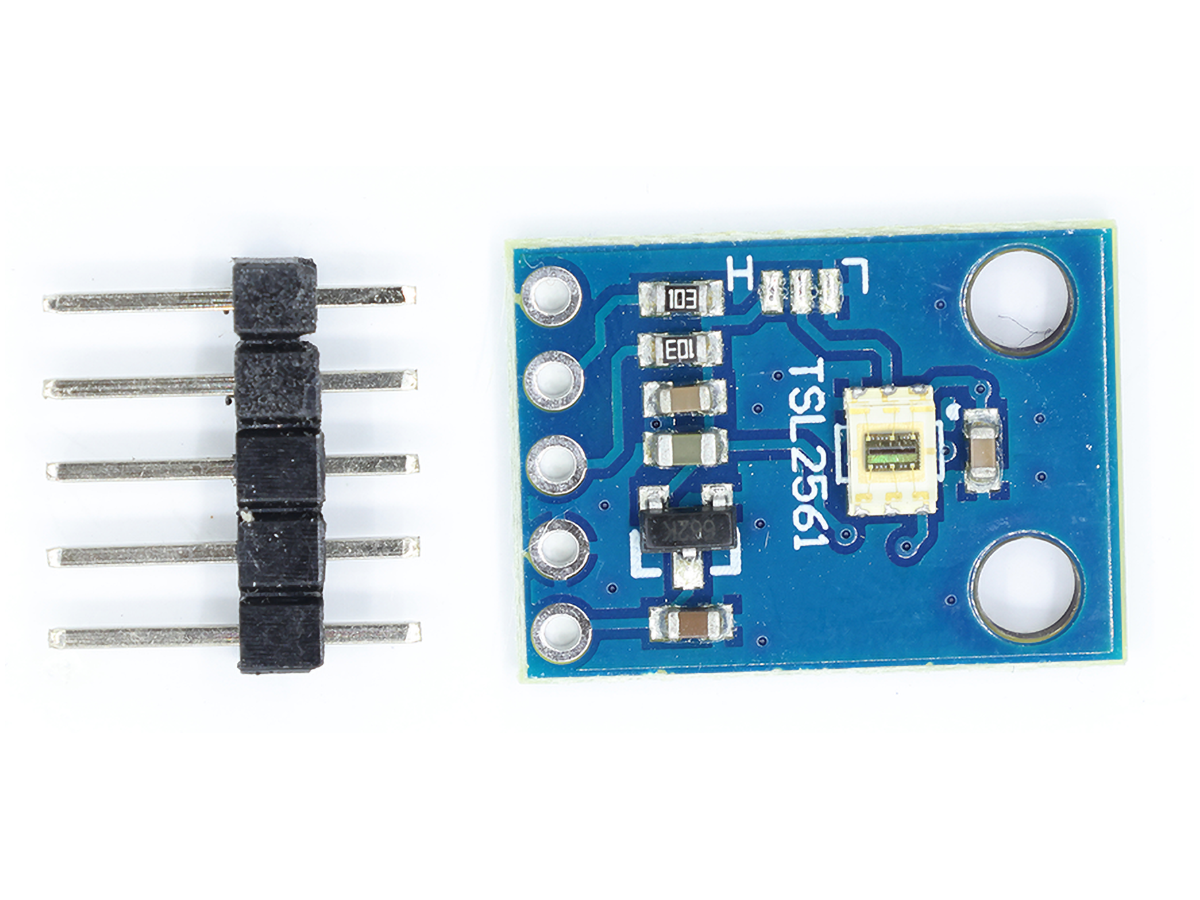
3.The third type is more advanced. Thanks to semiconductor technology and integrated circuits, these modules can be miniaturized. They can also have built-in MCUs (Microcontrollers) to expand functionality—for example, the TSL2561 module.
Can an LED be used as a light sensor?
However, while LEDs can convert light into electric current, the current generated is extremely weak. Reading this current requires an ADC (Analog-to-Digital Converter) circuit with very low error—and the cost of such a circuit is already high enough to buy a high-precision dedicated light sensor. Moreover, the current produced by an LED is easily affected by environmental factors.
Is 10,000 lux the same as 10,000 lumens?
First, we must understand the difference between lumens and lux:
- A lumen measures the total light intensity emitted by a light source.
- A lux measures the light intensity received per unit area.
For example, if a flashlight shines on a wall, and the illuminated area of the wall is 2 square meters, while the flashlight’s total light intensity is 10 lumens, the light intensity per unit area (lux) on the wall is calculated as: 10 lumens ÷ 2 m² = 5 lux.
To use an analogy with electricity: Lumens are like the total current from a power supply, and lux is like the average current across all parallel loads. In other words:
- If the light source’s total intensity (lumens) remains constant, a larger illuminated area will result in lower brightness (lux) on the surface. (This is like keeping total current constant—more loads mean lower average current.)
- If the illuminated area is fixed, higher brightness (lux) on the surface means the light source has a higher total intensity (lumens).
From this, we can conclude: For lux and lumens to be numerically equal, the illuminated area must be exactly 1 square meter. However, due to various errors and environmental influences, this is nearly impossible in practice.
What is TSL2561?
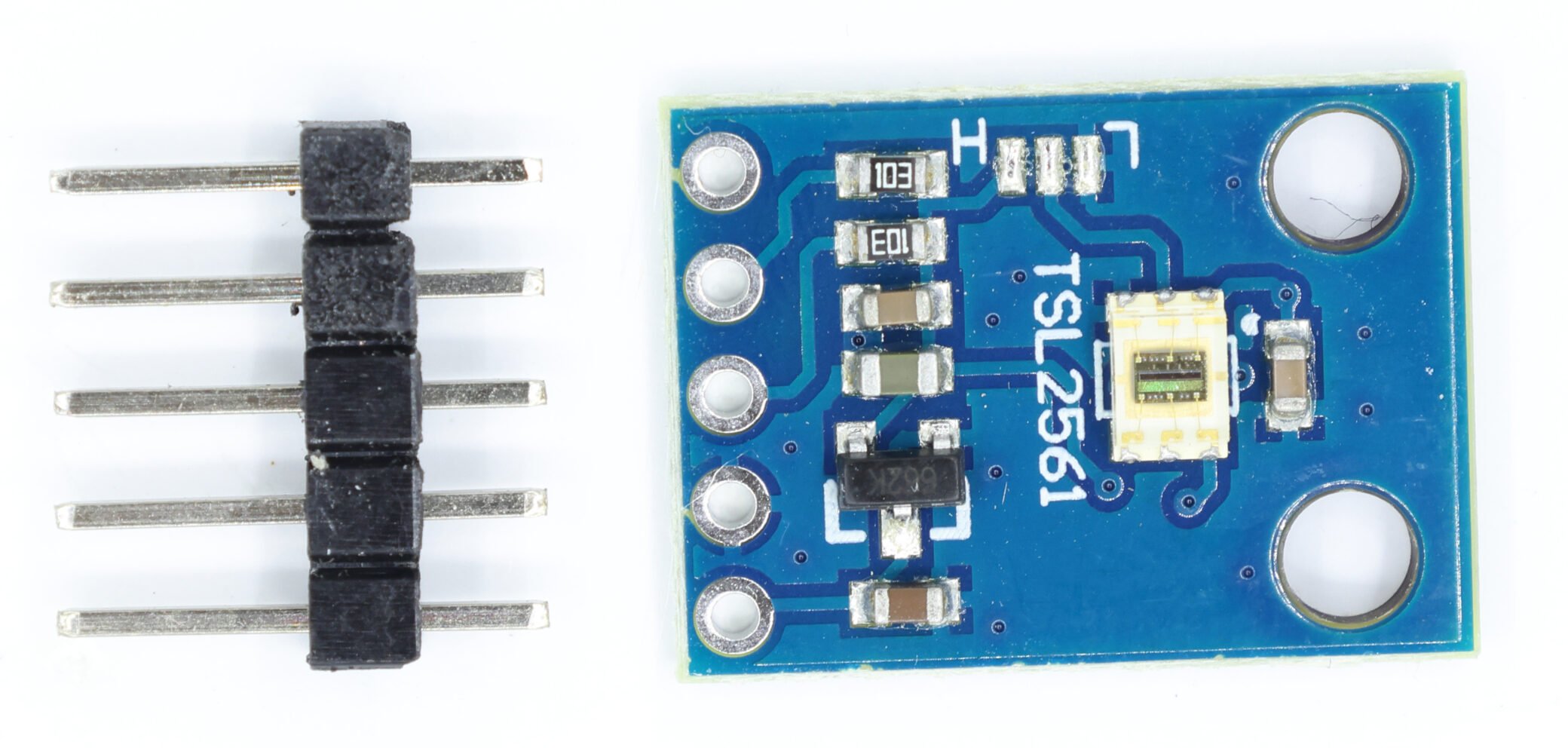
The TSL2561 is a high-precision light intensity sensor. Since it measures light in lux, it is also called a “lux sensor.” It has two built-in light sensors: both measure light, but one specifically detects only infrared spectra. By calculating the difference between the two readings, the sensor corrects for IR interference in visible light, resulting in a light intensity value that closely matches what the human eye perceives.
What is the use of TSL2561?
The TSL2561 can measure visible light intensity more accurately than ordinary light sensors. Most basic light sensors detect a mix of visible light and IR light (which the human eye cannot see), so their readings often differ from what the human eye perceives. Such sensors are only suitable for scenarios where accuracy is not critical—for example, streetlights.
The TSL2561, however, separately detects IR light and corrects its readings to eliminate IR interference. This gives a light intensity value that aligns closely with human visual perception. It is therefore ideal for scenarios requiring precise measurements, such as scientific research or high-end cameras.
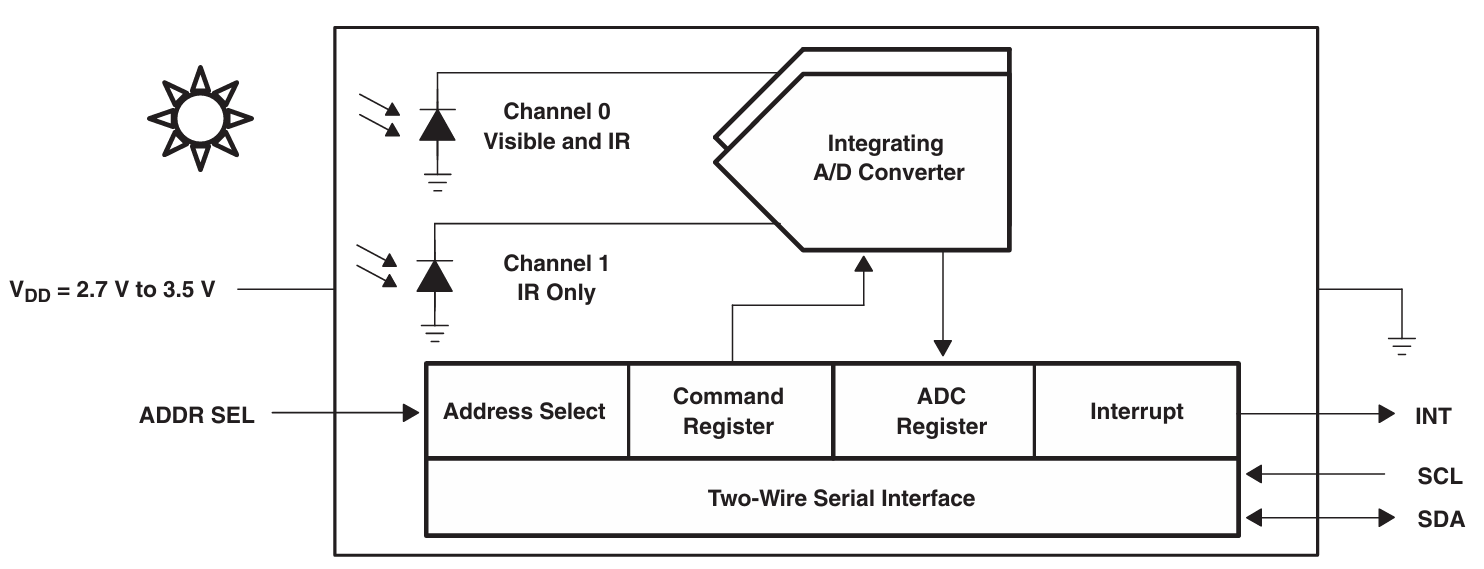
The following content is more accessible when paired with the datasheet, so we’ll start with the TSL2561 datasheet here.
Differences between TSL2561 and BH1750
| Feature | TSL2561 | BH1750 (GY-2561) |
|---|---|---|
| Accuracy | High, dual-channel (infrared-filterable) | Relatively high, single-channel |
| Range | 0.1 – 40,000+ Lux | 0 – 65535 Lux |
| Interface | I2C | I2C |
| Configuration | Relatively complex (requires setting gain/integration time) | Simple (basically no configuration needed) |
| Power Consumption | Relatively low (supports sleep mode) | Very low |
| Applicable Scenarios | High-precision light measurement, professional equipment | General light sensing, automatic dimming |
What is the range of TSL2561?
The TSL2561 has a measurement range of 0.1 – 40,000+ lux. This range is not explicitly stated in the datasheet but is calculated from other datasheet parameters:
- The maximum ADC (Analog-to-Digital Converter) value of the sensor is 65,535.
- Assume the ratio of IR light to total light (IR + visible) is between 0.5 and 0.61 (like 0.5 < CH1/CH0 < 0.61, where CH1 = IR reading, CH0 = total light reading).
- Using the lux calculation formula from the datasheet: Lux = 0.0224×CH0 − 0.031×CH1
If CH0 = 65,535 (max) and CH1 = 65,535×0.5 = 32,767.5 (min IR), the result is 452.19 lux.
Switching to low-gain mode increases the range by 16x, giving 452.19×16 = 7,235 lux.
This still seems far from 40,000+ lux, but the discrepancy arises from the sensor’s different saturation characteristics under various light sources. The 40,000+ lux range is achieved by optimizing the sensor’s scaling factor for specific lighting conditions.
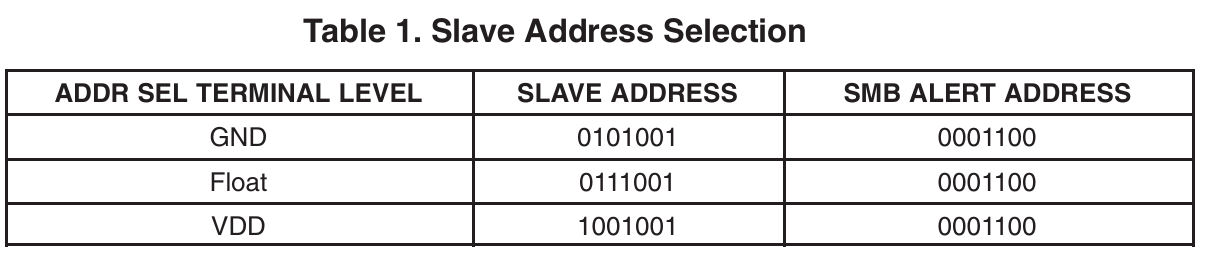
What is the I2C address of TSL2561?
The TSL2561 offers three selectable I2C addresses: 0x29, 0x39, and 0x49. The address is determined by how the ADDR SEL pin is connected. This means up to 3 TSL2561 sensors can be connected to the same I2C bus. The default address (when ADDR SEL is left floating) is typically used for communication.
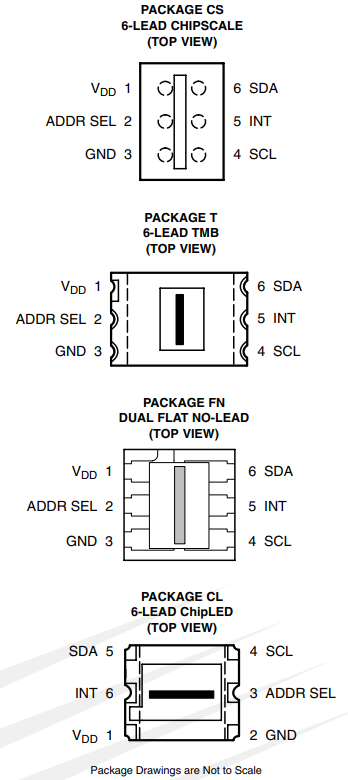
TSL2561 Pin Definition
The TSL2561 is available in multiple package types; please note that pin locations vary between packages.
VDD: Digital power supply input, connect to 3.3V.
GND: Zero‑potential reference and current return path; connect to the power supply’s GND or negative terminal.
ADDR SEL: Address selection pin. Different I²C addresses can be set by leaving it floating, connecting it to VDD, or connecting it to GND.
SDA: Data line for the I²C bus.
SCL: Clock input line for the I²C bus.
INT: Interrupt output pin.
Reading TSL2561 with Arduino
Due to the high soldering difficulty of the bare TSL2561 chip, it is recommended to use a TSL2561 module for connection to an Arduino board.
Step 1: Wiring
Connect the TSL2561 module to the Arduino as follows:
VCC-5V
GND-GND
SDA-SDA(A4)
SCL-SCL(A5)
INT-Leave floating
The module has 3 solder points for selecting the TSL2561’s I2C address—leave them floating by default.
| TSL2561 Module Pin | Arduino Pin |
|---|---|
| VCC | 5V |
| GND | GND |
| SDA | SDA (Pin A4) |
| SCL | SCL (Pin A5) |
| INT | Not Connected / Floating |
Step 2: Install the Library
Search for and install the “TSL2561” library in the Arduino IDE.

Step 3: Upload the Code
Upload the test code to the Arduino (relevant notes are included in the code
					#include <Wire.h>
#include <Adafruit_Sensor.h>
#include <Adafruit_TSL2561_U.h>

//Create a sensor object and specify a unique ID and display name
Adafruit_TSL2561_Unified tsl = Adafruit_TSL2561_Unified(TSL2561_ADDR_FLOAT, 12345);
//"TSL2561_ADDR_FLOAT" is the address (0x39) when ADDR_SEL is left floating.
//It can be changed to TSL2561_ADDR_LOW (0x29) or TSL2561_ADDR_HIGH (0x49).
//12345 is the device ID and can be customized.
  int a;
  int b;
  int c;
  int ch0=0;
  int ch1=1;
  int ch2=2;
//Channel Settings
void setup() {
  Serial.begin(9600);
  if(!tsl.begin()) { // Initialize Sensor
    Serial.println("Sensor TSL2561 not found!");
    while(1);
  }

  // Configure sensor gain and integration time
  tsl.enableAutoRange(true);          // Automatic gain switching (use high gain in low light).

  //Manual gain setting requires disabling automatic gain. You can choose either 1x or 16x.
  //tsl.setGain(TSL2561_GAIN_1X);

  //Set the integration time. Options include 13ms, 101ms, and 402ms.
  tsl.setIntegrationTime(TSL2561_INTEGRATIONTIME_402MS); // Longer integration time results in higher precision.
}

void loop() {
  sensors_event_t event;//Receive Structure
  tsl.getEvent(&event); // Get Sensor Event

  tsl.getLuminosity(&ch0,&a);//Read the value of channel 0 and assign it to A.
  Serial.print("full: ");
  Serial.print(a);
  //Full Spectrum

  tsl.getLuminosity(&ch1,&b);
  Serial.print("   IR: ");
  Serial.print(b);
  //Infrared Spectrum

  tsl.getLuminosity(&ch2,&c);
  Serial.print("   visible: ");
  Serial.println(c);
  //Visible Light Estimate

  if (event.light) {
    Serial.print("Illuminance: ");
    Serial.print(event.light);
    Serial.println(" lux");
  } else {
    Serial.println("Error");
  }
  delay(100);


}
Step 4: View Results
You’ll then see all the original values and the calculated LUX values, and you can even create your own Lux conversion function.
