

Blog
From Blind to Eagle-Eyed: Supercharge Your Project with a Single GP2Y
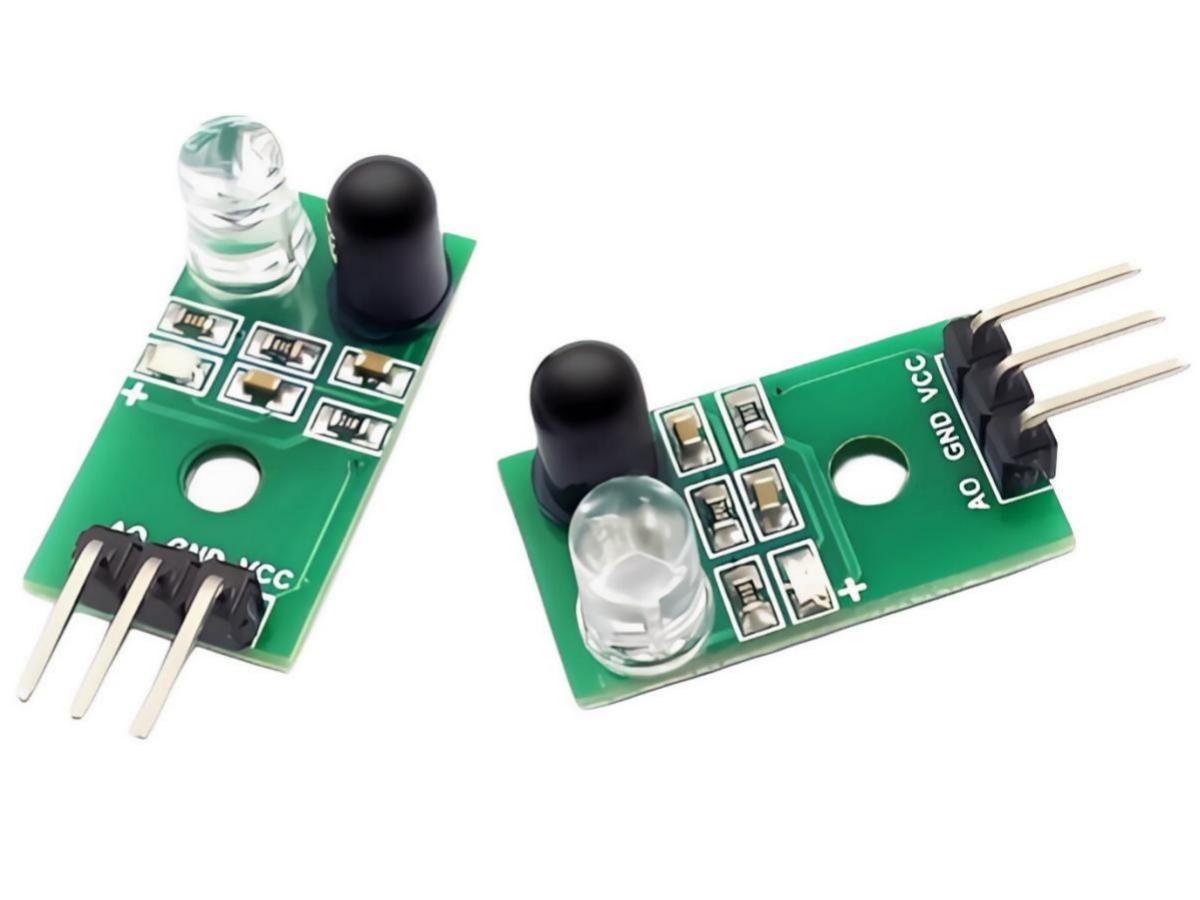
Introduction
The GP2Y0A02YK0F infrared distance sensor utilizes advanced optical measurement technology. Its core principle involves measuring distance through an infrared emitter and receiver. When the infrared emitter sends out a beam of light, it reflects off obstacles and is captured by the receiver, which then converts it into an electrical signal. By measuring the time difference or intensity change between the emitted and received light, the sensor can accurately calculate the distance to the obstacle. The sensor outputs an analog signal, meaning the output voltage is proportional to the detected distance. This indicates that as the obstacle gets closer, the output voltage increases, while as the obstacle moves farther away, the output voltage decreases. By reading the output voltage value and applying a calibration formula, users can precisely calculate the distance to the obstacle.
GP2Y0A02YK0F
This sensor operates on the optical triangulation principle, not simply the transmit-receive time difference. Its internal structure is quite ingenious:An infrared LED emits a modulated beam → It reflects off an object and returns → The reflected light is focused via a lens onto a component called a Position Sensitive Detector (PSD).
The closer the object, the more off-center the reflected light focuses; the farther the object, the closer the focus point is to the center. This positional change is converted into a current difference and then into an analog voltage output.As a result, you’ll notice that the output voltage and distance have an inverse nonlinear relationship—the farther the distance, the lower the voltage.
Official data shows that it roughly decreases from about 0.4V (at 150cm) to 2.8V (at 15cm), but beware—this is not a straight line! It’s a curve, and using a linear formula directly will lead to significant errors!
Main Features
Non-Contact Measurement:The GP2Y0A02YK0F infrared distance sensor utilizes infrared transmission and reception components to achieve non-contact distance measurement. It can measure the distance between the target object and the sensor without any physical contact.
High-Precision Measurement: This sensor offers high measurement accuracy and stability, delivering reliable distance measurement results. It achieves high resolution within a short measurement range.
Easy Arduino Integration:The GP2Y0A02YK0F sensor can be directly connected to an Arduino development board, with distance values read via an analog input pin (e.g., A0). Its integration with Arduino is straightforward, making it suitable for beginners and rapid prototyping.
GP2Y0A02YK0F Core Specifications
| Parameter | Value |
|---|---|
| Detection Range | 15-150cm |
| Operating Voltage | 0.4V~2.8V (decreases as distance increases) |
| Working Voltage | 4.5V~5.5V (stable 5V power supply recommended) |
| Current Consumption | Approximately 33 mA (pulse operation, energy-efficient) |
| Response Time | Typical 39 ms |
| Temperature Range | -10℃~+60℃ |
| Field of View (FOV) | 8° |
Design Tips
- Mounting Angle: It is recommended to tilt the sensor 5°~10forward and downward to minimize ground reflection interference (particularly to avoid false triggers caused by light-colored floors).
- Dual sensor layout: One on each side forms “binocular vision,” which can not only determine distance but also roughly estimate the direction of obstacles;
- Dynamic threshold: When the vehicle is moving fast, it begins deceleration 30cm in advance; when moving slowly, it reacts closer to obstacles to improve passing efficiency;
- Intermittent power supply: The battery-powered system can use MOSFETs to control sensor power, turning on once every 100ms, reducing average power consumption to below 10mA;
- Temperature drift compensation: After prolonged operation in high or low temperatures, the zero point may drift, making periodic recalibration to the origin essential.
GP2Y0A02YK0F VS HC-SR04
| Dimension | GP2Y0A02YK0F | HC-SR04 Ultrasonic |
|---|---|---|
| Anti-interference | Unaffected by sound or airflow | Susceptible to interference from fans/air conditioners |
| Output method | Analog voltage directly input to ADC | Requires precise triggering and echo detection |
| Cost | Moderate | Extremely low |
| Precision stability | Better (especially at close range) | Highly susceptible to temperature and humidity influences |
Infrared Ranging
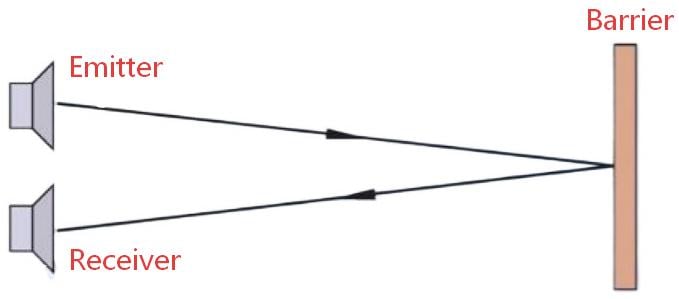
With the continuous advancement of science and technology, various distance measurement methods have emerged, including laser ranging, microwave radar ranging, ultrasonic ranging, and infrared ranging. As a widely applied and highly accurate measurement method, infrared ranging leverages the characteristics of infrared light, such as minimal diffusion and a low refractive index during propagation. By measuring the time it takes for the infrared signal to be emitted from the transmitter module, reflected off an object, and received by the receiver module, the corresponding distance calculation formula is applied to achieve precise distance measurement.
Infrared ranging first emerged in the 1960s as a measurement method that uses infrared rays as the transmission medium. The research on infrared ranging holds extraordinary significance, as it possesses unique characteristics not found in other ranging methods. Its technical difficulty is relatively low, the system construction cost is relatively inexpensive, and it offers good performance, ease of use, and simplicity. It makes indispensable contributions to various industries, resulting in greater market demand and broader development prospects. Its working principle is based on the fact that the intensity of reflection varies with the distance of obstacles encountered by infrared signals, enabling the detection of the proximity of obstacles.
Infrared ranging sensors consist of a pair of infrared signal transmitting and receiving diodes. The transmitting diode emits infrared signals at a specific frequency, while the receiving diode captures these signals. When an obstacle is encountered in the detection direction, the infrared signal is reflected back and received by the receiving diode. After processing, the data is transmitted back to the robot’s main controller via a digital sensor interface, enabling the robot to recognize changes in its surrounding environment based on the returned infrared signals.
GP2Y0A02YK0F Infrared Ranging with Arduino
Distance measurement and monitoring: The combination of GP2Y0A02YK0F with Arduino and OLED display can be used for measurement and monitoring applications, such as measuring the distance between an object and the sensor and displaying the distance value in real-time on the screen. This has wide-ranging applications in fields such as robot navigation, automatic door control, and security monitoring.
Obstacle detection and avoidance: By integrating the GP2Y0A02YK0F with Arduino and an OLED display, obstacle detection and avoidance functions can be achieved. The sensor can measure the distance between a vehicle or robot and obstacles, display relevant warning information on the screen, and enable intelligent obstacle avoidance.
Distance alarm system: By utilizing a distance sensor and an OLED display, a distance alarm system can be constructed. When a detected distance exceeds or falls below a set threshold, the system can provide visual warnings on the display or trigger other alarm devices, such as a buzzer or warning light.
Arduino Code
					#include <Wire.h>
#include <Adafruit_GFX.h>
#include <Adafruit_SSD1306.h>

#define SCREEN_WIDTH 128
#define SCREEN_HEIGHT 64
Adafruit_SSD1306 display(SCREEN_WIDTH, SCREEN_HEIGHT, &Wire, -1);

#define SENSOR_PIN A0
#define VREF 5.0
#define ADC_MAX 1023

void setup() {
  Serial.begin(9600);

  if(!display.begin(SSD1306_SWITCHCAPVCC, 0x3C)) {
    while(1);
  }

  display.clearDisplay();
  display.setTextSize(1);
  display.setTextColor(WHITE);
  display.setCursor(20, 20);
  display.println("Distance Sensor");
  display.setCursor(30, 40);
  display.println("Starting...");
  display.display();
  delay(1000);
}

float getDistance() {
  int sum = 0;
  for(int i = 0; i < 10; i++) {
    sum += analogRead(SENSOR_PIN);
    delay(2);
  }

  float voltage = (sum / 10.0) * (VREF / ADC_MAX);
  float distance = (5.0 - voltage) * 3.0 + 1.0;

  if(distance < 1.0) distance = 1.0;
  if(distance > 15.0) distance = 15.0;

  return distance;
}

void showDisplay(float dist, float volt, int adc) {
  display.clearDisplay();

  // Title
  display.setCursor(0, 0);
  display.println("Distance Sensor");
  display.drawFastHLine(0, 10, 128, WHITE);

  // Distance
  display.setTextSize(3);
  display.setCursor(10, 15);
  display.print(dist, 1);
  display.setTextSize(2);
  display.print(" cm");

  // Info
  display.setTextSize(1);
  display.setCursor(0, 45);
  display.print("Volt: ");
  display.print(volt, 2);
  display.print("V");

  display.setCursor(0, 55);
  display.print("ADC: ");
  display.print(adc);
  display.print(" 1-15cm");

  // Progress bar
  int bar = map(constrain(dist, 1, 15), 1, 15, 20, 120);
  display.fillRect(20, 35, bar, 6, WHITE);

  display.display();
}

void loop() {
  int adcValue = analogRead(SENSOR_PIN);
  float voltage = adcValue * (VREF / ADC_MAX);
  float distance = getDistance();

  Serial.print("ADC:");
  Serial.print(adcValue);
  Serial.print(" Volt:");
  Serial.print(voltage, 2);
  Serial.print("V Dist:");
  Serial.print(distance, 1);
  Serial.println("cm");

  showDisplay(distance, voltage, adcValue);
  delay(300);
}
Output Voltage vs. Actual Distance Graph


User Manual

Sensor Installation Positioning and Field of View Calibration Methods
The GP2Y0A02YK0F features an approximate 15° detection field of view, with the optimal measurement direction aligned directly ahead of the user’s path.
Calibration steps are as follows:
- Secure the device on a mount, facing a vertical white wall.
- Record the ADC output values at distances of 0.2m, 0.5m, 1.0m, and 1.5m respectively.
- Adjust the housing angle until the readings at each distance point align as closely as possible with the theoretical curve.
- Use UV-curing adhesive to secure the sensor position and prevent loosening.
After calibration is completed, establish an initial distance-voltage lookup table for subsequent table-based compensation.
Precautions
Measurement Range and Resolution: The GP2Y0A02YK0F sensor has specific measurement range and resolution characteristics. When using the sensor, it is essential to understand its measurement range and select the appropriate sensor model based on the specific application requirements.
Reflectivity and Ambient Light Influence: The sensor’s measurement results may be affected by the reflectivity of the target object and ambient light. In specific applications, calibration or other measures may be necessary to obtain accurate measurement results.
Power Supply and Connections: Ensure that the sensor and OLED display are properly powered and connected to the Arduino development board. Follow the relevant circuit connection and power supply requirements to guarantee normal operation and reliability.
Data Processing and Display: Write appropriate code in Arduino to process and display the distance values read from the sensor. If necessary, techniques such as moving average filtering can be employed to smooth the measurement results, thereby reducing noise and jitter.
Ensure Safety: When operating or installing the GP2Y0A02YK0F sensor and OLED display, be sure to follow all relevant safety procedures. Avoid exposing the sensor to excessively high temperatures, humidity, or other harsh environmental conditions to prevent device damage or performance degradation.
Relative Information
Application
The Preferred Choice for Educational Robot Experiment Platforms — Simple interfaces and intuitive results enable students to build obstacle-avoiding cars within half an hour.
AGV front-end collision warning — Costs significantly lower than lidar while covering critical distance ranges.
Automatic door/elevator door anti-pinch protection — Non-contact monitoring, both safe and durable.
Edge assistance for robotic vacuum cleaners — Works in conjunction with cliff sensors to prevent falls while avoiding furniture.
DIY drone low-altitude height stabilization — Although not a substitute for barometers, it provides additional reference within 1.5 meters.
FAQ
1.How to Make the Sensor Stable and Reliable Through Peripheral Circuits?
- Power supply decoupling:Add a 0.1μF ceramic capacitor next to VCC to prevent power supply jitter.
- Signal filtering:Implement an RC low-pass filter at the output (e.g., 1kΩ + 0.1μF) with a cutoff frequency of approximately 1.6kHz to effectively suppress high-frequency noise.
- Keep away from interference sources:Avoid bundling the sensor with motor drive wires, as PWM noise can couple into the analog signal, causing erratic readings!
2.How to Solve the "Classic Challenges" Encountered by Sensors?
High nonlinearity error
→ Conduct a calibration experiment by recording the output voltage at fixed distances such as 15cm, 30cm, 50cm, etc., to generate a V-D mapping table or fit a higher-order polynomial.
Readings drift in sunlight
→ Add a sunshade , or switch to a model with stronger modulation capabilities (e.g., Sharp newer series). In extreme cases, pair with an ambient light sensor to dynamically adjust sensitivity.
No response when encountering black objects
→ Infrared light has weak reflection on dark/light-absorbing surfaces, making it prone to missed detection. In such cases, it is recommended to team up with an ultrasonic sensor to form a complementary system. One is insensitive to color but struggles with soft materials, while the other is unaffected by darkness but susceptible to sound absorption. Working together ensures a more reliable performance!
Movement too fast to keep up
→ Although the response time is 39ms, if the control cycle is too long (e.g., reading only once every 500ms), it will cause lag. It is recommended to keep the sampling period within 50ms and combine it with Kalman filtering to predict trends, thereby improving dynamic response.