

Blog
A Complete Guide to UV Sensors: Everything You Need to Know
Introduction
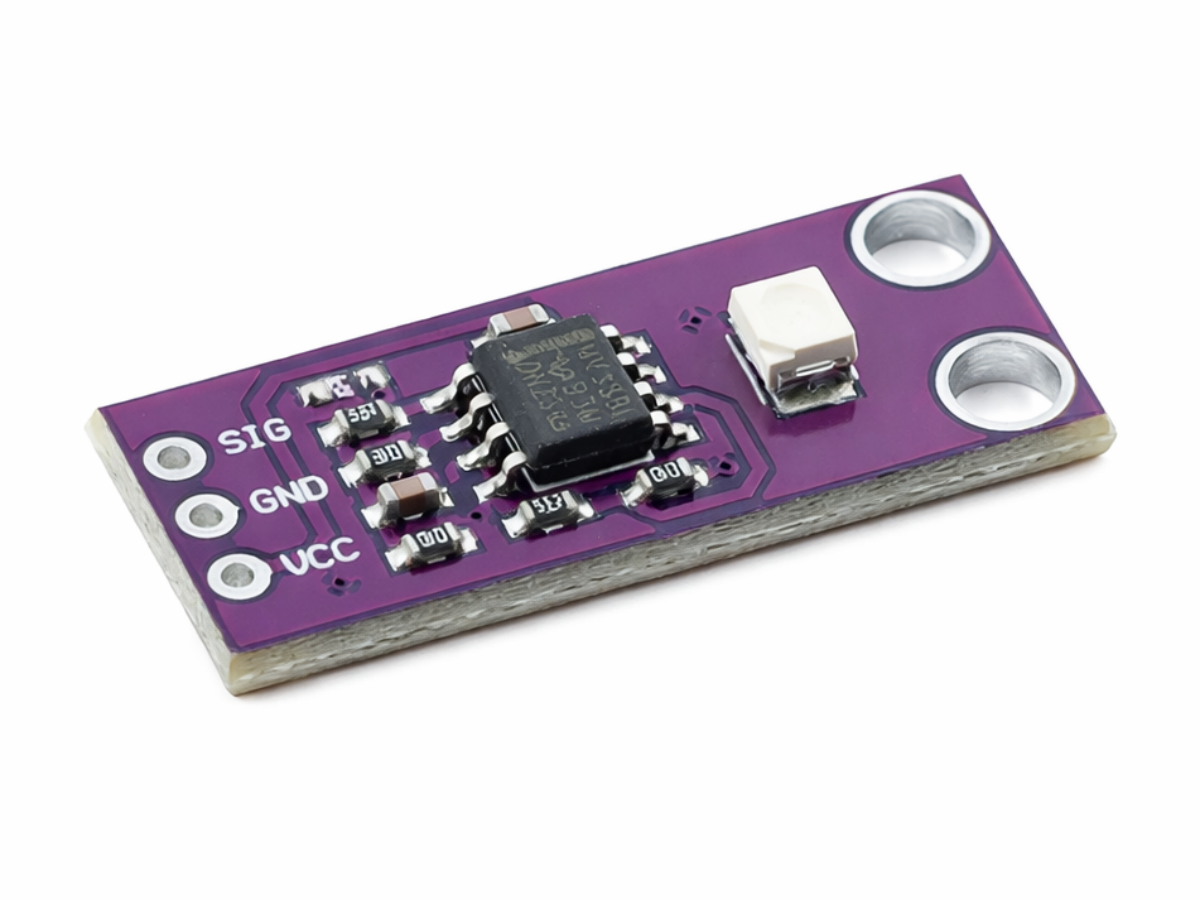
When people talk about UV sensors (ultraviolet sensors), most think of outdoor sun protection or environmental monitoring. However, these sensors have long been integrated into scenarios like smart wearables and industrial testing. As core components that convert ultraviolet light signals into electrical signals, UV sensors excel at accurately and conveniently detecting ultraviolet rays in the 200-400nm wavelength range (covering UVA, UVB, and UVC). They enable functions such as UV monitoring and UV index assessment. Among numerous sensor modules, the CJMCU-GUVA-S12SD UV sensor module stands out as the top choice for beginners and mass-production projects, thanks to its ultra-low power consumption, high integration, and affordable price. It eliminates the need for additional amplification circuits and is directly compatible with mainstream development boards, making it easy to implement UV detection functions quickly.
First, Understand: What Exactly Can a UV Sensor Do?

The core function of a UV sensor is to detect ultraviolet intensity and convert it into measurable electrical signals. Its applications are more widespread than you might think:
- Consumer Electronics: Sun protection reminders on smartwatches and fitness trackers (informing users of sun protection levels via the UV index);
- Environmental Monitoring: UV monitoringin outdoor weather stations and agricultural greenhouses to assess crop light exposure or atmospheric UV radiation;
- Industrial Sector: Intensity detection for UV curing equipment and disinfection lamps, ensuring process compliance or disinfection effectiveness;
Healthcare: Portable UV detectors to help people with special needs (like those with skin conditions) avoid harmful UV rays;
- Smart Wearables: Wearable UV sensorsthat provide real-time feedback on ambient UV intensity to guide outdoor activities.
In short, any scenario requiring “UV detection” relies on UV sensors. The choice of module depends on the scenario’s specific requirements for power consumption, size, and accuracy.
Core Advantages of the CJMCU-GUVA-S12SD: At a Glance
Let’s introduce the CJMCU-GUVA-S12SD—an integrated module with a GUVA-S12SD photosensitive element and an LMV358 operational amplifier at its core. Compared to similar products, its strengths lie in “practicality, convenience, and cost-effectiveness”:
- Plug-and-Play, No Extra Design Needed: Built-in LMV358amplifier directly amplifies the weak current from the sensor into a stable analog voltage, which can be read by a microcontroller directly—perfect for beginners;
- Ultra-Low Power Consumption, Suitable for Portable Devices: Operates at2.7V-6Vwith a working current of <1mA. Paired with a lithium battery, it can work continuously for months, making it ideal for wearable UV sensors;
- Full-Wavelength Detection, Sufficient Accuracy: Covers the 200-400nmfull UV spectrum, detecting UVA, UVB, and UVC—meeting accuracy needs for most non-professional detection scenarios;
- Affordable Price, Great Cost-Effectiveness: A single module typically costs just a few yuan, much cheaper than high-precision professional sensors. No additional amplifiers are required, reducing costs for mass production;
- Compact Size, Easy Integration: Features a standard CJMCU package, compatible with breadboards or PCB soldering. It can be easily embedded in small devices like fitness trackers or portable detectors.
Comparison with Similar Products: Who Is the True Cost-Effectiveness King?

Common UV detection solutions on the market fall into three categories: standalone sensors, professional modules, and integrated modules. Let’s compare their core differences to see the competitiveness of the CJMCU-GUVA-S12SD:
| Comparison Dimension | CJMCU-GUVA-S12S | DGY-ML8511 | VEML6075 | Standalone GUVA-S12S Sensor |
|---|---|---|---|---|
| Core Function | UV intensity detection (analog output) | Intensity + UV index estimation | Separate UVA/UVB detection | Only weak current output |
| Detection Wavelength | 200-400nm | 280-390nm | 300-400nm | 200-400nm |
| Output Type | Analog voltage (0-3.3V) | Analog voltage | I2C digital output | Weak current (needs amplification) |
| Operating Voltage | 2.7-6V | 3.3V | 2.5-5.5V | 2.7-5.5V |
| Operating Current | <1mA | 300-500μA | <1μA (low-power mode) | <0.5mA (extra amplification consumes power) |
| Integration Level | Built-in LMV358 amplifier, plug-and-play | Built-in dedicated amplifier chip | Built-in ADC, digital output | No amplification/filter circuit |
| Price Range (Per Unit) | 1-8 RMB | 2-23 RMB | 5-15 RMB | 0.8-3 RMB (needs extra components) |
| Suitable Scenarios | Beginner DIY, wearables, mass production | High-precision detection, consumer electronics | Professional projects, wavelength-specific monitoring | Custom circuit design |
The conclusion is clear: For beginners, low-power portable devices, or mass production, the CJMCU-GUVA-S12SD is unbeatable in “cost-effectiveness + ease of use”. If you pursue extreme accuracy or direct UV index output, choose the ML8511. Standalone sensors are better suited for professional developers with circuit design experience.
Inside the CJMCU-GUVA-S12SD: Core Components
The CJMCU-GUVA-S12SD is not a single sensor, but an integrated module combining “sensor + amplification circuit”. Its core components are simple and efficient (clearly visible in the schematic):
- GUVA-S12SD Photosensitive Element: The core UV sensorthat generates weak current proportional to UV intensity when exposed to ultraviolet light, with a response wavelength of 200-400nm;
- LMV358 Operational Amplifier: A dual-channel general-purpose op-amp used here to amplify the weak current from the photosensitive element into a 0-3.3V analog voltage signal, easy for microcontrollers to read;
- Resistor Network: Includes resistors such as 10MΩ (R3), 1KΩ (R2), and 3.3KΩ (R1) to set amplifier gain and circuit bias, ensuring stable signals;
- Filter Capacitors: 10μF (C1) and 0.1μF (C2) capacitors filter power noise and signal interference, improving detection accuracy;
- Pin Header: 4-pin header (VCC, GND, SIG) supporting breadboard insertion or soldering for simple wiring.
In short, it integrates the core “sensor + amplification + filtering” circuit onto a small PCB, eliminating the need for users to design, solder, or debug independently—truly “ready to use out of the box”.
Product Parameter
| Item | Details |
|---|---|
| Product Name | S12SD UV Sensor Module |
| Product Dimensions | 11mm*28mm |
| Supply Voltage | 2.5V~5V |
| Wide Detection Wavelength Range | 240nm~370nm |
| Wide Angle | 130 Degrees |
| Low Temperature Drift | 0.08%/°C |
How to Use the CJMCU-GUVA-S12SD Module?
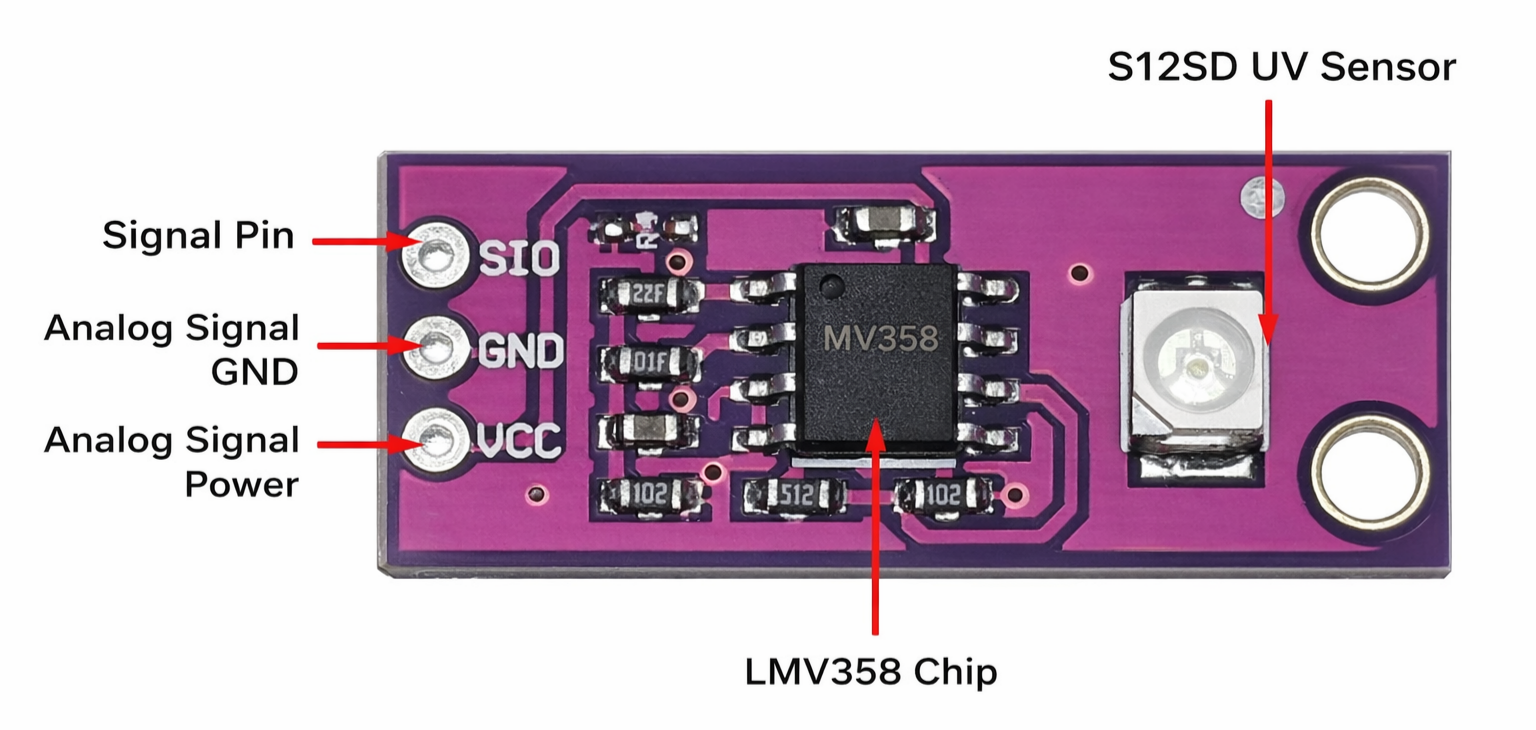
Connect directly to the development board as follows:
- VCC→ Connect to 3.3V (5V is prohibited—it will damage the S12SD UV sensor);
- GND→ Connect to the development board’s GND (common ground ensures stable signals);
- SIG→ Connect to the development board’s analog input pin (likeA0 on Arduino) to read the module’s output voltage signal.
Core Component Datasheet for CJMCU-GUVA-S12SD
If you want to learn more CJMCU-GUVA-S12SD product schematic details, you can refer to this datasheet.
Product Schematic
The power supply is 5V, and the SIG amplifies the analog voltage signal output.


Practical Project: Build a Portable UV Detector with Arduino
Required Materials
- CJMCU-GUVA-S12SD module×1
- Arduino Uno× 1
- Jumper wires
Code
					void setup() {
  Serial.begin(9600); // Initialize serial communication with a baud rate of 9600
}

void loop() {
  int analogValue = analogRead(A0); // Read the analog value from pin A0 (range: 0-1023)
  float voltage = analogValue * (3.3 / 1023.0); // Convert the analog value to voltage (range: 0-3.3V)

  // Estimate UV intensity (the coefficient needs to be adjusted according to actual calibration, this is just an example)
  float uvIntensity = voltage * 1.0; // Assume 1V corresponds to 1mW/cm²

  // Estimate UV index (simple mapping, for reference only)
  int uvIndex = 0;
  if (voltage < 0.2)
    uvIndex = 0; // No UV radiation
  else if (voltage < 0.4)
    uvIndex = 1-2; // Weak
  else if (voltage < 0.6)
    uvIndex = 3-4; // Moderate
  else if (voltage < 0.8)
    uvIndex = 5-6; // Strong
  else
    uvIndex = 7+; // Extreme

  // Output data via serial port
  Serial.print("Voltage: ");
  Serial.print(voltage);
  Serial.print("V | ");
  Serial.print("UV Intensity: ");
  Serial.print(uvIntensity);
  Serial.print("mW/cm² | ");
  Serial.print("UV Index: ");
  Serial.println(uvIndex);

  delay(1000); // Detect once per second
}
Function Explanation
The code reads the module’s output voltage via Arduino, estimates UV intensity and UV index, and outputs the data in real time through the serial port. Expose the module to sunlight to see value changes. For more accurate UV index readings, calibrate the relationship between voltage and actual index in different environments and modify the mapping logic in the code.
FAQS
Why is the voltage output from SIG always 0V after wiring?
First, rule out these two common issues:
- Wrong Test Environment: Ordinary light contains no UV rays—test with sunlight or a UV lamp (likeUV disinfection lamp);
- Reversed Pins: Ensure VCC is connected to 3.3V, and SIG is not mistakenly connected to GND (reversed pins cause no output).
The voltage changes slightly when the module is near a UV lamp—Is it broken?
Not necessarily. Check these first:
- Obstructed Sensor: The S12SD sensor (small silver component on the right side of the module) must face the UV light source directly—do not block it with wires or enclosures;
- Incorrect UV Lamp Wavelength: Ensure the lamp’s wavelength is within 200-400nm (the S12SD only responds to this range). Some decorative UV lamps may fall outside this range.
Can the module output UV index directly?
No, it cannot. The SIG pin outputs analog voltage—you need to convert the “voltage value” to UV index in the code. Record voltages in different environments (cloudy days, sunny afternoons) and map them to actual UV indices to establish a conversion relationship.
Is it normal for the module to heat up during operation?
No, it is not. The module’s working current is <1mA, so it should barely heat up under normal use. If it heats up, it may be because VCC is connected to a high voltage (like 5V) or there is an internal short circuit in the module. Power off immediately and check the wiring.