
Blog
A Speech Recognition Module Better than LD3320: LU-ASR01 tutorial
What is LU-ASR01?
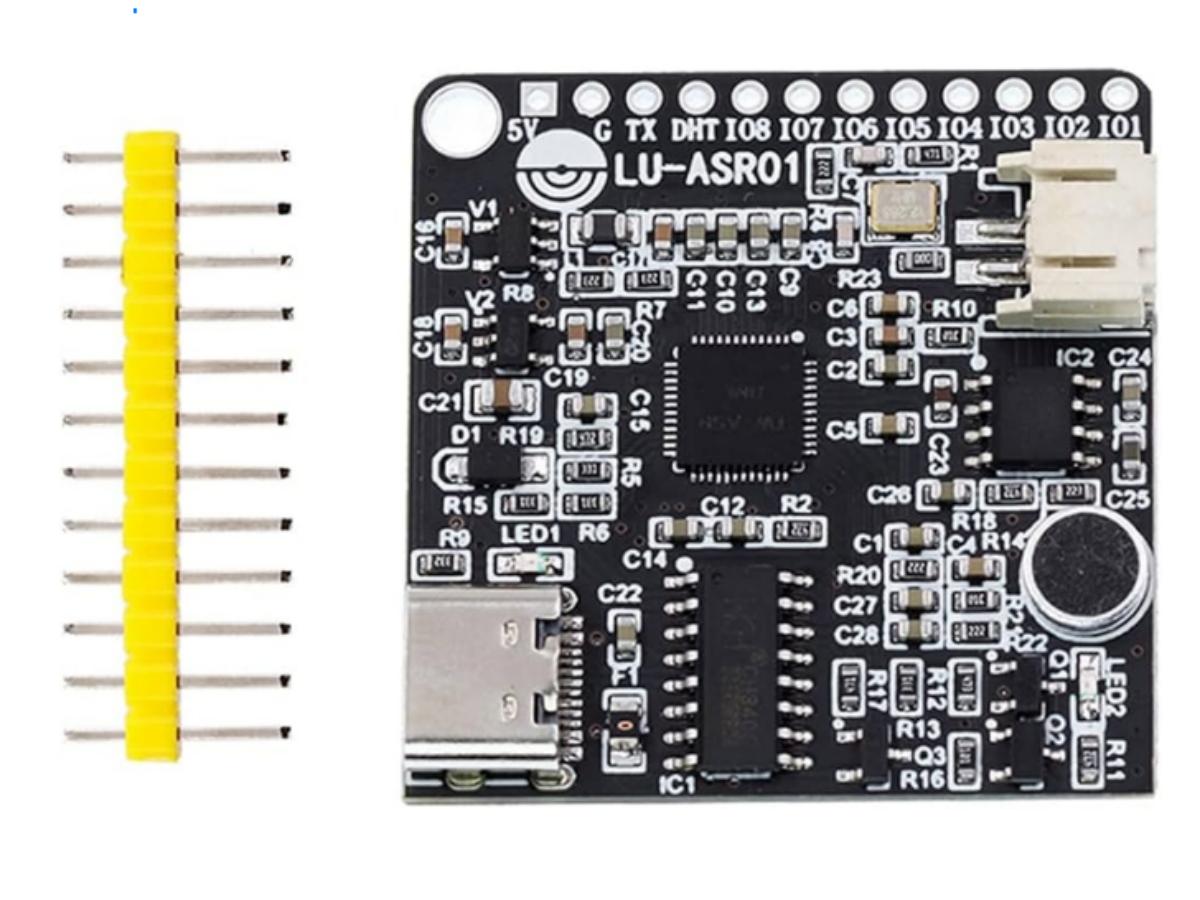
If you want to build a smart voice control project, such as a voice-controlled switch, you will definitely come across the LD3320 module and its so-called upgraded version, the LU-ASR01, when searching for voice recognition modules online. So, what exactly is the LU-ASR01? Is it really that amazing? Lets take a closer look.
There is one major difference between them: the LD3320 requires an internet connection. In harsh environments with unstable network signals, the standalone LU-ASR01 shows distinct advantages. Whats more, the LU-ASR01 supports custom command words, making it far more flexible than the LD3320, which can only recognize a set of fixed vocabulary—you are sure to love this feature. Additionally, it offers one-click firmware burning, which can be easily done by simply connecting a Type-C data cable. Its extremely user-friendly, even for beginners.
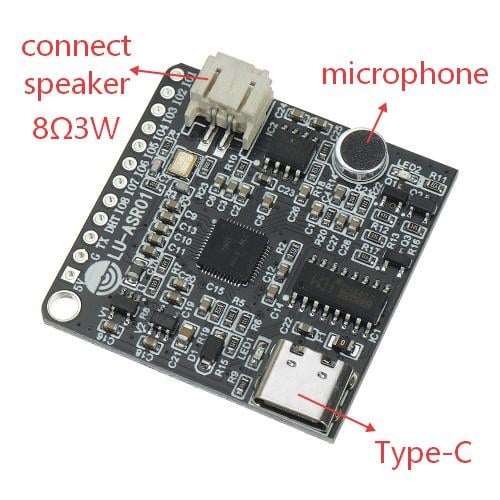
The LU-ASR01 is a feature-rich and easy-to-operate voice recognition module. Connect it to an 8-ohm 3-watt small speaker, and it can even engage in voice interactions with you. Now, lets explore how to play this module.
How to use LU-ASR01?
This module is programmed using TIANWEN BLOCK software—dont worry, its a graphical programming tool thats very easy to operate. Perhaps the only slight difficulty is that its a Chinese-language software. Many users report that there are very few English tutorials available online for it, and even if there are some, the Chinese labels on the software interface are often unclear, making it hard to get started.
But no need to worry—even less so about giving up this more convenient and user-friendly voice recognition and conversation module than the LD3320 because of this minor hurdle. Here, I have translated the Chinese elements of the software interface for everyone and will guide you through using this module step by step. I hope it helps.
First, you can download the “TIANWEN BLOCK” software from the official website. After downloading the ZIP file, simply install it with the default settings. Double-click to open the software, and you will see the interface below. This is its sample code—you can ignore it, as it has nothing to do with this voice module. First, here’s the translation of the Chinese text on the operation interface, as shown in the two images below.
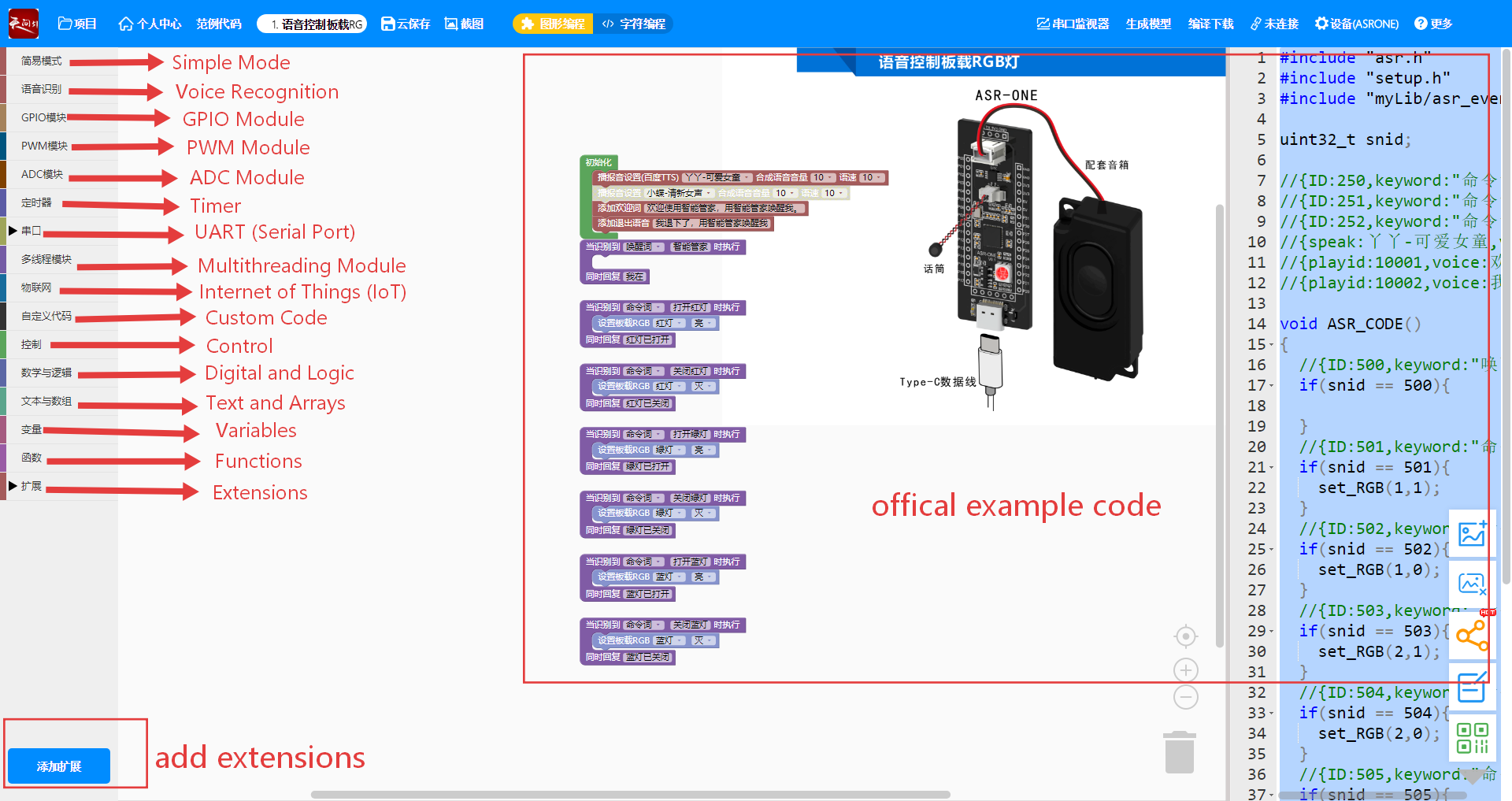

Now using this software will definitely be much easier for you. Let’s take a quick look at how to use it with the LU-ASR01 voice recognition module to control turning on a light via voice commands. Besides this module, you’ll also need an 8Ω 3W small speaker and an LED light.
The small speaker can be directly connected to the module. One end of the LED is grounded, and the other end is connected to the IO1 pin of the module. The module comes pre-programmed internally, so the speaker will produce sound as soon as it’s powered on. Since one end of the LED is grounded, it only needs a high level signal on the other end to light up. Now, let’s use this software to set the IO1 pin to high level and implement this entry-level voice-controlled light project.
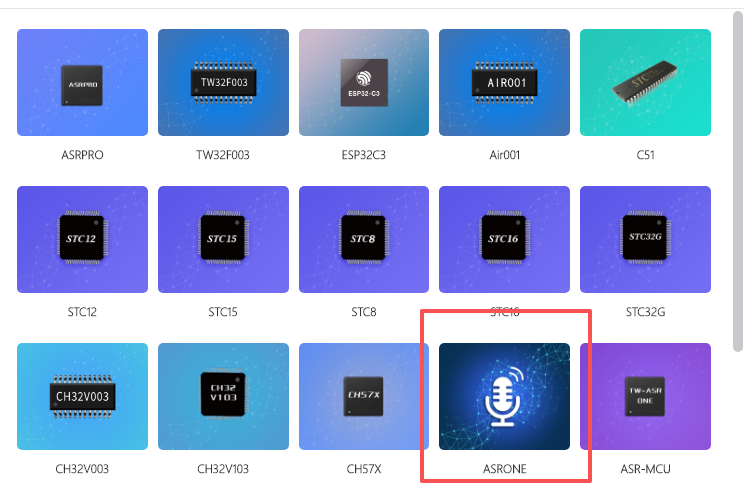
First, you need to click “Device” in the blue top bar. The following interface will appear—click the ASRONE option circled in red. It features a microphone icon and is the motherboard required for our voice recognition module.
The next step can be understood as adding library files. Whether you are developing with Arduino, the STM32 HAL library, or even designing PCB boards for hardware, library files greatly reduce our workload. They spare us the time to delve into the most low-level and fundamental details, allowing us to directly develop and apply solutions at the upper layer. This saves a great deal of unnecessary effort and lets us stand on the shoulders of giants.
The official library file we need to use here is “LUXIAOBAN”—the one circled in the image below. Simply click “Add Extension” and then download the corresponding file.
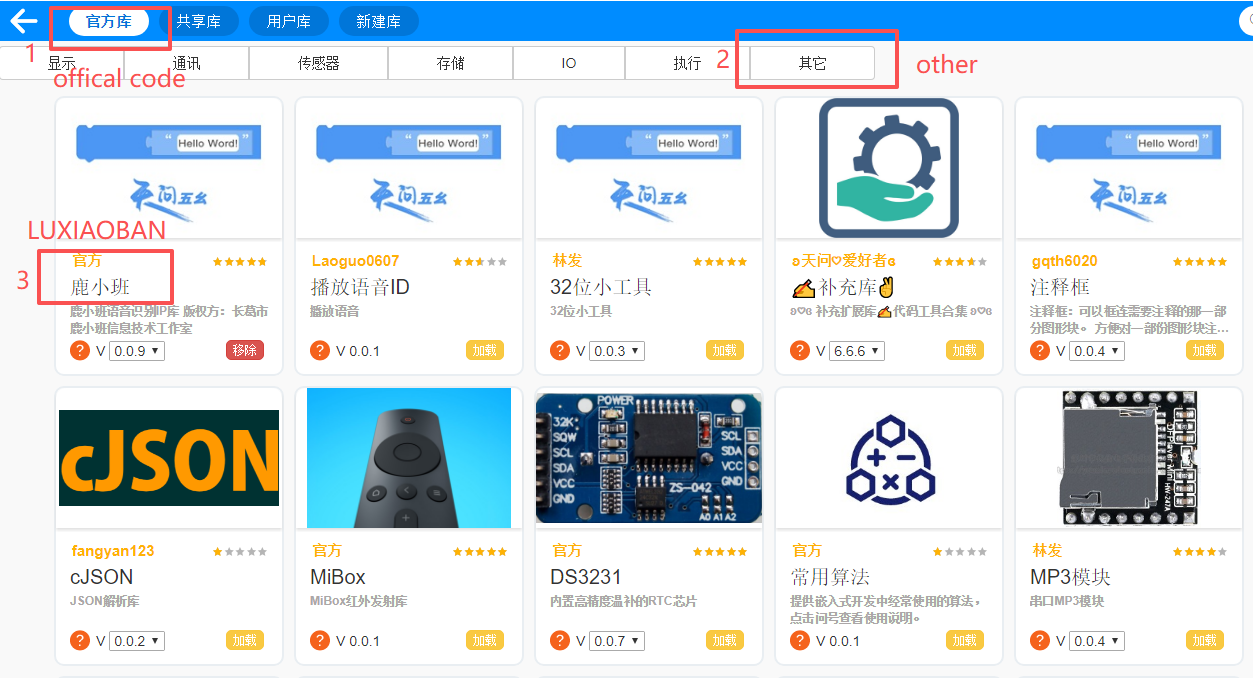
After the download is successful, it will appear here.
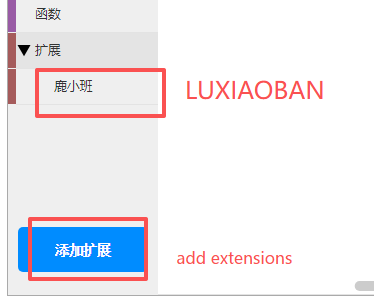
Clicking on this “LUXIAOBAN” will bring up some graphical programming blocks. Now let’s use these blocks to program the module.
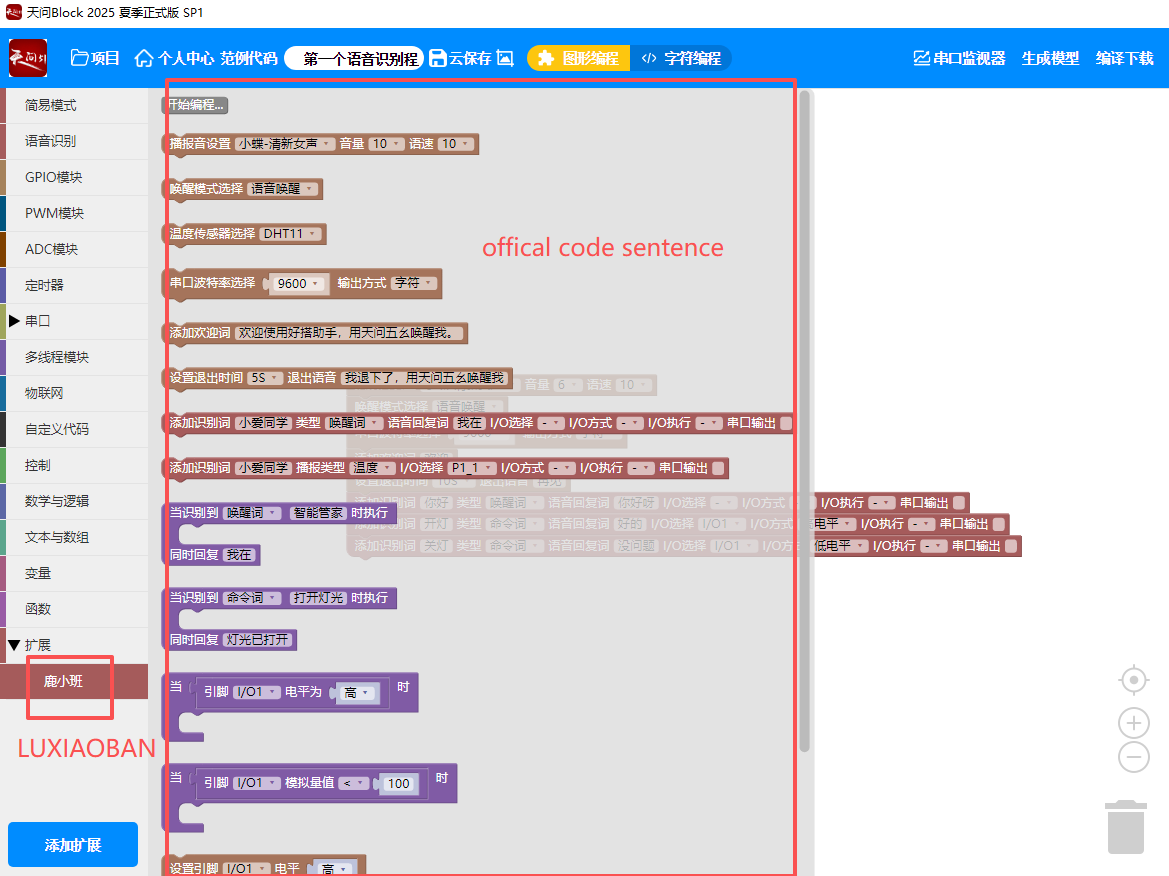
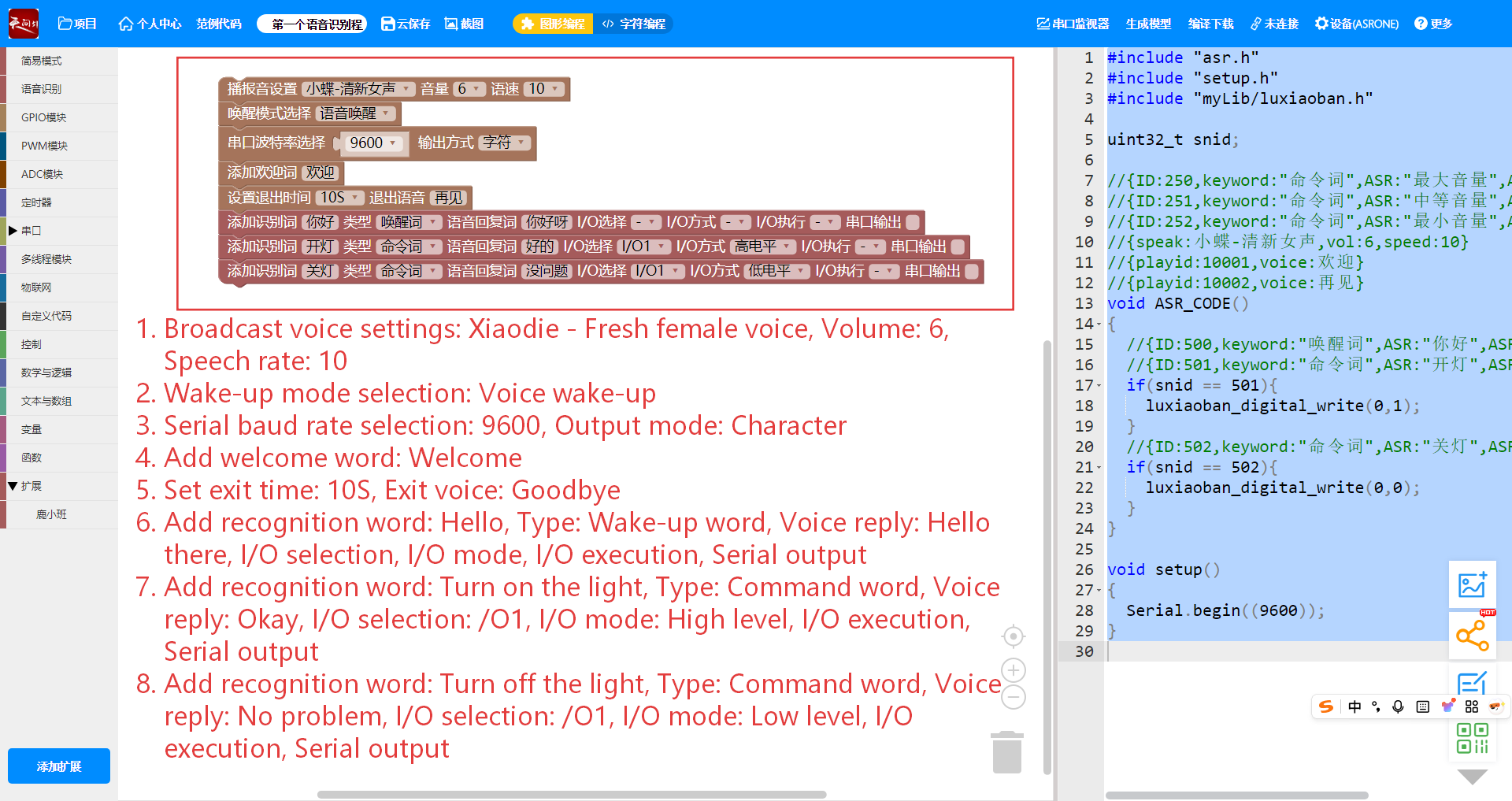
Just locate the blocks shown in the image below from the ones mentioned earlier—I’ve labeled their corresponding English translations on the image. With this program, the module will say “Welcome” as soon as it’s powered on. If you don’t respond to it after 10 seconds, it will say “Goodbye”. When you say “Hello” to it, it will greet you in return; when you say “Turn on the light”, it will pull the IO1 pin to high level to light up the LED and respond with “Okay” at the same time. When you give the command “Turn off the light”, it will pull the IO1 pin to low level and tell you “No problem” simultaneously. Of course, you can customize what you want to say to it and what responses you want it to give—this is one of the reasons why it’s more user-friendly than the LD3320.
As for the code panel on the right side, it displays text-based code. If you’re in the graphical programming mode, this panel is set to read-only and cannot be modified. If you don’t want to use graphical programming, you can click on the text programming mode at the top of the interface to program directly with text-based code. Of course, since the software has rolled out the graphical programming feature, we still recommend using this simpler and more easy-to-operate graphical programming method. As long as you clarify the functions you want to implement and the control operations you need to perform on the IO pins, you can create your own small electronic product.
CODE
If you don’t want to just get the basic operations working and instead want to learn about its internal logic, you can take a look at the code below, which corresponds to the voice-controlled light on/off function described above. Key comments have been added, and you can refer to them for learning purposes.
					#include "asr.h"                // TianwenBlock Speech Recognition (ASR) core library
#include "setup.h"             // Development board initialization auxiliary library
#include "mylib/luxiaoban.h"    // Luxiaoban hardware driver library

/******Global Configuration (Consistent with graphic block parameters) ******/
uint32_t snid;               // Voice command ID (Automatically assigned by TianwenBlock)
const uint8_t LIGHT_IO = 1; // Light control IO port (Matches graphic block "I/O Selection = I/O1")
const uint16_t PLAY_WELCOME = 10001;  // Welcome voice ID (Graphic block config: Welcome)
const uint16_t PLAY_BYE = 10002;       // Exit voice ID (Graphic block config: Goodbye)
const uint16_t PLAY_WAKE = 10003;     // Wake-up response ID (Hello there)
const uint16_t PLAY_OPEN = 10004;     // Light-on response ID (Okay)
const uint16_t PLAY_CLOSE = 10005;     // Light-off response ID (No problem)
const unsigned long EXIT_DELAY = 10000; // Exit delay (10 seconds, matches graphic block)

/***********Core Function: Voice Command Processing *************/
void ASR_CODE() {
  // 1. Wake-up word: ID=500 (Command ID for "Hello" in graphic block)
  if (snid == 500) {
    luxiaoban_play_voice(PLAY_WAKE);    // Play "Hello there"
    Serial.println("[Command Executed] Wake-up successful, response: Hello there");
  }

  // 2. Command word: Turn on light (ID=501)
  if (snid == 501) {
    luxiaoban_digital_write(LIGHT_IO, 1); // Set IO1 to high level (Turn on light)
    luxiaoban_play_voice(PLAY_OPEN);      // Play "Okay"
    Serial.println("[Command Executed] Light turned on successfully, response: Okay");
  }

  // 3. Command word: Turn off light (ID=502)
  if (snid == 502) {
    luxiaoban_digital_write(LIGHT_IO, 0); // Set IO1 to low level (Turn off light)
    luxiaoban_play_voice(PLAY_CLOSE);     // Play "No problem"
    Serial.println("[Command Executed] Light turned off successfully, response: No problem");
  }
}

/*************Initialization Function (Executed once on startup) *************/
void setup() {
  // 1. Serial port initialization (Baud rate 9600, matches graphic block config)
  Serial.begin(9600);
  while(!Serial); // Wait for serial port to be ready (Only required for USB development boards)

  // 2. Hardware IO initialization (Configure IO1 as output mode)
  luxiaoban_pin_mode(LIGHT_IO, OUTPUT);
  luxiaoban_digital_write(LIGHT_IO, 0); // Initial state: Light off

  // 3. Voice module initialization (Automatically encapsulated by TianwenBlock, prompt only)
  luxiaoban_asr_init();    // Initialize speech recognition module
  luxiaoban_voice_init();  // Initialize voice broadcast module

  // 4. Startup welcome
  luxiaoban_play_voice(PLAY_WELCOME);
  Serial.println("[System] Initialization completed, playing startup voice: Welcome");
  Serial.println("[System] Waiting for voice commands (Hello/Turn on light/Turn off light)...");
}

/***************Main Loop Function (Executed in infinite loop) ***************/
void loop() {
  // 1. Execute voice command logic
  ASR_CODE();

  // 2. 10-second no-operation exit logic
  static unsigned long last_cmd_time = millis(); // Record time of last command
  // Detect valid command (snid≠0) and update last operation time
  if (snid != 0) {
    last_cmd_time = millis();
    snid = 0; // Reset snid to avoid repeated execution
  }
  // Play "Goodbye" if no command for over 10 seconds
  if (millis() - last_cmd_time > EXIT_DELAY) {
    luxiaoban_play_voice(PLAY_BYE);
    Serial.println("[System] No operation for 10 seconds, playing: Goodbye");
    last_cmd_time = millis(); // Reset timer to avoid repeated playback
  }

  // 3. Reduce CPU usage (Necessary delay)
  delay(20);
}
Detailed Explanation
snid is the key to linking voice commands with code logic. Each voice command corresponds to a fixed numeric ID—for example, the wake-up word “Hello” maps to 500, and “Turn on the light” maps to 501. These mapping relationships are not built into the code; they must be manually configured in the graphical blocks of TIANWEN BLOCK. Only when the configurations are matched can the code accurately recognize different voice commands and execute the corresponding operations.
In embedded programming, using const to define fixed parameters (such as IO pin numbers and delay times) improves subsequent maintainability. Since the value returned by millis() increases continuously as the program runs, using the unsigned long type to record milliseconds prevents errors caused by numeric overflow. IO pin numbers typically range from 0 to 255, so the uint8_t type is sufficient for this purpose.
There is a variable named last_cmd_time in the code (used to record the timestamp of the last command), and it is mandatory to prepend the static modifier to it. The loop() function runs in an infinite loop: without static, this variable would be reinitialized (and its value reset) in every loop iteration. This would make it impossible to retain the timestamp of the last command, and thus the “10 seconds of inactivity” logic could not be implemented.
The millis() function—used in the 10-second inactivity check—returns the number of milliseconds since the program started, acting like the system’s built-in clock. Critically, it is non-blocking. Unlike delay(), which freezes the program for 10 seconds (during which no voice commands can be processed), millis() allows the program to loop normally: it can detect commands like “Turn on the light” or “Turn off the light” in real time while simultaneously checking if the 10-second inactivity condition has been met.
FAQ
what is speech recognition?
From voice recognition on mobile phones to voice recognition modules used in industrial settings, they essentially rely on Automatic Speech Recognition (ASR) technology. It converts human speech into processable information, which lies at the core of the speech recognition definition. Put simply, speech recognition is about enabling machines to understand human speech.
What are the two types of speech recognition?
It has two types: online speech recognition and offline speech recognition. The online version relies on the internet to call speech recognition APIs and offers higher accuracy. The offline version, such as the LU-ASR01 used in embedded devices, can work without an internet connection, making it suitable for offline scenarios.
What is an example of speech recognition?
Voice recognition is everywhere in daily life. Dragon Speech Recognition software helps users transcribe documents; Android’s voice recognition allows mobile phones to understand commands; there are speech-to-text features in social apps (a type of voice recognition application); and DIY projects controlled by the LU-ASR01 voice recognition module.
What are common speech recognition problems?
Strong accents can cause machines to misclassify speech, and ambient noise can interfere with the recognition process. Improperly configured speech recognition thresholds can easily lead to false triggers; open-source speech recognition may see compromised accuracy in complex contexts; and even hardware modules like the LD3320 can encounter misjudgments caused by repeated commands.
What is the best speech recognition?
There is no absolutely best speech recognition solution—the key lies in your specific needs. AI-powered speech recognition is suitable for scenarios requiring high accuracy; for offline projects, modules like the LU-ASR01 are more practical; open-source speech recognition is ideal for secondary development; and for mobile devices, Android’s voice recognition is more than sufficient.
I want the full information of programming in english language i want english command in the asrpro please help me to program
This programming is made by Chinese, you can search “Tianwen block” on google,and translate language to English, finally following my tutorial step by step to achieve it.