

Blog
LM317 Adjustable Buck Voltage Regulator: A Beginner’s DIY Guide

Introduction
Tired of being limited by fixed voltages when powering your electronic projects? An LM317 adjustable buck voltage regulator module solves this problem effortlessly! Known as the “all-rounder” in DIY power supplies, it supports a wide voltage adjustment range, is easy to use, and costs little. Whether you need to power a microcontroller, modify a charger, or build an experimental power supply, it handles everything with ease—even beginners can get it right on the first try!
Why Choose the LM317 Voltage Regulator Module?
One of the biggest headaches in electronic DIY is power adaptation: different components require different voltages, and multiple power supplies take up space and cost money. The LM317 adjustable buck module fixes this perfectly. You don’t need a complex LM317 voltage regulator circuit or in-depth knowledge of an LM317 schematic—just turn the potentiometer to adjust the output voltage. Pair it with a few accessories, and you’ll have a stable adjustable power supply.
What’s more, it comes with built-in short-circuit protection and overheat protection. It delivers high output voltage accuracy and low ripple, making it safe and stable for both entry-level experiments and small-project power needs. Whether you’re an electronics newbie looking to learn about power supplies or a maker needing a flexible power solution, this LM317 adjustable voltage regulator offers unbeatable value for money.
What is the LM317 module?
The LM317 is a 3-terminal adjustable positive voltage regulator IC—simply put, it’s the “core of the power supply’s voltage stabilization.” Its main job is to convert unstable input voltage (like from batteries or adapters) into precise, controllable output voltage. It also suppresses voltage fluctuations and ripple, providing reliable power for electronic devices.
As a module designed specifically for LM317 voltage regulator applications, it integrates the core IC, a heat sink, and essential peripheral components—greatly lowering the DIY barrier. This module supports a wide output range of 1.25V to 37V and a maximum output current of up to 1.5A, meeting the power needs of most low-to-medium power electronic devices. It’s a classic choice in the DIY power supply field.
LM317 vs. Other Series Products: Why It’s the Best for Beginners
TI (Texas Instruments) has many classic voltage regulator ICs in its LM series, such as the LM317HV, LM338, and LM1117. Let’s compare their key differences to help you choose:

| IC Model | Output Range | Voltage | Max Output Current | Core Advantages | Typical Applications |
|---|---|---|---|---|---|
| LM317 | 1.25V–37V | 1.5A | Cost-effective, easy to adjust | Beginner DIY projects, low-to-medium power devices | |
| LM317HV | 1.25V–45V | 1.5A | High-voltage compatibility, stable | Power supply for high-voltage devices | |
| LM338 | 1.25V–32V | 5A | High current output | High-power loads (like motors) | |
| LM1117 | Fixed/Adjustable (1.8V–13.8V) | 1A | Compact size, low power consumption | Low-power devices (like microcontrollers, sensors) |
The LM317 stands out for several reasons:
- Its wide voltage adjustmentrange works with everything from low-voltage sensors to medium-power modules.
- Its output current is sufficient for daily use, so you don’t need a large heat sink.
- TheLM317 ICis highly cost-effective—modules are cheap and easy to buy.
- It’s easy to use: no deep knowledge of the LM317 internal circuitis needed, making it perfect for beginners. It’s the best balance of “practicality, ease of use, and cost.”
How to Use the LM317 Module?
The LM317 module’s operating logic is simple: it relies on “input voltage + adjustment resistor + output load.” You can build an adjustable power supply in 3 steps:
1.Connect the input power: Attach the positive terminal of a DC power supply (like a battery or adapter) to the module’s “VIN” pin, and the negative terminal to the “GND” pin. The input voltage must be at least 3V higher than the desired output voltage (to ensure stable voltage regulation).
2.Configure the adjustment resistor: Most modules have a built-in potentiometer—just turn it to adjust the output voltage.
3.Connect the load: Attach the positive terminal of your device (the one needing power) to the module’s “VOUT” pin, and the negative terminal to “GND.” Make sure your device’s operating voltage and current don’t exceed the module’s rated parameters.
Internal Composition of LM317
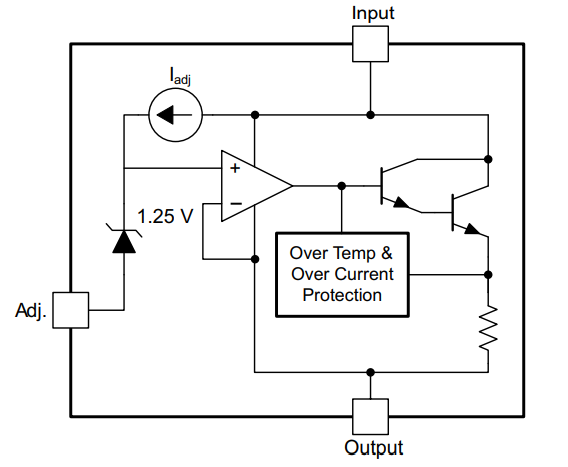
The LM317 voltage regulator consists of several key components: a reference voltage source, a comparator amplifier, a driver transistor, and reference resistors.
- Reference Voltage Source: This is the core of the circuit, providing a stable reference voltage (typically 1.25V). Its stability is critical to the regulator’s overall performance—with it, the LM317 maintains a stable output voltage regardless of changes in input voltage or load current.
- Comparator Amplifier: It compares the output voltage with the reference voltage, amplifies any difference, and uses this amplified signal to adjust the conduction level of the driver transistor. The accuracy and response speed of the comparator directly affect the voltage regulation performance.
- Driver Transistor: This is the main component that controls the LM317’s output voltage. It adjusts its conduction state based on signals from the comparator, controlling current flow to maintain a stable output voltage.
- Reference Resistors: These are key to setting the output voltage. The LM317 allows users to set the output voltage using two external resistors. Once these resistors are connected, the LM317 maintains a fixed proportional relationship between the output voltage and the reference resistors—enabling adjustable, stabilized output.
Hardware Parameters of the LM317 Adjustable Buck Voltage Regulator
| Parameter | Details |
|---|---|
| Output Current | 1.5A (minimum), 2.2A (typical) |
| Input-Output Voltage Difference (VI-VO) | 40Vdc (maximum) |
| Adjustable Output Voltage Range | 1.2~37V |
| Operating Temperature (1) | -55°C to +150°C |
| Current Output | 1.5A |
| Input Voltage | 4.2~40V |
| Operating Temperature (2) | 0°C ~ 125°C |
| Characteristic Frequency | 100 MHz |
| Module Dimensions | 35.6mm × 16.8mm |
| Input Connection | VIN (positive input), GND (negative input) |
| Output Connection | VOUT (positive output), GND (negative output) |
| Maximum Output Current | Maximum Output Current = 3 / (Input Voltage – Output Voltage) |
LM317 Pin Configuration and Functions


LM317 Regulator Datasheet and Schematic
If you want to learn more LM317 regulator detail, you can refer to this datasheet.

Project Example: LM317 Adjustable LED Ambient Light Power Supply
Use the LM317’s voltage adjustment function to control the LED’s power supply voltage—this adjusts the LED’s brightness (brighter as voltage increases). The result is a manually dimmable desktop ambient light.
Materials Needed
- LM317 voltage regulator module
- 12V 1A power adapter
- 5mm LED bulb
- 10Ω resistor (for current limiting)
Wiring Steps
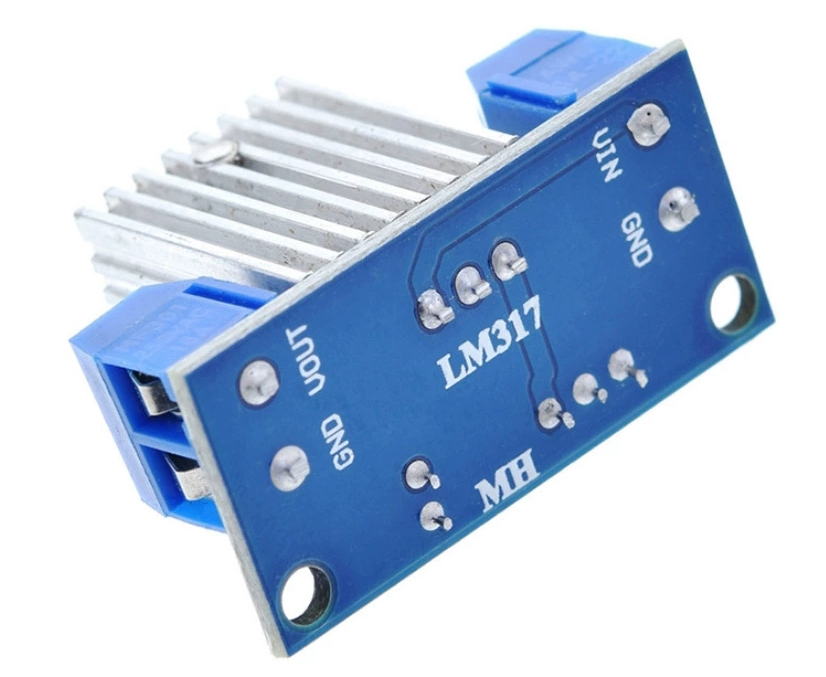
- Connect the power supply:Attach the positive terminal of the 12V adapter to the LM317 module’s “VIN” pin, and the negative terminal to the module’s “GND” pin.
- Set up the adjustment circuit:If the module has a built-in potentiometer, use it to adjust the voltage. If not, connect a 10kΩ potentiometer between the module’s “ADJUST” pin and “GND.”
- Connect the LED: Connect the positive terminal of the LED bulb in series with a 10Ω resistor, then attach this combination to the module’s “VOUT” pin. Connect the LED’s negative terminal to the module’s “GND” pin. (For RGB LEDs, connect each color channel separately with its own current-limiting resistor.)
FAQS
Why doesn’t the output voltage change when I turn the potentiometer?
Check these 3 things first:① Is the input voltage at least 3V higher than the desired output voltage? Insufficient voltage difference will cause voltage regulation to fail.② Is the module’s power connected in reverse? Reversing VIN and GND can damage the IC—you’ll need to replace the module if this happens.
Is it normal for the module to get very hot during operation?
Yes, it’s normal! The LM317 generates heat due to the voltage difference (between input and output) and output current. The larger the current or voltage difference, the more heat it produces. To fix this, you can replace the heat sink with a larger one or avoid running the module at full power for long periods—this prevents overheat protection from activating.
Can I use this module to charge lithium batteries? What should I note?
Yes, but you need an additional charge protection circuit (like a TP4056 charging module)! The LM317 module has no overcharge protection—charging lithium batteries directly with it can damage the battery or even cause a fire. First, calibrate the LM317’s output voltage to the lithium battery’s charging voltage (like 4.2V for a 3.7V lithium battery), then connect the battery via the charge protection module.