

Blog
Infrared Decoding Module: Specifications & Application Guide

If you want a microcontroller or smart device to receive commands from TV remotes, air conditioner remotes, or other infrared (IR) remotes, there’s a handy little gadget that works perfectly: the 5V infrared decoding module (BH1417K). This module acts like a “translator for IR signals” — it can receive 38KHz IR remote signals, decode them into digital signals, and output the signals via a serial port. With this, even ordinary devices can easily add IR remote control functionality. Today, we’ll break down this module, from its working principle to practical operation, and walk you through “receiving and decoding IR signals”.
What is a 5V Infrared Decoder Module? — The “Digital Converter” for Infrared Remote Controls
An infrared decoding module is an electronic component designed specifically to receive and decode IR remote signals. It converts IR signals of a specific frequency (like 38KHz) emitted by IR remotes into digital signals that microcontrollers or smart devices can recognize. This 5V infrared decoding module (BH1417K) features a compact, small design, making it ideal for integration into various embedded systems. It adds IR remote control capabilities to devices, greatly expanding the application scenarios and convenience of ordinary equipment. Whether in home appliance control, smart homes, or industrial automation, it plays a key role in making devices smarter and easier to use.

Features and Advantages of the 5V Infrared Decoder Module
5V Wide Compatibility: Supports 5V DC power supply, compatible with mainstream development boards like Arduino and ESP32.
- Serial Port Output:Decoded commands are transmitted via TXD/RXD serial ports, eliminating the need for complex external interrupt programming.
- NEC Protocol Support:Works with 99% of IR remotes (likeTV, air conditioner, and set-top box remotes).
- Ultra-Compact Size: Measures only about 30×20mm, allowing easy integration into smart devices.
- Core Advantage: More User-Friendly Than “Standalone IR Receivers”
Compared to basic IR receivers (which require manual decoding programming), its advantages are clear:
- No Decoding Code Needed:The module has a built-in BH1417K chip that automatically demodulates and decodes IR signals, directly outputting digital commands.
- Plug-and-Play Serial Port: Connects to development boards via TXD/RXD serial ports, no need to occupy interrupt pins.
- High Stability:Built-in filter circuit ensures strong resistance to ambient light interference, enabling stable operation both indoors and outdoors.
Module Pins: An Interface You Can Understand at a Glance
| Pin Label | Function Description | Common Use Cases |
|---|---|---|
| VCC | Positive Power Supply | Connect to a 5V DC power source (like the 5V pin of a development board) |
| GND | Negative Power Supply | Connect to the GND of the development board/power supply (common ground ensures signal stability) |
| TXD | Serial Data Transmitter | Connect to the RX pin of the development board (like D0 on Arduino) |
| RXD | Serial Data Receiver | Connect to the TX pin of the development board (optional, used for module configuration) |
| IR Receiver | Signal Input | Face the IR remote to receive 38KHz IR signals |
How Does the Module “Translate” Infrared Signals? — The Complete Process from Reception to Decoding
Its working logic can be roughly divided into four steps: “Reception → Demodulation → Decoding → Output”:
1.IR Reception: The IR receiver captures 38KHz IR light signals emitted by the remote and converts them into weak electrical signals.
2.Signal Demodulation: The module’s built-in circuit filters out ambient light interference and restores the remote’s encoded signals.
3.Command Decoding: The BH1417K chip parses the encoded signals into digital commands following the NEC protocol (like “Power button = 0x00FF”).
4.Serial Port Output: The decoded commands are sent to the development board via the TXD pin using a serial port (default baud rate: 9600).
How to Use? — Wiring + Debugging Guide
| Module Pin | Arduino Pin | Description |
|---|---|---|
| VCC | 5V | Powers the module |
| GND | GND | Common ground connection |
| TXD | D0 (RX) | Module transmits → Development board receives |
| RXD | Not Wired | Only used for module configuration |
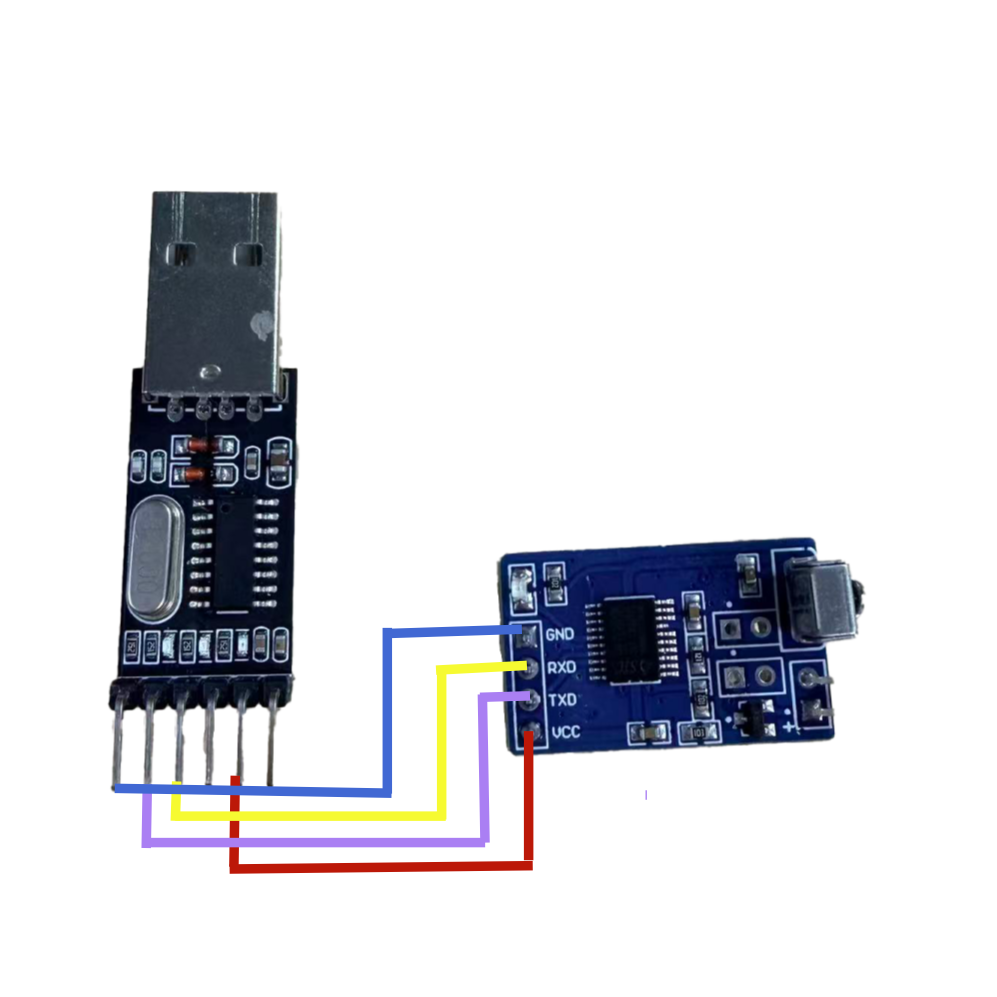
1、How to Use the IR Module with a USB TTL Adapter
(1) Install the USB TTL driver on your computer (skip if already installed).
(2) Connect the IR module to the USB TTL adapter and plug it into your computer.
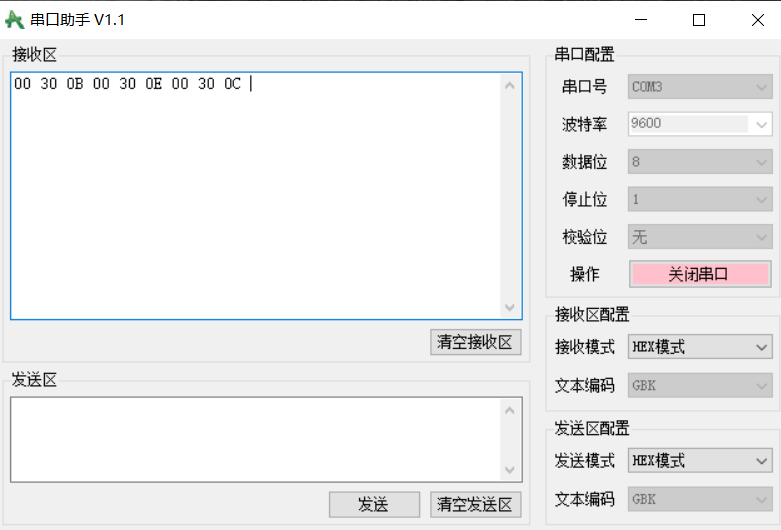
(3) Open a serial assistant tool, select the correct port (as shown in the right image), and configure settings like baud rate.
(4) Press a button on the IR remote — the module’s indicator light will flash, and the serial assistant’s receive window will display 3 bytes of data. This means decoding is complete; record the code for future use in transmitting signals to control devices.
(5) After obtaining the IR data, to control a device, enter the data in the transmit window following the decoded format, then click “Send Data” to restore the remote’s IR signal and control the IR device.
Note: If the module’s indicator light does not flash when you press the remote (Step 4), the remote may not be supported (it may not use the NEC format). If the indicator flashes but no data appears in the serial receive window, check if the serial port is correct, if the serial port is open, or if the baud rate is set properly. The most common issue is incorrect wiring — try swapping the middle two wires of the IR module.
Debugging Notes
- Baud Rate Matching:The module’s default baud rate is9600.
- Remote Alignment:The IR receiver must face the remote, with a maximum distance of 5 meters.
- Avoid Obstructions: Do not block the front of the receiver, as this can weaken the signal.
- Button Mapping:Different remotes use different button commands; use the serial monitor to record the “button-command” correspondence.
Typical Application: Enabling Devices to “Understand” Infrared Remote Controls
The core value of this module is to “expand a device’s IR remote control capabilities”. Typical application scenarios include:
- Smart Device Remote Control: Allow smart lights or fans made with Arduino/ESP32to be controlled via TV remotes.
- IR Signal to Serial Port:Convert IR remote commands into serial data for IR communication in industrial equipment.
- Remote Testing: Quickly check if an IR remote is working (by verifying if it outputs commands).
- Smart Home Linkage: Receive commands from air conditioner remotes and trigger linked actions (like”automatically close windows when the air conditioner is turned on”).
Summary: 5V Infrared Decoder Module — The “Convenient Interface” for Infrared Remote Controls
Summary: 5V Infrared Decoding Module — The “Convenient Interface” for IR Remote Control
This Infrared Decoding module is not a “professional device for complex IR communication”, but a convenient tool to “quickly add IR remote support to ordinary devices”. With its 5V power supply, serial port output, and no need for decoding programming, it allows makers and developers to implement “communication between devices and IR remotes” at low cost. It is an entry-level tool for DIY smart devices and IR communication projects.