

Blog
HW-488 Infrared Obstacle Avoidance Sensor
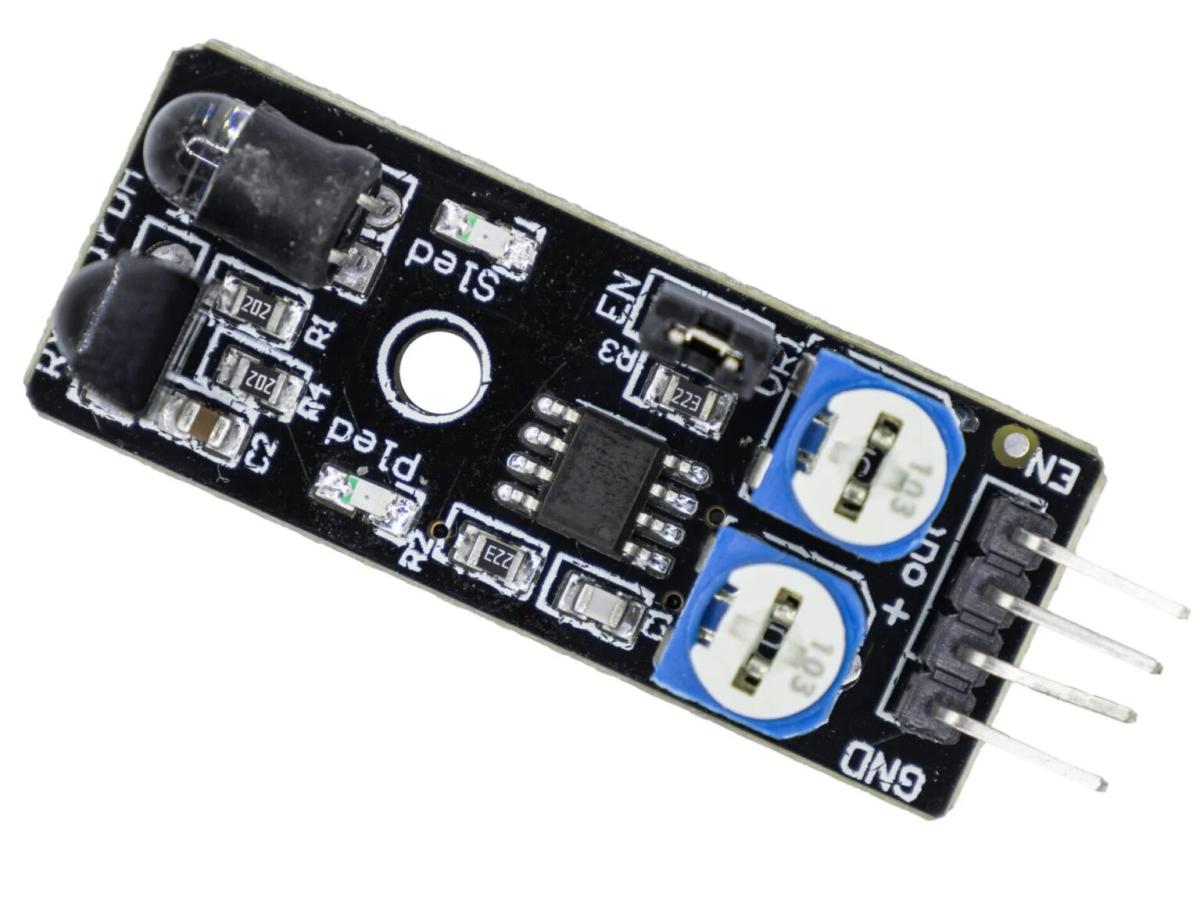
In today’s world, artificial intelligence is both a trend and a necessity. The market is flooded with smart robots, smart home devices, and autonomous vehicles, all capable of performing a series of operations automatically based on pre-set instructions. However, during the execution of these operations, these smart products inevitably encounter unforeseen obstacles, such as sudden environmental changes or obstacles in their path. Today, let’s focus on the issue of obstacles encountered during movement. How do these intelligent products identify obstacles and achieve avoidance? The following content will introduce a sensor module widely used in most intelligent products—the HW-488 IR obstacle avoidance sensor.
What is an IR obstacle avoidance sensor?
As the name suggests, an infrared obstacle avoidance sensor is a type of sensor that uses infrared detection technology to detect whether there are obstacles ahead. Infrared detection technology is one of its key features. Infrared technology is characterized by high sensitivity, precise identification, and low cost, making it widely used in many obstacle avoidance detection applications.
How does IR obstacle avoidance work?
The working principle of an infrared obstacle avoidance sensor involves emitting infrared light and receiving the reflected signal to detect whether there are any obstacles in front. When there are no obstacles in front of the sensor, the emitted infrared light propagates directly, and the receiving end cannot detect the reflected signal. At this point, the sensor outputs a low-level signal; However, when there is an obstacle in front of the sensor, the emitted infrared light is reflected back by the obstacle, and the receiver can detect the reflected signal. At this point, the sensor outputs a high-level signal. By detecting the level of the sensor’s output signal, we can determine whether there are any obstacles in front and thus achieve obstacle detection and avoidance.

What are the different types of obstacle avoidance sensor modules ?
Obstacle avoidance sensor modules are a relatively broad term. The obstacle avoidance sensors we commonly encounter can generally be divided into infrared obstacle avoidance sensors, ultrasonic detection obstacle avoidance sensors, laser ranging sensors, visual sensors (i.e., camera modules), and millimeter-wave radar sensors. Although these sensors operate on different principles, they all serve the function of detecting obstacles.
How do they differ?
| CHARACTERISTIC | INFRARED OBSTACLE AVOIDANCE SENSOR | ULTRASONIC SENSOR | LASER SENSOR | VISION SENSOR |
|---|---|---|---|---|
| Working Principle | Infrared light reflection intensity | Ultrasonic echo time | Laser flight time | Image recognition |
| Detection Precision | Low | Medium | Extremely high | High (depends on algorithm) |
| Detection Distance | Short (0 – 45cm) | Medium (2cm – 4m) | Long (up to hundreds of meters) | Medium – long (depends on camera) |
| Anti-light Interference | Poor | Good | Good | Poor |
| Anti-color Interference | Poor (afraid of black) | Good | Good | Good (but depends on color) |
| Cost | Extremely low | Low | High | Medium – high |
| Output Information | Switch quantity/approximate distance | Precise distance | Extremely precise distance | Rich image information |
What is the range of the IR obstacle avoidance sensor?
The detection range of infrared obstacle avoidance sensors is typically determined by the transmission power and wavelength of the infrared emitter. Higher-power infrared emitters can emit stronger beams, resulting in longer detection ranges. However, due to various external factors, the detection range of infrared obstacle avoidance sensors is generally between 0 and 50 centimeters.
About HW-488 IR obstacle avoidance sensor
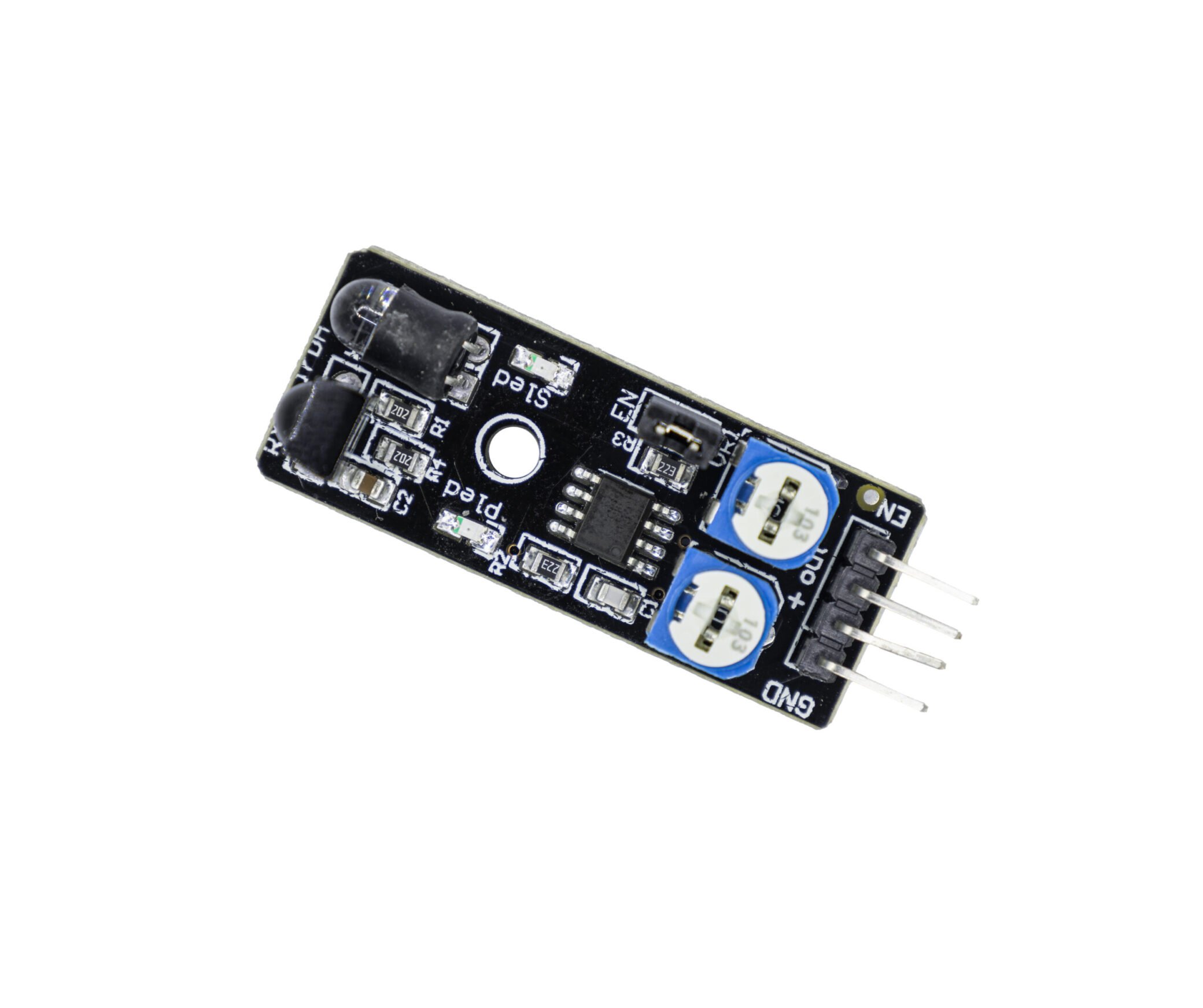
The core component of the HW-488 obstacle avoidance sensor is the NE555 chip. This chip can output a 38kHz square wave signal, which is used to light up the infrared LED light at the right end of the sensor. The key to detecting obstacles in front relies on the Vishay HS0038B infrared receiver module. This module can detect the infrared light reflected by nearby obstacles. The HS0038B module has a built-in 950nm external optical infrared filter and a 38kHz built-in electronic band-pass filter. The two work together to ensure that the module only receives infrared pulsed light of a specific frequency, thus avoiding interference from infrared light of other frequencies. However, it should be particularly noted that the HS0038B infrared receiving module contains AGC (Automatic Gain Control), which can quickly suppress continuous signals of any frequency, including 38kHz. Therefore, the 38kHz signal must be turned off regularly through the EN pin so that the AGC circuit can return to normal operation.

Key features of the HW-488 IR obstacle avoidance sensor
The HW-488 IR Obstacle Avoidance Sensor has advantages such as high sensitivity, long detection distance, small size, and easy installation. It is widely used in fields like intelligent robots, smart homes, and autonomous driving, providing reliable technical support for the obstacle – avoidance functions of intelligent products. Additionally, the HW-488 IR Obstacle Avoidance Sensor also features excellent stability and durability. It adopts high – quality materials and advanced manufacturing processes, ensuring that the sensor can still work stably in various harsh environments and is not easily damaged after long – term use. Meanwhile, this sensor also has the characteristic of low power consumption, which can effectively extend the usage time of intelligent products and reduce energy consumption.
HW-488 IR obstacle avoidance sensor pins
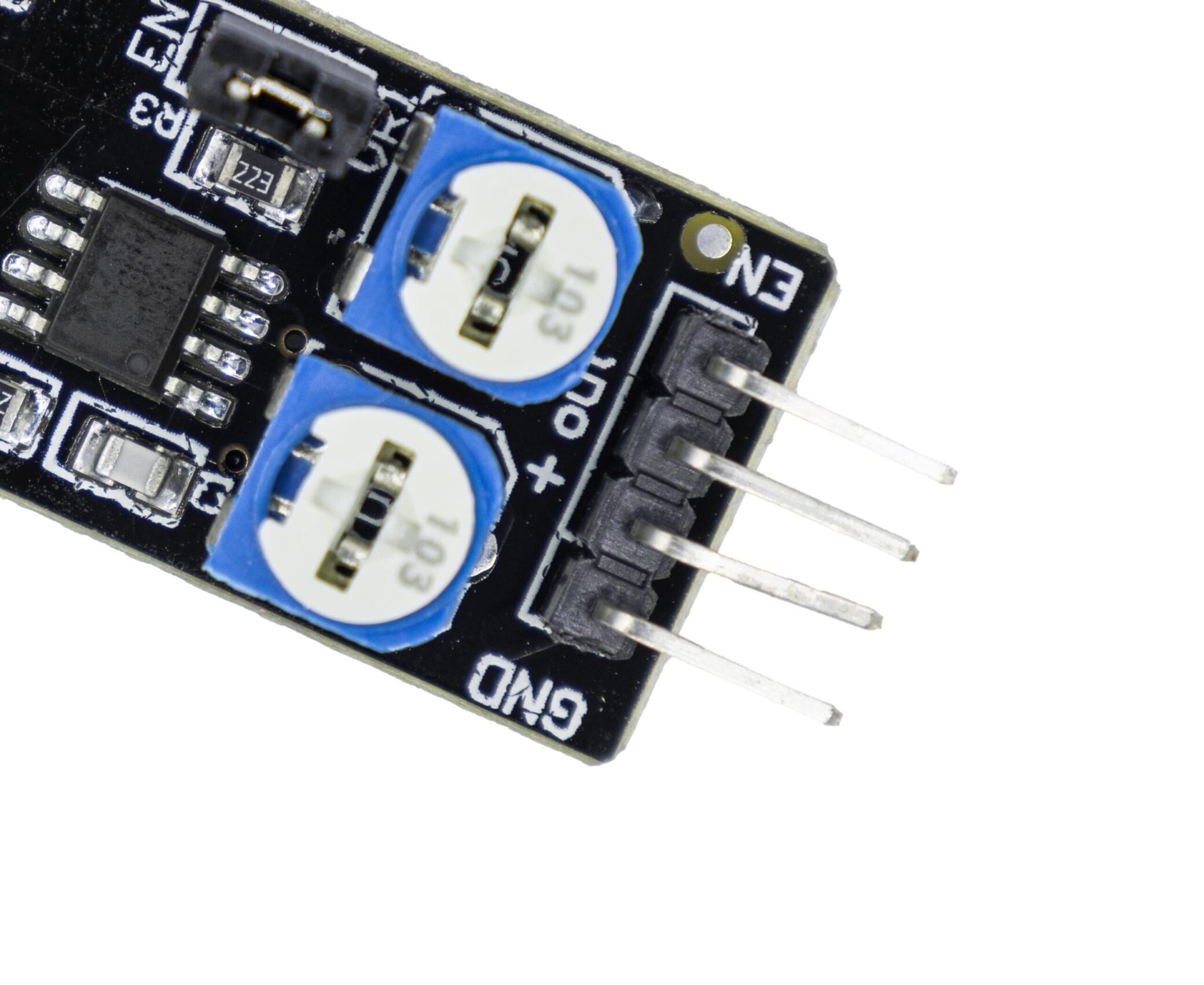
- GND = Ground pin, must be shared with the MCU ground.
- + = Voltage input pin (3.3–5V)
- OUT = Output pin, typically high level. When an obstacle is detected, the output pulse is low level.
- EN = Enable pin, active high. After installing the onboard jumper, the EN pin will be pulled to Vcc and remain enabled. After removing the jumper, the device can be enabled using the MCU’s output pin.
Product parameters
| HW-488 IR obstacle avoidance sensor | Details |
|---|---|
| Operating Voltage | 3.3V – 5V |
| Detectable Distance | 2cm – 40cm |
| Detectable Effective Angle | 35° |
| Output Signal | TTL low level active (when there is an obstacle) |
| Operating Temperature | Maximum temperature: 50°C Minimum temperature: -10°C |
| IO Interface | 4 pins (EN/out+/GND) |
| Product Dimensions | 40.4mm*16.5mm |
HW-488 IR obstacle avoidance sensor datasheet
Here we provide you with the datasheet for the Vishay HS0038B infrared receiver module for your reference.
HW-488 IR Obstacle Avoidance Sensor Connected to Arduino for a DIY Basketball Shot Counter
Recently, the weather has been pretty bad, with continuous rain. As someone who loves shooting baskets, I’ve been itching to play for ages. Suddenly, I noticed my HW-488 infrared obstacle avoidance sensor. So, I connected it to an Arduino, planning to make a simple shot – counting device. Now, let’s take a look at how to get it done.
Sample code
Here we provide you with sample code for connecting the HW-488 IR Obstacle Avoidance Sensor to Arduino to implement a simple basketball shot counter for your reference.
					#include <Wire.h>
#include <Adafruit_GFX.h>
#include <Adafruit_SSD1306.h>

// OLED display dimensions
#define SCREEN_WIDTH 128
#define SCREEN_HEIGHT 64
#define OLED_RESET    -1  // Reset pin not used

// Create OLED display object
Adafruit_SSD1306 display(SCREEN_WIDTH, SCREEN_HEIGHT, &Wire, OLED_RESET);

// Pin definitions
const int sensorOutPin = 2;  // Sensor output pin
const int buzzerPin = 3;     // Buzzer control pin

// Global variables
int obstacleCount = 0;       // Counter for detected obstacles
bool lastObstacleState = false;  // Previous state of obstacle detection

void setup() {
  Serial.begin(9600);

  // Configure pin modes
  pinMode(sensorOutPin, INPUT);
  pinMode(buzzerPin, OUTPUT);
  digitalWrite(buzzerPin, LOW);  // Ensure buzzer is off initially

  // Initialize OLED display
  if(!display.begin(SSD1306_SWITCHCAPVCC, 0x3C)) {
    Serial.println(F("OLED initialization failed"));
    for(;;);  // Halt execution if display fails to initialize
  }

  // Clear display and show initial count of 0
  display.clearDisplay();
  display.setTextSize(4);       // Large text size
  display.setTextColor(SSD1306_WHITE);
  display.setCursor(50, 20);    // Centered position
  display.println("0");
  display.display();

  Serial.println("System started");
}

void loop() {
  // Read current sensor state (LOW indicates obstacle detected)
  bool currentObstacleState = (digitalRead(sensorOutPin) == LOW);

  // Detect state change: no obstacle -> obstacle detected
  if (currentObstacleState && !lastObstacleState) {
    obstacleCount++;       // Increment counter
    triggerAlarm();        // Activate buzzer
    updateDisplay();       // Update count on display
    Serial.print("Count: ");
    Serial.println(obstacleCount);
  }

  // Save current state for next comparison
  lastObstacleState = currentObstacleState;
  delay(50);  // Short delay for debouncing
}

// Activate buzzer for brief alert
void triggerAlarm() {
  digitalWrite(buzzerPin, HIGH);
  delay(200);
  digitalWrite(buzzerPin, LOW);
}

// Update OLED display with current count
void updateDisplay() {
  display.clearDisplay();
  display.setTextSize(4);       // Large text size
  display.setTextColor(SSD1306_WHITE);
  display.setCursor(50, 20);    // Centered position
  display.println(obstacleCount);
  display.display();
}
FAQS
How do you calibrate an IR Obstacle Avoidance sensor?
How to check if an IR Obstacle Avoidance sensor is working or not?
The method for determining whether an infrared obstacle avoidance sensor is functioning properly is actually very simple. First, we can connect the sensor to a power source and a microcontroller, then observe the state of the sensor’s output pins. When an obstacle is placed in front of the sensor, the output pins should switch to a low level; When the obstacle is removed, the output pins should return to a high level. If the sensor operates normally in this way, we can conclude that it is functioning properly. Additionally, we can use a multimeter to measure the sensor’s output voltage to further confirm its operational state.