Introduction
The LED Battery Level Display Module Kit is a compact and reliable solution for visually monitoring battery voltage and remaining capacity. It is widely used in DIY electronics, battery-powered devices, power banks, electric vehicles, and industrial control systems.
Unlike generic product descriptions, this guide explains how the module actually works, how to calibrate it correctly, and how each component functions, supported by real module photos, circuit diagrams, and resistor references.
Physical Structure of the LED Battery Level Display Module
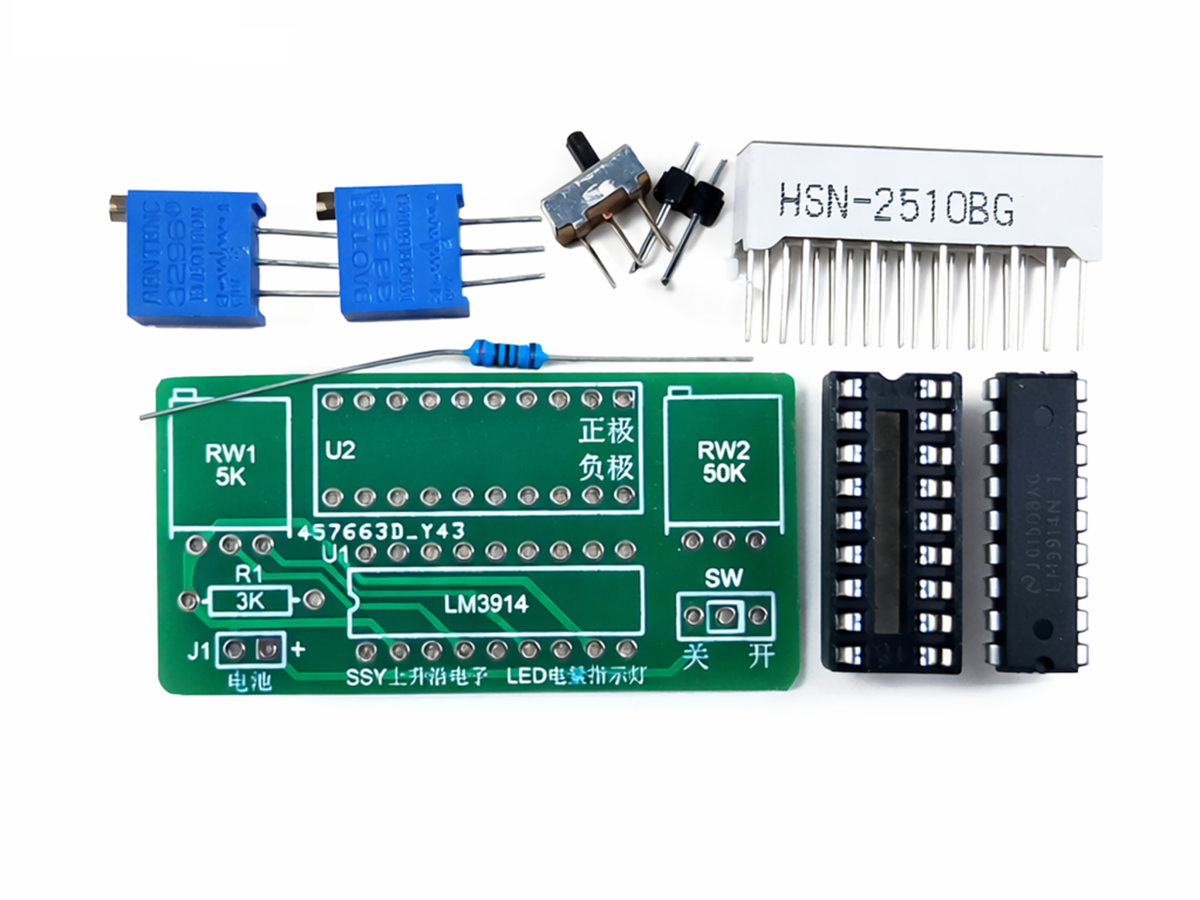
The image above shows the actual LED Battery Level Display Module Kit, based on the LM3914 LED driver IC. Each labeled part plays an important role in accurate voltage detection and display.
Key Components Explained
- LED Bar Display (10 segments)
- Displays the battery level visually from low to high voltage.LM3914 IC (Main Controller)
- Compares input voltage and drives the LEDs in dot or bar mode.Upper Voltage Adjustment Potentiometer
Sets the maximum voltage threshold (full battery).
- Lower Voltage Adjustment Potentiometer
Sets the minimum voltage threshold (empty battery).
- Power Switch (ON / OFF)
- Allows manual control to reduce standby power consumption.Battery Input Pads (Positive / Negative)
Clearly marked for safe and correct wiring.This real-board layout helps users understand where to connect power and how to tune the module, reducing installation errors.
Correct Calibration Method
Adjustment Order Matters
Always adjust the high-end voltage first, then the low-end voltage.
Repeat several times for accurate results.This instruction is critical and often ignored by beginners
Upper Limit Voltage Adjustment
When applying the maximum battery voltage:
- If no LEDs or only a few LEDs light → turn clockwise
- If all LEDs light → turn counterclockwise
- Adjust until all LEDs are just fully on
This ensures the top LED represents a fully charged battery.
Lower Limit Voltage Adjustment
When applying the minimum battery voltage:
- If no LEDs light → turn counterclockwise
- If several LEDs or all LEDs light → turn clockwise
- Adjust until only the first LED just turns on (or all just turn off)
This step defines the battery empty point, protecting against deep discharge misreading.
Internal Circuit Working Principle
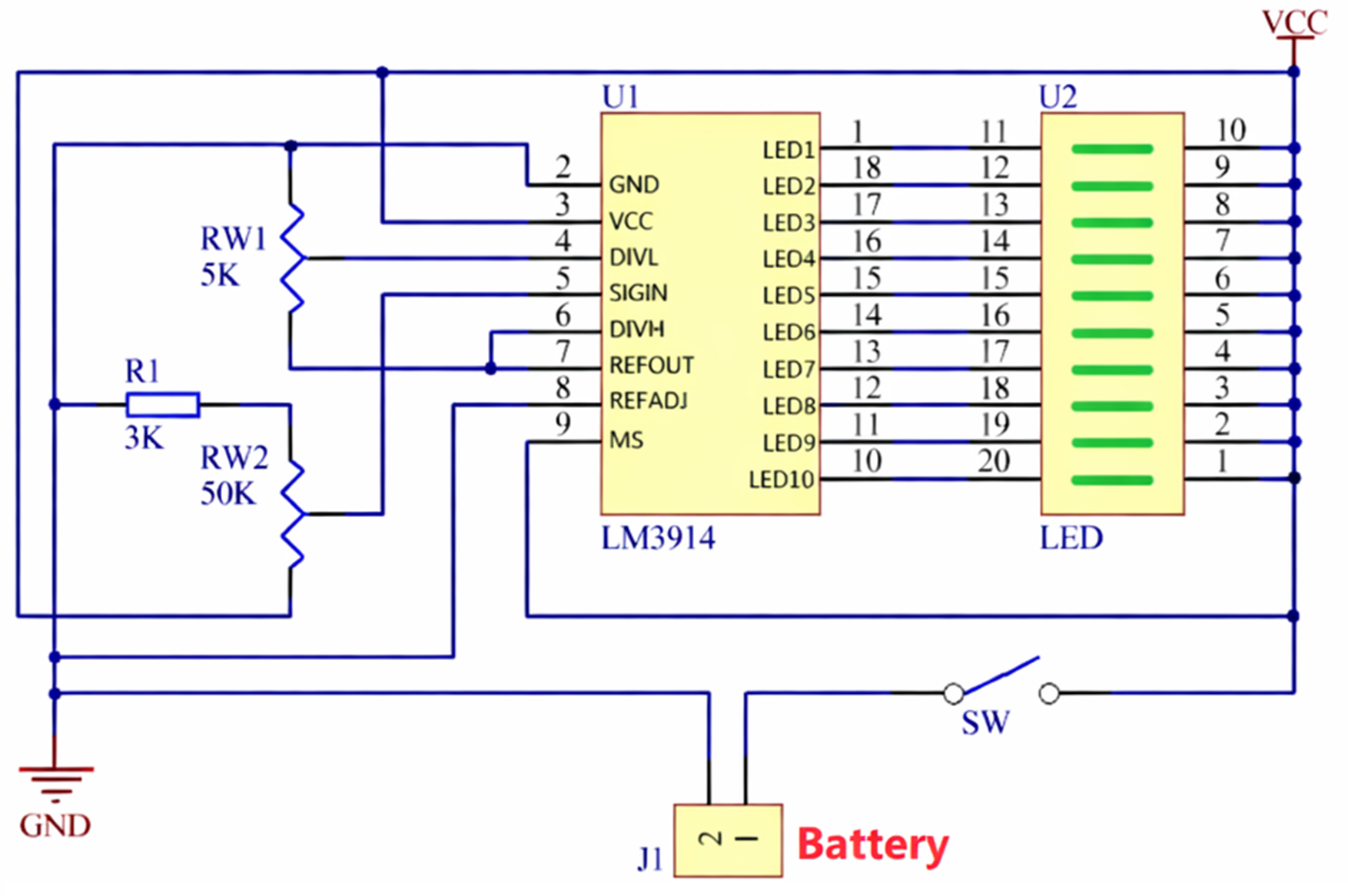
The schematic diagram above shows the classic LM3914 voltage display circuit, which is widely used in professional battery indicator designs.
How the Circuit Works
- U1: LM3914
- Compares the input voltage (SIGIN pin)
- Divides the reference voltage into 10 equal steps
- Drives LED1–LED10 accordingly
- RW1 (5K Potentiometer)
Controls the upper voltage reference
Controls the lower voltage reference
- R1 (3K Resistor)
- Sets LED current and reference stabilitySW (Power Switch)
- Disconnects battery to eliminate idle drainJ1 (Battery Input)
Direct connection to the battery being measuredThis design allows the same module to work with different battery voltages, simply by adjusting the potentiometers.
Understanding the Resistors Used in the Module
Many users struggle to identify resistor values when repairing or modifying the module. The resistor color code chart above explains this clearly.
Example from the Module
- A resistor marked with Yellow – Violet – Black – Red
→ 4, 7, 0 × 100 = 47KΩ
Understanding resistor values is useful when:
- Replacing damaged components
- Customizing LED current
- Modifying voltage ranges
- Designing your own LM3914-based PCB
Typical Applications of the LED Battery Level Display Module Kit
Thanks to its simple structure and reliable performance, this module is commonly used in:
- Lithium battery packs (18650, Li-ion, LiFePO4)
- DIY Arduino and Raspberry Pi projects
- Power banks and portable chargers
- Electric scooters and e-bikes
- Solar battery storage systems
- Industrial backup power indicators
Advantages Compared to LCD Battery Indicators
- No software or programming required
- Much lower power consumption
- Excellent visibility
- High reliability and long lifespan
- Lower cost and easier integration
Installation Tips and Best Practices
- Always confirm battery polarity before powering on
- Calibrate with a stable power supply if possible
- Avoid adjusting potentiometers randomly
- Secure the module to avoid vibration damage
- Do not exceed the rated voltage range