

Blog
LM2596S DC Buck Module with Digital Display: A Universal Module for Beginners

Introduction
The LM2596S DC-adjustable buck module with digital display is a go-to choice for electronic DIY projects, Arduino setups, or small industrial control systems where a stable power supply is essential. It combines the high stability of the LM2596 series with an intuitive digital display, making voltage adjustment and monitoring straightforward—perfect for beginners and experienced users alike.
What is the LM2596S Module?
The LM2596S module with digital display is an integrated DC-DC buck regulator module, powered by TI’s (Texas Instruments) LM2596S series chips. Its core function is to convert a wide-range input DC voltage range (4.5V–40V) into a stable output voltage (1.2V–37V) using switching power supply technology. A built-in digital display shows the output voltage in real time.
No additional soldering of peripheral components or advanced circuit knowledge is required—simply connect the wires and turn the knob to adjust the voltage. It solves common pain points like “blind voltage adjustment” and “unstable device power supply,” making it a cost-effective option for power conversion scenarios.
Side-by-Side Comparison:LM2596S vs XL4015 vs AMS1117
With many popular buck modules on the market, why does the LM2596S with digital display stand out as a “versatile solution”? The key differences are clear:
| Module Type | Input Voltage Range | Max Output Current | Core Advantages | Typical Applications |
|---|---|---|---|---|
| LM2596S | 4.5V-40V | 3A | Wide input voltage range, intuitive digital display, broad adjustable range, built-in protection, cost-effective | Most DIY projects, Arduino power supply, small device debugging |
| AMS1117 | 6.5V-12V | 1A | Ultra-low cost, simple circuit | Fixed 5V/3.3V low-current devices (like sensors) |
| XL4015 | 8V-36V | 5A | High current output, high conversion efficiency | Vehicle-mounted devices, high-power motor drives |
The AMS1117 is limited by fixed voltage and low current, lacking flexibility. The XL4015 offers high power but has a higher input voltage threshold and higher cost. In contrast, the LM2596S balances wide voltage compatibility, precise adjustment, and intuitive monitoring—covering the broadest range of scenarios and making it the top choice for both beginners and advanced users.
How to Use the LM2596S Module? 3 Simple Steps

Even beginners can master this module in minutes:
1.Wiring: Connect the positive and negative terminals of the input power supply (like 12V lithium battery, 24V adapter) to the module’s “IN+” and “IN-“. Connect the device to be powered to “OUT+” and “OUT-“. Note: Reverse polarity is protected—reversing the wires won’t damage the module but will prevent it from working.
2.Voltage Adjustment: Turn the blue potentiometer clockwise to increase the output voltage, or counterclockwise to decrease it. The digital display updates the voltage in real time—adjust precisely to the voltage required by your device (like 5V, 3.3V).
3.Power On: Confirm correct wiring and voltage, then turn on the power. The module automatically maintains a stable output, and the digital display continuously monitors the voltage to avoid device damage from voltage drift.
Core Components of the LM2596S Converter Module
The module features a simple, robust design with clear division of labor among key components to ensure stable operation:
- Core Chip: LM2596S(TI original), capable of 3A output with excellent line and load regulation—an industry-recognized high-reliability buck chip.
- Digital Display: Shows output voltage in real time with ±0.01V accuracy. No external multimeter is needed, making adjustment visible and easy.
- Precision Potentiometer:For fine-tuning output voltage, with smooth operation and accuracy suitable for daily use.
- Inductor Coil:High-frequency magnetic ring inductor reduces voltage ripple and improves conversion efficiency (up to 96%).
- Filter Capacitors:Eliminate power supply noise for smoother output voltage, protecting sensitive downstream devices.
- Protection Circuits: Built-in overheat shutdown, current limiting, and reverse polarity protection. Automatically cuts off the circuit in fault conditions to protect devices and users.
- Terminal Blocks: Solder-free design for quick plug-and-play, ideal for scenarios where devices are frequently swapped.
Key Hardware Parameters of LM2596S
| Specification | Details |
|---|---|
| Input Voltage | 4.0–40V (Input voltage must be at least 1.5V higher than output voltage) |
| Adjustable Output Voltage Range | 2.3V–37V (continuously adjustable; input voltage must be at least 1.5V higher than output voltage) |
| Output Current | 3A (recommended to use within 2.0A; add heat dissipation for large currents) |
| Output Power | 20W (add heat dissipation when exceeding 15W) |
| Conversion Efficiency | High (average 88%; related to input/output voltage, current, and voltage difference) |
| Reverse Connection Protection | With reverse connection protection (no damage when reversed) |
| Protection Functions | Overheat protection and short-circuit protection |
| Dimensions (L×W×H) | 61×34×12mm |
| Weight | 22g |
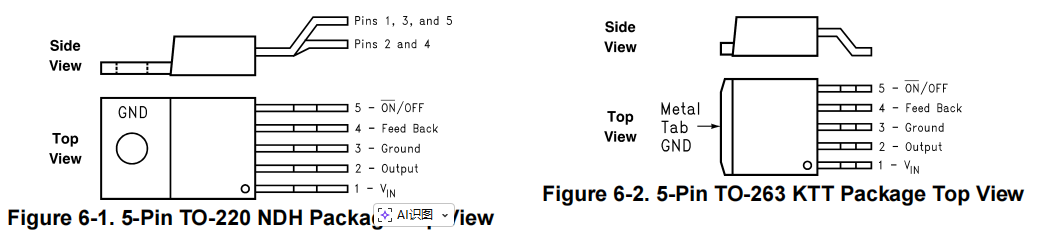
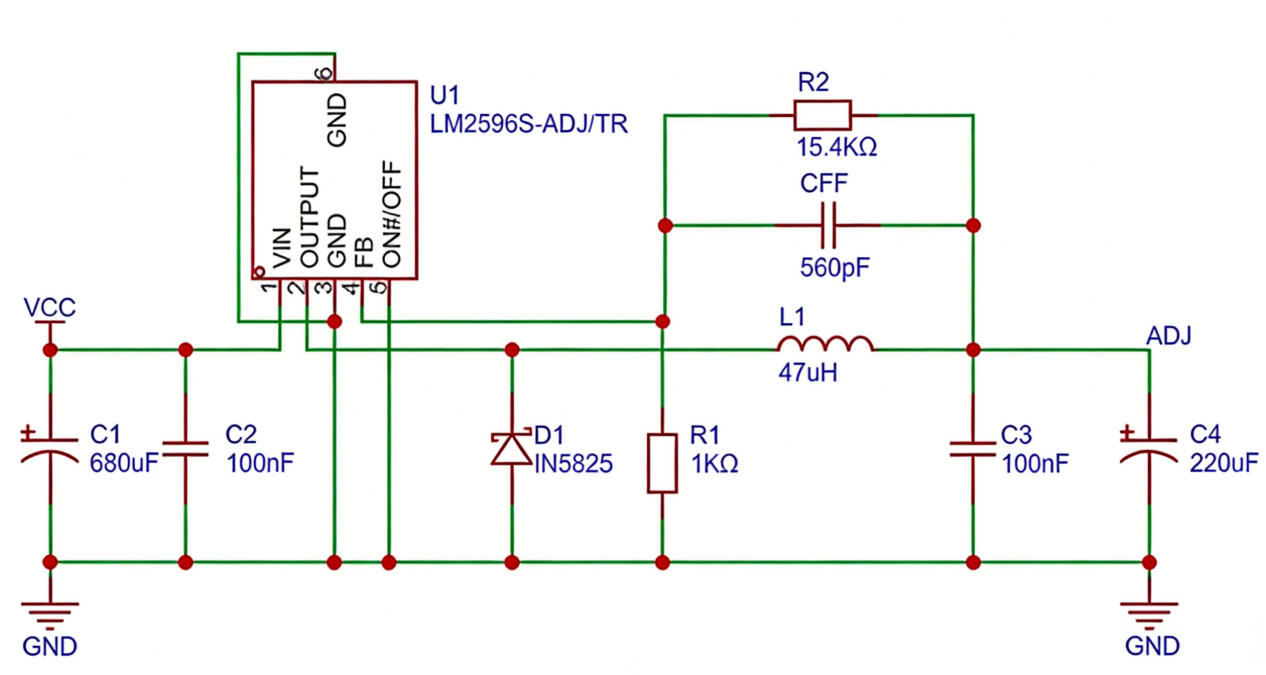
LM2596S Datasheet + Schematic
If you want to learn more LM2596S dc adjustable buck convert, you can refer to this datasheet.
Practical Project: LM2596S + LED – DIY Dimmable Color-Temperature Night Light
With the LM2596S module and warm-white/cool-white LED beads, you can build a dimmable color-temperature night light for under $3. No complex programming is needed—wiring is simple, and the project takes just 15 minutes to complete. It’s a great way to learn the core principles of voltage adjustment while creating a useful device.
Project Goal
Use the LM2596S module to provide a stable, adjustable power supply for separate warm-white and cool-white LED beads. Turn the potentiometer to switch color temperatures (warm yellow → natural white → cool white), with the digital display showing the supply voltage in real time—combining practicality and learning value.
Materials Require
| Component Name | Specifications |
|---|---|
| LM2596S Buck Module (with digital display) | Input: 4.5V–40V; Output: 1.2V–37V |
| LED Beads | 1 warm-white, 1 cool-white (3V, 20mA each) |
| Current-Limiting Resistors | 220Ω, 1/4W (2 pieces) |
| Dupont Wires | 4 male-to-female wires |
| Power Adapter | 5V 1A (or a mobile power bank) |
Hardware wiring
1.Power Connection: Connect the positive/negative terminals of the 5V adapter to the LM2596S module’s “VIN+” and “VIN-“. The digital display will light up if power is connected correctly.
2.LED Bead Wiring (same for both warm-white and cool-white beads):
- LM2596S module “VOUT+” → one end of a 220Ω current-limiting resistor → LED anode (long leg).
- LED cathode (short leg) → LM2596S module “VOUT-“.
- Connect warm-white and cool-white beads in parallel to the module’s output terminals (i.e., one bead-resistor set per “OUT+” and “OUT-“).
3.Debugging Preparation: Turn the LM2596S module’s blue potentiometer—the digital display will show the changing voltage.
FAQS
What should I do if the digital display of my Lm2596s won't light up?
- Check if the input power polarity is reversed or if the wires are loose.
- Ensure the input voltage is within the 4.5V–40Vrange (low voltage cannot power the display or chip).
What if the output voltage is unstable or fluctuates?
Check if the load exceeds 3A (heavy loads cause voltage fluctuations).
Is it normal for the module to get hot?
- Slight heat is normal when the output current is close to 3A.
- If the module becomes extremely hot, check for overload, loose wiring, or add a small heat sink.
Can it power precision sensors?
Yes. The module has output ripple ≤50mV—stable voltage reduces sensor data drift. Adjust the voltage to 3.3V or 5V for use.