

Blog
WTV020-SD Voice Module Quick Start: From Hardware Wiring to Code Implementation
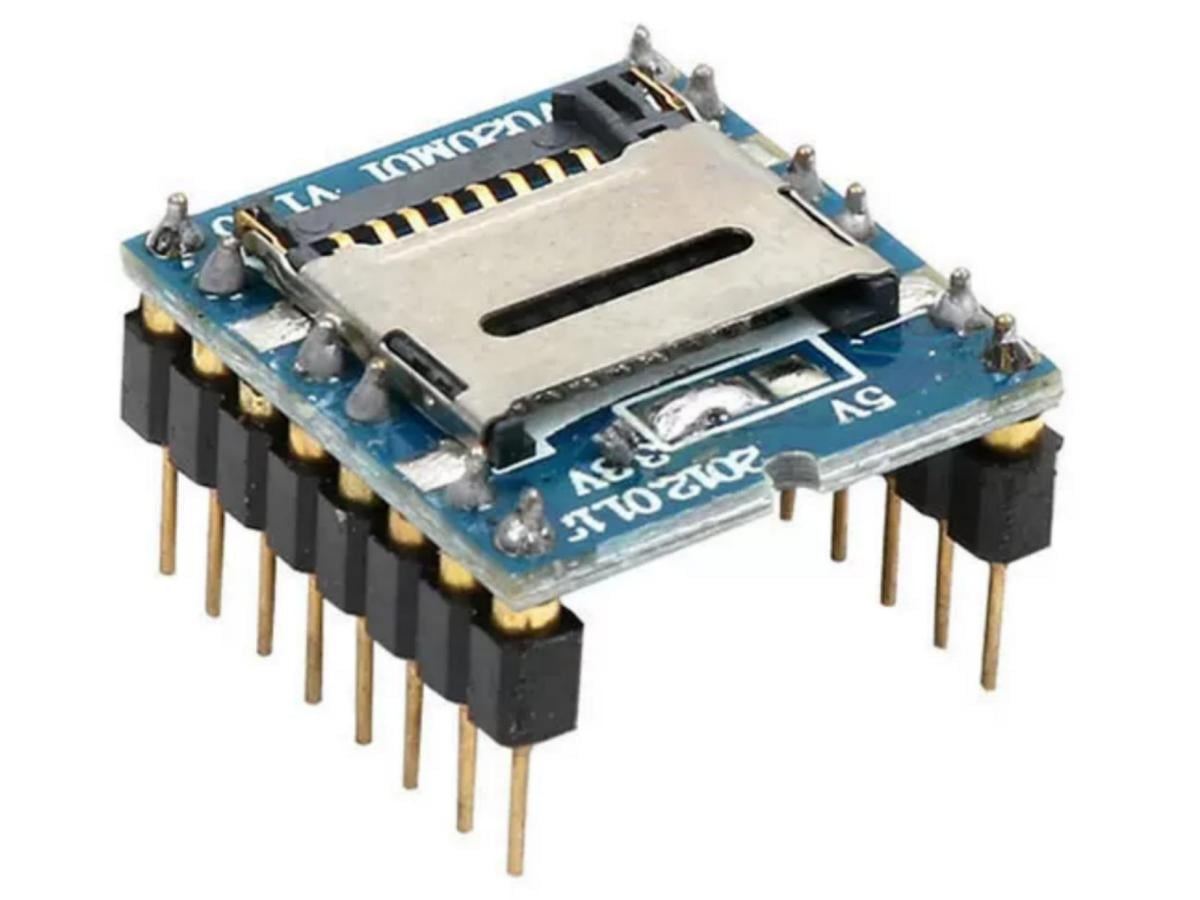
Ever wanted to add interactive sound effects to your smart toys? Enable voice prompts for your DIY access control system? Or create “trigger-to-play” voice feedback for your microcontroller projects? Look no further—the WTV020-SD Voice Module is your ideal “voice playback manager.” With SD card audio storage, support for button/serial port trigger playback, and compatibility with 5V/3.3V power supplies, it serves as the core component for “voice interaction” in small devices. Below is a breakdown of this compact module that “lets devices speak,” based on its parameters and application scenarios.
What is the WTV020-SD Voice Module? — The “Voice Output Hub” for Small Devices
The WTV020-SD Module is a large-capacity rewritable voice module that supports external SD cards up to 1GB. It can load audio files in WAV and AD4 formats.
Centered around the WTV020SD-20S voice chip, the module offers five operating modes: MP3 control mode, one-button-one-voice control mode (for 3 or 5 audio segments), power-on loop playback mode, and two-wire serial port control mode. These modes are set during chip manufacturing and cannot be switched during operation. Custom modes are available upon request.
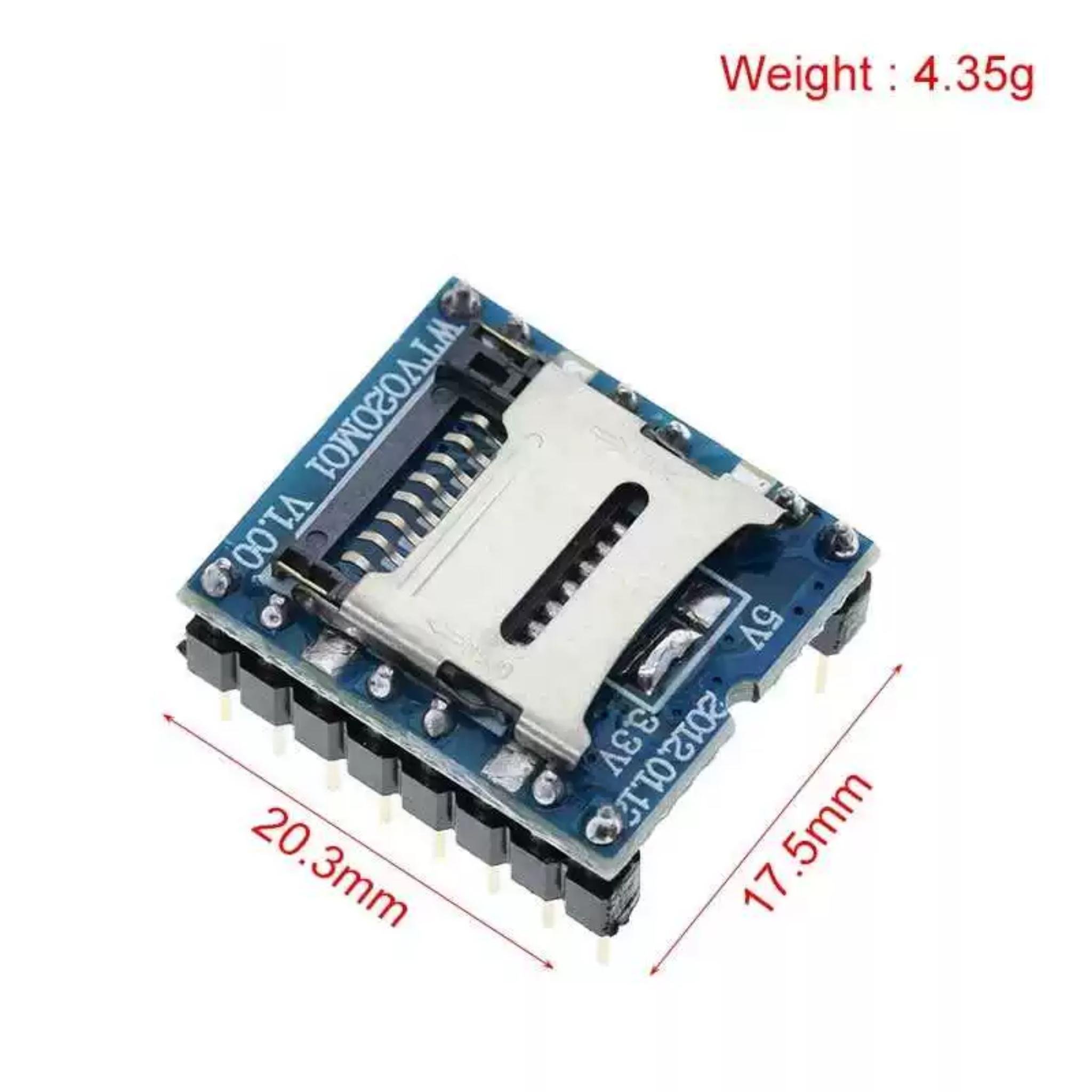
Core Competitive Advantages of the WTV020-SD Voice Module
·Supports external SD cards up to 1GB ·Plays 4-bit ADPCM format files ·Auto-recognizes audio file formats ·Loads AD4 audio (6KHz–32KHz, 36KHz sampling rate) ·Supports AD4 audio with sampling rates ranging from 6KHz–32KHz and 36KHz. ·Loads WAV audio (6KHz–16KHz sampling rate) ·16-bit DAC and PWM audio output- Stores up to 512 audio segments ·Two module types: WTV020-SD-20S, WTV020-SD-16P | ·Supports microprocessor and button control ·Plays any specific audio segment on demand ·Saves operation data when powered off ·No software required for audio loading (simply place files on the SD card) ·Supports combined file playback (including silent segments) ·Operating voltage: DC 2.5–3.6V ·Quiescent current: 16μA (without SD card inserted) |
Compared to fixed-storage single-segment voice modules
| Comparison Dimension | WTV020-SD Voice Module | Fixed-Segment Voice Module |
|---|---|---|
| Audio Storage Method | SD card (audio replaceable freely) | Built-in ROM (fixed, non-modifiable) |
| Number of Audio Segments | Up to 255 segments | Only 1 – 2 segments |
| Trigger Methods | Multi-mode (button/serial port/IO port) | Single button trigger only |
| Power Compatibility | Wide range (5V/3.3V) | Single voltage only |
Application Block Diagram
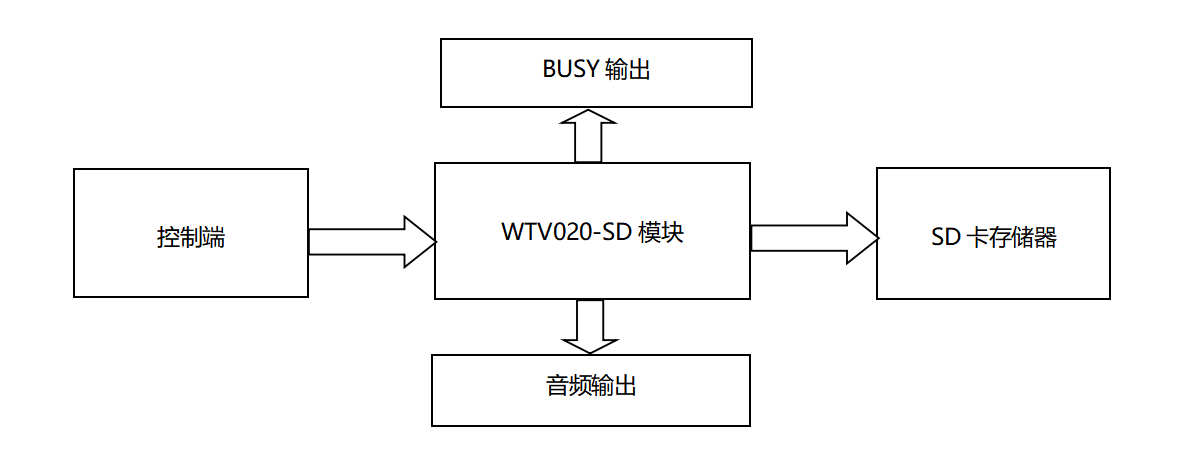
What are the control modes?
The WTV020-SD Voice Module has 5 operating modes:
- MP3 control mode:Offers basic functions like play/stop, next track, previous track, volume up, and volume down.
- One-button-one-voice control mode (3 audio segments):Each button triggers a specific audio segment. It can play 3 segments and adjust volume (up/down), and all buttons use non-repeatable pulse triggers by default.
- One-button-one-voice control mode (5 audio segments): Has 3 control options:
1.All buttons use repeatable pulse triggers.
2.All buttons act as play/stop triggers (single track, no loop).
3.All buttons act as play/stop triggers (single track, loopable).
- Power-on loop playback mode:Automatically plays all audio files on the SD card right after powering on (no I/O trigger needed). It has power-off memory—when re-powered, it resumes playback from where it stopped last time. There are 2 control options:
1.P04 supports pulse-based play/pause.
2.P05 supports level-based play/pause.
- Two-wire serial port mode:Controlled by a microcontroller viaCLK (clock) and DI (data) lines. You can play audio from any track, and combine multiple segments for playback.
To update audio content, just replace files on the SD card using a card reader on your PC. The module works with the FAT file system, and automatically recognizes the sample rate and format of audio files (supports AD4 audio at 6KHz~32KHz/36KHz, and WAV audio at 6KHz~16KHz).
1. MP3 Control Mode
Provides basic playback controls: play/stop, next track, previous track, volume up, and volume down.
By default, 6 IO ports are assigned specific functions in this mode:
| IO Port | P02 | P03 | P04 | P05 | P06 | P07 |
|---|---|---|---|---|---|---|
| Function | K1 | K2 | K3 | K4 | BUSY | K5 |
| Trigger Method | Next track | Previous track | Volume + | Volume – | —— | Play/Stop |
| Audio Control | Next segment | Previous segment | —— | —— | —— | Current segment |
- BUSY: A signal detection output. It outputs a high level when audio is playing, which can be connected to an LED for playback status indication or to components like relays.
2. One-Button-One-Voice Control Mode (3 Segments)
Each button triggers a specific audio segment. Pulling down IO ports P02, P03, and P07 triggers 3 audio segments respectively; P04 and P05 control volume.
| IO Port | P02 | P03 | P04 | P05 | P06 | P07 |
|---|---|---|---|---|---|---|
| Function | K1 | K2 | K3 | K4 | BUSY | K5 |
| Trigger Method | Non-repeatable pulse | Non-repeatable pulse | Volume – | Volume + | —— | Non-repeatable pulse |
| Audio Control | Segment 1 | Segment 2 | —— | —— | —— | Segment 3 |
- Buttons K1, K2, and K5 use non-repeatable pulse triggering.
- BUSY: Works the same as in MP3 mode (high level during playback).
3.Power-On Loop Playback Mode
In this mode, the module starts playing audio automatically right after it’s powered on, and loops through all playable audio files on the SD card.
- Trigger the corresponding I/O port once to pause playback; trigger it again to resume looping from where it paused.
- It has power-off memory:if the module is powered off and then turned back on, it will continue playing from the point where it stopped.
To activate this mode:
1.Create an empty TXT file.
2.Rename it to “1111.AD4”.
3.Place this file (along with other AD4 audio files) in the root directory of the SD card.
There are 2 ways to control play/pause in this mode:
1.Pulse-triggered play/pause
2.Level-triggered play/pause
4.Two-Wire Serial Port Mode
This mode uses 2 communication lines: CLK (clock) and DI (data), plus a reset line.
- If there’s no trigger within 1safter the chip is reset, it goes into sleep mode.
- The “previous track” and “next track” functions have power-off memory: for example, if the 7th audio segment was playing before power-off, pressing “previous track” after re-powering on will play the 6th segment directly.
Module Principle: How to Achieve “Trigger-to-Play”?
The WTV020-SD Voice Module operates in two key steps: audio storage and triggered playback.
1. Audio Storage
- Rename MP3/WAV audio files in sequential numbering (like”0001.mp3, 0002.mp3…”).
- Format the SD card to FAT16 and insert the numbered audio files into the root directory.
- Insert the SD card into the module’s slot—the module recognizes audio segments by file name numbering.
2. Triggered Playback
- Button Trigger:Press the button corresponding to the KEY pin to play the audio segment with the matching number.
- Serial Port Trigger:Send a serial command (like”PLAY 0001″) to trigger playback of the specified segment.
- IO Port Trigger:Input a high level to the corresponding IO port to play the linked audio segment.
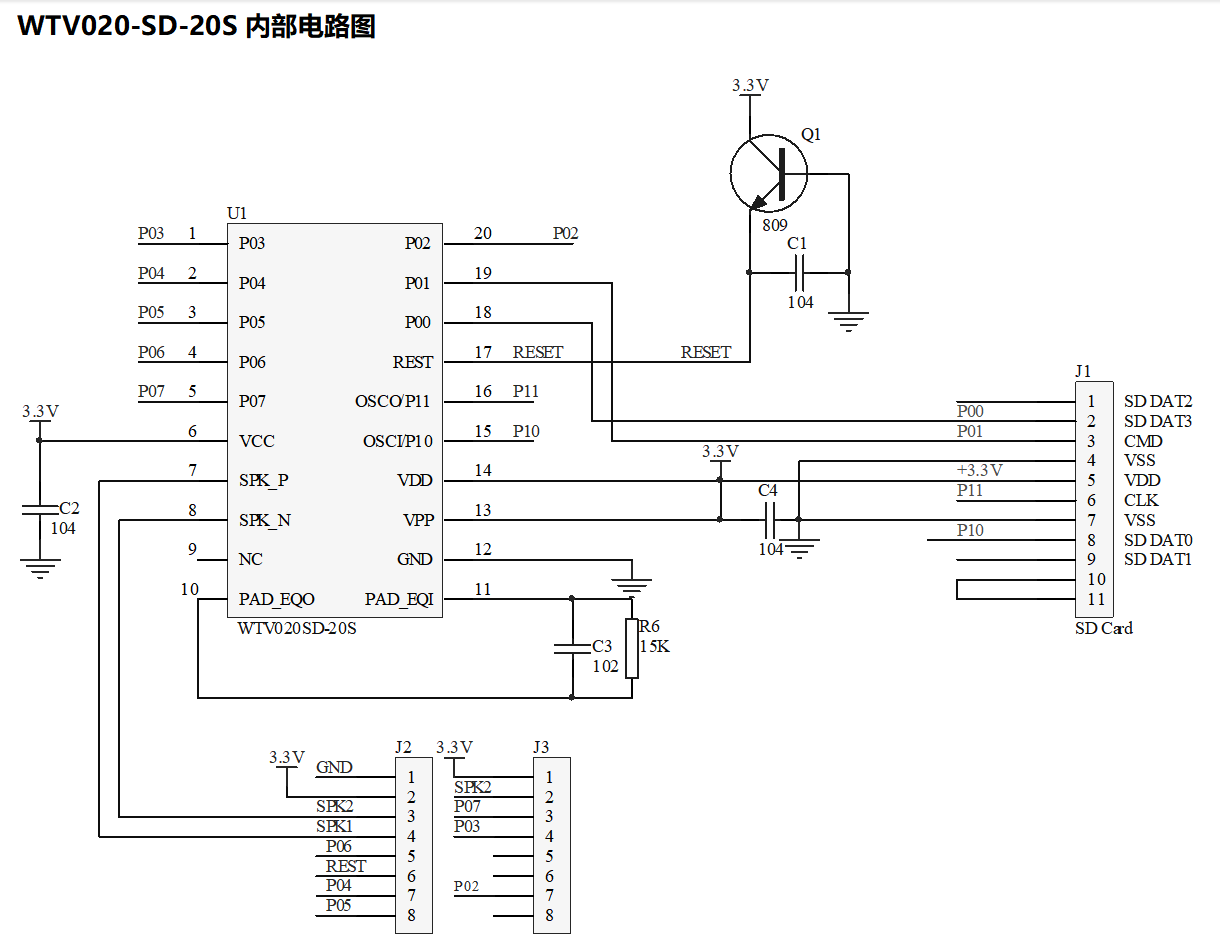
Package Pinout Diagram
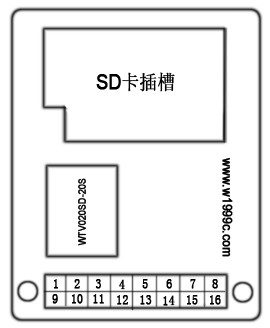
1.WTV020-SD-20S
| PIN | Description | Function | PIN | Description | Function |
|---|---|---|---|---|---|
| 1 | DC+3.3V | +3.3V positive power input | 9 | GND | Ground |
| 2 | SPK+ | Audio output | 10 | DC+3.3V | +3.3V positive power input |
| 3 | P07 | IO port | 11 | SPK+ | Audio output |
| 4 | P03 | IO port | 12 | SPK- | Audio output |
| 5 | NC | No connection | 13 | P06 | BUSY output |
| 6 | NC | No connection | 14 | RST | Reset pin |
| 7 | P02 | IO port | 15 | P04 | IO port |
| 8 | NC | No connection | 16 | P05 | IO port |
2.WTV020-SD-16P
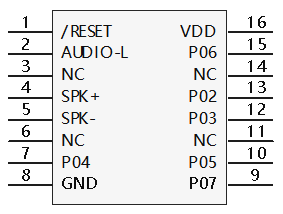
| Package Pin | Pin Label | Brief Description | Function |
|---|---|---|---|
| 1 | /RESET | Reset | Reset pin |
| 2 | AUDIO-L | AUDIO-L | Floating (no connection) |
| 3 | NC | NC | No connection |
| 4 | SP+ | PWM+ | PWM+ audio output pin / DAC positive audio output |
| 5 | SP- | PWM- | PWM- audio output pin |
| 6 | NC | NC | No connection |
| 7 | P04 | K3/A2/CLK | Button / Two-wire serial port clock pin |
| 8 | GND | GND | Ground pin |
| 9 | P07 | K5/A4/SBT | Button trigger pin |
| 10 | P05 | K4/A3/DI | Button / Two-wire serial port data input pin |
| 11 | NC | NC | No connection |
| 12 | P03 | K2/A1 | Button |
| 13 | P02 | K1/A0 | Button |
| 14 | NC | NC | No connection |
| 15 | P06 | BUSY | Audio playback busy signal output pin |
| 16 | VDD | VDD | Power input pin |
Module Selection
WTV020-SD-20S and WTV020-SD-16P share the same control modes (only differing in package). Custom modes with special functions are also available.
| Control Mode | Number of Voice Segments | Trigger Method | BUSY Output | Audio Output | Remarks |
|---|---|---|---|---|---|
| MP3 Mode | 256 | Key | Supported | DAC/PWM | |
| Key One-to-One (3 Voice Segments) | 3 | Key | Supported | DAC/PWM | Pulse cannot be re-triggered |
| Key One-to-One (5 Voice Segments) | 5 | Key | Supported | DAC/PWM | Pulse can be re-triggered |
| 5 | Key | Supported | DAC/PWM | Play/Stop (Single track no loop) | |
| 5 | Key | Supported | DAC/PWM | Play/Stop (Single track no loop) | |
| 5 | Key | Supported | DAC/PWM | Play/Stop (Single track no loop) | |
| Power-on Loop Play | 256 | Key | Supported | DAC/PWM | Play/Pause (Pulse) |
| 256 | Key | Supported | DAC/PWM | Play/Pause (Level) | |
| Two-Wire Serial Port | 256 | Microcontroller | Supported | DAC/PWM |
Program Example
					ORG 0000H

KEY     EQU P1.1        ; Key input pin
KEY2    EQU P1.2        ; Volume control key
KEY3    EQU P1.3        ; Clock +
KEY4    EQU P1.6        ; Clock -
KEY5    EQU P1.7        ; Send volume first, then send address

LED     EQU P3.0        ; Indicator LED for key press
SCL     EQU P3.2        ; Clock line
SDA     EQU P3.3        ; Data line
RST     EQU P3.4        ; Reset pin

DAIFAZHI EQU 50H        ; Code value buffer address
VOICENUM EQU 51H        ; Volume value
CLKNUM   EQU 52H        ; Clock timing value

        MOV DAIFAZHI,#0H    ; Initial code value = 0
        MOV VOICENUM,#0F0H ; Initial volume value = F0H
        MOV CLKNUM,#2      ; Default code timing = 1 ms
        MOV R5,#8          ; 8-bit transmission loop
        SETB SCL
        SETB SDA
        SETB RST

MAIN:
        JB KEY,KEY22
        CLR LED
        MOV R6,#5          ; Delay 10 ms
        LCALL DELAY2MS
        JB KEY,KEY22       ; Key debounce check
        JNB KEY,$          ; Wait for key release
        SETB LED
        LCALL RESET
        LCALL TWO_LINE     ; Call two-wire address transmission subroutine
        INC DAIFAZHI       ; Increment code value
        MOV A,DAIFAZHI
        CJNE A,#37,XX2     ; Check if max voice segment reached
XX2:    JC KEY22
        MOV DAIFAZHI,#0H

KEY22:
        JB KEY2,KEY33
        CLR LED
        MOV R6,#5          ; Delay 10 ms
        LCALL DELAY2MS
        JB KEY2,KEY33      ; Key debounce check
        JNB KEY2,$         ; Wait for key release
        SETB LED
        LCALL RESET
        LCALL VOICE        ; Call two-wire volume transmission subroutine
        INC VOICENUM       ; Increment volume value
        MOV A,VOICENUM
        CJNE A,#0F8H,XX4   ; Check if max volume reached
XX4:    JC KEY33
        MOV VOICENUM,#0F0H

KEY33:
        JB KEY3,KEY44
        CLR LED
        MOV R6,#5          ; Delay 10 ms
        LCALL DELAY2MS
        JB KEY3,KEY44      ; Key debounce check
        JNB KEY3,$         ; Wait for key release
        NOP
        INC CLKNUM
        SETB LED

KEY44:
        JB KEY4,KEY55
        CLR LED
        MOV R6,#5          ; Delay 10 ms
        LCALL DELAY2MS
        JB KEY4,KEY55      ; Key debounce check
        JNB KEY4,$         ; Wait for key release
        NOP
        DEC CLKNUM
        MOV A,CLKNUM
        CJNE A,#0H,XX5     ; Minimum code timing = 100 us
        MOV CLKNUM,#1
XX5:
        SETB LED

KEY55:
        JB KEY5,MAIN
        CLR LED
        MOV R6,#5          ; Delay 10 ms
        LCALL DELAY2MS
        JB KEY5,XX6        ; Key debounce check
        JNB KEY5,$         ; Wait for key release
        LCALL RESET
        MOV VOICENUM,#0F6H
        LCALL VOICE
        LCALL TWO_LINE
XX6:
        LJMP MAIN

TWO_LINE:                ; //// Voice address transmission subroutine
        CLR SCL
        MOV R6,#2
        LCALL DELAY1MS
        MOV A,#0

LOOP1:
        CLR SCL
        RLC A
        MOV SDA,C
        MOV R6,CLKNUM
        LCALL DELAY50US
        SETB SCL
        MOV R6,CLKNUM
        LCALL DELAY50US
        DJNZ R5,LOOP1

        MOV R5,#08H
        MOV A,DAIFAZHI

LOOP2:
        CLR SCL
        RLC A
        MOV SDA,C
        MOV R6,CLKNUM
        LCALL DELAY50US
        SETB SCL
        MOV R6,CLKNUM
        LCALL DELAY50US
        DJNZ R5,LOOP2

        MOV R5,#08H
        RET

VOICE:                   ; //// Volume data transmission subroutine
        CLR SCL
        MOV R6,#2
        LCALL DELAY1MS
        MOV A,#0FFH

LOOP3:
        CLR SCL
        RLC A
        MOV SDA,C
        MOV R6,CLKNUM
        LCALL DELAY50US
        SETB SCL
        MOV R6,CLKNUM
        LCALL DELAY50US
        DJNZ R5,LOOP3

        MOV R5,#08H
        MOV A,VOICENUM

LOOP4:
        CLR SCL
        RLC A
        MOV SDA,C
        MOV R6,CLKNUM
        LCALL DELAY50US
        SETB SCL
        MOV R6,CLKNUM
        LCALL DELAY50US
        DJNZ R5,LOOP4

        MOV R5,#08H
        RET

RESET:
        CLR RST
        MOV R6,#3
        LCALL DELAY1MS
        SETB RST
        MOV R6,#130
        LCALL DELAY2MS
        RET

DELAY2MS:                ; 2 ms delay subroutine, R6 controls delay length
L1:
        MOV R7,#248
L2:
        NOP
        NOP
        NOP
        NOP
        NOP
        NOP
        DJNZ R7,L2
        DJNZ R6,L1
        RET

DELAY50US:               ; 25 us delay subroutine, R6 controls delay length
L11:
        MOV R7,#6
L22:
        NOP
        NOP
        DJNZ R7,L22
        DJNZ R6,L11
        RET

DELAY1MS:                ; 1 ms delay subroutine, R6 controls delay length
L31:
        MOV R7,#240
L32:
        NOP
        NOP
        DJNZ R7,L32
        DJNZ R6,L31
        RET

END
WTV020-SD Voice Module datasheet
We provide you with the WTV020-SD Voice Module datasheet for your reference:
What are the typical application scenarios?
Leveraging its flexible triggering and SD card storage, the WTV020-SD Module fits various voice interaction scenarios:
- Smart Toys:Press toy buttons to play corresponding sound effects or story clips.
- Access Control / Alarm Devices:Play “Welcome” for successful card swipes, or “Please try again” for errors.
- DIY Interactive Devices:Trigger guidance audio via touch sensors.
- Industrial Equipment: Broadcast operation step prompts or fault alarm messages.
FAQS
1.How to store audio files in WTV020-SD?
Rename audio files to “0001.mp3, 0002.mp3…” (up to 255 files), format the SD card to FAT16, and insert it into the module’s card slot.
2.What trigger methods does WTV020-SD support?
It supports key trigger, serial port command trigger (9600 baud rate), and IO port level trigger.
3.What speaker is suitable for WTV020-SD?
It is recommended to use an 8Ω/0.5W speaker (the module’s built-in amplifier matches this parameter).
4.Can WTV020-SD play multiple audio files continuously?
Yes, it can be controlled via serial port commands to play multiple segments in sequence.