

Blog
2262/2272 315MHz 4-Key Wireless Remote Control Kit: Short-Range Smart Control
Introduction
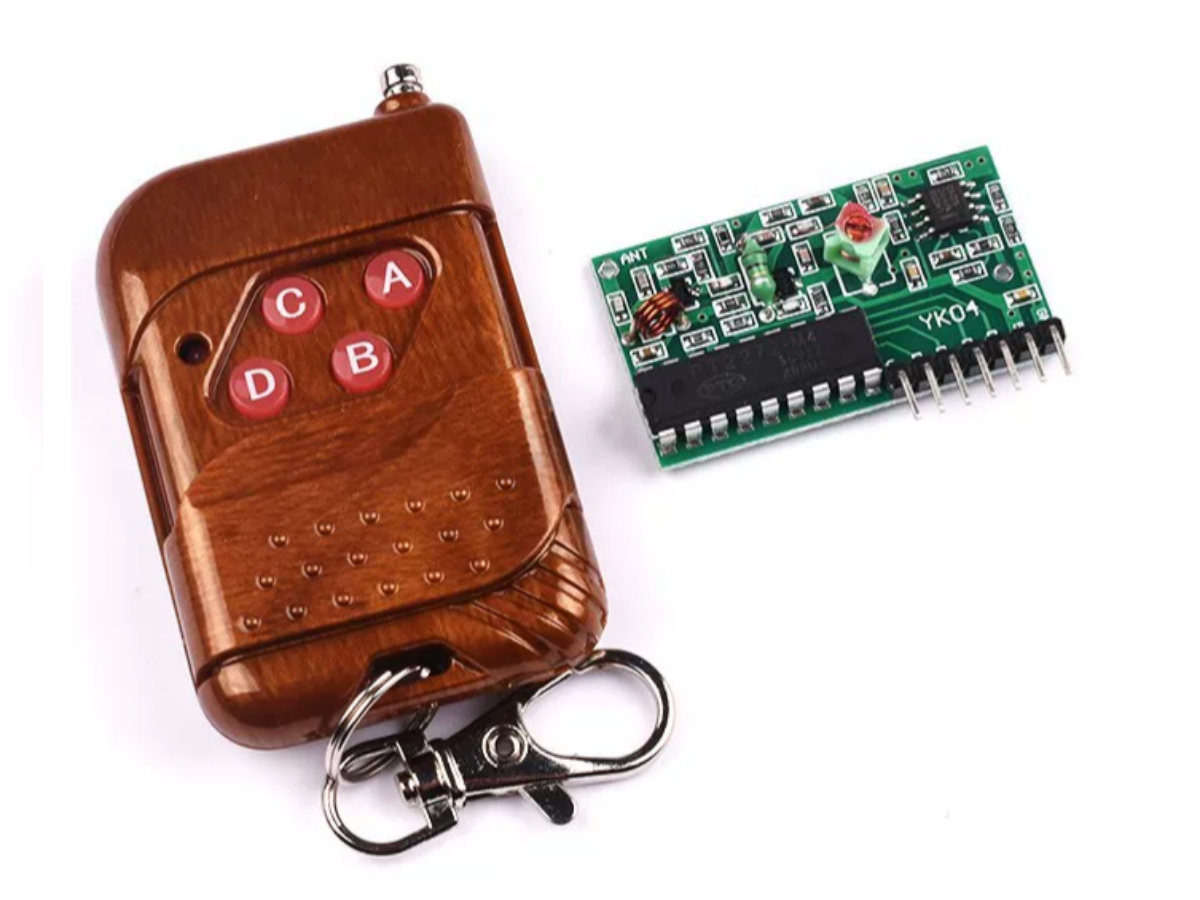
Want to add wireless control to home appliances, DIY anti-theft devices, or remotely operate a small car? This 2262/2272 Four-Channel Wireless Remote Control 315MHz kit is definitely a cost-effective choice! Centered on 315MHz high-frequency transmission, paired with flexible coding methods and multiple working modes, it’s perfect for electronics enthusiasts and beginner developers to easily meet short-range wireless control needs.
What Exactly is the 2272 Wireless Remote Control Module?
PT2262 and PT2272 are a commonly used pair of infrared or RF encoding/decoding chips, widely applied in wireless remote control systems.PT2262 encodes address and data codes into serial pulse signals, using Manchester coding to modulate the carrier—ensuring signal synchronization and anti-interference during transmission. Its coding frame consists of a preamble, 8-bit address code, and 4-bit data code. The A0-A8 pins can be configured into 531,441 unique combinations, effectively avoiding cross-interference between devices.
When PT2272 receives the modulated signal, its internal sync detection circuit restores the clock, decodes the Manchester signal, and verifies validity by matching the address code. Only when addresses match will it update the states of outputs D0-D3. It supports two modes: latch (L-type) for continuous control, and momentary (M-type) for transient triggering.The chips operate at 2.7V~12V. Typical oscillation resistors are 1.5MΩ (for PT2262) and 470kΩ (for PT2272)—their frequencies must match to ensure reliable communication.
Core Differences Between the 2272 and Its Series Counterpart 2262 Module

The 2262 and 2272 are “golden partners” in the same series but have distinct functional orientations. Here’s a detailed comparison:
| Feature | 2262 Module | 2272 Module |
|---|---|---|
| Core Function | Signal encoding and transmission | Signal reception and decoding |
| Working Role | Core chip of the transmitter | Core chip of the receiver |
| Output Type | Encoded wireless signals | Decoded high-level TTL signals |
| Supply Voltage | Usually DC12V (for remotes) | Usually DC5V (for development boards) |
| Key Parameters | Transmission power: 10mW, Current: 10mA | Reception sensitivity: -105dBm, Quiescent current: 4.5mA |
Simply saying, the 2262 is responsible for “sending commands,” while the 2272 “receives and executes commands.” The two must have matching codes to work properly—their combined use ensures better stability and anti-interference performance.
Pin Definition of PT2262 chip

PT2262 comes in DIP18 or SOIC18 packages, with 18 pins total. Key functional pins include A0–A8 (address inputs), D0–D5 (data inputs), TE (transmit enable), OSC1/OSC2 (oscillator interface), and DOUT (encoded output). Each pin’s function directly affects the final encoding format and communication reliability.
| Pin Number | Name | Function Description |
|---|---|---|
| 1–8 | A0–A7 | Address input pins: Configurable as high level, low level, or floating to form a unique device ID. |
| 9 | A8 | 9th address input (supported by some models). |
| 10–15 | D0–D5 | Data input pins: Used to indicate button states or other control information. |
| 16 | TE | Transmit enable pin: Triggers encoded output when set to low level. |
| 17–18 | OSC1/OSC2 | External RC oscillator interface: Determines the encoding clock frequency. |
| 14 | VDD | Positive power supply (typical 3–12V). |
| 7 | GND | Ground. |
| 17 | DOUT | Encoded pulse output: Connects to the modulation input of the RF module. |
How to Use the 2272 Module? 3 Quick Steps to Get Started
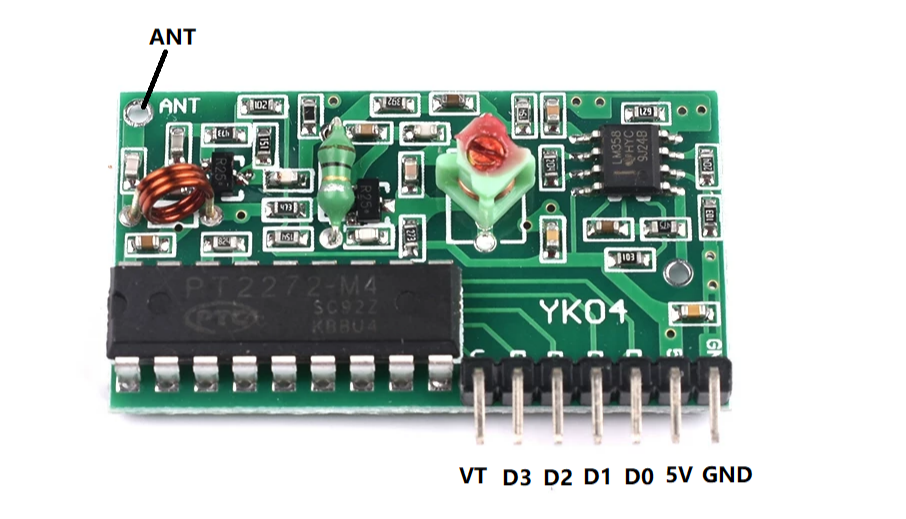
| Pin Number | Label | Function Description |
|---|---|---|
| 1 | VT | Output status indicator |
| 2 | D3 | Data output |
| 3 | D2 | Data output |
| 4 | D1 | Data output |
| 5 | D0 | Data output |
| 6 | 5V | Positive power supply |
| 7 | GND | Negative power supply (ground) |
| 8 | ANT | Antenna connection terminal |
1. Code Pairing (Critical First Step)
Both the receiver and transmitter are equipped with 8 password-setting channels. Each channel can be configured into 3 states (floating, connected to H=1, connected to L=0) via soldering or DIP switches, supporting a total of 6561 coding combinations to effectively prevent unauthorized control. Ensure the codes of the transmitter and receiver are identical; otherwise, normal communication will fail.
2. Working Mode Selection
Choose the receiver’s working mode by replacing the 2272 series chip:
- M4 (Momentary Mode):Outputs signals when the remote control button is pressed and held; stops when released.
- L4 (Interlock Mode):Only one of the four channels can output at a time to avoid device conflicts.
- T4 (Latching Mode): Press a button once to start output; press again to stop. All four channels work independently without mutual interference.
3. Wiring and Control
Connect the D0-D3 data output pins of the receiver to relays or microcontrollers, the 5V and GND pins to the power supply, and the ANT pin to a 50Ω 1/4-wavelength antenna (straight placement ensures optimal reception). After powering on, use the remote control to send commands—the VT pin of the receiver will synchronously indicate the working status.
Core Components of the 2272 Module
- Transmitter (4-Key Remote Control)
- Appearance: Dimensions 64×39.5×14.8mm, with four operation buttons.
- Core Configuration: Built-in 2262 encoding chip, powered by one 12V 23A battery.
- Key Components:Code-setting circuit, ASK modulation and transmission circuit, button trigger module.
- Receiver Module
- Appearance:Dimensions 40.7×23.1mm, printed circuit board design with 8 external interface pins.
- Core Configuration:2272 decoding chip, LC oscillation circuit, signal amplification and shaping circuit.
- Key Components:Password-setting DIP switches, signal receiving antenna interface, four-channel data output interface.
Detailed Hardware Specifications
| Remote Control Parameters | Details |
|---|---|
| Operating Voltage | DC12V |
| Operating Current | 10mA (12V) |
| Transmission Power | 10mW (12V) |
| Modulation Mode | ASK |
| Transmission Frequency | 315/433MHz (crystal frequency) |
| Encoding Type | Fixed Code |
| Decoding Receiver Board Parameters | Details |
|---|---|
| Operating Voltage | DC 5V |
| Operating Current | 4.5mA |
| Modulation Mode | OOK |
| Reception Sensitivity | -105dBm |
| Operating Temperature | -10°C ~ +70°C |
| Encoding Method | Pad Encoding (Fixed Code) |
| Dimensions | 41*23mm |
| Operating Frequency | 315MHz |
2262/2272 Four-Channel Wireless Remote Control Datasheet
If you want to learn more 2262/2272 Wireless Remote Control details, you can refer to this datasheet.
Practical Arduino Example: Controlling LED Lights with the 2272
Required Materials
- 2262/2272 Four-Channel Wireless Remote Control
- Arduino Uno
- LED
Wiring steps
| Component Pin | Arduino Pin | Pin Type | Connection Description |
|---|---|---|---|
| 2272 Receiver – D0 | 2 | Digital Input | Direct connection (no resistor) |
| 2272 Receiver – D1 | 3 | Digital Input | Direct connection (no resistor) |
| 2272 Receiver – D2 | 4 | Digital Input | Direct connection (no resistor) |
| 2272 Receiver – D3 | 5 | Digital Input | Direct connection (no resistor) |
| LED 1 (Anode) | 6 | Digital Output | LED cathode → GND via 220Ω resistor |
| LED 2 (Anode) | 7 | Digital Output | LED cathode → GND via 220Ω resistor |
| LED 3 (Anode) | 8 | Digital Output | LED cathode → GND via 220Ω resistor |
| LED 4 (Anode) | 9 | Digital Output | LED cathode → GND via 220Ω resistor |
| 2272 Receiver – VCC | 3.3V/5V | Power Input | Match module’s voltage specification |
| 2272 Receiver – GND | GND | Ground | Common ground with Arduino |
Code
					// Define the Arduino pins corresponding to D0-D3 of the 2272 receiver board
const int recvPinD0 = 2;
const int recvPinD1 = 3;
const int recvPinD2 = 4;
const int recvPinD3 = 5;

// Define the Arduino pins corresponding to the LEDs
const int ledPin1 = 6;
const int ledPin2 = 7;
const int ledPin3 = 8;
const int ledPin4 = 9;

void setup() {
  // Set the receiver pins as input mode
  pinMode(recvPinD0, INPUT);
  pinMode(recvPinD1, INPUT);
  pinMode(recvPinD2, INPUT);
  pinMode(recvPinD3, INPUT);

  // Set the LED pins as output mode
  pinMode(ledPin1, OUTPUT);
  pinMode(ledPin2, OUTPUT);
  pinMode(ledPin3, OUTPUT);
  pinMode(ledPin4, OUTPUT);

  // Turn off all LEDs initially
  digitalWrite(ledPin1, LOW);
  digitalWrite(ledPin2, LOW);
  digitalWrite(ledPin3, LOW);
  digitalWrite(ledPin4, LOW);
}

void loop() {
  // Read the voltage levels of D0-D3 on the 2272 receiver board (outputs high level when the button is pressed)
  int d0State = digitalRead(recvPinD0);
  int d1State = digitalRead(recvPinD1);
  int d2State = digitalRead(recvPinD2);
  int d3State = digitalRead(recvPinD3);

  // Button A (D0) controls LED1
  digitalWrite(ledPin1, d0State);
  // Button B (D1) controls LED2
  digitalWrite(ledPin2, d1State);
  // Button C (D2) controls LED3
  digitalWrite(ledPin3, d2State);
  // Button D (D3) controls LED4
  digitalWrite(ledPin4, d3State);
}
FAQS
No response when pressing the remote control?
- Check if the transmitter’s 12V 23A battery is charged; 2. Confirm the transmitter and receiver have identical code settings; 3. Verify wiring correctness—never reverse the 5V and GND pins.
Transmission distance is too short (less than 10 meters)?
- Connect an antenna to the receiver’s ANT pin and place it straight; 2. Avoid obstacles like walls and metal to reduce signal interference; 3. Ensure no other 315MHz devices are interfering in the working environment.
Mutual interference between multiple channels?
- Confirm the receiver is in the correct working mode (only one channel works in Interlock Mode); 2. Check that the code setting is unique to avoid conflicts with other devices.
Can it directly control high-power devices like motors or relays?
No direct connection allowed! Use a relay module as an intermediary: the TTL signal from the 2272 controls the relay to switch on/off, and the relay drives the high-power device.