Introduction
In the realm of embedded systems and electronics development, seamless communication between USB and serial interfaces is crucial. Silicon Labs’ CP210x series, particularly the widely-used CP2102, has emerged as a go-to solution for USB-to-UART (and USB-to-TTL) bridging. This blog delves deep into the CP210x family, comparing variants, contrasting with alternatives like CH340, providing code examples, and answering common questions to help developers leverage these controllers effectively.
What is USB-to-TTL?
TTL (Transistor-Transistor Logic) refers to the voltage levels (typically 3.3V or 5V) used in serial communication. USB-to-TTL bridges are a subset of USB-UART bridges, focusing on interfacing with devices that use TTL-level serial signals (as opposed to RS-232, which uses higher voltage levels).
What is USB-to-UART?
USB (Universal Serial Bus) is the dominant interface for connecting peripherals to computers, while UART (Universal Asynchronous Receiver-Transmitter) is a legacy serial protocol used in microcontrollers and embedded devices. A USB-UART bridge enables data transfer between these two interfaces, allowing PCs to communicate with embedded hardware.
UART Pins
- VCC: Power supply pin, generally connected to 3.3V. In many embedded MCUs, the UART controller is powered internally.
- GND: Ground pin. It is best for two devices communicating via UART to share a common ground; otherwise, data reception may have problems.
- RX: Data reception pin. (Connected to the TX of the other party)
- TX: Data transmission pin. (Connected to the RX of the other party)
- RTS: Output signal, used to indicate that this device is ready to receive data. Active low; a low level indicates that this device can receive data. (Can be unused)
- CTS: Input signal, used to determine whether data can be sent to the other party. Active low; a low level indicates that this device can send data to the other party. (Can be unused)
UART generally uses 4 pins (VCC, GND, RX, TX) and uses TTL levels, with low level being 0 (0V) and high level being 1 (3.3V or above).
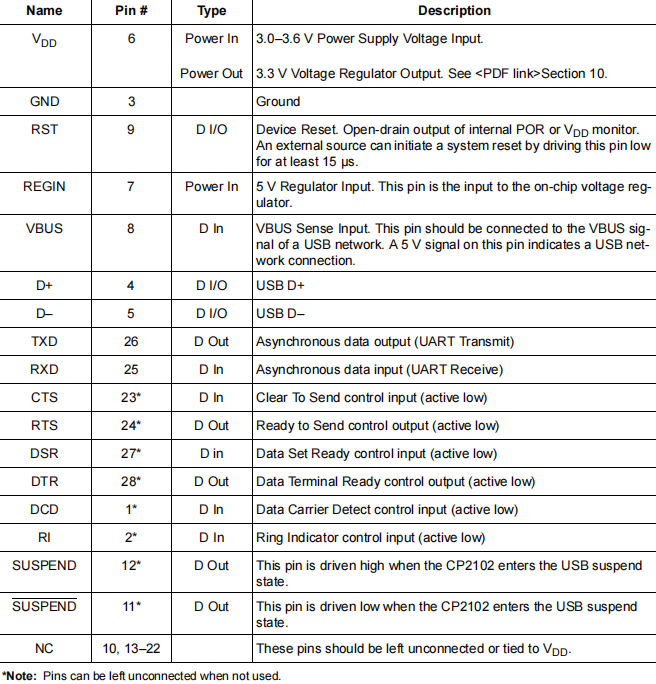
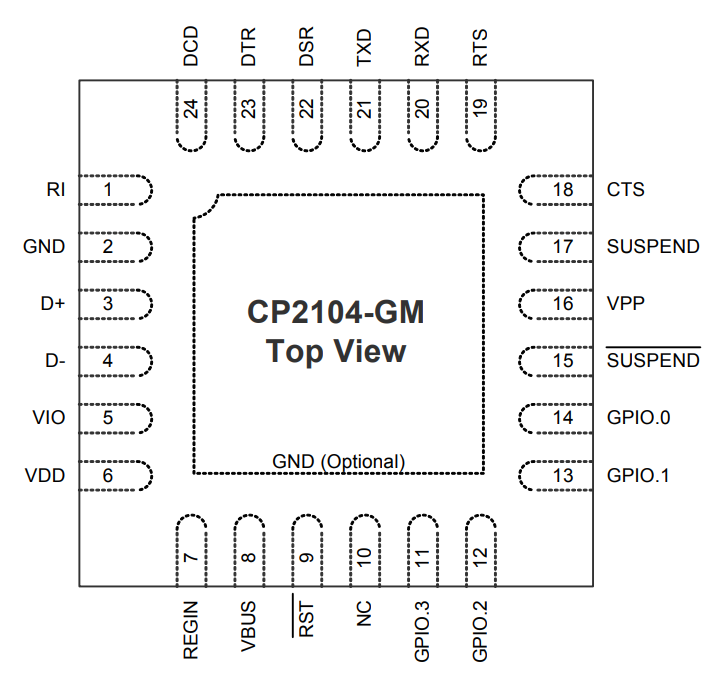
Pinout and Package Definitions
Product Comparison
The table below compares key CP210x variants:
| MODEL |
KEY FEATURES |
TYPICAL USE CASES |
POWER CONSUMPTION |
| CP2102 |
Single-channel USB-UART, 3.3V operation, low cost |
Arduino boards, small embedded projects |
~5mW (active) |
| CP2102N |
Enhanced CP2102 with lower power, improved ESD protection |
Battery-powered devices, industrial IoT |
~3mW (active) |
| CP2104 |
Quad-channel USB-UART, supports multiple serial ports simultaneously |
Multi-device debug stations, industrial controllers |
~8mW (per channel, active) |
| CP2105 |
Dual-channel USB-UART, I2C support, GPIO functionality |
Sensor hubs, multi-node embedded systems |
~6mW (per channel, active) |
| CP2108 |
Octal-channel USB-UART, high port count for complex systems |
Data loggers, large-scale device farms |
~12mW (per channel, active) |
CP2102 vs. CH340: Head-to-Head Comparison
CH340 is a popular alternative to CP2102. Here’s how they stack up:
| FEATURE |
CP2102 |
CH340 |
| Manufacturer |
Silicon Labs |
WCH |
| Driver Support |
Broad (Windows, macOS, Linux, embedded Linux) |
Good, but minor quirks on some Linux distros |
| Baud Rate Range |
Up to 3 Mbps |
Up to 2 Mbps |
| ESD Protection |
Robust (ESD ratings up to ±8kV) |
Basic (varies by CH340 variant) |
| Cost |
~$2.50 |
~$1.50 |
| Power Efficiency |
More efficient at low loads |
Slightly less efficient |
Setting Up CP2102: Driver Installation & Code Example
Driver Installation
1.Windows:
-
- Download the CP210x Windows Driver .
- Run the installer and follow prompts. The driver will automatically detect CP2102 devices.
2.macOS:
- macOS 10.10+ includes built-in CP210x support. For older versions, install from the Silicon Labs website.
3Linux:
- Most modern distros (Ubuntu 16.04+, Fedora, Debian) include the cp210x kernel module. Verify with:
Arduino Code Example (Reading Serial Data via CP2102)
Connect CP2102 to an Arduino’s RX/TX pins. Use this code to send/receive data:
Python Code Example (PySerial with CP2102)
Then use this script to send/receive data:
Advanced Usage: CP2102 with ESP32
ESP32 dev boards often use CP2102 for USB-UART communication. Here’s how to flash firmware and debug:
1.Flashing Firmware:
- Connect CP2102 to ESP32’s TX, RX, GND, and 3.3V.
- Use ESP-IDF or Arduino IDE; select the CP2102’s COM port and flash as usual.
2.Debugging Output:
- ESP32 prints debug logs to UART. Use this Python code to view logs:
CP2102 Applications
1.Educational & DIY Projects
- Integral to Arduino/ESP32 boards for code uploads and serial communication (e.g., sending sensor data to PCs in LED control or weather monitoring projects).
- Enables hobbyist robotics (e.g., line-following robots) by bridging microcontrollers and computers for debugging/algorithm updates.
2.Industrial & Monitoring Systems
- Connects sensor nodes (temperature, pressure) to PCs or PLCs for real-time data logging in factories or warehouses.
- Facilitates PLC programming and troubleshooting via USB-UART communication.
3.Home Automation & IoT
- Links microcontrollers in smart home devices (blinds, thermostats) to hubs (e.g., Raspberry Pi) for command transmission.
- Transfers data from environmental sensors (air quality, humidity) to IoT gateways/cloud platforms.
4.Medical Device Prototyping
- Used in wearable prototypes (heart rate monitors) to send vital sign data to PCs/mobile devices for analysis.
- Aids in debugging portable diagnostic tools (e.g., glucose monitors) via serial data transfer.
FAQs
Why is my CP2102 not detected by my computer?
- Driver Issue:Reinstall the CP210x driver (see Section 4.1).
- Hardware Problem:Check connections (TX/RX/GND/VCC) and ensure the device is powered.
- Faulty Device: Try a different CP2102 module or USB cable.
Can CP2102 work with 5V TTL devices?
Yes, CP2102 supports 5V TTL (it has internal level shifting for 3.3V/5V compatibility).
How to use CP2104’s multiple UART channels?
On Windows, each channel appears as a separate COM port. On Linux/macOS, they appear as /dev/ttyUSB0, /dev/ttyUSB1, etc. Access each port individually in your code.
Is CP2102 compatible with Raspberry Pi?
Yes! Raspberry Pi’s Linux kernel includes the cp210x driver. Connect CP2102 to the Pi’s USB port and use /dev/ttyUSB0 for communication.
Can I use CP2102 for RS-232 communication?
No, CP2102 is for TTL-level UART. For RS-232, use a TTL-to-RS-232 adapter with CP2102.