

Blog
Getting Started with A4950 Dual Motor Drive Module on Arduino
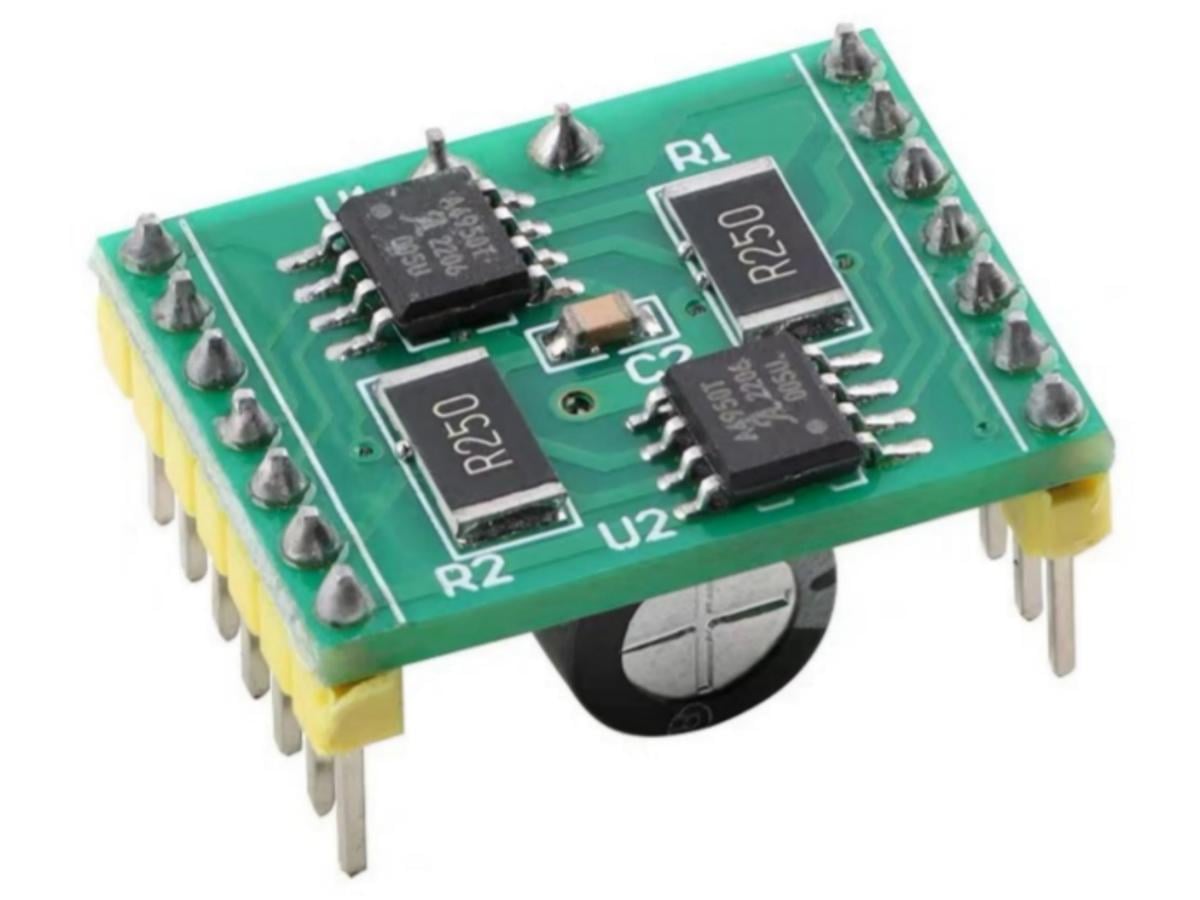
During the development of robot projects, I found that many motor driver modules on the market generally have problems of high heat generation and low efficiency. After repeated tests and comparisons, I finally chose the A4950 dual channel motor driver module, which has obvious advantages in performance and experience.
The A4950 module adopts an optimized design, which effectively reduces power consumption and heat generation. Its operating efficiency is superior to the common L298N, especially maintaining stability during long-term continuous operation. It can reliably drive both small robots and more complex control systems.
It has a reasonable interface layout and simple operation. The installation and debugging process is very friendly to beginners, allowing them to get started quickly without tedious settings, thus saving development time. At the same time, the module has a wide voltage adaptation range, which can flexibly meet the needs of different application scenarios.
What is A4950 motor driver module?
The A4950 motor driver is designed for Pulse Width Modulation (PWM) control of DC motors. Considering factors such as heat generation, the module has a current limit of 2A. It provides input terminals for controlling the speed and direction of DC motors through external PWM control signals. An internal synchronous rectification control circuit is provided to reduce power consumption during PWM operations. Internal circuit protections include overcurrent protection, motor lead-to-ground or power supply short-circuit protection, hysteretic thermal shutdown, VBB undervoltage monitoring, and cross-conduction protection.
A4950 Working Principle
The A4950 IC is a single H-bridge motor driver chip produced by Allegro MicroSystems, USA. Therefore, the A4950 driver module uses two A4950 chips to achieve the capability of controlling two DC motors.
- A4950Pinout Diagram

| Number | Name | Function |
|---|---|---|
| 1 | GND | Ground |
| 2 | IN2 | Logic input 2 |
| 3 | IN1 | Logic input 1 |
| 4 | VREF | Analog input |
| 5 | VBB | Load supply voltage |
| 6 | OUT1 | DMOS full bridge output 1 |
| 7 | LSS | Power return – sense resistor connection |
| 8 | OUT2 | DMOS full bridge output 2 |
| – | PAD | Exposed pad for enhanced thermal dissipation |
Full H-bridge Circuit
- H-bridge Circuit Schematic Diagram (taking full NMOS transistors as an example)
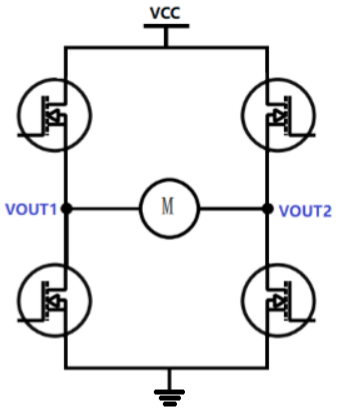
It can be seen from the above figure that this motor drive circuit is composed of 4 NMOS transistors, shaped like an H, so the name full H-bridge circuit. By controlling the conduction and cutoff of the 4 MOS transistors, different control effects on the intermediate motor can be achieved. The NMOS transistor conducts when its gate is at a high level and cuts off when it is at a low level.
2.H-bridge Operating Mode
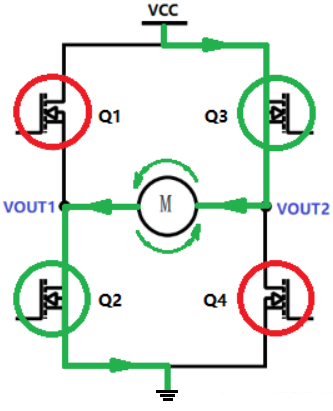
(1) Forward rotation mode
When the gates of Q1 and Q4 are at high level, and the gates of Q2 and Q3 are at low level, Q1 and Q4 are turned on. As shown in the figure below, the motor rotates forward.

(2) Reverse rotation mode
When the gates of Q2 and Q3 are at high level, and the gates of Q1 and Q4 are at low level, Q2 and Q3 are turned on. As shown in the figure below, the motor rotates in the reverse direction.
(3) Current decay mode
Here I will only give a general explanation. The decay mode can be simply understood as how to stop the motor. If the motor is controlled to rotate in one direction continuously, no problems will occur. However, if you want to stop the motor at this time, problems arise. Since the motor is an inductive load, the current cannot change abruptly. When the voltage applied across the motor is disconnected, the back electromotive force generated by the motor is likely to damage the FET. Therefore, to stop the motor, in addition to cutting off the power supply, a freewheeling circuit must be formed to release the energy stored in the motor.
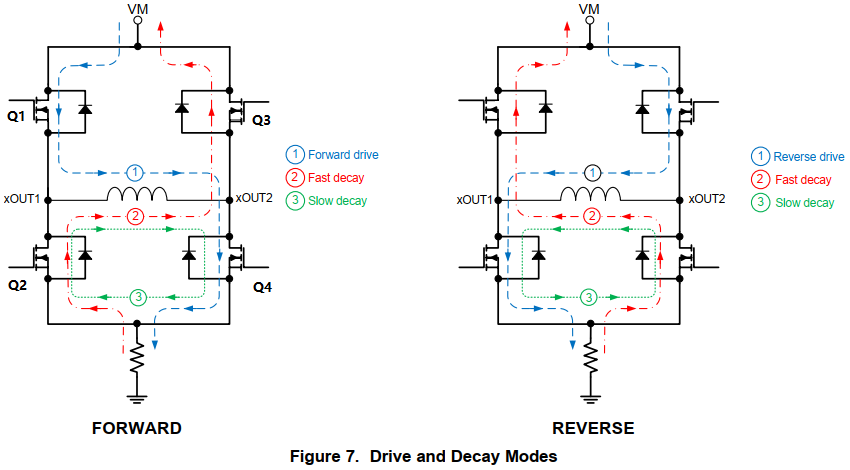
The parasitic diodes of the FETs are added to the figure.
Taking the figure of forward rotation on the left as an example:
① First, the motor rotates forward, and the current flows as shown by line ①.
② If the coasting/fast decay mode is adopted at this time: all four MOSFETs are turned off, and the current on the motor will continue to flow through the parasitic diodes of Q2 and Q3, as shown by line ②. It can be found that the direction of the current is opposite to the power supply voltage at this time, so the current decays rapidly. When the current decays to 0, since the FETs are turned off, the power supply voltage will not be applied to the motor, and the motor will gradually stop.
③ If the braking/slow decay mode is adopted: Q2 and Q4 are turned on, while Q1 and Q3 are turned off. The current on the motor continues to flow through Q2 and Q4, as shown by line ③. The energy on the motor will be gradually consumed in the motor itself, Q2 and Q3, resulting in a relatively slow current decay.
Note : Fast and slow decay refer to the current, not the rotation speed of the motor.
- H-bridge Supplementary Notes
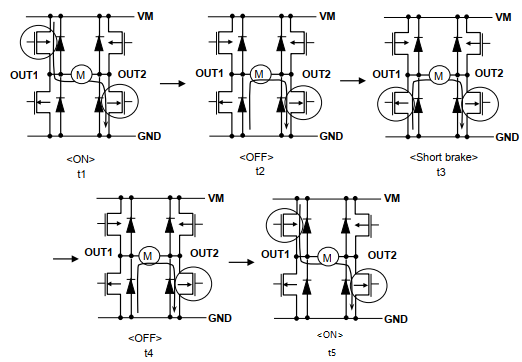
In an H-bridge, it is absolutely forbidden for the FETs on the same side (left/right side) to conduct simultaneously. This would cause current to flow directly to ground without passing through the motor, resulting in a short circuit! Therefore, state transitions must be performed step by step. Integrated H-bridge chips typically resolve this issue automatically internally (using dead-time control), as shown in the figure below: when switching between forward rotation and braking, there is a transition state (OFF).
A4950 Pin Function

| Pin | Definition |
|---|---|
| AOUT1 | Connect to the positive pole of Motor A, and control the motor by output voltage. |
| AOUT2 | Connect to the negative pole of Motor A, and control the motor by output voltage. |
| BOUT1 | Connect to the positive pole of Motor B, and control the motor by output voltage. |
| BOUT2 | Connect to the negative pole of Motor B, and control the motor by output voltage. |
| AIN1 | Motor A PWM Input 1 |
| AIN2 | Motor A PWM Input 2 |
| BIN1 | Motor B PWM Input 1 |
| BIN2 | Motor B PWM Input 2 |
| VM | Positive pole of the motor drive power supply, input according to the motor parameters, with a range of 7.6~30V. |
| VCC | Connect to 5V input. Do not input 3.3V, otherwise it will affect the performance. |
| GND | Grounding |
- The A4950 module determines the motor direction by comparing the magnitude relationship of the PWM outputs from the two control pins.
- The difference between the PWM outputs of the two control pins determines the motor speed.
A4950 Control Example
(1) Motor A rotates forward with 50% duty cycle
Solution: Connect the two wires of Motor A to AOUT1 and AOUT2 respectively. Connect AIN1 to low level, and AIN2 to PWM with 50% duty cycle.
Since there is a voltage difference between AIN1 and AIN2, the motor can rotate at 50% speed. The larger the voltage difference, the faster the rotation speed.
(2) Motor B reverse rotation, 20% duty cycle
Solution: Connect the two wires of Motor B to BOUT1 and BOUT2 respectively. Connect BIN1 to high level, and BIN2 to PWM with 20% duty cycle.
Note: If your PWM frequency is relatively high, such as 10 kHz, two PWM pins are required to control forward and reverse rotation. If using Arduino’s default PWM frequency of 500 Hz, you can use one IO pin and one PWM pin to control forward and reverse rotation, but the performance is not as good as using two PWM pins.
Many people still don’t quite understand after reading the above tutorial. In fact, simply put, the voltage difference between the signals of AIN1 and AIN2 controls the output of AOUT1 and AOUT2. If one of the two input pins is at high level (100% duty cycle) and the other is at low level (0% duty cycle), the output will be at maximum speed. The PWM frequencies controlled by the two pins should be the same, such as 10 kHz for both.
A4950 Arduino Tutorial
A4950 Pinout
| Arduino | A4950 | Description |
|---|---|---|
| 5V | VCC | logic power supply |
| GND | GND | Common ground |
| External DC | VM | Motor power supply (match motor voltage) |
| External ground | GND | Common ground |
| D9 | AIN1 | Motor A PWM input 1 |
| D10 | AIN2 | Motor A PWM input 2 |
| \ | AOUT1 | Motor positive terminal |
| \ | AOUT2 | Motor negative terminal |
Note : Attention should be paid to the fact that the VM pin must be connected to the external motor power supply (instead of the Arduino’s 5V) during wiring, and all devices must share a common ground.
A4950 Code
					// Define control pins for single motor (Motor A)
const int motorA_IN1 = 9;  // AIN1 on A4950 module
const int motorA_IN2 = 10; // AIN2 on A4950 module

// Motor speed (0-255, max speed for testing)
const int motorSpeed = 255;

void setup() {
  // Set motor control pins as output mode
  pinMode(motorA_IN1, OUTPUT);
  pinMode(motorA_IN2, OUTPUT);

  // Initialize serial monitor for debugging
  Serial.begin(9600);
  Serial.println("Single motor starts forward rotation");

  // Start motor forward immediately
  startMotorForward();
}

void loop() {
  // Empty loop - motor runs continuously
}

// Core function: Start motor forward rotation
void startMotorForward() {
  digitalWrite(motorA_IN1, HIGH);
  digitalWrite(motorA_IN2, LOW);
  analogWrite(motorA_IN1, motorSpeed); // PWM speed control
}
A4950 Effect Demonstration
A4950 Application Scenario
1. Small robot mobile platform (wheeled/track-driven)
2. Conveyor belts in automated equipment
3. Axis drive for 3D printers and CNC engraving machines
4. Smart car and aircraft model servo replacement drive
5. Controllable moving components of industrial instruments
Relative Information
Purchase Link
FAQ
How to control the forward and reverse rotation of a motor with the A4950 module?
Just change the combination of high and low levels of IN1/IN2.
Can the A4950 module drive two motors simultaneously?
Yes, dual independent channels.
What happens if motor wires are reversed?
Motor runs in reverse, module is not damaged.
Can A4950 module connect directly to Arduino?
Yes, logic level compatible with 5 V.