

Blog
Complete Guide to Remote WiFi Thermostat Modules
Introduction
In the era of smart homes and the Internet of Things (IoT), remote temperature control has become a core demand for energy conservation, comfortable living, and intelligent management. Whether it’s adjusting the temperature of a residential heating system, maintaining precise environmental conditions in an industrial workshop, or ensuring stable temperature control for medical storage equipment, a reliable, high-precision temperature module that supports remote control is an essential component.
The Remote Wi-Fi Thermostat High-Precision Temperature Control Module stands out due to its deep integration of Wi-Fi communication capabilities, highly sensitive temperature sensing, and intelligent control algorithms. It has become the preferred solution for developers, smart home enthusiasts, and industrial application designers. This article provides a comprehensive analysis of the module’s core value, covering product overview, competitor comparison, key parameters, application scenarios, hands-on project tutorials, and solutions to common problems.
What is a Remote WiFi Thermostat High-Precision Temperature Control Module?
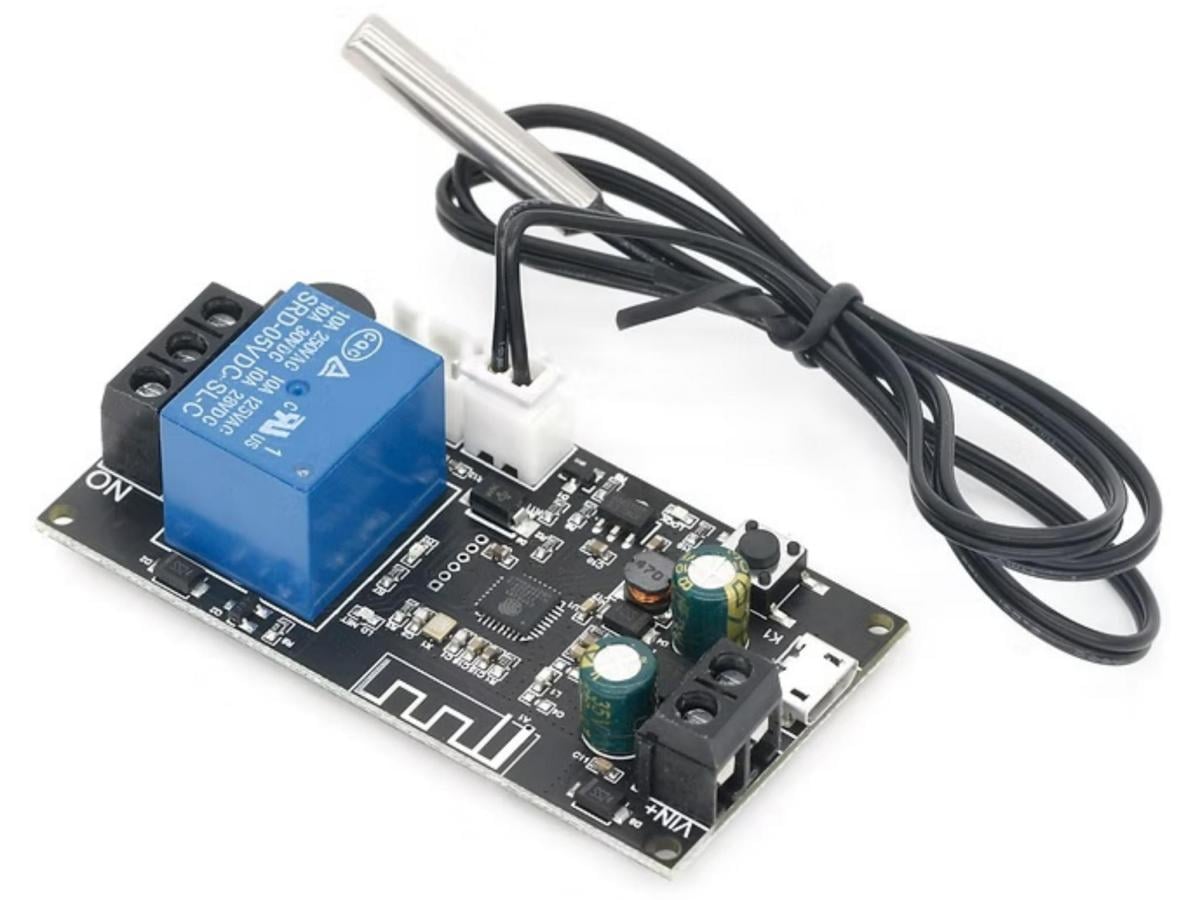
The Remote Wi-Fi Thermostat High-Precision Temperature Control Module is an integrated electronic module designed for accurate temperature measurement, remote control, and intelligent adjustment. Its core advantage lies in integrating a highly sensitive temperature sensor (such as DS18B20, SHT30, or TMP117), a Wi-Fi communication chip (such as ESP8266/ESP32), a microcontroller (MCU), and a relay/output control circuit. It offers the following key features:
- Enables high-precision temperature measurement with an accuracy of ±0.1℃;
- Transmits real-time data to mobile phones, computers, or cloud platforms via Wi-Fi;
- Receives remote control commands to adjust heating/cooling devices such as air conditioners, heaters, and refrigerators.
Centered on “high precision, low power consumption, and stable remote connectivity,” the module overcomes the wiring limitations of traditional wired thermostats and the performance shortcomings of low-precision mechanical thermostats. It supports functions like scheduled temperature control, automatic calibration, and temperature anomaly alarms. Its compact size and flexible interface design make it suitable for integration into various devices, with wide applications in smart homes, industrial control, healthcare, and agriculture.
Remote WiFi Thermostat Module vs Traditional Thermostat Module vs Bluetooth Thermostat Module: Comparison
| Function Dimension | Remote WiFi Temperature Control Module | Traditional Temperature Control Module | Bluetooth Temperature Control Module |
|---|---|---|---|
| Communication Method | WiFi (supports internet remote access) | Wired (e.g., 485 bus) or no communication | Bluetooth (short-range, within 10 meters) |
| Temperature Measurement Accuracy | High (±0.1°C~±0.3°C) | Medium-Low (±1°C~±2°C) | Medium (±0.5°C~±1°C) |
| Control Range | Remote (no distance limit via cloud) | Local (limited by wired range) | Short-range (requires direct connection to mobile devices) |
| Core Advantages | High precision, remote access, intelligent linkage, data recording | Low cost, simple wiring, local stability | Low power consumption, convenient mobile phone pairing |
| Power Consumption | Low (5-15mA in working state, supports sleep mode) | Low (3-10mA, no wireless communication) | Extremely low (1-5mA, Bluetooth low energy) |
| Applicable Scenarios | Smart home, industrial remote monitoring, medical storage, agricultural greenhouses | Traditional residential heating, simple local temperature control | Short-range smart devices (e.g., small refrigerators, desktop heaters) |
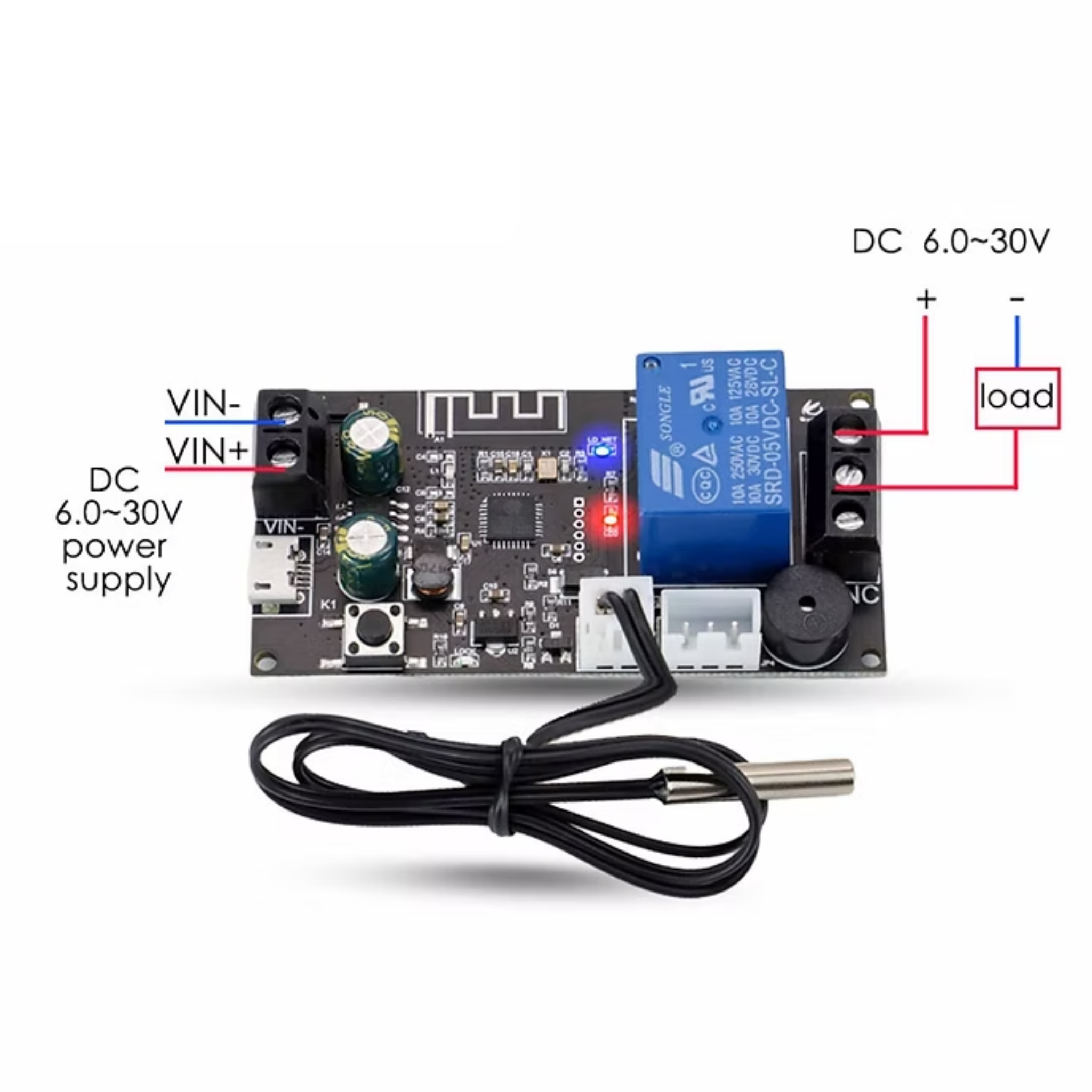
Remote WiFi Temperature Control Module Interface Specification
| Pin | Description |
|---|---|
| VCC | Power input (3.3V~5V, supports wide voltage input) |
| GND | Power ground, needs common ground with external devices to ensure stable operation |
| SDA | I2C communication pin (connects to I2C temperature sensors like SHT30) |
| SCL | I2C communication clock pin (cooperates with SDA to transmit sensor data) |
| DQ | 1-Wire communication pin (connects to 1-Wire sensors like DS18B20) |
| RELAY_OUT | Relay output pin (controls the on/off of external heating/cooling devices) |
| ALARM | Alarm output pin (triggers high/low level when temperature exceeds threshold) |
| RESET | Module reset pin (active low, restores factory settings or reboots) |
WiFi Temperature Control Module Key Hardware Parameters
| Parameter | Value |
|---|---|
| Operating Voltage | DC 3.3V – 5V |
| Temperature Measurement Range | -40°C ~ +125°C |
| Relay Load Capacity | AC 250V/10A, DC 30V/10A |
Application Areas
- Smart Homes: Serves as the core of smart temperature control systems. It remotely controls air conditioners, underfloor heating, water heaters, and refrigerators via mobile apps, enabling scheduled temperature control (like”pre-heating before returning home”) or linkage with smart speakers (voice-controlled temperature adjustment) to enhance living comfort and energy efficiency.
- Industrial Control:Used for temperature monitoring and adjustment of machine tool cooling systems and production line heating equipment. It uploads real-time data to industrial IoT platforms, triggers alarms for abnormal temperatures, and automatically adjusts settings to ensure production safety and product quality.
- Healthcare: Compatible with medical equipment such as medicine refrigerators, blood storage cabinets, and incubators. It maintains precise temperature ranges (like2-8℃), records temperature data long-term, meets medical industry standards, and ensures the effectiveness of medicines/samples.
- Agricultural Scenarios:Applied in greenhouses, seedling rooms, and aquaculture ponds. It monitors ambient temperature in real time, automatically controls heating lamps, ventilation fans, and humidifiers, and creates a suitable growth environment for crops/aquatic products to improve yield and quality.
- Commercial Buildings:Integrated into central air conditioning systems of office buildings, shopping malls, and hotels. It supports zoned temperature control (different temperatures for different floors/areas), allowing property staff to manage remotely, reduce energy waste, and optimize user experience.
- Education & Maker Projects: Serves as a teaching tool for IoT and intelligent control experiments (learning Wi-Fi communication, sensor data collection, and cloud connection). It supports maker projects (likesmart temperature-controlled flower pots, small refrigerators) and competition development, with a low entry barrier.
What are the available modes?
The Remote Wi-Fi Thermostat High-Precision Temperature Control Module has two operating modes: Auto Mode and Manual Mode.
1.Auto Mode
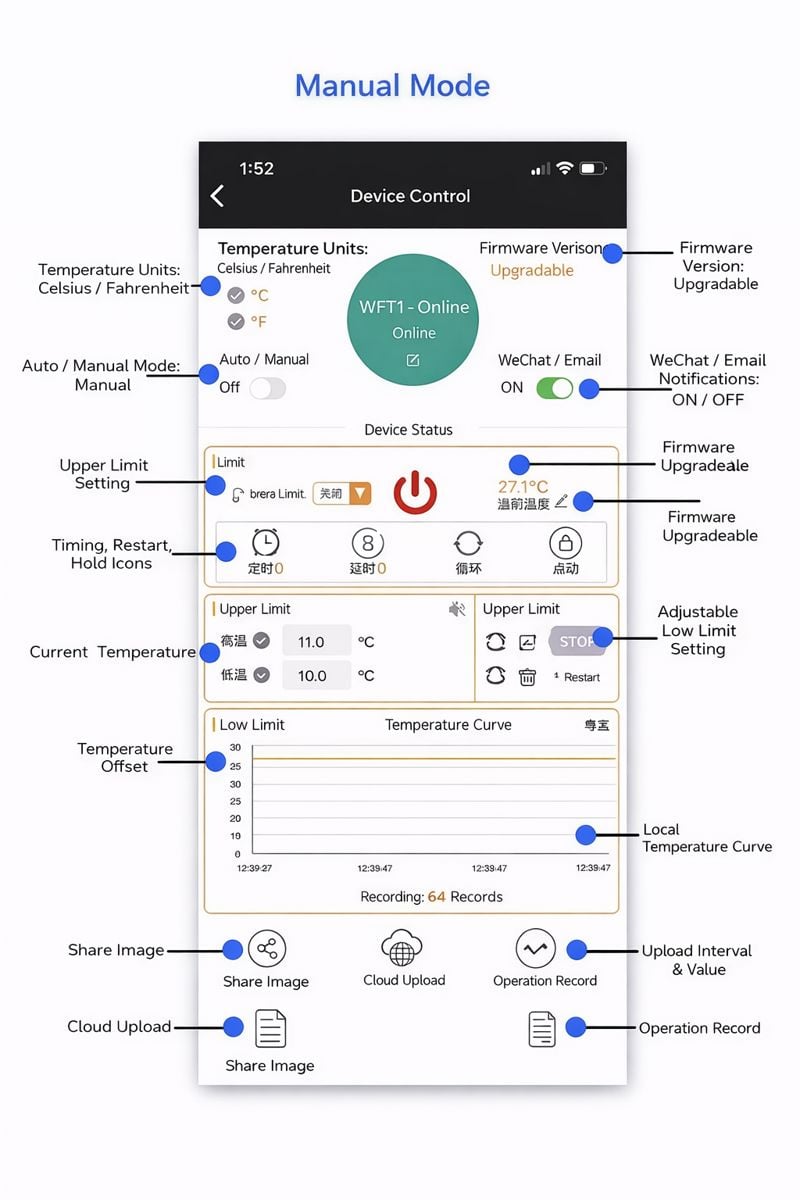
1.1 Function Description of Auto Mode
(1) First, select Heating Mode or Cooling Mode;
(2) Set the target temperature and temperature differential. If delayed startup is required, set the delayed startup time;
(3) If high/low temperature alarms are needed, set the high/low temperature alarm thresholds manually.
1.2 Description of Heating Mode
When the detected temperature (current temperature) ≤ Target Temperature – Temperature Differential → Relay turns on, and heating equipment starts working;When the detected temperature (current temperature) ≥ Target Temperature → Relay turns off, and heating equipment stops working.
Example: Set Target Temperature = 30℃, Temperature Differential = 5℃;
- When the temperature is 20℃ (which is < 25℃, i.e., 30-5), the relay engages and heating starts;
- When the temperature reaches 30℃ (≥ Target Temperature of 30℃), the relay disengages and heating stops.
1.3 Description of Cooling Mode
When the detected temperature (current temperature) ≥ Target Temperature + Temperature Differential → Relay turns on, and cooling equipment starts working;When the detected temperature (current temperature) ≤ Target Temperature → Relay turns off, and cooling equipment stops working.
Example: Set Target Temperature = 30℃, Temperature Differential = 5℃;
- When the temperature is 36℃ (which is ≥ 35℃, i.e., 30+5), the relay engages and cooling starts;
- When the temperature reaches 30℃ (≤ Target Temperature of 30℃), the relay disengages and cooling stops.
1.4 Description of Delayed Startup Function
After one heating/cooling cycle ends, it sets the delay time (in seconds) before the next heating/cooling cycle is allowed to start.
1.5 Temperature Calibration Function
Long-term system operation may cause deviations. This function corrects the temperature:Current Displayed Temperature = Measured Temperature + Calibration Value.
1.6 High/Low Temperature Alarm Function
- Buzzer On/Off: When enabled, the buzzer sounds during an alarm; pressing a button stops the buzzer.
- High-Temperature Alarm: When enabled, if the current temperature exceeds the high-temperature alarm threshold, the relay turns off.
- Low-Temperature Alarm: When enabled, if the current temperature is below the low-temperature alarm threshold, the relay turns off.
1.7 Emergency Stop Function
When emergency stop is enabled, the relay turns off regardless of its current state; when emergency stop is disabled, the relay returns to normal operation.
1.8 Offline Operation in Auto Mode
After setting parameters in Auto Mode, the product can operate offline (without an internet connection), and parameters are retained even when power is cut off.
1.9 LAN Data Export Function
Temperature data is uploaded every 1s in the local area network (LAN) for data analysis.
2.Manual Mode
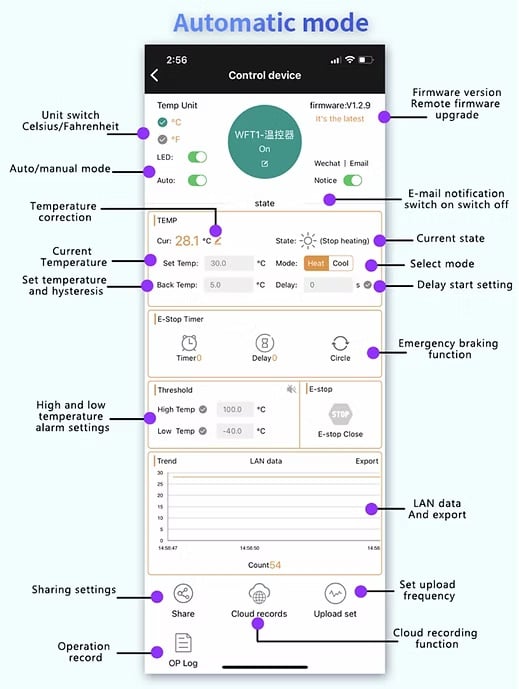
2.1 Function Description of Manual Mode
In Manual Mode, you can set timing, delay, cycle, and momentary control functions.
2.2 Description of Power-On State Settings
- Power-On State – On:The relay defaults to engaged when powered on;
- Power-On State – Off: The relay defaults to disengaged when powered on;
- Power-On State – Hold:The relay automatically restores its state before power was cut off when powered on.
2.3 Offline Operation in Manual Mode
In Manual Mode, the product cannot operate offline (requires an internet connection).
2.4 Other Functions in Manual Mode
Other functions are the same as those in Auto Mode.
Project 1: Remote Wi-Fi Thermostat Module + Smart Home App (Basic Temperature Monitoring & Remote Control)
Project Goal
Project 1: Remote Wi-Fi Thermostat Module + Smart Home App (Basic Temperature Monitoring & Remote Control)
1.Project Goal
Use the Remote Wi-Fi Thermostat Module to collect ambient temperature, upload it to a cloud platform via Wi-Fi, and display the real-time temperature on a self-developed mobile app. Users can set the target temperature via the app, and the module will automatically control the relay to turn the heater on/off (simulated with an LED and a 12V small fan), realizing remote temperature control. This project helps beginners master the core logic of “Wi-Fi temperature measurement + cloud communication + remote control.”
2.Required Materials
- Remote Wi-Fi Thermostat Module (integrated with ESP32 chip and SHT30 sensor)
- 12V Heater (or 5V LED for simulation)
- 12V Power Adapter
- Relay Module (if not integrated into the thermostat module)
- Connecting Wires
- Mobile Phone (with control app installed)
3.Hardware Wiring Steps
| Remote WiFi Temperature Control Module Pin | External Device | Notes |
|---|---|---|
| VCC | 5V Power Supply | Ensure stable power supply and avoid voltage fluctuations |
| GND | Power Ground + Heater Ground | Common ground to prevent signal interference |
| RELAY_OUT (Normally Open) | Heater Positive Pole | Relay controls the on/off of the heater power supply |
| Heater Negative Pole | Power Ground | Form a complete circuit with the power supply |
| SDA/SCL | SHT30 Sensor (If Not Integrated) | No wiring required if the module has a built-in sensor |
4.Software Configuration & Programming
- Cloud Platform Configuration
Use a free IoT cloud platform (like ThingsBoard, MQTT.fx, Alibaba Cloud IoT) to create a device node. Record the Device ID, MQTT Broker Address, Username, and Password (for module-cloud communication);
Create temperature data points (like “temperature” of type float) and control commands (like “target_temp” of type float, “device_switch” of type boolean) on the platform.
- Module Programming (Based on Arduino IDE)
Install required libraries: Open Arduino IDE and install the “ESP32 WiFi” library (for Wi-Fi connection), “Adafruit SHT3x” library (for SHT30 data reading), and “PubSubClient” library (for MQTT cloud communication).
Core code
					#include <WiFi.h>
#include <PubSubClient.h>
#include <Adafruit_SHT3x.h>

// WiFi configuration
const char* ssid = "Your WiFi Name";       // Replace with your home/commercial WiFi name
const char* password = "Your WiFi Password"; // Replace with your WiFi password
const char* mqttBroker = "mqtt.thingsboard.io"; // Cloud MQTT broker address
const char* mqttUsername = "Your Device Token"; // Cloud platform device ID/token
const char* mqttPassword = "";           // No password required for some platforms, leave blank
const int mqttPort = 1883;               // MQTT default port

// Pin definitions
const int relayPin = 4;                  // Relay control pin on the module
Adafruit_SHT3x sht30 = Adafruit_SHT3x(); // SHT30 sensor object
WiFiClient espClient;
PubSubClient client(espClient);

// Global variables
float currentTemp = 0.0;
float targetTemp = 25.0; // Default target temperature 25°C
bool deviceSwitch = false;

void setup() {
  Serial.begin(115200);
  pinMode(relayPin, OUTPUT);
  digitalWrite(relayPin, LOW); // Turn off relay initially

  // Initialize sensor
  if (!sht30.begin(0x44)) {
    Serial.println("Sensor initialization failed! Please check wiring");
    while (1);
  }

  // Connect to WiFi
  connectWiFi();

  // Connect to MQTT cloud server
  client.setServer(mqttBroker, mqttPort);
  client.setCallback(callback); // Set callback function for receiving cloud commands
  while (!client.connected()) {
    Serial.print("Connecting to MQTT...");
    if (client.connect("WiFiThermostat", mqttUsername, mqttPassword)) {
      Serial.println("Connected");
      client.subscribe("v1/devices/me/commands/#"); // Subscribe to control commands
    } else {
      Serial.print("Failed, state code=");
      Serial.print(client.state());
      Serial.println(" Retrying in 5 seconds");
      delay(5000);
    }
  }
}

void loop() {
  if (!client.connected()) {
    reconnect();
  }
  client.loop();

  // Read temperature data
  sensors_event_t humidity, temp;
  sht30.getEvent(&humidity, &temp);
  currentTemp = temp.temperature;
  Serial.print("Current temperature: ");
  Serial.println(currentTemp);

  // Upload temperature to cloud
  char tempMsg[20];
  dtostrf(currentTemp, 4, 2, tempMsg);
  client.publish("v1/devices/me/telemetry", "{\"temperature\":" + String(tempMsg) + "}");

  // Temperature control logic
  if (deviceSwitch) {
    if (currentTemp < targetTemp - 0.5) {
      digitalWrite(relayPin, HIGH); // Turn on heater
      Serial.println("Heater turned on");
    } else if (currentTemp > targetTemp + 0.5) {
      digitalWrite(relayPin, LOW); // Turn off heater
      Serial.println("Heater turned off");
    }
  } else {
    digitalWrite(relayPin, LOW); // Turn off heater when device is disabled
  }

  delay(2000); // Update data every 2 seconds
}

// WiFi connection function
void connectWiFi() {
  WiFi.begin(ssid, password);
  while (WiFi.status() != WL_CONNECTED) {
    delay(500);
    Serial.print(".");
  }
  Serial.println("\nWiFi connected");
  Serial.println("IP address: " + WiFi.localIP().toString());
}

// MQTT reconnection function
void reconnect() {
  while (!client.connected()) {
    if (client.connect("WiFiThermostat", mqttUsername, mqttPassword)) {
      Serial.println("MQTT reconnected");
      client.subscribe("v1/devices/me/commands/#");
    } else {
      Serial.print("MQTT reconnection failed, state code=");
      Serial.print(client.state());
      Serial.println(" Retrying in 5 seconds");
      delay(5000);
    }
  }
}

// Callback function (receive cloud commands)
void callback(char* topic, byte* payload, unsigned int length) {
  Serial.print("Command received: ");
  String command = "";
  for (int i = 0; i < length; i++) {
    command += (char)payload[i];
  }
  Serial.println(command);

  // Parse command (example: {"target_temp":26.0, "device_switch":true})
  if (command.indexOf("target_temp") != -1) {
    targetTemp = parseValue(command, "target_temp");
    Serial.print("Target temperature updated to: ");
    Serial.println(targetTemp);
  }
  if (command.indexOf("device_switch") != -1) {
    deviceSwitch = (parseValue(command, "device_switch") == 1) ? true : false;
    Serial.print("Device switch: ");
    Serial.println(deviceSwitch ? "On" : "Off");
  }
}

// Helper function: Parse JSON value
float parseValue(String json, String key) {
  int keyIndex = json.indexOf(key) + key.length() + 2;
  int valueIndex = json.indexOf(",", keyIndex);
  if (valueIndex == -1) valueIndex = json.indexOf("}", keyIndex);
  String value = json.substring(keyIndex, valueIndex);
  return value.toFloat();
}
FAQS
1.Data cannot be uploaded to the cloud?
Check the following three points:
- Confirm the Wi-Fi name/password is correct (the module only supports 2.4GHz Wi-Fi; 5GHz is incompatible);
- Verify that the cloud MQTT Broker Address, Device ID, and Token are configured correctly in the code;
- Check the network firewall (ensure the platform’s MQTT port 1883 is not blocked).
2.Temperature readings inaccurate?
- Calibrate the sensor: Compare with a standard thermometer and add a calibration offset in the code (likeif the measured value is 0.3℃ higher, subtract 0.3℃ from the collected data);
- Install the sensor correctly:Avoid direct sunlight, heat sources (motors/heaters), and air currents (fans); keep it away from metal surfaces;
- Ensure stable power supply: Voltage fluctuations affect sensor performance. Use a regulated power supply and connect a 0.1μF decoupling capacitor in parallel with the module’s VCC pin.
3.Remote control commands not working?
- Check if the module is online (view the device status on the cloud platform);
- Verify the command format: The app/platform must send commands in the agreed JSON format (likecorrect key names like “target_temp” and “device_switch”);
- Check the relay wiring: Confirm the relay’s normally open/normally closed contacts are correctly connected to the controlled device, and the relay’s output capacity matches the device’s power.
4.Can the module operate in a low-temperature environment of -30°C?
Most modules have an operating temperature range of -20℃~+85℃. If operation below -20℃ is required, select an industrial-grade version with an extended temperature range (supporting -40℃~+125℃) and match it with a low-temperature-resistant sensor (like DS18B20, which supports -55℃~+125℃).