

Blog
AHT10 Temperature and Humidity Sensor Easy to Use Great for Beginners
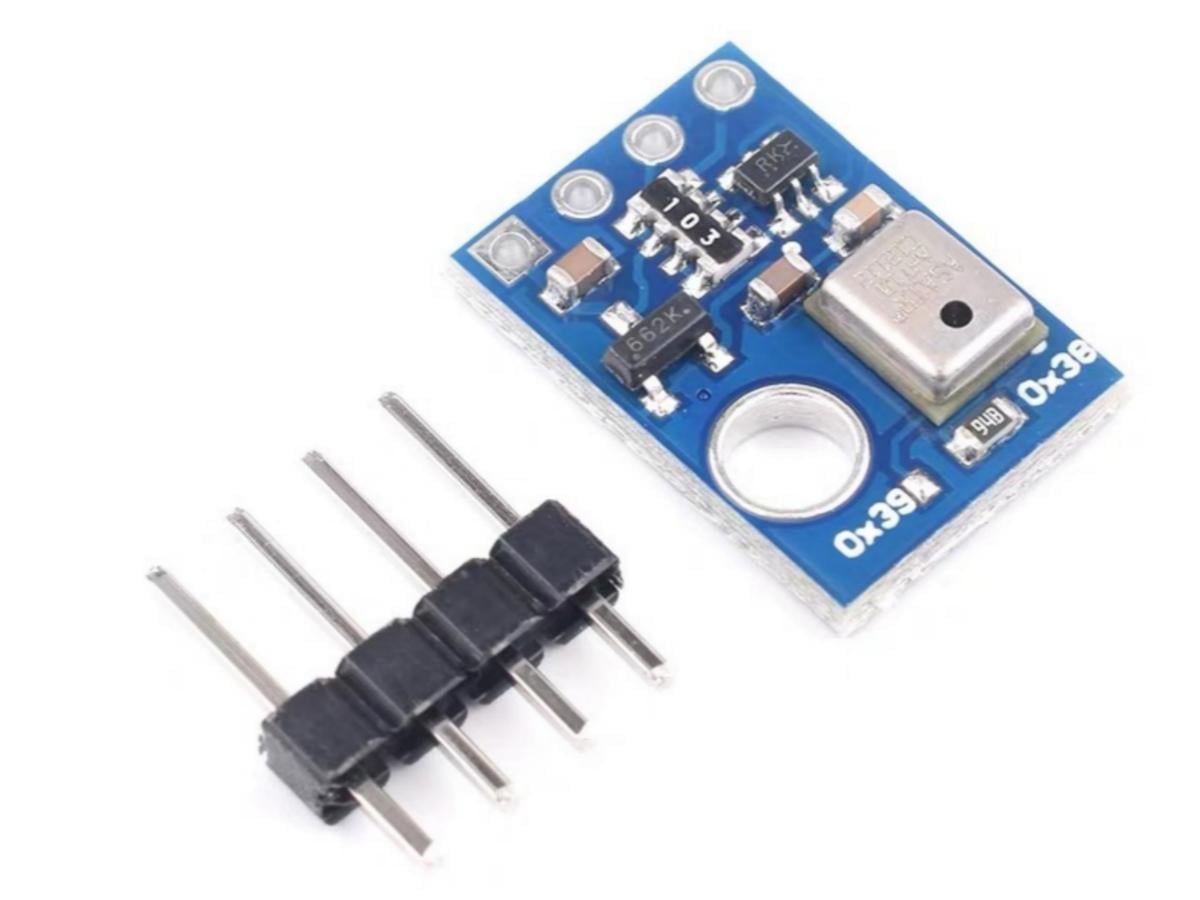
Say hello to your new favorite AHT10 temperature sensor, small in size, big on performance! With excellent AHT10 accuracy, it delivers reliable temperature and humidity data that puts guesswork to rest.
Thanks to its wide AHT10 voltage support, it fits right into 3.3V and low-power projects, making it a go-to for wearables, IoT, and battery gear. Whether you’re reading schematics or just getting started, our guide includes a clear AHT10 schematic and simple steps to use the AHT10 sensor Arduino. Get ready to sense smarter!
What is AHT10 temperature and humidity sensor module?
The AHT10 sensor is a high precision, fully calibrated, surface-mount package temperature and humidity sensor. The MEMS manufacturing process ensures extremely high reliability and excellent long-term stability of the product. The sensor includes a capacitive humidity-sensitive element connected to a high performance CMOS microprocessor. This product has the advantages of excellent quality, ultra-fast response, strong anti-interference ability, and extremely high cost performance.
The AHT10 adopts the standard I2C communication protocol. Its ultra-small size and extremely low power consumption make it the optimal choice for various applications, even the most demanding ones. The AHT10 supports a wide operating supply voltage range, offering cost-effective and low-power advantages for various common application scenarios. Temperature and humidity sensors are factory-calibrated in high-precision constant temperature and humidity chambers, directly outputting temperature-compensated humidity, temperature. Users can obtain accurate temperature and humidity data without the need for additional temperature compensation for humidity.
AHT10 Working Principle
- AHT10 start and stop signals
First of all, a complete transmission sequence must start with a start signal and end with a stop signal.
(1) Execution sequence and principle of the start signal
Here, the start signal specifically refers to the start signal in the I2C protocol. If you are familiar with the start principle of the I2C protocol, you can skip this part, including the stop signal below.
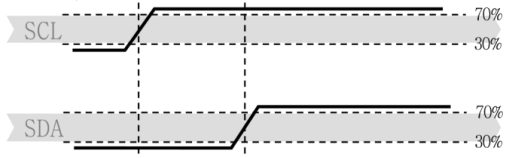
The start transmission state occurs when SDA transitions from a high level to a low level while SCL is high. Generally, when generating a start signal, we first set both SCL and SDA to high level simultaneously, then pull SDA to low level. This ensures that SDA is driven low during the high-level period of the SCL clock line, thereby forming the start signal.

(2) Execution sequence and principle of the stop signal
The stop transmission state occurs when SDA transitions from a low level to a high level while SCL is high. The stop state is a special bus state controlled by the master, indicating the end of transmission to the slave (after Stop, the BUS is generally considered to be in an idle state). First, pull down the SDA data line, pull up the SCL line, then pull up the data line again to ensure the stop signal is reliably generated.
2. AHT10 sending measurement commands function
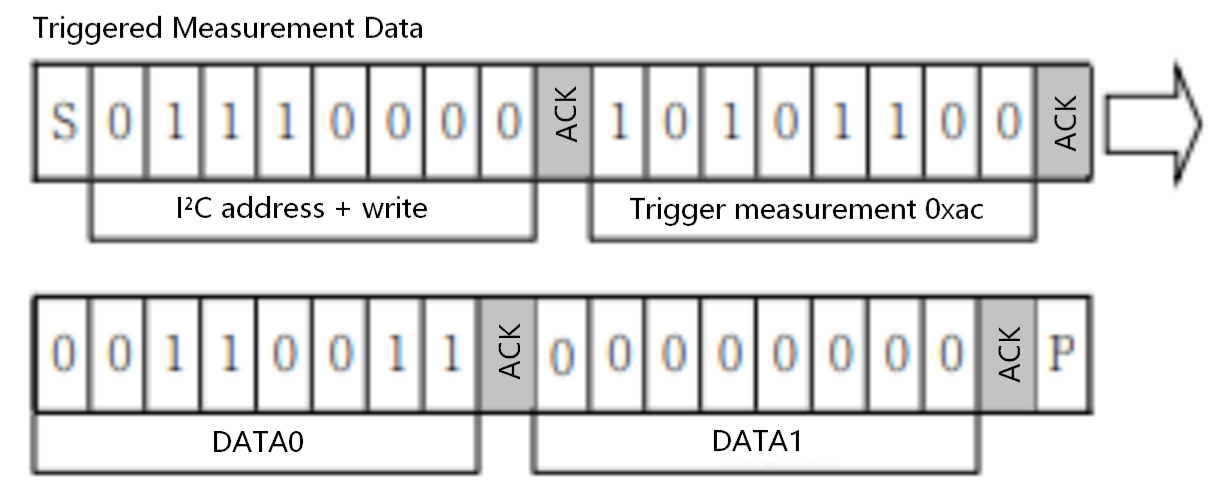
Four data bytes need to be sent: AHT10 address (I²C address), 0xAC, 0x33, and 0x00.
3. Soft reset function
This command is used to restart the sensor system without the need to turn off and then turn on the power again. After receiving this command, the sensor system begins to re-initialize and restores to the default setting state. The time required for a soft reset does not exceed 20 ms.

4. AHT10 read the detected data
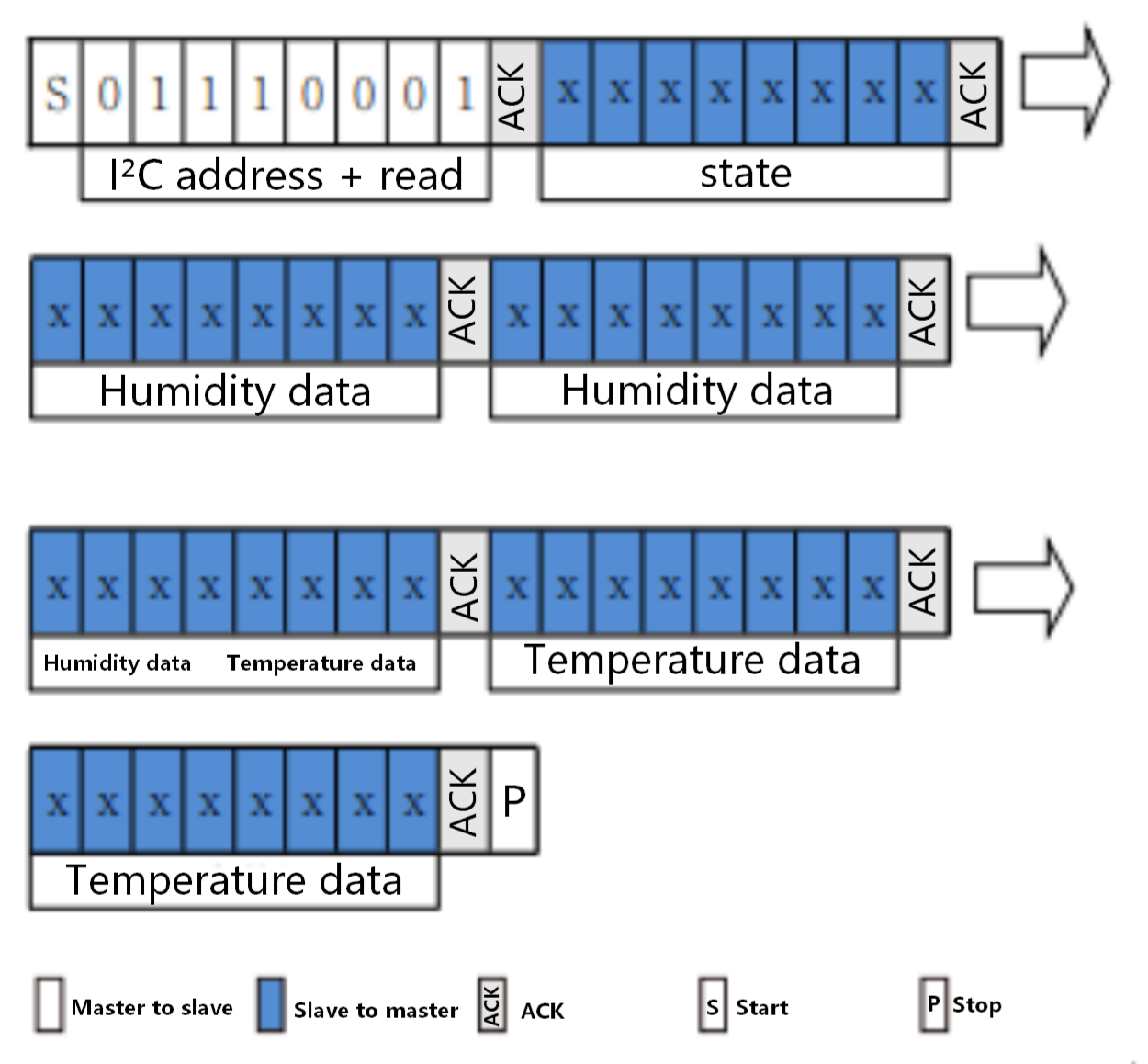
Among them, the blue color represents the data sent from the slave. The first byte represents status information and can be ignored. The subsequent five bytes are divided equally into the bytes corresponding to humidity and temperature.
Next, we will explain signal conversion.
(1) Relative humidity conversion
Relative humidity RH can be based on SDA output relative humidity signal SRH calculated by the following formula (the result is %RH
indicates).

(2) Temperature conversion
Temperature T can output the signal by the temperature ST substitute into the formula below to calculate (results are expressed in temperature °C ):

					/************** Read the AHT10 temperature and humidity data **************/
void aht10_read(float *temp, float *humi) {
  // Send read command
  Wire.beginTransmission(AHT10_ADDR); 	//AHT10 I2C address
  Wire.write(0xAC);       // Trigger measurement instruction
  Wire.write(0x33);
  Wire.write(0x00);
  Wire.endTransmission();
  delay(80); // Wait for the measurement to be completed (for at least 75 ms)

  // Read 6-byte data
  Wire.requestFrom(AHT10_ADDR, 6);
  if (Wire.available() == 6) {
    uint8_t byte1 = Wire.read();
    uint8_t byte2 = Wire.read();
    uint8_t byte3 = Wire.read();
    uint8_t byte4 = Wire.read();
    uint8_t byte5 = Wire.read();
    uint8_t byte6 = Wire.read();

    // Calculate humidity: Convert raw data to percentage
    *humi = ((uint32_t)byte2 << 12) | ((uint32_t)byte3 << 4) | (byte4 >> 4);
    *humi = (*humi * 100.0) / 0x100000;

    // Calculate temperature: Convert raw data to degrees Celsius
    *temp = (((uint32_t)(byte4 & 0x0F) << 16) | ((uint32_t)byte5 << 8) | byte6);
    *temp = (*temp * 200.0) / 0x100000 - 50.0;
  }
}
/********************************************************************/
5. AHT10 Initialization Function
					/********************* AHT10 initialization function *********************/
void aht10_init() {
  Wire.beginTransmission(AHT10_ADDR);
  Wire.write(0xBE);       // AHT10 initialization instruction
  Wire.write(0x08);       // Calibration enablement
  Wire.write(0x00);
  Wire.endTransmission();
  delay(20);
}
AHT10 Feature
1. Digital output, I²C interface
2. Excellent long-term stability
3. Adopts SMD package suitable for reflow soldering
4. Fast response and strong anti-interference capability
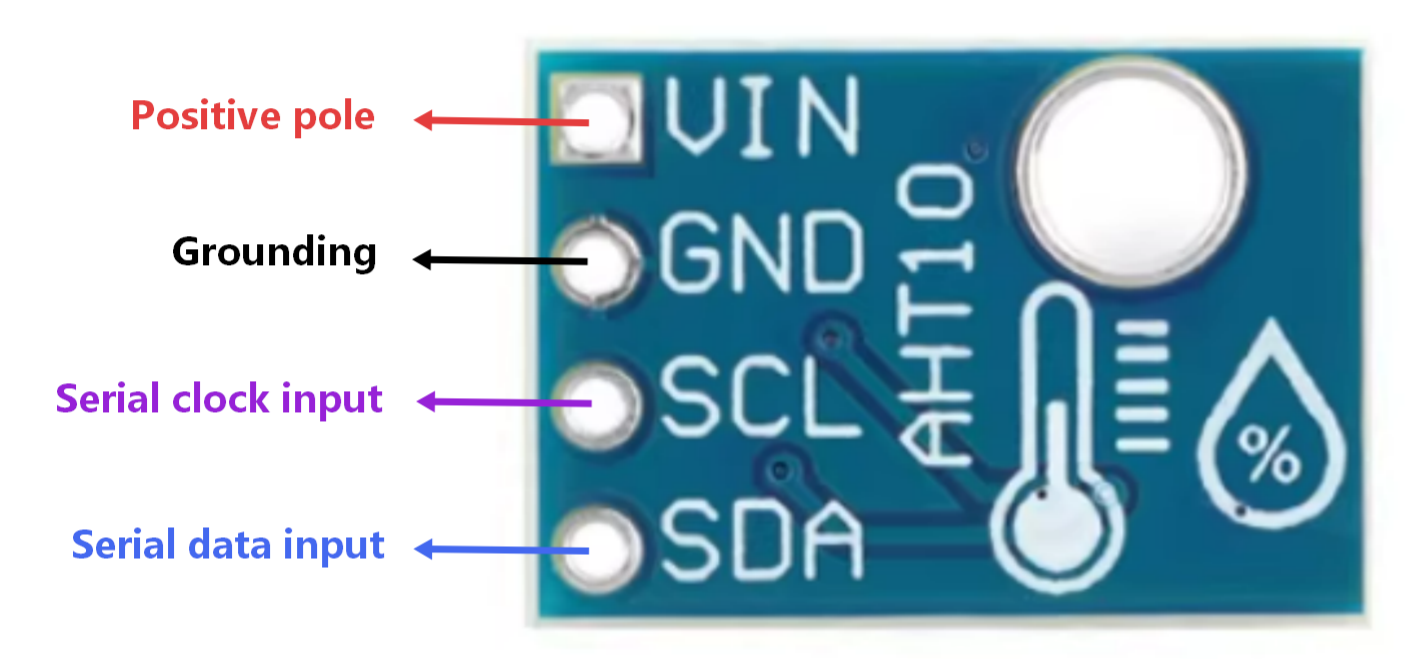
AHT10 Pin Function
AHT10 vs DHT22
| Model | AHT10 | DHT22 |
|---|---|---|
| Temperature Accuracy | Typical ±0.3℃ | Typical ±0.5℃ |
| Humidity Accuracy | Typical ±2%RH | Typical ±2% RH |
| Temperature Resolution | 0.01℃ | 0.1° C |
| Humidity Resolution | 0.024%RH | 0.1% RH |
| Response Time | Up to 1 Hz (continuous) | Max 1 Hz (but often slower) |
AHT10 Arduino Example
AHT10 Pinout
- AHT10 Arduino
VCC ——> 3.3V
GND ——> GND
SCL ——> SCL
SDA ——> SDA
AHT10 Arduino Code
					#include <Wire.h>
#include <Adafruit_GFX.h>
#include <Adafruit_SSD1306.h>

// Define OLED resolution (0.96-inch I2C OLED fixed 128×64)
#define SCREEN_WIDTH 128
#define SCREEN_HEIGHT 64
// OLED I2C address (ZJY_M2420 default: 0x3C, change to 0x3D if screen is black)
#define OLED_ADDR     0x3C

// Initialize OLED object
Adafruit_SSD1306 display(SCREEN_WIDTH, SCREEN_HEIGHT, &Wire, -1);

// AHT10 sensor I2C address (fixed 0x38, no need to modify)
#define AHT10_ADDR 0x38

// Store temperature and humidity data
float temperature = 0.0;
float humidity = 0.0;

void setup() {
  Wire.begin();         // Initialize I2C bus (SDA=A4, SCL=A5)
  Serial.begin(9600);   // Serial debugging (optional, view data via serial monitor)

  // Initialize OLED screen
  if(!display.begin(SSD1306_SWITCHCAPVCC, OLED_ADDR)) {
    Serial.println(F("OLED initialization failed!"));
    for(;;); // Halt if initialization fails, easy to troubleshoot
  }
  display.clearDisplay(); // Clear screen
  display.setTextColor(SSD1306_WHITE); // Set text color (OLED only black/white, fixed white)

  // Initialize AHT10 sensor
  aht10_init();
  delay(200); // Sensor power-on stable delay
}

void loop() {
  // Read AHT10 temperature and humidity data
  aht10_read(&temperature, &humidity);

  // Display data on OLED screen
  display_show(temperature, humidity);

  // Serial print data (for debugging, can be deleted)
  Serial.print("Temperature: ");
  Serial.print(temperature, 1);
  Serial.print(" °C\t");
  Serial.print("Humidity: ");
  Serial.print(humidity, 1);
  Serial.println(" %RH");

  delay(1000); // Refresh every 1 second
}

/************************ AHT10 initialization function ************************/
void aht10_init() {
  Wire.beginTransmission(AHT10_ADDR);
  Wire.write(0xBE);       // AHT10 initialization command
  Wire.write(0x08);       // Calibration enable
  Wire.write(0x00);
  Wire.endTransmission();
  delay(20);
}

/************************ Read AHT10 temperature and humidity data ************************/
void aht10_read(float *temp, float *humi) {
  // Send measurement command
  Wire.beginTransmission(AHT10_ADDR);
  Wire.write(0xAC);       // Trigger measurement command
  Wire.write(0x33);
  Wire.write(0x00);
  Wire.endTransmission();
  delay(80); // Wait for measurement completion (at least 75ms)

  // Read 6 bytes of data
  Wire.requestFrom(AHT10_ADDR, 6);
  if (Wire.available() == 6) {
    uint8_t byte1 = Wire.read();
    uint8_t byte2 = Wire.read();
    uint8_t byte3 = Wire.read();
    uint8_t byte4 = Wire.read();
    uint8_t byte5 = Wire.read();
    uint8_t byte6 = Wire.read();

    // Calculate humidity: raw data to percentage (strictly match AHT10 datasheet)
    *humi = ((uint32_t)byte2 << 12) | ((uint32_t)byte3 << 4) | (byte4 >> 4);
    *humi = (*humi * 100.0) / 0x100000;

    // Calculate temperature: raw data to Celsius (strictly match AHT10 datasheet)
    *temp = (((uint32_t)(byte4 & 0x0F) << 16) | ((uint32_t)byte5 << 8) | byte6);
    *temp = (*temp * 200.0) / 0x100000 - 50.0;
  }
}

/************************ OLED display temperature and humidity interface ************************/
void display_show(float temp, float humi) {
  display.clearDisplay(); // Clear screen to avoid text overlap

  // 1. Display title (centered, enlarged font)
  display.setTextSize(2);          // Font size: 2x (1=smallest,8=largest)
  display.setCursor(18, 0);        // Coordinate(x,y): x=18 for center, y=0 for top
  display.print("Temp&Humi");

  // 2. Display temperature data (1x font, with unit)
  display.setTextSize(1);
  display.setCursor(10, 30);
  display.print("Temp: ");
  display.print(temp, 1);          // Keep 1 decimal place for tidiness
  display.print(" C");

  // 3. Display humidity data (1x font, with unit)
  display.setCursor(10, 50);
  display.print("Humi: ");
  display.print(humi, 1);
  display.print(" %");

  display.display(); // Refresh screen and show cached content
}
AHT10 Effect Demonstration
AHT10 Application Scenario
HVAC, dehumidifiers, testing and measurement equipment, consumer products, automotive, automatic control, data loggers, weather stations, home appliance humidity regulation, medical and other related humidity detection and control…
Relative Information
Purchase Link
FAQ
AHT10 vs DHT11, which one is better for humidity sensing?
The AHT10 is superior, with a humidity accuracy of ±2% RH and a range of 0–100% RH, while the DHT11 has an accuracy of ±5% RH and a range of only 20–80% RH.
Is AHT10 a digital or analog sensor?
The AHT10 is a digital sensor that outputs temperature and humidity data through the AHT10 I²C interface.
How do I fix incorrect readings from AHT10?
Check the wiring, ensure stable power supply, preheat for a few seconds (3~5s), and confirm that the correct data conversion formula is used.
Can I use AHT10 with ESP32 or ESP8266?
Sure. The ESP32/ESP8266 supports I²C and 3.3V.