

Blog
stepper-motor driver-board-a3967
What is a Stepper Motor?
A stepper motor is an electric motor that converts electrical pulse signals into corresponding angular or linear displacement. In other words, it rotates by an angle or moves one step each time a pulse signal is input. Its speed is entirely determined by the interval between pulses, so it’s also called a “pulse motor.”
The most common stepper motors today are two-phase four-wire and three-phase six-wire types. The difference is that the three-phase six-wire version rotates in smaller angles, making it more suitable for industrial applications requiring higher precision. However, their basic working principles are the same.

Difference between stepper motor and DC motor
Both stepper motors and DC motors achieve rotation by constantly changing the magnetic field direction. DC motors automatically switch the energized coils using the torque generated during rotation, while stepper motors are controlled by an external driver.
Thus, DC motors are simpler—just connect them to a power supply to use. Stepper motors, on the other hand, offer more precise control, longer lifespan, and higher rotational speed.

Working principle of stepping motor
Stepper motors are structurally similar to brushless motors, but there’s a key difference: one end of the three-phase coils in a brushless motor is connected together, with the other ends led out as control wires (“U, V, W”).

In contrast, both ends of the internal coils in a stepper motor are led out—hence the two-phase four-wire and three-phase six-wire configurations we see.
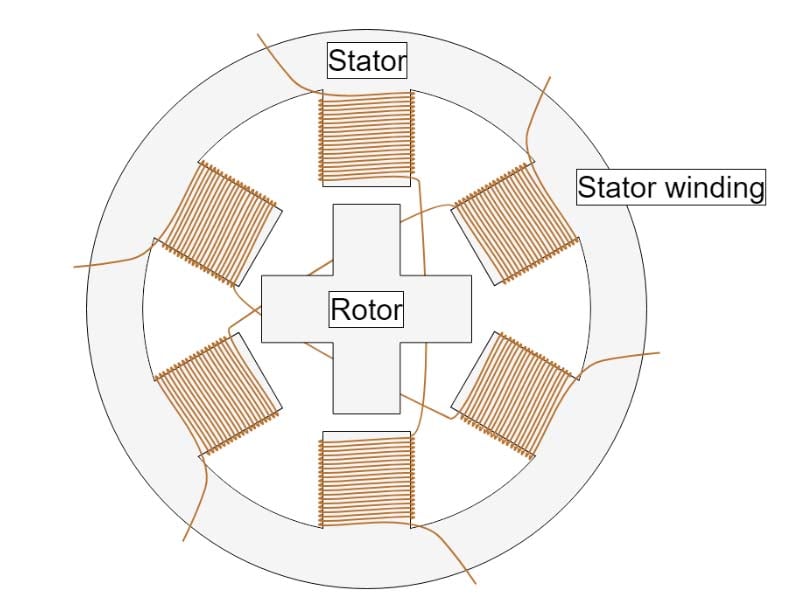

When a coil is energized, since the two coils of the same phase are wound in the same direction, they generate magnetic fields in the same direction. However, due to their positions, the magnetic field directions near the center are always opposite. For example, when phase A is energized, according to the law of electromagnetism, the N pole points down and the S pole points up. This means the pole of the upper coil near the center is N, and the pole of the lower coil near the center is S—holding the central rotor in a fixed direction.This process is simplified in the diagram below.
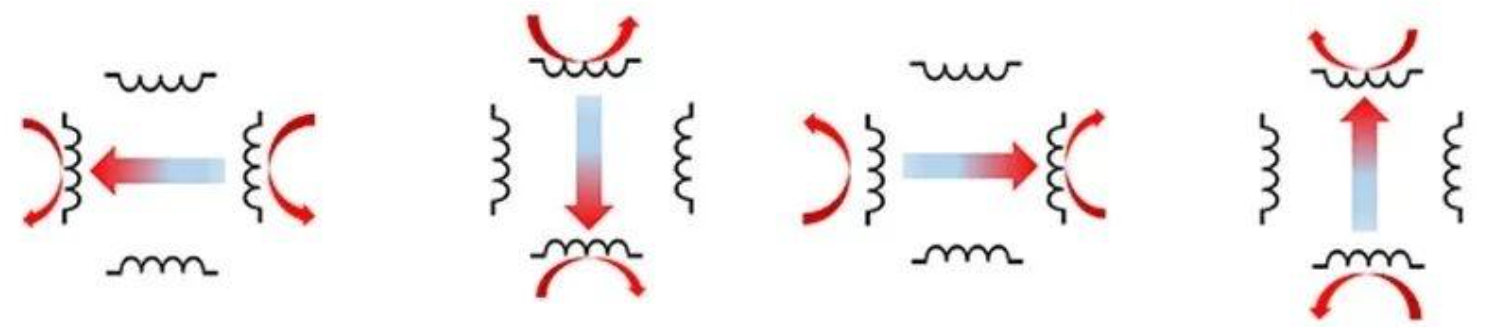
In fact, four basic directions aren’t enough for practical use, so magnetic field superposition is used to achieve smoother rotation.

Additionally, you can control the strength of the magnetic field by adjusting the current through the coils, or reduce the minimum rotation angle by adding more coils. Theoretically, the angle can be adjusted arbitrarily, but due to physical factors like friction, the smallest available angle currently is 1.8° (1.2° for three-phase six-wire stepper motors).
Control of Stepping Motor
While three-phase six-wire stepper motors offer higher precision, they and their drivers are more expensive. Most also require household AC power, which carries the risk of tripping and safety hazards.
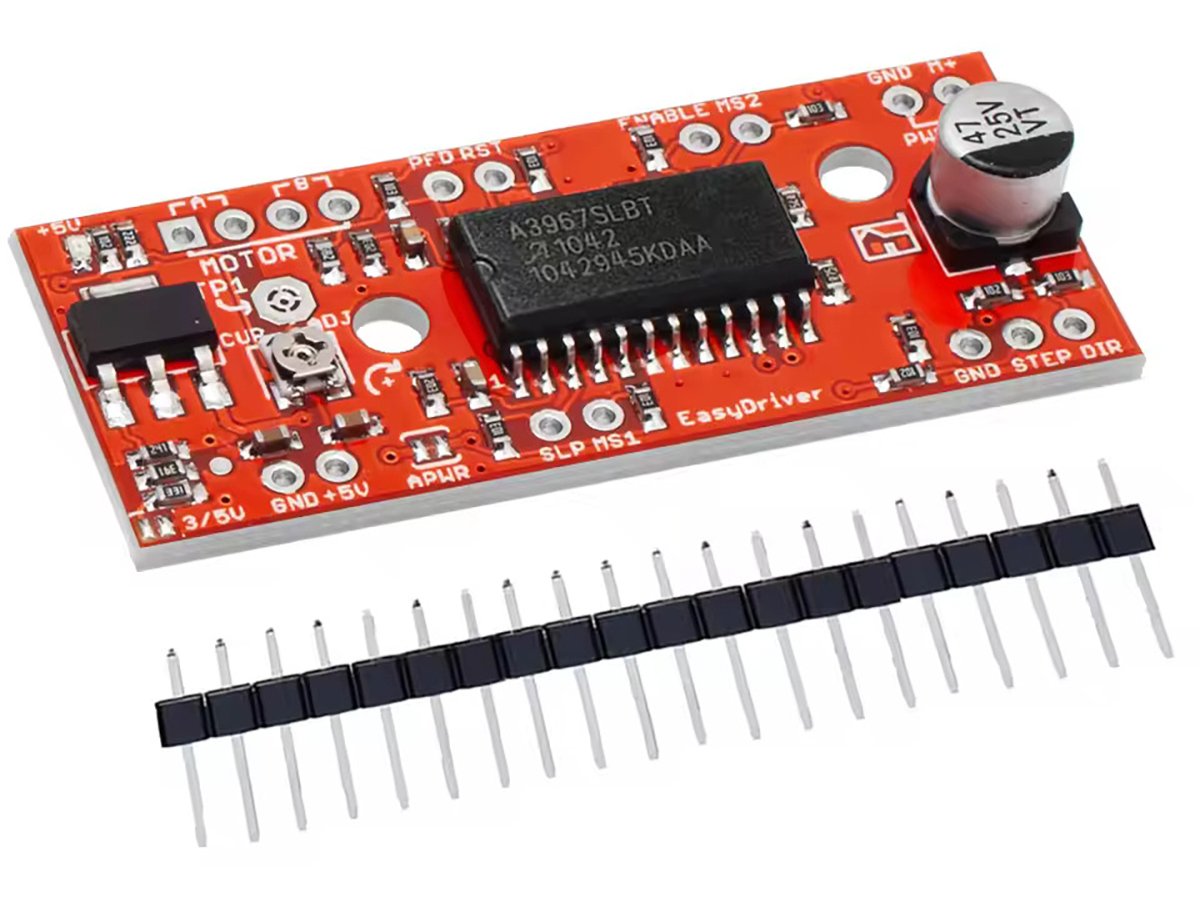
For beginners, two-phase four-wire stepper motors are the best choice. Their working principle is similar, and the driver’s control logic is identical. Here, we’ll use the A3967 driver module to control a two-phase four-wire stepper motor.
What is A3967?
The A3967 is a complete microstepping motor driver with a built-in translator. It can drive two-phase four-wire stepper motors in full-step, half-step, quarter-step, and eighth-step modes, with an output drive capability of 30V and ±750mA.
No phase sequence table, high-frequency control lines, or complex programming interfaces are needed. The A3967’s interface is ideal for applications without a complex microprocessor or where the microprocessor is overloaded.
Internal circuit protections include thermal shutdown with hysteresis, undervoltage lockout (UVLO), and cross-current protection. No special power-up sequence is required.

The A3967 has two internal H-bridge circuits. An H-bridge is a circuit composed of four switching transistors, shaped like the letter “H.” Different input signals enable different output modes. For example, applying a high-level signal to SIGNAL 1 and SIGNAL 4 connects OUT 1 to VCC and OUT 2 to GND.

The Use of A3967 Module
The A3967 module only supports two-phase four-wire stepper motors—do not connect other motor types!
Wiring Guide
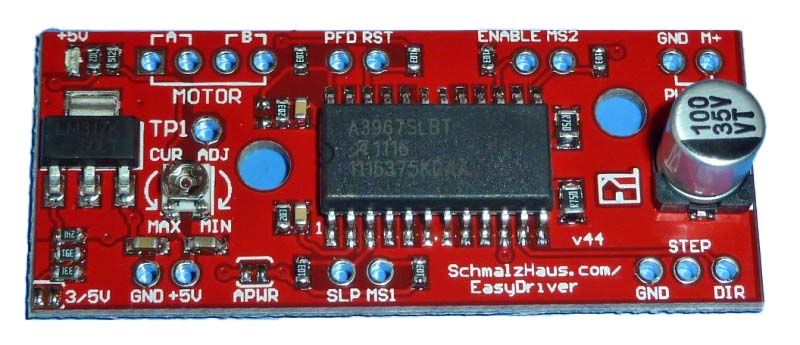
- Connect the stepper motor’s A+, A-, B+, B- wires to the “MOTOR” terminal in left-to-right order.
- PFD: Adjusts the motor’s voltage change rate—no connection required.
- RST: Reset input (active low).
- ENABLE: Enable input (active low). The PCB is already connected to GND via a 10K resistor.
- GND: Ground (no need for introduction).
- M+: Power input. The A3967 can handle 30V, but the voltage regulator IC powering the chip can only withstand 12V—so input voltage must not exceed 12V.
- +5V: Connects to the power management IC, providing 5V power for MCUs.
- SLP: Sleep enable (active low), connected to 5V power via a 10K resistor.
- MS1 & MS2: Together determine motor control precision. When both are high, each step of the stepper motor is divided into 8 microsteps, achieving a maximum precision of 1.8°.
- STEP: Motor rotation signal input. A high-level signal makes the motor move one step; the step distance is determined by MS1 and MS2.
- DIR:Motor rotation direction control, determines the rotation direction by changing the input high and low levels.
Using Arduino to Control a Stepper Motor
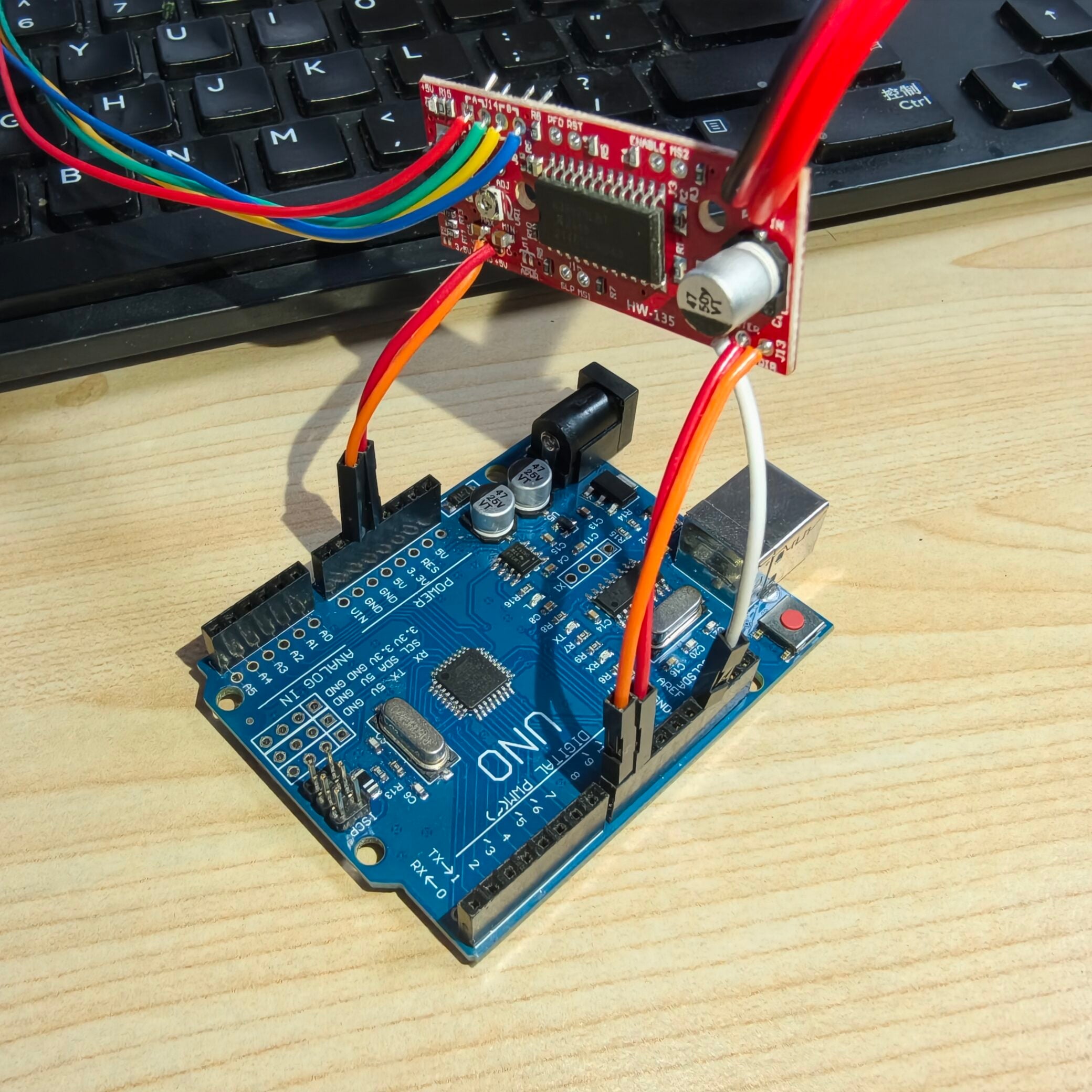
Step 1: Wiring
- Connect +5V to power the Arduino.
- Connect either GND next to +5V or GND next to STEP to the Arduino’s GND.
- Connect STEP to Arduino pin 9.
- Connect DIR to Arduino pin 8.
- Connect M+ to the positive terminal of a 12V power supply, and the adjacent ·GND to the power supply’s negative terminal.
- Finally, connect the stepper motor as instructed.
Notes
- Ensure the motor’s rated voltage matches the power supply voltage.
- Connect the motor’s four wires (A+, A-, B+, B-) to the “MOTOR” terminal in left-to-right order.

Step 2: Code
The code is simple: Pin 8 uses high/low levels to control the motor’s direction (clockwise/counterclockwise), and Pin 9 alternates between high and low levels to simulate pulse signals.
According to the datasheet, the minimum switching time is 1μs, but the author found that using the delayMicroseconds() function requires 100μs for the motor to rotate. Additionally, continuously adjusting the pulse interval to change speed didn’t work—this may be due to the motor’s quality. If possible, try a higher-quality motor.
					void setup() {
  pinMode(8, OUTPUT);
  pinMode(9, OUTPUT);
  digitalWrite(8, LOW);
  digitalWrite(9, LOW);
}

void loop() {
  digitalWrite(8, LOW);
  for(int i=0;i<10;i++)
  {
    for(int j=0;j<200;j++)
    {
      digitalWrite(9, HIGH);
      delayMicroseconds(1000);
      digitalWrite(9, LOW);
      delayMicroseconds(1000);
      }
  }
  for(int i=0;i<10;i++)
  {
    for(int j=0;j<1000;j++)
    {
      digitalWrite(9, HIGH);
      delayMicroseconds(100);
      digitalWrite(9, LOW);
      delayMicroseconds(100);
      }
  }
  for(int i=0;i<10;i++)
  {
    for(int j=0;j<200;j++)
    {
      digitalWrite(9, HIGH);
      delayMicroseconds(1000);
      digitalWrite(9, LOW);
      delayMicroseconds(1000);
      }
  }
  delay(1000);
  digitalWrite(8, HIGH);
  for(int i=0;i<10;i++)
  {
    for(int j=0;j<200;j++)
    {
      digitalWrite(9, HIGH);
      delayMicroseconds(1000);
      digitalWrite(9, LOW);
      delayMicroseconds(1000);
      }
  }
  for(int i=0;i<10;i++)
  {
    for(int j=0;j<1000;j++)
    {
      digitalWrite(9, HIGH);
      delayMicroseconds(100);
      digitalWrite(9, LOW);
      delayMicroseconds(100);
      }
  }
  for(int i=0;i<10;i++)
  {
    for(int j=0;j<200;j++)
    {
      digitalWrite(9, HIGH);
      delayMicroseconds(1000);
      digitalWrite(9, LOW);
      delayMicroseconds(1000);
      }
  }
  delay(1000);
}
Code Function
The motor will: Slow rotation → High-speed rotation → Slow rotation → Change direction → Slow rotation → High-speed rotation → Slow rotation → Change direction
