Blog
TB6600 Stepper Motor Driver Tutorial, Easily Master Motor Control Techniques

When it comes to “golden partners” for stepper motors, TB6600 is definitely on the list! This little guy can not only handle high current easily but also support various microstepping modes. Whether driving NEMA series motors or other models, it can make rotation both smooth and precise.
What is a stepper motor driver? Why is a stepper motor driver needed?
TB6600 stepper driver is a professional two-phase stepper motor driver, compatible with Arduino and various other main controllers, capable of realizing functions such as motor forward and reverse rotation control, rotation angle control, etc.
A stepper motor driver is an electronic device, usually serving as a bridge to connect the controller, power supply and stepper motor. Although the controller has strong processing performance, its own output capability (current) is very small. It needs an intermediate bridge to connect the motor and the main controller, and at the same time provide sufficient power for the motor. It’s like the human brain, the brain tissue itself is very fragile, but it can drive the entire body by giving orders to the muscles. The driver is like the human muscles, which is an important part responsible for the movement of the entire system.
The TB6600 stepper motor driver adopts H-bridge bipolar constant phase current drive, and can be directly powered by 9~42VDC. It offers 7 selectable microstep controls (1, 2/A, 2/B, 4, 8, 16, 32) and 8 current controls (0.5A, 1A, 1.5A, 2A, 2.5A, 2.8A, 3.0A, 3.5A), with a maximum output current of 4A. The signal terminals are equipped with high-speed photoelectric isolation to prevent signal interference, and support both common cathode and common anode signal input modes. For safety, the driver stepper TB6600 supports an offline hold function, allowing users to debug in the powered-on state. The stepper TB6600 has built-in temperature protection and overcurrent protection, enabling adaptation to harsher working environments.
The TB6600 driver is suitable for driving 57 and 42 type two-phase and four-phase hybrid stepper motors, achieving low vibration, low noise, and high-speed driving effects. It can be applied in high-precision fields such as robot control and 3D printing.
Motor Stepper Driver TB6600 Hardware Detailed Explanation
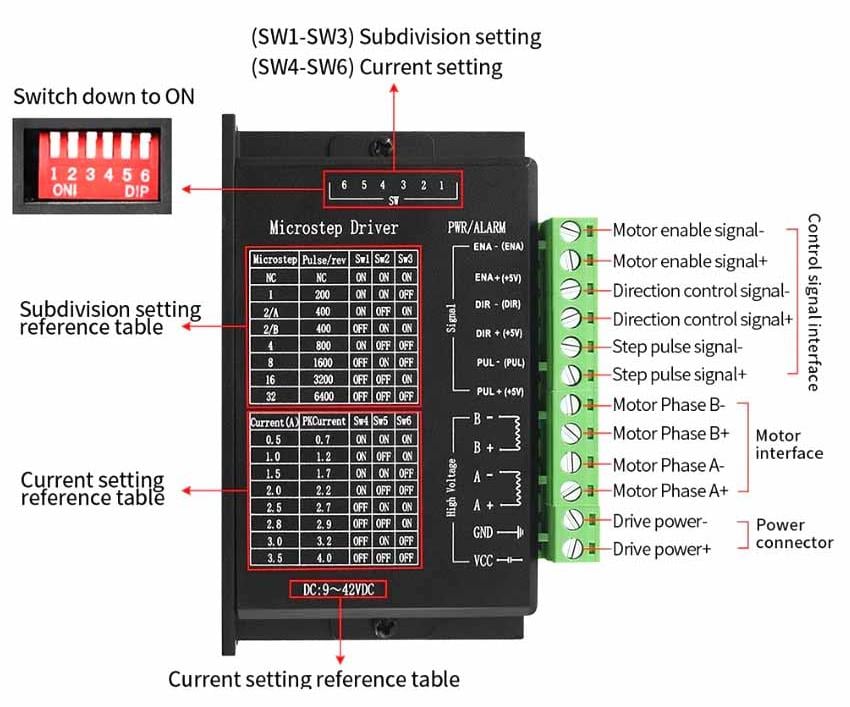
Introduction to Driver TB6600 Interface and Wiring
1、TB6600 signal input terminal
PUL+ PUL- | Pulse input signal. The default pulse rising edge is valid. To reliably respond to the pulse signal, the pulse width should be more than 1.2us. |
DIR+ DIR- | Direction input signal, high/low level signal. To ensure reliable commutation of the motor, the direction signal should be established at least 5us before the pulse signal. The initial running direction of the motor is related to the wiring of the motor windings. Swapping any phase winding (such as swapping A+ and A-) can change the initial running direction of the motor. |
ENA+ ENA- | Enable input signal (offline signal), used to enable or disable the driver output. When enabled, the driver will cut off the current of each phase of the motor, putting the motor in a free state and not responding to stepping pulses. When this function is not needed, the enable signal terminal can be left floating. |
2、Motor winding connection
A+, A- | Motor Phase A Winding |
B+, B- | Motor Phase B Winding |
3、TB6600 power supply voltage connection
VCC | DC power supply positive (DC 9V-42V) |
GND | DC power supply negative |
4、TB6600 status indicator
Green LED | Power indicator light, fault indicator light. When the driver is powered on, this LED is always on. When the driver is powered off, this LED is off. If the light does not turn on when powered on, it indicates a fault. When the fault is cleared by the user, the green LED is always on. Causes of failure: ① Please check the power wiring or whether the operating voltage is within the operating range. ② Overcurrent protection (short circuit to ground; short circuit to VM; short circuit between outputs (phase error)): power off and check whether the wiring is correct. ③ Overtemperature protection: cool down for a period of time until the driver temperature drops before use, or install a cooling fan. |
Blue LED | Running indicator light. When the driver receives pulses, this light flashes. Once the pulse transmission stops, it stays on or flashes. |
If all indicator lights are off, the driver may have been damaged during use. | |
5、TB6600 wiring method
There are three input signals in all:
① Step pulse signal PUL +, PUL- ;
② Direction signal DIR +, DIR- ;
③ Off-line signal EN +, EN-.
The driver supports common-cathode and common-anode circuit, you can select one according to your demand.
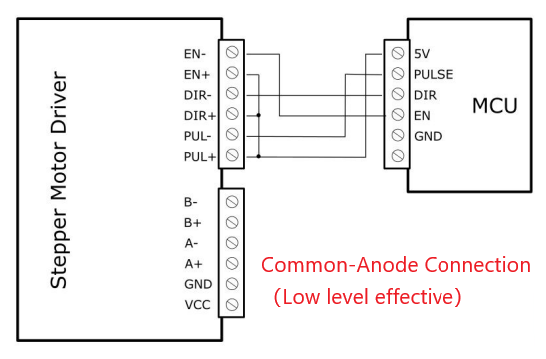
Common-Anode Connection(Low level effective):
Connect PUL +, DIR + and EN + to the power supply of the control system. If the power supply is + 5V, it can be directly connected. If the power supply is more than +5V, the current limiting resistor R must be added externally. To ensure that the controller pin can output 8 ~ 15mA current to drive the internal optocoupler chip. Pulse signal connects to PUL-; direction signal connects to Dir- ; Enable signal connects to EN-. As shown below:
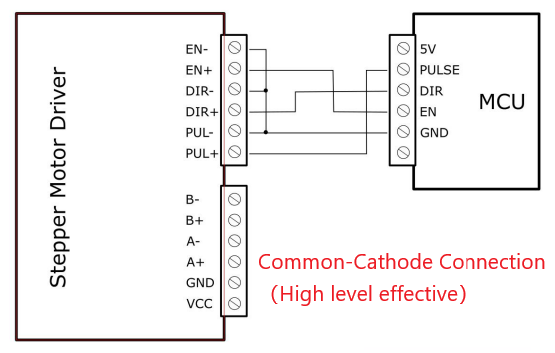
Common-Cathode Connection(High level effective):
Connect PUL – , DIR – and EN – to the ground terminal of the control system. Pulse signal connects to PUL- . Direction signal connects to Dir- . Enable signal connects to EN- . As shown below:
Note:
- It is advisable to avoid sharing the VCC and GND lines between the Stepper Motor Driver and the MCU.
- When“EN”is in the valid state, the motor is in a free states (Off-line mode). In this mode, you can adjust the motor shaft position manually. When“EN”is in the invalid state, the motor will be in an automatic control mode.
6、TB6600 wiring requirements
(1) To prevent interference with the stepper motor driver TB6600, it is recommended that shielded cables be used for control signals, with the shield layer shorted to the ground wire. Only one grounding point is allowed within the same machine. If it is not a real grounding wire, severe interference may occur, in which case the shield layer should not be connected.
(2) Pulse and direction signal wires must not be bundled together with motor wires and power wires. It is best to separate them by at least 10cm. Otherwise, motor noise may interfere with pulse and direction signals, causing faults such as inaccurate motor positioning and system instability.
(3) If one power supply is used for multiple drivers, they should be connected in parallel at the power supply. Daisy-chain connection (first to one driver then to another) is not allowed.
(4) It is strictly forbidden to plug or unplug the driver’s power terminals when powered on. When a powered motor is stopped, there is still a large current flowing through the coil, and plugging or unplugging the power terminals will generate a huge instantaneous induced electromotive force that will damage the driver.
(5) It is strictly forbidden to connect wire ends with solder to the terminals. Otherwise, due to the contact, the resistance may increase and cause the terminals to overheat and be damaged.
(6) Wire ends must not be exposed outside the terminals to prevent accidental short circuits that may damage the TB6600 driver.
Current and Microstep DIP(Dual In-line Package) Switch Settings

The driver uses a six-position DIP switch to set the microstep and operating current. The detailed description is as follows:
SW1、SW2、SW3 | Microstep precision setting |
SW4、SW5、SW6 | Drive current setting |
1、Microstep setting
Microstep | Pulses per revolution | SW1 | SW2 | SW3 |
NC | NC | ON | ON | ON |
1 | 200 | ON | ON | OFF |
2/A | 400 | ON | OFF | ON |
A/B | 400 | OFF | ON | ON |
4 | 800 | ON | OFF | OFF |
8 | 1600 | OFF | ON | OFF |
16 | 3200 | OFF | OFF | ON |
32 | 6400 | OFF | OFF | OFF |
Note:① NC stands for motor disabled and offline. ② Both 2/A and 2/B are 2 microsteps.
2、Operating (dynamic) current setting
Current (A) | Peak value (A) | SW4 | SW5 | SW6 |
0.5 | 0.7 | ON | ON | ON |
1.0 | 1.2 | ON | OFF | ON |
1.5 | 1.7 | ON | ON | OFF |
2.0 | 2.2 | ON | OFF | OFF |
2.5 | 2.7 | OFF | ON | ON |
2.8 | 2.9 | OFF | OFF | ON |
3.0 | 3.2 | OFF | ON | OFF |
3.5 | 4.0 | OFF | OFF | OFF |
TB6600 Features
- Signal input: Single-ended, pulse/direction
- Selectable microsteps: 1/2/4/8/16/32 microsteps
- Output current: 0.5A-3.5A
- Input voltage: 9-42VDC, recommended operating voltage 12-24VDC
- Current automatically halves when stationary
- Can drive 4, 6, 8-wire two-phase and four-phase stepper motors, 42-type, 57-type motors with 1.8Nm and below
- Optocoupler isolated signal input, strong anti-interference capability
- With overheating, overcurrent, undervoltage lockout, input voltage reverse connection protection and other functions
- Compact size, easy to install
- External signals 3.3-24V universal, no need for series resistors
TB6600 Parameters
Input Voltag | 9V~40V | Power (MAX) | 160W |
Input Current | 0~5A | Temperature | -10℃~+45℃ |
Output Current | 0.5-4.0A | Dimension | 95.8×56.5×35.0 mm |
Micro Step | 1, 2/A, 2/B, 4, 8, 16, 32 | ||
Cooling method | Natural cooling or forced air cooling | ||
Operating environment | It must not be placed near other heat-generating equipment. It should be kept away from places with dust, oil stains, corrosive gases, excessive humidity and strong vibrations. Flammable gases and conductive dust are prohibited. | ||
Motor Selection and Matching
The TB6600 upgraded driver can be used to drive 4-wire, 6-wire and 8-wire two-phase and four-phase hybrid stepper motors, which are applicable to both motors with a step angle of 1.8 degrees and 0.9 degrees. Motor selection is mainly determined by the motor’s torque and rated current. The torque is mainly determined by the motor size. Larger-sized motors have higher torque. The current is mainly related to inductance. Motors with small inductance have better high-speed performance but higher current.
1、Motor Selection and Matching
(1) Determine the load torque
T_motor = C (Jε + T_load)
J : Moment of inertia of the load
ε : Maximum angular acceleration of the load
C : Safety factor, recommended value 1.2-1.4
T_load : Maximum load torque, including resistance torques such as effective load, friction force, and rotation efficiency
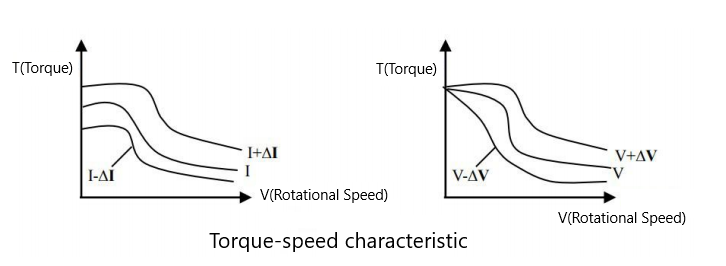
(2) The determinants of the output torque of the motor
For a given stepper motor and coil connection, the output torque has the following characteristics:
① The larger the actual current of the motor, the larger the output torque, but the more copper loss (P=I²R) of the motor, resulting in more heat generation.
② The higher the supply voltage of the driver, the larger the high-speed torque of the motor.
③ It can be seen from the torque-frequency characteristic curve of the stepper motor that the torque at high speed is smaller than that at medium and low speeds.
2、Motor wiring
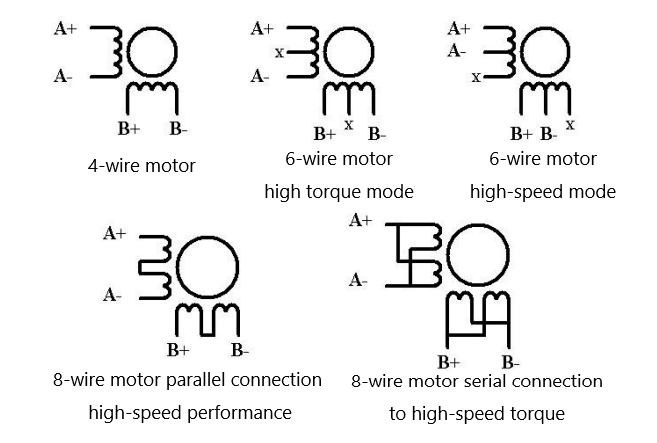
Wiring for 2-phase 4-wire, 6-wire and 8-wire motors, as shown in the following figure
3、Selection of supply voltage and output current
(1) Setting of supply voltage
Generally speaking, the higher the supply voltage, the greater the torque of the motor at high speed, which can better avoid jamming and step loss caused by insufficient torque at high speed. However, on the other hand, too high voltage will lead to overvoltage protection, more heat generation of the motor, and may even damage the driver. When working under high voltage, the vibration of the motor during low-speed movement will be greater.
(2) Setting value of output current
For the same motor, the larger the current setting value, the greater the output torque of the motor, but the motor and driver will generate more heat when the current is large. The specific amount of heat generation is not only related to the current setting value, but also to the type of movement and the duration of the stay. The following setting method uses the rated current value of the stepper motor as a reference, but the optimal value in practical applications should be adjusted on this basis.
① For 4-wire motors: Set the output current equal to or slightly higher than the motor’s rated current.
② For 6-wire motors in high-torque mode: Set the output current to 50% of the motor’s rated current in unipolar connection.
③ For 6-wire motors in high-speed mode: Set the output current to 100% of the motor’s rated current in unipolar connection.
④ For 8-wire motors in series connection: The output current can be set to 70% of the motor’s rated current in unipolar connection.
⑤ For 8-wire motors in parallel connection: The output current can be set to 140% of the motor’s rated current in unipolar connection.
Note : After setting the current, run the motor for 15-30 minutes. If the motor temperature rises too high (>70℃), the current setting should be reduced. Therefore, in general, the current should be set to a value that the motor becomes warm but not overheated during long-term operation.
TB6600 Arduino Tutorial
TB6600 Pinout
TB6600 motor driver pin | Arudino pin | 42 Stepper motor |
ENA- (Pulse ground) | GND | \ |
ENA+ (Pulse input, controlling stepping ) | D4 | \ |
DIR- (Direction ground) | GND | \ |
DIR+ (Direction control, high and low level switching) | D3 | \ |
PUL- (Enable ground) | GND | \ |
PUL+ (Enable control, low level is the active state.) | D2 | \ |
B- | \ | Blue wire |
B+ | \ | Red wire |
A- | \ | Green wire |
A+ | \ | Black wire |
GND | External power supply GND | |
VCC | External power supply 12V~36V (must not be connected to Arduino) | |
Note :
①The GND of Arduino must be connected to the GND of TB6600 (as well as the GND of the external power supply). Otherwise, the signal may be unstable.
②The wiring colors of the 42-step stepper motor need to be confirmed according to the motor manual. If the rotation direction is abnormal, the wires of phase A or phase B can be swapped.
TB6600 DIP Switch Settings
DIP switch | Function | Example settings | Description (taking the 42 stepper motor as an example, the current can be reduced if the torque requirement is low) |
SW1 | microstep setting 1 | OFF | Microstep combination: OFF+OFF+OFF = 1 microstep (1.8° per step) (The higher the microstep , the smoother the operation, but the lower the maximum speed) |
SW2 | microstep setting 2 | OFF | |
SW3 | microstep setting 3 | OFF | |
SW4 | current setting 1 | ON | Current combination: ON+ON = 1.5A (common rated current for 42 motors) (Adjust according to the motor’s rated current to avoid overload) |
SW5 | current setting 2 | ON | |
SW6 | Half-current enable | OFF | Disable half-current (ensure stable current during operation) |
Note:
① Microstep explanation: 1 microstep = 1.8°per step, 2 microsteps = 0.9° per step, and so on. The higher the microstep, the more pulses are required to complete one full rotation.
② Current explanation: The combination of SW4 and SW5 corresponds to the current (refer to the TB6600 manual), which must be ≤ the motor’s rated current (42 motors are usually 1-2A).
TB6600 Code
					// Pin definition
#define PULSE_PIN 2  // Pulse signal
#define DIR_PIN   3  // Direction signal
#define ENA_PIN   4  // Enable signal

// Parameter settings (focus on modifying time ratios)
const int minDelay = 300;     // Maximum speed (fastest)
const int maxDelay = 3000;    // Initial/end speed (slowest)
const int step = 15;          // Acceleration/deceleration step (smoothness)
const unsigned long runTime = 10000;  // Total runtime per direction (still 10 seconds)
const float accelRatio = 0.2;  // Acceleration phase ratio (20% → 2 seconds, unchanged)
const float decelRatio = 0.5;  // Deceleration phase ratio (50% → 5 seconds, extended deceleration)
// Constant speed phase ratio = 1 - 0.2 - 0.5 = 0.3 → 3 seconds (target value)

void setup() {
  pinMode(PULSE_PIN, OUTPUT);
  pinMode(DIR_PIN, OUTPUT);
  pinMode(ENA_PIN, OUTPUT);

  digitalWrite(ENA_PIN, LOW);  // Enable driver
  delay(100);  // Wait for initialization
}

void loop() {
  // Forward rotation for 10 seconds (2s acceleration → 3s constant speed → 5s deceleration)
  digitalWrite(DIR_PIN, HIGH);
  runWithSmoothSpeed(runTime);

  // Reverse rotation for 10 seconds (same as above)
  digitalWrite(DIR_PIN, LOW);
  runWithSmoothSpeed(runTime);
}

// Core function: Implements acceleration → constant speed → deceleration process
void runWithSmoothSpeed(unsigned long totalTime) {
  unsigned long startTime = millis();
  int currentDelay = maxDelay;  // Start from the slowest speed
  int stage = 0;  // 0=acceleration, 1=constant speed, 2=deceleration

  while (millis() - startTime < totalTime) {
    unsigned long elapsed = millis() - startTime;
    float progress = (float)elapsed / totalTime;  // Running progress (0~1)

    // 1. Acceleration phase (first 20% of time → 2 seconds)
    if (stage == 0) {
      if (progress < accelRatio) {
        if (currentDelay > minDelay) {
          currentDelay -= step;
          if (currentDelay < minDelay) currentDelay = minDelay;
        }
      } else {
        stage = 1;  // Enter constant speed phase
      }
    }
    // 2. Constant speed phase (middle 30% of time → 3 seconds)
    else if (stage == 1) {
      if (progress >= (1 - decelRatio)) {  // When progress exceeds 50% (1-0.5=0.5), enter deceleration
        stage = 2;
      }
      // Maintain maximum speed (currentDelay=minDelay)
    }
    // 3. Deceleration phase (last 50% of time → 5 seconds)
    else if (stage == 2) {
      if (currentDelay < maxDelay) {
        currentDelay += step;
        if (currentDelay > maxDelay) currentDelay = maxDelay;
      }
    }

    // Output pulse
    digitalWrite(PULSE_PIN, HIGH);
    delayMicroseconds(currentDelay / 2);
    digitalWrite(PULSE_PIN, LOW);
    delayMicroseconds(currentDelay / 2);
  }
}
TB6600 Effect Demonstration
TB6600 Application Scenario
- 3D printers: Used to drive the stepper motors for moving the print head or platform, achieving precise positioning.
- CNC engraving machines/milling machines: Control the operation of X, Y, and Z axis motors for high-precision machining.
- Automation equipment: Control the actions of stepper motors in equipment such as automatic assembly lines and conveyor belts.
- Robot joint control: Provide precise motion control for the joints of robotic arms or mobile robots.
- DIY electronic projects: Widely used in stepper motor control projects by makers and electronics enthusiasts.
TB6600 Common Problem
Common problems and solutions in applications
Phenomenon | Possible problem | Solution |
The motor does not rotate. | The power light is not on. | Normal range of power supply |
The current setting is too low. | Select the appropriate current gear based on the rated current of the motor. | |
The driver has been protected. | After troubleshooting, power on again. | |
Enable signal is low. | This signal is pulled high or not connected. | |
Control signal issue | 1. Check whether the amplitude and width of the control signal meet the requirements. 2. For high-speed motor startup, the controller signal needs acceleration and deceleration processing. 3. Different output signals require different wiring methods (NPN selects common anode, PNP selects common cathode). | |
Incorrect motor rotation direction | The motor wires are connected incorrectly. | Arbitrarily swap the two wires of the same phase of the motor (e.g., swap the wiring positions of A+ and A-). |
There is an open circuit in the motor wire. | Check and connect correctly. | |
The alarm indicator light is off. | The motor wires are connected incorrectly. | Check the wiring. |
Voltage is too high or overheating. | Check the power supply voltage; place it aside and wait for the temperature to drop before use. | |
The motor or driver is damaged. | Replace the motor or the driver | |
Position inaccuracy | The signal is interfered with. | 1. Eliminate interference 2. Perform shielded wire processing |
The shielding ground is not connected or is not properly connected. | Reliable grounding | |
There is an error in the microstep. | Set the microstep correctly. | |
The current is too low. | Increase the current appropriately | |
Control signal issue | Check whether the control signals meet the timing requirements. | |
Motor acceleration stall | The acceleration time is too short. | Appropriately increase the acceleration time |
The motor torque is too small. | Choose a high-torque motor | |
Voltage is too low or current is too small. | Appropriately increase the voltage or set a larger current |
Relative Information
Purchase Link
FAQ
How to tell if a stepper motor is burned out?
To determine if a stepper motor is burned out, first check its appearance for cracked housing, deformed shaft, or a burnt smell. If so, internal damage may have occurred. Then manually rotate the motor shaft, under normal conditions, there should be a certain magnetic resistance without jamming. If it is completely immovable or has no resistance at all, the coil may be short-circuited or open-circuited. Next, measure the resistance of each phase coil (e.g., A+/A-, B+/B-) with a multimeter. If the resistance is infinite (open circuit), zero (short circuit), or deviates significantly from the nominal value, the coil is burned out. Finally, conduct a power-on test; when running no-load, if the motor does not rotate, shakes violently, makes abnormal noises, or emits smoke, it can basically be confirmed as burned out.
Following these troubleshooting steps can usually quickly determine if the motor is damaged.
What is the lifespan of a stepper motor?
The service life of a stepper motor can typically reach tens of thousands to hundreds of thousands of hours (about 3-10 years under normal use). However, the actual service life is affected by factors such as load type, operating environment (temperature/humidity), current magnitude, lubrication condition, and maintenance frequency. High loads, frequent starts and stops, overcurrent, or dusty/humid environments can significantly shorten the service life. Reasonable usage (such as avoiding stalling, controlling temperature rise, and regular cleaning and lubrication) can maximize its reliability. Core components (such as bearings) are often the key determinants of service life.
Is TB6600 silent?
TB6600 is not quiet. It uses the traditional PWM modulation method to drive stepper motors. During operation, the motor will generate obvious electromagnetic noise and vibration at low speeds due to current switching. At high speeds, it may also have jitter or noise due to current fluctuations. Moreover, it does not have active noise reduction technology, so the noise problem is relatively prominent, making it unsuitable for scenarios requiring a quiet environment.