

Blog
Build ESP32-S3 Voice Robot from 0 to 1: Local Wake-Up + Cloud LLM Interaction
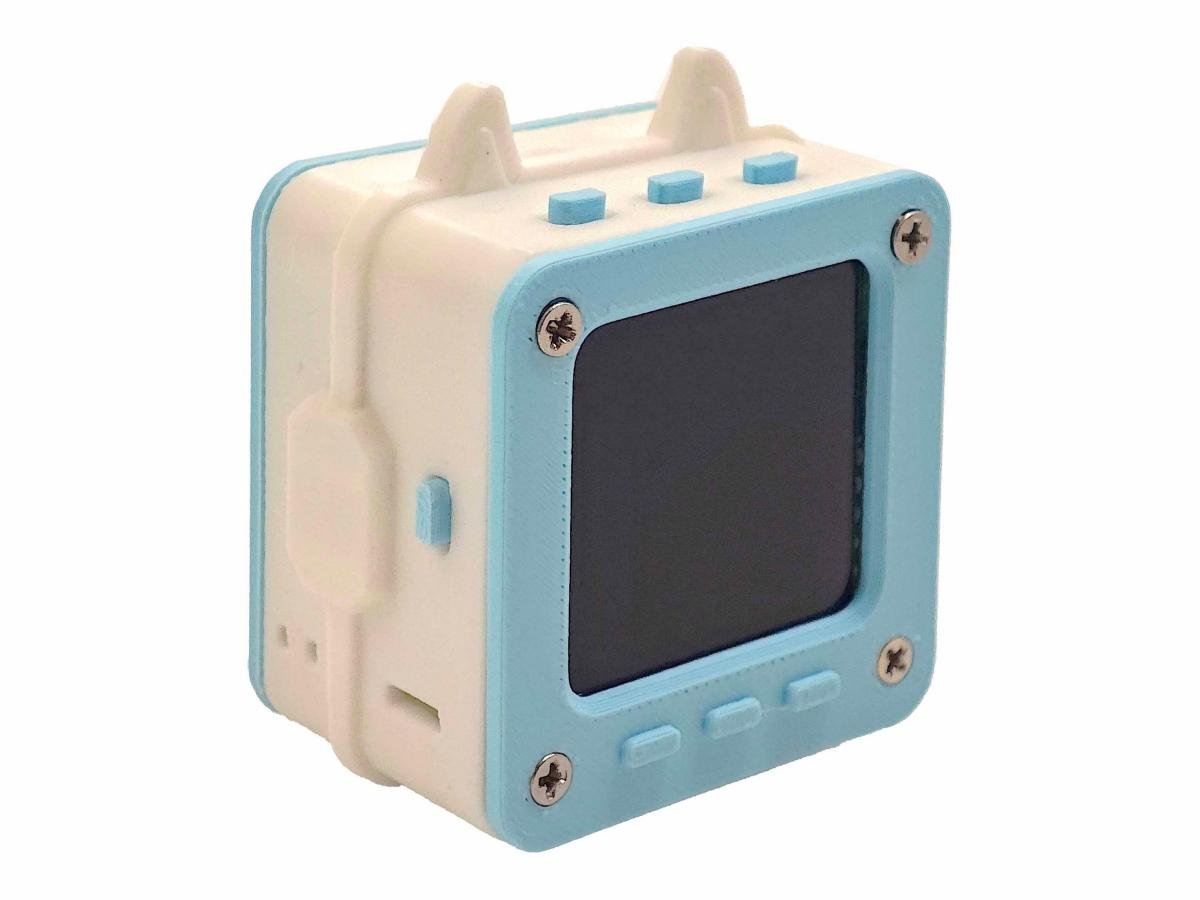
Introduction
This blog is a detailed tutorial designed specifically for beginners in the fields of AI and embedded systems. Centered around the ESP32 microcontroller, it guides you through the step – by – step process of building the voice – interactive robot “XiaoZhi”. The tutorial integrates high – quality online resources from various sources and has been carefully polished. It covers everything from basic principles and hardware preparation to software environment setup, code writing for voice wake – up and interaction with cloud – based large language models, as well as subsequent optimization and expansion. The content is explained clearly and is easy to put into practice. If you’re interested in AI robot toys, this article will definitely help you.
Overview of Basic Principles
Among numerous chip systems, the main reason for choosing the ESP32 over chips like the ESP8266 and STM series is its stronger computing performance and richer interfaces, which make it more suitable for AI robot projects such as “XiaoZhi” that require voice processing and cloud interaction. ESP32 series chips show strong advantages in the field of AI hardware with its unique architecture design:
| CHARACTERISTIC | ESP32-S3 | TRADITIONAL MCU | ADVANTAGE ANALYSIS |
|---|---|---|---|
| Main Frequency | 240MHz | 80-160MHz | 3× Performance Improvement |
| AI Instructions | Vector Instruction Extension | No Dedicated Instructions | Neural Network Acceleration |
| Memory | 512KB SRAM | 128-256KB | Large Model Support |
| Power Consumption | Ultra-Low Power Design | Relatively High | Battery-Friendly |
ESP32 Main Model Comparison
| MODEL | PROCESSOR | MEMORY | WIRELESS FUNCTION | TYPICAL APPLICATION SCENARIOS |
|---|---|---|---|---|
| ESP32 | Xtensa LX6 | 520KB | Wi-Fi + BLE | General IoT Devices |
| ESP32-C3 | RISC-V | 400KB | Wi-Fi 4 + BLE | Low-Cost IoT Devices |
| ESP32-S3 | Xtensa LX7 | 128KB SRAM | Wi-Fi 4 + BLE | High-Performance Graphical Interface Devices |
| ESP32-S2 | Xtensa LX7 | 128KB SRAM | Wi-Fi 4 | Single-Mode Wi-Fi Applications |
ESP32 Hardware Architecture
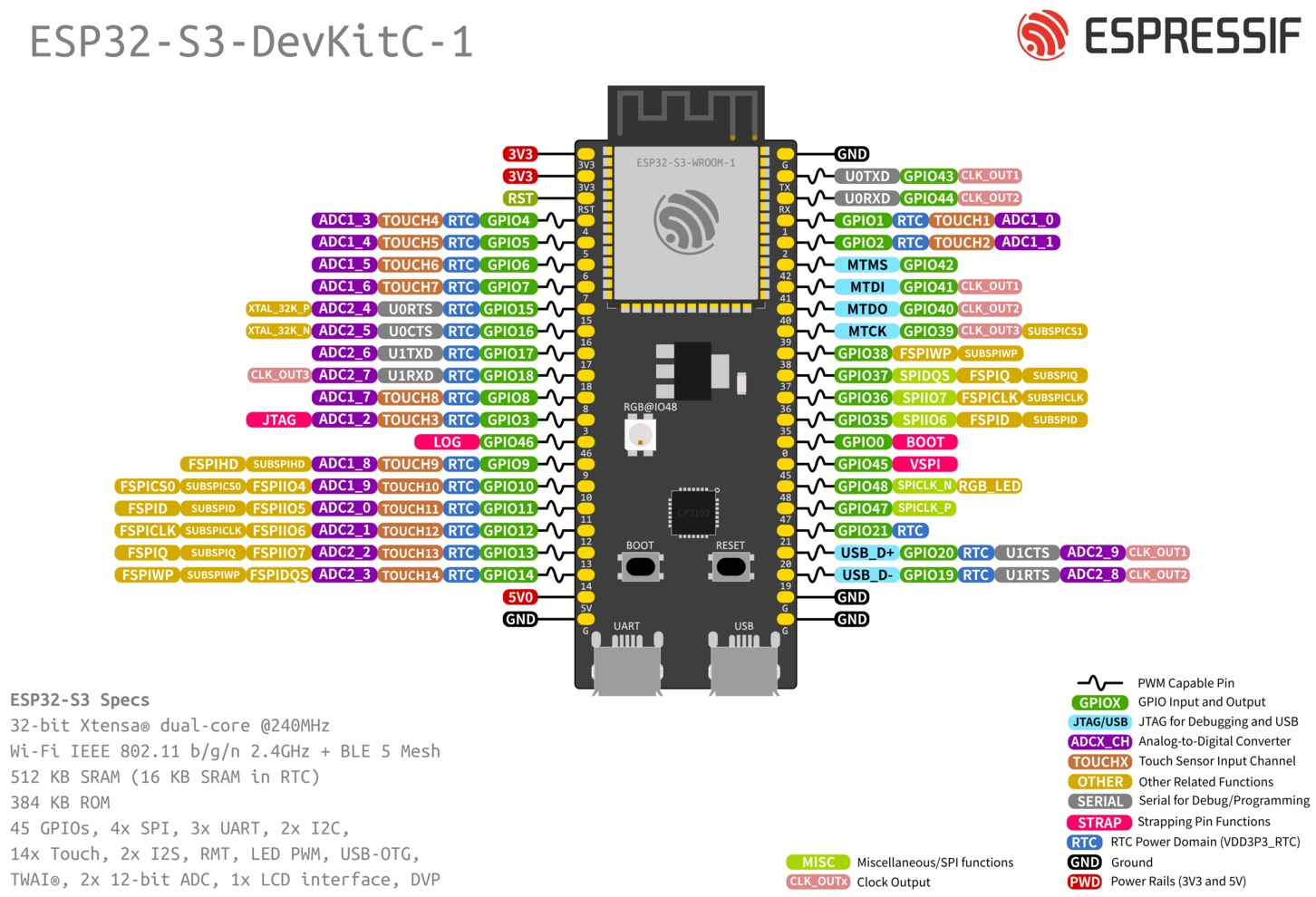
- Processor Core: The ESP32 is typically equipped with a dual – core Xtensa® 32– bit LX6 microprocessor, which can operate at a maximum frequency of240MHz. These two cores can run different tasks independently, enabling parallel task processing and greatly improving the computing efficiency of the chip. For example, in a smart home control project based on the ESP32, one core can be responsible for collecting data from various sensors (such as temperature and humidity sensors), while the other core focuses on communicating with cloud servers to upload data and receive control commands.
- Memory Structure: It has abundant memory resources, including on – chip SRAM (Static Random Access Memory).A large – capacity SRAM can quickly store and retrieve temporary data during program operation, ensuring the efficient operation of the program. At the same time, the ESP32 also supports external memory expansion. It can connect to flash memory via theSPI (Serial Peripheral Interface) for storing a large amount of data such as program codes and data files, meeting the storage requirements of complex applications. For instance, in some voice recognition applications that need to store a large number of voice model data, external flash memory can be used to store the relevant models.
- Communication Interfaces: The ESP32 integrates a variety of communication interfaces, such as Wi – Fi and Bluetooth.The Wi – Fi supports the 802.11 b/g/n protocol, enabling high – speed and stable wireless network connections. This facilitates the device to access the Internet for remote control and data interaction. For example, a smart camera can use the Wi – Fi function of the ESP32 to upload captured video images to a cloud server in real – time. The Bluetooth function supports Bluetooth 4.2 and Bluetooth Low Energy (BLE)technologies, making it easy for short – range communication with other Bluetooth devices. For example, it can connect to a mobile phone to enable the mobile phone to configure and control the ESP32 – based device. In addition, it is also equipped with common serial communication interfaces such as SPI, I2C (Inter – Integrated Circuit), and UART (Universal Asynchronous Receiver/Transmitter) for connecting various external devices like sensors and actuators, expanding the functionality of the device.
- Power Management: It is equipped with an advanced power management unit and supports multiple low – power modes, such as deep sleep mode and light sleep mode. In deep sleep mode, the power consumption of the ESP32 can be reduced to a very low level, which is of great significance for portable devices powered by batteries, such as smart bracelets and wireless sensor nodes, as it can greatly extend their battery life.
ESP32 Main Features
1.Powerful Wireless Functionality
- Built – in Wi – Fi and Bluetooth, enabling network connection or inter – device communication without the need for external modules.
- Supports STA (Station), AP (Access Point), and STA + AP mixed modes.
2.Dual – Core Processing Capability
- The dual – core CPU can process tasks in parallel (e.g., one core handles network protocols, and the other controls hardware).
3.Rich Peripheral Interfaces
- Supports the connection of various peripherals such as sensors, displays, SD cards, and motor drivers.
4.Low – Power Design
- Suitable for battery – powered IoT devices, with a battery life of up to several months.
5.High Cost – Effectiveness
- It is cheap (about $2-5) and performs much better than traditional 8/16-bit microcontrollers.
6.Open – Source Ecosystem
- Supports multiple development environments such as Arduino, ESP – IDF(Espressif official framework), MicroPython, and CircuitPython.
ESP32 Datasheet
ESP32 Development Environments And Tools
1.Arduino IDE
By installing the ESP32 development board support package, you can quickly develop using Arduino syntax.
2.ESP – IDF (Official Framework)
Based on FreeRTOS, it provides lower – level APIs and advanced features (such as OTA updates and multi – threading).
3.MicroPython/CircuitPython
Programming is done through Python scripts, which is suitable for rapid prototyping.
4.PlatformIO
A cross – platform professional development tool that supports multiple frameworks and debugging functions.
5.Graphical Programming
Supports Blockly (such as TinkerGen’s CodeCraft) or Node – RED to simplify logic design.
The AI XiaoZhi Toy – esp32 adopts a layered architecture design to ensure the scalability and stability of the system:
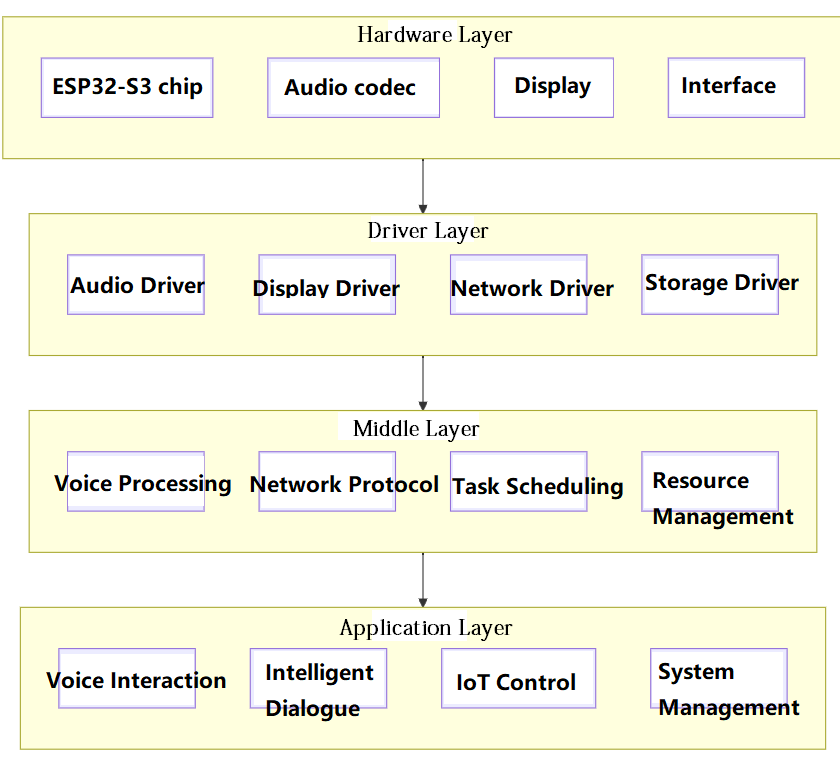
As can be seen from the above flowchart, the ESP32 – S3 is responsible for front – end data collection and preliminary processing (such as audio processing), then transmits the data to powerful AI models on the cloud or local servers for complex calculations, and finally returns the results to the device. This architecture fully utilizes the real – time control capability of the ESP32 and the powerful reasoning capability of cloud – based large models.
The working mechanism of the ESP – SR voice wake – up module is as follows: Espressif has officially launched the ESP – SR voice recognition framework, which includes components such as the WakeNet wake – word engine and MultiNet command – word recognition. Among them, the wake – word function works by continuously monitoring the audio stream when the device is in standby mode. Once a specific wake – word is detected, it triggers the device to enter the dialogue or recognition state. For example, we can set “XiaoZhi XiaoZhi” as the wake – word. When the ESP32 runs the WakeNet model, it continuously records audio from the microphone, then calculates features such as Mel – Frequency Cepstral Coefficients, and classifies these features through a neural network algorithm optimized for the ESP32 – S3. Once a trained key sequence is detected, WakeNet outputs a wake – up signal, putting the device into the voice interaction state. This local wake – up mechanism can maintain a high accuracy rate even in the presence of environmental noise. Official data shows that the recognition rate is not less than 80% in noisy environments. The ESP – SR provides some ready – to – use wake – word models by default, such as “Hi, ESP” or “Hi, Espressif”, and developers can also customize their own wake – word models. Its working process is as follows: The analog audio collected by the microphone undergoes front – end processing, such as noise reduction and gain adjustment, and is then sent to WakeNet for key frame detection. If no wake – word is detected, the device remains in standby mode; once a wake – word is detected, the device enters the subsequent voice recognition or dialogue process. At the same time, to save computing resources, the ESP32 usually pauses WakeNet after being woken up to free up the CPU for processing subsequent audio; after the dialogue is completed, WakeNet is re – enabled to monitor the next wake – word.
In simple terms, this project utilize the local voice wake – up function of the ESP32 – S3. When the device recognizes the wake – word “XiaoZhi”, it starts recording and sends the audio data to the cloud in a streaming manner. Then, it conducts real – time interaction of dialogue data with the large language model on the server via WebSocket. After the cloud returns a response in text form, the ESP32 can display the response on the screen or play it back via voice, thus completing a cycle of human – machine dialogue.
Hardware Preparation List
To build a voice – interactive robot, you need to prepare suitable hardware components and connect them correctly, as detailed below:
- Core Control Board: Choose an ESP32 – S3 development board (with PSRAM), which serves as the “brain” of the robot. The ESP32 – S3 series development boards are very suitable because they have an AI acceleration instruction set and high – speed PSRAM, which can support AI functions such as voice wake – up. Examples include the official ESP32 – S3 – DevKitC – 1 (WROVER module with 8MB PSRAM), as well as all – in – one voice development boards like theESP32 – S3 – Korvo series and ESP32 – S3 – BOX.These boards come with built – in microphone arrays, audio codecs, and other hardware, facilitating the development of voice applications.
- Microphone: Use a digital microphone(MEMS microphone)with an I2S interface, such as the INMP441 module. Digital microphones can directly transmit audio data to the ESP32, offering strong anti – interference capabilities and good sound quality. Avoid using the combination of an analog microphone and an ADC. The built – in ADC of the ESP32 has limited accuracy and is prone to noise, resulting in poor sound quality with the analog solution. Common I2S microphone modules include the INMP441 and ICS – 43434. These modules need to be connected to the I2S interface pins (WS, SCK, SD, etc.) of the ESP32 and also require a power supply connection.
- Speaker and Audio Amplifier (Optional):If you want the robot to “speak”, a small speaker (e.g., 4Ω 3W) is necessary. The ESP32 can output analog audio through its built – in DAC, but a power amplifier is required to drive the speaker. A commonly used option is an I2S digital power amplifier module (such as the MAX98357A), which receives I2S data and clock signals from the ESP32 and outputs power audio signals to drive the small speaker. If voice output is not needed temporarily, the speaker can be omitted initially, and the robot’s response text can be viewed later through the serial port log or the screen.
- Display Screen (OLED/LCD, Optional):It is used to display dialogue content or the robot’s expressions, enhancing the human – machine interaction experience. For beginners, a monochrome OLED with an I2C interface (e.g., 0.96 – inch 128×64 OLED) or a color LCD with an SPI interface (e.g., 1.3 – inch 240×240 TFT) is a good choice. These screens can display the user’s input, the robot’s response text, as well as icons and avatars to indicate the current state (such as listening, thinking, speaking, etc.). The screen is connected to the corresponding pins of the ESP32 via the I2C or SPI interface and also needs a power supply. Later, a graphics library (such as LVGL) or a driver library can be used to control the displayed content.
- Other Accessories:If using an independent development board and modules, you need to prepare a breadboard, connecting wires (for easy prototype building), a power cord, and a USB data cable. If you choose a highly integrated device like the ESP32 – S3 – BOX, components such as the screen, microphone, and speaker are already built – in, eliminating the need for additional connections.

Purchase Recommendations: If you want to reduce the trouble of hardware connection, it is a good idea to choose development kits like the ESP32 – S3 – BOX or ESP32 – S3 – Korvo. These kits integrate most of the hardware required for voice functions, allowing you to use the wake – word and voice functions right out of the box. However, these kits are relatively more expensive. For learning and prototyping purposes, using an ordinary ESP32 – S3 development board with an external microphone and screen offers better cost – effectiveness. When purchasing a microphone module, confirm that the pin definition is compatible with the ESP32 (usually connected to 3.3V, GND, WS, SCK, SD) and pay attention to parameters such as the microphone’s directivity and sensitivity to meet the application requirements. If high sound quality is required or an omnidirectional microphone is needed, array technology should be considered. For the speaker, a low – power speaker can meet general needs. If a higher volume is required, an active speaker or a higher – power amplifier can be used, but attention should be paid to the power supply. The choice of display screen depends on your needs and budget. Initially, an inexpensive 0.96 – inch OLED can be used for text display, and later you can upgrade to a color screen for displaying avatars or graphical interfaces.
In conclusion, during hardware assembly, you must connect the circuit correctly in accordance with the specifications of each module and ensure a stable power supply (the ESP32 development board is usually powered via USB, so ensure that the computer’s USB port or power adapter can provide sufficient current). After the hardware is connected, you can proceed with the software environment setup and code writing.
Software Environment Setup
1.Install the ESP - IDF Plugin
- Open the extension panel.
- Enter “IDF” in the search box and select “ESP – IDF” from the list.
- Click “Install”.
2.Import the Project Source Code from GitHub and Extract It to a Custom Directory (It is recommended to download version 2.1)
3.Open the Project in VSCode and Configure Compilation Information
- Configure the Serial Flasher Config and Partition Table.
- Configure the development board and LCD type.
- Configure the pins corresponding to the expansion board in config.h according to the previous schematic design.
4.Upload and Compile the Program
- idf.py fullclean # Delete the build directory, then click to compile and upload the code
5.Firmware Burning
- OpenESP – IDF 5.3 in PowerShell, find the path where the compiled build directory is stored, and modify the following code:
E:\ProgramFiles\Espressif\xiaozhi – esp32 – main – 1 (Modify the path to your custom one)
- Burn the generated esp32_xiaozi.binfirmware via PowerShell (Select the port and baud rate to compile the firmware in the relative path).
Flash Download Tool
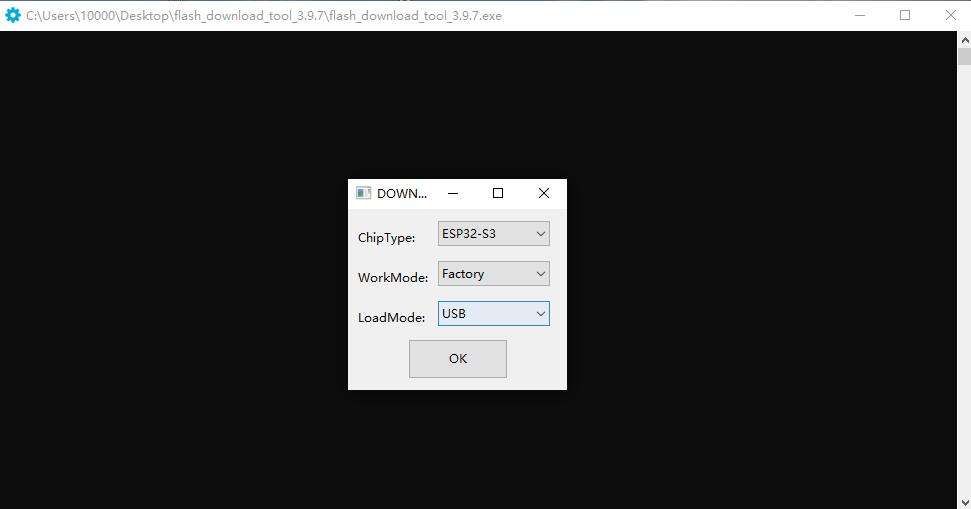
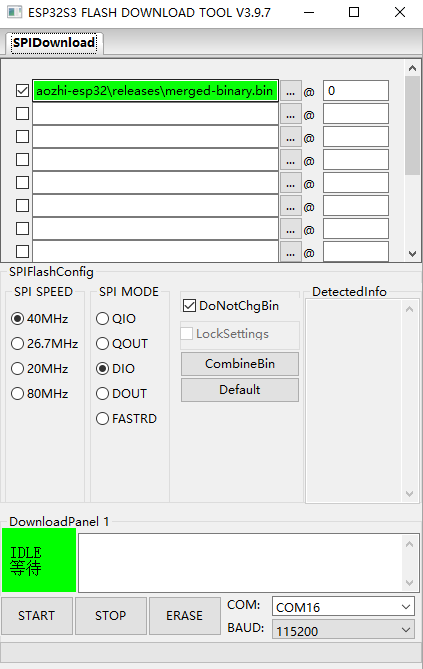
After opening, select the corresponding model based on your board.
2.Select the Output BIN File and Confirm the Start Address is 0x0
Select the SPI frequency and mode (40MHz and DIO), determine the specific connected serial port number (COM) and the upload baud rate (BAUD), erase the chip by clicking ERASE, and then start the upload by clicking START. (Upload errors may occur; try modifying the baud rate and port number.)
Key Points For Cloud Deployment
1.Core Step
1.Platform Selection and Preparation: Choose Baidu Smart Cloud, Alibaba Cloud, etc., or a self – built server with FastAPI. After registration, activate services such as ASR (Automatic Speech Recognition), TTS (Text – to – Speech), and large language model APIs, and apply for API keys.
2.Interface Adaptation and Communication Protocol Configuration: Use WebSocket (or HTTP/2) for real – time communication. Convert audio to 16kHz sampling rate, 16 – bit depth, mono PCM format. Encapsulate text data in JSON format, which should include key information such as device ID, request type (recording after wake – up/text interaction), and data content to prevent parsing errors on the cloud. In addition, configure interface permissions on the cloud: only allow requests from the device IP of “XiaoZhi” or those carrying valid API keys to access, preventing abuse of the interface. You can first test the interface locally using tools like Postman or Curl to confirm that ASR can correctly convert speech to text, the large language model can generate responses, and TTS can convert text to speech before connecting to the ESP32 – S3.
3.Large Language Model Adaptation and Response Optimization: If using the platform’s built – in large language model, you can directly call the existing interface, but pay attention to setting appropriate parameters: such as response length limit (to avoid responses that are too long for the ESP32 to handle) and temperature value (between 0.3 and 0.7 to balance the accuracy and flexibility of the answer); if building a custom large language model, deploy a lightweight version (such as the 7B quantized version of Llama 2) and enable the streaming output function. This way, the response is returned to the ESP32 in segments without waiting for the complete response to be generated, reducing the user’s waiting time. You can also implement a simple “local cache” optimization: pre – store responses to high – frequency questions (such as “What’s your name?” and “What’s the weather like today?”) on the cloud, and directly return them when the same request is received, eliminating the need for the large language model to recalculate and improving response speed.
4.Joint Debugging of Device End and Cloud: First, enable the ESP32 – S3 to connect to WiFi successfully (remember to handle the reconnection logic in the code to prevent failure to recover after network disconnection), and then implement the complete process of “wake – up → recording → audio upload → text reception → voice playback/display” through code. During joint debugging, focus on testing: whether the audio upload is complete (whether there is packet loss), whether the cloud parsing is accurate (whether there are typos in speech – to – text conversion), and whether the response return is timely (the delay is best controlled within 2 seconds). You can print key logs in the serial monitor of the ESP32 (such as “Connected to the cloud”, “Audio uploaded successfully”, “Received cloud response”) to facilitate troubleshooting. For example, if no response is received, first check if the WiFi is stable, then verify if the API key is correct, and finally confirm whether the data format meets the requirements of the cloud.
2.Key Details
- Security: TLS/SSL encryption is used for communication, andAPI keysare encrypted and stored.
- Network: Reconnect to WiFi, retry data, and set timeout.
- Resource:Voice selection in small volume format, text response control length, pay-as-you-go.
- Compatibility:Select cross-platform services to assign a unique ID to the device.
Optimization And Expansion Direction
1.Performance Optimization:
In terms of hardware, if you are not satisfied with the sound pickup effect of the microphone, you can replace it with a more sensitive one to improve the quality of voice collection; replace the speaker with a better – quality one to enhance the voice output effect. In terms of software, you can optimize the algorithms in the code, such as adopting a more efficient voice preprocessing algorithm to reduce the amount of data transmission, thereby reducing delay and improving the overall performance of the robot.
2.Function Expansion:
- Adding New Functions: You can add an image recognition module, such as connecting a camera, and use the combination of the ESP32 and cloud – based large language models to realize the recognition of surrounding environment images; you can also add a movement function to the robot, such as installing a motor driver module and wheels, enabling the robot to move within a certain range.
- Scenario Adaptation: For home scenarios, you can add the function of controlling smart home devices; for campus scenarios, you can set up functions such as course reminders and campus navigation to make the robot better adapt to different application scenarios.
3.Common Problem Solutions:
During the production process, you may encounter the problem of inaccurate voice recognition, which may be caused by excessive environmental noise or poor voice collection quality. This can be solved by adding noise reduction processing and optimizing the installation position of the microphone. If you encounter unstable network connections, you can check the WiFi signal strength, try switching network protocols, or add a network reconnection mechanism to solve the problem.
FAQS
The firmware burning fails with an upload error. What might be the reason and how to fix it?
Common reasons and solutions: ① Incorrect baud rate or port settings—reselect the correct COM port and baud rate (115200 is recommended); ② Loose hardware connection—check the USB connection between the ESP32 and the computer to ensure a secure fit; ③ Wrong firmware path—verify that the bin file path selected in the burning tool is correct; ④ Mismatched chip model—select the corresponding ESP32-S3 model in the burning tool.
Why is WebSocket recommended instead of HTTP for cloud deployment?
WebSocket supports real-time two-way communication, enabling streaming interaction of “recording while uploading, processing while responding” with lower latency, which is perfectly suited for voice dialogue scenarios. HTTP, on the other hand, is a one-way request-response model that requires waiting for the complete audio to be uploaded before processing, resulting in higher latency. Additionally, frequent connection establishment increases resource overhead. If using HTTP, HTTP/2 is recommended to reduce connection costs.
Can I omit the display or speaker? Can these components be added later?
Yes. Both the display and speaker are optional: without a display, the robot’s responses can be viewed via the serial port log; without a speaker, responses can be displayed as text only. They can be added at any time later—connect the display to the ESP32 via I2C/SPI interface, and the speaker via a power amplifier module such as MAX98357A. No modifications to the core code are needed, only configuration of the corresponding drivers is required.