

Blog
CH375B U-Disk Read Write Module Development Guide
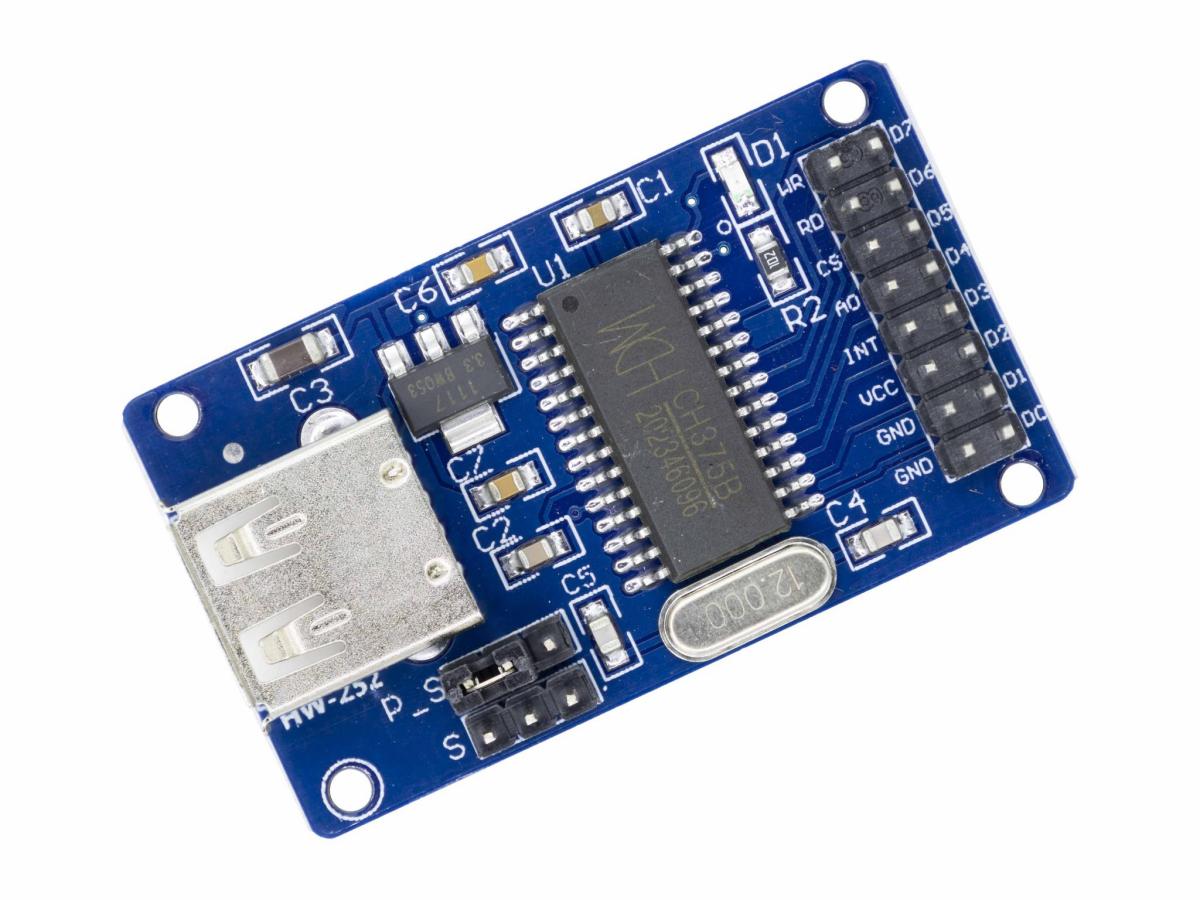
When working on single-chip microcomputer projects, do you often worry about “where to store data and how to transfer it”? The CH375B module is the “little expert” to solve this problem. Without complex operations, it enables controllers like 51 single-chip microcomputers and Arduino to easily read and write to USB disk.
This compact and powerful USB communication module can effortlessly enable data exchange between the 51 single-chip microcomputer and the USB disk, completely breaking through the traditional storage bottleneck of the single-chip microcomputer. This article will guide you in deeply analyzing the usage techniques of CH375B, from hardware connection to software programming. Step by step, it teaches you how to master the reading and writing of USB disks using it, easily achieving data storage and transmission. It is truly a “legendary add-on” for embedded development enthusiasts!

What is CH375B U-Disk Module?
The CH375B USB read-write module is a powerful and easy-to-use USB flash drive read-write module. It features an 8-bit data bus, read, write, chip select control lines, and interrupt output, enabling convenient connection to controllers. This module supports parallel and serial communication modes, and is equipped with a USB status indicator light for easy user debugging and monitoring. In addition, the module has a built-in voltage regulator chip and crystal oscillator, providing stable power supply and clock signals. Through reasonable design and programming, users can easily implement the read-write function of USB flash drives and apply it in various industrial fields.
Its core advantage lies in eliminating the need for a complex USB protocol stack. It can directly control the read and write operations of the USB drive through the serial port or parallel port of the single-chip microcontroller, significantly reducing the development difficulty. Additionally, the module itself features high integration and a compact size, making it highly suitable for use in embedded projects.
CH375B Working Principle
CH375B Schematic Diagram
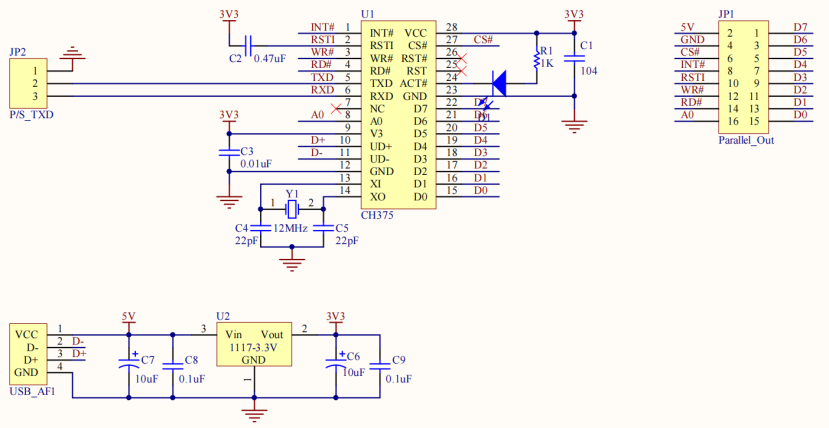
FUNCTIONAL BLOCK DIAGRAM

The core of the CH375B USB flash drive module is the CH375B chip. The entire working process revolves around four key aspects “hardware adaptation, mode configuration, protocol processing, and data interaction”, ultimately achieving efficient communication between the microcontroller and the USB flash drive. Its most convenient feature is that it has a built-in complete USB protocol stack, eliminating the need for us to manually write complex protocol codes, which greatly reduces the development difficulty.
CH375B core hardware and interface
The module features a flexible interface design, supporting both parallel and serial connection modes. The specific type is determined by the level of the TXD pin during the chip reset process. If the TXD is at low level during reset, the parallel mode is adopted. If it is at high level, the serial mode is used, without the need for additional jumper settings.
Parallel mode: If the pins of the microcontroller are abundant, choosing the parallel mode is the most convenient. It can directly connect to the system bus of the microcontroller through an 8-bit data bus and several control signal lines, and work together with other peripheral devices.
Serial mode: If the pins are insufficient or the wiring is simple, the serial mode is more suitable. Only the RXD, TXD, and INT three lines need to be connected. However, it should be noted that in the serial mode, the module can only control the USB drive as a “USB host”.
In addition, this module is equipped with a voltage stabilizing chip. Both 5V and 3.3V power supplies can be connected. There is also a 12MHz crystal oscillator, which will be converted into a 48MHz USB-specific clock to ensure stable communication. The status indicator on the board is also very practical. When a USB drive is inserted, the light turns on. When it is removed, the light goes off. During the debugging process, the connection status can be easily identified at a glance.
CH375B Initialization
After the module is powered on, it will first “reset”. This process takes approximately 18 to 40 milliseconds. During this time, the parallel or serial interface will be automatically selected. Then, we only need to send a command to the chip to configure it as “USB host mode”, and then it can control the USB drive.
After the configuration is completed, the module will continuously monitor the USB interface. If a USB drive is inserted or removed, it will send an “interrupt signal” through the INT pin to notify the microcontroller. We can also actively send commands to query the connection status. We can receive the reply within 2 microseconds.
Key operation | Command code |
Configure USB mode | SET_USB_MODE(15H) |
Check the connection | TEST_CONNECT(16H) |
USB flash drive initialization | DISK_INIT(51H) |
CH375B Core protocol
The module has a built-in USB Mass-Storage protocol stack, which simply means “all complex USB communication rules are implemented”. We don’t need to study the details of the protocol. To check the USB flash drive capacity, we can send the DISK_SIZE command. To read or write bytes, we can send the corresponding read or write commands. The remaining troublesome tasks such as data verification and transmission retry will be automatically handled by the chip.
CH375B Read and Write Process
Process steps | Data reading |
①Parameter configuration | Send DISK_READ (54H), and write the LBA address + number of sectors (tell the module “where to start reading and how many to read”). |
②Data transmission | An interrupt is triggered every 64 bytes. After reading the buffer, continue (the module notifies the microcontroller to fetch data every time it reads 64 bytes, and continues to read the next batch after fetching). |
③Complete feedback | Complete reading of all data, the interrupt returns a success status (when all data is read, a signal is sent to the microcontroller indicating “completed”). |
CH375B Practical guarantee mechanism
In addition to basic functions, the module has two very practical designs.
① It supports file-level operations. If you want to directly read and write files such as TXT and BIN, you only need to add a CH375 subroutine library and call simple commands like CH375FileOpen (to open a file) and CH375FileReadX (to read a file), without needing to parse the file system of the USB flash drive by yourself.
② It uses interrupt notification instead of “repeated query”. For key events such as USB flash drive connection and completion of data transmission, the module will actively send signals to the microcontroller, eliminating the need for the microcontroller to keep “inquiring”, thus saving resources.
CH375B Feature
- Low-speed and full-speed USB-HOST host interfaces, compatible with USB V2.0. The peripheral components only require crystals and capacitors.
- Low-speed and full-speed USB device interfaces, fully compatible with the CH372 chip, supporting dynamic switching between host and device modes.
- 64 bytes each for host endpoint input and output buffers, supporting 12Mbps full-speed USB devices and 1.5Mbps low-speed devices.
- Supports control transfer, bulk transfer, and interrupt transfer for USB devices.
- Automatically detects the connection and disconnection of USB devices, providing event notifications for device connection and disconnection.
- Built-in protocol processor for control transfers, simplifying common control transfers.
- Built-in firmware handling dedicated communication protocols for mass storage devices, supporting Bulk-Only transfer protocol and USB storage devices with SCSI, UFI, RBC or equivalent command sets (including USB hard drives/USB flash drives/USB disks/USB card readers).
- Enables microcontrollers to read and write files in USB storage devices through the USB disk file-level subroutine library.
- Parallel interface includes an 8-bit data bus and 4 control lines: read strobe, write strobe, chip select input, and interrupt output.
- Serial interface includes serial input, serial output, and interrupt output, supporting dynamic adjustment of communication baud rate.
- Supports 5V and 3.3V power supply voltages, and supports low-power mode.
- Adopts SOP-28 lead-free package, compatible with RoHS, providing a conversion board from SOP28 to DIP28, with pins basically compatible with the CH374 chip.
CH375B USB Flash Drive Module Feature
- CH375B is a general-purpose interface chip for the USB bus, featuring an 8-bit data bus, read, write, chip select control lines, and interrupt output, which can be easily connected to the system bus of controllers such as microcontroller/DSP/MCU/MPU. In USB host mode, CH375B also provides a serial communication mode, connecting to microcontroller/DSP/MCU/MPU through serial input, serial output, and interrupt output.
- 2×8 connector for easy connection to MCU
- Can work in parallel or serial mode according to jumper selection
- USB status indicator light
- Onboard 3.3V LDO 1117, providing a maximum current of 800mA
- 5V power supplied by the target board
- 12MHz crystal oscillator
CH375B Pin Function
Pin | Type | Description |
VCC | POWER | Positive power input port |
GND | POWER | Public ground |
INT | OUT | Interrupter request output after reset, active with low-level |
AO | IN | Address wire input to identify command and data port, with feeble pull-up resistance, A0=1, write order; A0=0, read/write data |
CS | IN | Active LOW CH375 chip select, With feeble pullup resistor |
RD | IN | Read Strobe Input, an active LOW input, with feeble pull-up resistor |
WR | IN | Write Strobe Input, an active LOW input, with feeble pull-up resistor |
D0 ~ D7 | Bi-directional tri-state | 8-bit bi-directional data bus, with pull-up resistor |
CH375B Parameter
IC Chip | CH375B |
LDO | 3.3V |
Power Supply | 5V |
Crystal | 12 MHz |
PCB Size (mm) | 48×28 |
PCB Colour | Blue |
CH375B VS CH372
Model | CH375B | CH372 |
Core function | Enable the microcontroller to read and write to the USB drive and operate USB devices. | Make the microcontroller recognized as a custom device by the computer. |
Data flow direction | Microcontroller → Control → USB drive (or other peripherals) | Computer ← Communication → Microcontroller (as a device) |
Typical application | Data recorder, offline downloader, advertisement machine update content | USB adapter cables (such as USB-to-serial cables), custom HID devices (such as keyboards, mice), and data acquisition cards (upload collected data to computers) |
Interface mode | Parallel bus、SPI | Parallel bus、SPI |
CH375B Application Scenario

- Data collection and recording
- Offline update of firmware or configuration parameters
- Portable data exchange and export
- As an expansion storage device
Relative Information
Purchase Link
FAQ
What's the difference in transmission speed between serial and parallel modes?
The serial mode is affected by the baud rate, generally reaching tens of Kbps. The parallel mode directly uses the data bus, with a speed of hundreds of Kbps. If there is a requirement for transmission speed (such as large-volume data collection), parallel mode should be chosen. For simple scenarios, serial mode is sufficient.
Can I manually check the USB flash drive status without using the interrupt signal?
Yes! You can send the TEST_CONNECT (16H) command every time you want to check, and it will return the “connected” or “not connected” status within 2 microseconds. This is suitable for simple small projects, though it consumes slightly more microcontroller resources compared to using interrupts.
What could be the reasons for the initialization failure prompt?
It’s most likely a problem with the USB drive. Try using a FAT32 formatted USB drive first. It could also be due to poor contact of the wiring, so pay special attention to checking the GND and INT pins. Additionally, if the module’s reset time is insufficient, it may cause errors. In the program, wait an extra 50 milliseconds before sending the initialization command.
What is the maximum size of the USB drive that can be read?
It supports FAT12/FAT16/FAT32 formats. Generally, USB drives of several tens of gigabytes or even hundreds of gigabytes are not a problem.