

Blog
Car Bluetooth 4.1 MP3 WAV Decoding Board Speaker Amplifier Audio Receiver Module
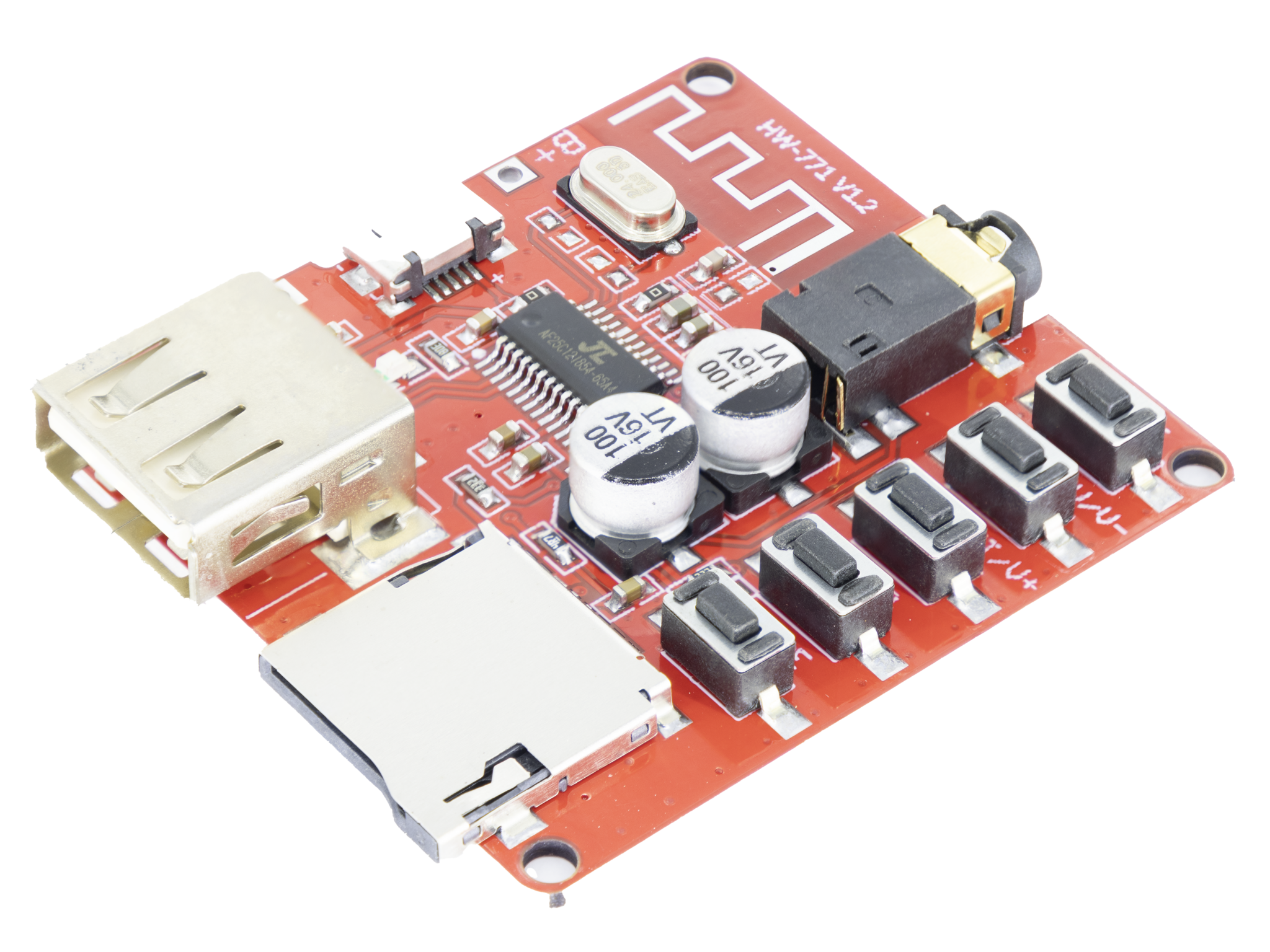
In the world of car electronics upgrades and portable audio devices, a common need is: “How can I make my traditional speakers or car stereo wireless, while also supporting multiple audio formats?” The Car Bluetooth 4.1 MP3/WAV Decoding Board (we’ll call it the “Bluetooth decoder board” from now on) is a core module designed to solve this problem. It combines Bluetooth wireless reception, audio decoding, and signal amplification into one unit. It can easily upgrade ordinary speakers into “wireless smart audio devices” and is widely used in car audio systems, home speaker modifications, and DIY audio projects. Today, we’ll break down this “audio connection tool” completely from the principle, function, usage method to the application scenario, so that you can easily grasp its core value.
What is 4.1 MP3 WAV Decoding Board?
The Car Audio 4.1 MP3 WAV Decoding Board is a compact audio module. It’s not just a single chip, but an integrated product module that combines Bluetooth wireless communication, audio decoding, and power amplification. Its core consists of three parts:
1. Bluetooth 4.1 communication chip: responsible for receiving wireless audio signals from devices like phones and tablets.
2. MP3/WAV decoding chip: converts digital audio files into analog audio signals.
3. Audio amplification circuit: boosts the power of the analog signal to drive speakers.
It also comes with peripheral components like a USB port, TF card slot, and audio input/output interfaces, offering a “plug-and-play” experience.

What are the advantages compared to ordinary Bluetooth receivers?
Its key advantages over standard Bluetooth receivers are more pronounced:
1. Multi-format Decoding Ability: It doesn’t just support audio signals via Bluetooth; it can also directly read MP3/WAV files (some advanced versions support FLAC lossless format) from a TF card or USB device, without needing an external device like a phone.
2. Adapted for Car Use: It has a built-in wide-voltage input circuit (12V/24V), suitable for a car’s 12V battery or a home 220V-to-12V power adapter. It also includes anti-interference design to avoid electromagnetic noise from the car’s electrical system affecting the audio signal.
3. Integrated Power Amplification: It has a built-in audio amplifier, with an output power typically ranging from 2x5W to 2x15W (depending on the model). It can directly drive 4Ω or 8Ω car speakers or small home speakers without needing an separate amplifier board.
4. Bluetooth 4.1 Technology Benefits: Compared to older Bluetooth versions like 3.0 or 2.1, Bluetooth 4.1 offers a longer range (up to 10 meters in open space), lower latency (audio delay <100ms, minimizing “lip-sync” issues), lower power consumption, and supports “multi-device memory” (can remember 3-5 paired devices for automatic reconnection).
How Does It “Wirelessly Play Sound”? — A Breakdown of the Core Principle
Many people wonder: how can such a small module wirelessly transmit music from a phone to speakers? In fact, the Bluetooth decoder board’s workflow involves four main steps, forming a complete chain from digital signal to sound:
1. Wireless Signal Reception: The Bluetooth 4.1 “Bridge”
Once your phone is paired with the decoder board via Bluetooth, the phone converts music files (like MP3s) into a digital audio stream and transmits it wirelessly to the board’s Bluetooth chip using the Bluetooth 4.1 protocol. Bluetooth 4.1 uses “frequency hopping” (changing frequency 1600 times per second) to avoid interference from other wireless signals (like car electronics or Wi-Fi), ensuring stable audio transmission without dropouts. Some models also support the “APT-X audio codec,” which reduces audio compression loss for better, near-lossless sound quality.
2. Audio Decoding: Converting from “Digital” to “Analog”
Whether it’s the digital audio stream received via Bluetooth or MP3/WAV files from a TF card/USB drive, the data needs to be “decoded” before the speaker can use it. This is because speakers only understand analog audio signals (current variations that physically move the speaker cone to create sound). This is where the board’s “audio decoding chip” comes in:
- For MP3 files: The decoding chip parses the compressed audio data and reconstructs it into the original digital audio signal.
- For WAV files: Since it’s uncompressed, the chip directly reads the PCM digital signal (resulting in higher fidelity sound).
- Finally, the decoding chip converts the digital signal into a weak analog audio signal (which is too weak to drive speakers directly).
3. Audio Amplification: “Boosting the Signal” to Drive Speakers
The decoded analog audio signal is very weak (usually only a few milliwatts) and cannot move the speaker cone. At this stage, the module’s “power amplification circuit” (made with amplifier chips like TDA2822, PAM8403, etc.) boosts the signal power to a “Watt-level” output (like 2x10W), while keeping the signal clear and undistorted. This amplified current signal is then sent to the speakers via the “audio output interface,” making the speakers produce clear sound.
4. Auxiliary Functions: Adapting to Various Needs
Besides the core “receive-decode-amplify” chain, the module includes other helpful circuits:
- Wide-Voltage Input Protection: A voltage regulator chip stabilizes the 12V/24V input voltage to 5V for the Bluetooth and decoding chips to use. It also includes over-voltage and over-current protection to prevent damage from voltage spikes in the car.
- ButtonControl: Physical buttons for “Previous/Next Track,” “Volume +/-,” and “Play/Pause” allow direct control on the module itself.
- Status Indicator: An LED light shows Bluetooth pairing status (blinking = waiting to pair, solid = connected) and playback status (slow blinking = playing), making it easy to see what the module is doing.
4.1 MP3 WAV Decoding Board Interface Specifications
| Interface << | Description |
|---|---|
| Power Interface | Standard Micro USB port for 5V power input. |
| 3.7-5V Pads | Soldering pads for external 3.7V to 5V power input (for custom installations). |
| USB Port | Supports playing MP3/WAV/APE files from USB drives. Requires FAT16/FAT32 format. |
| TF Card Slot | Supports playing MP3/WAV/APE files from TF (MicroSD) cards. Requires FAT16/FAT32 format. |
| LED Indicator | Bluetooth mode: Blue light solid. Music playing: Blue light blinking. |
| 3.5mm Stereo Output | Standard 3.5mm jack for stereo audio output. Can connect to headphones, amplifiers, etc. |
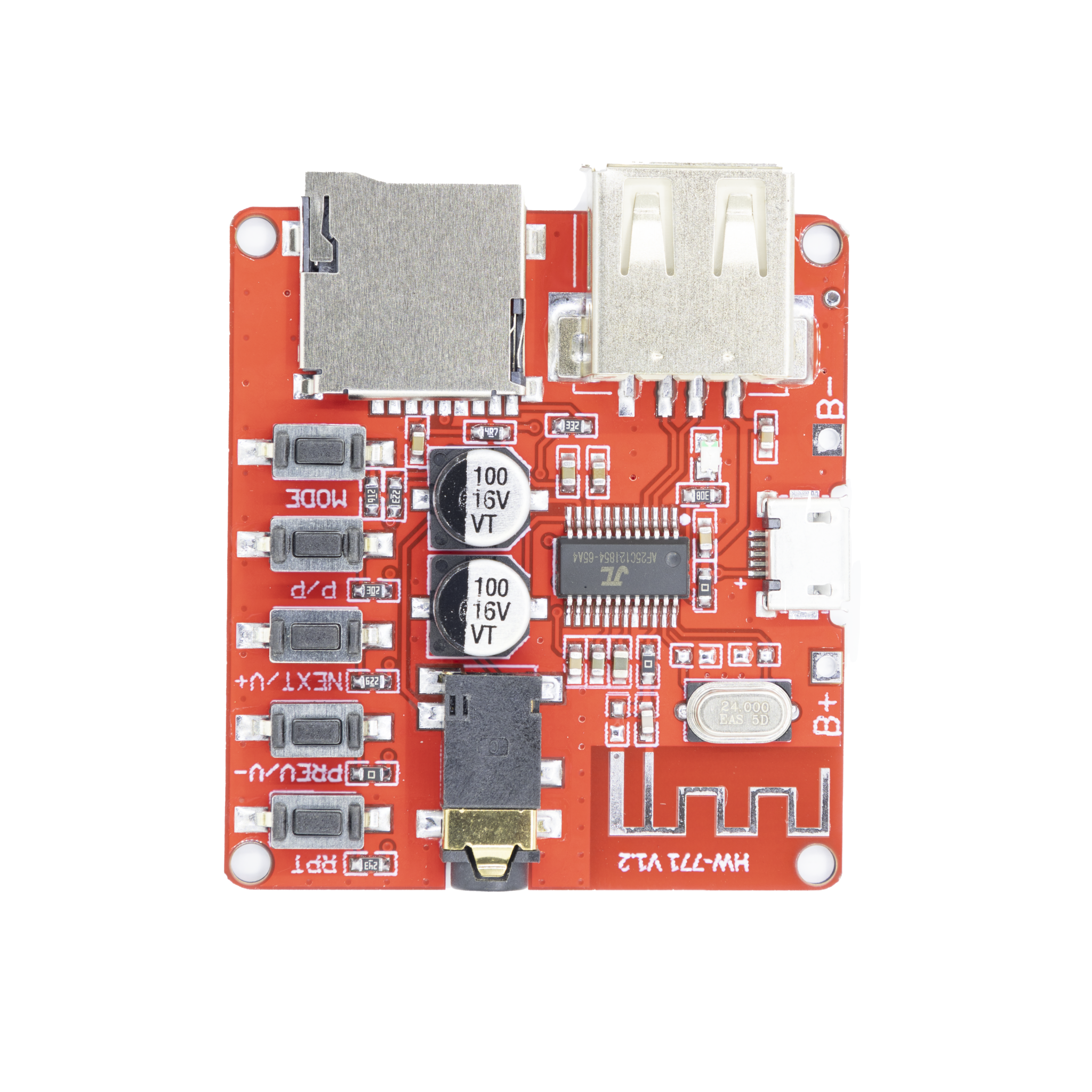
4.1 MP3 WAV Decoding Board Buttons and Their Functions
| BUTTON | FUNCTION DESCRIPTION |
|---|---|
| RPT | Short press to switch between single track and loop play. |
| PREV/V- | Short press to play the previous track; long press to decrease volume. |
| NEXT/V+ | Short press to play the next track; long press to increase volume. |
| P/P | Short press to play/pause. |
| MODE | Short press to switch among TF card, U disk, and Bluetooth modes. |
How to Use a Bluetooth Decoder Board? — Wiring and Debugging Guide
Our Bluetooth decoder board is extremely easy to use. Even if you are a new to audio DIY, you can complete the wiring in 5 minutes. We take “Car scene: Connect the module to the car speaker” as an example to explain the specific operation steps:
1. First, identify the main interfaces on the module(using a common model as an example):
While layouts vary slightly by brand, the core interfaces are generally the same:
- Power Interface: VIN(Positive, connect to car battery positive or 12V adapter positive) and GND(Negative, connect to battery negative or power supply negative).
- Audio Output Interface: LEFT(Left channel output, to positive terminal of left speaker), RIGHT(Right channel output, to positive terminal of right speaker), SPK GND(Speaker common ground, to the negative terminals of both speakers).
- Data Interfaces: TF Card Slot, USB Port.
- Auxiliary Interfaces: AUX IN(Line-in input for devices like CD players), KEY(Button interfacefor external buttons).
2. Connection Steps (Important! Follow this sequence for safety):
- Connect Power: Connect the car battery’s positive terminal (or 12V adapter positive) to the module’s VIN, and the negative terminal to GND.
Warning: Never reverse positive and negative, as this will instantly destroy the module.
- Connect Speakers: Connect the left car speaker’s positive wire to LEFT, the right speaker’s positive wire to RIGHT, and connect the negative wires from both speakers to SPK GND.
Test Functionality:
- Bluetooth Pairing: After powering on, the module’s LED will blink (waiting to pair). On your phone, search for Bluetooth devices and select the module’s name (often “BT-AUDIO” or “CAR-BT”). Once connected, the LED will stay solid.
- Play Music: Play music on your phone; sound should come through the speakers via the module. If a TF card is inserted, the module will usually prioritize playing files from it automatically.
- Button Check: Use the module’s volume and track buttons to confirm they work correctly.
3. Important Notes (Avoid common pitfalls):
- Power Match: For car use, you must use 12V input (or a 12V/24V wide-voltage module for some trucks). Never connect 220V home power directly; always use an adapter.
- Speaker Impedance Match: Match the module’s output impedance (usually 4Ω or 8Ω) with your speakers. Using speakers with too low impedance (like 2Ω) can overload and damage the amplifier chip.
- Interference Handling: In a car, install the module away from sources of strong electromagnetic interference (like ignition coils). If you hear a “hissing” noise, try adding a “ferrite bead filter” on the power line.
- TF Card/USB Drive Requirements: Use cards/drives of 32GB capacity or less (some modules don’t support larger sizes), formatted as FAT32. Keep audio files in the root directory for best compatibility.
After discussing the in-car scenario, we'll also provide a typical test example to demonstrate the operation process
Choosing the Right Model and Avoiding Pitfalls: How to Select a Reliable Bluetooth Decoder Board?
Bluetooth decoder boards on the market range from $5 to $15, with varying quality. Poor-quality modules may suffer from issues like frequent Bluetooth disconnections, audio distortion, and excessive heat generation. When purchasing, keep an eye on these four key points:
1. Check Core Chip Models (Determines performance):
- Bluetooth Chip: Prioritize CSR8675 and BK3231 (supporting APT-X encoding for superior sound quality), followed by BK3431 for its cost-effective performance and stable basic functions. Avoid unbranded ‘white-label’ chips, which have short transmission ranges and are prone to disconnection.
- Decoder Chip: Basic models support MP3/WAV. For lossless audio, look for chips supporting FLAC (like VS1053).
- Amplifier Chip: Choose power output based on your speakers. PAM8403 is good for small speakers (~2x5W), TDA7377 for slightly larger ones (~2x15W). Avoid modules with exaggerated power ratings.
2. Check Power and Protection Design:
- Prioritize the“12V/24V wide-voltage input” module (suitable for both automotive and home use) over those supporting only 5V input, which require an additional voltage stabilizer circuit and are more troublesome.
- Check for Over-Voltage Protection (OVP) and Over-Current Protection (OCP) to safeguard against power surges.
- Look for screw terminals for power connections instead of plug-in types, as they are more secure, especially in a car.
3. Consider Actual Sound Quality and Stability:
- Sound Test: Listen for static or distortion, especially at high volume.
- Bluetooth Stability: Test if the connection stays stable when your phone is in your pocket or trunk (good modules should work within 10 meters without obstacles).
- Delay Test: Check for noticeable audio delay when watching videos; delay under 100ms is good for navigation prompts.
4. Look for Additional Features (Improves experience):
- AUX Input: Essential if you also want to connect a CD player or other audio source.
- Memory Function: A good module remembers the last played track and position after power is cycled.
- Remote Control: Some modules support infrared remotes for convenient operation from a distance.
Summary
The Car Bluetooth 4.1 MP3/WAV Decoding Board is undoubtedly a cost-effective choice for audio upgrades. For around $5, it solves three key needs: making traditional audio systems wireless, enabling multi-format playback, and adapting to car environments. It’s easy to use, has wide applications, and is especially suitable for upgrading older cars or for DIY audio projects.
For regular users and DIY enthusiasts, the Bluetooth decoder board is not just a practical tool—it’s a perfect way to understand how audio signals flow. With it, you can clearly see the complete process: digital signal → wireless transmission → analog amplification. Whether you want to breathe new life into your old home speakers or add Bluetooth functionality to your car audio system, this module is a must-try. It’ll give you a hassle-free wireless music experience you’ll love!