

blog

DHT22 (AM2302) Sensor: Complete Guide from Basics to Arduino Tutorial
AM2302 TITLE

1.Add Your Heading Text Here

DHT22是一款温湿度组合传感器模块(DAM2302),采集温湿度数据并通过数字信号传输数据的功能。它采用1-Wire传输数据交互方式,只需连接VCC、GND、SDA串口即可使用。它精度高、响应速度快、价格轻、体积小、功耗低。

AM2302 1BY1

2.DHT22 Application Principle

DHT22 Operating Principle

When using the DHT22 sensor and 5V voltage, an external 5.1K pull-up resistor needs to be connected to maintain the circuit at a high level. The DHT22 uses the 1-Wire communication and can be used with a microcontroller for data transmission and interaction. When transmitting data, the DHT22 sends 40-bit data. In the application, the measurement frequency should be at least 2 seconds or more. Otherwise, data errors may occur. When sending data, it generally sends the data from the previous measurement. Multiple repeated transmissions of data are usually required to achieve the function of precise and rapid measurement of temperature and humidity.

3.What does a DHT22 sensor do?

The DHT22 is mainly used for measuring temperature and humidity. It has high measurement accuracy, with humidity accuracy within ±3% RH and temperature accuracy within ±0.5℃. It has a fast response speed and can provide real-time data feedback. It adopts the 1-Wire protocol.

4.What is the purpose of the DHT sensor?

The DHT is mainly applied in scenarios such as rural agriculture, industrial production, and daily life that require environmental monitoring or smart home applications. For example, in agriculture, it is used to monitor temperature and humidity to ensure that plants grow in an optimal environment. In smart homes, it is used to detect temperature and humidity so that air conditioners can adjust more effectively.

5.Types of Temperature and Humidity Sensors

There are many common temperature and humidity sensors available on the market, which can be roughly classified into the following models: DHT, SHT, and BME280. Compared to others, DHT has a lower cost, good accuracy, and higher versatility, making it suitable for use in consumer electronic products. SHT has higher accuracy and stronger anti-interference ability. It is more suitable for high-precision fields such as industrial automation. The BME series has more measurement parameters and a longer lifespan. It is suitable for use in environments such as agriculture that require long-term and multi-parameter monitoring.

6.Which is better:DHT11,DHT22 or DS18B20?

In the DHT series, the DHT11 and DHT22 are more commonly used. The DHT22 is an upgraded version of the DHT11, and its various performance parameters are superior to DHT11. However, the price of the DHT22 is slightly higher than DHT11. In terms of temperature measurement, the DS18B20 is also widely used. Here is a detailed comparison between them:

ParameterDHT11DHT22DS18B20
Temp Range0-50°C (±2°C)-40-80°C (±0.5°C)-55-125°C (±0.5°C)
Humidity Range20-90% (±5%)0-100% (±2%)N/A
Resolution1°C, 1% RH0.1°C, 0.1% RH0.0625°C
Speed1s2s0.75s
InterfaceSingle-wireSingle-wire1-Wire
Best forBasic monitoringPrecise monitoringExtreme temps

7.What are the pros and cons of DHT22?

The advantages of the DHT22 lie in its wide measurement range, high measurement accuracy, fast response speed. Additionally, as a composite sensor, it can measure both temperature and humidity simultaneously. Compared with other industrial-grade temperature and humidity sensors, it is more affordable.

The disadvantage of the DHT22 is that its sampling frequency is not high. It requires two seconds for sampling. If the frequency is too high or too low, it will affect the output data. Moreover, it is not suitable for extremely harsh environments. If you only need to measure one parameter, there are better options available.

8.Specification Parameter Table

ParameterSpecification ValueRemarks
ModelDHT22 (AM2302)Digital temperature & humidity sensor
Dimensions (L×W)15.4mm × 25.3mmCompact package size
Operating Voltage3.3V ~ 5.5VWorks at 3.3V, more stable at 5V
Temperature Range-40℃ ~ 80℃Suitable for most scenarios
Temperature Accuracy±0.5℃ (at 25℃)High precision
Humidity Range0% ~ 99.9% RHFull range coverage
Humidity Accuracy±2% RH (at 25℃)Suitable for most environmental monitoring
Communication InterfaceSingle-wire (1-Wire)Requires only 1 digital pin

9.DHT22 PINOUT

8e6c80a284bb0d23ba024d50674e0c0

①:VCC ②:DATA(SDA) ③:NC ④:GND

 VCC: This is used to provide power to the circuit. When connected to a 5V power source, a 5.1k ohm pull-up resistor is required to maintain a high level.

DATA: This is used for data transmission and reception between the AM2302 and the microcontroller. It uses 1-Wire transmission protocol and can be used to adjust and control the AM2302 module.

NC: This pin has no application function.

GND: This pin is grounded and is used to stabilize the circuit and reduce interference..

10.An Easy Tutorial of Using in Arduino

Use the serial port monitor to observe the data version:

First, connect the VCC interface of the DHT22 to the 5V interface of Arduino. Connect the GND interface to the corresponding GND interface. Connect the SDA interface to the SDA pin of Arduino

AM2302 Arduino-1

After installing the DHT library in Arduino IDE, proceed with code uploading.

DHT22 IDE

Example Code:

				
					#include <dht.h>
#define dataPin 8 // Defines pin number to which the sensor is connected
dht DHT; // Creats a DHT object
 
void setup() 
{
Serial.begin(9600);
}
void loop() 
{
//Uncomment whatever type you're using!
int readData = DHT.read22(dataPin); // DHT22/AM2302
//int readData = DHT.read11(dataPin); // DHT11
 
float t = DHT.temperature; // Gets the values of the temperature
float h = DHT.humidity; // Gets the values of the humidity
 
// Printing the results on the serial monitor
Serial.print("Temperature = ");
Serial.print(t);
Serial.print(" ");
Serial.print((char)176);//shows degrees character
Serial.print("C | ");
Serial.print((t * 9.0) / 5.0 + 32.0);//print the temperature in Fahrenheit
Serial.print(" ");
Serial.print((char)176);//shows degrees character
Serial.println("F ");
Serial.print("Humidity = ");
Serial.print(h);
Serial.println(" % ");
Serial.println("");
 
delay(2000); // Delays 2 secods


Computational results:

AM2302 CODE SHOW

Viewing data version using OLED:

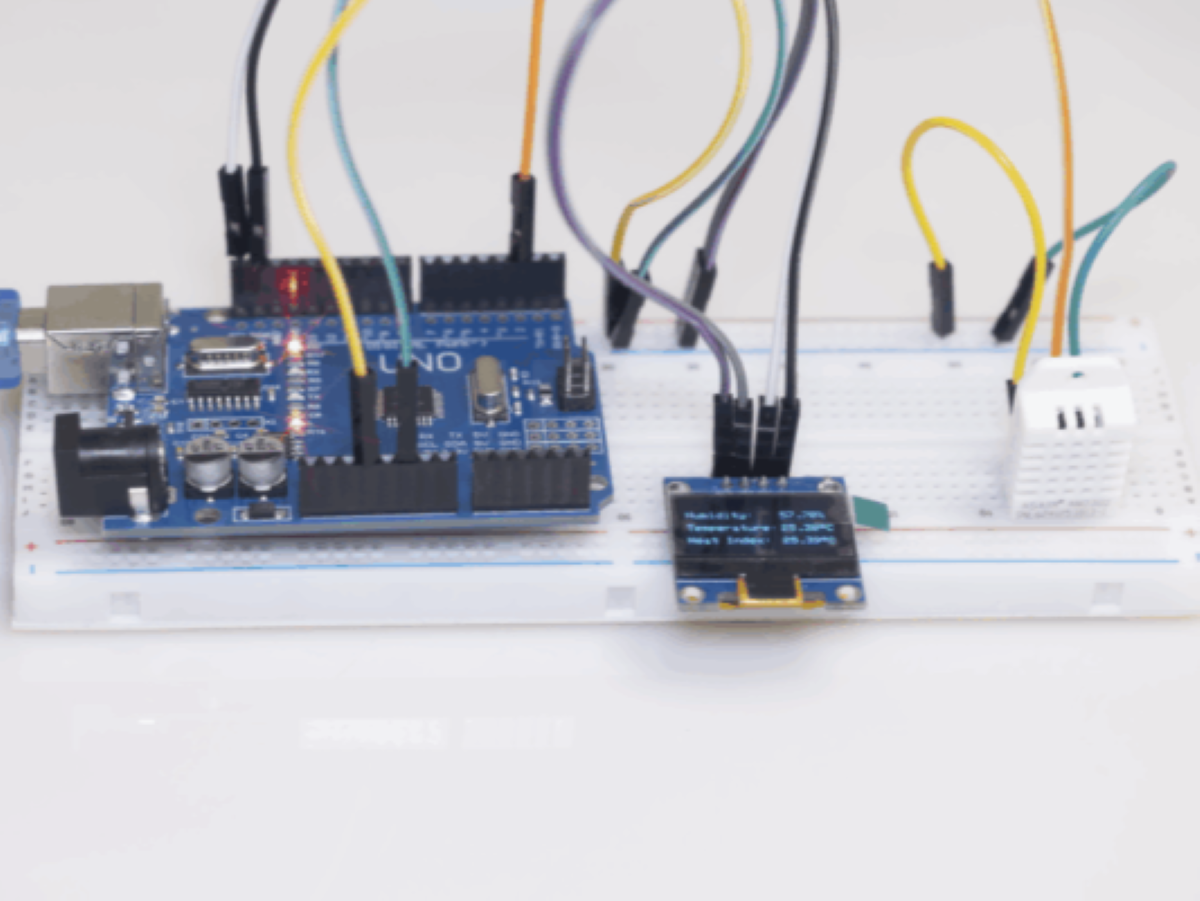
When using OLED display, it needs to be connected to the SDA and SCL interfaces. On the Arduino, there is only one corresponding interface, so it can only be connected to a fixed position. The DHT22 still needs to be connected to the corresponding pins as before.

 The specific connection reference diagram is as follows:

DHT22 Arduino OLED

 Software part: Open Arduino IDE, add the DHT,Adafruit_GFX, Adafruit_SSD1306 library in the library manager, then input the code and upload it to Arduino.

DHT22 OLED-1 DHT22 OLED-2

Here is the demonstration code:

				
					#include <SPI.h>
#include <Wire.h>
#include <Adafruit_GFX.h>
#include <Adafruit_SSD1306.h>
#include "DHT.h"
 
#define SCREEN_WIDTH 128 // OLED display width, in pixels
#define SCREEN_HEIGHT 64 // OLED display height, in pixels
 
// Declaration for an SSD1306 display connected to I2C (SDA, SCL pins)
#define OLED_RESET 4 // Reset pin # (or -1 if sharing Arduino reset pin)
Adafruit_SSD1306 display(SCREEN_WIDTH, SCREEN_HEIGHT, &Wire, OLED_RESET);
 
#define DHTPIN 2
#define DHTTYPE DHT22 // DHT 22 (AM2302), AM2321
DHT dht(DHTPIN, DHTTYPE);
 
#define PIEZO 8
 
#define ALARM 1000
 
int Sound[] = {ALARM, ALARM};
int SoundNoteDurations[] = {4, 4};
 
#define playSound() playMelody(Sound, SoundNoteDurations, 2)
 
char inChar;
String inString;
 
void setup() {
 
if (!display.begin(SSD1306_SWITCHCAPVCC, 0x3C)) {
Serial.println(F("SSD1306 allocation failed"));
for (;;); // Don't proceed, loop forever
}
display.clearDisplay();
dht.begin();
 
}
 
void loop() {
 
// Wait a few seconds between measurements.
delay(2000);
 
// Reading temperature or humidity takes about 250 milliseconds!
// Sensor readings may also be up to 2 seconds 'old' (its a very slow sensor)
float h = dht.readHumidity();
// Read temperature as Celsius (the default)
float t = dht.readTemperature();
// Read temperature as Fahrenheit (isFahrenheit = true)
float f = dht.readTemperature(true);
 
// Check if any reads failed and exit early (to try again).
if (isnan(h) || isnan(t) || isnan(f)) {
Serial.println(F("Failed to read from DHT sensor!"));
return;
}
 
// Compute heat index in Fahrenheit (the default)
float hif = dht.computeHeatIndex(f, h);
// Compute heat index in Celsius (isFahreheit = false)
float hic = dht.computeHeatIndex(t, h, false);
 
if (hic >= 41) {
displayOled();
playSound();
}
else {
displayOled();
noTone(PIEZO);
}


}
 
void displayOled() {
 
// Read humidity
float h = dht.readHumidity();
// Read temperature as Celsius (the default)
float t = dht.readTemperature();
// Read temperature as Fahrenheit (isFahrenheit = true)
float f = dht.readTemperature(true);
// Compute heat index in Fahrenheit (the default)
float hif = dht.computeHeatIndex(f, h);
// Compute heat index in Celsius (isFahreheit = false)
float hic = dht.computeHeatIndex(t, h, false);
 
display.clearDisplay();
display.setTextColor(WHITE);
display.setTextSize(1);
display.setCursor(5, 15);
display.print("Humidity:");
display.setCursor(80, 15);
display.print(h);
display.print("%");
display.setCursor(5, 30);
display.print("Temperature:");
display.setCursor(80, 30);
display.print(t);
display.print((char)247); // degree symbol
display.print("C");
display.setCursor(5, 45);
display.print("Heat Index:");
display.setCursor(80, 45);
display.print(hic);
display.print((char)247); // degree symbol
display.print("C");
display.display();
 
}
 
void playMelody(int *melody, int *noteDurations, int notesLength)
{
pinMode(PIEZO, OUTPUT);
 
for (int thisNote = 0; thisNote < notesLength; thisNote++) {
int noteDuration = 1000 / noteDurations[thisNote];
tone(PIEZO, melody[thisNote], noteDuration);
int pauseBetweenNotes = noteDuration * 1.30;
delay(pauseBetweenNotes);
noTone(PIEZO);
}
}


Lorem ipsum dolor sit amet, consectetur adipiscing elit. Ut elit tellus, luctus nec ullamcorper mattis, pulvinar dapibus leo.

DHT22 Arduino OLED SHOW

The demonstration video is as follows:

FAQ:

1.Is AM2302 the same as DHT22?

Yes, AM2302 and DHT22 are the same thing, just with different packages. DHT22 is usually in SMD packaging, while AM2302 is typically in a single-column surface-mount type packaging. There is no difference in their application functions in the circuit.

2.Which DHT sensor is best?

Considering factors such as price and application scope, the DHT22 is relatively inexpensive. It has a wide measurement range and high accuracy, and is suitable for most DIY enthusiasts to use in the electronic field.

3.Does DHT22 need a resistor?

Generally speaking, when using a 5V voltage with DHT22, a 5.1K pull-up resistor is required to keep DHT22 in a normal high level state. The reason is that DHT22 uses 1-Wire communication protocol and its pins are open-drain outputs. Commonly, it cannot actively pull up the voltage and requires a pull-up resistor to keep VCC at the corresponding voltage.

Leave a Reply

Your email address will not be published. Required fields are marked *