

Blog
DY-SV5W Voice Playback Module: Serial Music Control
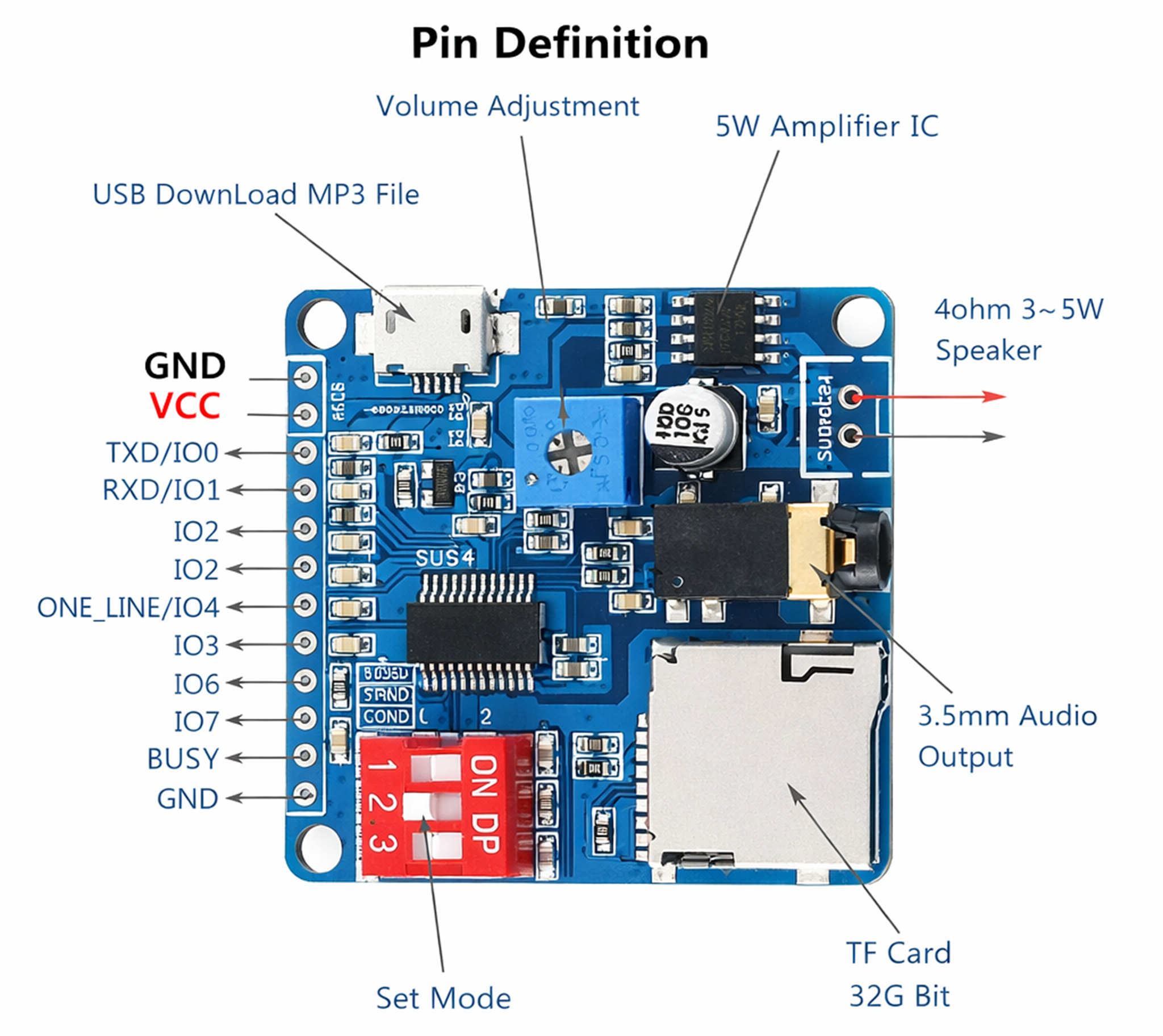
Hardware Introduction
UART Configuration
| Configuration Pin | CON3 | CON2 | CON1 |
| Logic Level Setting | 1 | 0 | 0 |
Pin Assignment
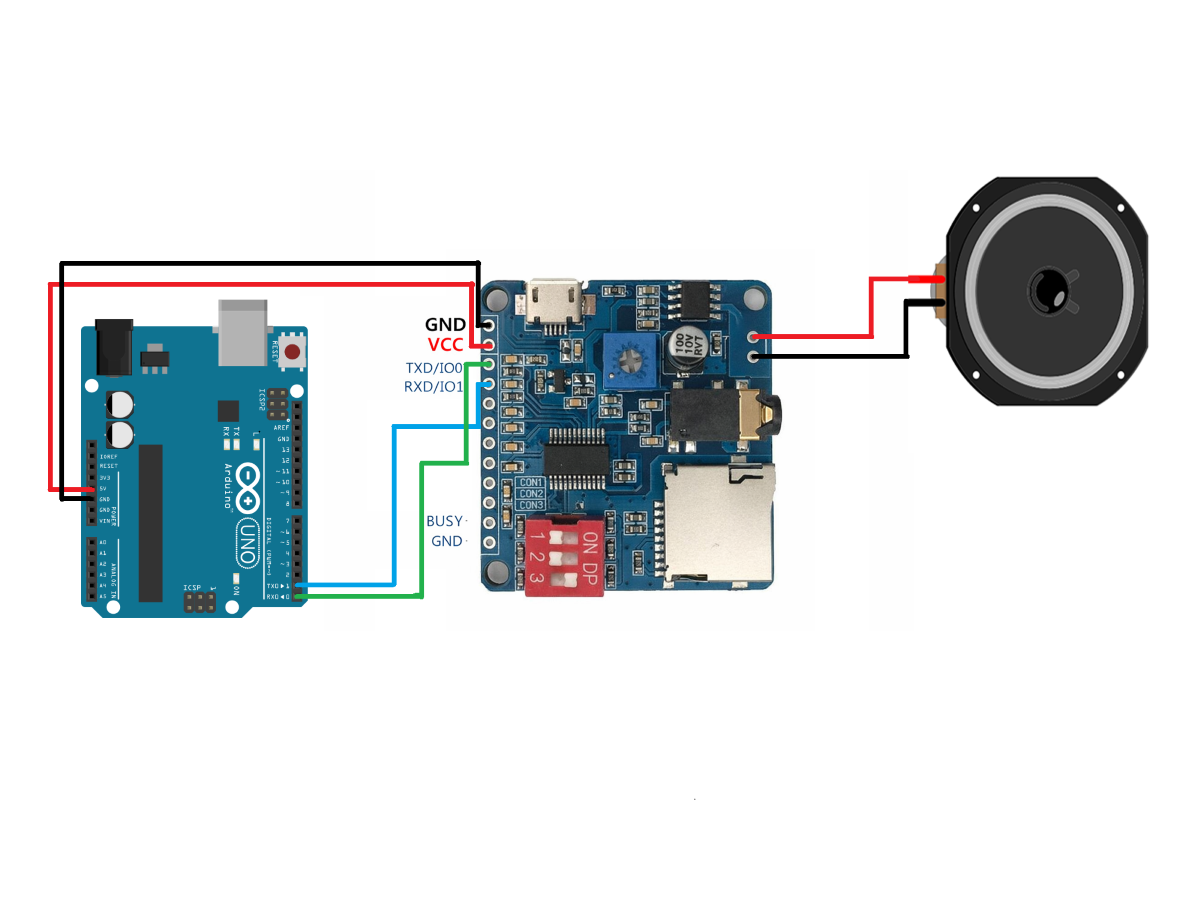
| 5V Power Negative | Connect to 5V power negative (GND) |
| 5V Power Positive | Connect to 5V power positive |
| TXD / IO0 | In UART control mode, this is the TX pin. Connect to the RX pin of the controller (MCU). |
| RXD / IO1 | In UART control mode, this is the RX pin. Connect to the TX pin of the controller (MCU). |
| BUSY | Outputs LOW level (0V) while playing, and HIGH level (3.3V) after playback finishes. |
| GND | Ground reference (connect to controller GND) |
Hardware Connection

					#include <SoftwareSerial.h>


// SoftwareSerial(RX, TX)
SoftwareSerial VOICE(0, 1);   // D10 <- TXD , D11 -> RXD(RXD串1K)


uint8_t calcChecksum(const uint8_t *buf, uint8_t len) {
  uint16_t sum = 0;
  for (uint8_t i = 0; i < len - 1; i++) {
    sum += buf[i];
  }
  return (uint8_t)(sum & 0xFF);
}

void sendCmd(uint8_t *buf, uint8_t len) {
  buf[len - 1] = calcChecksum(buf, len);
  VOICE.write(buf, len);
}


uint8_t CMD_PLAY[4]   = {0xAA, 0x02, 0x00, 0x00};

uint8_t CMD_STOP[4]   = {0xAA, 0x10, 0x00, 0x00};

uint8_t CMD_QUERY[4]  = {0xAA, 0x01, 0x00, 0x00};


uint8_t CMD_LOOP_ONE[5]  = {0xAA, 0x18, 0x01, 0x01, 0x00};
uint8_t CMD_LOOP_STOP[5] = {0xAA, 0x18, 0x01, 0x02, 0x00};


void setVolume(uint8_t vol) {
  if (vol > 30) vol = 30;
  uint8_t buf[5] = {0xAA, 0x13, 0x01, vol, 0x00};
  sendCmd(buf, 5);
}

void playTrack(uint16_t track) {
  uint8_t buf[6] = {
    0xAA, 0x07, 0x02,
    (uint8_t)(track >> 8),
    (uint8_t)(track & 0xFF),
    0x00
  };
  sendCmd(buf, 6);
}


// disk: 0=USB 1=SD 2=FLASH
void insertTrack(uint8_t disk, uint16_t track) {
  uint8_t buf[7] = {
    0xAA, 0x16, 0x03,
    disk,
    (uint8_t)(track >> 8),
    (uint8_t)(track & 0xFF),
    0x00
  };
  sendCmd(buf, 7);
}

void playResume() { sendCmd(CMD_PLAY, 4); }
void stopPlay()   { sendCmd(CMD_STOP, 4); }
void queryState() { sendCmd(CMD_QUERY, 4); }

/* ================= millis  ================= */
unsigned long lastMillis = 0;

bool everyMillis(unsigned long interval) {
  if (millis() - lastMillis >= interval) {
    lastMillis = millis();
    return true;
  }
  return false;
}


void setup() {
  Serial.begin(9600);
  VOICE.begin(9600);

  delay(300);

  setVolume(30);            //  30
  delay(50);

  sendCmd(CMD_LOOP_ONE, 5); //
  delay(50);

  playTrack(1);
}


void loop() {

  if (everyMillis(5000)) {
    insertTrack(1, 3);   //
  }
}
Communication Format
Serial Communication Protocol
Communication Mode: Full-duplex serial communication.
Parameters: Baud Rate: 9600, Data Bits: 8, Stop Bits: 1, Parity: None (N).
Frame Format:
Start Code – Command Type – Data Length (n) – Data 1 … Data n – Checksum (SM)
Field Descriptions:
- Start Code: Fixed at 0xAA.
- Command Type: Used to distinguish between different command types.
- Data Length: The number of bytes in the data payload.
- Data: The payload data. When the data length is 1, it indicates there is no data payload, only the command byte.
- Checksum: The lower 8 bits of the sum of all preceding bytes, from the Start Code through the last data byte.
- Data Format: Data is transmitted in Big-Endian format, with the high-order byte sent first, followed by the low-order byte.
Communication Mechanism
- Slave Mode Operation: The module operates as a slave. On power-up, it defaults to a standby state, and all playback operations are controlled by the master device.
- Communication Initiation: The slave will not initiate communication. All communication is initiated by the master.
- Logic Level: The serial port operates at 3.3V TTL logic. If the host system uses 5V logic, a 1kΩ resistor must be placed in series.
- Data Format: Unless otherwise specified, all data in this protocol is represented in hexadecimal format.
Protocol Specification
Data Definitions for Chip Feedback and Recognized Commands
- Playback Status Definition
The system is in a stopped state upon power-up.
00: Stop
01: Play
02: Pause
- Storage Source Definition
The system enters a stopped state after switching the storage source.
00: USB
01: SD Card
02: FLASH
FF: NO_DEVICE
- Volume Definition
The volume range is from 0 to 30 (31 levels total). The default volume on power-up is level 20.
- Playback Mode Definition
The default mode on power-up is “Single Track – Stop”.
00: All Tracks Loop: Plays all tracks on the current storage source sequentially and repeats.
01: Single Track Loop: Continuously repeats the current track.
02: Single Track – Stop: Plays the current track once and then stops.
03: All Tracks Random: Randomly plays tracks from the current storage source.
04: Folder Loop: Plays all tracks in the current folder sequentially and repeats. Subfolders are not included.
05: Folder Random: Randomly plays tracks within the current folder. Subfolders are not included.
06: Folder Sequential: Plays all tracks in the current folder sequentially once and then stops. Subfolders are not included.
07: All Tracks Sequential: Plays all tracks on the current storage source sequentially once and then stops.
- EQ Definition
The default EQ on power-up is NORMAL (00).
00: NORMAL
01: POP
02: ROCK
03: JAZZ
04: CLASSIC
- DAC Output Channel Definition
The default DAC output channel on power-up is the MP3 Playback Channel (00).
00: MP3 Playback Channel: The DAC outputs audio from the music player.
01: AUX Channel: The DAC outputs audio from the P26 and P27 inputs.
02: MP3 + AUX: Both MP3 and AUX channels are active. The DAC outputs a mix of audio from the music player and the P26/P27 inputs.
- Combination Playback Definition
Combination playback is based on filenames. Files must be stored in a folder named “ZH”. The files to be combined should be renamed to a two-byte name. It is generally recommended to use numbers, for example: 01.mp3, 02.mp3. Two-letter names are also acceptable.
Communication Commands
- Query Playback Status (01)
Command: AA 01 00 AB
Response: AA 01 01 [Playback Status] SM
Description: The current playback status can be queried at any time.Playback Status Values:00: Stop
01: Play
02: Pause
- Play (02)
Command: AA 02 00 AC
Response: None
Description: Sending this command at any time will start playing the current track from the beginning.
- Pause (03)
Command: AA 03 00 AD
Response: None
- Stop (04)
Command: AA 04 00 AE
Response: None
- Previous Track (05)
Command: AA 05 00 AF
Response: None
- Next Track (06)
Command: AA 06 00 B0
Response: None
- Specify Track (07)
Command: AA 07 02 [Track High Byte] [Track Low Byte] SM
Response: None
Description: Plays a specific track on the current storage source. The track number ranges from 1 to 65535. The track order is determined by the physical storage sequence.Example: To play the 8th track, send the command: AA 07 02 00 08 BB.
- Specify Storage Source and Path for Playback (08)
- Command: AA 08 [Length] [Storage Source] [Path] SM
- Response: None
- Description: Length = 1 (for the storage source) + path length.
- Example: To play /ZH/XM.mp3, the format can be represented with wildcards as /ZH/XM???. ZH: Represents a folder whose first two characters are “ZH”. is a wildcard.
- ZH*???: Represents a file whose first two characters are “XM”, followed by any three characters (unrestricted format).
- The module supports MP3 and WAV formats. The hex-encoded data for this path, generated by a host PC tool, would be: 02 FD 11 08 01 2F B9 E3 B8 E6 2A 2F D0 A1 C3 D7 2A 3F 3F 3F CD.
- For specific path formatting methods, please refer to the “Path Format Description” section below.
- Query Online Storage Sources (09)
- Command: AA 09 00 B3
- Response: AA 09 01 [Storage Source Mask] SM
- Description: Online storage sources are distinguished by bits: USB: BIT(0)
- SD: BIT(1)
- FLASH: BIT(2)
- This function can be used to determine which storage sources are currently available. It is recommended to query online sources before switching.
- Query Current Playback Storage Source (0A)
- Command: AA 0A 00 B4
- Response: AA 0A 01 [Storage Source] SM
- Storage Source Values:00: USB
- 01: SD
- 02: FLASH
- FF: NO_DEVICE
- Switch to Specified Storage Source (0B)
- Command: AA 0B 01 [Storage Source] SM
- Response: None
- Description: This command switches to the specified storage source if it is online. After switching, the module enters a stopped state and the current track is set to 1. It is recommended to check if the source is online before switching. Example: AA 0B 01 00 B6: Switch to USB drive (enters stopped state).
- Example: AA 0B 01 01 B7: Switch to TF card (enters stopped state).
- Example: AA 0B 01 02 B8: Switch to FLASH (enters stopped state).
- Query Total Number of Tracks (0C)
- Command: AA 0C 00 B6
- Response: AA 0C 02 [Total Tracks High Byte] [Total Tracks Low Byte] SM
- Query Current Track Number (0D)
- Command: AA 0D 00 B7
- Response: AA 0D 02 [Current Track High Byte] [Current Track Low Byte] SM
- Previous Folder (0E)
- Command: AA 0E 00 B8
- Response: None
- Description: Switches to the previous folder and begins playing the last track
- Next Folder (0F)
- Command: AA 0F 00 B9
- Response: None
- Description: Switches to the next folder and begins playing the first track within it.
- End Playback (10)
- Command: AA 10 00 BA
- Response: None
- Description: This command can immediately terminate the current operation. It stops the current playback. If used during an insert playback, it will end the insert and return to the previous state.
- Query First Track of Current Folder (11)
- Command: AA 11 00 BB
- Response: AA 11 02 [Track Number High Byte] [Track Number Low Byte] SM
- Description: Returns the sequence number of the first track in the current directory.
- Query Total Tracks in Current Folder (12)
- Command: AA 12 00 BC
- Response: AA 12 02 [Track Count High Byte] [Track Count Low Byte] SM
- Description: This count does not include files in subdirectories.
- Set Volume (13)
- Command: AA 13 01 [Volume Level] SM
- Response: None
- Example: AA 13 01 14 D2 sets the volume to level 20 (hex 0x14).
- Volume Up (14)
- Command: AA 14 00 BE
- Response: None
- Volume Down (15)
- Command: AA 15 00 BF
- Response: None
- Insert Specific Track (16)
- Command: AA 16 03 [Storage Source] [Track High Byte] [Track Low Byte] SM
- Response: None
- Example: AA 16 03 00 00 09 CC inserts track 9 from the USB drive for immediate playback.
- Description: Track numbers are determined by storage order. Consecutive insert commands will create a queue. All inserted tracks are played in the order they were received. After all insertions are finished, playback returns to the breakpoint of the original track. Example: If track 1 is playing, and you execute insert commands for track 3, then track 6, then track 5, the module will immediately play track 3. After it finishes, it will play track 6, then track 5. After track 5 is finished, playback will resume from the breakpoint in track 1.
- Insert Specified Path (17)
- Command: AA 17 [Length] [Storage Source] [Path] SM
- Response: None
- Description: Length = 1 (for source) + path length. This is a single-level insert. A new insert command will overwrite the previous insert queue. After the inserted track finishes, playback returns to the breakpoint of the first interrupted track. The path format is the same as command 08.
- End Insert Playback
- Command: Use the End Playback command (AA 10 00 BA).
- Response: None
- Description: Terminates the current insert playback and returns to the original playback state.
- Set Loop Mode (18)
- Command: AA 18 01 [Loop Mode] SM
- Response: None
- Example: AA 18 01 02 C5 sets the mode to “Single Track – Stop”.
- Set Loop Count (19)
- Command: AA 19 02 [Loop Count High Byte] [Loop Count Low Byte] SM
- Response: None
- Description: This command is only effective when the playback mode is “All Tracks Loop”, “Single Track Loop”, or “Folder Loop”.
- Example: AA 19 02 00 06 CB sets the loop count to 6.
- Set EQ (1A)
- Command: AA 1A 01 [EQ Mode] SM
- Response: None
- Example: AA 1A 01 02 C7 sets the EQ to ROCK.
- Combination Playback (1B)
- Command: AA 1B [Length] [Track 1 Name High] [Track 1 Name Low] … [Track n Name High] [Track n Name Low] SM
- Response: None
- Example: AA 1B 04 30 31 30 32 8C plays a combination of files named “01” and “02”.
- Description: Combining tracks by filename is more accurate and not affected by copy order. The filenames must be two bytes long.
- End Combination Playback (1C)
- Command: AA 1C 00 C6
- Response: None
- Description: Ends the combination playback and returns to the state before it started.
- Set Channel (1D)
- Command: AA 1D 01 [Channel] SM
- Response: None
- Query Short Filename (1E)
- Command: AA 1E 00 C8
- Response: AA 1E [Filename Length] [Short Filename] SM
- Select Track without Playing (1F)
- Command: AA 1F 02 [Track High Byte] [Track Low Byte] SM
- Response: None
- Replay Control (20)
- Command: AA 20 04 [Start Min] [Start Sec] [End Min] [End Sec] SM
- Response: None
- End Replay (21)
- Command: AA 21 00 CB
- Response: None
- Fast-Rewind by Specified Time (22)
- Command: AA 22 02 [Time High Byte] [Time Low Byte] SM
- Response: None
- Description: The time unit is seconds.
- Fast-Forward by Specified Time (23)
- Command: AA 23 02 [Time High Byte] [Time Low Byte] SM
- Response: None
- Description: The time unit is seconds.
- Get Current Track Duration (24)
- Command: AA 24 00 CE
- Response: AA 24 03 [Hour] [Min] [Sec] SM
- Enable Playback Time Updates (25)
- Command: AA 25 00 CF
- Response: AA 25 03 [Hour] [Min] [Sec] SM
- Description: Enables automatic time updates. The module will send the current
- Disable Playback Time Updates (26)
- Command: AA 26 00 D0
- Response: None
- Description: Disables the automatic playback time updates.
Path Format Specification for Playback and Insert Playback
The module supports English path specification for both playback and insert playback. Paths must be formatted according to the rules below.
- To specify a folder path:
/XXX/???
- To specify a file in the root directory for playback:
/YYY*???
- To specify a file within a folder for playback:
/XXX/YYY???
Lorem ipsum dolor sit amet, consectetur adipiscing elit. Ut elit tellus, luctus nec ullamcorper mattis, pulvinar dapibus leo.
Explanation of Rules:
(1) Path Format: All paths must begin with a forward slash /.
(2) Naming Conventions:
- XXX represents the folder name, and YYY represents the file name. These can be in Chinese, English, or a combination of both.
- The length of XXX must be less than 8 bytes, and the length of YYY must be less than 8 bytes.
- All letters used in the path for matching must be uppercase.
- Regardless of the actual case of the folder or filename on the storage device, you must use the first few distinguishable letters or characters for matching. The total length used for matching cannot exceed 8 bytes. Example: If there are two folders, 002ABC and 002DFG, you must use 002A and 002D respectively in your command to distinguish between them.
(3) Byte Counting:
- One Chinese character occupies 2 bytes.
- One English letter occupies 1 byte.
Practical Examples:
(4) To play the 1st track in a folder: /DY*/00001MP3
(Where the file is named 00001MP3)
(5) To play the 255th track in a folder: /DY/00255MP3
(6) To play the 65535th track in a folder: /DY/65535MP3
(7) To play the 1st track in the root directory: /00001MP3
(8) To play the 255th track in the root directory: /00255MP3
(9) To play the 65535th track in the root directory: /65535MP3