

Blog
GPS + 4G in One: SIM7600CE_T Ends Your Dual-Module Hassle
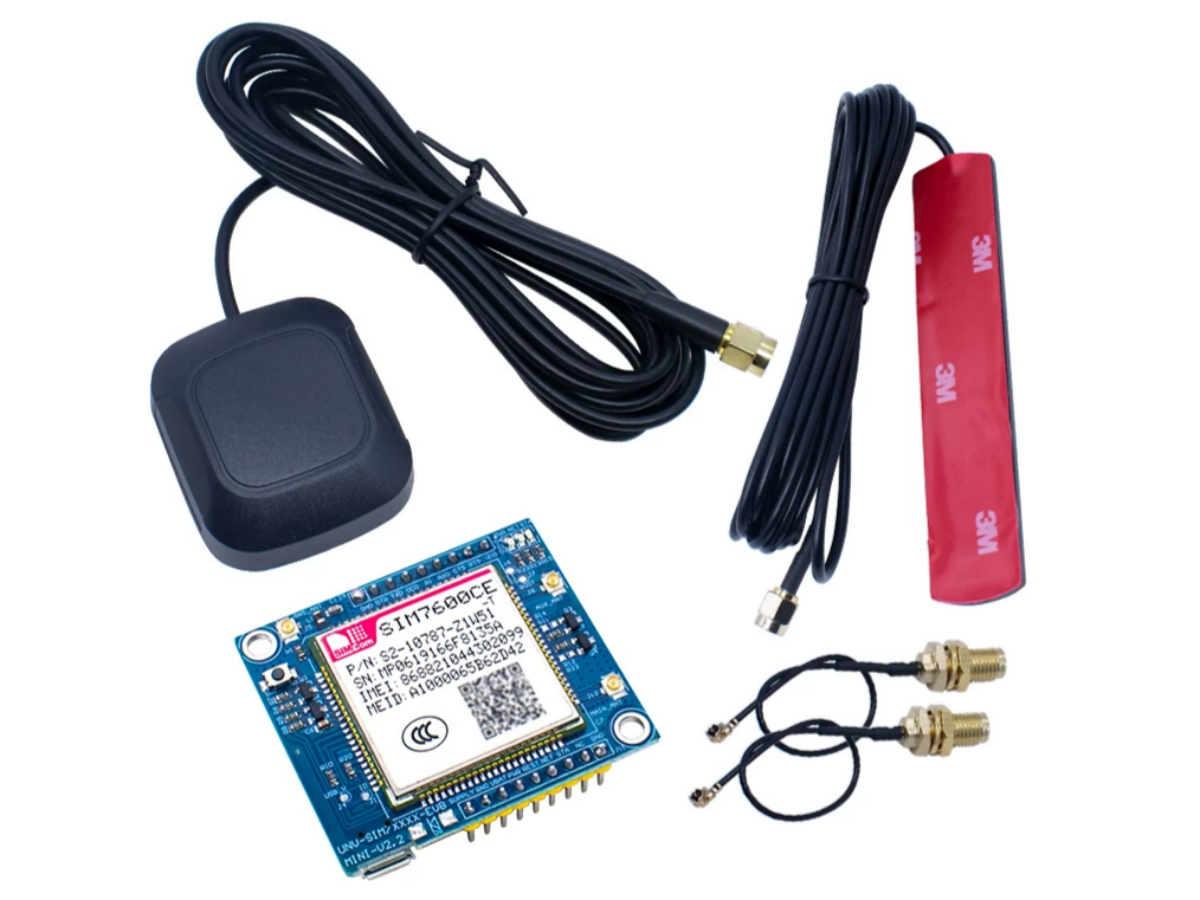
Introduction
If you’ve ever juggled separate GPS modules and 4G communication modules for projects like vehicle tracking or remote monitoring, you know the hassle—extra wiring, incompatible interfaces, and bulky setups that ruin compact designs. But what if there’s a single module that packs both functions, plus reliability and ease of use? Meet the SIM7600CE_T—a game-changer that merges high-performance GPS positioning with stable 4G LTE connectivity, all in a tiny, industrial-grade package. Whether you’re building a DIY tracker or a professional IoT device, this module eliminates the “separate parts” headache and unlocks new possibilities for on-the-go data and location insights.
First, Understand: What Exactly Do GPS and 4G Do?
To grasp the core value of the SIM7600CE_T, let’s break down the two key technologies it integrates—neither can be missing for most practical scenarios.
GPS: Your "Precision Positioning Manager"
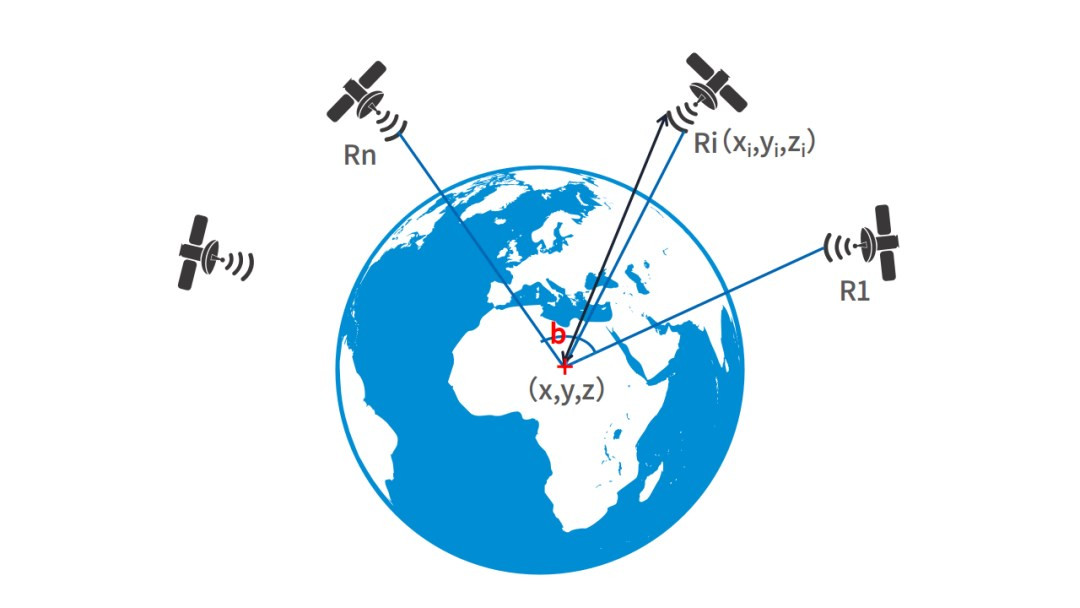
GPS (Global Positioning System) is a satellite-based navigation technology that provides precise location, speed, and time data for devices worldwide around the clock, with meter-level accuracy. Unlike conventional positioning tools, it operates independently of terrestrial networks, making it indispensable for outdoor and mobile applications:
- Vehicle tracking:Monitor real-time routes of logistics trucks or ride-hailing cars.
- Outdoor equipment:Provide location support for hiking gear, drones, or wildlife trackers.
- Industrial scenarios:Locate sensors or construction equipment in remote areas.
- Emergency support:Quickly lock the position of devices or personnel in urgent situations.
But a standalone GPS module can only “know the location.” To send positioning data to a phone or computer, you need a communication module to build a “data bridge.”
4G: A Fast, Stable "Data Transmission Channel"

4G (4th Generation Mobile Communication Technology) is the current mainstream mobile network standard based on LTE. It offers download speeds up to 150Mbps and upload speeds up to 50Mbps, enabling fast data transfer and supporting VoLTE HD voice calls. A reliable 4G module frees your devices from Wi-Fi limitations:
- Remote data synchronization:Send real-time sensor data (liketemperature, humidity, device status) to the cloud.
- Wireless control: Send commands via your phone to remotely turn devices on/off.
- Emergency alerts: Automatically send SMS or app notifications when devices malfunction.
- Global connectivity: Supports multiple regional network bands, no need to worry about geographical restrictions.
What used to require two separate modules—positioning + communication—can now be done with the SIM7600CE_T alone, saving double the debugging and wiring costs.
What is the SIM7600CE_T?
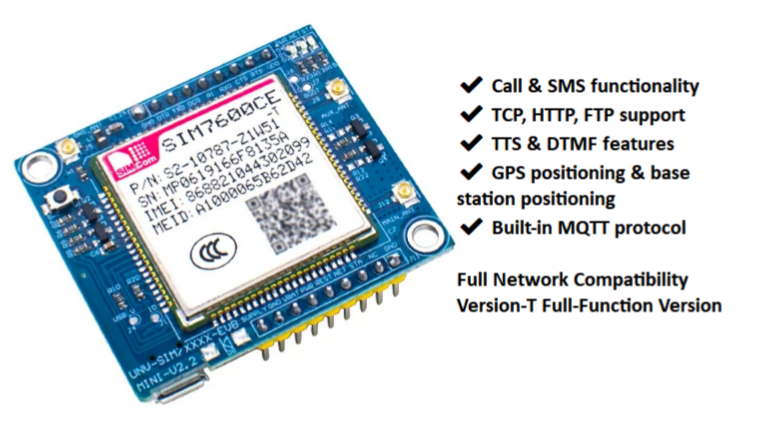
The SIM7600CE_T is an all-in-one communication and positioning module launched by SIMCom, classified as an LTE Cat-4 product. Its core highlight is “GPS + 4G in one”—no additional components needed to achieve both positioning and data transmission simultaneously.
Its key advantages are standout:
- All-in-one design: Eliminate the hassle of matching GPS and 4G modules, reducing device size and power consumption.
- Global network compatibility: Supports LTE-TDD (B34/B38/B39/B40/B41) and LTE-FDD (B1/B3/B5/B8) bands, and is backward compatible with 3G/2G networks. It works seamlessly in China, Europe, Southeast Asia, and other regions.
- Precise positioning: Built-in GNSS multi-system receiver, supporting GPS, Beidou, and GLONASS. It locks onto satellites quickly, with positioning accuracy within 10 meters in open outdoor environments.
- Industrial-grade durability:Operates in a temperature range of –40°C to 85°C, adapting to harsh outdoor conditions (high/low temperatures). Voltage compatibility ranges from 3.4V to 4.2V, ensuring maximum stability.
- Rich interfaces:Supports USB 2.0, UART, I2C, and other interfaces, easily connecting to mainstream main control boards like Arduino, Raspberry Pi, and STM32.
SIM7600CE Series Comparison: Choose What You Need, Not the Most Expensive
The SIM7600CE family has multiple models, each tailored to different scenarios—choose wisely for cost-effectiveness:
| Model | Core Functions | Application Scenarios |
|---|---|---|
| SIM7600CE_T | 4G LTE Cat-4 + GPS/GNSS; Positioning | Dual needs of positioning + communication (trackers, remote devices) |
| SIM7600CE_L | 4G LTE Cat-4 (no GPS), low-power design | Data transmission only (smart meters, sensors) |
| SIM7600CE_m1s | 4G Cat-1 (low speed), compact and portable | Budget-limited, low data volume scenarios |
| SIM7600CE_11s | 4G Cat-1 (low speed), no GPS | Simple data transmission, pursuit of ultimate cost-effectiveness |
If your project requires both “positioning + communication,” the SIM7600CE_T is the only choice. For single-function needs, consider other simplified models.
Getting Started Guide: Master the SIM7600CE_T in 3 Steps
No complex circuit knowledge is needed—beginners can start the module quickly. Here, we use the Waveshare SIM7600CE_T development board (with built-in interfaces and antennas for easier debugging) as an example:
1. Prepare Tools
- SIM7600CE_T development board (including 4G main antenna and GPS antenna);
- Activated 4G SIM card (supports GPRS; regular phone cards are recommended—IoT cards may have functional restrictions);
- 5V/2A power adapter or USB data cable;
- Computer (for serial port debugging);
- Jumper wires (for connecting to the main control board).
2. Hardware Connection
1.Insert the SIM card into the board’s SIM slot when powered off (supports 1.8V/3V; micro/nano SIM cards require adapters);
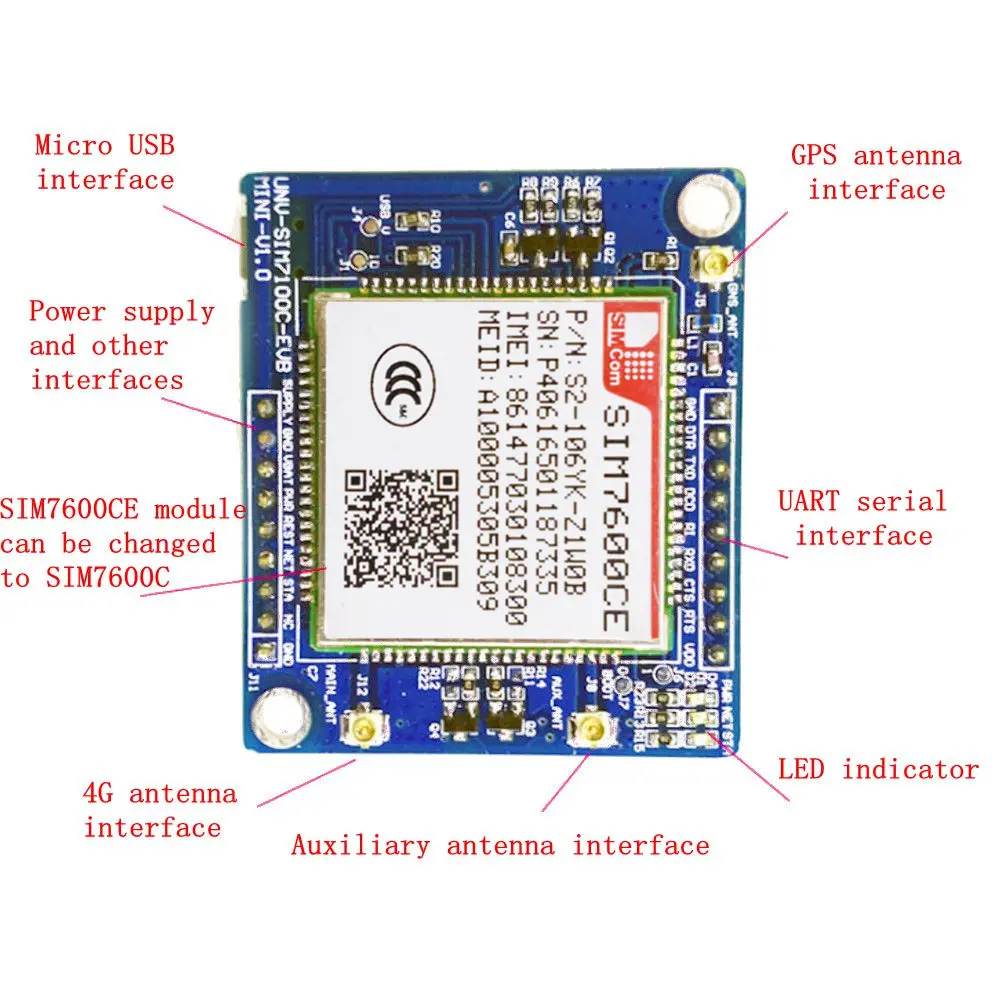
2.Tighten the antennas: Connect the 4G main antenna to the “MAIN” interface and the GPS antenna to the “GNSS” interface (antenna signal directly affects positioning and communication—ensure secure connections);
3.Power on: Connect the development board to the computer via USB cable or 5V/2A adapter. The PWR light will stay on, and the NET light will flash once per second, indicating it’s searching for a network.
3. Function Testing (Debug with Serial Port Tool)
We recommend using SSCOM or SecureCRT serial port tools. Follow these steps:
1.Configure the serial port: Select the corresponding COM port (check in Device Manager), set the baud rate to 115200, data bits to 8, stop bits to 1, and parity to none;
2.Test communication function:
- Send command “AT”—a return of “OK” means the module responds normally;
- Send “AT+CSQ”to check signal strength (the first number in the return value is better if larger; ≥15 indicates good signal);
- Send “AT+COPS?”to confirm operator access (likereturning “CHINA MOBILE” means connecting to China Mobile’s network);
3.Test positioning function:
- Send “AT+CGPS=1” to enable GPS (place the GPS antenna in an open outdoor environment and wait 1-5 minutes for satellite search);
- Send “AT+CGPSINFO” to get positioning data (example format: 3045.1234,N,11420.5678,E—representing latitude, longitude, date, time, etc.);
4.Test data transmission:
- Configure APN:For China Mobile cards, send “AT+CGDCONT=1,”IP”,”CMNET””; for China Unicom, “3GNET”; for China Telecom, “CTNET”;
- Enable network:Send “AT+NETOPEN”;
- Connect to server:Send “AT+CIPOPEN=0,”TCP”,”Server IP”,Port Number”;
- Send positioning data: Send “AT+CIPSEND=0,50” (50 is the data length), then paste the GPS positioning result to complete transmission.
SIM7600CE_T Datasheet
If you want to learn more SIM7600CE_T product details, you can refer to this datasheet.
Core Module Composition: Uncover Its "Black Technology"
From the datasheet, we can see the SIM7600CE_T has a simple yet robust internal design, with key components working together:
- Core chip:SIM7600CE_T main control chip, integrating 4G LTE communication and GNSS positioning functions—the “brain” of the module;
- GNSS receiver:Receives signals from GPS, Beidou, and other satellites to parse positioning data;
- RF transceiver:Processes 4G/LTEsignal transmission and reception to ensure stable network connectivity;
- Power management IC: Stabilizes input voltage and protects the module from voltage fluctuations;
- Filter capacitor:Reduces voltage ripple and improves the purity of communication and positioning signals;
- Interface circuit:Adapts to multiple communication interfaces for easy connection to different main control boards;
- SIM card slot:Compatible with 1.8V/3V SIM cards, supporting hot-swapping (power-off swapping is recommended for safety).
SIM7600CE_T Hardware Parameters
| Product Name | Details |
|---|---|
| Product Name | UNV-SIM7600CE_T |
| Supported Bands | Supports China Mobile/Unicom/Telecom 2G, China Unicom 3G, China Mobile/Unicom/Telecom 4G |
| Built-in Platform | Qualcomm solution |
| Power Supply | 5-18V (9V 1A power adapter recommended) |
| Serial Port | One full serial port (fully led out) |
| External Interface | Dual-row 2.54mm pitch pin header |
| Additional Features | Equipped with GPS function and auxiliary antenna |
Recommended Practical Project: DIY Car Real-Time Tracker

Build a car tracker with the SIM7600CE_T to check vehicle location in real time—costing less than 200 yuan and super easy to assemble:
Required Materials
- SIM7600CE_T development board;
- Raspberry Pi Zero W;
- 12V to 5V car power adapter (connects to the car cigarette lighter);
- 32G MicroSD card;
- Mobile app (MQTT Dashboard is recommended for receiving location data).
Implementation Logic
1.Wiring
Connect the Raspberry Pi to the SIM7600CE_T via the UART interface (TX to module RX, RX to module TX). Power both with the car adapter, and fix the GPS antenna inside the car’s front windshield (no obstructions);
2.Programming
Write a Python script on the Raspberry Pi to achieve three core functions:
- Obtain GPS positioning data every 30s;
- Send positioning data to an MQTT server via 4G network;
- Back up positioning data to the SD card to prevent loss if the network is interrupted;
3.Monitoring
Install MQTT Dashboard on your phone. After connecting to the server, you can view the vehicle’s latitude, longitude, and speed in real time, and even see its location on a map.
The entire project requires no complex hardware debugging, relying mainly on the SIM7600CE_T’s all-in-one “positioning + communication” capability. Beginners can complete the setup in 2 hours.
FAQS
What if GPS can’t find satellite signals and returns empty positioning data?
- Ensure the GPS antenna is placed in an open outdoor environment, away from buildings or metal obstructions;
- The first satellite search may take 1-5 minutes—please be patient;
- Send the command “AT+CVAUXS=1” to enable antenna power supply and speed up satellite search;
- Rainy or cloudy weather can affect satellite signals—test on a sunny day if possible.
4G can register to the network but can’t send data?
- Check if the APN configuration is correct;
- Confirm the SIM card has sufficient data;
- Send “AT+CGREG?” to check network registration status—returning “+CGREG:0,1” means successful registration;
- Test with SIM cards from different operators to rule out band compatibility issues.
Can the module connect to Arduino?
Absolutely! Connect Arduino to the module via the UART interface (5V power supply);Install the corresponding serial communication library and control the module by sending AT commands. Refer to Waveshare’s official documentation for specific examples.
Is waterproofing needed for outdoor use?
The module itself is not waterproof. For outdoor or car use, pair it with an IP66-rated waterproof case;Seal the antenna interface to prevent rainwater from seeping in and causing short circuits.