

Blog
HC-SR501 vs other PIR sensors which to buy?
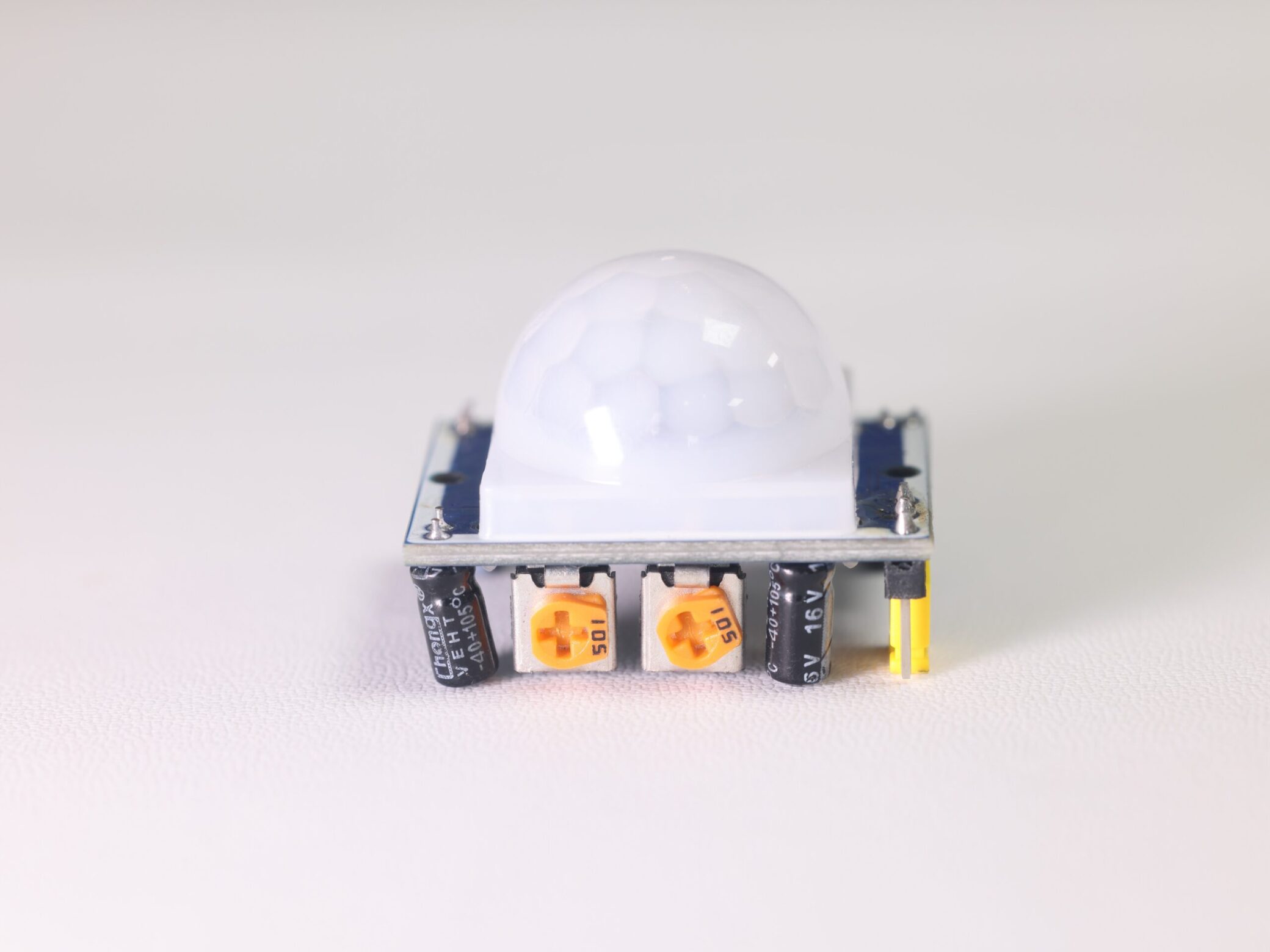
HC-SR501 vs other PIR sensors which to buy?
Today, we will conduct an in-depth comparison between HC-SR501 and other popular PIR sensors. We’ll break down the differences in performance, price, and suitable scenarios to help you answer the question: “HC-SR501 vs other PIR sensors: which to buy?”
Whether you are a DIY enthusiast, a smart home player or a small business owner, reading this will help you accurately select the suitable PIR sensor.
What is PIR sensors?
A PIR sensor works by detecting changes in infrared radiation from moving humans or objects. Its main function is to “detect moving objects without contact.”Why compare and choose? Different PIR sensors vary significantly in detection range, stability, price, and size. Choosing the wrong one can lead to issues like frequent false triggers, poor durability, or mismatch with your intended use.
Next, I will focus on introducing the HC-SR501 sensor to you.
What is HC-SR501?
The HC-SR501 is a commonly used human infrared sensor module. It operates based on PIR technology, detecting changes in infrared radiation from humans or animals within its range. It’s widely used in security systems, automatic lighting controls, and alarm systems.
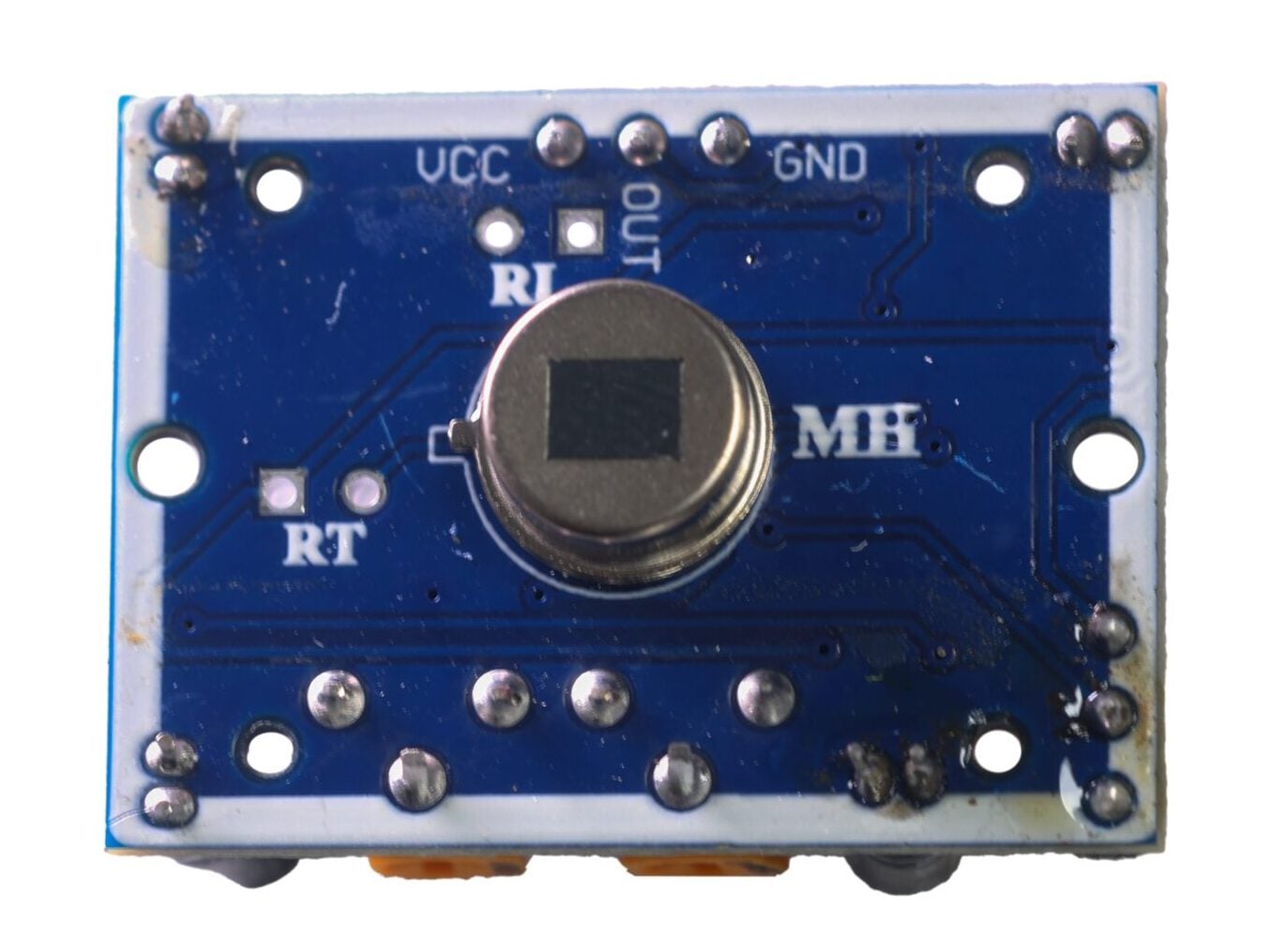
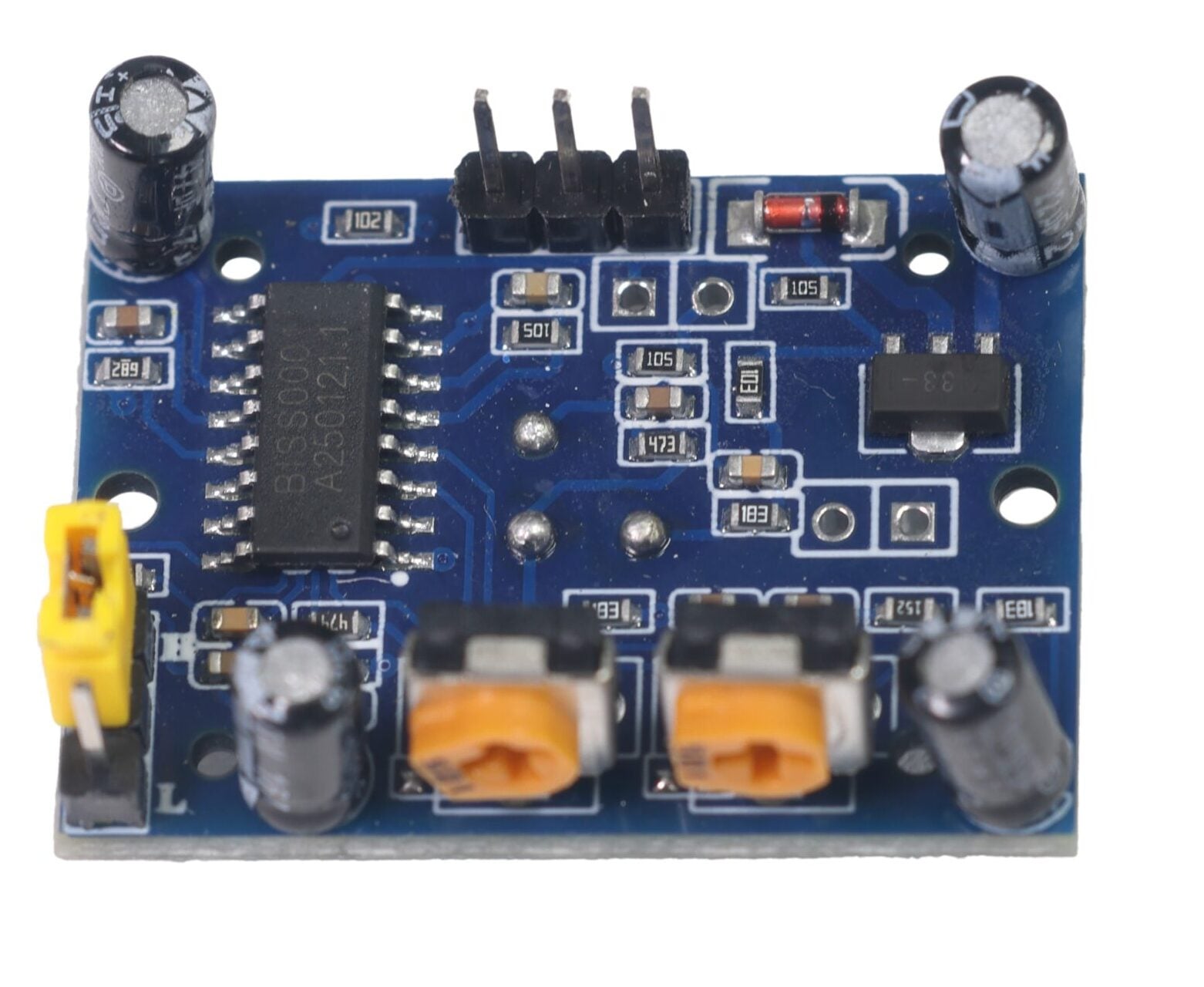
What is the composition of the HC-SR501 module?
The HC-SR501 human infrared sensor module consists of several key components:
- A core PIR infrared sensor
- A top-mounted Fresnel lens (focuses signals and expands detection range)
- A signal processing circuit (amplifies signals and converts them into high/low voltage levels)
- Two adjustable potentiometers (for adjusting detection range and delay time)
- A mode selection jumper (switches between single trigger and repeat trigger modes)
- Power interfaces: VCC, GND, and OUT
These components work together to stably detect human movement, making it suitable for various automatic control scenarios.
How does the HC-SR501 work?
The human body maintains a constant temperature (around 37°C), emitting infrared radiation at a specific wavelength (~10μm). The HC-SR501’s passive infrared probe detects this radiation.
The infrared rays of about 10 μm emitted by the body are enhanced by the Fresnel lens and then focused on the infrared sensing source. Infrared sensing sources usually adopt pyroelectric elements.When this element detects temperature changes from the infrared radiation, it loses charge balance and releases electrons. The subsequent circuit can generate an alarm signal after detection and processing.
The core advantages and shortcomings of the HC-SR501 PIR Sensor
After reading the above, you must have understood all aspects of the HC-SR501 sensor. So, would a module with such complete functions be very expensive? In fact, on the contrary, its price is very low(about 2 to 5 US dollars), making it suitable for beginners with limited budgets and bulk purchases. In addition, the following parameters of it make it also a popular PIR:
| Parameter | Value |
|---|---|
| Operating Voltage | DC 4.5V-20V |
| Detection Range | 5-7m |
| Output Level | High (3.3V) / Low (0V) |
| Standby Current | < 50µA |
| Operating Temperature | -15°C – 87°C |
| Detection Angle | ~110° |
| Lockout Period | 2.5s (default) |
| Delay Time | 0.5s-200s |
However, the HC-SR501 has some “minor drawbacks”:
- Warm-up requirement: Needs 2-3 minutes to stabilize after power-up; otherwise, it may trigger falsely.
- Moderate size: Not suitable for miniaturized devices.
- Insensitivity to static objects: May fail to detect stationary humans for long periods.
HC-SR501 vs Other PIR Sensors: Key Differences to Know Before Buying
| Product | HC-SR501 | AM312 (Mini) | RCWL-0516 (Microwave + PIR) | HC-SR505 (Ultra-small) |
|---|---|---|---|---|
| Price | $2-$5 (high value) | $1-$3 | $5-$8 (slightly expensive) | $2-$4 |
| Detection Range | 5-7m (adjustable) | 3-5m (fixed) | 5-8m (longer) | 2-4m (short range) |
| Size | 32x24mm (medium) | 15x10mm (mini) | 22x15mm (medium) | 12x8mm (ultra-small) |
| Power Voltage | 3.3V-5V | 3.3V-5V | 4V-20V (wide range) | 3.3V-5V |
| Key Advantage | Adjustable range/delay, wide compatibility | Ultra-small size, plug-and-play | Anti-interference (resists heat/light) | Extremely small, ideal for micro-devices |
| Suitable Scenarios | Most DIY, home automation | Small devices (toys, nightlights) | Outdoor/complex environments (awnings, kitchens) | Wearable devices, mini robots |
1、If you’re a DIY beginner or home user: Choose the HC-SR501! Its adjustability, low price, and abundant data make it easy to use with Arduino projects (like automatic lights, pet feeders) with minimal risk of issues.
2、If you need a tiny device: Choose the AM312 or HC-SR505, but note their shorter fixed detection ranges.
3、If using in outdoor/complex environments (like kitchens, awnings): Choose the RCWL-0516 for its strong resistance to heat sources and light interference.
4、If prioritizing ultra-low cost (bulk purchases): Both the HC-SR501 and AM312 work, but the HC-SR501 is preferred for its more comprehensive functions.
Next, I’ll give you a simple tutorial: Combine the HC-SR501 module with OLED and LED using arduino.
How to connect HC-SR501 to Arduino ?
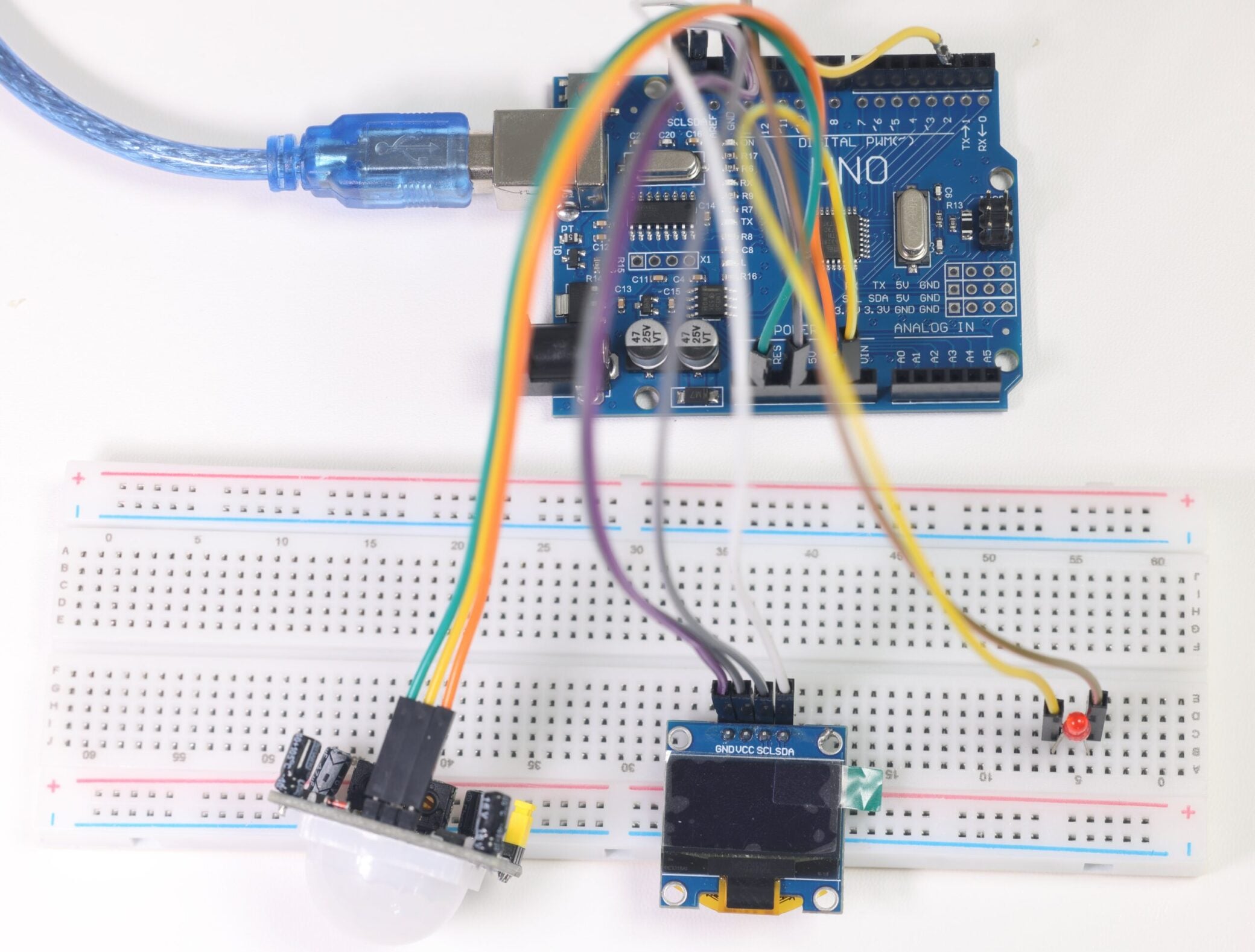
Connecting the HC-SR501 to an Arduino is simple—only 3 wires are needed:
- VCC → Arduino’s 5V pin (the module supports 3.3V-5V, but 5V is more stable).
- GND → Arduino’s GND pin (ensures consistent voltage levels).
- OUT → Arduino’s digital pin (e.g., D2; can be modified based on your code, preferably within pins 2-13).
Besides,you can also DIY by adding other modules to the Arduino, such as LEDs, speakers, OLED screens, or light sensors. Below is a sample wiring diagram and code for reference.

					#include <Wire.h>
#include <Adafruit_GFX.h>
#include <Adafruit_SSD1306.h>

#define SCREEN_WIDTH 128 // OLED display width, in pixels
#define SCREEN_HEIGHT 64 // OLED display height, in pixels
#define OLED_RESET     -1 // Reset pin # (or -1 if sharing Arduino reset pin)
Adafruit_SSD1306 display(SCREEN_WIDTH, SCREEN_HEIGHT, &Wire, OLED_RESET);

const int pirPin = 2;   // HC-SR501 output pin connected to Arduino digital pin 2
const int ledPin = 13;  // LED connected to Arduino digital pin 13

void setup() {
  Serial.begin(9600);

  // Initialize OLED display
  if(!display.begin(SSD1306_SWITCHCAPVCC, 0x3C)) {
    Serial.println(F("SSD1306 allocation failed"));
    for(;;); // Don't proceed, loop forever
  }

  pinMode(pirPin, INPUT);
  pinMode(ledPin, OUTPUT);
  digitalWrite(ledPin, LOW); // Initially turn LED off

  // Display initial information
  display.clearDisplay();
  display.setTextSize(1);
  display.setTextColor(WHITE);
  display.setCursor(0, 20);
  display.println("Waiting...");
  display.println("for detection");
  display.display();

  // Give HC-SR501 sensor time to warm up
  delay(15000);
  Serial.println("Sensor ready");
}

void loop() {
  int pirState = digitalRead(pirPin);

  if (pirState == HIGH) {
    // Motion detected
    digitalWrite(ledPin, HIGH);
    display.clearDisplay();
    display.setCursor(0, 20);
    display.println("Successfully!");
    display.display();
    Serial.println("Motion detected!");
  } else {
    // No motion detected
    digitalWrite(ledPin, LOW);
    display.clearDisplay();
    display.setCursor(0, 20);
    display.println("Waiting...");
    display.println("for detection");
    display.display();
    Serial.println("No motion");
  }

  delay(100); // Short delay to reduce CPU load
}
Is HC-SR501 better than other PIR sensors for home automation?
Yes!HC-SR501’s adjustable range and delay make it more flexible for home scenes like corridor lights or bathroom sensors, compared to fixed-range sensors like AM312.
Can the HC-SR501 only detect humans?
No. It works based on PIR and may detect any moving object with a temperature different from the environment (like pets, heated devices). However, it’s less sensitive to static objects or those with temperatures close to the environment.
How to reduce false triggers with the HC-SR501?
Three solutions: ① Avoid pointing the module at heat sources like sunlight or air vents. ② Reduce the detection range using the distance potentiometer. ③ Add software filtering ( A valid signal is only determined when a high level is detected multiple times in a row).
Can the HC-SR501’s delay time be precisely controlled?
The module’s built-in potentiometer has limited precision (approximately 5s-5min). For precise control, ignore the hardware delay and use code to record detection times, creating custom delay logic.
Video tutorial
FAQS
HC-SR501 vs AM312: which is better for beginners?
HC-SR501 is better for beginners because it has more tutorials online, and its adjustable knobs let you adjust performance easily—no need to “guess” the right settings.
Why is HC-SR501 more popular than other PIR sensors?
It balances price, performance, and ease of use. Most DIY projects don’t need advanced features, so HC-SR501’s “good enough” specs + low cost make it a top choice.