

Blog
HMC5883L Electronic Compass Module: Principles, Advantages and I2C Communication
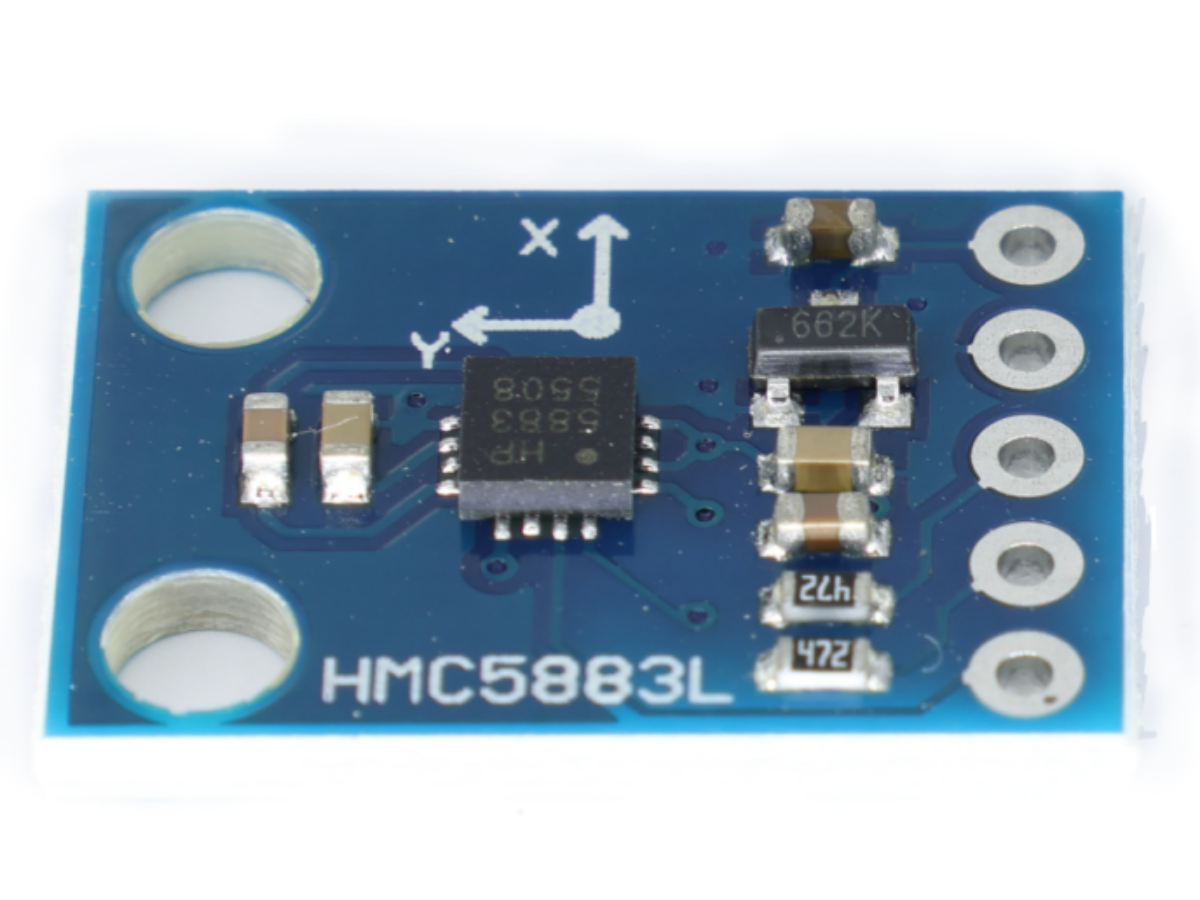
In today’s society, navigation has become indispensable for travel. Whenever we arrive in new environments, navigation systems provide us with a profound sense of security. But in the past, before the era of navigation, how did our ancestors distinguish directions and determine north, south, east, and west? This brings us to the concept of the compass. It was precisely the compass that enabled people to discern directions, guiding them back home. In today’s electronic landscape, we have a widely used module that greatly assists in positioning—the HMC5883L Electronic Compass Module!
What is the HMC5883L Electronic Compass Module?
The HMC5883L Electronic Compass Module is a highly integrated magnetoresistive sensor module. It precisely measures the direction and strength of the Earth’s magnetic field, providing accurate directional information. This module combines advanced magnetoresistive technology with microelectronic processing, enabling outstanding performance in various navigation and positioning applications. Whether in drones, robots, or other smart devices requiring directional awareness, the HMC5883L Electronic Compass Module delivers stable and reliable directional data, empowering devices to achieve precise navigation and positioning capabilities.

How accurate is the HMC5883L?
The HMC5883L offers high precision, utilizing advanced magnetoresistive sensor technology that sensitively detects subtle variations in the Earth’s magnetic field. It achieves accuracy within 1° to 2°. In practical applications, a precisely calibrated HMC5883L electronic compass module typically maintains directional measurement errors within an extremely narrow range. For most applications requiring directional accuracy, such as drone flight control and robot path planning, the directional data provided by the HMC5883L is sufficiently precise to meet the demands of stable device operation and accurate navigation. Moreover, its accuracy remains unaffected by minor fluctuations in common environmental factors like temperature and humidity, consistently delivering reliable directional guidance to users.
What is the working principle of the HMC5883L Electronic Compass Module?
How does the GY-273 “capture” the Earth’s magnetic field?
The core of the GY-273 is the HMC5883L triaxial magnetoresistive sensor chip. Its operation is based on the anisotropic magnetoresistance (AMR) effect. Simply put, when an external magnetic field acts on magnetoresistive material, the material’s resistance changes according to the direction of the magnetic field. The chip integrates three sets of mutually perpendicular magnetoresistive sensors (X, Y, Z axes), enabling simultaneous detection of magnetic field components in three-dimensional space.
The specific workflow can be divided into three steps:
Magnetic Field Detection: The Earth itself acts as a large magnet with magnetic fields at its north and south poles. When the module occupies a specific spatial position, the X and Y-axis sensors detect magnetic field components on the horizontal plane, while the Z-axis sensor compensates for vertical magnetic interference (e.g., errors caused by tilt).
Signal Conversion: The magnetic resistance sensors convert magnetic field strength into weak voltage signals. These signals are processed by internal amplification and filtering circuits within the chip, then converted into digital signals via an analog-to-digital converter (ADC).
Data Output: The module transmits magnetic field data from the X, Y, and Z axes to the controller via I2C or SPI communication protocols. The controller then calculates the heading angle through algorithms, ultimately enabling the “pointing” function.
Internal Schematic Diagram

What is the composition of the HMC5883L Electronic Compass Module?
The HMC5883L Electronic Compass Module primarily consists of the HMC5883L triaxial magnetoresistive sensor chip, signal processing circuitry, power management circuitry, and communication interface circuitry. The HMC5883L triaxial magnetoresistive sensor chip serves as the module’s core, responsible for sensing magnetic field components in three-dimensional space. The signal processing circuit amplifies, filters, and performs analog-to-digital conversion on the weak voltage signals output by the sensor. The power management circuit provides stable operating voltage to ensure reliable performance across diverse environments. The communication interface circuit transmits processed magnetic field data to the controller via I2C or SPI protocols, enabling interaction with external devices. These components collaborate to form the complete functional system of the HMC5883L electronic compass module.
Advantages of the HMC5883L Electronic Compass Module?
Benefiting from the physical characteristics of the HMC5883L, it offers the following performance advantages:
- Low Power Consumption: Static current consumption is only tens of microamperes, making it suitable for battery-powered portable devices.
- High Stability: Built-in temperature compensation circuitry mitigates the impact of temperature variations on measurement accuracy;
- High Integration: The module comes fully assembled with chip soldering and calibrated circuit design, requiring no additional debugging for immediate use;
- Cost-effective: Unit price typically ranges from tens to dozens of yuan, offering exceptional value.
Product Parameter Sheet for HMC5883L Electronic Compass Module
| HMC5883L Electronic Compass Module | Details |
|---|---|
| Measurement Range | ±8 Gauss, covering Earth’s magnetic field strength (approximately 0.3-0.6 Gauss) and common environmental magnetic fields |
| Resolution | 0.73 milligauss (mG), enabling precise detection of minute magnetic field variations |
| Operating Voltage | 3.3V-5V, compatible with mainstream controller power supply standards |
| Communication Interface | Default I2C (address configurable), with SPI support in select versions |
| Response Speed | Up to 160Hz, meeting real-time navigation demands for high-speed mobile devices |
| Product Dimensions | Length: 13mm, Width: 18mm |
HMC5883L Electronic Compass Module Datasheet
What are the application scenarios for the HMC5883L Electronic Compass Module?
The GY-273 HMC5883L, with its compact size, precise performance, and affordable price, is widely used across multiple fields:
In consumer electronics: Compass functionality in smartphones and tablets, outdoor navigation for smartwatches, and heading control for drones;
In robotics: Path planning for wheeled and tracked robots to prevent course deviation;
In industrial control: autonomous driving for agricultural machinery (e.g., straight-line operation of tractors), heading indication for vessels and small aircraft;
Outdoor equipment: Directional assistance in handheld GPS navigators, hiking poles, and outdoor watches;
In Electronics Projects: Directional sensing modules for student STEM projects, DIY robots, and smart cars—a classic introductory electronics teaching tool.
Comparison with Similar Products: Advantages and Differences of GY-273 HMC5883L
In the electronic compass field, besides the GY-273 HMC5883L, there are numerous comparable products such as the MPU-9250 (integrating accelerometer, gyroscope, and magnetometer) and the QMC5883L module. Comparing these helps clarify the distinctive features of the GY-273 HMC5883L.
- Comparison with MPU-9250
The MPU-9250 is a nine-axis sensor module integrating a three-axis accelerometer, three-axis gyroscope, and three-axis magnetometer. Its comprehensive functionality enables simultaneous motion detection and orientation sensing, making it suitable for applications requiring both motion state and directional awareness, such as drone attitude control and VR devices. However, it has notable drawbacks: a significantly higher price point (typically 3-5 times that of the GY-273 HMC5883L) and relatively higher power consumption. The GY-273 HMC5883L, focused solely on orientation sensing, offers better cost-performance for this single function with lower power consumption. It is more suitable for projects sensitive to cost and power consumption that require only orientation detection, such as simple navigation carts and outdoor compass devices.
- Comparison with QMC5883L Module
The QMC5883L is another commonly used triaxial magnetic sensor chip operating on the Hall effect principle, differing from the anisotropic magnetoresistance (AMR) principle of the HMC5883L. In terms of performance, the QMC5883L offers a wider measurement range of ±2/4/8/12 Gauss, providing greater flexibility. However, its resolution is relatively lower at approximately 1.2 mGauss, slightly inferior to the HMC5883L’s 0.73 mGauss. Priced similarly, the GY-273 HMC5883L offers superior resolution, making it more advantageous in scenarios demanding high measurement accuracy, such as precision heading control. Conversely, the QMC5883L performs better in environments with significant magnetic field variations.
In summary, we can select products based on our specific requirements. Considering cost-effectiveness and practicality, I recommend the GY-273 HMC5883L Electronic Compass Module. Should you require it, we can also provide the GY-273 HMC5883L Electronic Compass Module. For details, please refer to the GY-273 HMC5883L.
HMC5883L Electronic Compass Module Connected to Arduino
For electronics enthusiasts and developers, mastering the practical operation and usage of the GY-273 HMC5883L is essential. Below is a detailed introduction to the module’s wiring method and calibration steps.
- Wiring Method (Using Arduino Connection as Example)
The GY-273 HMC5883L defaults to I2C communication, enabling straightforward connection to Arduino as follows:
VCC Pin: Connect to Arduino’s 3.3V or 5V pin (select based on module version; most support wide voltage ranges).
GND pin: Connect to the Arduino’s GND pin;
SDA pin: Connect to Arduino’s A4 pin (I2C SDA pin on models like Arduino Uno);
SCL pin: Connect to the Arduino’s A5 pin (the I2C SCL pin on models like Arduino Uno).
Some modules also feature a DRDY (Data Ready) pin and an INT (Interrupt) pin. These pins can be left unconnected if real-time data reading or interrupt functionality is not required.
- Calibration Procedure
Calibration is a critical step to ensure the measurement accuracy of the GY-273 HMC5883L, especially during initial use or after changing the operating environment. Follow these steps:
Preparation: Place the wired module on a level surface, away from interference sources such as metal objects, magnets, and high-power electrical appliances.
Initiate Calibration: In the Arduino development environment, upload dedicated calibration code (available from open-source communities like relevant GitHub projects). This code will instruct the module to enter calibration mode.
Perform 8-Direction Calibration: Following program prompts, manually rotate the module 360 degrees around the X-axis (maintain horizontal orientation; clockwise or counterclockwise rotation is acceptable), then 360 degrees around the Y-axis, and finally 360 degrees around the Z-axis. This ensures the module fully senses magnetic fields in all directions.
Save calibration data: Upon completion, the program automatically calculates and stores calibration parameters (e.g., offset, gain). Some modules support storing calibration data in EEPROM, eliminating the need for recalibration during subsequent use.
Verify calibration results: Upload the test code, read the heading angle data output by the module, and observe whether it stably and accurately reflects directional changes. If the data fluctuates significantly, recalibration is required.
Sample code
					#include <Wire.h>
#include <Adafruit_GFX.h>
#include <Adafruit_SSD1306.h>
#include <Adafruit_Sensor.h>
#include <Adafruit_HMC5883_U.h>

// Define OLED screen parameters (128x64 resolution)
#define SCREEN_WIDTH 128
#define SCREEN_HEIGHT 64
Adafruit_SSD1306 display(SCREEN_WIDTH, SCREEN_HEIGHT, &Wire, -1);

// Initialize HMC5883L compass
Adafruit_HMC5883_Unified mag = Adafruit_HMC5883_Unified(12345);

void setup() {
  Serial.begin(9600);

  // Initialize OLED screen
  if(!display.begin(SSD1306_SWITCHCAPVCC, 0x3C)) {  // Address may be 0x3D, adjust according to actual module
    Serial.println(F("OLED initialization failed! Check wiring or address."));
    for(;;); // Infinite loop on initialization failure
  }
  display.clearDisplay();
  display.setTextColor(SSD1306_WHITE);  // Set white text (OLED is monochrome)

  // Initialize compass
  if(!mag.begin()) {
    Serial.println(F("HMC5883L initialization failed! Check wiring."));
    for(;;); // Infinite loop on initialization failure
  }
}

void loop() {
  sensors_event_t event;
  mag.getEvent(&event);  // Get magnetic field data

  // Calculate heading angle (in degrees), atan2(y, x) gives radians, converted to degrees
  float heading = atan2(event.magnetic.y, event.magnetic.x) * 180 / M_PI;

  // Correct angle range to 0-360 degrees (atan2 may return -180~180)
  if(heading < 0) {
    heading += 360;
  }

  // Draw rotating compass (pass current heading angle)
  drawCompass(heading);

  delay(100);  // Control refresh rate to avoid screen flickering
}

// Compass drawing function (parameter: current heading angle in degrees)
void drawCompass(float heading) {
  display.clearDisplay();  // Clear screen buffer

  // Screen center coordinates
  int centerX = SCREEN_WIDTH / 2;
  int centerY = SCREEN_HEIGHT / 2;
  // Compass radius (adjust according to screen size, leaving border space)
  int radius = min(centerX, centerY) - 2;

  // Draw compass outer circle
  display.drawCircle(centerX, centerY, radius, SSD1306_WHITE);
  // Draw inner circle (decorative)
  display.drawCircle(centerX, centerY, radius/3, SSD1306_WHITE);

  // Draw direction markers (N/S/E/W)
  drawDirection(centerX, centerY, radius, 0, "N");    // North (0 degrees)
  drawDirection(centerX, centerY, radius, 90, "E");   // East (90 degrees)
  drawDirection(centerX, centerY, radius, 180, "S");  // South (180 degrees)
  drawDirection(centerX, centerY, radius, 270, "W");  // West (270 degrees)

  // Calculate pointer angle: compass needle always points north, needle rotates oppositely when module rotates
  float pointerAngle = -heading;  // Negative sign for reverse rotation compensation
  // Calculate pointer end coordinates (from center pointing north)
  int pointerLength = radius - 5;  // Pointer length (slightly shorter than radius)
  int x2 = centerX + cos(pointerAngle * M_PI / 180) * pointerLength;
  int y2 = centerY + sin(pointerAngle * M_PI / 180) * pointerLength;
  // Draw pointer (line from center to end)
  display.drawLine(centerX, centerY, x2, y2, SSD1306_WHITE);
  // Draw pointer tip (small triangle for better visual effect)
  int x3 = centerX + cos((pointerAngle + 5) * M_PI / 180) * (pointerLength - 8);
  int y3 = centerY + sin((pointerAngle + 5) * M_PI / 180) * (pointerLength - 8);
  int x4 = centerX + cos((pointerAngle - 5) * M_PI / 180) * (pointerLength - 8);
  int y4 = centerY + sin((pointerAngle - 5) * M_PI / 180) * (pointerLength - 8);
  display.fillTriangle(x2, y2, x3, y3, x4, y4, SSD1306_WHITE);

  // Display current angle value (centered at screen bottom)
  display.setCursor(centerX - 20, SCREEN_HEIGHT - 10);  // Adjust text position
  display.setTextSize(1);  // Text size (1 is default)
  display.print(heading, 0);  // Display integer angle
  display.print("°");

  display.display();  // Show buffer content on screen
}

// Helper function: draw direction markers and text
void drawDirection(int cx, int cy, int r, float angle, const char* text) {
  float rad = angle * M_PI / 180;  // Convert degrees to radians
  // Marker line end coordinates (outer circle)
  int x = cx + cos(rad) * r;
  int y = cy + sin(rad) * r;
  // Marker line start coordinates (indented 5 pixels inward)
  int x1 = cx + cos(rad) * (r - 5);
  int y1 = cy + sin(rad) * (r - 5);
  // Draw marker line
  display.drawLine(x1, y1, x, y, SSD1306_WHITE);
  // Draw direction text (position slightly inward to avoid going off-screen)
  int textX = cx + cos(rad) * (r - 8) - 4;  // -4 is for text centering offset
  int textY = cy + sin(rad) * (r - 8) - 4;
  display.setCursor(textX, textY);
  display.setTextSize(1);
  display.print(text);
}