

Blog
How to Use the LCD1602A
LCD1602A (Parallel Interface)

Parameters
| PARAMETER | 5V OPERATING CONDITIONS | 3.3V OPERATING CONDITIONS |
|---|---|---|
| Logic Operating Voltage (Vdd) | +4.8V ~ +5.2V | +4.8V ~ +5.2V |
| Display | White characters on blue background | White characters on blue background |
| LCD Driver Voltage (Vdd – Vo) | +3.0V ~ +5.0V | +3.3V |
| Operating Temperature (Ta) | -20°C ~ +70°C (Wide Temperature Range) | -20°C ~ +70°C (Wide Temperature Range) |
| Storage Temperature (Tst) | -30°C ~ +80°C (Wide Temperature Range) | -30°C ~ +80°C (Wide Temperature Range) |
| Operating Current (Backlight Off) | 1.7mA (max) | 1.7mA (max) |
| Operating Current (Backlight On) | 24.0mA (max) | 24.0mA (max) |
PINOUT

| PIN | PIN DESCRIPTION |
|---|---|
| GND | Ground pin |
| VDD | Power pin, typically connected to a 5V power supply |
| V0 | Controls contrast, usually connected to the middle pin of a potentiometer |
| RS (Register Select) | Determines if data is a command or character data (RS = 0 for command, RS = 1 for characters) |
| R/W (Read/Write) | Determines whether you’re sending data to the LCD or reading from it (R/W = 0 for Write, R/W = 1 for Read) |
| E (Enable) | Tells the LCD when to read the data lines (D0-D7) |
| D0-D7 (Data Lines) | Carries data or commands to the LCD (D0-D7 for 8-bit mode, D4-D7 for 4-bit mode) |
| A (Anode) | Power pin for backlight LED (connects to positive voltage, typically 5V) |
| K (Cathode) | Power pin for backlight LED (connects to ground) |
How to Wire
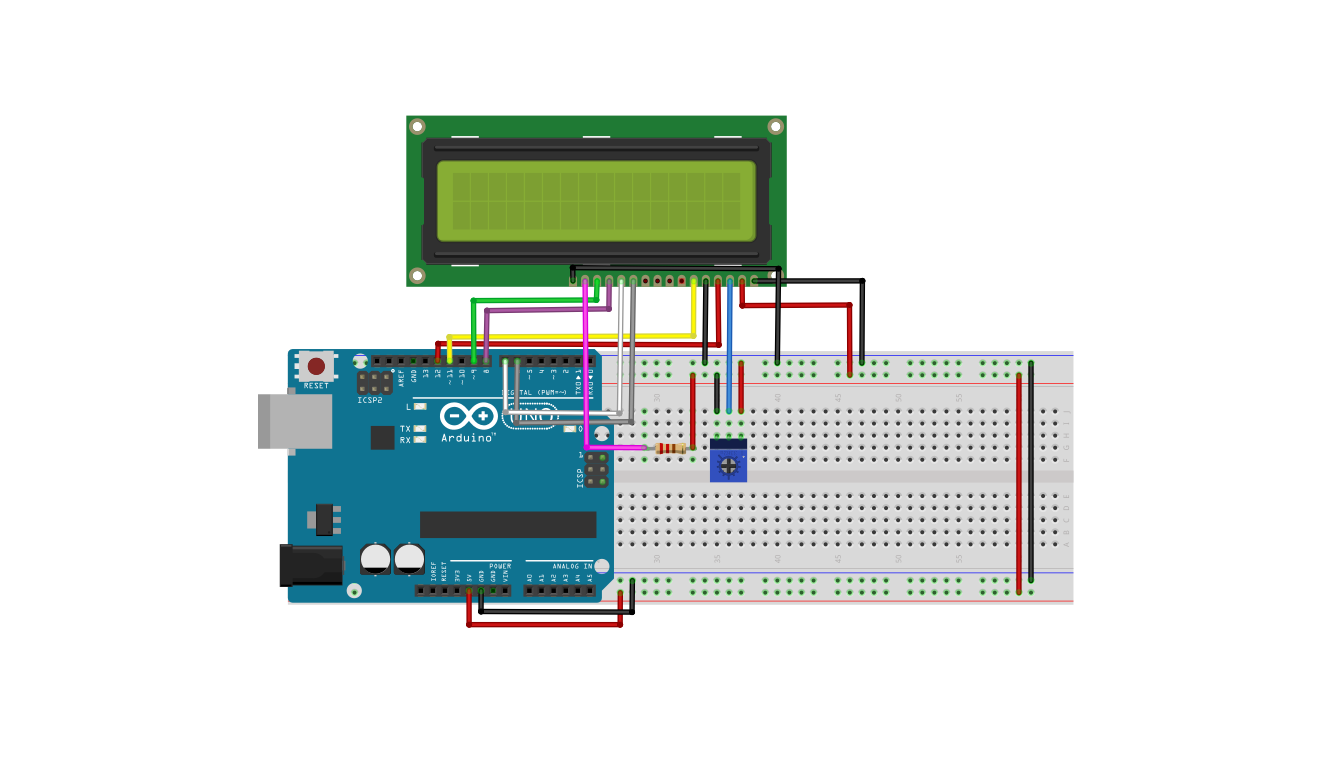
4-bit and 8-bit Mode of LCD:
The LCD display can work in a 4-bit mode and an 8-bit mode.
4-bit mode: Only 4 bits of data are processed at a time. If the data is represented by a byte, then the high order nibble and then the low-order nibble will be handled to show the required character, by using shifting of data in the register. This more complicated process is desired only when the number of I/O pins needed from the Arduino Uno is not sufficient to handle an 8-bit sequence simultaneously.
8-bit mode: the entire 8-bit sequence is processed through the 8-bit data lines of the LCD display and 8 lines from the Arduino Uno. If another Arduino board with a lot more I/Oports is used, then the 8-bit mode would lead to simpler programming and faster execution
4-bit Mode String Display
| LCD Display | Arduino Uno | ||
|---|---|---|---|
| Pin # | Label | Label | |
| 1 | VSS | GND | |
| 2 | VDD | 5V | |
| 3 | VO | See notes below | |
| 4 | RS | Digital Pin 11 | |
| 5 | R/W | GND | |
| 6 | E | Digital Pin 12 | |
| 11 | DB4 | Digital Pin 2 | |
| 12 | DB5 | Digital Pin 3 | |
| 13 | DB6 | Digital Pin 4 | |
| 14 | DB7 | Digital Pin 5 | |
| 15 | Backlight + | See notes below | |
| 16 | BackLight – | GND | |
Arduino Code
					#include <LiquidCrystal.h>


LiquidCrystal lcd(11, 12, 2, 3, 4, 5);

void setup() {

  lcd.begin(16, 2);


  lcd.print("Hello, Arduino!");
  lcd.setCursor(0, 1);
  lcd.print("LCD1602 Test");
}

void loop() {

  lcd.setCursor(0, 1);
  lcd.print("LCD1602 Test  ");
  delay(1000);
  lcd.setCursor(0, 1);
  lcd.print("                ");
  delay(1000);
}
Upon Power-on:
• Line 1: Displays the fixed text: “Hello, Arduino!”
• Line 2: Displays: “LCD1602 Test”
During the Running Loop:
• The text on the second line, “LCD1602 Test”, will blink once every second.
• The blinking interval is one second.
• The first line, “Hello, Arduino!”, remains constant at all times.
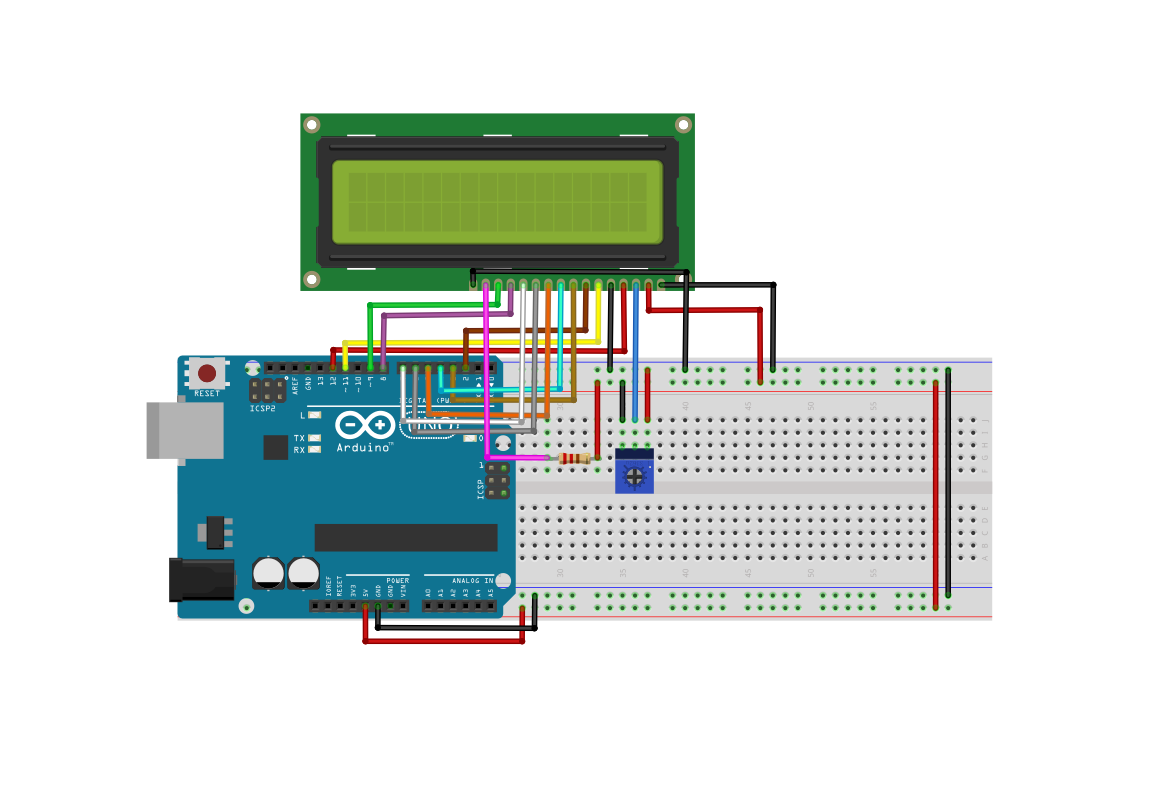
8-bit Mode String Display
| LCD1602A PIN | PIN NAME | FUNCTION DESCRIPTION | CONNECTED TO ARDUINO PIN | REMARKS |
|---|---|---|---|---|
| 1 | VSS | Power Ground | GND | LCD Negative Pole |
| 2 | VDD | Power Positive | 5V | LCD Positive Pole |
| 3 | V0 | Contrast Adjustment | Middle Pin of Potentiometer | 10k Potentiometer Adjusts Contrast (Two Ends Connected to 5V and GND) |
| 4 | RS | Register Select | D12 | High=Data, Low=Command |
| 5 | RW | Read/Write Select | GND | Ground (Write Mode) |
| 6 | E | Enable Signal | D11 | Latch Data on Rising Edge |
| 7 | D0 | Data Line bit0 | D2 | Lowest Data Bit |
| 8 | D1 | Data Line bit1 | D3 | – |
| 9 | D2 | Data Line bit2 | D4 | – |
| 10 | D3 | Data Line bit3 | D5 | – |
| 11 | D4 | Data Line bit4 | D6 | – |
| 12 | D5 | Data Line bit5 | D7 | – |
| 13 | D6 | Data Line bit6 | D8 | – |
| 14 | D7 | Data Line bit7 | D9 | Highest Data Bit |
| 15 | A (LED+) | Backlight Positive | 5V through 220Ω Resistor | Backlight Current Limiting |
| 16 | K (LED-) | Backlight Negative | GND | Backlight Negative Pole |
Arduino Code
					#include <LiquidCrystal.h>

LiquidCrystal lcd(12, 11, 2, 3, 4, 5, 6, 7, 8, 9);

void setup() {
  lcd.begin(16, 2);
  lcd.setCursor(0, 0);
  lcd.print("LCD1602A 8-bit");
  lcd.setCursor(0, 1);
  lcd.print("Hello, Arduino!");
  delay(2000);

  lcd.clear();
  lcd.print("Counting:");
}

void loop() {
  static unsigned long counter = 0;
  static unsigned long lastUpdate = 0;

  if (millis() - lastUpdate >= 500) {
    lastUpdate = millis();
    lcd.setCursor(10, 0);
    lcd.print("    ");
    lcd.setCursor(10, 0);
    lcd.print(counter++);
  }
}
Program Behavior
On Initialization:First line displays: LCD1602A 8-bitSecond line displays: Hello, Arduino!
After a 2-second delay, the screen automatically clears and displays: Counting: 0000
The number increments every 0.5 seconds.
Note: If the display is completely black or blank, adjust the potentiometer’s dial until the text is clear.
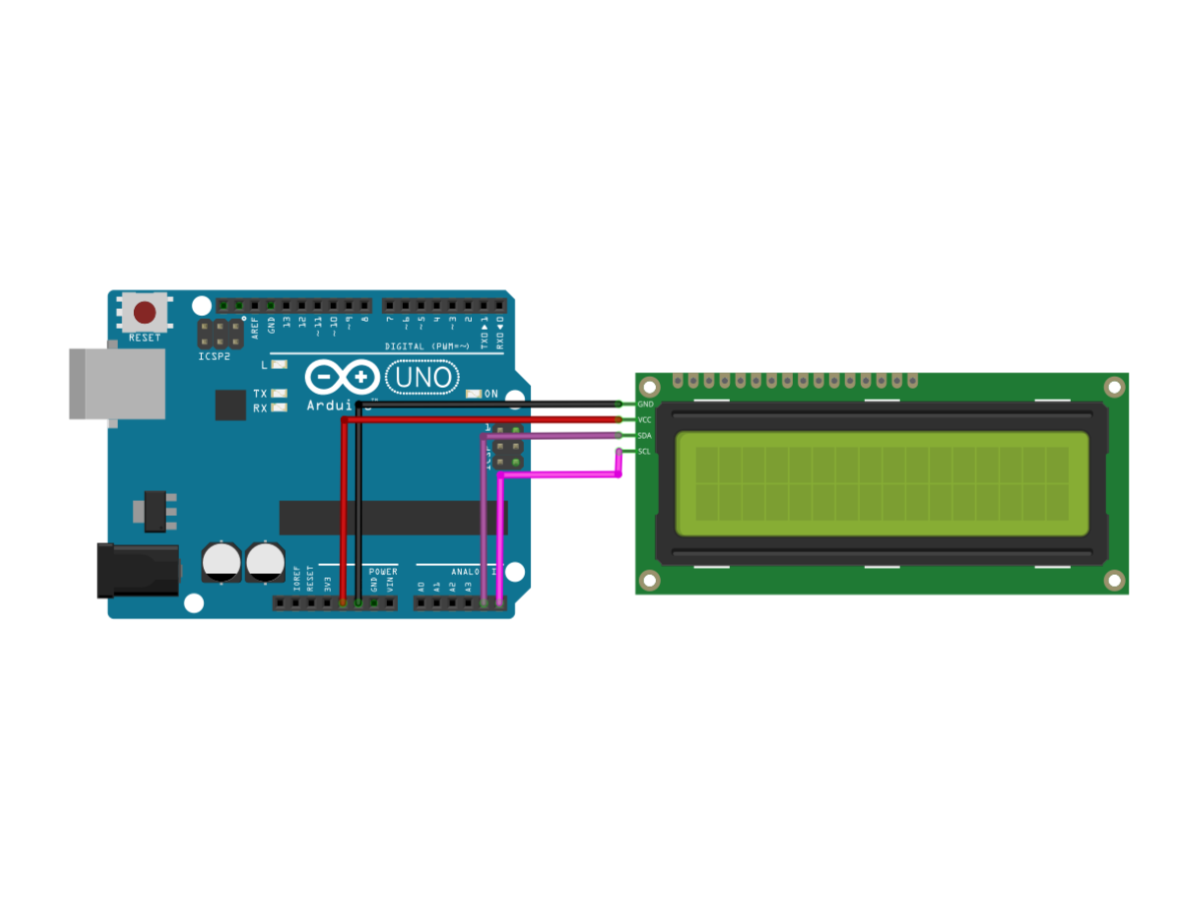
LCD1602A_IIC

As we all know, though LCD and some other displays greatly enrich the man-machine interaction, they share a common weakness. When they are connected to a controller, multiple IOs will be occupied of the controller which has no so many outer ports. Also it restricts other functions of the controller.
Therefore, LCD1602 with an I2C module is developed to solve the problem. The I2C module has a built-in PCF8574 I2C chip that converts I2C serial data to parallel data for the LCD display.
| SPECIFICATIONS | DETAL |
|---|---|
| Board Dimensions | 41.5 x 19 x 15.3mm |
| Supply Voltage | 2.5V – 6V |
| Interface | I2C protocol |
| Backlight | Equipped with backlight. Can be enabled/disabled via jumper cap. |
| Contrast Adjustment | Adjustable via a blue potentiometer. Clockwise to increase, counter-clockwise to decrease. |
| Potentiometer Location | Conveniently located on the top of the board for easy user adjustment. |
| Device Address | Can be modified by shorting the A0/A1/A2 pads. Default I2C address is 0x27. |
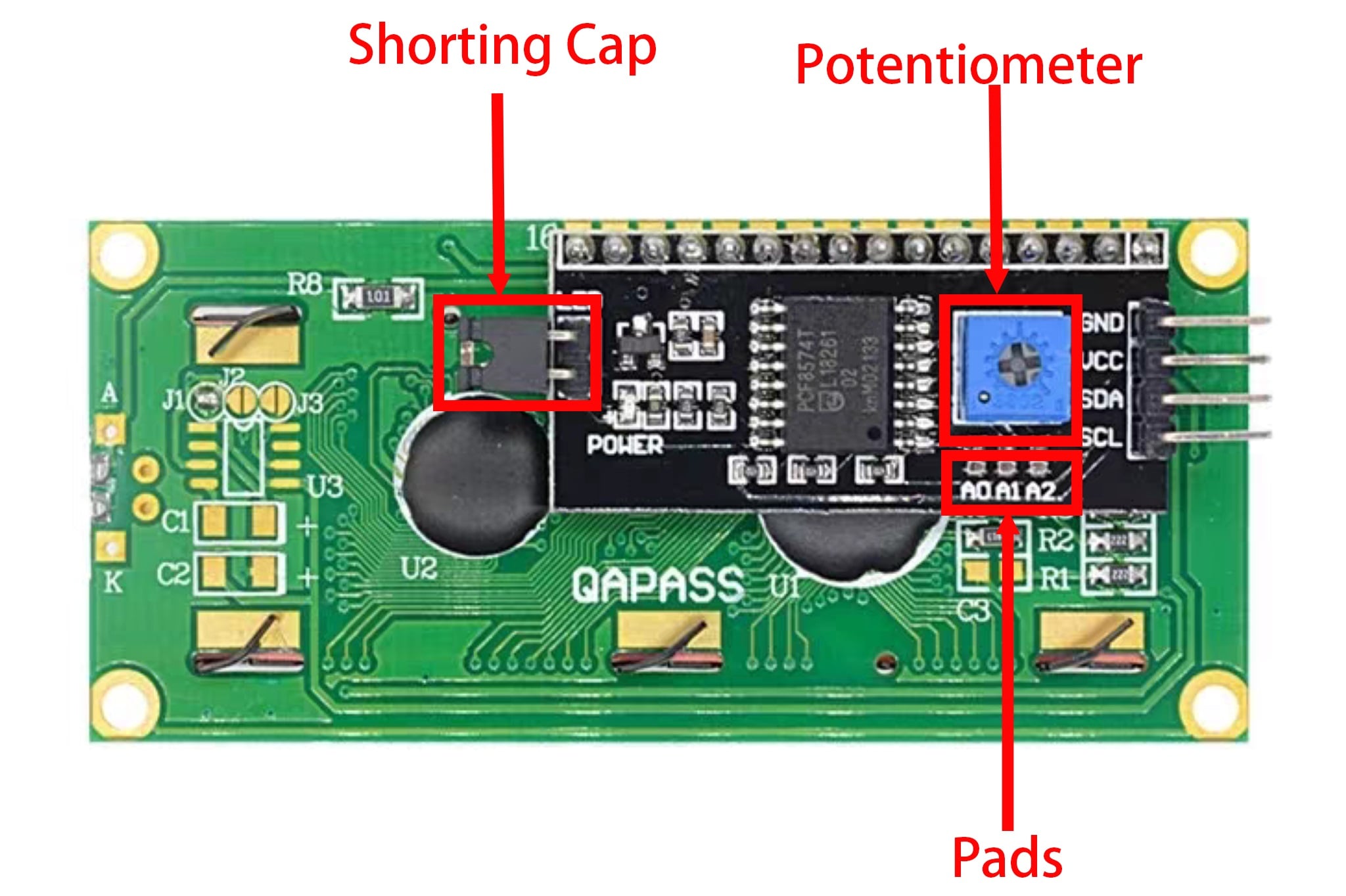
Shorting Cap: Backlight can be enabled by this cap,unplugg this cap to disable the backlight.
Potentiometer: It is used to adjust the contrast (the clarity of the displayed text), which is increased in the clockwise
Pads:The default address is basically 0x27, in a few cases it may be 0x3F.Taking the default address of 0x27 as an example, the device address can be modified by shorting the A0/A1/A2 pads; in the default state, A0/A1/A2 is 1, and if the pad is shorted, A0/A1/A2 is 0.
| IIC MODULE PINS | FUNCTION DESCRIPTION | CONNECT TO ARDUINO UNO | REMARKS |
|---|---|---|---|
| VCC | Power Positive | 5V | Power Supply 5V (Some modules are also compatible with 3.3V) |
| GND | Power Ground | GND | Common Ground |
| SDA | I²C Data Line | A4 | SDA of UNO |
| SCL | I²C Clock Line | A5 | SCL of UNO |
| (Backlight Pad) | Control Backlight | Module’s Own Jumper | Short Circuit = Backlight Always On, Disconnect = Backlight Controllable |
| (Blue Potentiometer) | Contrast Adjustment | Built-in Adjustment | Rotate Clockwise/Counterclockwise to Adjust Display Contrast |

					#include <Wire.h>
#include <LiquidCrystal_I2C.h>

LiquidCrystal_I2C lcd(0x27, 16, 2);

void setup() {
  lcd.init();
  lcd.backlight();

  lcd.setCursor(0, 0);
  lcd.print("I2C LCD1602A");
  lcd.setCursor(0, 1);
  lcd.print("Hello, Arduino!");
  delay(2000);

  lcd.clear();
  lcd.setCursor(0, 0);
  lcd.print("Counting:");
}

void loop() {
  static unsigned long counter = 0;
  static unsigned long lastUpdate = 0;

  if (millis() - lastUpdate >= 500) {
    lastUpdate = millis();
    lcd.setCursor(10, 0);
    lcd.print("    ");
    lcd.setCursor(10, 0);
    lcd.print(counter++);
  }
}
Program Behavior
- Upon Power-On: The LCD backlight will turn on.
- Initial Display:
- Line 1: “I2C LCD1602A”
- Line 2: “Hello, Arduino!”
- After 2 Seconds: The screen auto-clears and displays “Counting: 000”, with the number incrementing by 1 every 0.5 seconds.
- Contrast Adjustment: Use the blue potentiometer on the back of the module to fine-tune the display clarity.
- Troubleshooting: If the screen is blank or completely dark, slowly rotate the potentiometer.