

Blog
How to use ZP01 sensor to test air quality
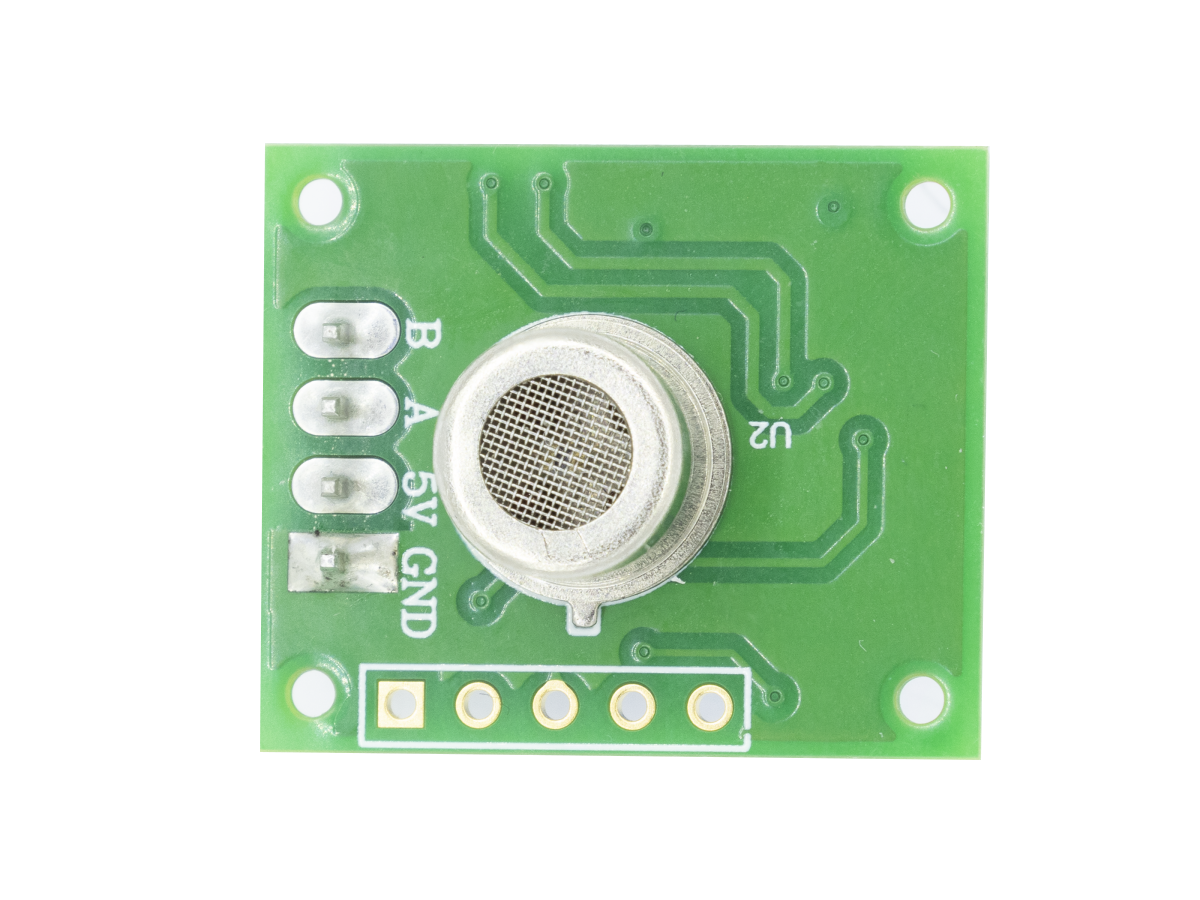
What is ZP01 Sensor
Module Introduction
Sensitivity Curves of the ZP01 Module for Various Gas Detection

Application of schematic diagram

- Pin 1: GND (Input power -)
- Pin 2: 5V (Input power +)
- Pin 3: A (Output signal A)
- Pin 4: B (Output signal B)
Output signal
- Grade 0: Output A (0V), Output B (0V) → Clean
- Grade 1: Output A (0V), Output B (+5V) → Light pollution
- Grade 2: Output A (+5V), Output B (0V) → Moderate pollution
- Grade 3: Output A (+5V), Output B (+5V) → Severe pollution
Code 1
					// Define LCD pins (RS, EN, D4, D5, D6, D7)
LiquidCrystal lcd(7, 8, 9, 10, 11, 12);
// ZP01 digital output pins
const int PIN_ZP01_A = 2;
const int PIN_ZP01_B = 3;
// Buzzer pin (Low level triggers alarm)
const int PIN_BUZZER = 4;
void setup() {
  // Initialize pin modes
  pinMode(PIN_ZP01_A, INPUT);
  pinMode(PIN_ZP01_B, INPUT);
  pinMode(PIN_BUZZER, OUTPUT);
  // Initialize LCD (16 columns × 2 rows)
  lcd.begin(16, 2);
  // Serial debugging (optional)
  Serial.begin(9600);
  // Power-on prompt
  lcd.print("ZP01 Detector");
  delay(1000);
  lcd.clear();
}
void loop() {
  // Read ZP01 A/B output levels (HIGH=5V, LOW=0V)
  int valA = digitalRead(PIN_ZP01_A);
  int valB = digitalRead(PIN_ZP01_B);
  // Judge pollution grade based on A/B levels
  String gradeStr;
  int grade;
  if (valA == LOW && valB == LOW) {
    grade = 0;
    gradeStr = "Clean";      // Grade 0: No pollution (clean air)
  } else if (valA == LOW && valB == HIGH) {
    grade = 1;
    gradeStr = "Light";      // Grade 1: Light pollution
  } else if (valA == HIGH && valB == LOW) {
    grade = 2;
    gradeStr = "Moderate";   // Grade 2: Moderate pollution
  } else {
    grade = 3;
    gradeStr = "Severe";     // Grade 3: Severe pollution
  }
  // Buzzer alarm logic: Trigger when grade ≥ 1
  if (grade > 0) {
    digitalWrite(PIN_BUZZER, LOW); // Activate alarm (low level trigger)
    // Extension: Set different alarm sounds for different grades (frequency/interval)
  } else {
    digitalWrite(PIN_BUZZER, HIGH); // Turn off alarm
  }
  // LCD display content
  lcd.setCursor(0, 0);
  lcd.print("Pollution: ");
  lcd.print(gradeStr);       // Display pollution grade
  lcd.setCursor(0, 1);
  if (grade > 0) {
    lcd.print("ALARM! Lv");
    lcd.print(grade);        // Display alarm grade
  } else {
    lcd.print("No Alarm      "); // Clear residual characters
  }
  delay(500); // Refresh interval (adjustable)
}

Module Wiring
- GND connects to Arduino GND
- 5V connects to Arduino 5V
- Pin A connects to Arduino D2
- Pin B connects to Arduino D3
- Buzzer negative pin connects to Arduino GND
- Buzzer positive pin connects to Arduino D4
- LCD1602 Display:
- RS connects to Arduino D7
- EN connects to Arduino D8
- D4 connects to Arduino D9
- D5 connects to Arduino D10
- D6 connects to Arduino D11
- D7 connects to Arduino D12
- VCC connects to Arduino 5V
- GND connects to Arduino GND
Pin V0 is externally connected to a 10K potentiometer (the two ends of the potentiometer are connected to 5V and GND respectively, which is used to adjust the display contrast)
The program above is a basic one for using this module. If you want to implement more complex functions, you can check out the program below.
Code 2
					// ====================== Hardware Pin Definitions ======================
// LCD1602 pins (RS, EN, D4, D5, D6, D7)
LiquidCrystal lcd(7, 8, 9, 10, 11, 12);
// ZP01 odor sensor pins
const int PIN_ZP01_A = 2;
const int PIN_ZP01_B = 3;
// Alarm output pins
const int PIN_BUZZER = 4;
const int LED_LIGHT = 5;   // Green LED (light pollution)
const int LED_MODERATE = 6;// Yellow LED (moderate pollution)
const int LED_SEVERE = 13; // Red LED (severe pollution)
// Buttons (pull-up input, trigger on LOW level)
const int KEY_THRESHOLD = A0; // Adjust alarm threshold
const int KEY_MUTE = A1;      // Mute alarm

// ====================== Global Variables ======================
int odorGrade = 0;          // Current odor grade (0-3: clean to severe)
int alarmThreshold = 1;     // Alarm threshold (1=light+, 2=moderate+, 3=severe only)
bool isMute = false;        // Mute status (true = buzzer off)
bool lastMuteState = false; // Last mute state (prevent repeated trigger)
unsigned long lastKeyTime = 0; // Key debounce timestamp
const int DEBOUNCE_DELAY = 20; // Debounce delay (ms)

// ====================== Function Declarations ======================
void readOdorGrade();       // Read ZP01 signal and judge odor grade
void updateLED();           // Control LED indicators based on odor grade
void updateBuzzer();        // Control buzzer based on grade, threshold and mute state
void handleKeyInput();      // Process button input (debounce + function logic)
void updateLCD();           // Update LCD display (no flicker)
void printSerialLog();      // Output formatted log to serial monitor

void setup() {
  // Initialize pin modes
  pinMode(PIN_ZP01_A, INPUT);
  pinMode(PIN_ZP01_B, INPUT);
  pinMode(PIN_BUZZER, OUTPUT);
  pinMode(LED_LIGHT, OUTPUT);
  pinMode(LED_MODERATE, OUTPUT);
  pinMode(LED_SEVERE, OUTPUT);
  pinMode(KEY_THRESHOLD, INPUT_PULLUP); // Enable internal pull-up resistor
  pinMode(KEY_MUTE, INPUT_PULLUP);

  // Initialize LCD
  lcd.begin(16, 2);
  lcd.print("ZP01 Detector");
  delay(1000);
  lcd.clear();
  lcd.print("Threshold: ");
  lcd.print(alarmThreshold);
  delay(500);
  lcd.clear();

  // Initialize serial monitor (9600 baud rate)
  Serial.begin(9600);
  Serial.println("=== ZP01 Odor Detector Start ===");
  Serial.print("Initial Alarm Threshold: ");
  Serial.println(alarmThreshold);

  // Turn off all outputs by default
  digitalWrite(PIN_BUZZER, HIGH);
  digitalWrite(LED_LIGHT, LOW);
  digitalWrite(LED_MODERATE, LOW);
  digitalWrite(LED_SEVERE, LOW);
}

void loop() {
  readOdorGrade();    // Get current odor grade
  handleKeyInput();   // Check button presses
  updateLED();        // Update LED status
  updateBuzzer();     // Update buzzer status
  updateLCD();        // Refresh LCD if status changed
  printSerialLog();   // Output log to serial
  delay(200);         // Main loop interval (avoid frequent refresh)
}

// Read ZP01 A/B pin levels and determine odor grade
// 0 = Clean, 1 = Light pollution, 2 = Moderate pollution, 3 = Severe pollution
void readOdorGrade() {
  int valA = digitalRead(PIN_ZP01_A);
  int valB = digitalRead(PIN_ZP01_B);

  if (valA == LOW && valB == LOW) {
    odorGrade = 0;
  } else if (valA == LOW && valB == HIGH) {
    odorGrade = 1;
  } else if (valA == HIGH && valB == LOW) {
    odorGrade = 2;
  } else {
    odorGrade = 3;
  }
}

// Control LED indicators: green for light, yellow for moderate, all on for severe
void updateLED() {
  // Turn off all LEDs first to avoid residual light
  digitalWrite(LED_LIGHT, LOW);
  digitalWrite(LED_MODERATE, LOW);
  digitalWrite(LED_SEVERE, LOW);

  switch (odorGrade) {
    case 1:
      digitalWrite(LED_LIGHT, HIGH); // Green LED on for light pollution
      break;
    case 2:
      digitalWrite(LED_MODERATE, HIGH); // Yellow LED on for moderate pollution
      break;
    case 3:
      // All LEDs on for severe pollution
      digitalWrite(LED_LIGHT, HIGH);
      digitalWrite(LED_MODERATE, HIGH);
      digitalWrite(LED_SEVERE, HIGH);
      break;
    default: // Grade 0 (clean), all LEDs off
      break;
  }
}

// Control buzzer: different beep frequency for different grades (if not muted)
void updateBuzzer() {
  // Trigger buzzer only if grade >= threshold and not muted
  if (odorGrade >= alarmThreshold && !isMute) {
    // Different beep frequency based on odor grade
    switch (odorGrade) {
      case 1: // Light pollution: beep once per second (200ms on, 800ms off)
        digitalWrite(PIN_BUZZER, LOW);
        delay(200);
        digitalWrite(PIN_BUZZER, HIGH);
        delay(800);
        break;
      case 2: // Moderate pollution: beep twice per second (100ms on, 100ms off)
        digitalWrite(PIN_BUZZER, LOW);
        delay(100);
        digitalWrite(PIN_BUZZER, HIGH);
        delay(100);
        break;
      case 3: // Severe pollution: buzzer on continuously
        digitalWrite(PIN_BUZZER, LOW);
        break;
    }
  } else {
    digitalWrite(PIN_BUZZER, HIGH); // Turn off buzzer
    // Auto cancel mute if grade drops below threshold
    if (odorGrade < alarmThreshold) {
      isMute = false;
    }
  }
}

// Process button input with debounce to avoid false triggers
void handleKeyInput() {
  unsigned long currentTime = millis();
  // Button 1: Adjust alarm threshold (cycle 1→2→3→1)
  if (digitalRead(KEY_THRESHOLD) == LOW && currentTime - lastKeyTime > DEBOUNCE_DELAY) {
    alarmThreshold++;
    if (alarmThreshold > 3) alarmThreshold = 1;
    lastKeyTime = currentTime;
    Serial.print("Alarm Threshold Updated: ");
    Serial.println(alarmThreshold);
    delay(100); // Short delay to prevent continuous press
  }
  // Button 2: Toggle mute status
  if (digitalRead(KEY_MUTE) == LOW && currentTime - lastKeyTime > DEBOUNCE_DELAY) {
    isMute = !isMute;
    lastKeyTime = currentTime;
    Serial.print("Mute State: ");
    Serial.println(isMute ? "ON" : "OFF");
    delay(100);
  }
}

// Update LCD only when status changes (no flicker)
void updateLCD() {
  static int lastGrade = -1;
  static int lastThreshold = -1;
  static bool lastMute = false;

  // Refresh LCD only if grade/threshold/mute status changes
  if (odorGrade != lastGrade || alarmThreshold != lastThreshold || isMute != lastMute) {
    lcd.clear();
    // First line: Odor grade + mute status
    lcd.setCursor(0, 0);
    lcd.print("Odor: ");
    switch (odorGrade) {
      case 0: lcd.print("Clean  "); break;
      case 1: lcd.print("Light  "); break;
      case 2: lcd.print("Moderate"); break;
      case 3: lcd.print("Severe "); break;
    }
    lcd.print(isMute ? "(Mute)" : "      ");

    // Second line: Alarm threshold
    lcd.setCursor(0, 1);
    lcd.print("Thresh: ");
    lcd.print(alarmThreshold);
    lcd.print(" (Lv");
    lcd.print(alarmThreshold);
    lcd.print("+)");

    // Update last status to compare next time
    lastGrade = odorGrade;
    lastThreshold = alarmThreshold;
    lastMute = isMute;
  }
}

// Output formatted serial log (once per second to avoid spam)
void printSerialLog() {
  static unsigned long lastLogTime = 0;
  // Output log every 1 second
  if (millis() - lastLogTime > 1000) {
    Serial.print("[");
    Serial.print(millis() / 1000); // Elapsed time in seconds
    Serial.print("s] Odor Grade: ");
    Serial.print(odorGrade);
    Serial.print(" | Alarm Thresh: ");
    Serial.print(alarmThreshold);
    Serial.print(" | Mute: ");
    Serial.println(isMute ? "YES" : "NO");
    lastLogTime = millis();
  }
}

Problem
No display on LCD1602:
Two possible causes—either the contrast potentiometer isn’t adjusted, or the wiring is reversed. First, rotate the potentiometer until the characters on the screen are clear. Then double-check if the RS, EN, D4-D7 pins are wired incorrectly, and also verify if the LCD’s VCC and GND are reversed.
Overlapping characters on LCD:
Residual characters on the screen aren’t being cleared. Add spaces after outputting content with lcd.print(), or call lcd.clear() to wipe the screen clean before each display.
Pollution level always shows “Clean”:
This could be because the ZP01 module hasn’t finished preheating, or the module pin wiring is wrong. Wait for the module to preheat for 3 minutes before testing, then double-check if the A/B pins of the ZP01 module are connected to pins 2/3 of the Arduino. Also, make sure the module’s VCC is connected to 5V (connecting it to 3.3V will cause detection to fail).
Frequent level fluctuations:
The sensor’s output voltage level is jittering. Enable the debounce function in the code, or adjust the delay value in the loop() function to over 200ms to extend the sampling interval.
FAQ
Are home air quality tests worth it?
Can I test air quality myself?
Can my phone test air quality?