

Blog
JR6001 Voice Module: Custom Voice + Serial Broadcast, Zero Integration Threshold

Introduction
JR6001 is a voice playback module supporting MP3 and WAV formats with 24-bit DAC output.It features convenient voice content update via USB,along with serial port and AD control functions.Driver-free and plug-and-play for direct file copying,it is suitable for diverse scenarios including industrial control,intelligent transportation and advertising.The module also supports 30-level volume adjustment,free combination playback and loop count setting,and comes with a dedicated PC tool easy debugging and operation.
Technical Parameters
- Operating voltage: DC 3.6V–5.2V;
- Audio Format Support: Compatible with WAV and MP3 audio file playback;
- Storage Capacity: Built-in Flash memory, expandable up to 8MB or higher (dependent on model);
- Interface Type: Provides UART and SPI interfaces for host communication; supports GPIO control signal triggering for playback;
- Sampling Rate Range: 8KHz–48KHz.
Module Pin Description

| Pin | Label | Function Description |
|---|---|---|
| 1 | GND | Ground |
| 2 | VCC | Module power supply pin, DC 3.6-5.2V |
| 3 | RX | UART asynchronous serial data input |
| 4 | TX | UART asynchronous serial data output |
| 5 | BUSY | Busy signal: Outputs high level when playing audio |
| 6 | SPK+ | Connect to speaker, polarity-insensitive |
| 7 | SPK- | Connect to speaker, polarity-insensitive |
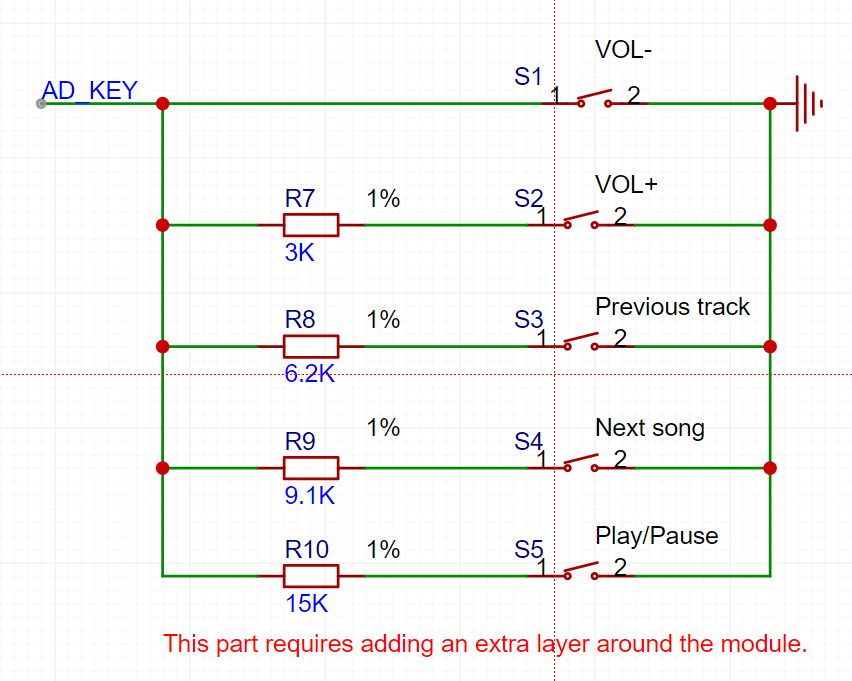
| 8 | AD_KEY | AD port: Different resistor parameters correspond to different functions. Please refer to the circuit diagram for details |
| 9 | DACR | Audio right channel output |
| 10 | DACL | Audio left channel output |
Functional Features
- High Quality: Utilizes advanced speech synthesis algorithms to deliver high-fidelity, realistic, and natural-sounding speech.
- Multi-Language Support: Compatible with multiple languages and dialects to meet the needs of different regions and users.
- Flexibility: Supports multiple playback modes and control methods, allowing for flexible configuration and control based on actual needs.
- Easy Integration: Offers a wide range of interfaces and development tools to facilitate secondary development and integration for developers.
- Wide Range of Applications: Extensively used in various scenarios such as smart homes, intelligent transportation, smart robotics, and more.
Main Pin Functions
1.BUSY
The BUSY pin indicates the current operational status of the module. When this pin is at a high level, it signifies that the module is busy processing tasks (such as playing audio); a low level indicates an idle state. The status of this signal can be detected by configuring the GPIO. The specific configuration is as follows:
					#define JR6001_BUSY_GPIO_CLK RCC_APB2Periph_GPIOA
#define JR6001_BUSY_GPIO_PORT GPIOA
#define JR6001_BUSY_GPIO_PIN GPIO_Pin_6
#define JR6001_BUSY_GPIO_Mode GPIO_Mode_IPD
2.UART communication pins
JR6001 supports receiving commands via a serial port to perform various operations, such as playback, pause, volume adjustment, and other functions. Commonly used UART pins include TXD (transmit), RXD (receive), and GND (ground). These pins typically need to be connected to the main control MCU to enable interaction.
3.Power pins (VCC/GND)
Provides working voltage input; it is generally recommended to use a 5V power supply.
4.Other auxiliary pins
There may also be additional functional expansion pins or reserved terminals.
Serial Port Communication Commands
Communication Mechanism
- We operate as a slave device, defaulting to a wait state upon power-on. All playback operations are initiated by the host.
- The slave device does not initiate communication on its own; all communication is initiated by the host.
- The serial port operates at 3.3V TTL level. If the host system uses 5V level, a 1K resistor should be connected in between.
- All data in the protocol is in ASCII code.
Protocol Agreement
The following are the data definitions that this chip can recognize:
Playback Status: The system is in a halted state upon power-up.
Drive Letter Definition: After switching the drive letter, the system enters a stopped state.
USB: 00, TF: 01, FLASH: 02, NO_DEVICE: FF.
Volume: A total of 31 levels, ranging from 0 to 30. The default level upon power-up is 20.
Playback Mode Definition: The default mode upon power-up is single-track stop.
Full-Drive Loop (00): Plays all tracks in order and loops after completion.
Single-Track Loop (01): Continuously loops the current track.
Single-Track Stop (02): Stops sequentially after playing the current track.
Full-Drive Random (03): Randomly plays tracks within the drive.
Directory Loop (04): Plays tracks in the current folder in order and loops after completion; subdirectories are not included.
Directory Random (05): Randomly plays tracks within the current directory; subdirectories are not included.
Directory Sequential Play (06): Plays tracks in the current folder in order and stops after completion; subdirectories are not included.
Sequential Play (07): Plays all tracks in order and stops after completion.
Combination Playback Definition: Combination playback is based on filenames. The files must be stored in the “ZH” folder, and their names should be changed to two-byte names, typically represented by numbers, such as 01.mp3, 02.mp3.
Instructions for Using AD Buttons
The AD_KEY pin of the module is reserved for adding external control buttons. A total of 5 control buttons can be added. Their functions are: volume down, volume up, previous track, next track, and play/pause. To use this feature, the following circuit needs to be added:
JR6001 Voice Broadcast Workflow
- Initialization: At the start of the program, perform necessary initialization operations, including loading voice resources, setting playback parameters, etc.
- Receive Command: The program receives the command or text content that needs to be broadcast through some means, which could be via network reception, file reading, or other methods.
- Text Processing: After receiving the command, the program processes the text content, including tasks like word segmentation and grammatical analysis, to facilitate better speech synthesis.
- Speech Synthesis: Based on the processed text content, use the corresponding speech synthesis algorithm to convert the text into a speech signal. This step may include text-to-speech conversion algorithms, voice selection, etc.
- Playback of Voice: Once the voice signal is generated, the program sends it to the audio device for playback. This step may involve selecting the audio device, controlling volume, etc.
- Monitor Feedback: During playback, the program may need to monitor user feedback, such as confirming whether the broadcast was successful, user commands, etc.
- End Processing: After playback is complete, the program performs necessary termination procedures, such as releasing resources, saving logs, etc.
Voice Announcement for JR6001
Connection method:
| USB to TTL module pins | JR6001 Master Control Module |
|---|---|
| VCC (or 5V/3.3V) | VCC (Please confirm the operating voltage of the master control module and select the corresponding voltage output) |
| GND | GND |
| TXD | RXD (Master Control Unit’s Receiving End) |
| RXD | TXD (Master Control Unit’s Transmitting End) |
Application Fields
- Industrial Control Field: Industrial equipment, control devices, etc.
- Intelligent Transportation Equipment: Toll stations, parking lots, in-vehicle voice prompts.
- Advertising Industry: Broadcasting of promotional messages.
- Access Control and Attendance: “Door is open,” “Password correct,” etc.
- Security Industry: Motion detection alerts, safety voice reminders, warm notification messages.
- Gaming Industry: Rocking machines, bumper cars, basketball machines, etc.
- Medical Electronics: Call devices, queuing systems, etc.
- Education and Communication: Educational equipment, communication electronics.
Relative Information
FAQ
- Are there any precautions for serial port connections?
The TX and RX of the host computer’s serial port need to be crossed when connecting to the module. Specifically, the TX of the host computer’s serial port should connect to the RX on the module, and the RX of the host computer’s serial port should connect to the TX on the module.
The I/O level of this chip is 3.3V. If the connected microcontroller operates at 5V, it is essential to connect a 1K resistor in series between the microcontroller’s TX pin and the module’s RX pin. Otherwise, the module may malfunction.
2.Why does the JR6001 voice module fail to start when connected to a computer?
- USB cable malfunction.
Using poor-quality or excessively long USB cables can lead to insufficient power supply or signal degradation.
Solution: Replace with a shielded USB data cable (not a charging cable) shorter than 20cm, preferably using the original cable provided with the module.
- Poor contact at the interface.
USB port oxidation or cold solder joints.
Solution: Clean the module’s USB interface with anhydrous alcohol; try switching to another USB port on the computer (recommended to use the motherboard’s native USB 2.0 interface).
- Insufficient power supply.
JR6001 peak operating current ≥ 500mA
Solution: Disconnect other USB devices; use a USB hub with an external power supply.
- Operating mode conflict.
The USB drive function is disabled when the module is in UART control mode.
Solution: Keep the BUSY pin floating during power-up; check if the PA6 control pin was accidentally triggered.
- SPI Flash damaged.
Frequent plugging and unplugging may cause Flash firmware anomalies.
Solution: Short the BOOT pins on the back of the module and then power it on again (forces entry into programming mode).
- Driver signature conflict (Windows system).
Solution: `bcdedit /set nointegritychecks on` # Run CMD with administrator privileges.
A system restart is required after performing this operation.
- Incompatible file system.
JR6001 only supports SPI Flash formatted in FAT32.
Solution: Format other devices to FAT32 and copy test files; then insert the module to check if it is recognized.
- Hardware malfunction.
Check if the D+/D- pins of the USB interface are short-circuited (the diode measurement with a multimeter should show a resistance of 500-700Ω).
Test the power supply voltage of the core chip (the 5V pin should be stable between 4.75-5.25V).
Replace the SPI Flash chip (typically model W25Q64).
3.How to resolve the issue of false activation in JR6001 voice recognition?
When using the JR601 voice module, the common issue of “false activation” often manifests as the module waking up abnormally without user commands or due to environmental interference. This problem is frequently caused by improper sensitivity settings, environmental noise interference, unstable power supply, or conflicts with other signal sources.
Solution: Adjust the module’s trigger threshold to reduce sensitivity to low-frequency noise; optimize the power supply to avoid false triggers caused by voltage fluctuations; set reasonable wake words, avoiding terms that are too simple or easily imitated by environmental sounds; implement proper shielding in hardware wiring to prevent electromagnetic interference. Through coordinated software and hardware optimization, the recognition accuracy and stability of the JR6001 in complex environments can be significantly improved.