

Blog
KA2284 Op-Amp-Free Design, Minimal Circuit Realizes LED Level Visualization
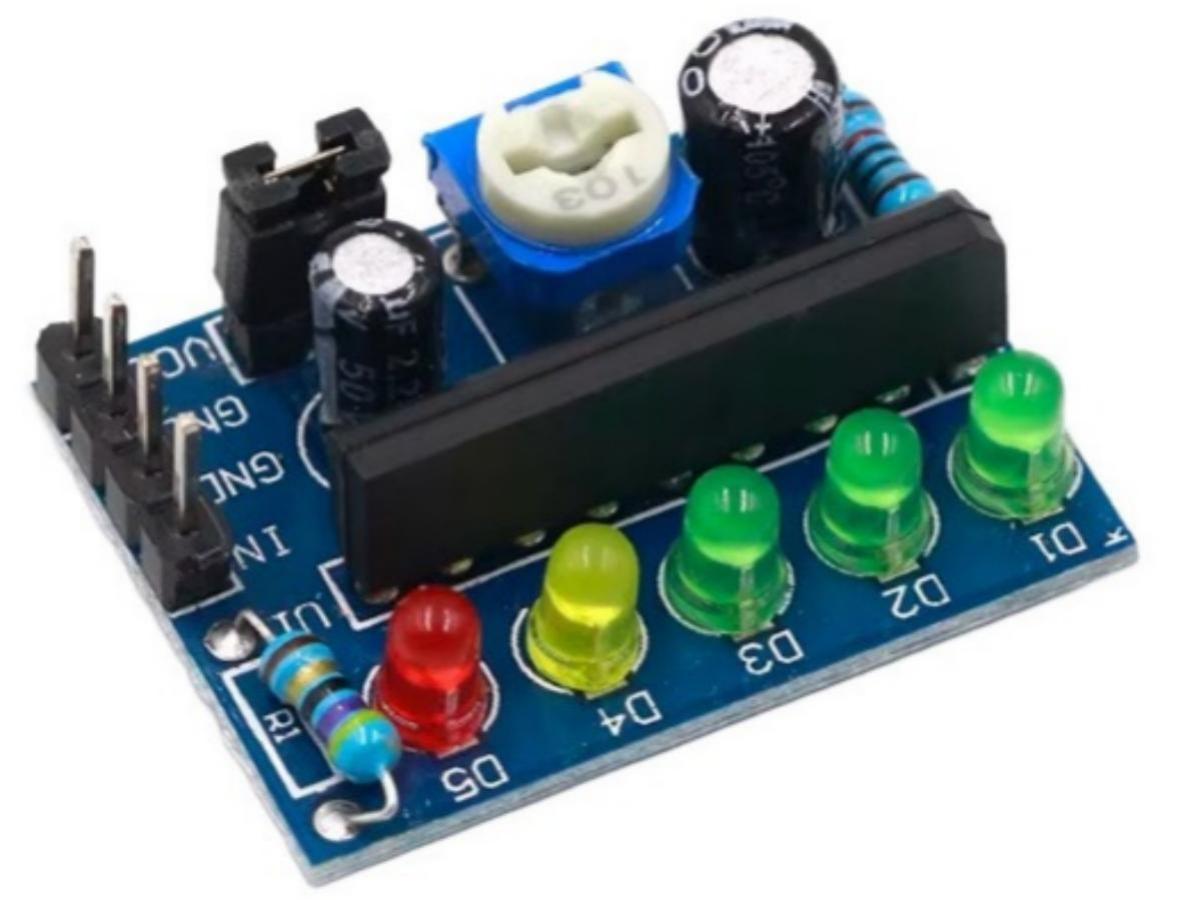
Introduction
The KA2284 is a classic audio level indicator chip. While various alternatives are available nowadays, it is still commonly used in power amplifier maintenance. This chip is mainly designed to display the intensity of audio signals, reflecting changes in audio levels through different LED brightness or colors. In audio equipment, the level indication function is crucial: it enables users to intuitively monitor the amplitude of input or output audio signals, facilitating volume adjustment and overload prevention.
Features
- High Efficiency: The KA2284 adopts a high-efficiency buck converter, delivering up to 90% conversion efficiency to minimize heat loss and power consumption.
- Wide Input Voltage Range: The KA2284 features an input voltage range of 3.5V–16V, suitable for various types of power supply inputs.
- Multi-channel Output: The KA2284 provides multi-channel outputs, capable of supplying power to multiple devices simultaneously.
- High Reliability: The KA2284 adopts a highly reliable design and manufacturing process, enabling long-term stable operation in harsh working environments.
- Logarithmic 5-point LED Indication: Provides 5-level logarithmic indication at -10dB, -5dB, 0dB, 3dB and 6dB, simulating the way the human ear perceives sound intensity.
- High-Gain AC Detector Amplifier: The built-in high-gain AC detector amplifier (Gv=26dB) ensures excellent response to weak signals.
- Low Radiation Noise: The circuit generates low radiation noise when LEDs are illuminated, ensuring stable and accurate indication.
Working Principle of the Level Indicator Module
Level indication generally refers to the visual display of signal strength or level, which can be analog or digital. The KA2284 module may be equipped with multiple LEDs or an LCD screen, reflecting the amplitude of input signals through changes in color or brightness. These indicators or screens can provide continuous or discrete readings, allowing users to accurately measure and analyze the dynamic changes of signals.
The level indicator module mainly realizes level indication by utilizing the conduction characteristics of electronic components such as diodes or transistors. In the circuit, when the input voltage is higher than the set threshold, the diode or transistor conducts and current flows through, turning on the indicator light to achieve level indication. Conversely, when the input voltage is lower than the set threshold, the diode or transistor cuts off and current cannot pass through, so the indicator light turns off.
How to Use the Level Indicator Module
Before using the level indicator module, it is necessary to understand the circuit working principle and level status, and set the module’s threshold reasonably. Connect the level indicator module to the circuit; the working status of the circuit can be intuitively monitored according to the on-off status of the indicator lights. If threshold adjustment is required, it can be achieved by adjusting the potentiometer on the level indicator module.
Circuit Design Principle
The typical circuit design of the KA2284 consist of the following key sections:
- Operational Amplifier Configuration: The KA2284 is typically configured as a non-inverting amplifier or comparator mode.
- Power Supply: The KA2284 requires dual power supply (e.g. ±5V or ±12V) to ensure it can process bipolar input signals. An additional bias circuit is required for single power supply to support single-ended signal input.
- Filtering & Stabilization: To minimize the impact of high-frequency noise, a filter capacitor (e.g. 10μF) is typically added to the input terminal and a compensation capacitor (e.g. 2.2μF) to the output terminal. These components effectively enhance circuit stability.
KA2284 Pin Function Diagram

| Serial Number | Symbol | Function |
|---|---|---|
| 1 | OUT1 | -10dB output |
| 2 | OUT2 | -5dB output |
| 3 | OUT3 | 0dB output |
| 4 | OUT4 | 3dB output |
| 5 | GND | Ground |
| 6 | OUT5 | 6dB output |
| 7 | OUT | Output end |
| 8 | IN | Input end |
| 9 | VCC | Power Supply |
Application Circuit
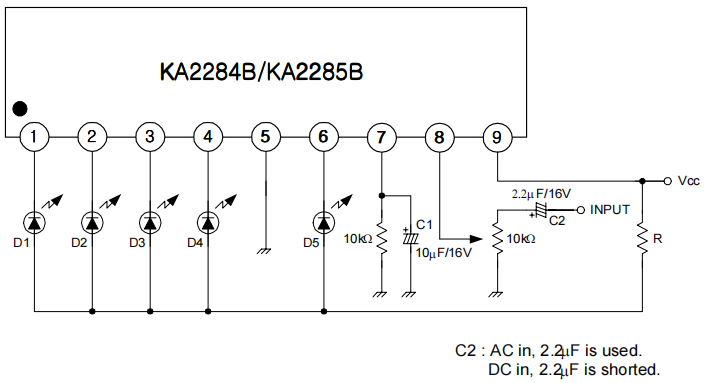
KA2284 Level Module Schematic Diagram
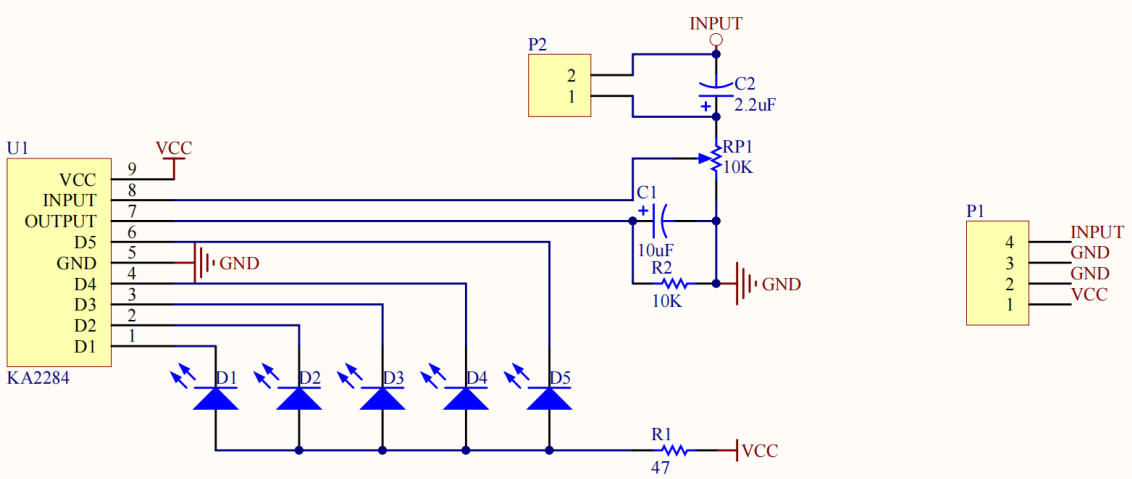

Simple Level Indicator Light
Use code to make Arduino output audio signals of different frequencies,simulate audio with different tones more realistically,and make the level indication effect simulated by KA2284 clser to actual music scenarios.
Mode of Connection
KA22284→Arduino
VCC→5V
GND→GND
IN→D9
GND(optional)→GND(optional)
Arduino Code
					/*
  Arduino Audio Frequency Output (Using tone() Function)
  Compatible with: KA2284 module IN connected to Arduino D9, no additional components needed
  Effect: Outputs low → medium → high frequencies sequentially. KA2284 LEDs light up in varying numbers based on frequency/duration
*/

const int audio_pin = 9; // Connect to the IN pin of the KA2284 module
// Define common audio frequencies (in Hz)
int frequencies[] = {196, 262, 329, 392, 440, 523, 659}; // From low C to high La
const int freq_count = sizeof(frequencies) / sizeof(frequencies[0]);

void setup() {
  pinMode(audio_pin, OUTPUT);
  Serial.begin(9600);
}

void loop() {
  // Loop through and output different frequencies, each for 1 second
  for (int i = 0; i < freq_count; i++) {
    int freq = frequencies[i];
    Serial.print("Output frequency: ");
    Serial.print(freq);
    Serial.println(" Hz");

    // Output audio signal at the specified frequency
    tone(audio_pin, freq);
    // Sustain for 1 second. During this time, KA2284 detects the level and lights corresponding LEDs
    delay(1000);
    // Stop output, pause for 0.5 seconds
    noTone(audio_pin);
    delay(500);
  }
}
Matters Need Attention
- Ensure the power supply voltage complies with the chip specification to avoid caused by overvoltage.
- The input signal amplitude shall be within the allowable range of the chip;a clipping protection circuit must be added if necessary.
- Use high-quality non-inductive resistors and capacitors to minimize the impact of parasitic effects on circuit performance.
Application
- Embedded System:In embedded systems,it helps developers monitor the I/O pin levels of microcontrollers to ensure stable system operation.
- Communication Networks:In network devices,it can display signal strength in real time,facilitating debug and optimizing transmission quality.
- Power Management:Monitors the stability of the power supply voltage to ensure the reliability of the device’s power supply.
- Audio and Video System:In audio equipment,it displays the level of audio signals,while in video systems,it can check the amplitude of video signals.
- Laboratory Testing: It serves as an indispensable tool for electronic experiments or product development, facilitating circuit debugging and fault location.
Relative Information
FAQ
1.Why is my LEDs not working properly?
- All LED stay on continuously after power-on→Cause:Excessive signal input voltage/Sensitivity set too high;Solution:Turn the potentiometer clockwise to reduce value,or add a voltage divider resister to the input signal.
- Signal present but all LEDs not lighting up→Cause:Poor common ground connection/Sensitivity too low/Weak signal;Solution:Check GND wiring first,the turn potentiometer counterclockwise,or amplify the input signal.
- LEDs flash erratically(not lighting up in sequence)→Cause:Signal interface/Poor wiring connection;Solution Replace with shielded signal cable,fasten wire terminals,and keep away from high-power circuits.
- Partial LEDs not lighting up→Cause:LED damaged/Module poor soldering;Solution:Replace the corresponding LED or resolder the module pins.
2.How to adjust the sensitivity?
The built-in adjustable potentiometer of the module is the core calibration component,which determines the threshold voltage required to trigger the LEDs to light up.
- Power on first:Connect the power supply and signal properly,and keep the signal to be tested stable(e.g.:fixed audio volume,fully charged battery).
- Adjust the potentiometer:Rotate the potentiometer slowly with a screwdriver.
- Clockwise rotation:Sensitivity decrease→A stronger signal is required to light light up more LEDs(suitable for high-signal scenarios,e.g.:power amplified output).
- Counterclockwise rotation:Sensitivity increase→Weak signals can light up the LEDs(suitable for low-signal scenarios,e.g.:microphone input).
3.Calibration Standard
- Audio scenario:LEDs 2-3 stay on at moderate volume;LED 5 lights up at maximum volume;all LEDs turn off at minimum volume(mute).
- Lighting scenario:All 5 LEDs stay on when battery is fully charged(e.g.:4.2V for a fully charged 3.7V lithium battery);only LED 1 light up for all turn off when battery is low(e.g.:3.0V).