

Blog
KY-008 Laser Module—A Practical Guide for Makers
Introduction
If you’re into DIY electronics, robotics, or sensor projects, you’ve probably encountered the need for a simple yet reliable laser source. The KY-008 laser module is a go-to choice for hobbyists and makers alike – it’s compact, affordable, and easy to integrate with microcontrollers like Arduino and STM32. Whether you’re building a laser tripwire, a distance-sensing setup, or a fun interactive project, this 650nm red laser transmitter delivers consistent performance without the complexity. Let’s dive into everything you need to know about the KY-008, from its core specs to hands-on projects that put its features to use.
What is the KY-008 Laser Module?
The KY-008 Laser is a compact laser transmitter module designed for electronic projects that require a focused red laser beam. At its core, it’s a 650nm laser diode-based module with minimal components, making it lightweight and easy to wire. Unlike complex laser systems, it uses a simple digital signal to turn the laser on and off, so you don’t need advanced circuitry to control it.
It’s commonly paired with Arduino but works just as well with STM32, Raspberry Pi, and other microcontrollers. While it’s primarily a transmitter , it’s often used with a laser receiver for projects like obstacle detection or laser communication. Despite its simplicity, it’s important to note that the laser is powerful enough to damage eyesight – never point it directly at eyes or reflective surfaces.
How to Use the KY-008 Laser Module?
This is one of the simpler modules and needs very little interaction. Unless you need to check the laser’s power state, you can put the sensor in a separate circuit. To get the ‘tripwire’ function working, you just need to connect the photo sensing module to your device.
The KY-008 laser module only needs to be connected to the power pins, unless you need to turn the laser on and off when it’s not in use. The VCC (+) pin connects to the 5V pin on the Raspberry Pi (the red one), and (-) GND connects to the ground pin (the black one). Alternatively, you can connect the laser module to any 5V power source and use the photosensor module to turn sensing on and off.
Component Breakdown of the KY-008 Laser Module
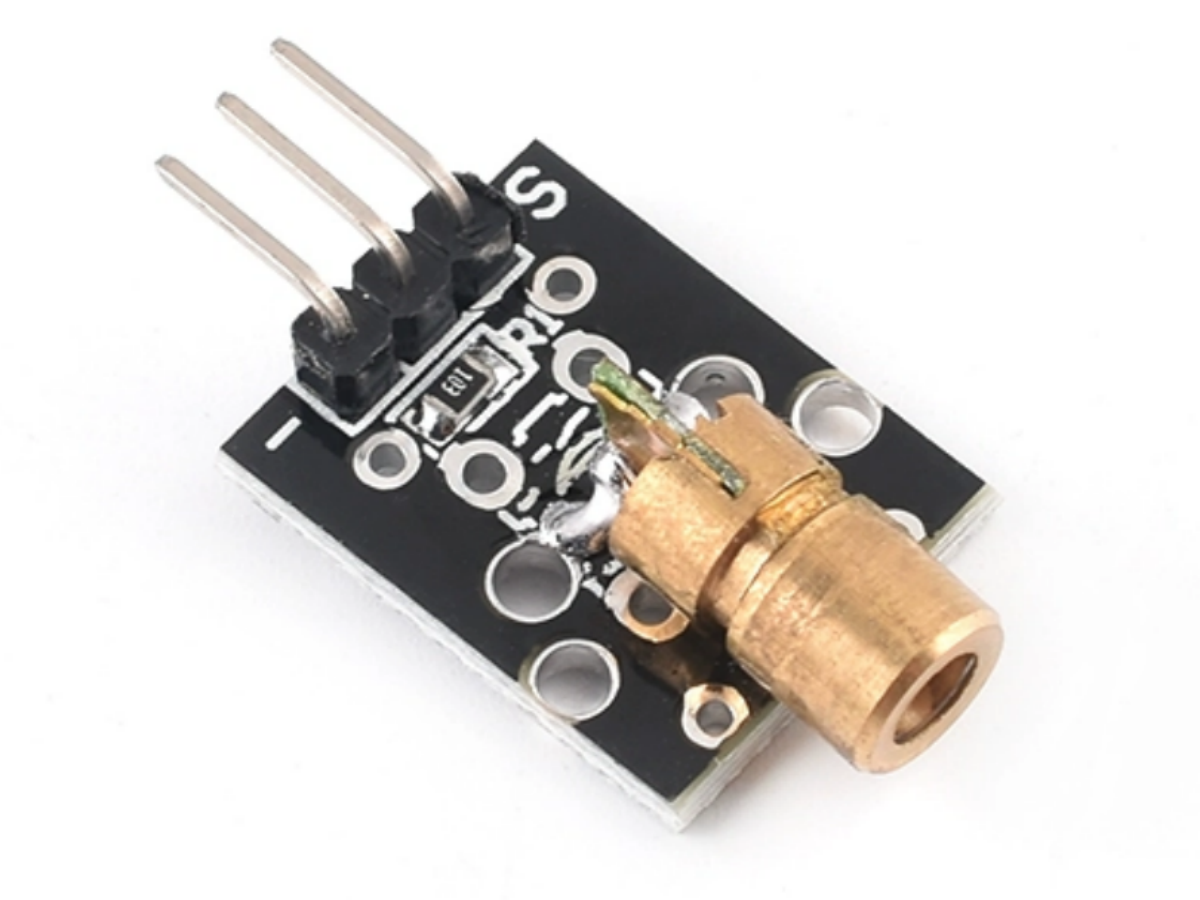
The KY-008 Laser Module with only three core components:
- 650nm Red Laser Diode: The heart of the module, emitting a focused red laser beam with 5mW output power. It’s the key component responsible for the module’s laser transmission function.
- Current-Limiting Resistor: Soldered directly on the PCB, it restricts the operating current to ~30-40mA, preventing the laser diode from burning out.
- 3 Pins: Gold-plated pins for easy wiring, labeled S (signal), 5V (power), and GND (ground) for straightforward integration.
- PCB Board:A small (18.5mm x 15mm) printed circuit board that holds all components, with a compact form factor that fits in tight project enclosures.
KY-008 Specification
| Parameter | Value |
|---|---|
| Operating Voltage | 5V |
| Output Power | 5mW |
| Wavelength | 650nm |
| Operating Current | < 40mA |
| Working Temperature | -10°C – 40°C [14°F to 104°F] |
| Board Dimensions | 18.5mm x 15mm [0.728in x 0.591in] |
KY-008 Datasheet
If you want to learn more KY-008 laser module details,you can refer to this datasheet.
Pin Configuration
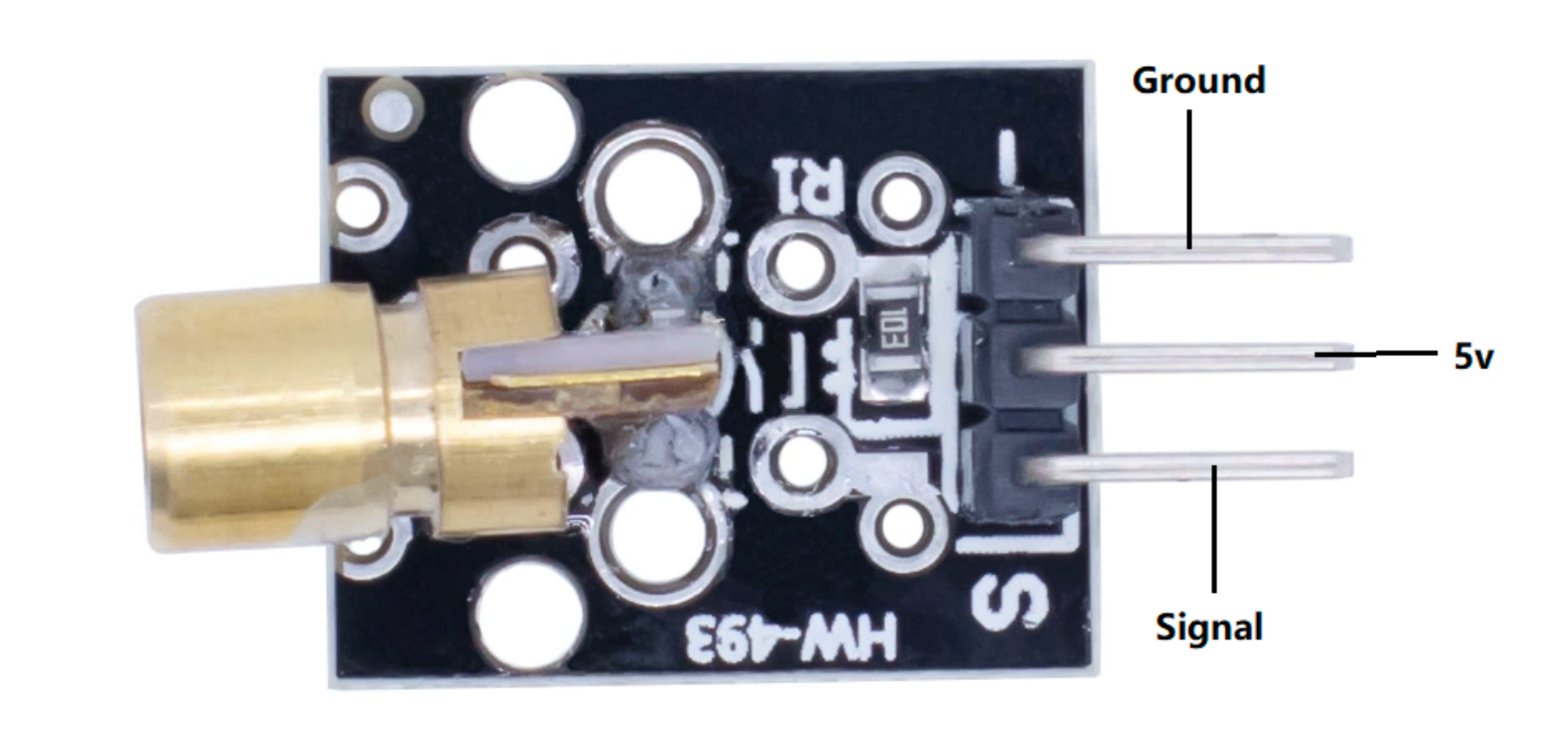
- Pin-1 (S):This is the signal pin of the module which controls whether the laser is turned off/on.
- Pin-2 (5V):This is a power supply pin that provides supply based on the module.
- Pin-3 (GND):This is the ground pin of the module.
Project 1: Arduino Button-Controlled Laser
Turn the laser on when the button is pressed, and off when released. No extra components like resistors are needed—we’ll use Arduino’s built-in pull-up resistor.
Required Components
- Arduino Uno (or compatible board)
- KY-008 laser module × 1
- Momentary pushbutton × 1
- Jumper wires × 4 (color-coded recommended)
Wiring Instructions
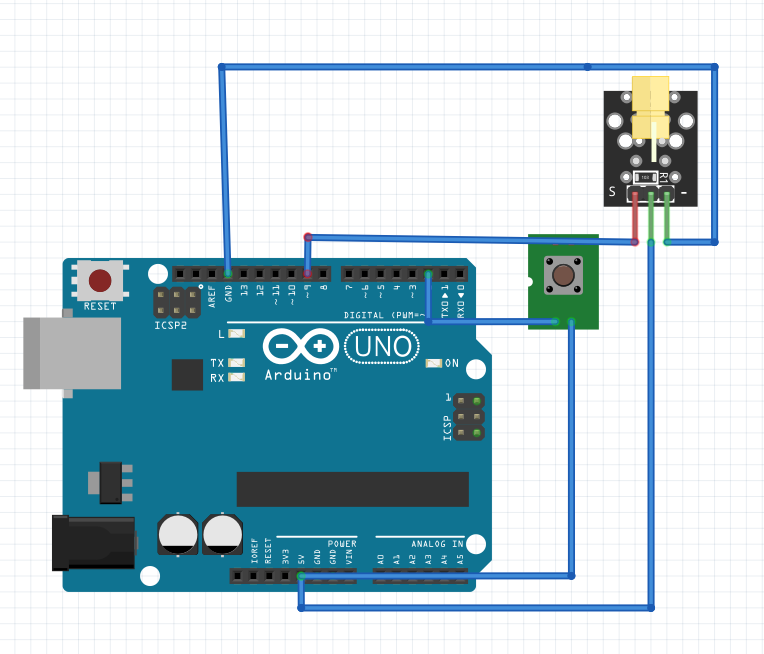
Follow these connections exactly—start with GND (ground) to avoid short circuits:
KY-008 → Arduino:
- 5V pin → Arduino 5V
- GND pin → Arduino GND
- Signal (S) pin → Arduino Digital Pin 9
Button → Arduino:
- One leg → Arduino Digital Pin 2
- Other leg → Arduino 5V
Arduino Code
					/*
  KY-008 Laser Module + Arduino Button Control
  Turns laser on when button is pressed, off when released
*/

// Define pin numbers (easy to modify if needed)
const int laserPin = 9;   // Laser module connected to D9
const int buttonPin = 2;  // Button connected to D2

void setup() {
  pinMode(laserPin, OUTPUT);          // Set laser pin as output
  pinMode(buttonPin, INPUT_PULLUP);   // Set button pin as input with internal pull-up
}

void loop() {
  // Read the button state (INPUT_PULLUP makes pressed = LOW)
  int buttonState = digitalRead(buttonPin);

  // Check if button is pressed
  if (buttonState == LOW) {
    digitalWrite(laserPin, HIGH);    // Turn laser ON
    delay(50);                       // Debounce delay (prevents false triggers)
  } else {
    digitalWrite(laserPin, LOW);     // Turn laser OFF
  }
}
Troubleshooting for Beginners
- Laser won’t turn on: Check if the KY-008 is connected to 5V (3.3V won’t provide enough power). Verify the signal pin is in D9.
- Button doesn’t work:Swap the button’s two legs—buttons have no polarity, so reversing them won’t damage anything.
- Laser stays on:Ensure the code uses INPUT_PULLUP (not just INPUT). The internal pull-up resistor is critical here.
Project 2: STM32 Button-Controlled Laser
Replicate the Arduino project using an STM32F103C8T6 (Blue Pill) board. We’ll use STM32CubeMX for quick pin configuration and HAL library for simple code.
Required Components
- STM32F103C8T6 (Blue Pill) × 1
- KY-008 laser module × 1
- Momentary pushbutton × 1
- Jumper wires × 4
Wiring Instructions
KY-008 → STM32:
- 5V pin → STM32 5V
- GND pin → STM32 GND
- Signal (S) pin → STM32 PB0
Button → STM32:
- One leg → STM32 PB1
- Other leg → STM32 3.3V
STM32CubeMX Configuration (3 Steps)
1.Open STM32CubeMX and select “STM32F103C8T6” from the chip list.
2.Configure the pins: PB0 → GPIO_Output (controls the laser)
3.PB1 → GPIO_Input, set Pull-Down (reads the button)
4.Generate code: Choose your IDE (like MDK-ARM or STM32CubeIDE), then click “Generate Code”.
STM32 Code
					/* USER CODE BEGIN 2 */
// Initialize laser to OFF state
HAL_GPIO_WritePin(GPIOB, GPIO_PIN_0, GPIO_PIN_RESET);
/* USER CODE END 2 */

/* USER CODE BEGIN WHILE */
while (1)
{
  /* USER CODE END WHILE */

  /* USER CODE BEGIN 3 */
  // Read button state (PB1 connects to 3.3V, so pressed = HIGH)
  if(HAL_GPIO_ReadPin(GPIOB, GPIO_PIN_1) == GPIO_PIN_SET)
  {
    HAL_GPIO_WritePin(GPIOB, GPIO_PIN_0, GPIO_PIN_SET);  // Turn laser ON
    HAL_Delay(50);                                       // Debounce delay
  }
  else
  {
    HAL_GPIO_WritePin(GPIOB, GPIO_PIN_0, GPIO_PIN_RESET); // Turn laser OFF
  }
}
/* USER CODE END 3 */
STM32 Troubleshooting Tips
- Code won’t download: Set the Boot0 pin to 1(connect to 3.3V) before uploading. After upload, set Boot0 back to 0and reset the board.
- Button unresponsive: Double-check STM32CubeMX settings—PB1 must have Pull-Downenabled (not Pull-Up or No Pull).
- Dim laser: If the laser is faint, use an external 5V power supply for the STM32 (the USB port may not provide enough current).
Demo Video
FAQS
Can I use the KY-008 with 3.3V microcontrollers (like Raspberry Pi)?
No, the KY-008 requires 5V to operate properly. Using 3.3V will result in a dim laser or no output at all. If you’re using a 3.3V microcontroller, use a 5V power supply for the module and connect the signal pin via a level shifter (or directly – the module’s signal pin is 5V-tolerant for most microcontrollers).
How far can the KY-008’s laser beam reach?
The module’s datasheet says the range is “unlimited in air,” but in practice, the beam becomes dimmer over distance. For indoor projects, it works reliably up to 10-15 meters; outdoors, sunlight will reduce visibility, so use it in shaded areas or pair it with a laser receiver for longer ranges.
Is the KY-008 safe?
The module’s 5mW output is classified as Class IIIa laser, which is safe for accidental exposure but can damage eyesight if stared at directly. Always avoid pointing the beam at eyes, reflective surfaces, or flammable materials.
Can I adjust the laser’s brightness?
No, the KY-008 is a simple on/off module – it doesn’t support PWM dimming. The laser’s brightness is fixed at 5mW, which is set by the laser diode and current-limiting resistor.