

Blog
Tough & Error-Free! AHT21B Senses Temp/Humidity in High Temp/High Humidity!
Introduction
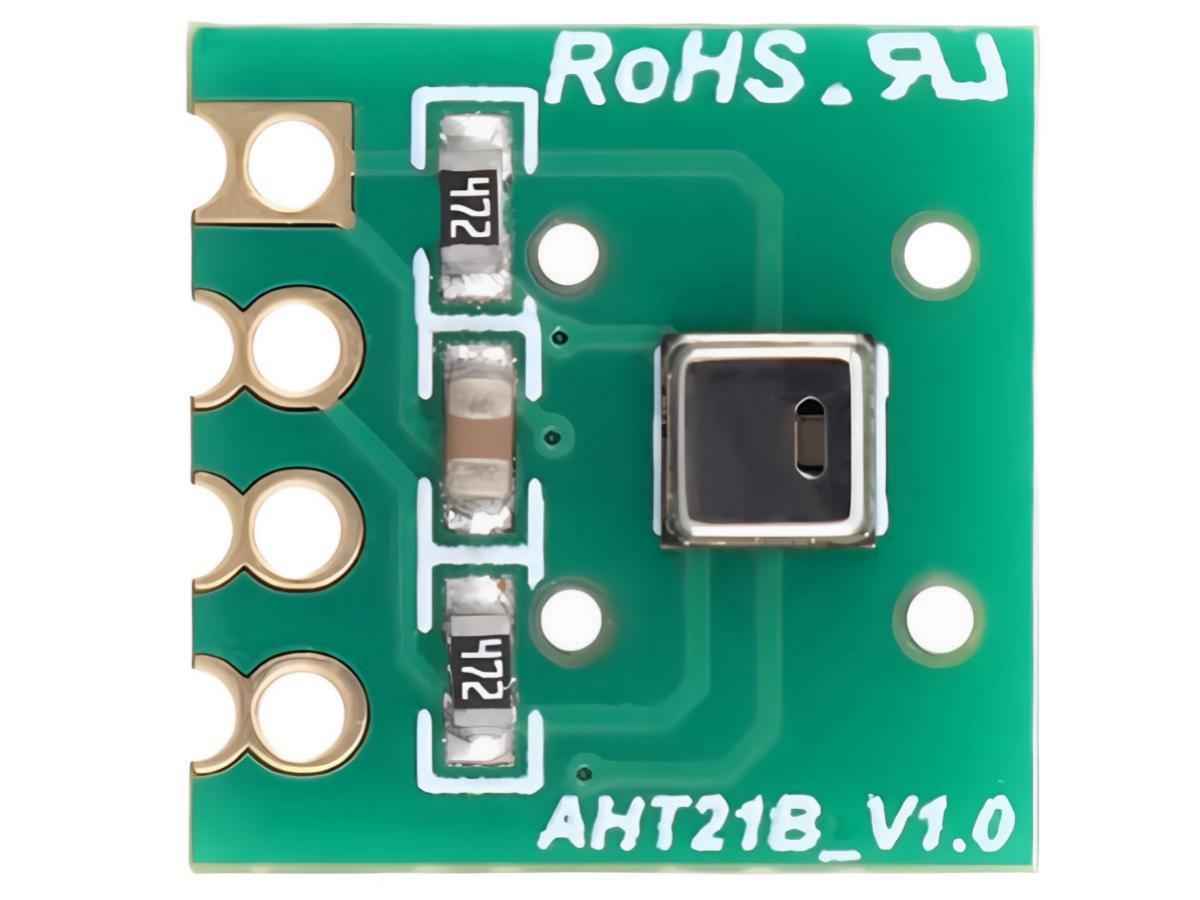
AHT21B is a comprehensively upgraded product, equipped with a dedicated ASIC sensor chip: a high-performance semiconductor silicon-based capacitive humidity sensor and a standard on-chip temperature sensor, utilizing the standard I2C data output signal format. Its performance has been significantly enhanced and surpasses the reliability level of the previous generation of sensors. The new generation of upgraded products has been improved to deliver more stable performance in high-temperature and high-humidity environments. At the same time, the product’s accuracy, response time, and measurement range have all been substantially improved. Every sensor undergoes rigorous calibration and testing before leaving the factory, ensuring it meets the demands of large-scale customer applications.
Sensor Communication
Start Sensor
The first step is to power on the sensor with the selected VDD supply voltage (ranging from 2.2V to 5.5V). After power-up, the sensor requires a stabilization time of no less than 100ms (with SCL held high) to reach an idle state, indicating it is ready to receive commands from the master (MCU).
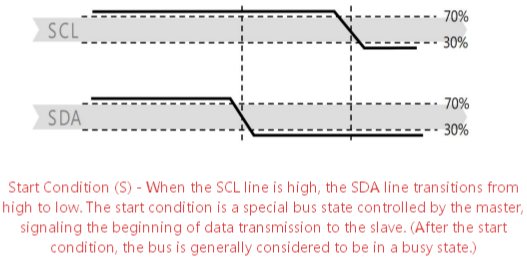
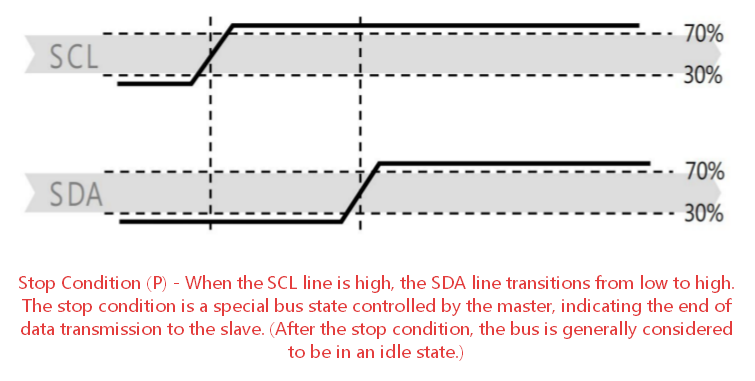
Start/Stop Sequence
Each transmission sequence begins with a Start condition and ends with a Stop condition.
Send Command
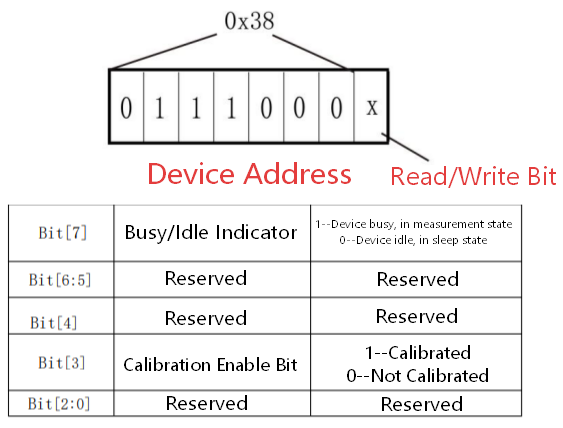
After initiating transmission, the first byte sent via I²C includes the 7-bit device address 0x38 and an SDA direction bit (read R: ‘1’, write W: ‘0’). Following the falling edge of the 8th SCL clock, the sensor indicates successful data reception by pulling the SDA pin low (ACK bit). After sending the measurement command 0xAC, the MCU must wait until the measurement is completed.
Sensor Reading Procedure
- After power-on, wait for at least 100ms. Before reading temperature and humidity values, send 0x71 to retrieve a one-byte status word. If the result of performing a bitwise AND operation between the status word and 0x18 is not equal to 0x18, initialize registers 0x1B, 0x1C, and 0x1E. If the result is equal to 0x18, proceed to the next step.
- Wait 10ms and send the command 0xAC (trigger measurement). This command includes two parameters: the first byte is 0x33, and the second byte is 0x00.
- Wait 80ms for the measurement to complete. If bit[7] of the read status word is 0, it indicates the measurement is finished, and you can proceed to read six consecutive bytes of data. Otherwise, continue waiting.
- After receiving six bytes of data, the next byte is the CRC checksum data, which can be read if needed. If the receiving end requires CRC verification, send an ACK response after receiving the sixth byte. Otherwise, send a NACK to end the communication.
- Calculate temperature and humidity values.
Communication Protocol
The commands used for communication between the master chip and the AHT21B sensor are shown in the table below
| Num | Command Word | Function Description | Abbreviation |
|---|---|---|---|
| 1 | 0xE1 | Calibration Command | AHT21B_CMD_CALIBRATE |
| 2 | 0xAC | Trigger Measurement Readout | AHT21B_CMD_TRIGGER |
| 3 | 0xBA | Software Reset | AHT21B_CMD_SOFTRESET |
The actual control flow for this sensor can be referenced in the following pseudocode:
- Initialize sensor
					Initiate an I2C read operation to obtain the sensor status (1 byte).
IF (the sensor is NOT in the READY state)
    Reset the sensor.
- Read temperature and humidity measurement results
					Send the command to read temperature and humidity measurement results ([AHT21B_CMD_TRIGGER, 0x33, 0x00]).
while (the sensor is in the BUSY state):
    Wait 5 ms.
Initiate an I2C read operation (7 bytes).
The format of the 7 bytes read is shown in the table below
| Byte Order | 1 | 2 | 3 | 4 | 5 | 6 | 7 |
|---|---|---|---|---|---|---|---|
| Meaning | Sensor Status | Humidity (bit12 – bit19) | Humidity (bit4 – bit11) | Humidity (bit0 – bit3) – Temperature (bit16 – bit19) | Temperature (bit8 – bit15) | Temperature (bit0 – bit7) | Temperature CRC-8 |
- Stop measurement
Send the command to stop periodic measurement (CMD_BREAK).
Relative Humidity

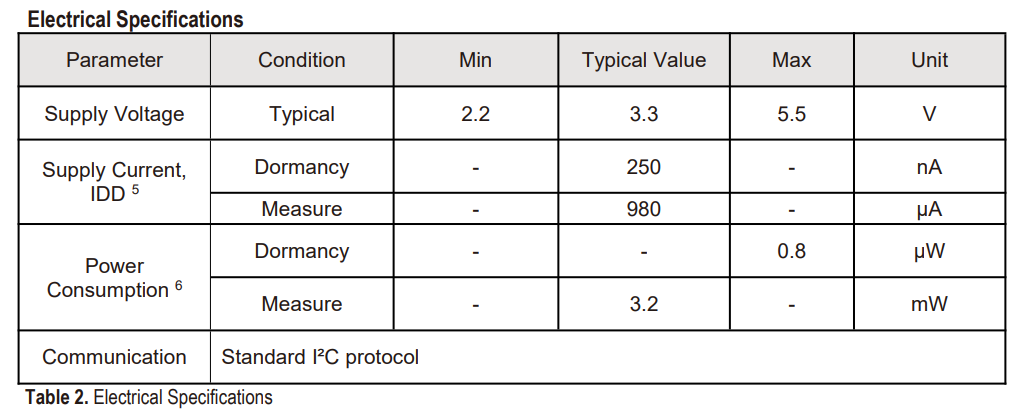
Electrical Specifications
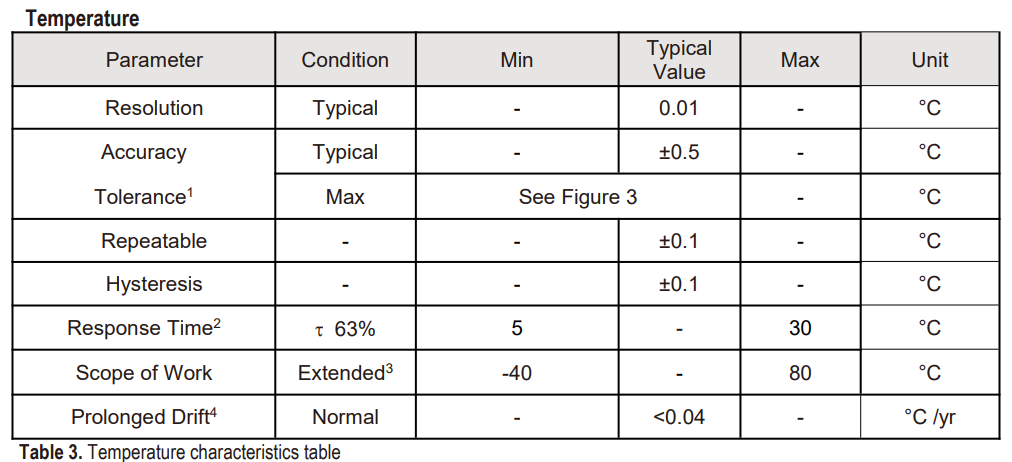
Relative Temperature
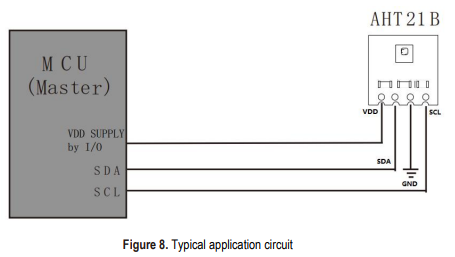
Typical Application Circuit
To prevent signal conflicts, the microcontroller (MCU) must only drive SDA and SCL to a low level. An external pull-up resistor (e.g., 4.7 kΩ to 10 kΩ) is required to pull the signals to a high level. Note that such pull-up resistors may already be integrated in the MCU’s I/O circuitry.
Note:
- The pull‑up voltage for SDA must be supplied from VCC, with a supply voltage range of 2.0 V to 5.5 V.
- A decoupling capacitor with a value of 100 nF should be added between VCC and GND.
- The AHT21B can share the I²C bus with other I²C devices.
Relative Information
Application Scenario
HVAC (Heating, Ventilation, and Air Conditioning System)
HVAC systems are primarily designed to maintain indoor temperature and humidity within a comfortable range (temperature: 20-26°C, humidity: 40-60% RH) while optimizing energy efficiency. The AHT21B sensor can be integrated into air conditioners, fresh air systems, and central heating equipment to collect real-time temperature and humidity data from indoor spaces and ventilation ducts.
Dehumidifiers and Humidity Control Devices
Dehumidifiers and industrial humidifiers require extremely high precision and rapid response in humidity detection, characteristics that the AHT21B is perfectly designed to meet.
Detection and Monitoring Equipment
In various testing instruments, data loggers, weather stations, and similar equipment, the AHT21B serves as a core sensing unit, delivering precise and stable temperature and humidity data support.
Consumer Electronics and Home Appliances
With the widespread adoption of smart home systems and wearable devices, the AHT21B—with its compact packaging and flexible customization options—has become an ideal choice for consumer-grade products.
Automotive and Automatic Control
In automotive electronics, industrial automation control, and similar applications, the AHT21B is required to withstand complex electromagnetic environments and temperature fluctuations, with its strong anti-interference capability and wide temperature range highlighting its advantages.
Medical Field
In medical settings, precise control of temperature and humidity is directly related to patient safety, medication storage, and the operation of medical equipment. The AHT21B sensor meets medical-grade requirements with its high precision and stability.
AHT21B + Arduino + OLED Temperature and Humidity Monitor
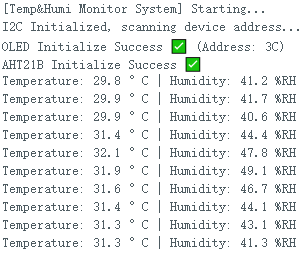
This project displays real-time data from the AHT21B sensor on an OLED screen while retaining serial output functionality, creating a comprehensive temperature and humidity monitoring device.
Bill of Materials: Arduino UNO/Nano, AHT21B Temperature and Humidity Sensor, SSD1306 OLED Screen (0.96-inch, I2C interface), Dupont wires.
Wiring Diagram
| AHT21B | Arduino | OLED | Arduino |
|---|---|---|---|
| VCC | 3.3V | VCC | 5V |
| GND | GND | GND | GND |
| SCL | A5 | SCL | A5 |
| SDA | A4 | SDA | A4 |
Serial Monitor
Arduino Code
					/*
 * Arduino + OLED(128*64) + AHT21B Temperature and Humidity Monitor Complete Version
 * Fixed: Compilation errors + Chinese garbled code + I2C compatible, no warnings, upload and run directly
 * Compatible with Arduino UNO/Nano/Mega series, perfect for IDE1.8.x
 */
#include <Wire.h>
#include <Adafruit_GFX.h>
#include <Adafruit_SSD1306.h>
#include <Adafruit_AHTX0.h>

// ====================== Hardware Configuration (Can be modified) ======================
#define SCREEN_WIDTH  128
#define SCREEN_HEIGHT 64
#define OLED_RESET    -1
#define OLED_ADDR     0x3C   // 0x3C/0x3D optional, change if OLED not light up
#define READ_INTERVAL 2000
// ======================================================================================

Adafruit_SSD1306 display(SCREEN_WIDTH, SCREEN_HEIGHT, &Wire, OLED_RESET);
Adafruit_AHTX0 aht;

bool oledReady = false;
bool sensorReady = false;
float temperature = 0.0;
float humidity = 0.0;

void setup() {
  Serial.begin(115200);
  Serial.println(F("[Temp&Humi Monitor System] Starting..."));
  delay(200);

  Wire.begin();
  Serial.println(F("I2C Initialized, scanning device address..."));

  // Fix the core error: Serial print for OLED init, use separate print instead of splicing
  if (display.begin(SSD1306_SWITCHCAPVCC, OLED_ADDR)) {
    oledReady = true;
    Serial.print(F("OLED Initialize Success ✅ (Address: "));
    Serial.print(OLED_ADDR, HEX);
    Serial.println(F(")"));
    display.clearDisplay();
    display.setTextSize(1);
    display.setTextColor(SSD1306_WHITE);
    display.setTextWrap(false); // Fix garbled text display completely
  } else {
    Serial.println(F("OLED Initialize Failed ❌, Check wiring/I2C address"));
  }

  if (aht.begin()) {
    sensorReady = true;
    Serial.println(F("AHT21B Initialize Success ✅"));
  } else {
    Serial.println(F("AHT21B Initialize Failed ❌, Check wiring/sensor"));
  }

  initOledShow();
  delay(1500);
}

// Main loop must be retained, fix the error: undefined reference to 'loop'
void loop() {
  static unsigned long lastReadTime = 0;
  unsigned long currentMillis = millis();

  if (currentMillis - lastReadTime >= READ_INTERVAL) {
    lastReadTime = currentMillis;
    readSensorData();
    updateOledDisplay();
  }
}

// Read AHT21B sensor data
void readSensorData() {
  if (!sensorReady) return;

  sensors_event_t hum_event, temp_event;
  if (aht.getEvent(&hum_event, &temp_event)) {
    if(temp_event.temperature > -20 && temp_event.temperature < 80){
      temperature = temp_event.temperature;
    }
    if(hum_event.relative_humidity >= 0 && hum_event.relative_humidity <= 100){
      humidity = hum_event.relative_humidity;
    }
    Serial.print(F("Temperature: "));
    Serial.print(temperature, 1);
    Serial.print(F(" °C | Humidity: "));
    Serial.print(humidity, 1);
    Serial.println(F(" %RH"));
  } else {
    Serial.println(F("⚠️  Sensor data read failed!"));
  }
}

// OLED initial display page
void initOledShow() {
  if (!oledReady) return;
  display.clearDisplay();

  display.setCursor(0, 0);
  display.println(F("Temp & Humi Monitor"));
  display.drawLine(0, 10, 127, 10, SSD1306_WHITE);

  display.setCursor(0, 15);
  display.print(F("OLED: "));
  display.println(oledReady ? F("OK") : F("ERROR"));

  display.setCursor(0, 25);
  display.print(F("AHT21B: "));
  display.println(sensorReady ? F("OK") : F("ERROR"));

  display.setCursor(0, 40);
  display.println(F("Waiting for data..."));
  display.display();
}

// Update OLED display content
void updateOledDisplay() {
  if (!oledReady) return;
  display.clearDisplay();

  display.setTextSize(1);
  display.setCursor(0, 0);
  display.println(F("Temp & Humi Monitor"));
  display.drawLine(0, 9, 127, 9, SSD1306_WHITE);

  display.setCursor(5, 15);
  display.print(F("Temp: "));
  display.setTextSize(2);
  display.print(temperature, 1);
  display.setTextSize(1);
  display.print(F("°C"));

  display.setCursor(5, 40);
  display.print(F("Humi: "));
  display.setTextSize(2);
  display.print(humidity, 1);
  display.setTextSize(1);
  display.print(F("%"));

  display.display();
}
FAQ
1. How to restore the sensor's performance?
Prolonged exposure to conditions outside the normal range, especially at humidity >80%, may cause temporary signal drift (e.g., +3% RH after 60 hours). When normal operating conditions are restored, the sensor will gradually return to its calibrated state. However, extended use under abnormal conditions will accelerate product aging.
Recovery Process
Drying Treatment: Maintain ambient temperature at 60-65℃ and relative humidity <5%RH for 10 hours. This removes excess moisture adsorbed inside the sensor and eliminates drift caused by high-humidity environments.
Re-humidification Treatment: Maintain ambient temperature at 20-30℃ and relative humidity at 75-85%RH (a stable 75% RH environment can be conveniently generated using a saturated sodium chloride solution) for 12 hours. This allows the sensor to readapt to normal humidity conditions and restores the sensitivity and calibration accuracy of the humidity-sensing element.
Precautions
- The recovery process must be performed strictly in the order of “Drying → Re-humidification”. Reversing or skipping steps may compromise the recovery effect.
- During the process, avoid exposing the sensor to chemical contaminants, volatile solvents, etc. The environment should be clean and free from interference.
- If the sensor has undergone irreversible aging due to prolonged exposure to abnormal conditions, the above procedure may not fully restore its performance. In such cases, evaluate whether the sensor needs to be replaced.
- Before first use after recovery, it is recommended to verify the calibration status through the normal communication protocol (send command 0x71 and check status bit [3]; confirm it is 1, indicating the “Calibrated” state). If the standard is not met, the recovery procedure may be repeated once.