

Blog
KY-038 Sound Sensor Module
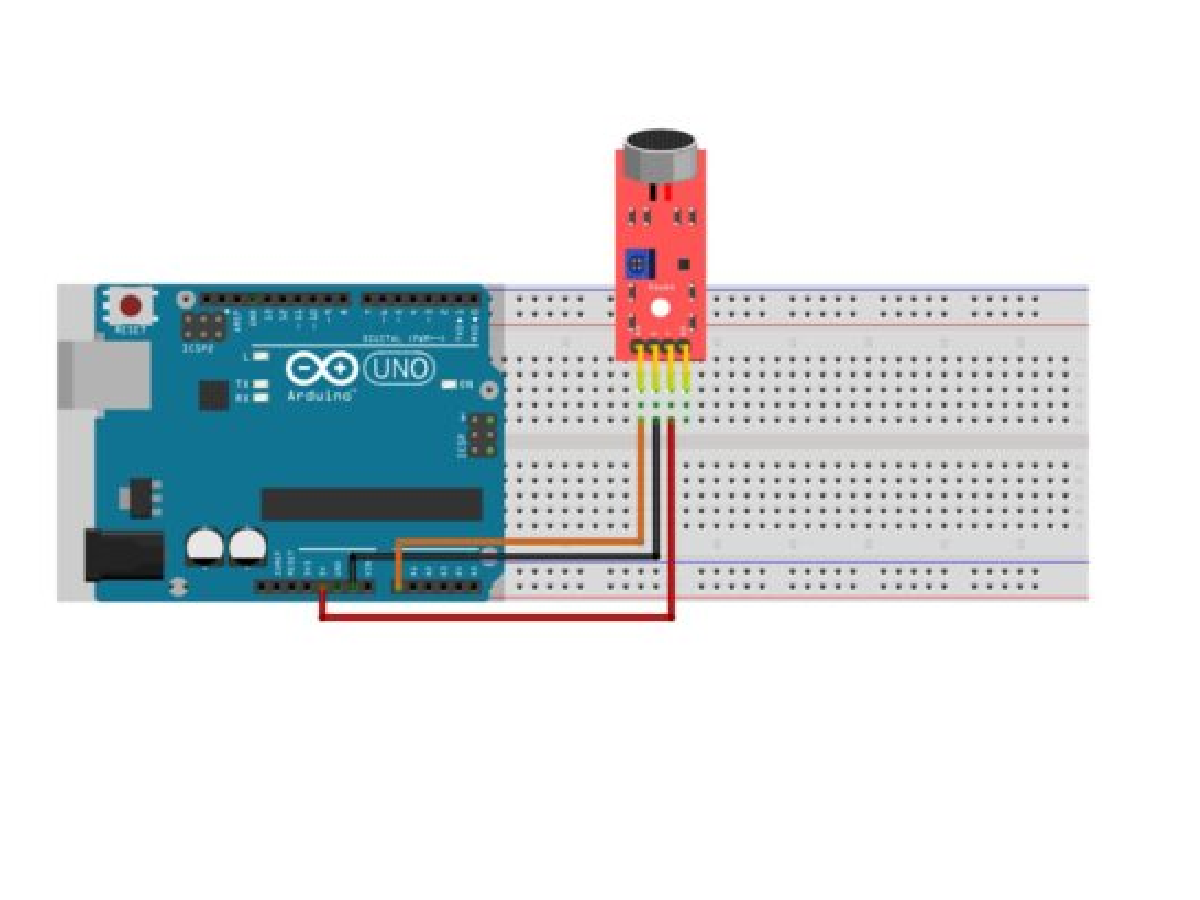
What Is a Sound Sensor Module?
The Sound Sensor is a compact and efficient module designed to detect and measure sound levels in a wide range of environments. Equipped with a high-sensitivity microphone, it converts acoustic signals into electrical outputs, making it ideal for applications in noise monitoring, voice recognition, and interactive electronics. With both analog and digital outputs, the sensor provides flexibility for different project requirements: the analog output reflects the actual sound intensity, while the digital output can be used as a simple sound trigger.
Engineered for reliability, the sensor delivers stable performance with low power consumption, ensuring long-term use in embedded systems and portable devices. Its adjustable sensitivity allows users to fine-tune detection levels, making it suitable for everything from clap-activated switches to smart home automation and IoT solutions.
Easy to integrate with microcontrollers such as Arduino, Raspberry Pi, or ESP32, the Sound Sensor is widely used in robotics, environmental monitoring, and educational projects. Whether for hobbyists, students, or engineers, it provides an accessible and practical way to bring sound awareness into electronic designs.
KY-038 High-Sensitivity Sound Sensor Module

The KY-038 Sound Sensor is a simple yet practical module that helps your projects “hear” the world around them. At its core, it uses a small microphone to pick up sound and a built-in circuit to process the signal. What makes it useful is the combination of two outputs: the analog pin gives you a smooth reading of sound intensity, while the digital pin lets you know when the sound goes above a certain threshold—almost like a noise alarm.
You can easily adjust the sensitivity with a small screw on the board, so it works whether you’re trying to detect loud claps, gentle knocks, or changes in background noise. Because it’s designed to be beginner-friendly, the KY-038 connects quickly to Arduino, Raspberry Pi, or other microcontrollers without complicated setup.
People often use it for fun DIY projects, like clap-controlled lights, voice-activated switches, or smart cars that react to sound. It’s also a great little tool for students who want to explore how sensors and sound detection work. Affordable, compact, and straightforward, the KY-038 is a reliable entry point into sound-based electronics.
The working principle of KY-038

The KY-038 sound sensor works by using a small electret microphone to capture sound waves from the environment. When sound waves hit the microphone’s diaphragm, they are converted into tiny electrical signals. These weak signals are then sent to an amplifier and comparator circuit built into the module.
Analog Output (A0): After amplification, the sensor produces an analog voltage proportional to the sound intensity. Louder sounds generate higher voltage levels, which can be read by an analog-to-digital converter (ADC) on a microcontroller. This allows users to measure the approximate volume of the sound.
Digital Output (D0): The module also has a comparator circuit with an adjustable potentiometer. When the detected sound level exceeds the set threshold, the digital pin outputs a HIGH signal; otherwise, it stays LOW. This makes it useful for simple “sound trigger” applications like clap switches or alarms.
KY-038 parameters
| Parameter | Details |
|---|---|
| Operating Voltage | 3.3V-5V or 4V-6V (slight variations in different data sources) |
| Input Voltage Range | 3V-24V |
| Chip | LM393 |
| Microphone Type | Electret Condenser Microphone (ECM) |
| Sensitivity | -46±2dB (0dB=1V/Pa) at 1kHz, sensitivity threshold adjustable via potentiometer |
| Minimum Detectable Noise | 58dB |
| Frequency Range | 100-10000Hz |
| Output Signal | Analog output AO, real-time microphone voltage signal output; Digital output DO, high-low level signal output (0 and 1), digital output state determined by adjustable threshold via potentiometer |
| Maximum Sensing Distance | 0.5 meters |
| Indicator Lights | Power indicator and sensor status indicator. Power indicator remains on when powered; sensor status indicator lights up when sound reaches set threshold |
| Dimensions | 35x15x13mm |
| Weight | Approximately 3g |
Arduino example of KY-038

Create a music visualization project using the KY-038 sound sensor. The sound sensor converts the received sound into analog signals, and the Arduino transforms these analog signals into a frequency spectrum. This spectrum is then output to an OLED display, while controlling LED lights to pulse rhythmically—creating a stunning stage light effect.
Code
					#include <Wire.h>
#include <Adafruit_GFX.h>
#include <Adafruit_SSD1306.h>

// OLED Display Configuration
#define SCREEN_WIDTH 128
#define SCREEN_HEIGHT 64
#define OLED_RESET -1
Adafruit_SSD1306 display(SCREEN_WIDTH, SCREEN_HEIGHT, &Wire, OLED_RESET);

// New LED Pin Definitions - Arranged According to Stage Layout
// Left Half (Away from Center)
const int LED_RED2 = 2;      // Right Red LED (Non-PWM)
const int LED_GREEN2 = 3;    // Right Green LED (Non-PWM)
const int LED_YELLOW2 = 4;   // Right Yellow LED (Non-PWM)

// Central RGB LED
const int RGB_RED = 5;       // RGB LED Red Channel (PWM)
const int RGB_GREEN = 6;     // RGB LED Green Channel (PWM)
const int RGB_BLUE = 9;      // RGB LED Blue Channel (PWM)

// Right Half (Away from Center)
const int LED_YELLOW1 = 10;  // Left Yellow LED (Non-PWM)
const int LED_GREEN1 = 11;   // Left Green LED (Non-PWM)
const int LED_RED1 = 12;     // Left Red LED (Non-PWM)

// Sound Sensor Configuration
const int SOUND_SENSOR = A0;
const int NOISE_THRESHOLD = 50;    // Noise Threshold
const int SAMPLE_WINDOW = 50;      // Sampling Window (ms)
unsigned int sample;

// Visualization Parameters
unsigned long lastSampleTime = 0;
float peakToPeak = 0;   // Sound Peak-to-Peak Value

// Spectrum Analysis Parameters
#define BAND_COUNT 30
float bands[BAND_COUNT];
float bandDecay[BAND_COUNT];
unsigned long lastBandUpdate = 0;
const int BAND_UPDATE_INTERVAL = 30; // Band Update Interval (ms)

// Light Effect Parameters
unsigned long lastLightWave = 0;
const int WAVE_INTERVAL = 150; // Wave Effect Interval (ms)
int wavePosition = 0;         // Current Wave Position
bool waveDirection = true;    // Wave Direction (true=Outward, false=Inward)

// RGB LED Effect Parameters
unsigned long lastColorChange = 0;
const int COLOR_CHANGE_INTERVAL = 100; // Color Change Interval (ms)
int colorMode = 0;            // Current Color Mode
const int COLOR_MODES = 3;    // Total Number of Color Modes
float hue = 0;                // Hue in HSV Color Space

void setup() {
  // Initialize LED Pins
  pinMode(LED_RED1, OUTPUT);
  pinMode(LED_GREEN1, OUTPUT);
  pinMode(LED_YELLOW1, OUTPUT);
  pinMode(LED_YELLOW2, OUTPUT);
  pinMode(LED_GREEN2, OUTPUT);
  pinMode(LED_RED2, OUTPUT);

  pinMode(RGB_RED, OUTPUT);
  pinMode(RGB_GREEN, OUTPUT);
  pinMode(RGB_BLUE, OUTPUT);

  // Initialize Serial Communication
  Serial.begin(9600);

  // Initialize OLED Display
  if(!display.begin(SSD1306_SWITCHCAPVCC, 0x3C)) {
    Serial.println(F("SSD1309 Allocation Failed"));
    for(;;); // Infinite loop to halt program if display initialization fails
  }
  display.clearDisplay();
  display.setTextSize(1);
  display.setTextColor(SSD1306_WHITE);
  display.setCursor(0,0);
  display.println("Music Spectrum Visualizer");
  display.println("Initialization Complete...");
  display.display();
  delay(2000);

  // Initialize Band Data
  for(int i = 0; i < BAND_COUNT; i++) {
    bands[i] = 0;
    bandDecay[i] = random(85, 96) / 100.0; // Random decay coefficient (0.85-0.95)
  }
}

void loop() {
  unsigned long currentMillis = millis();

  // 1. Sound Sampling
  if (currentMillis - lastSampleTime >= SAMPLE_WINDOW) {
    sampleSound();
    lastSampleTime = currentMillis;
  }

  // 2. Update Band Data
  if (currentMillis - lastBandUpdate >= BAND_UPDATE_INTERVAL) {
    updateBands();
    lastBandUpdate = currentMillis;
  }

  // 3. Control LEDs
  controlLEDs(currentMillis);

  // 4. Update OLED Display
  updateDisplay();
}

void sampleSound() {
  static unsigned int signalMax = 0;
  static unsigned int signalMin = 1024;

  // Reset Peak-to-Peak Value
  peakToPeak = 0;

  // Capture Maximum and Minimum Values Within Sampling Window
  unsigned long startMillis = millis();
  while (millis() - startMillis < SAMPLE_WINDOW) {
    sample = analogRead(SOUND_SENSOR);
    if (sample < 1024) { // Ensure sample is within valid analog read range (0-1023)
      if (sample > signalMax) signalMax = sample;
      if (sample < signalMin) signalMin = sample;
    }
  }

  // Calculate Peak-to-Peak Amplitude
  peakToPeak = signalMax - signalMin;

  // Reset Values for Next Sampling Cycle
  signalMax = 0;
  signalMin = 1024;
}

void updateBands() {
  // Update All Band Values (Random Distribution)
  for(int i = 0; i < BAND_COUNT; i++) {
    // Apply Decay to Fade Out Previous Values
    bands[i] *= bandDecay[i];

    // Randomly Update Selected Bands
    if(random(100) < 30) { // 30% Probability of Updating This Band
      float intensity = peakToPeak * (random(60, 100) / 100.0); // Intensity based on sound peak (60%-100%)
      if(intensity > bands[i]) {
        bands[i] = intensity;
      }
    }
  }
}

void controlLEDs(unsigned long currentMillis) {
  // Calculate Dynamic Threshold (Adjusts with Sound Intensity)
  int dynamicThreshold = NOISE_THRESHOLD + (peakToPeak * 0.2);

  // Control Wave Effect
  if (currentMillis - lastLightWave >= WAVE_INTERVAL) {
    wavePosition = waveDirection ? wavePosition + 1 : wavePosition - 1;

    // Reverse Wave Direction at Boundaries
    if(wavePosition >= 3 || wavePosition <= 0) {
      waveDirection = !waveDirection;
    }

    lastLightWave = currentMillis;
  }

  // Set Lights Based on Wave Position (Non-PWM Control: On/Off Only)
  switch(wavePosition) {
    case 0: // Central Area
      digitalWrite(LED_YELLOW1, HIGH);
      digitalWrite(LED_YELLOW2, HIGH);
      digitalWrite(LED_GREEN1, LOW);
      digitalWrite(LED_GREEN2, LOW);
      digitalWrite(LED_RED1, LOW);
      digitalWrite(LED_RED2, LOW);
      break;

    case 1: // Expand to Green Area
      digitalWrite(LED_YELLOW1, LOW);
      digitalWrite(LED_YELLOW2, LOW);
      digitalWrite(LED_GREEN1, HIGH);
      digitalWrite(LED_GREEN2, HIGH);
      digitalWrite(LED_RED1, LOW);
      digitalWrite(LED_RED2, LOW);
      break;

    case 2: // Expand to Red Area
      digitalWrite(LED_YELLOW1, LOW);
      digitalWrite(LED_YELLOW2, LOW);
      digitalWrite(LED_GREEN1, LOW);
      digitalWrite(LED_GREEN2, LOW);
      digitalWrite(LED_RED1, peakToPeak > dynamicThreshold); // Turn on if sound exceeds threshold
      digitalWrite(LED_RED2, peakToPeak > dynamicThreshold);
      break;
  }

  // Control Central RGB LED - Enhanced Effects
  if (currentMillis - lastColorChange >= COLOR_CHANGE_INTERVAL) {
    lastColorChange = currentMillis;

    // Switch Color Mode Every 100ms
    colorMode = (colorMode + 1) % COLOR_MODES;
  }

  // Update Hue Value (Cycle Through 0-360°)
  hue = fmod(hue + 1.0, 360.0);

  // Set RGB Color Based on Current Mode
  switch(colorMode) {
    case 0: // Mode 1: Dynamic Rainbow Effect
      setRainbowColor(hue);
      break;

    case 1: // Mode 2: Spectrum Response Effect
      setSpectrumColor();
      break;

    case 2: // Mode 3: Pulse Effect
      setPulseColor(currentMillis);
      break;
  }
}

// HSV to RGB Conversion Function
// h: Hue (0-360°), s: Saturation (0.0-1.0), v: Value (0.0-1.0)
// r, g, b: Output RGB values (0-255)
void hsvToRgb(float h, float s, float v, uint8_t &r, uint8_t &g, uint8_t &b) {
  h = fmod(h, 360.0); // Ensure hue stays within 0-360°
  h /= 60.0;          // Convert hue to 0-6 range
  int i = floor(h);   // Integer part of hue
  float f = h - i;    // Fractional part of hue
  float p = v * (1 - s);
  float q = v * (1 - s * f);
  float t = v * (1 - s * (1 - f));

  switch(i) {
    case 0: r = v*255; g = t*255; b = p*255; break;
    case 1: r = q*255; g = v*255; b = p*255; break;
    case 2: r = p*255; g = v*255; b = t*255; break;
    case 3: r = p*255; g = q*255; b = v*255; break;
    case 4: r = t*255; g = p*255; b = v*255; break;
    default: r = v*255; g = p*255; b = q*255; break; // Case 5
  }
}

// Set Rainbow Color (Uses HSV Hue Cycle)
void setRainbowColor(float hue) {
  uint8_t r, g, b;
  hsvToRgb(hue, 1.0, 1.0, r, g, b); // Full saturation and brightness
  analogWrite(RGB_RED, r);
  analogWrite(RGB_GREEN, g);
  analogWrite(RGB_BLUE, b);
}

// Set Spectrum-Responsive Color
void setSpectrumColor() {
  // Calculate Average Values for Low, Mid, and High Frequencies
  float lowFreq = 0, midFreq = 0, highFreq = 0;
  for(int i = 0; i < 10; i++) lowFreq += bands[i];     // Low frequencies (bands 0-9)
  for(int i = 10; i < 20; i++) midFreq += bands[i];    // Mid frequencies (bands 10-19)
  for(int i = 20; i < 30; i++) highFreq += bands[i];   // High frequencies (bands 20-29)

  lowFreq /= 10.0;  // Average low frequency value
  midFreq /= 10.0;  // Average mid frequency value
  highFreq /= 10.0; // Average high frequency value

  // Map Frequency Averages to RGB Values (Constrain to 0-255)
  uint8_t r = constrain(lowFreq * 2.5, 0, 255);
  uint8_t g = constrain(midFreq * 2.5, 0, 255);
  uint8_t b = constrain(highFreq * 2.5, 0, 255);

  analogWrite(RGB_RED, r);
  analogWrite(RGB_GREEN, g);
  analogWrite(RGB_BLUE, b);
}

// Set Pulse Effect Color
void setPulseColor(unsigned long currentMillis) {
  // Create Time-Based Pulse Effect (0.0-1.0 Range)
  float pulse = (sin(currentMillis / 200.0) + 1.0) / 2.0; // Sine wave converted to positive range

  // Adjust Pulse Intensity Based on Volume
  float intensity = constrain(peakToPeak / 200.0, 0.1, 1.0); // Limit intensity to 0.1-1.0
  pulse *= intensity;

  // Use Blue-Purple Hue for Pulse Effect
  analogWrite(RGB_RED, 150 * pulse);
  analogWrite(RGB_GREEN, 50 * pulse);
  analogWrite(RGB_BLUE, 255 * pulse);
}

void updateDisplay() {
  display.clearDisplay();

  // Draw Title Bar
  display.setTextSize(1);
  display.setCursor(0, 0);
  display.print("Vol:");
  display.print(int(peakToPeak)); // Display integer volume value
  display.print(" Mode:");
  display.print(colorMode);       // Display current color mode

  // Draw 30 Spectrum Bars
  int barWidth = 3;
  int spacing = 1;
  int graphHeight = 54;
  int startY = SCREEN_HEIGHT - graphHeight; // Y-coordinate of graph bottom

  // Simulate Spectrum Distribution from Reference Image: Higher in Center, Lower at Sides
  int centerBand = BAND_COUNT / 2;
  float centerIntensity = 1.5; // Boost intensity for central bars
  float sideIntensity = 0.7;   // Reduce intensity for side bars

  for(int i = 0; i < BAND_COUNT; i++) {
    float intensityFactor;
    // Apply different intensity factors based on band position
    if (i < centerBand - 5 || i > centerBand + 5) {
      intensityFactor = sideIntensity;
    } else {
      intensityFactor = centerIntensity;
    }
    float adjustedBand = bands[i] * intensityFactor;
    // Map band value to bar height (constrain input to 0-200 for consistent scaling)
    int barHeight = map(constrain(adjustedBand, 0, 200), 0, 200, 1, graphHeight);
    int x = i * (barWidth + spacing); // Calculate X-coordinate for each bar

    // Draw filled rectangle for spectrum bar
    display.fillRect(x, startY + (graphHeight - barHeight), barWidth, barHeight, SSD1306_WHITE);
  }

  // Add Bottom Border Line
  display.drawFastHLine(0, SCREEN_HEIGHT-1, SCREEN_WIDTH, SSD1306_WHITE);

  display.display(); // Update display with new content
}