

Blog
LED Traffic Light Module:From Basics to Arduino Project

In the fields of traffic management and smart infrastructure, LED traffic light modules have become an important component. These modules not only ensure smooth traffic flow but also help improve energy efficiency and sustainability. In this blog, we will delve deep into the world of LED traffic light modules, exploring their functions, related projects, and even how to work with them using Arduino.
What is a LED light module?
An LED traffic light module is a replacement for LED light bulbs. It is mainly composed of light – emitting diodes. When a voltage is applied, the diodes conduct and generate photons. Unlike traditional incandescent lamps, LED modules are more energy – efficient, have a longer lifespan, and provide better visibility. Moreover, LED modules can be easily integrated into traffic signal systems and luminous signal systems. Its compact and small technology does not require much cost for installation and maintenance.
How does an led light module work?
The core of an LED optical module is LED (Light-emitting Diode) – a semiconductor device that directly converts electrical energy into light.When you apply a suitable voltage to the LED, electrons within the semiconductor material move and “recombine” with electron “holes.” This recombination releases energy in the form of photons.
LED traffic light circuit diagram

What are the characteristics of LED traffic light modules?
1、Built – in current – limiting resistor to control the current in the circuit and prevent damage to components due to excessive current.
2、Compared with small LEDs, they have the advantage of clearer display and easier observation.
3、The red, yellow, and green lights are all active at high level (you can also say “high voltage level” for easier understanding in an English context).
4、The LED traffic light has stronger compatibility and is compatible with both 3.3V and 5V input voltages.
5、Each of its prices is very low, durable, energy-saving and environmentally friendly, of appropriate size and easy to install. It is the best choice!
Product parameters
| LED TRAFFIC LIGHT MODULE | DETAILS |
|---|---|
| Size | 57*22*11mm |
| Color | Red Yellow Green |
| LED | 8mm*3 |
| Brightness | Normal |
| Voltage | 5V |
| Input | Digital Signal Output |
| Interface | Common Cathode with separate control for red, yellow, and green |
What are the application scenarios for LED light modules?
Originally, LED light modules were only used for simple lighting tasks. Nowadays, the application scope of LED modules is very wide,you can see it in many places such as homes, roads, offices, schools, parking lots, etc. Here’s how they shine:
- Smart Home Integration: Paired with Wi – Fi controllers, they enable color – changing, dimmable mood lighting for living rooms or bedrooms.
- Offices: Energy – efficient LED panel modules replace old fluorescent lights, reducing costs while brightening workspaces.
- Schools & Universities: Durable LED modules illuminate classrooms, hallways, and sports facilities—long – lasting and cost – effective for large spaces.
- Roads & Streets: Streetlights use LED modules for unified control remotely, saving the budget.
- Parking Lots/Garages: LED floodlight modules improve safety with bright, even lighting across large parking areas.
Led traffic light module Pinout
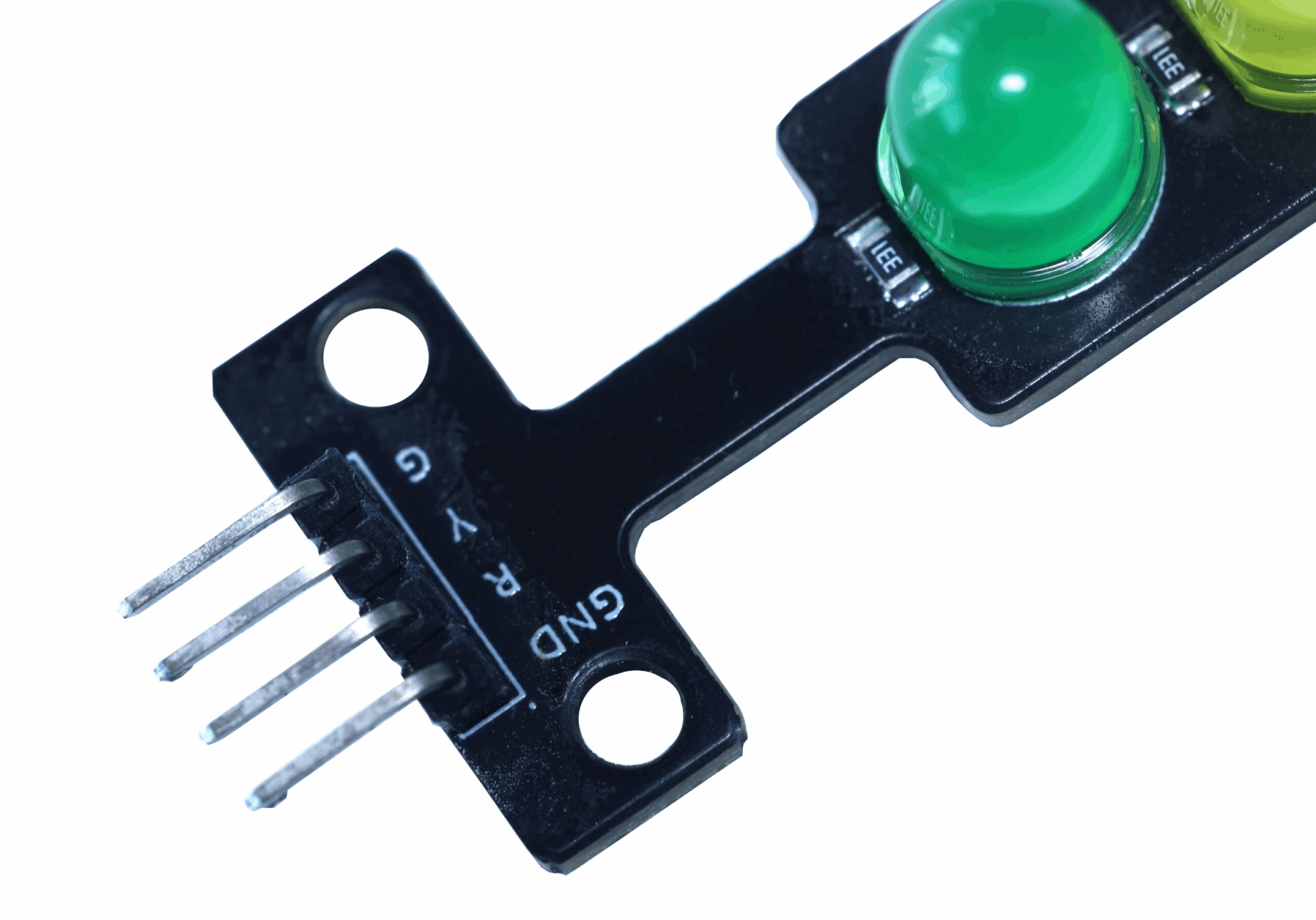
G = Green LED (active HIGH)
Y = Yellow LED (active HIGH)
R = Red LED (active HIGH)
GND = Ground terminal
How Led light module connected to Arduino?


					#include <Wire.h>
#include <Adafruit_GFX.h>
#include <Adafruit_SSD1306.h>
#define SCREEN_WIDTH 128 // OLED display width, in pixels
#define SCREEN_HEIGHT 64 // OLED display height, in pixels
#define OLED_RESET     -1 // Reset pin # (or -1 if sharing Arduino reset pin)
Adafruit_SSD1306 display(SCREEN_WIDTH, SCREEN_HEIGHT, &Wire, OLED_RESET);
// Time setting (unit: milliseconds)
#define GREEN_SET_TIME 15000
#define YELLOW_SET_TIME 3000
#define RED_SET_TIME 10000
#define BLINK_DURATION 3000   // The flashing lasts for 3 seconds
#define BLINK_INTERVAL 400    // The flashing interval is 500 milliseconds
// Buzzer settings
#define BUZZER_PIN 5          // The pin connected to the buzzer
#define GREEN_FREQ 1500       // Green light alarm frequency (Hz)
#define YELLOW_FREQ 1000      // Yellow light alarm frequency (Hz)
#define LIGHT_1_RED 2
#define LIGHT_1_YELLOW 3
#define LIGHT_1_GREEN 4
#define GREEN_LIGHT 0
#define YELLOW_LIGHT 1
#define RED_LIGHT 2
unsigned long gulStart_Timer = 0;
unsigned long gulBlink_Timer = 0;
bool gbBlink_State = false;
unsigned short gusSet_Time[3] = {GREEN_SET_TIME, YELLOW_SET_TIME, RED_SET_TIME};
short gsWhich_Light_Index = GREEN_LIGHT;
void setup()
{
  Serial.begin(9600);
  // Initialize OLED display
  if(!display.begin(SSD1306_SWITCHCAPVCC, 0x3C)) {
    Serial.println(F("SSD1306 allocation failed"));
    for(;;); // Don't proceed, loop forever
  }
  // Clear the buffer
  display.clearDisplay();
  display.display();
  // Set up traffic light pins
  pinMode(LIGHT_1_RED, OUTPUT);
  pinMode(LIGHT_1_YELLOW, OUTPUT);
  pinMode(LIGHT_1_GREEN, OUTPUT);
  pinMode(BUZZER_PIN, OUTPUT);
  digitalWrite(LIGHT_1_GREEN, HIGH);
  digitalWrite(LIGHT_1_YELLOW, LOW);
  digitalWrite(LIGHT_1_RED, LOW);
  noTone(BUZZER_PIN);
  gulStart_Timer = millis();
  gulBlink_Timer = millis();
  updateDisplay();
}
void loop()
{
  unsigned long currentTime = millis();
  unsigned long elapsed = currentTime - gulStart_Timer;
  unsigned long remaining = gusSet_Time[gsWhich_Light_Index] - elapsed;

  // Check if it is necessary to switch the light status
  if(elapsed >= gusSet_Time[gsWhich_Light_Index])
  {
    changeLight();
  }

  // Deal with the yellow light flashing (flashing throughout the entire yellow light period)
  if(gsWhich_Light_Index == YELLOW_LIGHT)
  {
    if(currentTime - gulBlink_Timer >= BLINK_INTERVAL)
    {
      gbBlink_State = !gbBlink_State;
      gulBlink_Timer = currentTime;
      digitalWrite(LIGHT_1_YELLOW, gbBlink_State ? HIGH : LOW);
      if(gbBlink_State) {
        tone(BUZZER_PIN, YELLOW_FREQ);
      } else {
        noTone(BUZZER_PIN);
      }
    }
  }
  // Deal with the last three seconds of the green light flashing
  else if(gsWhich_Light_Index == GREEN_LIGHT && remaining <= BLINK_DURATION)
  {
    if(currentTime - gulBlink_Timer >= BLINK_INTERVAL)
    {
      gbBlink_State = !gbBlink_State;
      gulBlink_Timer = currentTime;
      digitalWrite(LIGHT_1_GREEN, gbBlink_State ? HIGH : LOW);
      if(gbBlink_State) {
        tone(BUZZER_PIN, GREEN_FREQ);
      } else {
        noTone(BUZZER_PIN);
      }
    }
  }
  // The red light does not flash
  else if(gsWhich_Light_Index == RED_LIGHT)
  {
    digitalWrite(LIGHT_1_RED, HIGH);
    noTone(BUZZER_PIN);
  }
  updateDisplay();
  delay(50);
}
void changeLight()
{
  gsWhich_Light_Index++;

  if(gsWhich_Light_Index > RED_LIGHT)
  {
    gsWhich_Light_Index = GREEN_LIGHT;
  }
  gulStart_Timer = millis();
  gulBlink_Timer = millis();
  gbBlink_State = true;
  digitalWrite(LIGHT_1_GREEN, LOW);
  digitalWrite(LIGHT_1_YELLOW, LOW);
  digitalWrite(LIGHT_1_RED, LOW);
  noTone(BUZZER_PIN);
  if(gsWhich_Light_Index == GREEN_LIGHT)
  {
    digitalWrite(LIGHT_1_GREEN, HIGH);
  }
  else if(gsWhich_Light_Index == YELLOW_LIGHT)
  {
    digitalWrite(LIGHT_1_YELLOW, HIGH);
    gbBlink_State = true;
  }
  else if(gsWhich_Light_Index == RED_LIGHT)
  {
    digitalWrite(LIGHT_1_RED, HIGH);
  }
  updateDisplay();
}
void updateDisplay() {
  unsigned long elapsed = millis() - gulStart_Timer;
  unsigned long remaining = gusSet_Time[gsWhich_Light_Index] - elapsed;
  if (remaining < 0) remaining = 0;
  display.clearDisplay();
  // Display current light status
  display.setTextSize(2);
  display.setTextColor(SSD1306_WHITE);
  display.setCursor(0, 0);
  switch(gsWhich_Light_Index) {
    case GREEN_LIGHT:
      display.println("GREEN");
      break;
    case YELLOW_LIGHT:
      display.println("YELLOW");
      break;
    case RED_LIGHT:
      display.println("RED");
      break;
  }
  // Display remaining time
  display.setTextSize(3);
  display.setCursor(30, 30);
  display.print(remaining/1000);
  display.print("s");
  // Display progress bar
  int progress = map(elapsed, 0, gusSet_Time[gsWhich_Light_Index], 0, SCREEN_WIDTH);
  display.drawRect(0, 55, SCREEN_WIDTH, 8, SSD1306_WHITE);
  display.fillRect(0, 55, progress, 8, SSD1306_WHITE);
  display.display();
}
FAQS
Is there a device that can change traffic lights?
There are generally two ways to change traffic lights:The first way is to modify the program to change the traffic signals;The second way is to use a device that changes traffic signals, such as the Opticom system in traffic systems. This kind of system can use infrared signals or radio signals to communicate with the controller of the traffic signals, so as to realize the temporary switching of red, yellow and green lights.
What is the AI traffic light system?
The AI traffic light system refers to using AI to empower the traffic system. It connects traffic lights to a large AI model, monitors real – time traffic conditions through cameras, and uses the advanced aithmetic of AI technology to enable traffic lights to customize the duration of red, yellow and green lights according to traffic conditions, so as to achieve the purpose of smooth traffic flow.
Why are LEDs used in traffic lights?
Humans tend to trust the first system, which is intuition, rather than the rationality of the second system. In the case of red – green traffic lights, using the specific color light emitted by LED lights to indicate moving forward or stopping is often easier to judge than using words.