

Blog
LIS3DH 3-Axis Accelerometer: The “All-Round Sensing Star” in the MEMS World
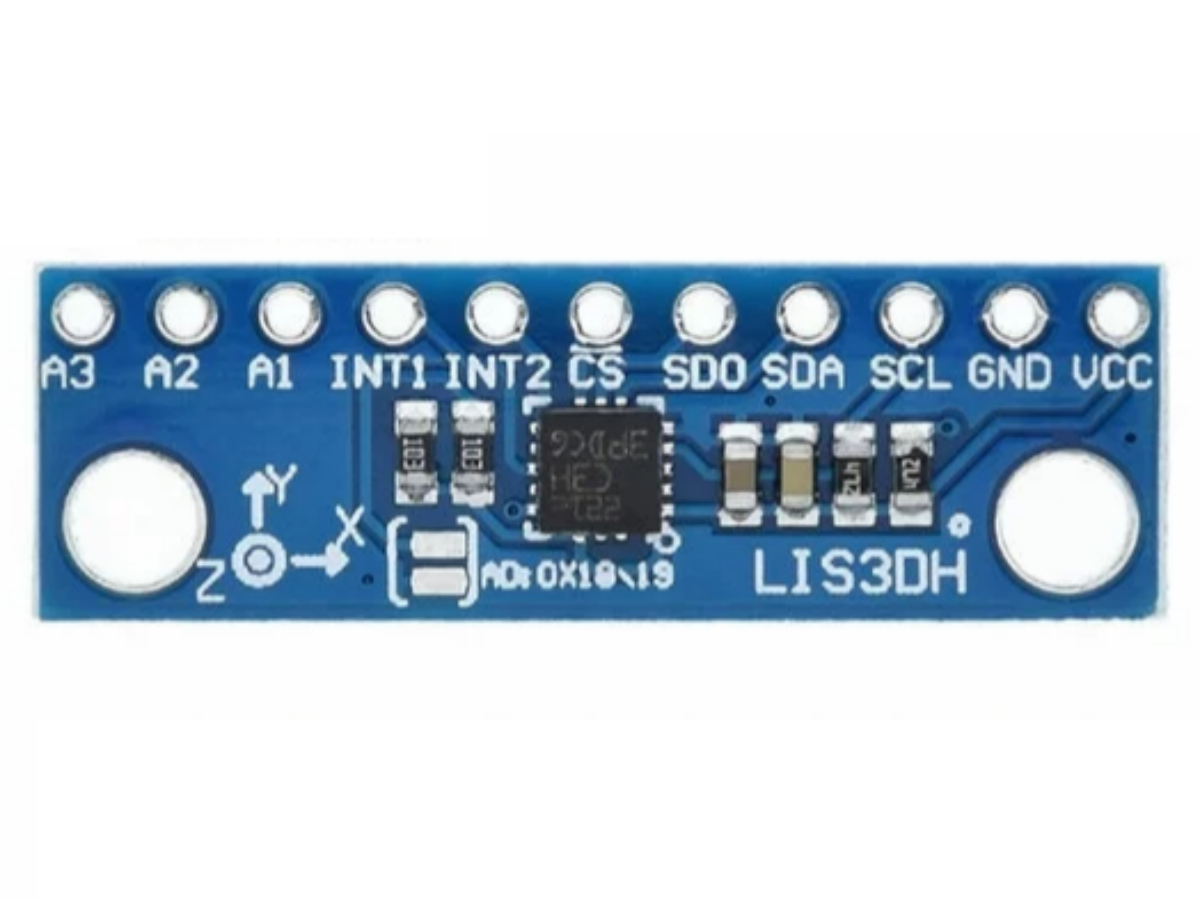
Introduction
In the Internet of Things (IoT), wearable devices, and DIY electronic projects, accurate motion sensing is a core need—whether it’s a pedometer, smart bracelet, or fall detection device, all require a compact, low-power, and stable accelerometer. The LIS3DH 3-axis accelerometer, a flagship MEMS sensor launched by STMicroelectronics, stands out in consumer electronics to industrial scenarios with its 1μA-level ultra-low power consumption, adjustable multi-range, and built-in rich intelligent features. It not only accurately captures X/Y/Z 3-axis motion but also outputs digital signals directly, allowing even beginners to easily implement complex motion detection needs.
What exactly is LIS3DH?
The LIS3DH is a 3-axis linear accelerometer based on MEMS (Micro-Electro-Mechanical Systems) technology, belonging to STMicroelectronics’ “nano” series, focusing on high cost-effectiveness and ultra-low power consumption. It converts acceleration from physical motion into readable digital signals, and communicates with microcontrollers or development boards via I2C or SPI interfaces to realize functions like motion detection, posture recognition, and free-fall detection.
Unlike traditional analog sensors, the LIS3DH has a built-in ADC converter and signal processing circuit—no additional filtering or amplification modules are needed. Its core strength lies in the compact yet comprehensive LGA-16 package, which integrates programmable interrupts, 32-level FIFO cache, temperature sensors, and other features, making it ideal for applications where size and power efficiency are critical.
Side-by-Side Comparison: LIS3DH vs. LIS3DSH vs. ADXL345

There are many popular 3-axis accelerometers on the market—why does the LIS3DH stand out? Let’s compare it directly with two other popular models to see the clear differences:
| Comparison Dimension | LIS3DH | LIS3DSH | ADXL345 |
|---|---|---|---|
| Power Consumption | Ultra-low (0.5μA in standby) | Regular (10μA in standby) | Medium (4μA in standby) |
| Measurement Range | Adjustable ±2g/±4g/±8g/±16g | Adjustable ±2g/±4g/±8g/±16g | Adjustable ±2g/±4g/±8g/±16g |
| Core Functions | Built-in temp sensor, 32-level FIFO, 6D posture detection | No temp sensor, 16-level FIFO | No temp sensor, 32-level FIFO |
| Interface Type | Dual I2C/SPI interfaces | SPI interface only | Dual I2C/SPI interfaces |
| Interrupt Function | 2 independent programmable interrupts (click/free-fall) | 1 interrupt | 2 interrupts |
In short, the LIS3DSH focuses more on anti-vibration performance for industrial scenarios but lags behind the LIS3DH in power consumption and function integration. The ADXL345 offers good cost-effectiveness but lacks temperature sensing and more flexible low-power modes. The LIS3DH, however, balances low power consumption, multi-functionality, and high compatibility, making it the best choice for DIY enthusiasts and small-device development.
Easy to Get Started: How to Use the LIS3DH?
Wiring (Taking Arduino UNO + I2C Interface as an Example)
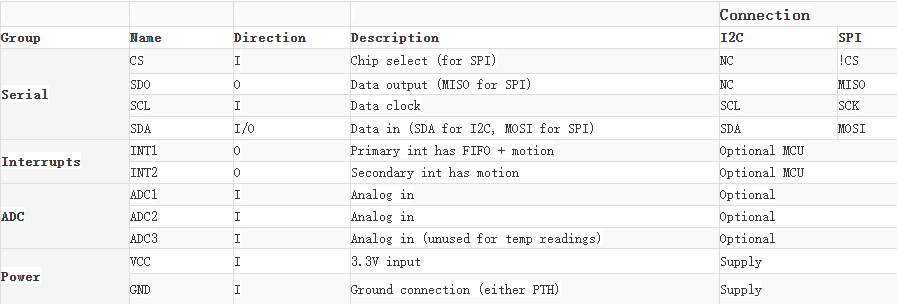
- VDD → Arduino 3.3V (5V is not supported—connecting to 5V will damage the sensor)
- GND → Arduino GND
- SDA → Arduino A4 (I2C data pin)
- SCL → Arduino A5 (I2C clock pin)
- INT1 → Arduino D2 (interrupt pin, optional)
Configure Core Parameters
Set the sensor’s operating mode, range, and data output rate via code:
- Operating Mode: Choose from high-resolution mode (12-bit), normal mode (10-bit), or low-power mode (8-bit).
- Measurement Range: Select from ±2g(high precision) to ±16g(high acceleration scenarios) based on needs.
- Output Rate: Adjustable from1Hz to 5.3kHz—choose 1Hz for low-power scenarios and over 100Hz for fast motion detection.
Read Data
After configuration, the Arduino reads the acceleration data from the sensor via the I2C interface, which can be directly used for posture judgment, motion counting, and other scenarios.
LIS3DH Three-Axis Accelerator Datasheet
If you want to learn more details about the LIS3DH 3-axis accelerometer, you can refer to this datasheet.
Core Composition of the Module: Unpacking the LIS3DH’s "Black Technology"
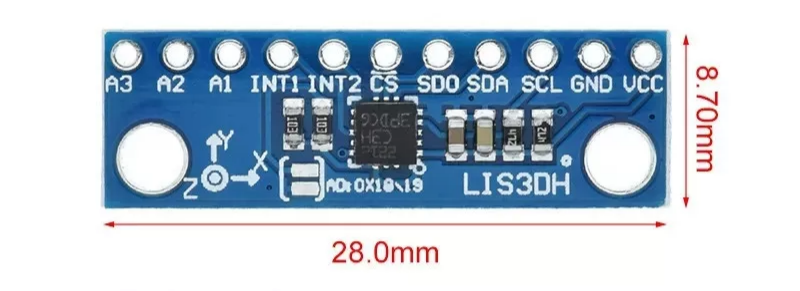
As seen in the LIS3DH datasheet, its internal structure is compact yet powerful, with key components each serving a clear purpose:
- MEMS Sensing Unit: The core sensitive component that detects acceleration via capacitance changes, supporting a ±16g range and withstanding up to 10000g impact.
- Signal Processing Circuit:Includes a low-noise amplifier and ADC converter to convert analog signals into 16-bit digital signals.
- Control Logic Unit:Handles I2C/SPI communication and register configuration; the built-in FIFO buffer reduces MCU load.
- Interrupt Generator: Supports 2 independent interrupts, configurable for trigger events like click detection, free-fall, and posture changes.
- Temperature Sensor: Embedded design that synchronously collects ambient temperature with an accuracy of 1 digit/°C.
- Power Management Unit:Supports a wide input voltage range of 1.71V-3.6V and optimizes current consumption in low-power mode.
LIS3DH 3-Axis Accelerator Hardware Parameter
| Item | Details |
|---|---|
| Operating Voltage | 3.3V |
| Operating Current | 2μA |
| Built-in Components | Programmable state machine |
| Built-in Components | Temperature sensor |
| Built-in Components | First-In-First-Out (FIFO) |
| Dynamic Gradient | ±2g/±4g/±8g/±16g |
| Material | PCB + electronic components |
| Application | Acceleration module temperature sensor |
Practical Project: Build a Simple Pedometer with the LIS3DH
Take Arduino + LIS3DH as an example to implement basic step-counting functionality— the code is simple and easy to understand:
Required Materials
- LIS3DH sensor module ×1
- Arduino UNO ×1
Wiring
Follow the I2C wiring method above, and connect the INT1 pin to Arduino UNO’s “D2” for step impact detection.
Code
					#include <Wire.h>
#include <Adafruit_GFX.h>
#include <Adafruit_SH110X.h>
#include <Adafruit_LIS3DH.h>
#include <Adafruit_Sensor.h>

/* ---------- OLED (SH1106) ---------- */
#define SCREEN_WIDTH 128
#define SCREEN_HEIGHT 64
#define OLED_RESET -1

Adafruit_SH1106G display(SCREEN_WIDTH, SCREEN_HEIGHT, &Wire, OLED_RESET);

/* ---------- LIS3DH ---------- */
Adafruit_LIS3DH lis;

/* ---------- Parameters ---------- */
float threshold = 1.3;               // Trigger threshold in g
unsigned long debounceTime = 500;    // Debounce time in ms
unsigned long lastTrigger = 0;

int counter = 0;

void setup() {
  Wire.begin();
  delay(100);

  /* Initialize OLED */
  display.begin(0x3C);               // SH1106 I2C address
  display.clearDisplay();
  display.setTextColor(SH110X_WHITE);

  /* Initialize LIS3DH (SDO -> GND, CS -> 3.3V) */
  if (!lis.begin(0x18)) {             // I2C address = 0x18
    while (1);                        // Stop if sensor not found
  }
  lis.setRange(LIS3DH_RANGE_2_G);     // ±2G range for best sensitivity

  /* Startup screen */
  display.setTextSize(2);
  display.setCursor(0, 0);
  display.println("Counter");
  display.display();
  delay(800);
}

void loop() {
  lis.read();

  /* Convert raw Z-axis data to g */
  float z = lis.z / 16384.0;
  unsigned long now = millis();

  /* Trigger detection with debounce */
  if (abs(z) > threshold && (now - lastTrigger > debounceTime)) {
    counter++;
    lastTrigger = now;
  }

  updateDisplay(z);
}

void updateDisplay(float z) {
  display.clearDisplay();

  display.setTextSize(2);
  display.setCursor(0, 0);
  display.print("Count:");

  display.setTextSize(3);
  display.setCursor(0, 24);
  display.print(counter);

  display.setTextSize(1);
  display.setCursor(0, 56);
  display.print("Z=");
  display.print(z, 2);
  display.print(" g");

  display.display();
}
Function Explanation
The project counts steps by detecting sudden changes in Z-axis acceleration (impact from walking). A 500ms anti-shake mechanism prevents false triggers, and the serial port outputs acceleration data and step count in real time.
FAQS
No data output after wiring the module—what to do?
- First, check if the power supply is 3.3V (the module does not support 5V; 5V will burn the sensor).
- Confirm the correct I2C address (the module’s SA0 pin is connected to GND by default, address 0x18; if connected to VCC, address is 0x19).
- Check if the SDA/SCL pins are reversed or if the jumper wires have poor contact.
No response from the module’s INT interrupt pin?
- Verify the interrupt pin is connected correctly (the module’s INT1/INT2 pins must correspond to the development board’s interrupt pins, like, D2/D3 for Arduino).
- Ensure the interrupt trigger conditions (like”free-fall detection” or “click detection”) are correctly configured in the code and the interrupt function is enabled.
Is the data update slow in the low-power mode of the module?
- The default data output rate in low-power mode is low—adjust the setDataRate parameterto over 50Hzvia code.
- Enable the module’s FIFO buffer function to reduce the communication frequency between the development board and the module, further lowering power consumption.
Can the module be powered directly by a lithium battery?
Yes, but ensure the lithium battery voltage is around 3.3V (if using a 3.7V lithium battery, connect a low-dropout regulator to reduce the voltage to 3.3V to avoid overvoltage damage to the module).
How to implement free-fall detection?
- Configure theINT1 pin as a free-fall interrupt and set the threshold and duration.
- When the 3-axis acceleration is close to 0g, the sensor triggers the interrupt, and the Arduino responds to execute actions like an alarm.