

Blog
Understand AHT20 in 5 Minutes: Wiring, Code and Data Reading Explained
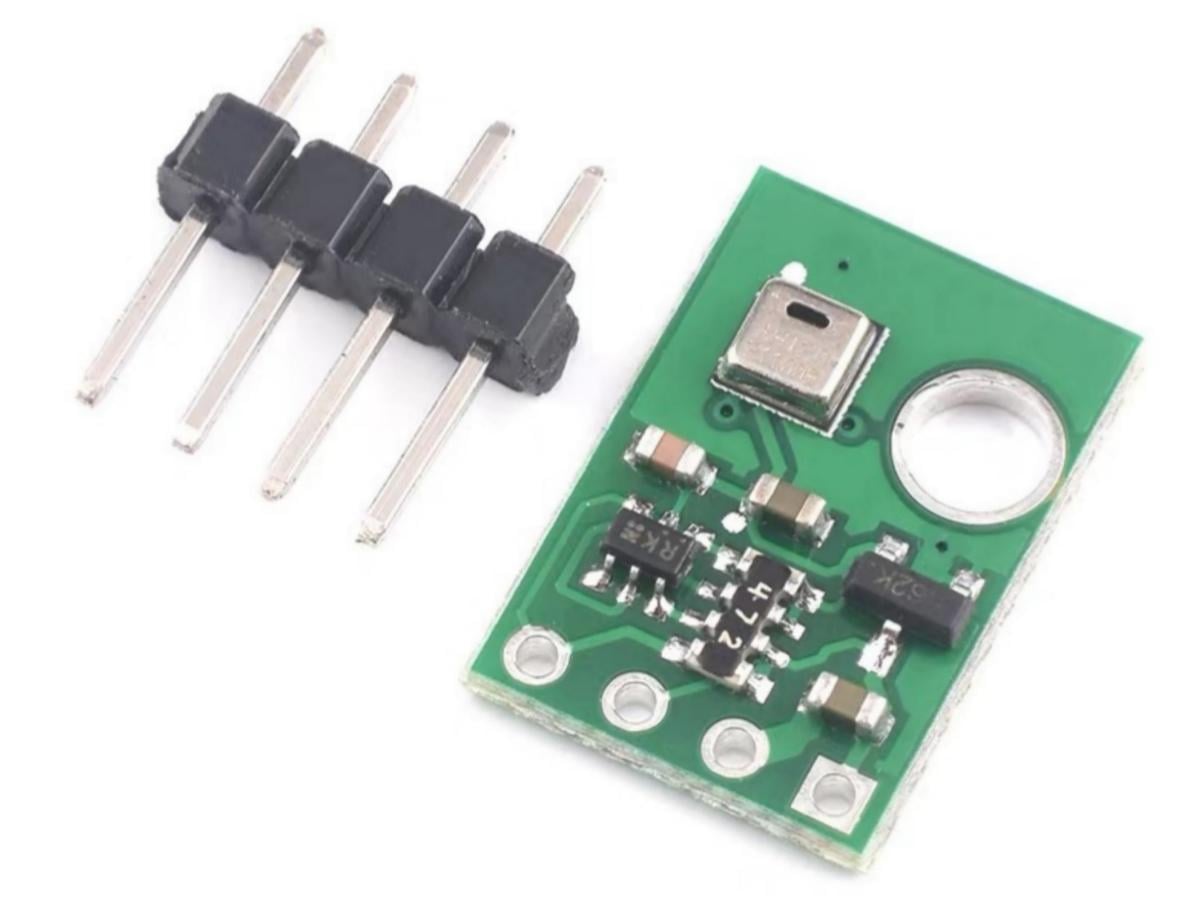
Meet the AHT20 module, your tiny weather wizard for sensing humidity and temperature.
It may be small in size, but it shines when it comes to AHT20 accuracy and overall performance. This reliable sensor gives precise readings in a compact form. Whether you are making a smart greenhouse, a home weather station, or just exploring the air around you, the AHT20 module makes it easy to add clear environmental sense to your ideas. With its strong accuracy and simple design, let us begin and bring your project to life, one step and one data point at a time.
What is AHT20 Temperature and Humidity Sensor?
The AHT20 module is a digital temperature and humidity sensor that features high precision, low power consumption, and digital output, making it suitable for a variety of applications including industry, agriculture, meteorology, home automation, and others.
AHT20 Working Principle
AHT20 I2C Address
The first byte sent via I2C includes a 7-bit I2C device address 0x38 and an SDA direction bit X (Read : ‘1’, Write : ‘0’).
The module address definition described in the manual is as follows:

AHT20 Common Command

AHT20 Status Bit
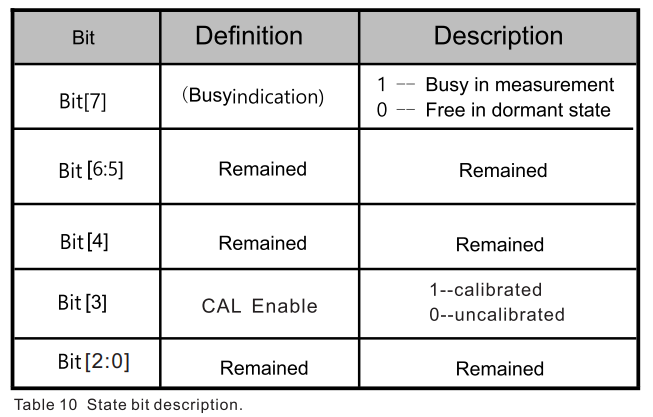
A byte of status word can be obtained by sending 0x71. The meaning of each bit of the status word is described as follows:
AHT20 Signal Conversion
- AHT20 relative humidity conversion
Relative humidity RH can be based on SDA output relative humidity signal SRH calculated by the following formula (the result is %RH indicates).

2. AHT20 temperature conversion
Temperature T can output the signal by the temperature ST substitute into the formula below to calculate (results are expressed in temperature °C ):

AHT20 Sensor Reading Process
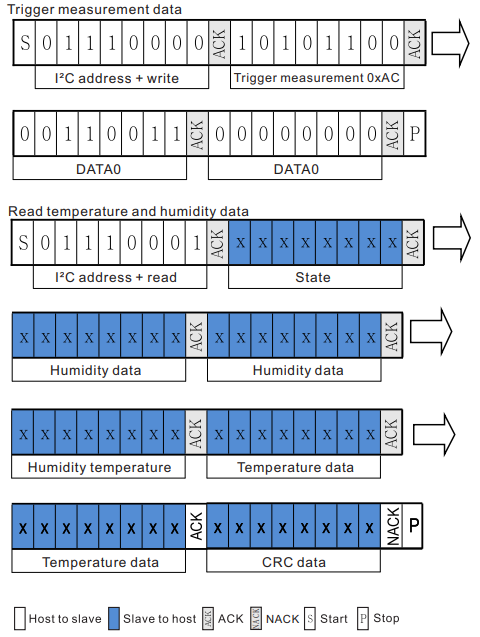
(1) Wait 40ms after power-on. Before reading the temperatureand humidity values, first check whether the calibration enable bit Bit [3] of the status word is 1 (you can get a byte of status word by sending 0x71). If not 1, need to send 0xbe command (for initialization), this command parameter has two bytes, the first byte is 0x08, the second byte is 0x00, and then wait for 10ms.
(2) Send the 0xAC command directly (trigger measurement). The parameter of this command has two bytes, the first byte is 0x33 and the second byte is 0x00.
(3) Wait for 80ms to wait for the measurement to be completed. If the read status word Bit [7] is 0, it indicates that the measurement is completed, and then six bytes can be read in a row; otherwise, continue to wait.
(4) After receiving six bytes, the next byte is the CRC check data, the user can read it as needed, if the receiving end needs CRC check, then send it after receiving the sixth byte ACK response, otherwise NACK is sent out, CRC initial value is 0XFF, CRC8 check polynomial is:

(5) Calculate the temperature and humidity values.
Note: The calibration status check in the first step only needs to be checked at power-on. No operation is required during the normal acquisition process.
AHT20 Feature
- High-Precision Measurement
Built-in 24-bit ADC, supporting synchronous acquisition of temperature and humidity with a data refresh rate of approximately 0.5Hz (default mode).
Integrated calibration function with factory pre-calibration, eliminating the need for additional calibration.
- Low-Power Design
Sleep mode current as low as 5μA, suitable for battery-powered devices (such as weather stations, sensor nodes).
- I2C Communication
Standard I2C protocol (100kHz/400kHz), default slave address is 0x38 (can be modified via hardware).
AHT20 Pin Function
AHT20 VS AHT21
| Model | AHT20 | AHT21 |
|---|---|---|
| Communication Interface | I²C | I²C |
| Supply Voltage | 2.0-5.5V | 2.2-5.5V |
| Humidity Range | 0% ~ 100% RH | 0% ~ 100% RH |
| Temperature Range | -40℃ ~ +85℃ | -40℃ ~ +85℃ |
| Humidity Accuracy | Typical ±2% RH | Typical ±2% RH |
| Temperature Accuracy | Typical ±0.3℃ | Typical ±0.3℃ |
AHT20 vs DHT20 vs DHT11
| Model | AHT20 | DHT20 | DHT11 |
|---|---|---|---|
| Compatibility | Compatible with DHT20 | Compatible with AHT20 | Not compatible |
| Accuracy | Highest | Lower than AHT20 | Lowest |
| Communication | Standard I²C | Standard I²C | 1-Wire Bus |
AHT20 Arduino Tutorial
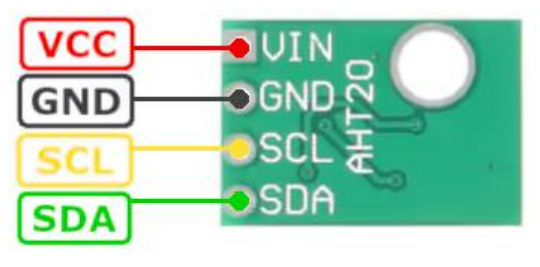
AHT20 Pinout
- AHT20 Arduino
VCC ——> 3.3V
GND ——> GND
SCL ——> A5
SDA ——> A4
Arduino AHT20 Code
					#include <Wire.h>
#include <Adafruit_GFX.h>
#include <Adafruit_SSD1306.h>

// Hardware Config
#define SCREEN_WIDTH  128
#define SCREEN_HEIGHT 64
#define OLED_ADDR     0x3C
#define AHT20_ADDR    0x38

Adafruit_SSD1306 display(SCREEN_WIDTH, SCREEN_HEIGHT, &Wire, -1);
float temp_val = 0.0, humi_val = 0.0;

void setup() {
  Serial.begin(9600);
  Wire.begin();

  // OLED Init
  if(!display.begin(SSD1306_SWITCHCAPVCC, OLED_ADDR)) {
    Serial.println(F("OLED Init Error!"));
    while(1);
  }
  display.setTextSize(2);
  display.setTextColor(SSD1306_WHITE);
  display.clearDisplay();
  display.setCursor(0,0);
  display.println(F("Init OK!"));
  display.display();
  delay(800);

  aht20_Init();
  Serial.println(F("System Ready!"));
}

void loop() {
  aht20_Read(&temp_val, &humi_val);

  // Serial Monitor Output
  Serial.print(F("Temp: "));Serial.print(temp_val,1);Serial.print(F(" °C | "));
  Serial.print(F("Humi: "));Serial.print(humi_val,1);Serial.println(F(" %RH"));

  // OLED Display
  display.clearDisplay();
  display.setCursor(0,10);display.print(F("T:"));display.print(temp_val,1);display.print(F("C"));
  display.setCursor(0,40);display.print(F("H:"));display.print(humi_val,1);display.print(F("RH"));
  display.display();

  delay(1000);
}

// AHT20 Init Function
void aht20_Init() {
  Wire.beginTransmission(AHT20_ADDR);
  Wire.write(0xBE);Wire.write(0x08);Wire.write(0x00);
  Wire.endTransmission();
  delay(100);
}

// AHT20 Data Read Function
void aht20_Read(float *t, float *h) {
  uint8_t buf[6];
  Wire.beginTransmission(AHT20_ADDR);
  Wire.write(0xAC);Wire.write(0x33);Wire.write(0x00);
  Wire.endTransmission();
  delay(80);

  Wire.requestFrom(AHT20_ADDR,6);
  for(int i=0;i<6;i++) buf[i]=Wire.read();

  if((buf[0]&0x80)==0){
    *h = ((uint32_t)buf[1]<<12)|((uint32_t)buf[2]<<4)|(buf[3]>>4);
    *h = (*h *100.0)/0x100000;
    *t = (((uint32_t)buf[3]&0x0F)<<16)|((uint32_t)buf[4]<<8)|buf[5];
    *t = (*t *200.0)/0x100000 -50.0;
  }
}
AHT20 Effect Demonstration
AHT20 Application Scenario
1. Automatic temperature and humidity adjustment (such as linkage with air conditioners and humidifiers).
2. Greenhouses, warehousing and logistics (real-time monitoring of temperature and humidity abnormalities).
3. Fitness bands/watches (judging human sweating status combined with humidity).
4. Equipment cabinet cooling systems (activating fans based on temperature).
Relative Information
Purchase Link
FAQ
What is the I2C address of the AHT20?
The AHT20 temperature and humidity sensor adopts a default I2C address of 0x38. Typically, sensors on the I2C bus are hard-wired, and most breakout boards cannot be changed, which makes it very convenient to use.
What is the function of the AHT20?
This sensor can be widely used for measuring the ambient temperature and humidity of household electronic devices, as well as the temperature and humidity in automobiles, etc.
Can the AHT20 sensor be used with other microcontrollers (such as ESP32)?
Yes, the AHT20 can work with any microcontroller that supports I²C communication, including ESP32, ESP8266, STM32 and Raspberry Pi.
Why does my AHT20 sometimes stop providing new readings after a few minutes?
This usually occurs when the I²C communication is unstable. Use short cables and ensure a good connection.
Can I change the I²C address of the AHT20 sensor?
No, the I²C address of the AHT20 is fixed at 0x38 and cannot be changed.