

Blog
LED Dot Matrix Display

Have you ever learned about the structure of display screens? In fact, all the display screens we use are composed of individual pixels, each of which is a light-emitting unit. Images can be displayed by lighting up different pixels. As someone studying electronics, you must also try to understand the underlying principles. This time, we will use an 8*8 LED dot matrix display module for learning.
what is dot matrix display
The LED dot matrix module consists of 8 rows and 8 columns, totaling 64 LED. Patterns and text can be displayed by lighting up LED at specific positions. The control method is the same as that for lighting an ordinary LED, except that specific rows and columns are required to form a complete circuit. For example, the LED at the position of the 2nd row and 3rd column can be lit up when a complete circuit is formed between this row and column.Careful learners may notice a problem: to control all LED, every row and column needs to form a complete circuit, which would light up all LED at once. In reality, all display modules we use only light up designated LED. How is this achieved?
Principles of LED Dot Matrix Display
Human eyes have a remarkable feature: an image remains in the eye for approximately 0.2 seconds. When this residual image overlaps with the image you are currently seeing, it forms a “persistence” of the moving object. This phenomenon has a professional name called persistence of vision.The dot matrix only lights up one row at a time, then moves on to the next row. When the switching speed is fast enough, it appears as if all rows are lit up simultaneously. However, this method has an obvious drawback: since the displayed content needs to be “refreshed” continuously, it consumes more MCU resources. If resources are insufficient or other programs cause blockages, the display will appear to flicker, which can be understood as a too low display frame rate. This is also why OLED screens with high frame rates are more expensive. In addition, each row and column needs to be connected to the MCU. For MCU that already have a shortage of IO ports, this is undoubtedly a problem. Therefore, the direct connection control method is only suitable for beginners and projects with a small amount of code. If you need to save IO ports and MCU resources, additional control chips must be added.
What is the MAX7219
MAX7219 is a serial-input/parallel-output common-cathode LED display driver launched by Maxim Integrated. It features high integration, simple control, and low power consumption. It is widely used in display scenarios such as 8-segment nixie tubes and dot matrix LEDs, and is one of the most commonly used display driver chips in electronic production, industrial control, and intelligent devices. Its core lies in its highly integrated design, which significantly reduces the number of peripheral circuits and the resource occupation of the MCU (Microcontroller Unit).
| FEATURE | SPECIFIC FUNCTION |
|---|---|
| specific function | Strong display capability |
| three-wire control | Three wire serial interface (DIN, CLK, CS), familiar with SPI protocol, beginner friendly |
| brightness adjustment | Built in 16 levels programmable dimming |
| Multiple working modes | Normal mode, sleep mode (with all LEDs turned off), test mode (with all LEDs fully lit) |
| Anti flicker | Internally integrated scanning display circuit, supporting 8-bit dynamic scanning to prevent flickering |
| Built in protection | Overheating protection, LED current limiting (some models require external connection) |
| Cascade expansion | Only read the last 16 bits of data, and any excess data will be automatically transmitted to the DOUT port |
Pin Description of MAX7219
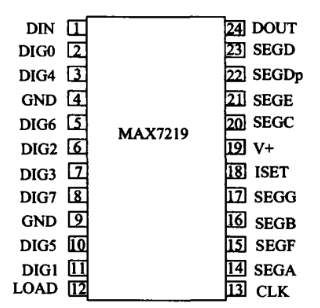
V+: Power input
GND: Ground
DIN/DOUT: Data input/output
CLK: Communication clock input
LOAD (CS): Data loading signal input
DIG0~DIG7: LED digit control
SEG A~SEG P, SEG Dp: Segment code and decimal point control output
ISET: LED current reference (hardware-adjustable brightness)
How does the MAX7219 work?
| REGISTER ADDRESS | FUNCTION | DETAILED INTRODUCTION |
|---|---|---|
| 0x01~0x08 | Dot matrix row or digital display control | For example, if the 0x03 register is 0x3f, it means that when controlling DIG3, SEGA~SEGDep outputs 0x3f |
| 0x09 | Decoding method | 0x01 is BCD decoding (used for digital tubes), 0x00 is non decoding (directly outputting register values) |
| 0x0A | Brightness control | 0x00 brightness is 1/32, 0x0F is 31/32 |
| 0x0B | Scan boundaries | 0x00~0x07 respectively represent the number of rows in the display dot matrix or 1–8 digital tubes |
| 0x0C | sleep mode | 0x00 enters sleep mode, all LED outputs are turned off, 0x01 works normally |
| 0x0F | test mode | 0x01 maximum brightness lights up all LEDs, 0x00 works normally |
Non decoding output
| HEX CODE | SEG DP | SEG G | SEG F | SEG E | SEG D | SEG C | SEG B | SEG A | CORRESPONDING HEX |
|---|---|---|---|---|---|---|---|---|---|
| 0x00 | 0 | 0 | 0 | 0 | 0 | 0 | 0 | 0 | 0x00 |
| 0x05 | 0 | 0 | 0 | 0 | 1 | 0 | 0 | 1 | 0x49 |
| 0xA3 | 1 | 0 | 1 | 0 | 0 | 0 | 1 | 1 | 0xCB |
| 0x3F | 0 | 0 | 1 | 1 | 1 | 1 | 1 | 1 | 0x7E |
| 0x06 | 0 | 0 | 0 | 0 | 0 | 1 | 1 | 0 | 0x06 |
| 0x5B | 0 | 1 | 0 | 1 | 1 | 0 | 1 | 1 | 0x5B |
| 0x4F | 0 | 1 | 0 | 0 | 1 | 1 | 1 | 1 | 0x4F |
| 0x66 | 0 | 1 | 1 | 0 | 0 | 1 | 1 | 0 | 0x66 |
| 0x6D | 0 | 1 | 0 | 0 | 1 | 1 | 0 | 1 | 0x6D |
| 0x7D | 0 | 1 | 1 | 0 | 1 | 1 | 0 | 1 | 0x7D |
| 0x07 | 0 | 0 | 0 | 0 | 0 | 1 | 1 | 1 | 0x07 |
| 0x7F | 0 | 1 | 1 | 1 | 1 | 1 | 1 | 1 | 0x7F |
| 0x6F | 0 | 1 | 1 | 0 | 1 | 1 | 1 | 1 | 0x6F |
Decoding output
| HEX CODE | SEG DP | SEG G | SEG F | SEG E | SEG D | SEG C | SEG B | SEG A | CORRESPONDING NON DECODING VALUES |
|---|---|---|---|---|---|---|---|---|---|
| 0x02 | 0 | 1 | 0 | 1 | 1 | 0 | 0 | 1 | 0x5B |
| 0x03 | 0 | 1 | 0 | 0 | 1 | 1 | 0 | 1 | 0x4F |
| 0x04 | 0 | 1 | 1 | 0 | 0 | 1 | 1 | 0 | 0x66 |
| 0x05 | 0 | 1 | 0 | 0 | 1 | 1 | 0 | 1 | 0x6D |
| 0x06 | 0 | 1 | 1 | 0 | 1 | 1 | 0 | 1 | 0x7D |
| 0x07 | 0 | 0 | 0 | 0 | 0 | 1 | 1 | 1 | 0x07 |
| 0x08 | 0 | 1 | 1 | 1 | 1 | 1 | 1 | 1 | 0x7F |
| 0x09 | 0 | 1 | 1 | 0 | 1 | 1 | 1 | 1 | 0x6F |
| 0x0A | 0 | 1 | 1 | 0 | 1 | 1 | 1 | 1 | 0x77 |
| 0x0B | 0 | 1 | 1 | 0 | 1 | 1 | 1 | 0 | 0x7C |
| 0x0C | 0 | 0 | 1 | 1 | 0 | 0 | 0 | 0 | 0x39 |
| 0x0D | 0 | 1 | 1 | 0 | 1 | 1 | 0 | 0 | 0x5E |
| 0x0E | 0 | 1 | 1 | 1 | 0 | 0 | 0 | 0 | 0x79 |
| 0x0F | 0 | 1 | 1 | 1 | 0 | 0 | 0 | 0 | 0x71 |

Lighting up the dot matrix screen with Arduino
Firstly, we need a development board that supports Arduino IDE and connects it in sequence
VCC-5V
GND-GND
CLK-PIN5
CS-PIN6
DIN-PIN7
As shown in the figure, the pins can be modified in the code,
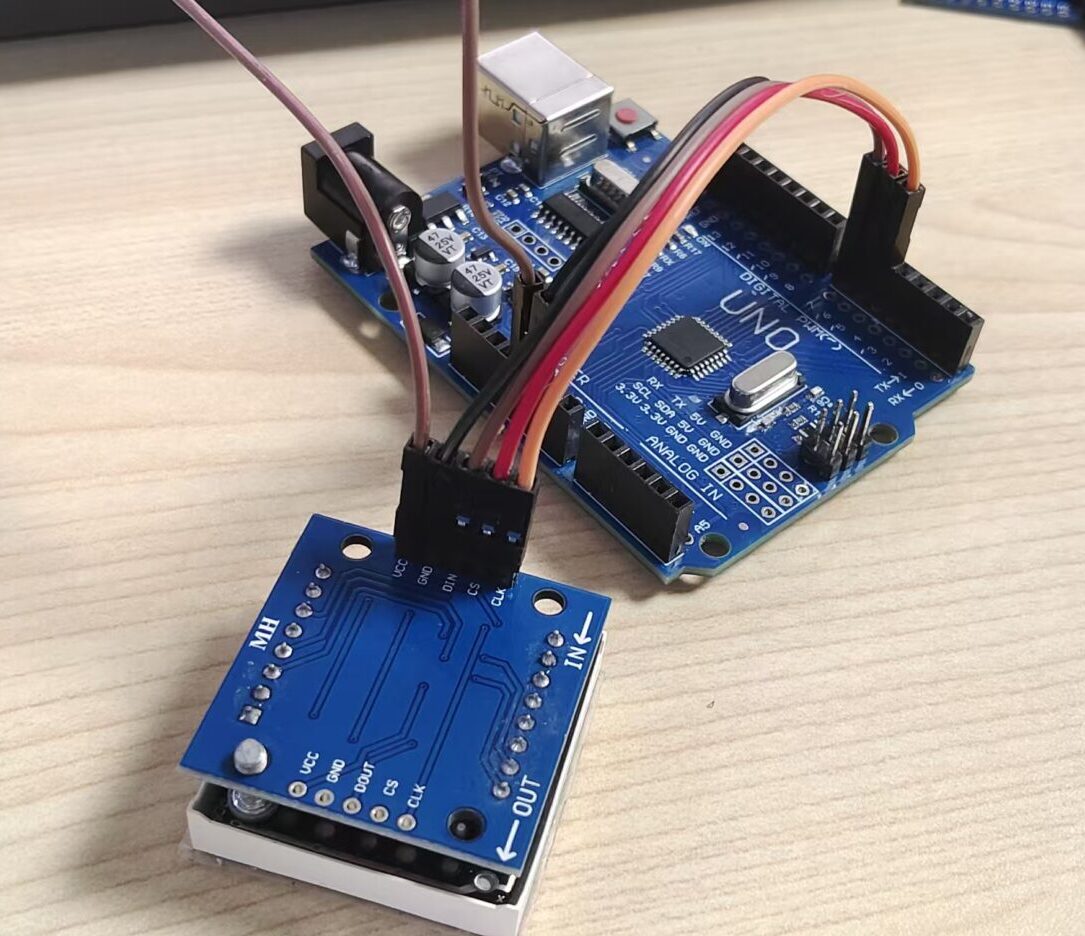
Once the connection is completed, you can burn the code. The following is the code for a single LED dot matrix module, which only controls the LED in rows 1 to 4. The control method is simple: first send the address of row X, then convert the on/off status of 8 LED into a binary signal and further into a hexadecimal signal for transmission (other number systems can also be used). Since the register numbers of all rows are 1 to 8, you can also directly send the row number instead of the address. For example, to control the 4th row, first send “4”, then send the hexadecimal signal. Meanwhile, a “for loop” is used to increment values, allowing you to more intuitively see the increment rule of binary numbers.
CODE
					#define CLK 5
#define CS 6
#define DIN 7

byte num1[9] = {0x00,0x01,0x03,0x07,0x0f,0x1f,0x3f,0x7f,0xff};
byte num2[9] = {0x00,0x80,0xc0,0xe0,0xf0,0xf8,0xfe,0xfe,0xff};
byte num3[9] = {0x00,0x01,0x02,0x04,0x08,0x10,0x20,0x40,0x80};

void setup() {
  // Initialize pins
  pinMode(DIN, OUTPUT);
  pinMode(CLK, OUTPUT);
  pinMode(CS, OUTPUT);
  sendCmd(0x09, 0x00);  // Turn off decoding mode
  sendCmd(0x0A, 0x03);  // Brightness setting (low brightness)
  sendCmd(0x0B, 0x07);  // Scan all 8 digits
  sendCmd(0x0C, 0x01);  // Normal working mode
  sendCmd(0x0F, 0x00);  // Turn off test mode
}
void loop() {
  for(int i=0;i<9;i++){
    sendCmd(1,num1[i]);//line 1
    delay(100);
    }
  for(int i=0;i<9;i++){
    sendCmd(2,num2[i]);//line 2
    delay(100);
    }
  for(int i=0;i<9;i++){
    sendCmd(3,num3[i]);//line 3
    delay(100);
    }
  for(int i=0;i<256;i++){
    sendCmd(4,i);//Line 4
    delay(50);
  }
}
void sendCmd(byte add1, byte dat1) {//Communication program
  digitalWrite(CS, LOW);    // Before communication, it is necessary to lower the voltage level
  for(byte i=0; i<8; i++){  //Shipping address
    digitalWrite(CLK, LOW);//Prepare to send
    digitalWrite(DIN,add1 & 0x80);//High bit in front
    add1 <<= 1;
    digitalWrite(CLK, HIGH);
  }
  // Send data
  for(byte i=0; i<8; i++){
    digitalWrite(CLK, LOW);
    digitalWrite(DIN,dat1 & 0x80);
    dat1 <<= 1;
    digitalWrite(CLK, HIGH);
  }
  digitalWrite(CS, HIGH);//All data needs to be sent before raising the voltage level
}
The above is just the basic application of the LED dot matrix screen. If you want more stunning displays or different shapes, you need to cascade multiple modules, and the code also requires significant modifications. This is because more control signals need to be sent, but you don’t have to worry,most of the code will remain the same.