

Blog
New Solution for Haptic Feedback — Technical Analysis of the HW-738 Vibration Motor Module

Ding~ You’ve got a new message. Don’t you often feel your phone vibrate and know there’s a new notification? But do you know how that vibration works? If you want to add vibration alerts to a smart bracelet, create button haptics for a DIY game controller, or build “vibrate-on-touch” interaction for a microcontroller project—we’ve got the solution for you. Meet the 738 (HW-738) Vibration Motor Module: your “haptic feedback sidekick.” Powered by 5V, driven by an MOSFET, and supporting PWM speed control, it’s the core accessory for adding “tactile interaction” to small devices. Let’s break down its parameters, pins, and size to see how this tiny module brings devices to life.

What is the 738 (HW-738) Vibration Motor Module? — The “Tactile Nerve” of Small Devices
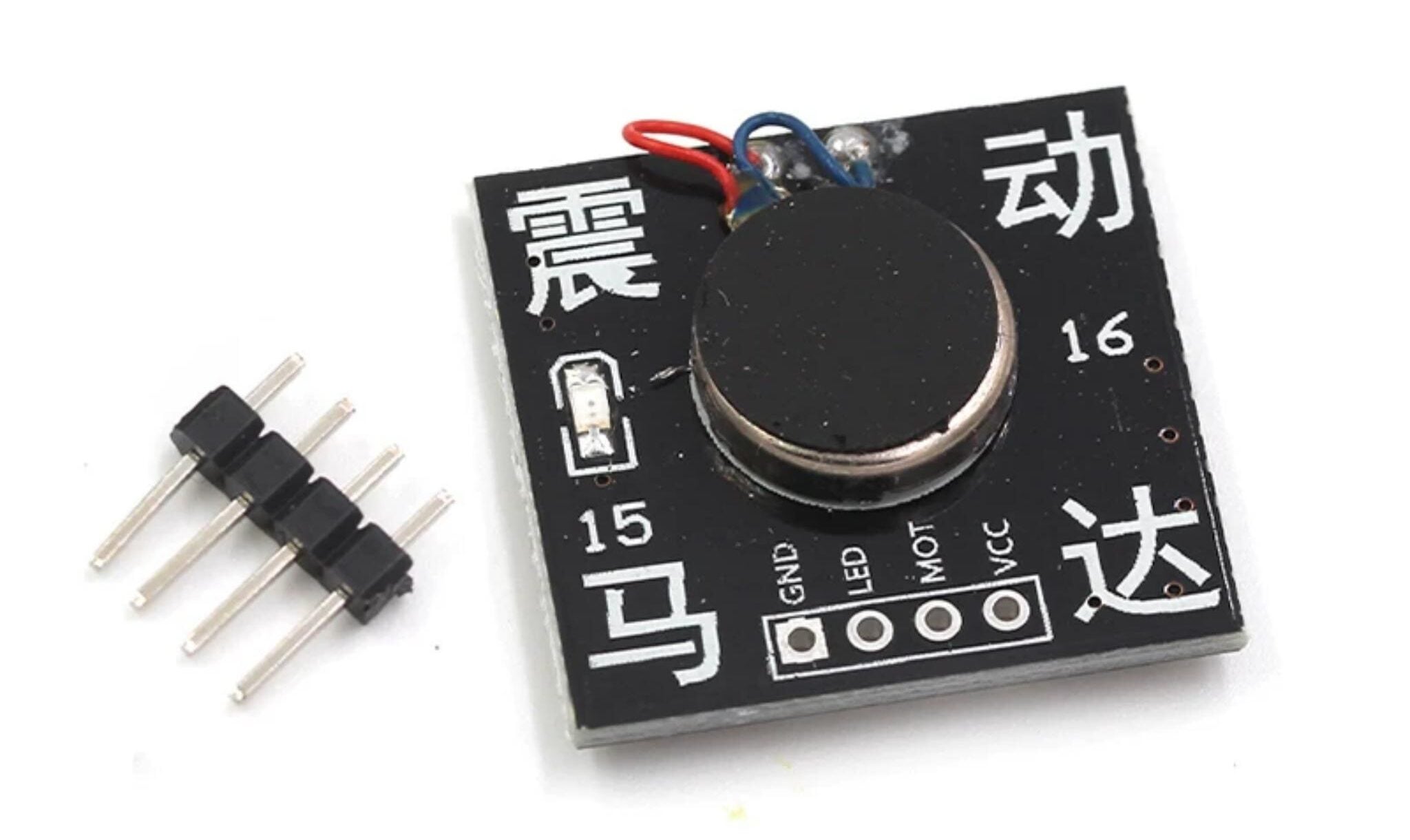
The HW-738 Vibration Motor Module is a haptic feedback component designed specifically for small devices. Its core function is to simulate physical touch through vibration, giving devices “perceivable interaction capabilities.” The module uses a micro DC motor structure with a built-in eccentric wheel vibration device—high-frequency vibration is achieved by controlling the on/off of current. With a compact size of 24mm×25mm, it fits easily into smart wearables, game controllers, or IoT terminals.
As a 5V low-voltage solution, it operates at low power via an MOSFET circuit and supports PWM signal to adjust vibration intensity (0-100% duty cycle). Whether you need the gentle vibration of a phone notification or the strong feedback of a game controller, precise control is possible by adjusting the pulse width.
Core Competitive Advantages
- Ultra-compact size:Precise dimensions of 23.8×25.3mm (approx. 24×25mm), fitting into portable devices like smart bracelets or mini controllers.
- 5V wide compatibility: Works with 5V power sources from microcontrollers or phone chargers—no extra voltage reduction needed.
- Two control modes: Supports digital control (on/off vibration) and PWM control (adjust vibration intensity).
- MOSFET drive:Stronger load capacity and more stable vibration compared to ordinary transistor drives.
- Status indicator: On-board LED that lights up synchronously when vibrating (no extra programming required).
Why is it more hassle-free than a “bare motor”?
| Comparison Dimension | 738 (HW-738) Vibration Motor Module | Bare Micro Motor |
|---|---|---|
| Drive Method | Built-in MOSFET; connects directly to digital/PWM pins | Requires external drive circuit |
| Control Method | On/off + PWM speed adjustment + status indicator | On/off control only |
| Compatibility | Connects directly to 5V microcontrollers | Needs matching power supply and driver |
| Size | 23.8×25.3mm (integrated drive) | Motor only (extra space for drive circuit needed) |
Core Parameters and Pin Definitions
Core Parameter List
| Parameter Dimension | Specific Specification | Description |
|---|---|---|
| Model | HW-738 Vibration Motor Module | Integrated design of micro eccentric motor + MOSFET drive |
| Operating Voltage | 5V | Compatible with power supplies for Arduino, ESP32, and other development boards |
| Control Method | High-level trigger (digital) + PWM speed control | High level = vibration; low level = stop; PWM adjusts vibration intensity |
| Drive Circuit | MOSFET transistor drive | Strong load capacity; stable vibration without stuttering |
| Precise Size | 23.8×25.3mm | Ultra-mini size; fits easily into portable devices |
| Interface Specification | 4-pin header | Supports breadboard insertion/soldering; easy wiring |
On-Board Pin Definitions
| Board Label | Function Description | Wiring Recommendation |
|---|---|---|
| VCC | Positive power supply | Connect to 5V pin of microcontroller/power supply |
| MOT | Control pin | Connect to digital/PWM pin of microcontroller |
| LED | Status indicator LED | Lights up when vibrating; can be left unconnected |
| GND | Negative power supply (ground) | Connect to GND pin of microcontroller/power supply |
What is the principle behind the module: How is “controlled vibration” achieved?
The HW-738 module’s operation relies on the mechanical vibration mechanism of a micro DC motor and an eccentric wheel, with core control logic enabled by the MOSFET drive circuit and PWM speed control technology.
When 5V power is connected to VCC, current flows through the MOSFET to drive the micro DC motor. The built-in eccentric wheel generates high-frequency vibration due to centrifugal force. When the MOT control pin receives a high-level signal, the MOSFET turns on and the motor starts; a low-level signal cuts off the current and stops vibration.
By adjusting the duty cycle (0-100%) of the PWM signal at the MOT pin, you can precisely control the motor’s average voltage—and thus the vibration intensity of the eccentric wheel. For example, a 20% duty cycle gives gentle vibration, while 80% gives strong feedback.
The on-board LED syncs with the vibration status, providing visual confirmation of operation without extra programming. This design lets developers control everything from basic on/off vibration to complex intensity adjustments using just a digital I/O or PWM output from a microcontroller—significantly lowering the barrier to developing haptic feedback features.
Arduino + 738 Module Implementation for “Vibration Notification”
Let’s take “vibrate for 2s (LED syncs) when a serial message is received” as an example. It only takes 3 steps:
1. Wiring steps (Arduino Uno)
| 738 Module Pin (Board Label) | Arduino Pin | Description |
|---|---|---|
| VCC | 5V | Powers the module |
| GND | GND | Common ground |
| MOT | D2 | Connects to digital/PWM pin |
| LED | Unused | No extra wiring needed |
Code Example
					const int vibratePin = 2;

void setup() {
  Serial.begin(9600);
  pinMode(vibratePin, OUTPUT);
  Serial.println("Send any message, the module will vibrate for 2 seconds (LED lights up synchronously)");
}

void loop() {
  if (Serial.available() > 0) {
    Serial.read(); // Read serial message
    // Trigger vibration for 2 seconds
    digitalWrite(vibratePin, HIGH);
    delay(2000);
    digitalWrite(vibratePin, LOW);
    Serial.println("Vibration has stopped, you can send a message again");
  }
}
PWM Speed Control Example (Adjust Vibration Intensity)
					const int vibratePin = 2; // PWM output pin connected to vibration motor control

void setup() {
  pinMode(vibratePin, OUTPUT); // Set pin as output mode
}

void loop() {
  // Vibrate intensity increasing from weak to strong
  for (int i = 0; i <= 255; i += 10) {
    analogWrite(vibratePin, i); // Set PWM duty cycle
    delay(100); // Delay 100ms to make the change noticeable
  }

  // Vibrate intensity decreasing from strong to weak
  for (int i = 255; i >= 0; i -= 10) {
    analogWrite(vibratePin, i); // Set PWM duty cycle
    delay(100); // Delay 100ms
  }
}
Typical Application Scenario: Enabling devices with “tactile interaction”
The 738 module’s mini size + controllable vibration makes it perfect for scenarios needing haptic feedback:
- Smart wearables: Trigger vibration alerts for messages (bracelets) or alarms (smartwatches).
- DIY interactive devices:Add vibration feedback to game controller buttons or touch-sensing devices.
- Microcontroller projects: Vibration alarms for abnormal sensor readings (likeexcessive temperature/humidity).
- Portable tools: Vibration alerts for Bluetooth anti-lost devices when out of range.
FAQS
1.How to use a vibration motor module?
Using the vibration module is simple—follow these steps:
1.Wiring: Connect VCC to the 5V pin of your power supply, and GND to the power supply’s GND pin for stable power.
2.Control pin: Connect the MOT pin to a digital or PWM pin of your microcontroller (for on/off or intensity control).
3.LED pin: Usually left unused—it lights up automatically when vibrating for status feedback.
4.Programming: Send a high-level signal to the MOT pin to start vibration, or a low-level signal to stop it. For intensity adjustment, use a PWM signal to change the duty cycle of the MOT pin (0-100% for stepless control).
2.How long do vibration motors last?
A vibration motor’s lifespan depends on factors like usage frequency, load, and operating environment. Under ideal conditions, high-quality vibration motors can run continuously for thousands of hours or more. To extend lifespan:
- Avoid long periods of high-intensity continuous use.
- Regularly check the motor’s wiring connections.
- Ensure good heat dissipation.
- Avoid use in humid, dusty, or extreme temperature environments.
3.What is the main cause of excessive vibration in a motor?
Excessive motor vibration typically stems from these issues:
- Loose installation: Unsecured motors produce extra vibration during operation.
- Damaged eccentric wheel:A loose or broken internal eccentric wheel causes uneven, intense vibration.
- Unstable power supply: Fluctuating voltage or excessive current in the drive circuit can trigger over-vibration.
Solutions include resecuring the motor, replacing the damaged eccentric wheel, or checking/stabilizing the drive circuit voltage. For the 738 module, its built-in MOSFET drive circuit and compact, stable design effectively prevent over-vibration from drive or structural issues.
4.How to size a vibrating motor?
Choose a vibration motor size based on your application’s needs:
- For space-constrained portable devices (e.g., smart bracelets, mini controllers), the 738 module’s 23.8×25.3mm ultra-mini size is ideal—it fits easily without taking up too much space.
- If your project needs stronger vibration and has more space, opt for a slightly larger but more powerful vibration motor.
- Also consider the motor’s mounting method—ensure it connects securely to your device to avoid extra vibration from poor installation.
The 738 module’s precise sizing and stable mounting make it a convenient, efficient haptic feedback solution for developers.
Summary: 738 (HW-738) Vibration Motor Module — The “Haptic Upgrade” for Small Devices
The 738 (HW-738) module isn’t for “high-power vibration equipment”—it’s the ideal choice for “tactile interaction in small, portable devices.” With its precise 23.8×25.3mm size, 5V wide compatibility, PWM-controlled vibration, and LED status indicator, it lets ordinary devices easily add vibration feedback. It’s a cost-effective accessory for DIY smart wearables and interactive devices.
If you’re interested, take a look!