

Blog
PCF8575 I2C Expander Hands-On: How to Use 16 IO? Solder After Watching

Introduction
The PCF8575 is an I/O expansion module with 16-bit quasi-bidirectional input/output (I/O) ports (P07-P00, P17-P10) and I2C communication. It incorporates latched outputs with high current-driving capability for directly driving LEDs. Each quasi-bidirectional I/O port can be used as either input or output without the need for data direction control signals. Upon power-up, these I/Os are at high level. In this mode, only a single current path connected to VCC is active.
Main Features
- 16-bit Parallel I/O Ports: Configurable as Input or Output.
- I2C Bus Interface: Compatible with Fast-mode I2C (400KHz); Supports 3.3V and 5V Systems.
- Interrupt Output: Triggers interrupt when input state changes.
- Low Standby Current Consumption: 10μA, ideal for battery-powered applications.
- 3 Hardware Address Pins for Addressing up to 8 Devices.
- Latched Outputs with High Current Driving Capability for Direct LED Driving.
- Industrial Temperature Range: -40℃ ~ +85℃.
Working Principle
The PCF8575 is a 16-bit I2C/SMBus I/O expansion chip launched by TI/NXP. Its core function is to expand the MCU’s I/O ports via the I2C bus. It requires no direction register configuration, realizes input/output through quasi-bidirectional ports and latching mechanism, and also supports interrupts and multi-device cascading.
The I2C communication module supports standard (100KHz) and fast (400KHz) I2C modes, and communicates with the host via two lines: SDA (Serial Data) and SCL (Serial Clock). The chip integrates 4 programmable slave addresses (set via level combinations of A0/A1 pins) to enable multi-device cascading.
When the 16-bit I/O ports output high level, the internal pull-up resistors (typical value 40KΩ) are activated, enabling direct driving of external low-source-current loads. When used as inputs, an external level signal is required, and the pull-up resistors prevent unstable levels caused by floating pins.
The chip has a supply voltage range of 2.5V–5.5V, compatible with both 3.3V and 5V systems. The I/O ports support 5V voltage tolerance, enabling direct connection to 5V peripherals without a level shifter circuit, featuring strong compatibility.
PCF8575 Pinout

PCF8575 Chip Select Address
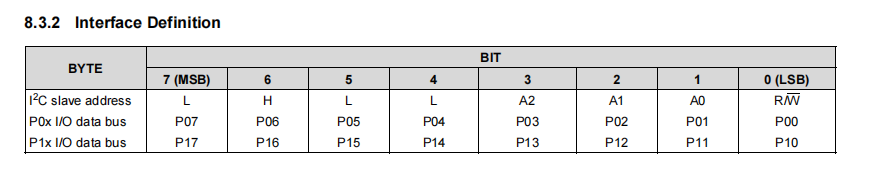
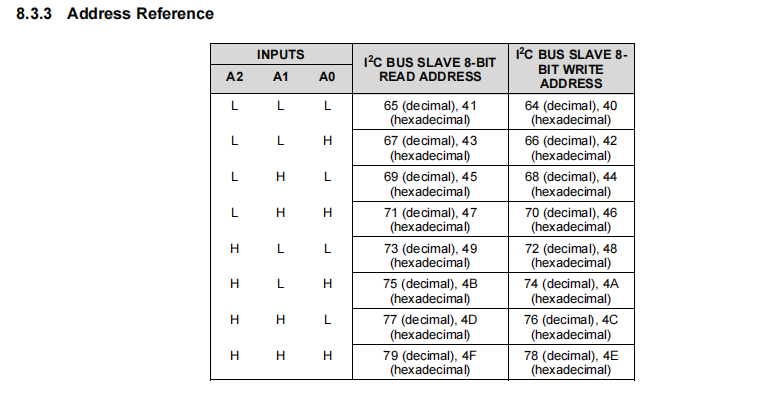
I2C Slave Address Configuration
- Fixed Base Address: 0100000 (corresponding to hexadecimal 0x20, non-modifiable)
- Programmable Address Pins: A0, A1, A2 (corresponding to bits 0, 1, and 2 of the address; level configurable by connecting to external GND/VCC, where GND=0 and VCC=1)
					Address Calculation Formula
// 7-bit Address (commonly expressed in hexadecimal) PCF8575_7BIT_ADDR = 0x20 + (A2 << 2) + (A1 << 1) + A0
 // Note: Some platforms (e.g., STM32 HAL Library) require shifting the 7-bit address left by 1 bit to convert it to an 8-bit slave address (to distinguish read/write bits)
PCF8575_8BIT_ADDR = PCF8575_7BIT_ADDR << 1
I2C Control
I2C Write Operation (Controlling 16-channel GPIO Outputs)
Write 16-bit data (2 bytes) to the PCF8575; each bit of data corresponds to the level status of one GPIO pin (0 = low level, 1 = high level), realizing GPIO output control.
Data Transmission Sequence
1.1st Byte: Lower 8-bit Data (corresponding to P00~P07 of the PCF8575)
2.2nd Byte: Upper 8-bit Data (corresponding to pins P10~P17 of the PCF8575)
Transmission Process: The master sends a start signal → sends the slave write address (7-bit address + 0) → the slave responds → sends the lower 8-bit and upper 8-bit data in sequence → the slave responds → the master sends a stop signal.
Logic Description
When writing the data 0x1234 (hexadecimal)
- Lower 8-bit data 0x34 → Controls P00~P07
- Upper 8-bit data 0x12 → Controls P10~P17
- Corresponding GPIO levels: P00=0, P01=0, P02=1, P03=1… P10=0, P11=0, P12=0, P13=1…
I2C Read Operation (Reading the Status of 16-channel GPIO Inputs)
Read 16-bit data (2 bytes) from the PCF8575; each bit of data corresponds to the input level status of one GPIO pin (0 = low level, 1 = high level), realizing GPIO input detection.
Data Reading Sequence
1.1st Read Byte: Lower 8-bit Data (corresponding to pins P00~P07 of the PCF8575)
2.2nd Read Byte: Upper 8-bit Data (corresponding to pins P10~P17 of the PCF8575)
Transmission Process: The master sends a start signal → sends the slave read address (7-bit address + 1) → the slave responds → reads the lower 8-bit and upper 8-bit data in sequence → the master sends a non-acknowledge signal → the master sends a stop signal.
Logic Description
When Byte 1 read is 0x56 and Byte 2 read is 0x78
- Assembled into 16-bit data: (0x78 << 8 | 0x56 = 0x7856)
- Parsing: P00~P07 correspond to each bit of 0x56, and P10~P17 correspond to each bit of 0x78.
Before reading the GPIO input status, it is imperative to write a high level (1) to the target GPIO via an I2C write operation to activate the built-in pull-up resistors of the PCF8575. Otherwise, the external input signal cannot be read stably (determined by the quasi-bidirectional port characteristic).
GPIO Control
The 16 GPIOs of PCF8575 (pin numbers P00~P07 correspond to 0~7 at software level, P10~P17 correspond to 8~15) are quasi-bidirectional, which is essentially different from the push-pull output of general MCU GPIOs.
No direction register configuration required: The operating mode is automatically switched by writing the level.
- Writing HIGH (high level): The GPIO enters input mode, the built-in pull-up resistor is activated, and external input signals (such as keys and sensors) can be stably detected.
- Writing LOW (low level): The GPIO enters output mode, the level is forcibly pulled low, and it can drive external devices (such as LEDs and small relays).
If a GPIO pin is to be used as an input, a high level must first be written to this pin; otherwise, the pull-up resistor will not be activated, and the external level status cannot be accurately read.
The 16 GPIOs correspond to one 16-bit data register, supporting precise control of a single pin as well as batch control of 16 pins, which flexibly adapts to different scenarios.
1.Individual GPIO output control (setting the level of a single pin)
					include <PCF8575.h>

include <Wire.h>

// Define the 7-bit I2C address of the PCF8575 (A0/A1/A2 all connected to GND, default 0x20)
define PCF8575_ADDR 0x20

// Create a PCF8575 object
PCF8575 pcf8575(PCF8575_ADDR);

void setup() {
  Wire.begin(); // Initialize the I2C bus
  // Initialize the PCF8575
  if (!pcf8575.begin()) {
    while (1); // Halt if initialization fails for easier debugging
  }
}

void loop() {
  // Individual GPIO output control: param1 = pin number (0~15), param2 = level (HIGH/LOW)
  pcf8575.digitalWrite(0, HIGH);  // P00 (pin 0) outputs HIGH (LED off, if connected with a series resistor in reverse)
  pcf8575.digitalWrite(1, LOW);    // P01 (pin 1) outputs LOW (LED on)
  pcf8575.digitalWrite(8, HIGH);   // P10 (pin 8) outputs HIGH
  pcf8575.digitalWrite(15, LOW);   // P17 (pin 15) outputs LOW

  delay(800); // Delay before switching states
  // Toggle pin levels
  pcf8575.digitalWrite(0, LOW);
  pcf8575.digitalWrite(1, HIGH);
  delay(800);
}
2.Individual GPIO input detection (reading the status of a single pin)
					include <PCF8575.h>

include <Wire.h>

define PCF8575_ADDR 0x20

PCF8575 pcf8575(PCF8575_ADDR);

void setup() {
  Wire.begin();
  Serial.begin(9600); // Serial print for reading status
  if (!pcf8575.begin()) {
    Serial.println("PCF8575 initialization failed!");
    while (1);
  }

  // Key step: Write HIGH to GPIO pins to be used as inputs to enable pull-up resistors
  pcf8575.digitalWrite(2, HIGH);  // P02 (pin 2) set to input mode
  pcf8575.digitalWrite(9, HIGH);  // P11 (pin 9) set to input mode
}

void loop() {
  // Individual GPIO input read: parameter = pin number, return value = bool (HIGH/LOW)
  bool pin2_state = pcf8575.digitalRead(2);  // Read P02 state
  bool pin9_state = pcf8575.digitalRead(9);  // Read P11 state

  // Print pin states (adapted for button detection scenario)
  Serial.print("P02 (pin 2): ");
  Serial.println(pin2_state ? "Button not pressed (HIGH)" : "Button pressed (LOW)");
  Serial.print("P11 (pin 9): ");
  Serial.println(pin9_state ? "Button not pressed (HIGH)" : "Button pressed (LOW)");
  Serial.println("----------------");

  delay(300); // Debounce delay, improves detection stability
}
3.16-bit GPIO batch output control
					include <PCF8575.h>

include <Wire.h>

define PCF8575_ADDR 0x20

PCF8575 pcf8575(PCF8575_ADDR);

void setup() {
  Wire.begin();
  if (!pcf8575.begin()) {
    while (1);
  }
}

void loop() {
  // Batch output: pass a 16-bit uint16_t data, each bit corresponds to a GPIO (bit0=P00, bit15=P17)
  uint16_t output_data;

  // Example 1: Only P00 is HIGH, all others are LOW
  output_data = 0x0001;
  pcf8575.write16(output_data);
  delay(300);

  // Example 2: Lower 8 bits all LOW, higher 8 bits all HIGH
  output_data = 0xFF00;
  pcf8575.write16(output_data);
  delay(300);

  // Example 3: 16-channel LED flowing light effect (rotate left)
  static uint16_t flow_light = 0x0001;
  pcf8575.write16(flow_light);
  flow_light = (flow_light << 1) | (flow_light >> 15); // Rotate left to achieve flowing effect
  delay(200);
}
4.16-bit GPIO batch input detection
					include <PCF8575.h>

include <Wire.h>

define PCF8575_ADDR 0x20

PCF8575 pcf8575(PCF8575_ADDR);

void setup() {
  Wire.begin();
  Serial.begin(9600);
  if (!pcf8575.begin()) {
    Serial.println("PCF8575 initialization failed!");
    while (1);
  }

  // Key step: Write 0xFFFF to set all GPIOs as input mode (activate all pull-up resistors)
  pcf8575.write16(0xFFFF);
}

void loop() {
  // Batch read: returns 16-bit uint16_t data corresponding to all GPIO states
  uint16_t all_gpio_state = pcf8575.read16();

  // Print reading result (hexadecimal and binary for intuitive viewing)
  Serial.print("All GPIO states (Hexadecimal): 0x");
  Serial.println(all_gpio_state, HEX);
  Serial.print("All GPIO states (Binary): ");
  Serial.println(all_gpio_state, BIN);

  // Parse individual pin states (using P03 and P13 as examples, parsed via bit operations)
  bool pin3_state = (all_gpio_state >> 3) & 0x01;  // Shift right 3 bits, take lowest bit with AND 1
  bool pin13_state = (all_gpio_state >> 13) & 0x01; // Shift right 13 bits, take lowest bit with AND 1
  Serial.print("P03 (pin 3): ");
  Serial.println(pin3_state ? "HIGH" : "LOW");
  Serial.print("P13 (pin 13): ");
  Serial.println(pin13_state ? "HIGH" : "LOW");

  Serial.println("==");
  delay(500);
}
Interrupt Capability
The PCF8575 is equipped with an INT pin and supports interrupt output. When the GPIO is configured as an input, the interrupt function can be used.When the GPIO status changes, a pulse will be generated on the INT pin. We can connect the INT pin to the SoC side and use a GPIO interrupt to monitor the INT pin.
When an interrupt is generated, we read the status of 16 GPIOs via I2C to identify which pin is the source of the interrupt signal.This can be accomplished using the kernel’s interrupt subsystem framework to implement the driver code, thereby configuring the controller to function the same as an internal controller.
Since I2C communication is used for interrupt expansion of the external GPIO controller, additional time consumption is incurred during interrupt mapping, which may result in interrupt loss in scenarios with high change frequencies.In other words, if the GPIO level change speed exceeds the time required for one I2C read operation to fetch the GPIO interrupt status, interrupts will be generated but some will be lost.
Therefore, it is not suitable for high-speed signals. During the I2C reading process of the PCF8575, if the GPIO changes, we cannot capture the transition information. As a result, the GPIO control rate is limited by the I2C access speed.
PCF8575 VS MCP23017
| PCF8575 | MCP23017 | |
|---|---|---|
| I/O Mode | Pseudo-bidirectional I/O with no direction register; input/output is switched via read/write timing. High level is weak pull-up, and low level is strong pull-down. | Configure the directions of Port A and Port B independently (via IODIRA/IODIRB), supports push-pull, pull-up input and open-drain output, with complete register management. |
| Current Driving Capability | Strong sink current capability (approx. 20mA per pin), weak source current (determined by internal pull-up current source, approx. 100μA), more suitable for sink current driving (e.g., LED cathode). | Maximum sink/source current of ±25mA per pin, supporting direct load driving. |
| I2C Speed | Up to 400KHz (SMBus compatible), with a lower speed limit. | I2C bus maximum speed is 1.7MHz, compatible with 100KHz and 400KHz modes simultaneously, ideal for high-speed scenarios. |
| Interrupt Capability | Single open-drain interrupt output (INT), triggered when the status differs from the last read, without polarity or mask configuration, featuring simple functions. | Dual interrupt outputs (INTA/INTB), trigger conditions (level/edge), polarity and mask can be configured independently, suitable for complex interrupt management. |
| Register Resources | Only one 16-bit I/O port register, no additional configuration registers, with simple operation. | Includes IODIRA/B, GPIOA/B, OLATA/B, GPPUA/B, IPOLA/B, GPINTEN and others, enabling precise configuration of I/O behaviors. |
| Typical Application | Ultra-simple expansion scenarios such as LCD1602/2004 driving, LED matrix, and simple key input. | Industrial control, sensor matrix, multi-device interrupt management, and complex I/O expansion. |
| Software Complexity | No register configuration required; direct port operation via read and write commands, with ultra-simple code, suitable for rapid development. | Multiple registers need to be configured, with mature Arduino libraries, suitable for complex logic. |
Matters Need Attention
The PCF8575 has no independent direction controller, and the input/output mode of its I/O ports is determined by actual scenarios. When the host sets an I/O port to high level via a write operation, the port can be used as an input port (to read external level) if there is no strong pull-down signal in the external circuit. For stable input operation, it is recommended to first configure the corresponding I/O port to high level via a write operation (to enable the internal pull-up) before performing a read operation.
Application
- Smart Home: Used to control lights, curtains, air conditioners and other devices, enabling automatic control of the smart home.
- Industrial Control: Suitable for various industrial control scenarios, such as PLC and robots.
- Medical Equipment: Used for monitoring and controlling various medical devices such as ECG monitors and ventilators.
- Automotive Electronics: Used for in-vehicle control, such as window and seat adjustment.