Blog
SHT31 Sensor: Accuracy King! 0.2℃ Error, Zero Drift!
Introduction
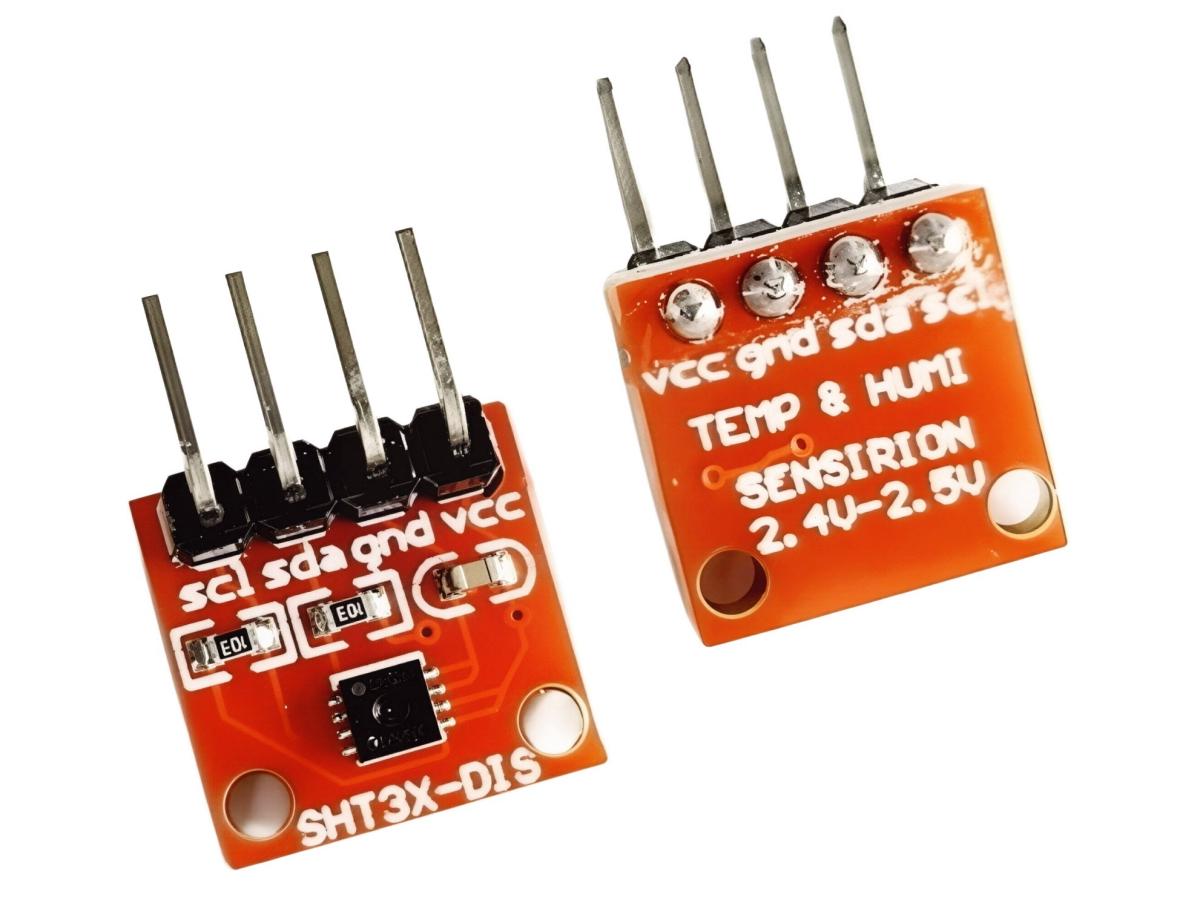
The SHT31 is a high-precision digital temperature and humidity sensor widely used in environmental monitoring, smart home, industrial control and other fields. It communicates with the main control chip via the I2C bus protocol, and features small size, low power consumption, fast response and high measurement accuracy.
Working Principle
Temperature Measurement Method
Composed of two dissimilar metal wires, a thermocouple has one welded end (measuring junction) placed at the target temperature, and the other end (reference junction) connected to a meter to form a closed loop. A temperature difference between the two junctions generates thermal EMF. The voltage signal is processed by a circuit, sent to the microcontroller, and converted into a machine-readable format.
Humidity Measurement Method
A polyamine salt or cellulose acetate polymer film (a macromolecule) is deposited on two conductive electrodes. Water absorption or desorption of the film alters the inter-electrode dielectric constant, leading to capacitance changes. These changes are captured and processed by an external circuit, and converted into a readable output signal.
Signal Processing
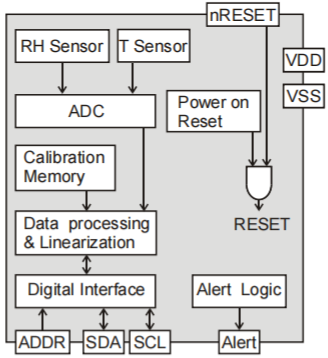
The SHT31 integrates a high-performance ASIC to process raw signals from its humidity and temperature sensors. It converts analog signals to digital ones, and executes linearization and calibration to guarantee accurate output data.
Communication Interface
The SHT31 communicates with external devices via the I2C bus, supporting both the Standard Mode (100 KHz) and Fast Mode (400 KHz). Users can read humidity and temperature data through the I2C interface, as well as configure the sensor’s operating modes and alarm thresholds.
Key Parameters
- High Precision: Temperature measurement accuracy up to ±0.3°C, humidity measurement accuracy ±2%RH.
- Low Power Consumption: Ideal for battery-powered or energy harvesting systems.
- I2C Communication: A user-friendly two-wire interface with a data transmission rate of up to 400kHz.
- Fast Response: Both temperature and humidity feature ultra-fast response times, enhancing real-time performance.
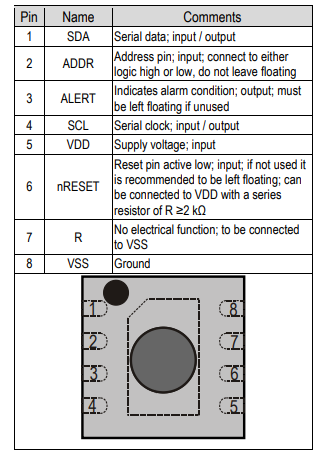
Pin Assignment
Functional Block Diagram
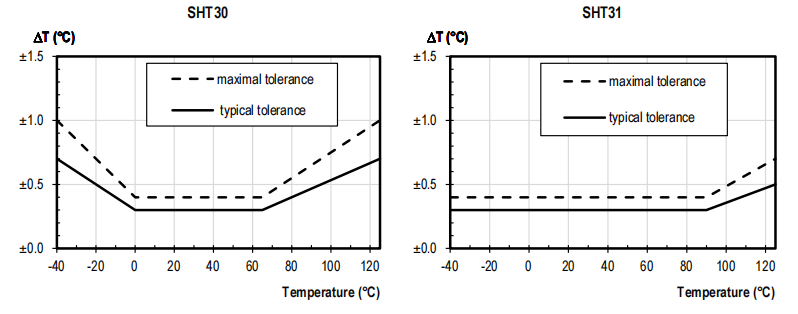
SHT30 VS SHT31
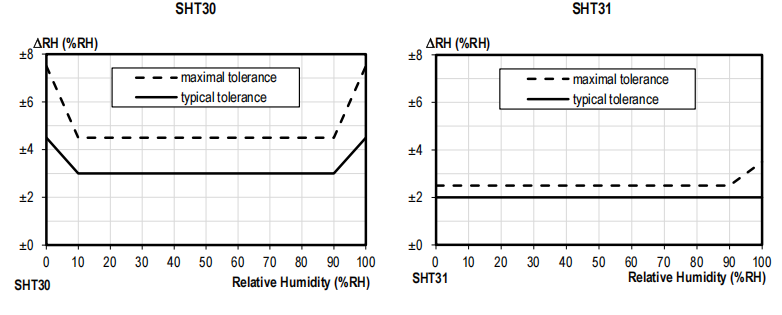
The core distinctions between SHT30 and SHT31 lie in their measurement ranges and stability performance.
Temperature Sensor Performance Graph
Humidity Sensor Performance Graph
I2C Bus Introduction
It is a special form of synchronous communication, featuring fewer interface lines, simple control mode, compact device packaging, and high communication speed. The I2C bus consists of only two bidirectional signal lines: one is the Serial Data Line (SDA) and the other is the Serial Clock Line (SCL).
I2C Communication Process
- Start Signal: When the SCL line is at a high level, the SDA line transitions from high to low (notifying the slave device that communication is initiated).
- Address + R/W Bit: Transmit a 7-bit slave address followed by a 1-bit read/write (R/W) bit (0 = Write, 1 = Read). The matched slave device returns an ACK (Acknowledgment) signal.
- Data Transmission: Data is transmitted byte by byte (most significant bit first). After each byte is sent, the receiver returns an ACK (Acknowledgment) signal. A NACK (Negative Acknowledgment) can be sent after the final byte to terminate the transmission.
- Stop Signal: When the SCL line is at a high level, the SDA line transitions from low to high (terminating the communication).
I2C Address
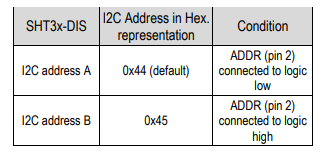
The SHT31 supports two I2C device addresses: when the ADDR pin is connected to VDD, the address is 0x45; when the ADDR pin is connected to ground (GND), the address is 0x44.
SHT31 Arduino Example
Requirement
SHT31 temperature and humidity sensor module、Arduino UNO 、Buzzer、OLED、Breadboard 、Dupont thread
Connection Diagram
Arduino Code
#include
#include
#include
#include
#define SCREEN_WIDTH 128
#define SCREEN_HEIGHT 64
#define OLED_RESET -1
// Buzzer pin (unchanged)
#define BUZZER_PIN 8
// Alarm thresholds: temperature ≥ 33℃ and humidity ≥ 80%
#define TEMP_ALARM 33.0
#define HUM_ALARM 80.0
Adafruit_SSD1306 display(SCREEN_WIDTH, SCREEN_HEIGHT, &Wire, OLED_RESET);
Adafruit_SHT31 sht31 = Adafruit_SHT31();
void setup() {
Serial.begin(9600);
// Initialize buzzer pin (output mode)
pinMode(BUZZER_PIN, OUTPUT);
// Low-level trigger: set initial state to HIGH (buzzer off)
digitalWrite(BUZZER_PIN, HIGH);
// Initialize OLED
if(!display.begin(SSD1306_SWITCHCAPVCC, 0x3C)) {
Serial.println("OLED initialization failed");
while(1);
}
// Initialize sensor
if(!sht31.begin(0x44)) {
Serial.println("Sensor initialization failed");
display.clearDisplay();
display.setTextSize(1);
display.setCursor(0,0);
display.println("Sensor Error");
display.display();
while(1);
}
display.clearDisplay();
display.setTextColor(WHITE);
display.display();
Serial.println("System startup complete (Buzzer: low-level trigger)");
}
void loop() {
float temp = sht31.readTemperature();
float hum = sht31.readHumidity();
if(isnan(temp) || isnan(hum)) {
Serial.println("Read failed");
// Restore HIGH level (turn off buzzer) on read failure
digitalWrite(BUZZER_PIN, HIGH);
return;
}
Serial.print("Temp: ");
Serial.print(temp);
Serial.print("C, Hum: ");
Serial.print(hum);
Serial.println("%");
// Clear screen
display.clearDisplay();
// Temperature display
display.setTextSize(1);
display.setCursor(0, 0);
display.println("Temperature:");
display.setTextSize(2);
display.setCursor(0, 12);
display.print(temp, 1);
display.setTextSize(1);
display.print(" ");
display.print((char)247);
display.print("C");
// Humidity display
display.setTextSize(1);
display.setCursor(0, 35);
display.println("Humidity:");
display.setTextSize(2);
display.setCursor(0, 47);
display.print(hum, 1);
display.setTextSize(1);
display.print(" %");
// Low-level trigger alarm logic
if (temp >= TEMP_ALARM && hum >= HUM_ALARM) {
// Low level → buzzer on
digitalWrite(BUZZER_PIN, LOW);
display.setTextSize(1);
display.setCursor(80, 0);
display.println("ALARM!");
} else {
// High level → buzzer off
digitalWrite(BUZZER_PIN, HIGH);
}
display.display();
delay(2000);
}
Application Scenarios
1.Smart Thermohygrometer/Weather
StationAs a core detection component, it can be integrated with display screens and wireless modules (e.g., WiFi, Bluetooth) to achieve real-time indoor temperature and humidity monitoring, data upload, and remote viewing.
2.Warehouse Environmental Monitoring
Applicable to pharmaceutical warehouses, food cold storages and electronic component repositories: Drugs and food are sensitive to temperature and humidity. The SHT31 can perform real-time monitoring and alerting to avoid product damage caused by environmental parameter exceeding limits; humidity control is required for electronic component storage to prevent short circuits.
3.Medical Device Integration
In thermostats, vaccine storage boxes, and operating room environmental monitors, the SHT31 delivers high-precision temperature and humidity data to meet the stringent requirements of medical scenarios.
4.Automotive Air Conditioning System Monitoring
It monitors the in-vehicle temperature and humidity, optimizes the air conditioning’s air outlet modes and fan speeds, and enhances driving and riding comfort.