Blog
Tiny Size, Big Power: QRE1113 IR Sensor for Industrial Counting & Positioning
Introduction
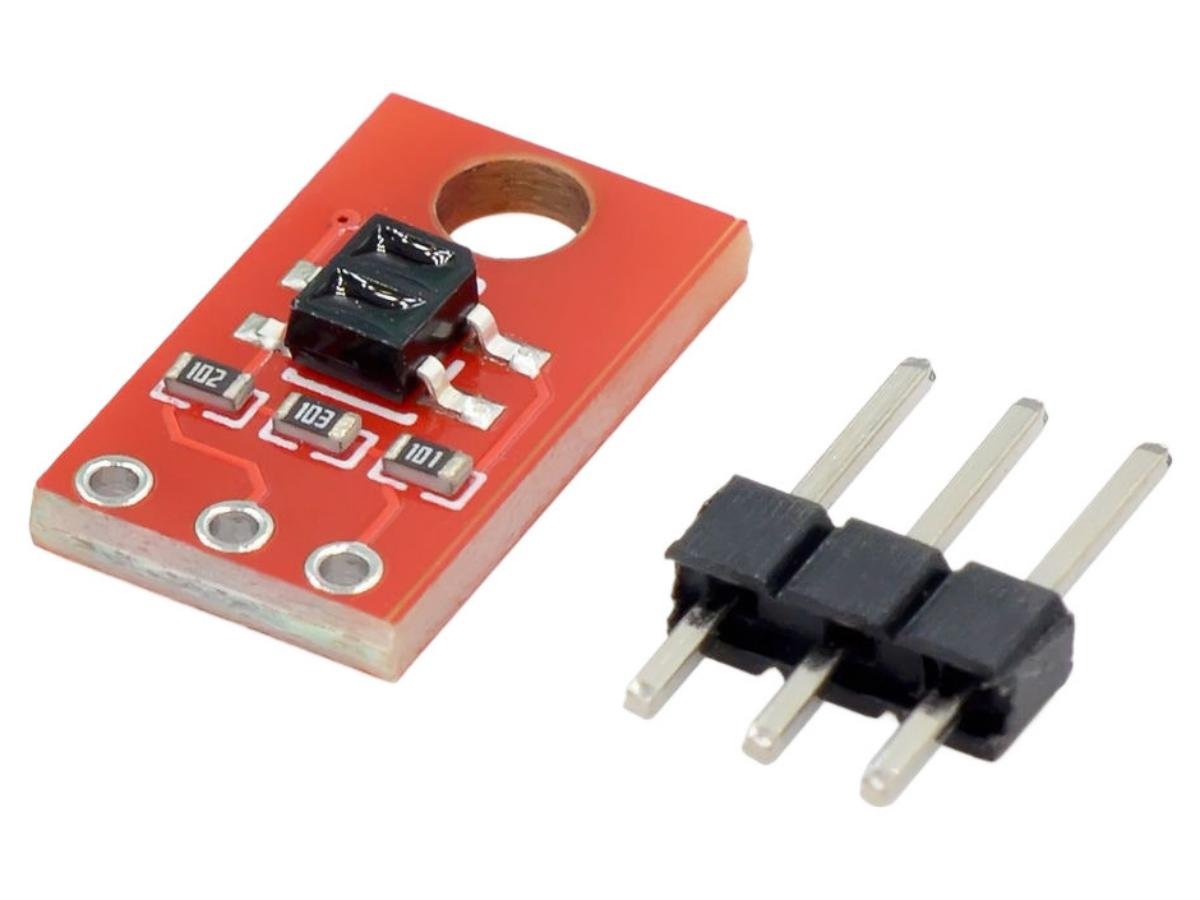
The core of the QRE1113 sensor consists of an infrared LED and an infrared phototransistor, which operates by emitting infrared light and detecting the amount of light reflected back. When an object or line passes through the sensor, the intensity of the infrared light reflected to the phototransistor will change, and the analog output pin of the sensor will accordingly generate a voltage variation. Users can determine the position of the object by measuring this voltage value, thereby achieving the detection of the object or line.
How it Works
- Infrared Emitter: The module contains an infrared LED (light-emitting diode) that emits infrared light.
- Reflection: The emitted infrared light is reflected off surfaces and returns to the sensor.
- Photodetector: A photodiode or phototransistor detects the reflected infrared light.
- Signal Processing: The sensor compares the amount of reflected light to determine the presence or absence of an object. A higher reflection indicates a lighter surface, while a lower reflection suggests a darker surface.
- Output: The sensor outputs a signal (either analog or digital depending on the configuration) that can be used by a microcontroller or other processing unit to detect objects or measure distances.
Parameter
| Working Voltage | 3.3-5V |
| Operating Temperature | -25℃-85℃ |
| Output Type | Digital output (when the sensor detects an object, it outputs a high or low level signal) Analog output (by measuring the intensity of reflected infrared light, a variable voltage signal is output) |
| Detection Range | The sensor can detect objects within a range of 1 to 5 centimeters, with the specific range depending on the reflectivity of the surface |
| Response Time | The fast response time, usually at the microsecond level, is suitable for real-time applications |
| Infrared LED Wavelength | Approximately 950 nm, operating within the infrared spectral range |
| Beam Angle | Infrared emitters have a relatively narrow beam Angle and can achieve focused detection over short distances |
QRE1113 IR Schematic

QRE1113 IR Pinout
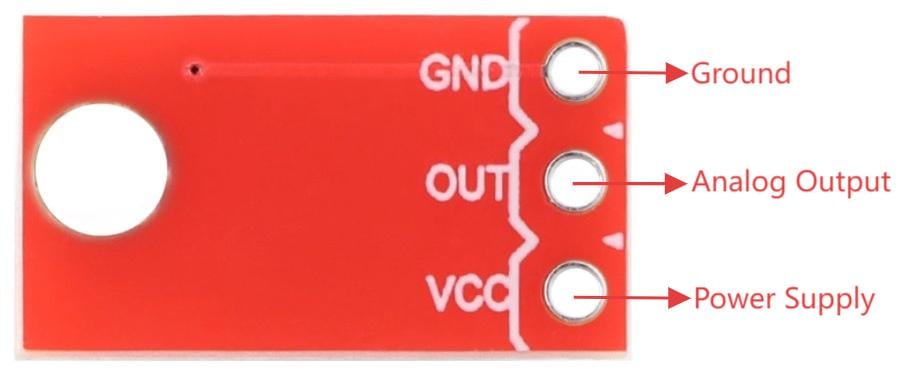
| Name | Description |
|---|---|
| GND | Ground |
| OUT | Analog Output |
| VCC | Power Supply |
QRE1113 IR Arduino Example
Automatic Sensor Faucet
5V System Material List:
Arduino Uno/Nano, USB power supply, 5V DC power supply, DuPont wire, QRE1113 ir sensor module, relay, water pump
5V system connection diagram:
5V power adapter (2A and above)→ Arduino Vin
Arduino 5V→Relay VCC
QRE1113 VCC
Arduino GND→Relay GND
QRE1113 GND
Arduino D3→Relay IN
Arduino A0→QRE1113 OUT
5V power supply +→Relay COM
Relay NO→Water pump+
Water pump-→5V power supply-
QRE1113 IR Arduino Code
					/*
 * Auto Induction Faucet - Stop Immediately When Hand Leaves Version
 * Function: Water flows when hand present, stops immediately when hand leaves
 */

// Pin Definitions
const int sensorPin = A0;  // QRE1113 OUT to A0
const int relayPin = 3;    // Relay IN to D3
const int ledPin = 13;     // Onboard LED

// Key Parameters
int triggerDelta = 50;     // Trigger difference (default 50)
int baseline = 0;          // Environment baseline value
unsigned long handTime = 0;
bool relayOn = false;
bool handDetected = false;
bool coolingDown = false;  // Cooldown protection flag
unsigned long cooldownStart = 0;

// Relay Trigger Mode
const bool RELAY_HIGH_TRIGGER = true;  // Modify according to your relay type

// Timing Parameters
const unsigned long COOLDOWN_TIME = 1000;      // Cooldown time 1 second
const unsigned long SAFETY_TIMEOUT = 30000;    // Safety timeout 30 seconds
const unsigned long MIN_ON_TIME = 200;         // Minimum on time 0.2 seconds

void setup() {
  Serial.begin(9600);
  pinMode(sensorPin, INPUT);
  pinMode(relayPin, OUTPUT);
  pinMode(ledPin, OUTPUT);

  // Initially off
  setRelay(false);
  digitalWrite(ledPin, LOW);

  Serial.println("Auto Induction Faucet - Stop When Hand Leaves Version");
  Serial.println("======================================================");

  // Calibration
  calibrate();

  Serial.println("\nSystem Ready! Water flows when hand present, stops when hand leaves");
  Serial.println("======================================================");
}

void loop() {
  unsigned long now = millis();

  // Read sensor
  int sensorValue = readFiltered();
  int delta = baseline - sensorValue;

  // Detect hand
  bool newHand = (delta > triggerDelta && sensorValue > 10);

  // Control logic
  if (newHand && !handDetected) {
    // Hand just entered
    handDetected = true;
    handTime = now;

    if (!coolingDown && !relayOn) {
      startWater();
      Serial.print("Hand detected! Δ=");
      Serial.println(delta);
    }
  }
  else if (!newHand && handDetected) {
    // Hand left
    handDetected = false;

    if (relayOn) {
      // Hand left, check minimum on time
      if (now - handTime >= MIN_ON_TIME) {
        stopWater();
        Serial.println("Hand left, water stopped immediately");
      } else {
        // Minimum time not reached, wait a bit
        delay(MIN_ON_TIME - (now - handTime));
        if (relayOn) {  // Double check
          stopWater();
          Serial.println("Hand left, minimum time reached, water stopped");
        }
      }
    }
  }

  // Hand still present
  if (handDetected && relayOn) {
    // Hand still there, update time
    handTime = now;
  }

  // Safety timeout check
  if (relayOn && (now - handTime > SAFETY_TIMEOUT)) {
    setRelay(false);
    relayOn = false;
    coolingDown = true;
    cooldownStart = now;
    Serial.println("Safety timeout! Forced water stop!");
  }

  // Cooldown protection check
  if (coolingDown && (now - cooldownStart >= COOLDOWN_TIME)) {
    coolingDown = false;
  }

  // Auto-update baseline
  updateBaseline(sensorValue, now);

  // Display status
  static unsigned long lastPrint = 0;
  if (now - lastPrint > 500) {
    printStatus(sensorValue, delta, now);
    lastPrint = now;
  }

  // Serial commands
  if (Serial.available()) {
    handleCommand(now);
  }

  delay(20);
}

// ========== Helper Functions ==========

int readFiltered() {
  int sum = 0;
  for (int i = 0; i < 4; i++) {
    sum += analogRead(sensorPin);
    delay(1);
  }
  return sum / 4;
}

void calibrate() {
  Serial.println("Calibrating... Keep clear of sensor");
  long sum = 0;
  for (int i = 0; i < 20; i++) {
    sum += analogRead(sensorPin);
    delay(50);
  }
  baseline = sum / 20;
  Serial.print("Baseline: ");
  Serial.println(baseline);
}

void updateBaseline(int sensorValue, unsigned long now) {
  static unsigned long lastUpdate = 0;
  if (now - lastUpdate > 2000 && !handDetected) {
    if (abs(baseline - sensorValue) < 20) {
      baseline = (baseline * 9 + sensorValue) / 10;
    }
    lastUpdate = now;
  }
}

void startWater() {
  if (!relayOn) {
    setRelay(true);
    relayOn = true;
    digitalWrite(ledPin, HIGH);
  }
}

void stopWater() {
  if (relayOn) {
    setRelay(false);
    relayOn = false;
    coolingDown = true;
    cooldownStart = millis();
    digitalWrite(ledPin, LOW);
  }
}

void setRelay(bool state) {
  if (RELAY_HIGH_TRIGGER) {
    digitalWrite(relayPin, state ? HIGH : LOW);
  } else {
    digitalWrite(relayPin, state ? LOW : HIGH);
  }
}

void printStatus(int sensorValue, int delta, unsigned long now) {
  Serial.print("Sensor: ");
  Serial.print(sensorValue);
  Serial.print(" | Baseline: ");
  Serial.print(baseline);
  Serial.print(" | Δ: ");
  Serial.print(delta);
  Serial.print(" | Threshold: ");
  Serial.print(triggerDelta);
  Serial.print(" | Status: ");

  if (coolingDown) {
    Serial.print("Cooling");
  } else if (relayOn) {
    unsigned long flowTime = (now - handTime) / 1000;
    Serial.print("Flowing(");
    Serial.print(flowTime);
    Serial.print("s)");
  } else if (handDetected) {
    Serial.print("Hand detected");
  } else {
    Serial.print("Standby");
  }

  Serial.println();
}

void handleCommand(unsigned long now) {
  char cmd = Serial.read();

  switch(cmd) {
    case '1':
      if (!coolingDown) {
        startWater();
        handDetected = true;  // Simulate hand presence
        handTime = now;
        Serial.println("Manual: Water ON");
      } else {
        Serial.println("Cooling down");
      }
      break;

    case '0':
      stopWater();
      handDetected = false;
      Serial.println("Manual: Water OFF");
      break;

    case '+':
      triggerDelta = max(20, triggerDelta - 10);
      Serial.print("More sensitive: Δ>");
      Serial.println(triggerDelta);
      break;

    case '-':
      triggerDelta = min(150, triggerDelta + 10);
      Serial.print("More stable: Δ>");
      Serial.println(triggerDelta);
      break;

    case 'c':
      if (!relayOn) {
        calibrate();
      } else {
        Serial.println("Turn off water first before calibration");
      }
      break;

    case 'h':
      Serial.println("Commands: 1=ON, 0=OFF, +=Sensitive, -=Stable, c=Calibrate, h=Help");
      break;
  }
}
Application and Scenario
It is mainly used in various occasions requiring non-contact detection, such as material counting and positioning systems in industrial automation, angle or position feedback signal generation in encoders, paper detection in office equipment like printers and copiers, motion component monitoring in consumer products such as toys and home appliances, liquid level detection modules in household appliances, and obstacle recognition in the field of robotics.
Relative Information
FAQ
1.Can the IR QRE1113 detect transparent objects?
Transparent materials (like clear plastic, glass, PET, acrylic, etc.) do not reflect IR strongly back toward the sensor — instead most IR passes through or is scattered away. That means:
- No strong reflection return → no reliable detection
- You may see very weak or unstable signals, if any
- Signal depends heavily on the exact material thickness, angle, surface finish, and wavelength
2.Does light affect QRE1113?
Background light interference:
When there are strong infrared light sources in the environment (such as sunlight, strong artificial light sources, etc.), these light sources may mix with the infrared emission light of the sensor, causing the sensor to be unable to correctly distinguish the reflected signal from the background light. This may lead to unstable or misreading of the sensor output, causing the sensor to misjudge the existence or position of the object.
Weakened reflected signal:
Ambient light may make the reflected infrared light signal even weaker, especially under strong white light or sunlight, where the reflected infrared signal is difficult to distinguish from the interference of other light sources.