

Blog
TDA2030A Power Amplifier Board: Revive Your Old Audio System
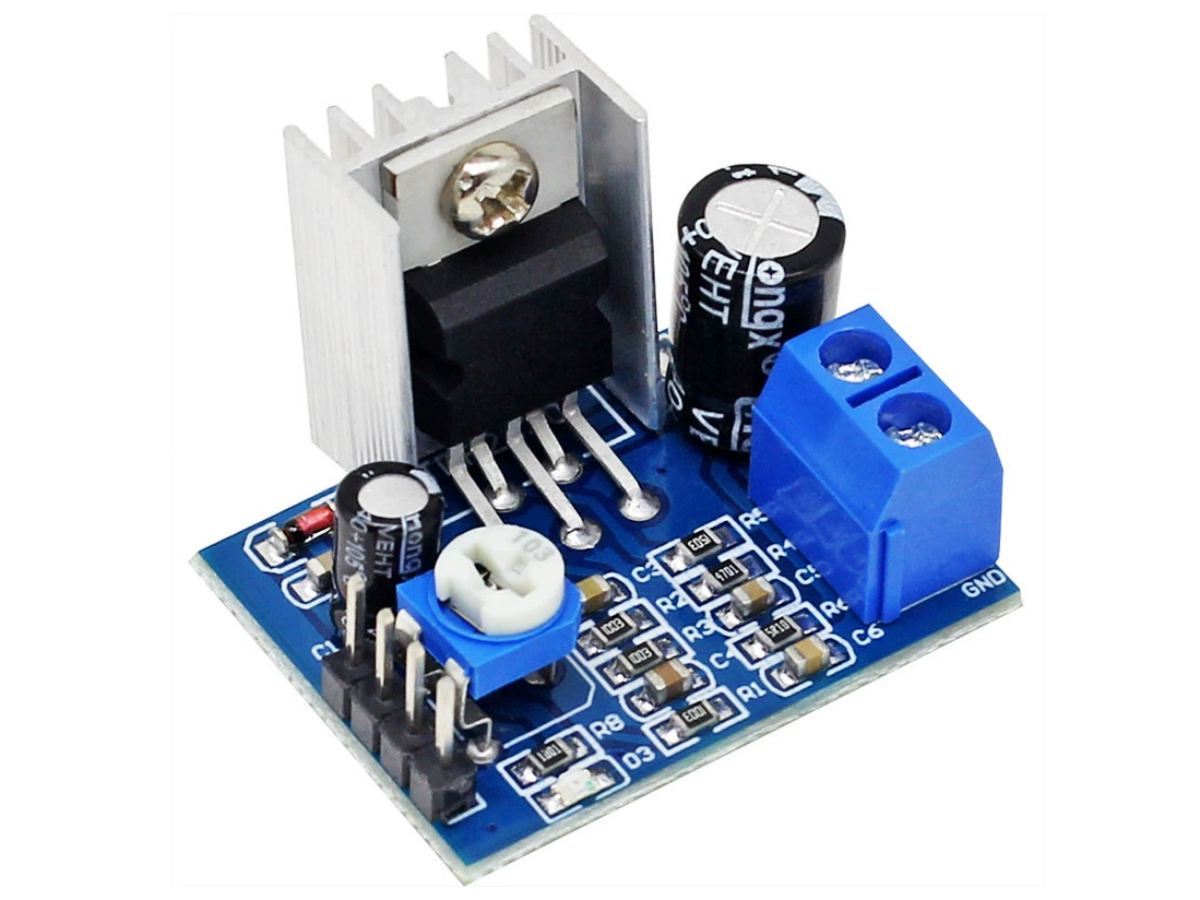
Introduction
Want to build a custom audio system but get discouraged by complex circuits? Actually, a single TDA2030A digital power amplifier board is all you need! As a “star chip” for entry-level Hi-Fi power amplifiers, it’s not only cost-effective and easy to operate but also delivers a maximum output power of 18W. Whether you’re assembling desktop speakers, car audio systems, or modifying old speakers, it handles the job effortlessly—even beginners can nail it on the first try!
Why choose the TDA2030A module?
There’s a wide range of power amplifier boards on the market, but most either lack sufficient power or are too complicated for beginners to use. The TDA2030A digital power amplifier board module solves these pain points perfectly. It integrates core amplification circuits and protection circuits into a small board—no need to solder complex components, or even dive deep into studying the tda2030a ic circuit diagram. All you need to do is pair it with a power supply and speakers, and it will produce sound right away.
What’s more, it supports Hi-Fi-grade audio output with extremely low harmonic distortion. It also comes with built-in short-circuit protection and overheating protection, ensuring top-tier safety. Whether you’re an electronics novice looking to experience the fun of DIY or an audio enthusiast aiming to build a custom system, this tda2030a audio amplifier module is the most cost-effective choice!
What exactly is the TDA2030A module?
The TDA2030A is a monolithic class AB audio power amplifier IC packaged in a Pentawatt case—simply put, it’s the “core brain” of a power amplifier system.
Its main function is to amplify weak audio signals (such as those from mobile phones or Arduino) to a power level strong enough to drive speakers, while keeping the sound clear and undistorted. Designed specifically for tda2030a amplifiers, this module integrates amplification and protection functions. Only a few external resistors and capacitors are needed to make it work, significantly lowering the DIY barrier.
This module supports both dual-power and single-power supply, offering excellent adaptability. With a maximum output power of 18W, it’s powerful enough to drive mainstream 4Ω or 8Ω speakers, making it the top choice for entry-level power amplifier DIY projects.
Why is the TDA2030A the top pick for beginners when comparing similar products?
STMicroelectronics’TDA series of power amplifier ICs includes several classic models, such as the TDA2030, TDA2040, and TDA2050. Let’s break down their key differences to help you choose the right one:
| Chip Model | Output Power | Supply Voltage Range | Core Advantages | Ideal Use Case |
|---|---|---|---|---|
| TDA2030 | 14W | ±6~±18V | Lowest cost, simple circuit | Entry-level low-power speakers |
| TDA2030A | 18W | ±6~±22V | Low distortion, comprehensive protection | Beginner DIY projects, desktop Hi-Fi systems |
| TDA2040 | 22W | ±8~±24V | Slightly higher power, strong compatibility | Medium-sized speakers, car audio |
| TDA2050 | 32W | ±10~±28V | High power output, excellent sound quality | Large speakers, stage equipment |
In comparison, the TDA2030A has distinct advantages: its power meets daily needs, and its wide supply voltage range means you don’t need a dedicated high-voltage power supply. The tda2030a transistor has extremely low harmonic distortion and crossover distortion, delivering sound quality far superior to other ICs in the same price range. It also comes with built-in short-circuit protection and thermal shutdown, so beginners won’t easily damage it. It’s the perfect balance of “ease of use, sound quality, and safety.”
How to use the TDA2030A module?
Using the TDA2030A module is incredibly straightforward—at its core, it’s just “input signal + power supply + output to speakers.” Follow these three steps to get sound:
1.Power Supply Connection: For dual-power supply (±16V is recommended), connect the positive and negative terminals to the module’s “+Vs” and “-Vs” pins. Ensure the power supply has low ripple to avoid noise.
2.Signal Input: Connect the audio output of a mobile phone, MP3 player, or Arduino to the module’s “non-inverting input (NON INVERTING INPUT)” pin. It’s recommended to connect a 1μF DC-blocking capacitor in series to prevent DC signals from damaging the module.
3.Speaker Connection: Connect the positive and negative terminals of a 4Ω or 8Ω speaker to the module’s “OUTPUT” and “GND” pins. Be careful not to reverse the polarity, as this can affect sound quality.
4.Function Testing: Turn on the power, play audio, and adjust the input volume—you’ll hear clear sound from the speaker. If there’s noise, check the power supply filtering or ensure the signal cables are properly connected.
Key Hardware Parameters of the TDA2030A Module
| Specification | Details |
|---|---|
| Supply Voltage | DC 6V~DC 12V |
| Output Power | 18W |
| Peak Output Current | 3.5A (with internal current limiting protection) |
| Total Harmonic Distortion | As low as 0.03% |
| Signal Bandwidth | 100Hz~15kHz |
| Quiescent Current | 50~80mA |
| Protection Functions | Short-circuit protection, thermal shutdown protection, over-voltage protection |
| Product Dimensions | 32mm × 24mm × 23mm |
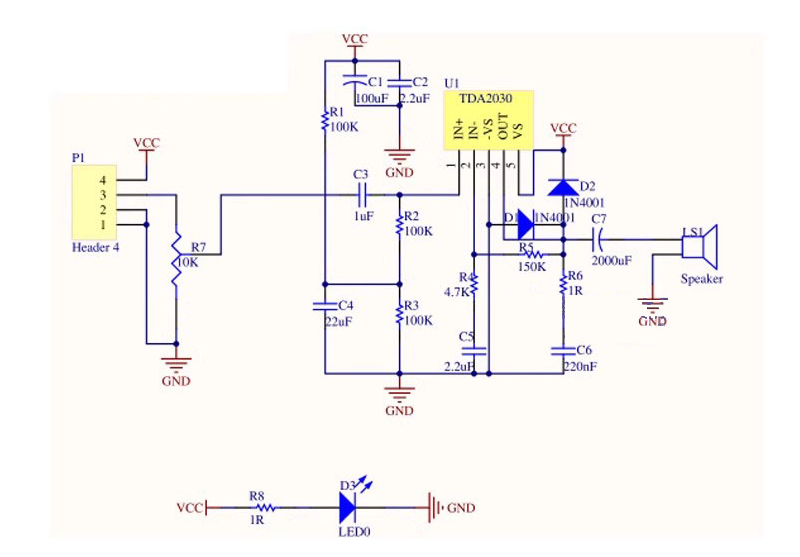
TDA2030A Amplifier Board Datasheet + Schematic
If you want to learn more tda2030a audio amplifier module details, you can refer to this datasheet.
Arduino Beginner Project: Simple TDA2030A Bluetooth Speaker
With this TDA2030A amplifier board and a few basic components, you can build a clear-sounding desktop speaker—no complex soldering required, and beginners can finish it easily!
Materials Needed
- TDA2030A power amplifier module
- 12V 2A power adapter
- 4Ω-5W speaker
- 3.5mm audio cable, DuPont wire
Wiring steps
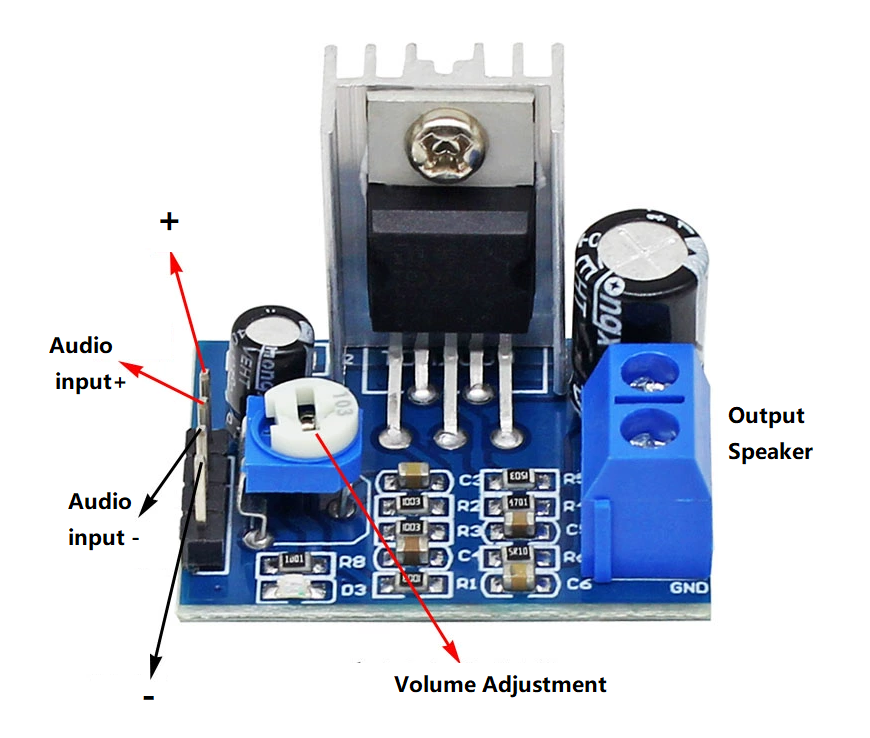
1.Connect the Audio Signal:
- Connect the “positive terminal” of the 3.5mm audio cable to the module’s “Audio Input Positive” pin.
- Connect the “negative terminal” of the audio cable to the module’s “Audio Input Negative” pin.
2.Connect the Power Supply:
- Connect the “positive terminal” of the 12V power adapter to the module’s “Power Positive” pin.
- Connect the “negative terminal” of the power adapter to the module’s “Power Negative” pin.
3.Connect the Speaker:
- Connect the “positive terminal” of the speaker to the module’s “Speaker Output” pin.
- Connect the “negative terminal” of the speaker to the module’s “GND” pin.
Testing and Use
1.Plug the other end of the 3.5mm audio cable into a mobile phone or computer, and play a song.
2.Turn on the power adapter, and rotate the “volume adjustment” knob on the module—you’ll hear clear sound from the speaker. Adjust the knob to control the volume.
FAQS
Why does the module get very hot during use?
The TDA2030A generates heat during operation, and heat increases with power output. It’s recommended to attach a heat sink to the chip. Also, avoid long-term full-power operation to prevent triggering thermal shutdown protection.
Why is there noise after connection?
Noise is usually caused by interference: ① Replace the audio cable with a “shielded cable” to reduce electromagnetic interference; ② Choose a power adapter with “low ripple” (low-quality adapters often cause noise); ③ Keep the amplifier board away from signal sources like mobile phones to avoid signal interference.
What size speaker can the module drive?
4Ω or 8Ω speakers are recommended, with a power range of 5~20W. Speakers with too low power may burn out, while overly high-power speakers won’t let the module perform at its best.
The audio cable only has one wire—how do I connect it to "Audio Input Positive/Negative"?
A standard 3.5mm headphone cable actually has three cores (left channel/right channel + ground). You can connect one channel’s wire to “Audio Input Positive” and the ground wire to “Audio Input Negative”—this will output mono sound, which doesn’t affect basic use.