
Blog
What Can a Motor Driver Be Used For?
What Is a Motor Driver?
Whether you want to build a small car, a fan, or even a robot, you’ll need a motor. For beginners, the most commonly used type is the DC motor. They have a very simple structure and don’t require complex signal operations—just apply a voltage, and they’ll rotate.
However, there’s one thing to note: if you connect the motor directly to a power supply and ground, it will rotate easily. But if you connect it to a microcontroller pin, the voltage, current, and power from the pin may not be sufficient to drive the motor. That’s when you need a motor driver to help.
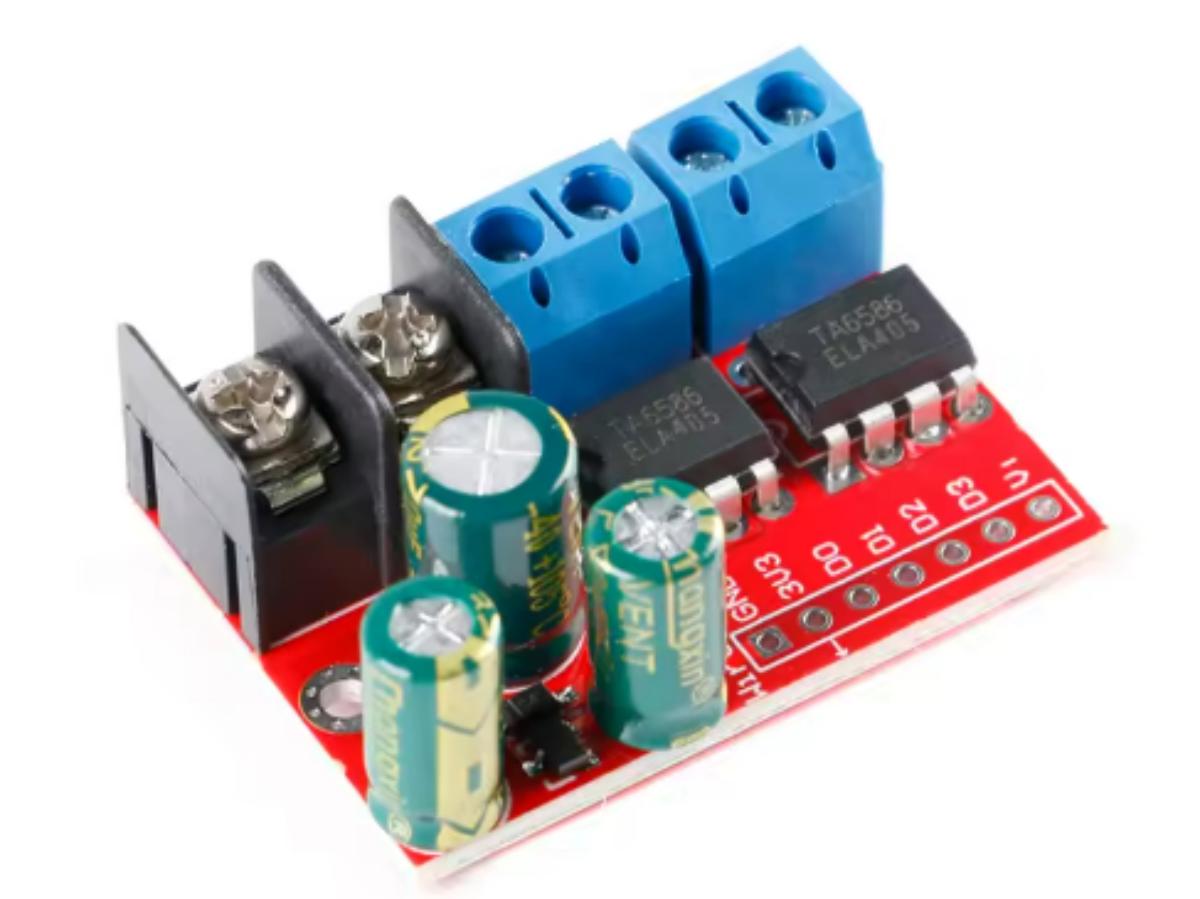
Here, we’ll focus on DC motor drivers as an introduction. A DC motor driver converts low-power control command signals from an MCU (Microcontroller Unit) into high-power electrical signals capable of driving the motor. Its main function is to adjust the magnitude and direction of voltage and current, supplying enough energy for brushed DC motors or stepper motors to rotate. AC motor drivers are slightly more complex—they also need to invert DC power into AC power with the appropriate frequency, phase, and voltage to drive the motor.
In addition, it protects your controller. If you connect the motor directly to a controller like Arduino, it could damage the Arduino, because the current required by a DC motor is much higher than the safe supply current of Arduino. The most common motor driver on the market is the L298N motor driver module.
Related Concepts
When a motor is rotating, what do you care about? You must be concerned about how fast it spins and which direction it turns. Correspondingly, you need to understand PWM speed control and H-bridge circuit commutation.
PWM Speed Control
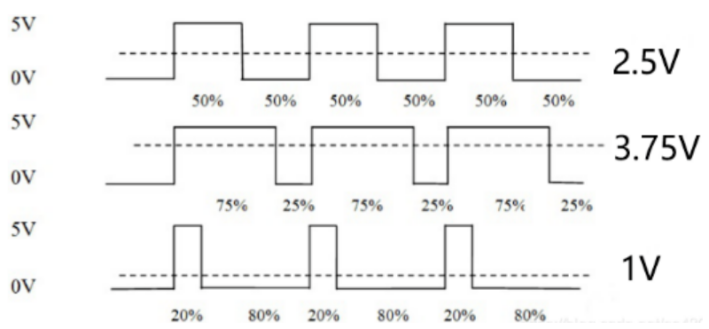
A motor’s speed is related to voltage: the higher the voltage, the faster the speed; the lower the voltage, the slower the speed. If the motor is powered by a fixed voltage, its speed will remain constant. Pulse Width Modulation (PWM) enables voltage adjustment.
It outputs high and low levels periodically, changing the ratio of the high-level duration to the total cycle time (duty cycle) to equivalently control the average voltage/current, thereby regulating the speed. For example, a 20% duty cycle means 20% power output, and 100% duty cycle means full power and full-speed rotation.
By changing the duty cycle of the square wave output from the I/O pin, you can obtain an analog voltage signal simulated by digital signals.
H-Bridge Circuit
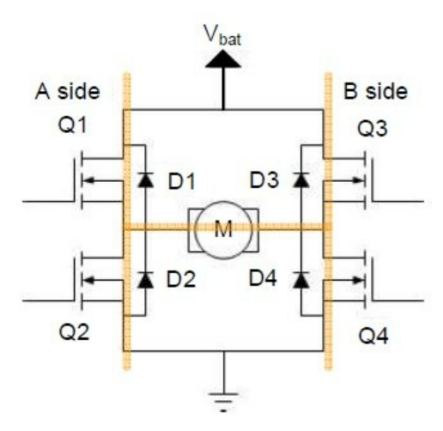
This circuit is used to control the direction of the motor (i.e., forward and reverse rotation). It typically consists of four independent switching components, and two different sets of conducting components control forward and reverse rotation. The circuit is shaped like the letter “H”, with the load motor connected to the middle horizontal line.
Q1 and Q3 are upper transistors. If N-channel MOSFETs are used, the gate voltage must be higher than the source voltage to conduct. Therefore, a bootstrap circuit is often used (composed of a capacitor and a diode: the capacitor charges when the lower transistor is on, and discharges to provide drive when the upper transistor is on).
Q2 and Q4 are lower transistors. For N-channel MOSFETs, the gate is connected to the drive voltage and the source is grounded, making control simpler. The four diodes D1~D4 are actually the body diodes of the switching transistors (parasitic to MOSFETs), and their direction depends on the transistor type.
For example, if Q1 is an N-channel MOSFET (source connected to the power supply, drain connected to the motor), the body diode is from drain to source; if Q2 is an N-channel MOSFET (source connected to ground, drain connected to the motor), the body diode is also from drain to source. This determines the path for freewheeling.
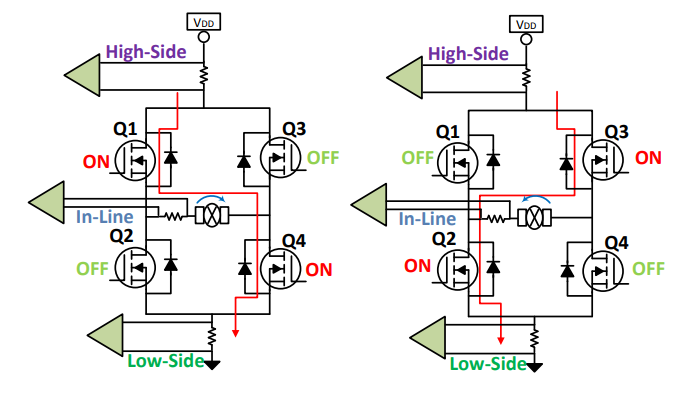
To control the motor to rotate forward, turn on Q1 and Q4: current flows from the power supply → Q1 → left end of the motor → right end of the motor → Q4 → ground. At this time, the left end of the motor is high and the right end is low. If Q1 and Q4 are suddenly turned off, the motor’s inductor will resist changes in current, causing the left end to instantly become low potential and the right end to instantly become high potential.
At this point, the body diode D2 of Q2 conducts, allowing current to flow from ground → D2 → left end of the motor; the body diode D3 of Q3 conducts, allowing current to flow from the right end of the motor → D3 → power supply. These two currents form a loop, slowly releasing the energy of the inductor and avoiding damage to the switching transistors by back EMF. This is the essence of freewheeling—the diodes provide a path for the suddenly changing current.
However, there’s a critical risk: the upper and lower transistors on the same side cannot be turned on at the same time (e.g., if Q1 and Q2 are turned on simultaneously, the power supply will be directly short-circuited to ground through them).
Why might this happen accidentally? Because the Miller capacitance (parasitic capacitance between the gate and drain of the MOSFET) can cause issues. When Q1 is turned off, the drain voltage rises suddenly, and the Miller capacitance draws charge from the gate, causing the gate voltage to drop temporarily.
If the gate voltage of Q2 starts to rise at this moment, a very short period of simultaneous conduction may occur. Therefore, a dead time must be inserted: after turning off the upper transistor, delay turning on the lower transistor by tens of nanoseconds to ensure the upper and lower transistors are completely disconnected.
Arduino example
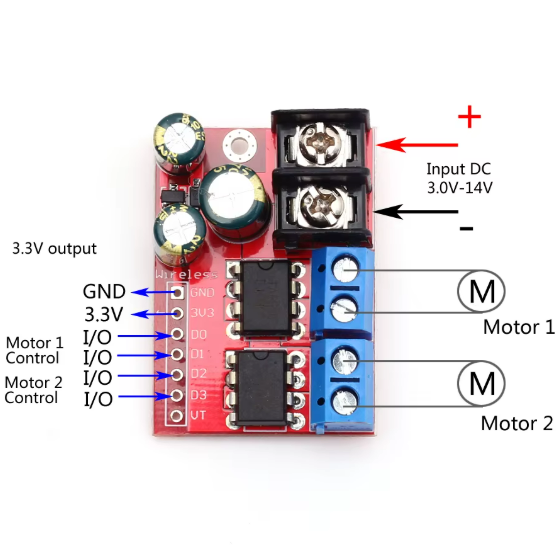
After understanding their basic principles, you can now try using Arduino to control the forward/reverse rotation and variable-speed rotation of a motor.
First, it is crucial to note that you must use pins with PWM (Pulse Width Modulation) functionality, which are marked with a tilde (~) on the Arduino board. This is because ordinary digital pins can only output two levels: high (5V) or low (0V), making speed regulation impossible. In contrast, PWM pins can output pulse waves alternating between high and low levels. By adjusting the duty cycle of high/low levels (a value range of 0–255 corresponds to a duty cycle of 0%–100%), different voltages can be simulated to achieve variable-speed rotation of the motor.
The value range of PWM is 0–255: 200 accounts for approximately 80% of 255, and 150 for about 60%. The larger the value, the higher the PWM duty cycle, the higher the average voltage across the motor, and the faster its rotational speed. The program below defines the rotational speeds for forward and reverse rotation separately, with forward rotation being faster than reverse rotation.
digitalWrite(motor2_D3, LOW) outputs a low level (0V) to the motor2_D3 pin, fixing the potential at one end of the motor. As for the analogWrite(motor2_D2, speed) function, the “analog” here does not refer to a true analog signal but instead outputs PWM waves—it sends PWM waves with a duty cycle corresponding to the value of speed to the motor2_D2 pin. At this point, a potential difference forms across the motor (one end is low level, and the other is a variable PWM voltage), causing current to flow through the motor in a fixed direction and making the motor rotate forward. The principle for reverse rotation is the same: simply swap the voltages applied to the two ports. To stop the motor, eliminating the potential difference between its two ends will prevent current from being generated, and the motor will naturally stop rotating.
CODE
					const int motor2_D2 = 6;  // D2 → Arduino D6(PWM)
const int motor2_D3 = 5;  // D3 → Arduino D5(PWM)
const int forward_speed = 200;   // speed(80%)
const int backward_speed = 150;  // speed(60%)
void setup() {
  pinMode(motor2_D2, OUTPUT);
  pinMode(motor2_D3, OUTPUT);
  stopMotor(); // stop
}
void loop() {
  forward(forward_speed);
  delay(5000); // forward 5s
  stopMotor();
  delay(3000); // stop 3s
  backward(backward_speed);
  delay(5000); // backward 5s
  stopMotor();
  delay(3000); // stop 3s
}
void forward(int speed) {
  digitalWrite(motor2_D3, LOW);
  analogWrite(motor2_D2, speed);   // PWM
}
void backward(int speed) {
  digitalWrite(motor2_D2, LOW);
  analogWrite(motor2_D3, speed);
}
void stopMotor() {
  digitalWrite(motor2_D2, LOW);
  digitalWrite(motor2_D3, LOW);
}
FAQ
What is a motor driver?
In essence, a motor driver is an intermediary between the controller and the motor. The signals output by the controller are weak and small, and cannot drive the motor to rotate at all. The driver amplifies this weak signal into high power that can drive the motor, and also helps control the motor’s speed, direction, and on/off state.
What is the PWM method of speed control?
Simply put, PWM speed control adjusts speed through pulses. It outputs an electrical signal that is alternately on and off, and controls the average voltage of the motor by changing the ratio of the on-time. The higher the duty cycle, the longer the on-time, and the faster the motor rotates.
How does a PWM controller work?
The core of a PWM controller is to generate pulse signals with a variable duty cycle. First, it has an internal oscillator that generates a reference signal with a fixed frequency. Then, according to external control commands (such as analog voltage or digital signals), a comparator adjusts the duration of the high level in each pulse (i.e., changes the duty cycle). Finally, the modulated signal is amplified and output to devices such as motors and fans.
What are the disadvantages of PWM controllers?
PWM controllers are not perfect. First, their fast-switching pulse signals are prone to generating electromagnetic interference (EMI), which may affect nearby sensitive electronic components—additional filtering or shielding is required. Second, energy loss occurs during high-frequency switching, reducing overall efficiency (especially when used at low duty cycles or high frequencies, the loss is more significant). Additionally, when the motor or fan rotates at low speeds, jitter or noise may occur due to discontinuous pulses.
