

Blog
ZK-DPL USB Adjustable Power Supply: Detailed Overview
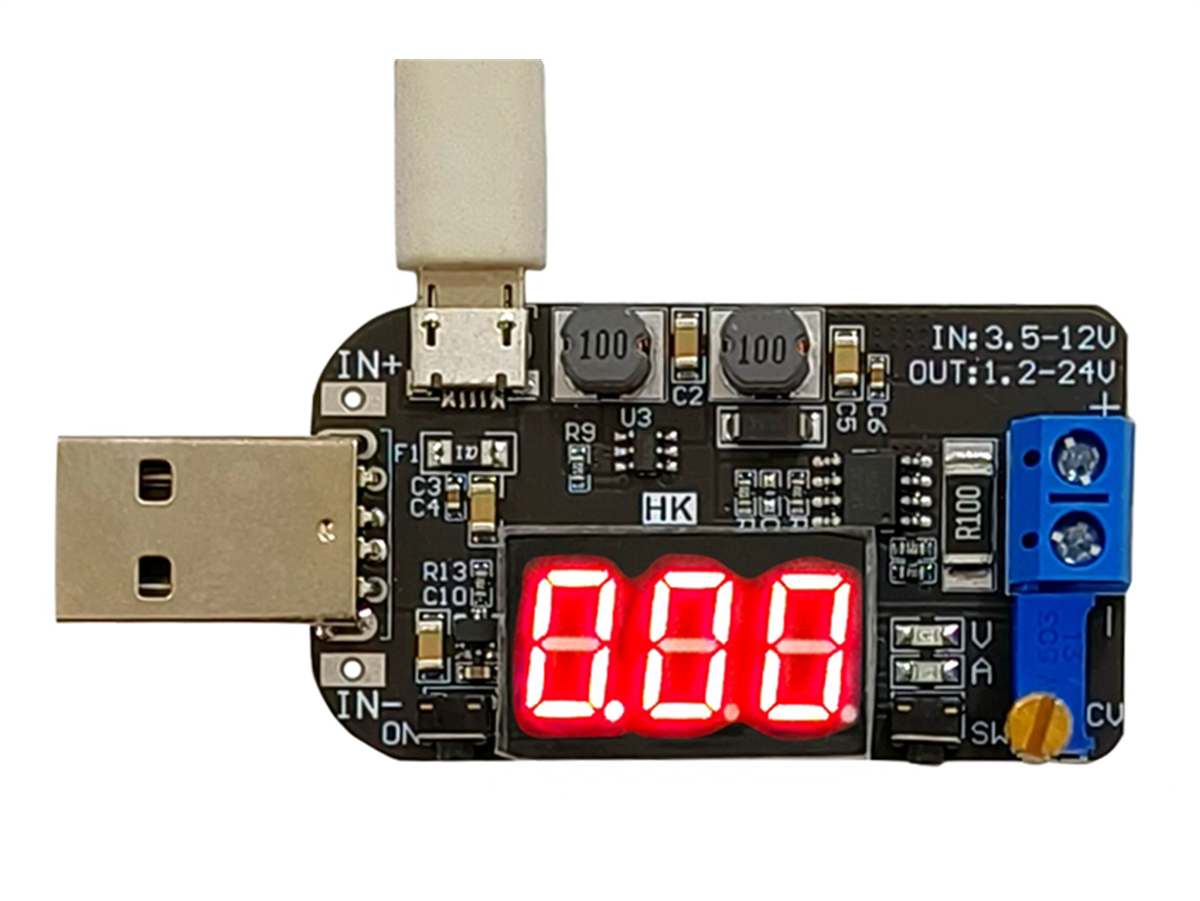
1.ZK-DPL USB Adjustable Power Supply Description
ZK-DPL is a DC adjustable step up/down power supply module with LED digital tube display.Display output voltage and output current.Adjustable output voltage.Set output voltage to meet the require.Simple and efficient, practical.
2.What are the key features of the ZK-DPL USB Adjustable Power Supply?
- 3-digit digital tube display
- Adjustable output voltage (1.2V–24V)
- Buck & Boost conversion (step-up and step-down)
- Multiple input power methods (USB / pads)
- High conversion efficiency (up to 95%)
- Low power consumption
- Output enable / power saving mode
- Compact and lightweight design
3.ZK-DPL USB Adjustable Power Supply: Technical Specifications
| Parameter Name | Parameter Description |
|---|---|
| Product Name | ZK-DPL DC-DC 3W Buck Boost Voltage Converter |
| Input Voltage (Pads) | DC 3.5V – 12.0V |
| Input Voltage (USB) | DC 5.0V |
| Output Voltage | DC 1.2V – 24.0V |
| Output Power | 3W (Max) |
| Conversion Efficiency | 95% |
| Operating Temperature Range | -20°C ~ 85°C |
| Operating Humidity Range | 0% ~ 95% RH |
| Size | 68 × 30 × 22 mm |
4.ZK-DPL USB Adjustable Power Supply: Functions and Descriptions of Buttons, Potentiometers, and LEDs
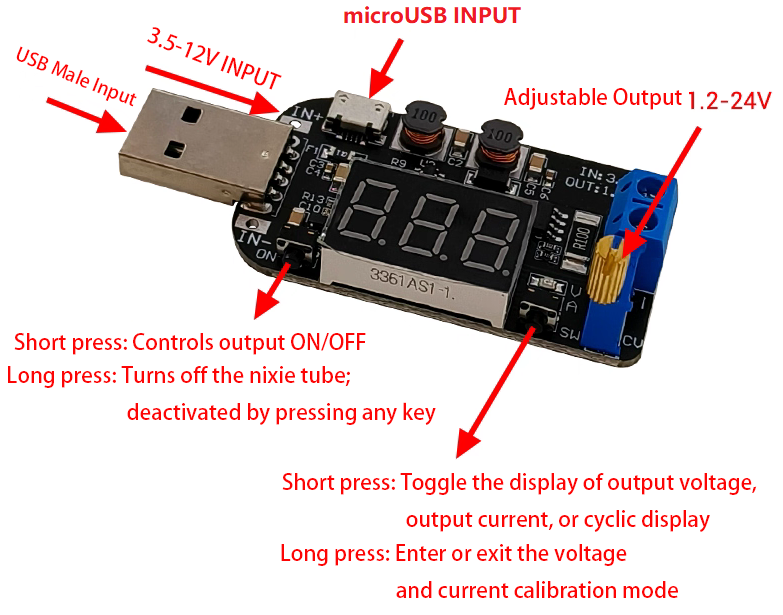
| Item | Description |
|---|---|
| Long Press | Long press means need keep press for more than 3 second. |
| Button ON | Short press to turn ON or OFF output voltage. Long press is used to turn ON or OFF screen meanwhile voltage keep output. |
| Button SW | Short press to switch display output voltage, output current or display these parameters in turn. Long press is used to enter or exit calibration mode. |
| CV Potentiometer | Adjust output voltage. Increase the output voltage when rotating clockwise. Please rotate the CV potentiometer 10 turns in counterclockwise if the output voltage cannot be adjusted. |
| V LED | Red indicator. It will turn ON when display output voltage. |
| A LED | Blue indicator. It will turn ON when display output current. |
| Output Terminal | KF-301-2P 5.08mm blue terminal. It can output DC 1.2V–24.0V. |
Input Terminal Description
| Input Method | Description |
|---|---|
| Method 1 | Standard Type A USB Male. It just can input DC 5V. |
| Method 2 | Micro USB Female. It just can input DC 5V. |
| Method 3 | IN+ and IN- pads. It can input DC 3.5V–12.0V. |
| Note | It can only choose one input method. |
5.How It Works
5-1.DC-DC Buck-Boost Working Principle
The core of the ZK-DPL is a buck-boost switching regulator, which allows the module to operate in both step-down and step-up modes automatically:
- When the input voltage is higher than the set output voltage, the module works in buck (step-down) mode.
- When the input voltage is lower than the set output voltage, the module works in boost (step-up) mode.
- The transition between buck and boost behavior happens automatically, without any manual switching.
This design ensures a stable output voltage even when the input voltage fluctuates, which is especially useful for USB-powered or battery-powered systems.
5-2.High-Efficiency Switching Regulation
The ZK-DPL uses switch-mode power conversion instead of linear regulation:
- Internal high-frequency switching elements control the energy transfer.
- A feedback control loop continuously monitors the output voltage.
- The system dynamically adjusts switching behavior to maintain regulation.
Thanks to this design, the module achieves high conversion efficiency (up to 95% under suitable conditions), reducing energy loss and heat generation compared to traditional linear regulators.
5-3.Adjustable Output Voltage via CV Potentiometer
The output voltage is set using the onboard CV (constant voltage) multi-turn potentiometer:
- Rotating the potentiometer clockwise increases the output voltage.
- Rotating it counterclockwise decreases the output voltage.
If the output voltage cannot be adjusted immediately, the potentiometer may be at the end of its adjustment range. In this case, rotate it counterclockwise more than 10 turns, then adjust again.
Once the voltage is set, the internal feedback circuit keeps the output voltage stable as long as the module operates within its rated power limits.
6.How to Calibrate the ZK-DPL USB Adjustable Power Supply
6-1.Calibrating Output Voltage Accuracy
- When the module is displaying output voltage, long press the SW button to enter voltage calibration mode.
- The digital display will start flashing, indicating calibration mode is active.
- Short press the ON button to decrease the calibration value.
- Short press the SW button to increase the calibration value.
- Long press the SW button again to save the setting and exit calibration mode.
- Press the buttons multiple times to fine-tune the value.
6-2.ACalibrating Output Current Accuracy
- When the module is displaying output current, long press the SW button to enter current calibration mode.
- The digital display will start flashing, indicating calibration mode is active.
- Short press the ON button to decrease the calibration value.
- Short press the SW button to increase the calibration value.
- Long press the SW button again to save the setting and exit calibration mode.
- Press the buttons multiple times to fine-tune the value.
Notes:
- Calibration accuracy improves when the output current is higher.
- The module cannot display or calibrate output current if the current is lower than approximately 10–30 mA.
7.Precautions for the ZK-DPL USB Adjustable Power Supply
- This is a DC power module. Do not connect it to AC power.
- Do not short-circuit the output terminals.
- IN- and OUT- must not be connected together; otherwise, the module will not support constant current operation.
- Make sure the input power is higher than the load power.
- If the module becomes hot during operation, please reduce the output power.
- If the output voltage cannot be adjusted, rotate the CV potentiometer counterclockwise more than 10 turns, then adjust again.
- The output current is not fixed and varies with the load. The total output power must not exceed 3W.
8.Applications of the ZK-DPL USB Adjustable Power Supply
- DIY electronic projects
- Power supply for microcontrollers (Arduino, ESP32, etc.)
- Battery-powered projects
- USB-powered adjustable power source
- Laboratory testing & prototyping
- Repair and maintenance use
9.FAQ
Q1:Why Buck-Boost Design Matters
By combining step-up and step-down capabilities in a single module, the ZK-DPL offers:
- Greater flexibility in power source selection
- Stable output across a wide input voltage range
- Ideal performance for USB-powered projects, battery systems, and electronic prototyping
This makes the ZK-DPL an excellent choice for makers, engineers, students, and DIY electronics enthusiasts who need a compact and adjustable DC power solution.
Q2: What input power sources does the ZK-DPL support?
The module supports three input methods:
- USB Type-A (DC 5V)
- Micro USB (DC 5V)
- IN+ / IN- pads (DC 3.5V–12V)
⚠️ Only one input method can be used at a time.
Q3: Can I connect this module to AC power?
No. This is a DC power module only. Connecting it directly to AC power will damage the module.
Q4: What is the adjustable output voltage range?
The output voltage can be adjusted from DC 1.2V to 24V using the onboard CV potentiometer, depending on the input voltage and load conditions.
Q5: How do I adjust the output voltage?
Use the CV potentiometer:
- Rotate clockwise to increase voltage
- Rotate counterclockwise to decrease voltage
If the voltage does not change, rotate the potentiometer counterclockwise more than 10 turns, then adjust again.
Q6: Does the module provide constant current output?
No. The ZK-DPL is a constant voltage (CV) adjustable power supply.
The output current varies with the connected load and cannot be set to a fixed value.
Q7: What is the maximum output power?
The maximum output power is 3W.
Exceeding this limit may cause overheating or unstable operation.
Q8: Why does the output current change?
Output current depends on the load. As load resistance changes, the current will change accordingly. This is normal behavior for a constant voltage power supply.
Q9: What should I do if the module gets hot?
- If the module becomes hot:Reduce the output power
- Lower the output current
- Improve ventilation or cooling
Q10: Can IN- and OUT- be connected together?
No. IN- and OUT- must not be connected together, otherwise the module may not operate correctly and constant current behavior will not be supported.
Q11: Can I short the output terminals?
No. Short-circuiting the output may damage the module and should be avoided.
Q12: What does the digital display show?
- The digital display shows:Output voltage (V mode, red LED ON)
- Output current (A mode, blue LED ON)
Use the SW button to switch between display modes.