

Blog
PCA9685-16-Channel 12-Bit PWM/Servo Driver——The Ultimate Guide for Makers
Introduction
If you’ve ever struggled with controlling multiple servos, LEDs, or small motors with a microcontroller, you know the frustration of limited GPIO pins and unstable signals. The PCA9685 16-channel 12-bit PWM/servo driver changes the game—this compact I2C-based module lets you control up to 16 devices with just two communication pins. Whether you’re building a robot, a lighting installation, or a drone, it delivers precise, reliable control that frees up your microcontroller’s resources. It’s no wonder it’s a staple for Arduino, Raspberry Pi, and ESP32 enthusiasts worldwide.
What is the PCA9685 Module?
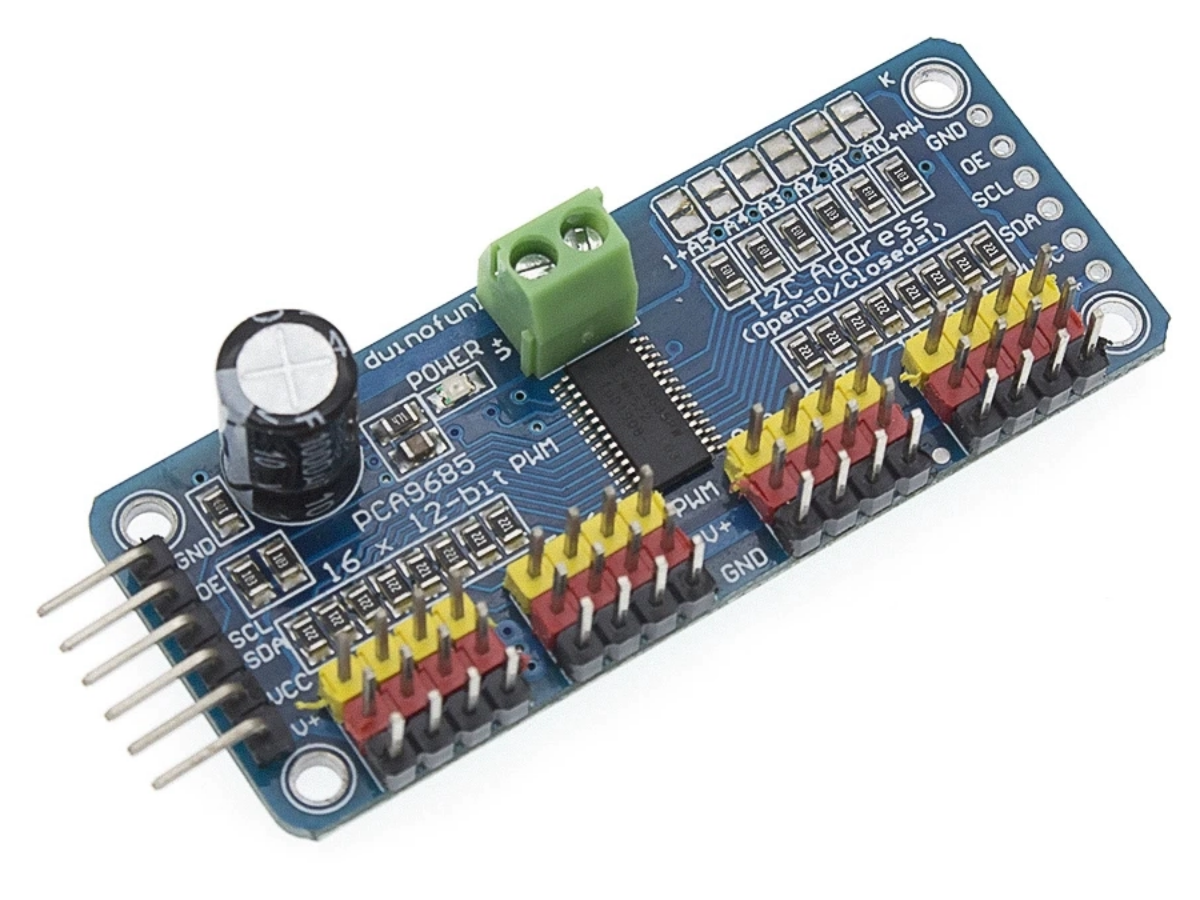
The PCA9685 is a 16-channel, 12-bit PWM (Pulse-Width Modulation) controller with an I2C interface. Unlike directly driving servos or motors from a microcontroller, this module acts as an intermediary: it receives commands via I2C, then generates stable PWM signals for each connected device independently.
Hardware Composition
PCA9685 IC
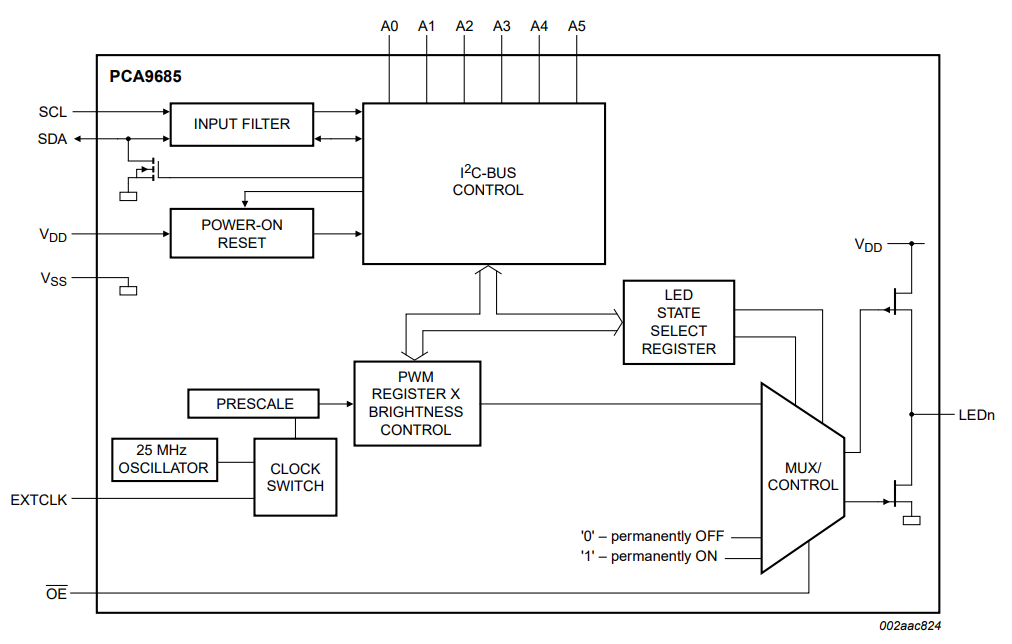
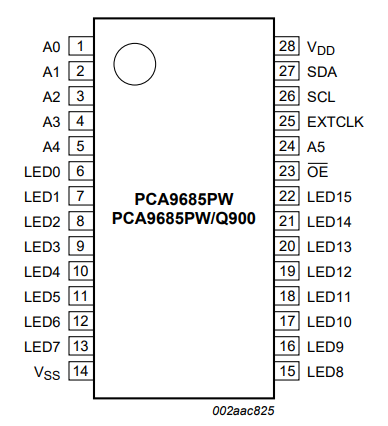
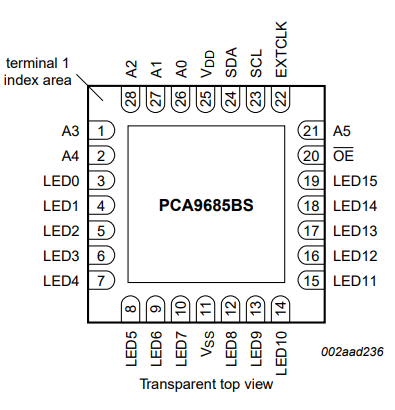
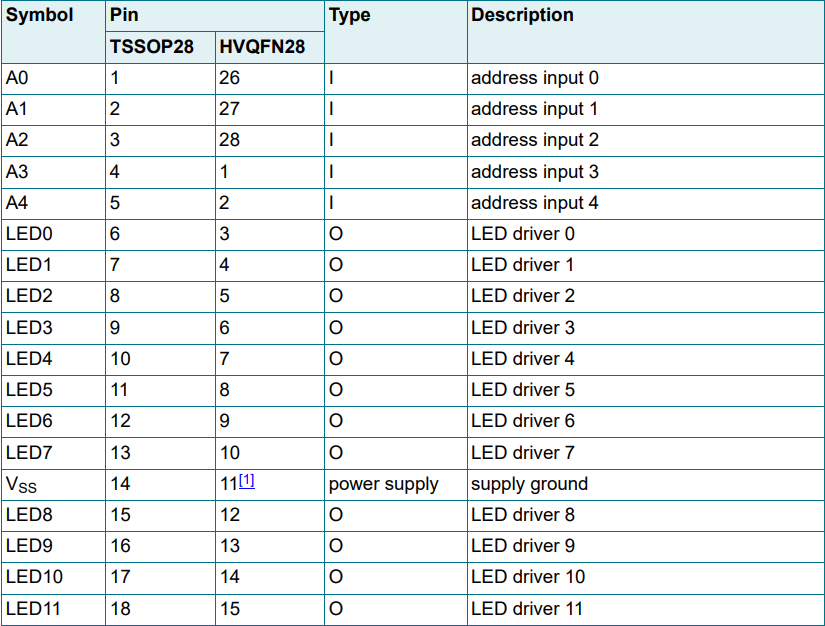
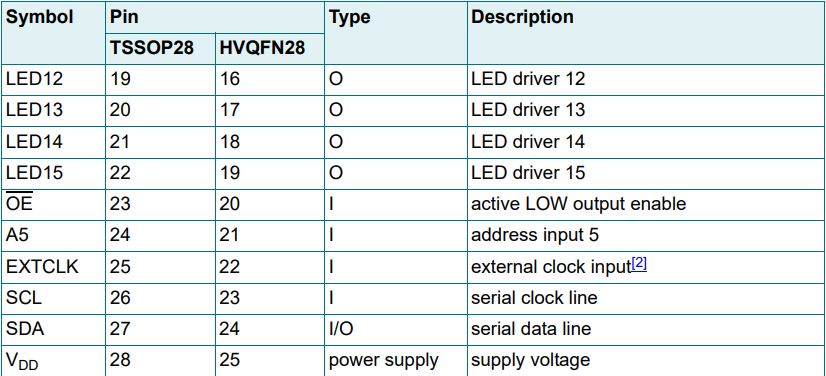
The PCA9685 IC (NXP) is the module core, handling I2C commands, PWM generation, and operation management. Available in TSSOP28/HVQFN28 packages, it integrates key sub-modules:
- 25MHz Internal Oscillator: Provides base clock for PWM (24Hz–1526Hz adjustable via prescaler), no external crystal needed.
- 16 PWM Channels: 12-bit resolution (4096 steps) per channel with independent on/off timing, reducing EMI via staggered switching.
- I2C Controller: Supports Fm+ (1MHz max) with 30mA SDA drive capability for high-capacitance buses.
- Mode Registers: MODE1/MODE2 configure sleep mode, output inversion, update mode, and driver type (open-drain/totem-pole).
- Software Reset: Resets to default via I2C general call (0x00 address, 0x06 data), simplifying initialization.
Power Management Circuitry
Ensures stable power for IC and peripherals with anti-interference protection. Key components:
- Voltage Regulation: AMS1117-3.3V regulator converts 5V–12V input to 3.3V for IC, protecting its 2.3V–5.5V limit.
- Decoupling Capacitors: 100nF ceramic (high-frequency noise) + 10μF electrolytic (current spike stabilization).
- Dual Power Inputs: Separate VCC (logic, 3.3V/5V) and V+ (peripherals, up to 12V) avoid voltage drop impacts.
I2C Communication Interface
2-wire I2C bus for MCU communication, with reliable transfer features:
- SDA/SCL Pins: 5V-tolerant, compatible with 3.3V/5V MCUs (Arduino, STM32).
- Pull-Up Resistors: 4.7kΩ resistors (with jumpers for disable) ensure proper I2C idle states.
- Noise Filters: Built-in IC filters reduce EMI on SDA/SCL inputs.
Address Expansion Circuitry
Enables multi-module connection on one I2C bus via address configuration:
- A0–A5 Pins: 6 address pins set unique 7-bit addresses, supporting up to 62 modules (0x40–0x7E).
- Address Jumpers: Pin headers/jumpers allow quick address adjustment (likeA0=VCC changes address to 0x41).
Output Driver Stage
16 flexible PWM output channels for diverse devices:
- Output Headers: CH0–CH15 (or LED0–LED15) headers, 25mA max continuous current per channel (5V totem-pole mode).
- OE Pin: Active-low pin globally enables/disables outputs, useful for emergency shutdowns.
- Edge Rate Control: Reduces EMI from fast signal transitions for noise-sensitive use cases.
External Clock Interface
EXTCLK Pin accepts up to 50MHz external clock for multi-module synchronization, replacing internal 25MHz oscillator. 0Ω resistor/jumper selects clock source.
Protective Components
Enhances module durability with protective features:
- ESD Protection: IC withstands 2000V (HBM), 200V (MM), 1000V (CDM) to prevent electrostatic damage.
- Reverse Polarity Protection: Optional Schottky diode (manufacturer-dependent) prevents reverse power connection damage.
How to Use PCA9685 16-channel 12-bit PWM it?
- I2C Communication: Uses only SDA (data) and SCL (clock) pins to connect to your microcontroller, saving precious GPIO for other tasks.
- 12-Bit Precision: Offers 4096 levels of PWM adjustment, so you can fine-tune servo angles, LED brightness, or motor speed with exceptional accuracy.
- Flexible Frequency: PWM frequency is programmable from 24Hz to 1526Hz, making it compatible with servos (typically 50Hz), LEDs, and small DC motors.
Parameter Specification
| Number of Channels | 16 independent PWM channels |
| PWM Resolution | 12-bit (4096 steps) |
| Communication Interface | I2C (Standard: 100kHz, Fast: 400kHz, Fm+: 1MHz) |
| Operating Voltage (IC) | 2.3V-5.5V |
| Output Current | 25mA continuous per channel; 50mA peak |
| Total Output Current | 400mA (max for all channels combined) |
| PWM Frequency Range | 24Hz-1526Hz (default: 200Hz) |
| Addressable Modules | Up to 62 (via A0-A5 pins) |
| Operating Temperature | -40°C to +85°C |
| Package Options | TSSOP28, HVQFN28 |
PCA9685 Datasheet & Diagram
If you want to learn more details,you can refer to this datasheet.
PCA9685 Pinout Circuit
Project 1: Arduino + PCA9685 16-Channel Servo Robot Arm Control
Required Components
- Arduino Uno
- PCA9685 module
- 6 SG90 servos
- Robot arm frame (3D printed or pre-assembled)
- Jumper wires
- 5V power supply (for servos, separate from Arduino if needed)
PCA9685 Wiring
1.Connect PCA9685 VCC to Arduino 5V (or external 5V power).
2.Connect PCA9685 GND to Arduino GND.
3.Connect PCA9685 SDA to Arduino A4, SCL to Arduino A5.
4.Connect each servo’s signal wire to PCA9685 channels CH0–CH5.
5.Power servos via PCA9685’s external power terminal.
Code Implementation
First, install the Adafruit PCA9685 Library via Arduino Library Manager.
					#include <Wire.h>
#include <Adafruit_PWMServoDriver.h>

Adafruit_PWMServoDriver pwm = Adafruit_PWMServoDriver();

// Servo pulse limits (adjust for your servos)
#define SERVO_MIN 150  // 0.5ms
#define SERVO_MAX 600  // 2.0ms

// Channel mapping for robot arm joints
const int baseCh = 0;
const int shoulderCh = 1;
const int elbowCh = 2;
const int wristCh = 3;
const int gripperCh = 4;
const int rotateWristCh = 5;

void setup() {
  Serial.begin(9600);
  pwm.begin();
  pwm.setPWMFreq(50);  // Servo standard frequency
  delay(10);
  // Move all servos to initial position (90°)
  setServoAngle(baseCh, 90);
  setServoAngle(shoulderCh, 90);
  setServoAngle(elbowCh, 90);
  setServoAngle(wristCh, 90);
  setServoAngle(gripperCh, 0);  // Gripper open
  setServoAngle(rotateWristCh, 90);
  delay(1000);
}

void loop() {
  // Demo sequence: move arm to pick and place
  moveArm(0, 45, 135, 45, 0, 45);  // Position 1
  delay(1000);
  moveArm(90, 60, 120, 60, 90, 90);  // Position 2
  delay(1000);
  moveArm(180, 45, 135, 45, 0, 135);  // Position 3
  delay(1000);
  moveArm(90, 90, 90, 90, 90, 90);  // Return to center
  delay(2000);
}

// Convert angle (0-180°) to PWM pulse
void setServoAngle(int channel, int angle) {
  if (angle < 0) angle = 0;
  if (angle > 180) angle = 180;
  int pulse = map(angle, 0, 180, SERVO_MIN, SERVO_MAX);
  pwm.setPWM(channel, 0, pulse);
}

// Move all joints simultaneously with smooth transition
void moveArm(int base, int shoulder, int elbow, int wrist, int gripper, int rotateWrist) {
  int currentBase = getCurrentAngle(baseCh);
  int currentShoulder = getCurrentAngle(shoulderCh);
  int currentElbow = getCurrentAngle(elbowCh);
  int currentWrist = getCurrentAngle(wristCh);
  int currentGripper = getCurrentAngle(gripperCh);
  int currentRotateWrist = getCurrentAngle(rotateWristCh);

  for (int i = 0; i <= 50; i++) {
    int stepBase = currentBase + (base - currentBase) * i / 50;
    int stepShoulder = currentShoulder + (shoulder - currentShoulder) * i / 50;
    int stepElbow = currentElbow + (elbow - currentElbow) * i / 50;
    int stepWrist = currentWrist + (wrist - currentWrist) * i / 50;
    int stepGripper = currentGripper + (gripper - currentGripper) * i / 50;
    int stepRotateWrist = currentRotateWrist + (rotateWrist - currentRotateWrist) * i / 50;

    setServoAngle(baseCh, stepBase);
    setServoAngle(shoulderCh, stepShoulder);
    setServoAngle(elbowCh, stepElbow);
    setServoAngle(wristCh, stepWrist);
    setServoAngle(gripperCh, stepGripper);
    setServoAngle(rotateWristCh, stepRotateWrist);
    delay(20);
  }
}

// Helper: Get current angle from pulse (for smooth movement)
int getCurrentAngle(int channel) {
  uint16_t pulse = pwm.getPWM(channel);
  return map(pulse, SERVO_MIN, SERVO_MAX, 0, 180);
}
Project 2: STM32 + PCA9685 RGB LED Matrix Control
Required Components
- STM32F103C8T6 (Blue Pill)
- PCA9685 module
- 16 RGB LEDs (common-cathode)
- 220Ω resistors (for each LED pin)
- Jumper wires
- 5V power supply
PCA9685 Wiring
1.Connect PCA9685 VCC to STM32 5V, GND to STM32 GND.
2.Connect PCA9685 SDA to STM32 PB7, SCL to STM32 PB6 (I2C1 pins).
3.Connect RGB LED channels:
- Red pins: CH0, CH4, CH8, CH12
- Green pins: CH1, CH5, CH9, CH13
- Blue pins: CH2, CH6, CH10, CH14
- LED cathodes to GND (via resistors for each color channel).
Code Implementation
First, set up STM32CubeIDE to configure I2C1 and generate a project.
					#include "stm32f1xx_hal.h"

I2C_HandleTypeDef hi2c1;

// PCA9685 registers and constants
#define PCA9685_ADDR 0x40
#define MODE1_REG 0x00
#define MODE2_REG 0x01
#define PRESCALE_REG 0xFE
#define LED0_ON_L 0x06
#define LED0_ON_H 0x07
#define LED0_OFF_L 0x08
#define LED0_OFF_H 0x09

// 12-bit resolution (0-4095)
#define PWM_MAX 4095

void SystemClock_Config(void);
static void MX_GPIO_Init(void);
static void MX_I2C1_Init(void);
void PCA9685_Init(void);
void PCA9685_SetPWM(int channel, int on, int off);
void PCA9685_SetRGB(int ledIndex, int r, int g, int b);
void RGBMatrix_Fade(void);

int main(void) {
  HAL_Init();
  SystemClock_Config();
  MX_GPIO_Init();
  MX_I2C1_Init();
  PCA9685_Init();

  while (1) {
    RGBMatrix_Fade();
    HAL_Delay(5000);
  }
}

void PCA9685_Init(void) {
  uint8_t buf[2];
  // Set to sleep mode to change prescale
  buf[0] = MODE1_REG;
  buf[1] = 0x10; // Sleep mode
  HAL_I2C_Master_Transmit(&hi2c1, PCA9685_ADDR, buf, 2, 100);
  // Set PWM frequency to 1000Hz (for smooth LED dimming)
  float freq = 1000.0f;
  float prescale = 25000000.0f / (4096.0f * freq) - 1.0f;
  buf[0] = PRESCALE_REG;
  buf[1] = (uint8_t)prescale;
  HAL_I2C_Master_Transmit(&hi2c1, PCA9685_ADDR, buf, 2, 100);
  // Wake up
  buf[0] = MODE1_REG;
  buf[1] = 0x00; // Normal mode
  HAL_I2C_Master_Transmit(&hi2c1, PCA9685_ADDR, buf, 2, 100);
  // Set output mode to totem pole
  buf[0] = MODE2_REG;
  buf[1] = 0x04;
  HAL_I2C_Master_Transmit(&hi2c1, PCA9685_ADDR, buf, 2, 100);
}

void PCA9685_SetPWM(int channel, int on, int off) {
  uint8_t buf[5];
  buf[0] = LED0_ON_L + 4 * channel;
  buf[1] = on & 0xFF;
  buf[2] = (on >> 8) & 0xFF;
  buf[3] = off & 0xFF;
  buf[4] = (off >> 8) & 0xFF;
  HAL_I2C_Master_Transmit(&hi2c1, PCA9685_ADDR, buf, 5, 100);
}

void PCA9685_SetRGB(int ledIndex, int r, int g, int b) {
  // Map LED index (0-15) to RGB channels
  int rCh = ledIndex + 0;
  int gCh = ledIndex + 1;
  int bCh = ledIndex + 2;
  // Ensure values are within 0-4095
  r = r < 0 ? 0 : (r > PWM_MAX ? PWM_MAX : r);
  g = g < 0 ? 0 : (g > PWM_MAX ? PWM_MAX : g);
  b = b < 0 ? 0 : (b > PWM_MAX ? PWM_MAX : b);
  // Set PWM for each color channel
  PCA9685_SetPWM(rCh, 0, r);
  PCA9685_SetPWM(gCh, 0, g);
  PCA9685_SetPWM(bCh, 0, b);
}

void RGBMatrix_Fade(void) {
  // Fade from red to green to blue
  for (int i = 0; i <= PWM_MAX; i += 10) {
    for (int led = 0; led < 16; led++) {
      PCA9685_SetRGB(led, i, PWM_MAX - i, 0);
    }
    HAL_Delay(5);
  }
  for (int i = 0; i <= PWM_MAX; i += 10) {
    for (int led = 0; led < 16; led++) {
      PCA9685_SetRGB(led, 0, i, PWM_MAX - i);
    }
    HAL_Delay(5);
  }
  for (int i = 0; i <= PWM_MAX; i += 10) {
    for (int led = 0; led < 16; led++) {
      PCA9685_SetRGB(led, PWM_MAX - i, 0, i);
    }
    HAL_Delay(5);
  }
}

// STM32 Cube-generated functions (SystemClock, I2C, GPIO)
void SystemClock_Config(void) {
  RCC_OscInitTypeDef RCC_OscInitStruct = {0};
  RCC_ClkInitTypeDef RCC_ClkInitStruct = {0};
  RCC_OscInitStruct.OscillatorType = RCC_OSCILLATORTYPE_HSE;
  RCC_OscInitStruct.HSEState = RCC_HSE_ON;
  RCC_OscInitStruct.PLL.PLLState = RCC_PLL_ON;
  RCC_OscInitStruct.PLL.PLLSource = RCC_PLLSOURCE_HSE;
  RCC_OscInitStruct.PLL.PLLMUL = RCC_PLL_MUL9;
  if (HAL_RCC_OscConfig(&RCC_OscInitStruct) != HAL_OK) {
    Error_Handler();
  }
  RCC_ClkInitStruct.ClockType = RCC_CLOCKTYPE_HCLK|RCC_CLOCKTYPE_SYSCLK
                              |RCC_CLOCKTYPE_PCLK1|RCC_CLOCKTYPE_PCLK2;
  RCC_ClkInitStruct.SYSCLKSource = RCC_SYSCLKSOURCE_PLLCLK;
  RCC_ClkInitStruct.AHBCLKDivider = RCC_SYSCLK_DIV1;
  RCC_ClkInitStruct.APB1CLKDivider = RCC_HCLK_DIV2;
  RCC_ClkInitStruct.APB2CLKDivider = RCC_HCLK_DIV1;
  if (HAL_RCC_ClockConfig(&RCC_ClkInitStruct, FLASH_LATENCY_2) != HAL_OK) {
    Error_Handler();
  }
}

static void MX_I2C1_Init(void) {
  hi2c1.Instance = I2C1;
  hi2c1.Init.ClockSpeed = 100000;
  hi2c1.Init.DutyCycle = I2C_DUTYCYCLE_2;
  hi2c1.Init.OwnAddress1 = 0;
  hi2c1.Init.AddressingMode = I2C_ADDRESSINGMODE_7BIT;
  hi2c1.Init.DualAddressMode = I2C_DUALADDRESS_DISABLE;
  hi2c1.Init.OwnAddress2 = 0;
  hi2c1.Init.GeneralCallMode = I2C_GENERALCALL_DISABLE;
  hi2c1.Init.NoStretchMode = I2C_NOSTRETCH_DISABLE;
  if (HAL_I2C_Init(&hi2c1) != HAL_OK) {
    Error_Handler();
  }
}

static void MX_GPIO_Init(void) {
  __HAL_RCC_GPIOB_CLK_ENABLE();
}

void Error_Handler(void) {
  while(1) {
    // Blink LED on error
  }
}
Project3:Controlling LEDs with Raspberry Pi
Required Components
- Raspberry Pi (any model with I2C support)
- PCA9685 module
- 4 LEDs (any color)
- 4 current-limiting resistors (220Ω)
- Jumper wires
- 5V power supply (for the module)
PCA9685 Wiring
1.Connect PCA9685 VCC to Raspberry Pi 5V (or external 5V).
2.Connect PCA9685 GND to Raspberry Pi GND.
3.Connect PCA9685 SDA to Raspberry Pi SDA (GPIO2).
4.Connect PCA9685 SCL to Raspberry Pi SCL (GPIO3).
5.Connect each LED’s anode to PCA9685 channels (LED0-LED3) via a 220Ω resistor; cathodes to GND.
Code Implementation (Python)
First, enable I2C on the Raspberry Pi (via raspi-config), then install the adafruit-blinka and adafruit-circuitpython-pca9685 libraries.
					import board
import busio
from adafruit_pca9685 import PCA9685
from adafruit_pca9685.decorators import pulse_width_range

# Initialize I2C bus
i2c = busio.I2C(board.SCL, board.SDA)

# Initialize PCA9685 module (default address 0x40)
pca = PCA9685(i2c)
pca.frequency = 1000  # Set PWM frequency to 1kHz (ideal for LEDs)

# Define LED channels (LED0-LED3)
led_channels = [pca.channels[0], pca.channels[1], pca.channels[2], pca.channels[3]]

# Function to set LED brightness (0-100%)
def set_led_brightness(channel, brightness):
    # Convert percentage to 12-bit value (0-4095)
    duty_cycle = int(brightness / 100 * 4095)
    channel.duty_cycle = duty_cycle

try:
    while True:
        # Fade LEDs up in sequence
        for brightness in range(0, 101, 5):
            for channel in led_channels:
                set_led_brightness(channel, brightness)
            time.sleep(0.05)
        # Fade LEDs down in sequence
        for brightness in range(100, -1, -5):
            for channel in led_channels:
                set_led_brightness(channel, brightness)
            time.sleep(0.05)
except KeyboardInterrupt:
    # Turn off all LEDs on exit
    for channel in led_channels:
        channel.duty_cycle = 0
    pca.deinit()
    print("Exited cleanly")
FAQS
Can I control servos and LEDs on the same module?
Yes. Servos typically use 50Hz PWM, while LEDs work best at 1kHz-2kHz. Set the module’s frequency to 50Hz (compatible with servos) and adjust duty cycles accordingly—LEDs will still function (brightness may be less smooth, but usable). For optimal results, use separate modules for servos and LEDs.
Why are my outputs not responding?
Check these common issues:
- The MODE1 register’s SLEEP bit (bit 4) is set to 1 (oscillator off). Set it to 0 to enable operation.
- I2C address conflict: Ensure no two modules share the same address (adjust A0-A5 pins).
- Wiring errors: Verify SDA/SCL connections (swap them if needed—common mistake!).
- OE pin is HIGH: Pull it LOW to enable outputs.
How do I synchronize multiple PCA9685 modules?
Use the EXTCLK pin: Connect an external clock source to one module’s EXTCLK pin, then daisy-chain the clock signal to other modules. Alternatively, use the OE pin to trigger all outputs simultaneously.
Can I drive high-current devices (like DC motors)?
The module’s 25mA per channel is insufficient for most DC motors. Use an external driver (like L298N) or relay, and use the PCA9685 to control the driver’s input signals.
How do I reset the module?
Use the Software Reset (SWRST) command: Send an I2C message to address 0x00 with data byte 0x06. This resets all registers to default values.