

Blog
TP4056 Charging Module—The Ultimate Guide for Beginners & Pros
If you’re working on lithium battery projects—whether it’s a DIY power bank, an Arduino-based gadget, or a solar-powered device—you’ve probably heard of the TP4056 charging module. This tiny, affordable board is a staple for anyone needing safe, reliable lithium-ion (Li-ion) or lithium-polymer (LiPo) battery charging. But with so many terms floating around—TP4056 vs TP4057, wiring diagrams, boost converters, and battery protection—it’s easy to get overwhelmed.
In this guide, we’ll break down everything you need to know about the TP4056: from its core specs and pinout to real-world wiring, project examples, and even alternatives. By the end, you’ll be confident using this module for your next build.
What is a TP4056 Charging Module?
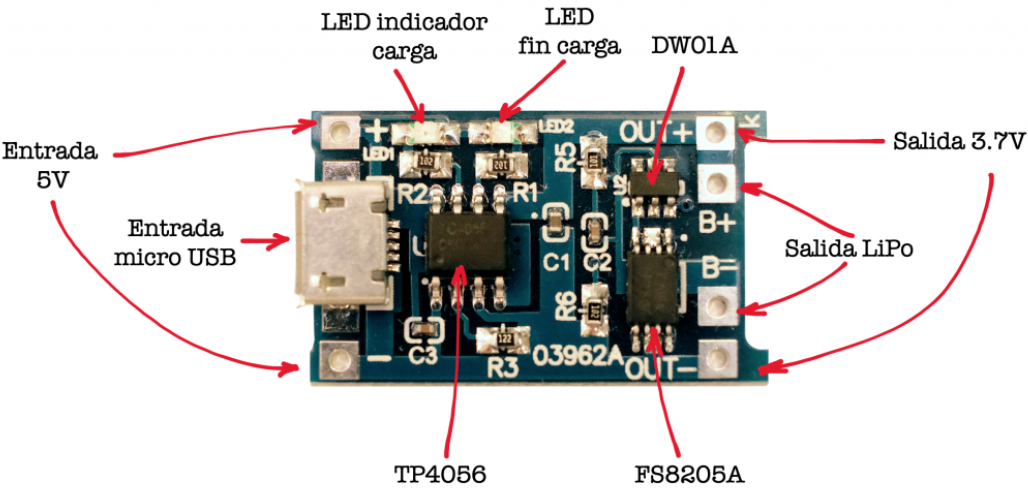
The TP4056 module is a compact, ready-to-use board built around the TP4056 IC—a highly integrated linear charger IC designed specifically for single-cell Li-ion/LiPo batteries (3.7V typical). Unlike bulky, custom charging circuits, the TP4056 module comes pre-soldered with all necessary components (resistors, capacitors, LEDs) to handle charging safely—no advanced electronics knowledge required.
Key features that make it popular:
- Low cost (often $1 per module)
- Built-in charging status LEDs (red = charging, blue/green = fully charged)
- Adjustable charging current (via a TP4056 current resistor)
- Compatibility with USB/DC inputs (perfect for portable projects)
- Optional battery protection(via add-ons like the DW01A IC)
Introduction to the Characteristics and Functions of TP4056 Chip
Overview of TP4056 Chip
TP4056 is a dedicated chip widely used in lithium – ion battery charging management. It has multiple protection functions and is suitable for portable devices powered by USB ports or adapters. This chip integrates charging current regulation, charging status indication, and comprehensive battery protection mechanisms.
Core Characteristics
The core characteristics of TP4056 include: Constant Current (CC) charging, Constant Voltage (CV) charging, automatic charging termination function, 0.1C overcharge protection, short – circuit and overheat protection.
Functional Details
·Constant Current Charging Mode
In the constant current mode, TP4056 maintains a set charging current unchanged until the battery voltage approaches the set charging termination voltage. This process speeds up the charging rate while reducing damage to the battery.
·Constant Voltage Charging Mode
When the battery voltage reaches the preset charging termination voltage, TP4056 automatically switches to the constant voltage mode. At this time, the charger maintains a constant voltage output, and the current gradually decreases until the charging process ends.
·Overcharge Protection
TP4056 prevents overcharging through a built – in voltage monitoring circuit. Once the battery voltage exceeds the safe range, the chip will immediately shut down the charging process to ensure battery safety.
·Short - circuit and Over - temperature Protection
The short – circuit protection function of the chip can respond quickly when a short – circuit occurs at the output end, limiting the output current and avoiding possible damage. The over – temperature protection function monitors the ambient temperature in real – time through a temperature sensor to prevent safety problems caused by overheating.
The above chapter introduces the basic characteristics and core functions of the TP4056 chip, laying a solid foundation for readers to understand the content of subsequent chapters. In the next chapter, we will delve into the charging process of lithium – ion batteries, as well as the role and implementation mechanism of TP4056 in it.
Charging process of TP4056
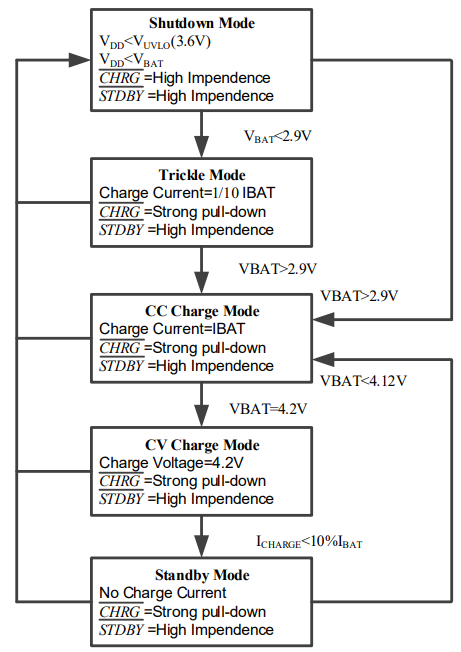
1、The external voltage VCC (USB charging port, 5V power supply) is greater than the voltage lock – in value (3.6V) of TP4056 and the chip CE enable terminal is at a high level; moreover, the external voltage needs to be higher than the battery voltage to activate the TP4056 charging chip.
2、When the battery voltage is lower than 2.9V, pre – charge the battery with a small current first.
3、When the battery voltage is higher than 2.9V, the charging chip charges the battery in constant – current mode, and the current is determined by the charging resistor.
4、When the battery voltage is charged to 4.2V, the charging current gradually decreases, and TP4056 enters the constant – voltage charging mode.
5、When the charging current decreases to the charging termination threshold (1/10 of the constant – current charging current), the charging cycle ends.
TP4056 Diagram schematic
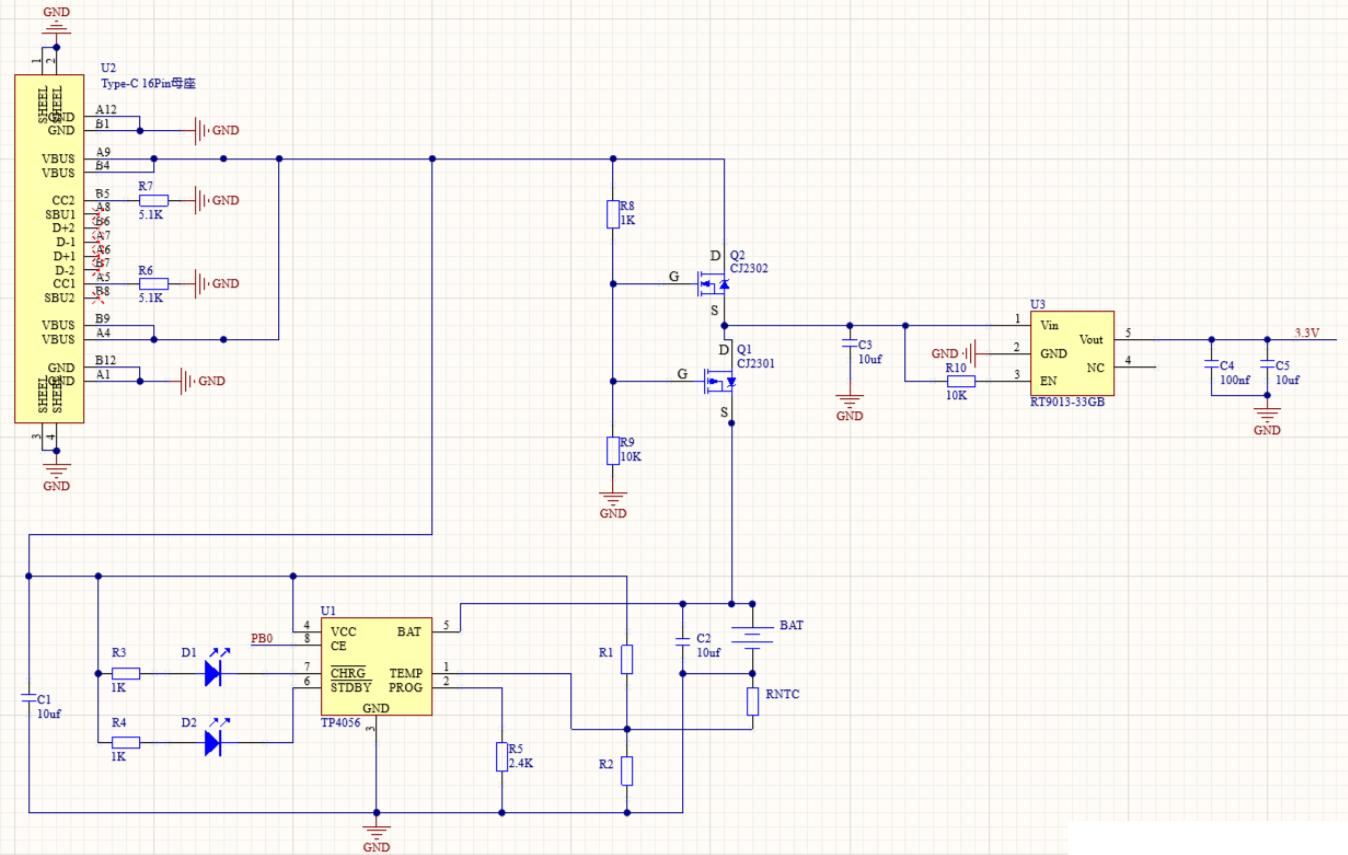
When TP4056 is charging the battery and supplying power to the load at the same time, it is easy to burn out TP4056; so a dual – power automatic selection circuit needs to be added. When the USB is plugged in to charge the battery, the load uses the power from the USB instead of the power from TP4056; when the USB is disconnected, the load uses the battery power.
1.When the USB is plugged in, the level between R8 and R9 is high, Q2 is turned on, Q1 is cut off, and the USB charges the battery and supplies power to load U3 at the same time.
- When the USB is not plugged in,the level between R8 and R9 is low, Q2 is cut off, Q1 is turned on, and the battery supplies power to load U3.
TP4056 Key Specifications
| PARAMETER | RANGE | UNIT |
|---|---|---|
| VCC Pin Voltage | -0.3 to 6.5 | V |
| Voltage of PROG, BAT, CE, TEMP Pins | -0.3 to 6.5 | V |
| CHRG Pin Voltage | -0.3 to 8 | V |
| STDBY Pin Voltage | -0.3 to 8 | V |
| BAT Pin Current | 1 | A |
| PROG Pin Current | 2 | mA |
| Maximum Power Dissipation | 1500 | mW |
| Operating Ambient Temperature | -40 ~ 85 | °C |
| Minimum/Maximum Storage Temperature Tstg | -65 to 125 | °C |
If you want to learn more details, you can refer to this datasheet.
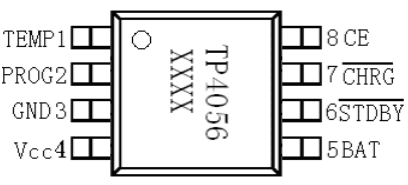
TP4056 Pinout & Wiring Diagram
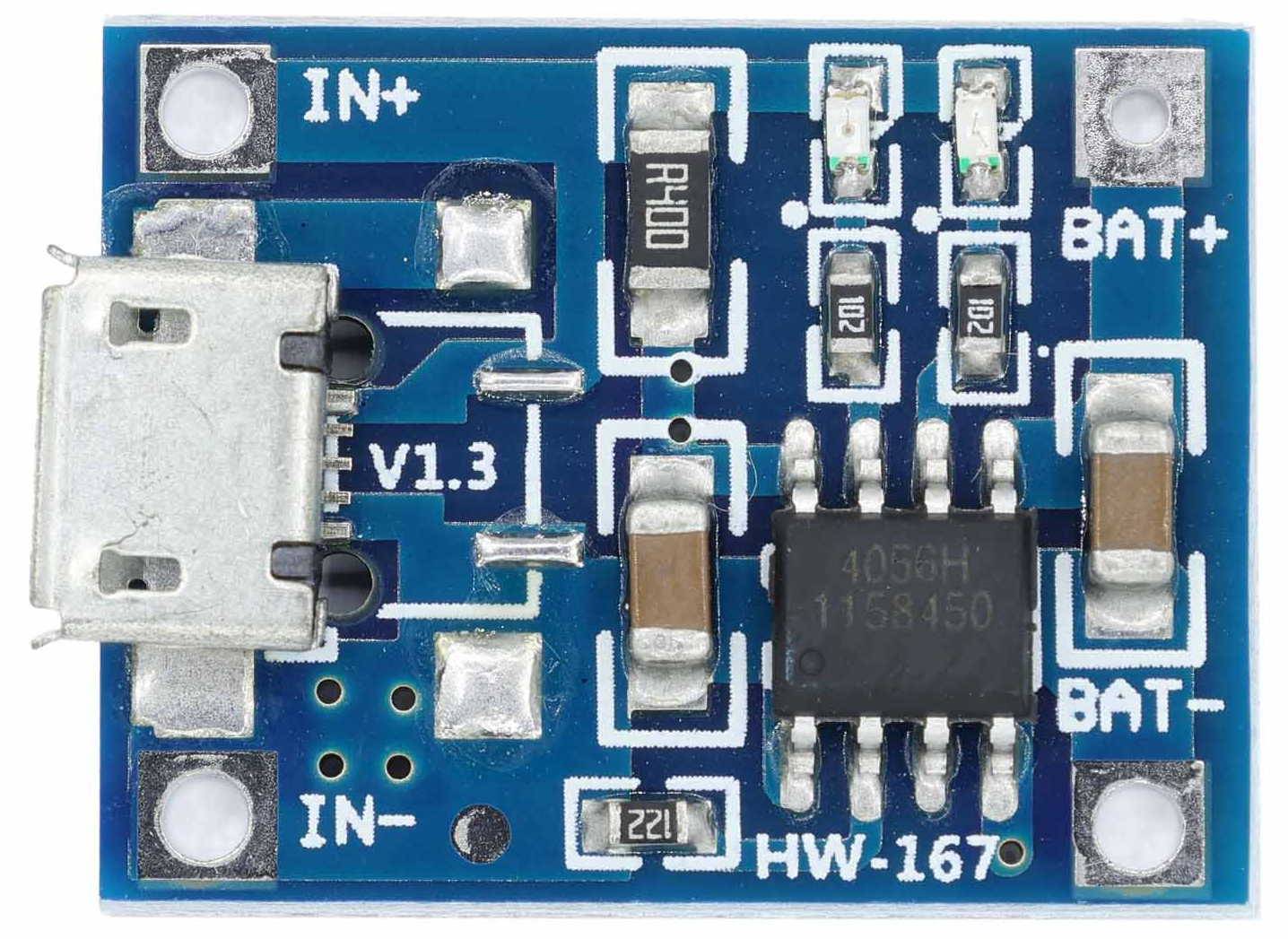
| Pin | Function Description |
|---|---|
| TEMP (Pin 1) | Temperature Sense Input. Connecting TEMP pin to NTC thermistor’s output pin (Lithium ion battery pack). If TEMP pin’s voltage is BELOW 45% or above 80% of supply voltage, this means that battery’s temperature is too high or too low, charging is suspended. The temperature sense function can be disabled by grounding the TEMP pin. |
| PROG (Pin 2) | Constant Charge Current Programming and Charge Current Monitor. Charge current is programmed by connecting a resistor RISET from this pin to GND. When in recharge mode, this pin’s voltage is regulated to 0.1V. When in constant – current mode, this pin is regulated to 1V. In all modes during charging, the voltage on this pin can be used to measure the charge current as follows: IBAT=(VPROG/RPROG)•1100 |
| GND (Pin3) | Ground Terminal |
| Vcc (Pin 4) | Positive Supply Voltage. Provides power to the charger. When VCC is within 30mV of the BAT pin voltage, the TP4056 enters shutdown mode, dropping BAT pin’s current to less than 2μA. |
| BAT (Pin5) | Battery Connection. Connect the positive terminal of the battery to the BAT pin. BAT pin provides charge current to the battery and regulates the final float voltage to 4.2V. BAT pin draws less than 2μA current in chip disable mode or in sleep mode. |
| $\overline{STDBY}$ (Pin6) | Charge Status Open – Drain Output. When battery charge cycle completes, $\overline{STDBY}$ is pulled low by an internal switch, otherwise $\overline{STDBY}$ pin is high impedance. |
| $\overline{CHRG}$ (Pin7) | Charge Status Open Drain Output. When the battery is charging, the $\overline{CHRG}$ pin is pulled low by an internal switch, otherwise $\overline{CHRG}$ pin is high impedance. |
| CE (Pin8) | Chip Enable Input. A logic high on CE pin will put the device in normal operation mode. Pulling the CE in to low will put the TP4056 into shutdown mode. The CE pin can be driven by TTL or CMOS logic level. |
Wiring Guide
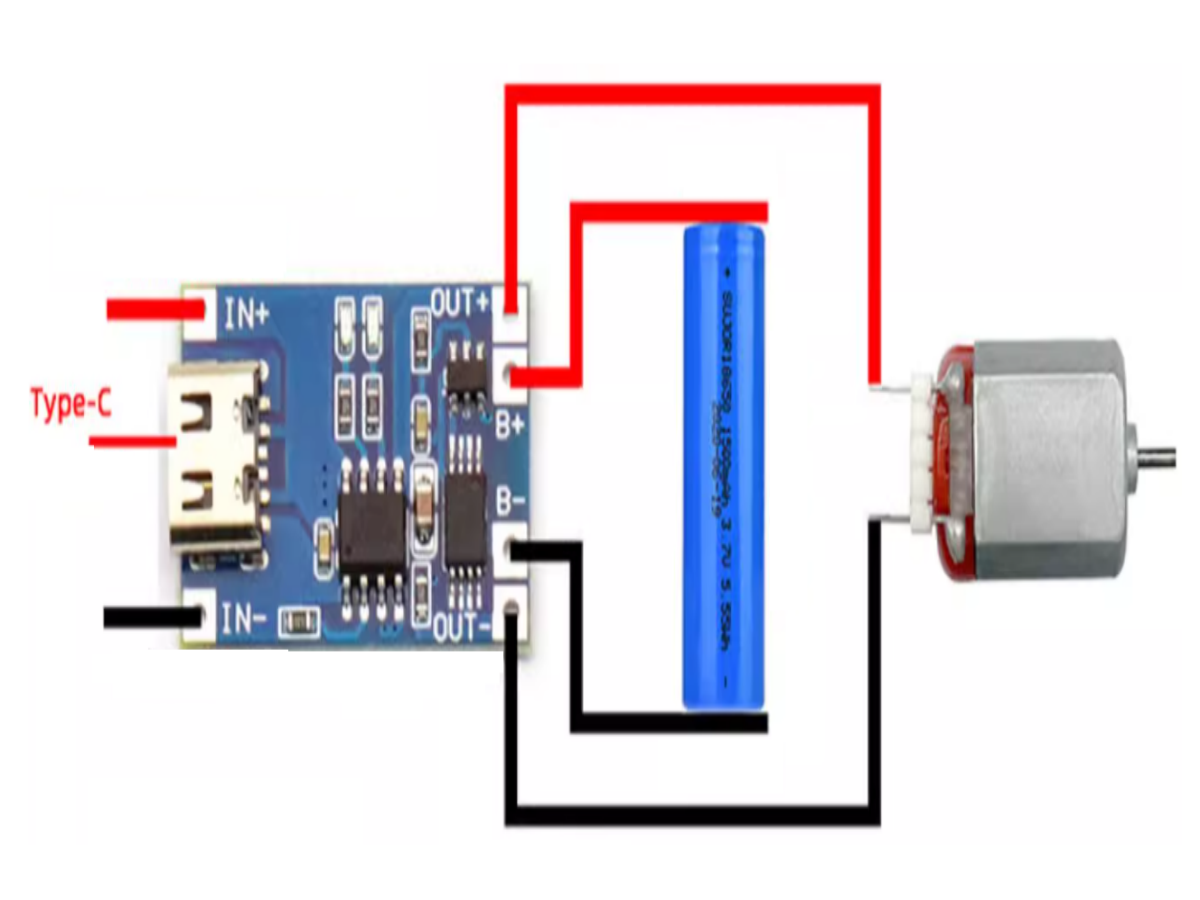
For a simple “charge a battery and power a device” setup, follow this TP4056 wiring diagram:
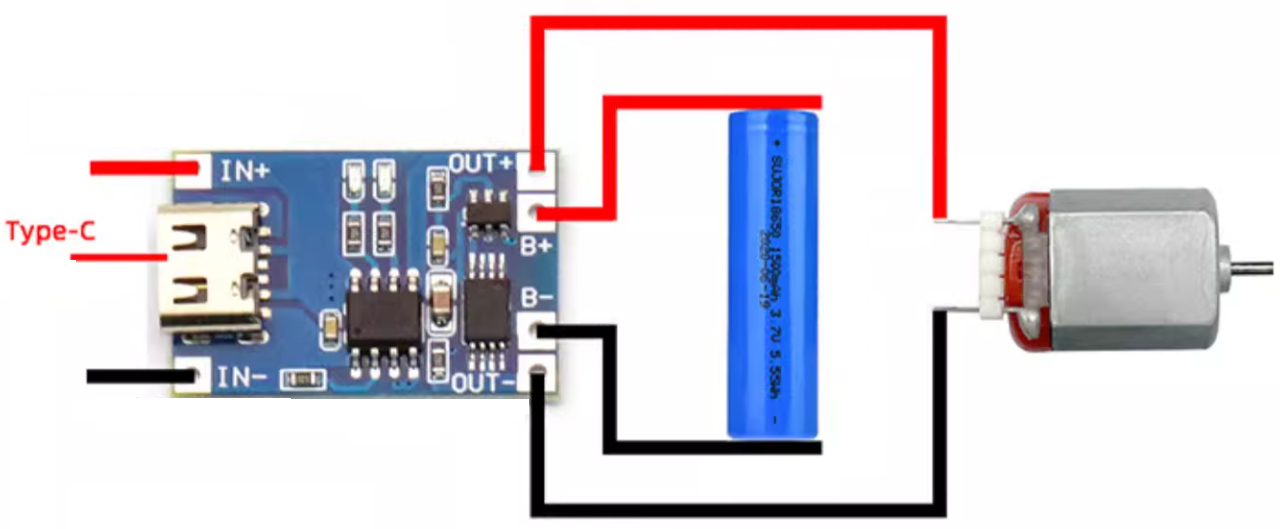
- Integrated charging and discharging, output voltage = battery voltage
- Multiple batteries can be connected in parallel
- Red light on:Charging
- Green light on:Fully charged
- Red and green lights on together or flashing: No battery installed, poor contact, battery damaged, or aged battery
TP4056 vs TP4054 vs TP4057 vs TP5100: Comparison Table
| Feature | TP4056 | TP4054 | TP4057 | TP5100 |
|---|---|---|---|---|
| Charging Current | Up to 1A (adjustable) | Up to 500mA (fixed) | Up to 1A (fixed) | Up to 2A (adjustable) |
| Input Voltage | 4.5V – 8V | 4.5V – 6V | 4.5V – 8V | 4.75V – 12V |
| Battery Support | Single-cell Li-ion/LiPo | Single-cell Li-ion/LiPo | Single-cell Li-ion/LiPo | Single-cell Li-ion/LiPo |
| Protection | Basic (overcharge) | Basic (overcharge) | Basic (overcharge) | Full (overcharge, over-discharge, short circuit) |
| Load Sharing | Optional | No | No | Built-in |
| Cost | $0.50 – $1.00 | $0.30 – $0.70 | $0.40 – $0.80 | $1.50 – $3.00 |
| Best For | General projects (Arduino, power banks) | Low-current devices (wearables) | Fixed 1A projects | High-power devices (solar chargers, tablets) |
Verdict: The TP4056 is the most versatile for hobbyists—it balances adjustability, cost, and compatibility. For high-power builds, upgrade to the TP5100; for tiny projects, the TP4054 works.
APPLICATIONS
- Cellular Telephones, PDAs, GPS
- Charging Docks
- Digital Cameras, Portable Devices
- USB Bus-Powered Chargers
FAQS
Can lithium batteries be directly charged via USB?
1、The standard charging cut-off voltage for lithium batteries is 4.2V, while the voltage of a standard USB interface is 5V. The voltage mismatch may lead to overcharging when connected directly, causing problems such as battery swelling.
2、The output current of USB exceeds the maximum charging current of the battery. The current mismatch will damage the battery or trigger the over-current protection of the battery’s small board.
3、Lack of charging management: Lithium battery charging needs to go through the charging process of constant current – constant voltage – cut-off. Direct connection will lead to insufficient or incomplete charging.
What is the small board on the lithium battery used for, and can it be used for charging?
- It can’t be used for charging. It is used to protect the battery and only has the function of protecting the battery.
- Overcharge protection: When the charging voltage exceeds the safe voltage (such as 4.25V), the charging circuit is closed.
- Over-discharge protection: When the battery voltage is lower than the cut-off voltage (such as 2.5V), the discharge circuit is closed.
- Short-circuit protection: Quickly shut off the circuit when the circuit is short-circuited.
What is floating charge voltage?
When the battery is fully charged, the charger will not stop charging. It will still provide a constant floating charge voltage and a very small floating charge current to the battery. Because once the charger stops charging, the battery will naturally release electrical energy. So the floating charge method is used to balance this natural discharge. In simple terms, it is the voltage maintained by the charging chip after the battery is fully charged.
Why does the charging time become longer when the input voltage of TP4056 increases?
If the input voltage of TP4056 is too high, such as 5.2 or even 5.5V, the charging current will be less than 1000mAh, which is normal. When the voltage is high, the chip will automatically reduce the charging current due to heat generation, so as not to burn the chip.
Can the battery charge and supply power to other components at the same time after connecting to USB?
No. The load power of TP4056 is too high, which easily burns out TP4056. A dual-power automatic selection circuit can be added. When USB is plugged in, USB is automatically selected as the power source; when USB is not plugged in, the battery is automatically selected as the power source.