

Blog
Ultimate TTP224 Touch Sensor Guide: 4-Channel Capacitive Control Without Pressing
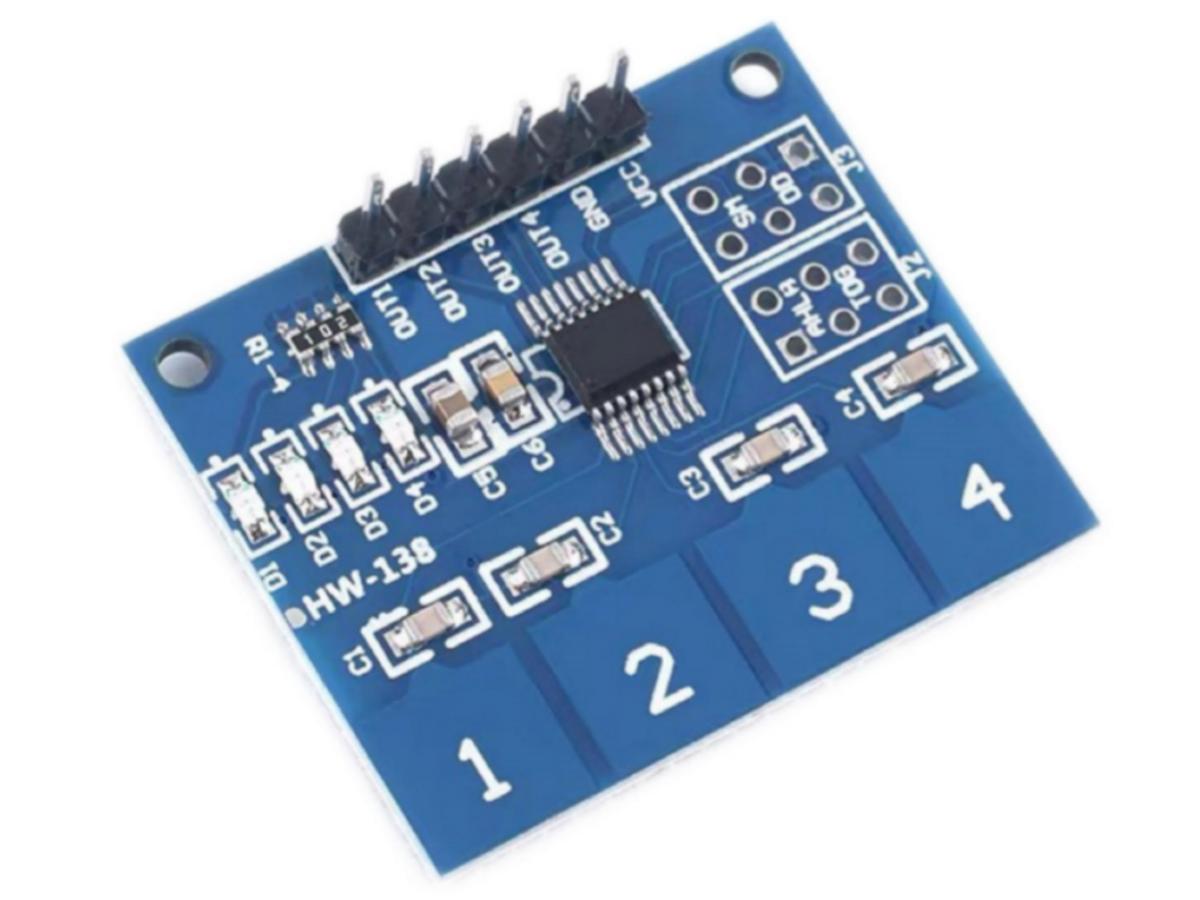
Tired of the “click” from mechanical buttons? A TTP224 capacitive touch sensor powered by the TTP224 IC. It swaps pressing for a gentle touch, giving you smooth, silent, and long-lasting interaction. With four independent channels, one module can handle multi-key control, like giving your project a pair of “magic touch eyes.”
What is TTP224 Touch Sensor?
This module is a capacitive jog touch switch module based on the TTP224B touch detection IC. In the normal state, the module outputs a low level and operates in the low-power mode. When a finger touches the corresponding position, the module outputs a high level and switches to the fast mode. When there is no touch for 12 consecutive seconds, the mode switches back to the low-power mode. The module can be installed on the surface of non-metallic materials such as plastic and glass. A thin piece of paper (non-metallic) can also be covered on the surface of the module until the touch position is correct, so that it can be made into a key hidden in walls, desktops, etc. This module can save you from the trouble of conventional push-button key.
TTP224 Working Principle
TTP224 Schematic Diagram
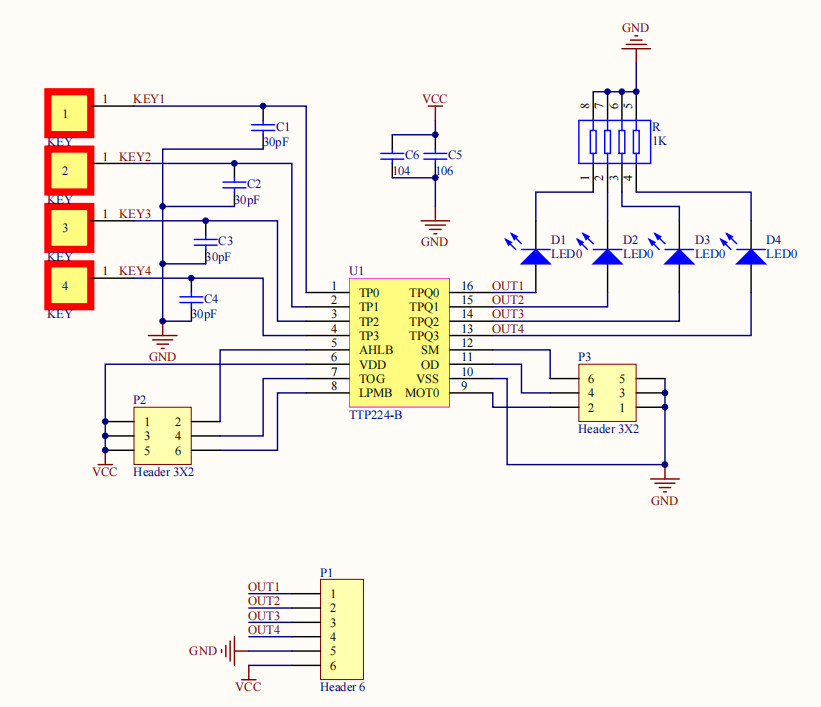
TTP224 Touch Detection Principle
The TTP224 touch switch realizes switch control by detecting the change of human body capacitance. Its core working principle is based on capacitive touch sensing technology. When a human finger approaches or touches the surface of the TTP224, a tiny capacitance change will be generated on the TTP224 due to the capacitive characteristics of the human body. This change will be detected by the internal circuit and converted into an electrical signal, thereby triggering the change of the switch state.
Typically, the internal circuit of the TTP224 touch switch uses a component called a capacitive sensor. This sensor forms an electromagnetic field within a specific area of the TTP224. When a finger touches or approaches this area, the electromagnetic field changes, thereby causing a change in capacitance. The TTP224 internal circuit monitors the change of this capacitance in real time. When the detected change exceeds the preset threshold, it will be recognized as a touch action, and the switch state will be changed accordingly.
TTP224 Switch Control Mechanism
The switch control mechanism of the TTP224 touch switch involves the collaborative work of internal circuit design and software algorithms. To improve stability and response speed, the TTP224 touch switch usually adopts specific control strategies. For example, it may utilize a hysteresis algorithm in the software to avoid false triggering caused by noise or minor capacitance fluctuations. This means that when the detected capacitance change signal exceeds the threshold, the system will not respond immediately, but will continuously monitor whether the change persists or recurs to determine whether a valid touch action has truly occurred.
The control mechanism may also include touch count detection, that is, different functions are executed by recording the number of consecutive touches. For instance, a single touch may be used for on/off control, while two consecutive touches may be used for brightness adjustment. The realization of such advanced functions requires the software of the TTP224 touch switch to support complex algorithms.
The TTP224 touch switch can also be programmed to set different working modes, such as latching mode, interlocking mode or non-latching mode, so that the optimal user experience can be achieved in different application scenarios. For example, in latching mode, the switch state remains unchanged after being touched until it is touched again. While in non-latching mode, the switch state returns to the original state immediately after each touch.
TTP224 Pin Function

Why TTP224 is better than traditional buttons?
(1) Different Working Principle
① Traditional button
It relies on physical contact closure/disconnection to control the circuit, with mechanical components such as springs and silicone gaskets, which will wear and age after long-term use.
② TTP224 touch sensor
It is based on the principle of capacitive sensing, detecting the change in electrode capacitance caused by finger approach, with no physical moving parts.
(2) Multi-Channel Integration
① Traditional multi-key setups require multiple independent switches and wirings, which occupy space and increase potential fault points.
② The TTP224 has 4 built-in independent detection channels, and a module can handle multi-key control, saving PCB space and cost.
(3) Software Configurable Modes
① Traditional keys have fixed function (press = turn on).
② The TTP224 supports jog/latching modes and adjustable sensitivity, which can be programmed as needed to adapt to different interaction logics.
TTP223 vs TTP224
| Model | TTP223 | TTP224 |
|---|---|---|
| Core Chip | TTP223 single channel capacitive touch sensor IC | TTP224 4-channel capacitive touch sensor IC |
| Touch Channel | Single channel | Four channels |
| Advantage | ① Small size and low cost ② Ultra-low power consumption, suitable for battery-powered devices | ① Multi-channel integration, save space ② Independent sensitivity adjustment for each channel, adaptable to complex environments ③ Support for more output modes with high flexibility |
| Detection Principle | Capacitive sensing | Capacitive sensing |
| Typical Application Scenario | Single-key Control (e.g., desk lamp switches, small household appliance triggers) | Multi-key Control (e.g., password lock panels, multi-key interaction for smart devices) |
TTP224 Arduino
TTP224 Pinout
| TTP224 | Arduino | LED1 | Arduino |
|---|---|---|---|
| VCC | 5V | Positive pole | D6 |
| GND | GND | LED2 | Arduino |
| OUT1 | D2 | Positive pole | D7 |
| OUT2 | D3 | Small fan | Arduino |
| OUT3 | D4 | Positive pole | D8 |
| OUT4 | D5 | Negative pole | GND |
TTP224 code
					// Define pins
const int touchPin1 = 2;    // TTP224 S1 → D2 (Control LED1)
const int touchPin2 = 3;    // TTP224 S2 → D3 (Control LED2)
const int touchPin3 = 4;    // TTP224 S3 → D4 (Control Fan: Toggle on/off, no time limit)
const int touchPin4 = 5;    // TTP224 S4 → D5 (Turn off all devices at once)
const int led1Pin = 6;      // LED1 → D6
const int led2Pin = 7;      // LED2 → D7
const int fanPin = 8;       // Small fan positive pole → D8 (No transistor needed)

// Define device state variables
bool led1State = LOW;       // LED1 initial state: Off
bool led2State = LOW;       // LED2 initial state: Off
bool fanState = LOW;        // Fan initial state: Stop

// Touch debounce variables (enhanced for stable LED)
unsigned long lastTouchTime1 = 0;
unsigned long lastTouchTime2 = 0;
unsigned long lastTouchTime3 = 0;
unsigned long lastTouchTime4 = 0;
const unsigned long debounceDelay = 400;  // Debounce time 400ms for anti-interference
bool lastTouch1State = LOW;  // Record last touch state for anti-interference
bool lastTouch2State = LOW;
bool lastTouch3State = LOW;
bool lastTouch4State = LOW;

void setup() {
  // Initialize pin modes
  pinMode(touchPin1, INPUT);
  pinMode(touchPin2, INPUT);
  pinMode(touchPin3, INPUT);
  pinMode(touchPin4, INPUT);
  pinMode(led1Pin, OUTPUT);
  pinMode(led2Pin, OUTPUT);
  pinMode(fanPin, OUTPUT);

  // Initial state: All devices are off
  digitalWrite(led1Pin, led1State);
  digitalWrite(led2Pin, led2State);
  digitalWrite(fanPin, fanState);

  // Serial initialization (optional, for debugging status)
  Serial.begin(9600);
  Serial.println("Device started, touch corresponding buttons to control");
}

void loop() {
  // Read current touch states (TTP224 outputs high level when touched)
  bool currentTouch1 = digitalRead(touchPin1);
  bool currentTouch2 = digitalRead(touchPin2);
  bool currentTouch3 = digitalRead(touchPin3);
  bool currentTouch4 = digitalRead(touchPin4);
  unsigned long currentTime = millis();

  // -------------------------- Enhanced LED1 Control (Stable) --------------------------
  // Double confirm touch state to avoid interference
  if (currentTouch1 == HIGH && lastTouch1State == HIGH && currentTime - lastTouchTime1 > debounceDelay) {
    led1State = !led1State;
    digitalWrite(led1Pin, led1State);
    lastTouchTime1 = currentTime;
    Serial.print("LED1 State: ");
    Serial.println(led1State ? "On" : "Off");
    // Reset touch state to avoid repeated trigger
    lastTouch1State = LOW;
  } else if (currentTouch1 == LOW) {
    lastTouch1State = LOW;
  } else {
    lastTouch1State = HIGH;
  }

  // -------------------------- Enhanced LED2 Control (Stable) --------------------------
  if (currentTouch2 == HIGH && lastTouch2State == HIGH && currentTime - lastTouchTime2 > debounceDelay) {
    led2State = !led2State;
    digitalWrite(led2Pin, led2State);
    lastTouchTime2 = currentTime;
    Serial.print("LED2 State: ");
    Serial.println(led2State ? "On" : "Off");
    lastTouch2State = LOW;
  } else if (currentTouch2 == LOW) {
    lastTouch2State = LOW;
  } else {
    lastTouch2State = HIGH;
  }

  // -------------------------- Fan Toggle Control (No Time Limit) --------------------------
  if (currentTouch3 == HIGH && lastTouch3State == HIGH && currentTime - lastTouchTime3 > debounceDelay) {
    fanState = !fanState;  // Toggle fan on/off
    digitalWrite(fanPin, fanState);
    lastTouchTime3 = currentTime;
    Serial.print("Fan State: ");
    Serial.println(fanState ? "Running" : "Stopped");
    lastTouch3State = LOW;
  } else if (currentTouch3 == LOW) {
    lastTouch3State = LOW;
  } else {
    lastTouch3State = HIGH;
  }

  // -------------------------- One-Click Turn Off All --------------------------
  if (currentTouch4 == HIGH && lastTouch4State == HIGH && currentTime - lastTouchTime4 > debounceDelay) {
    led1State = LOW;
    led2State = LOW;
    fanState = LOW;
    digitalWrite(led1Pin, led1State);
    digitalWrite(led2Pin, led2State);
    digitalWrite(fanPin, fanState);
    lastTouchTime4 = currentTime;
    Serial.println("All devices have been turned off");
    lastTouch4State = LOW;
  } else if (currentTouch4 == LOW) {
    lastTouch4State = LOW;
  } else {
    lastTouch4State = HIGH;
  }
}
TTP224 Effect Demonstration
TTP224 Application Scenario
1. Smart home control panel
2. Electronic password lock / Access control system
3. Touch-controlled lamp / Lighting switch
4. Multi-channel instrument or sound effect controller
5. Industrial equipment human-machine interface
6. Interactive control for smart toys
Relative Information
Purchase Link
FAQ
Can TTP224 work stably in humid environments?
Basic moisture resistance is moderate. It is recommended to apply a waterproof coating on the touch area or adopt a sealed structure to improve stability.
Which one is more suitable for multi-key projects, TTP224 or TTP223?
TTP224 is recommended for multi-key projects because it integrates 4 channels, saving space and wiring, and each channel can be controlled independently.
How to reduce false triggers on TTP224 touch sensor?
An insulating shield can be added around the touch pad to prevent metal objects from approaching, appropriately increase the sensitivity capacitor to reduce false triggers, add debounce delay in the software.
Why is my TTP224 touch sensor not responding to touch?
Check whether the power supply voltage is within the range of 2.4-5.5V, whether the GND is properly connected, whether the touch pad forms an effective capacitance with the finger, and whether it is in the correct working mode.