

Blog
A Digital Tube TM1650 with Extremely Low Standby Power Consumption
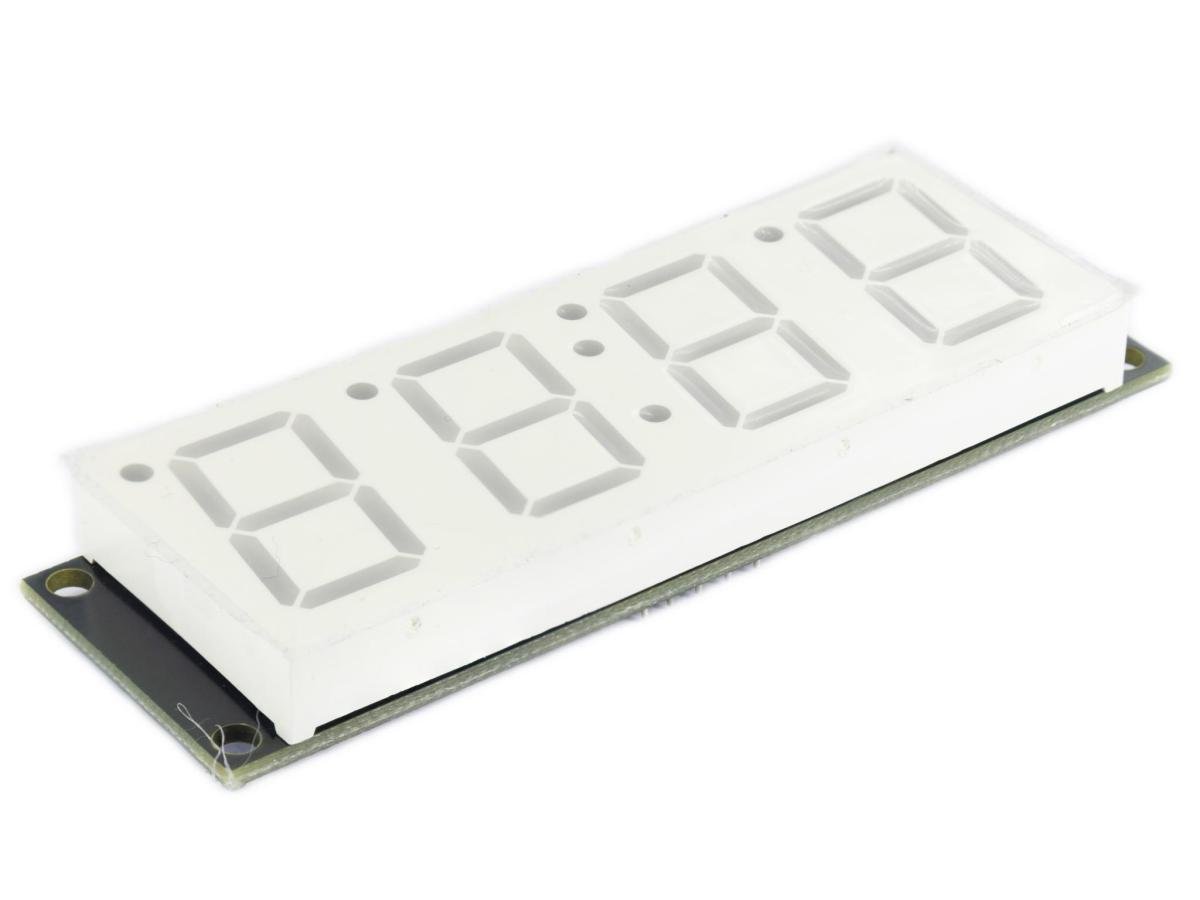
From smart sockets and humidity/temperature meters in home scenarios, to battery level displays for portable devices, electronic alarm clocks, and simple testers and LED dimmers for industrial tools, the TM1650 meets the core requirements of “digital display + button operation” for various devices at a low cost. It simplifies hardware design and lowers the development threshold, making it an excellent value option for DIY enthusiasts and small-scale electronic product mass production.
What is the TM1650?
The TM1650 is a dedicated IC for driving and controlling LED (light-emitting diode display) devices, featuring a keyboard scanning interface. It integrates an MCU digital interface, data latch, LED driver, and keyboard scanning circuits internally. It is of high quality, good stability, and strong anti-interference capability. It is mainly used in set-top boxes, household appliances (smart water heaters, microwave ovens, washing machines, air conditioners, induction cookers), electronic scales, and smart meters with digital tubes. It can be applied in scenarios requiring 24-hour continuous operation.
The Basic Working Principle of TM1650
The TM1650 integrates four independent 74HC4511 decoders internally. Each decoder can drive an 8-segment digital tube, thus enabling the display of 4 digits or letters simultaneously. Additionally, it contains some control pins for receiving instructions from an external microcontroller, such as brightness adjustment and digit tube segment selection control. In terms of key scanning, the TM1650 usually detects the status of different keys through its internal multiplexer, reducing the number of required external I/O ports.
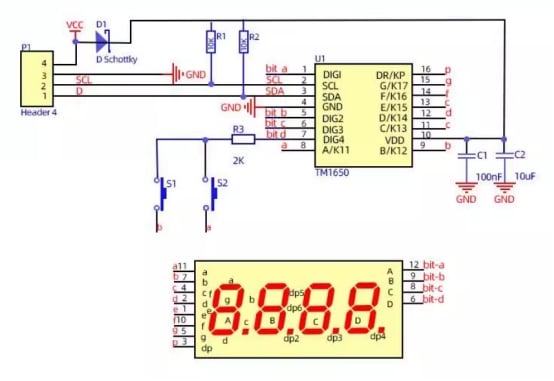
The Two-Wire Communication Interface of TM1650
- SCL (Clock Line): Responsible for synchronizing the communication rhythm. It is provided by the master controller and outputs the clock signal to ensure consistent data transmission timing.
- SDA (Data Line): Bidirectional transmission pins, which not only carry the instructions sent by the main controller (display mode, brightness, address data), but also feedback information such as the key codes of the chip.
The Working Principle of A Common-Cathode DigitalTube
The common-cathode digital tube is one where all the cathodes of the digital tube are connected together and are connected to the ground (GND). When driving a common-cathode digital tube, a high-level signal needs to be provided to the corresponding anode to light up a specific segment, thereby displaying a number or character. When driving a common-cathode digital tube with TM1650, high-level signals are sent to each segment of the common-cathode digital tube.
The Pin Functions of TM1650
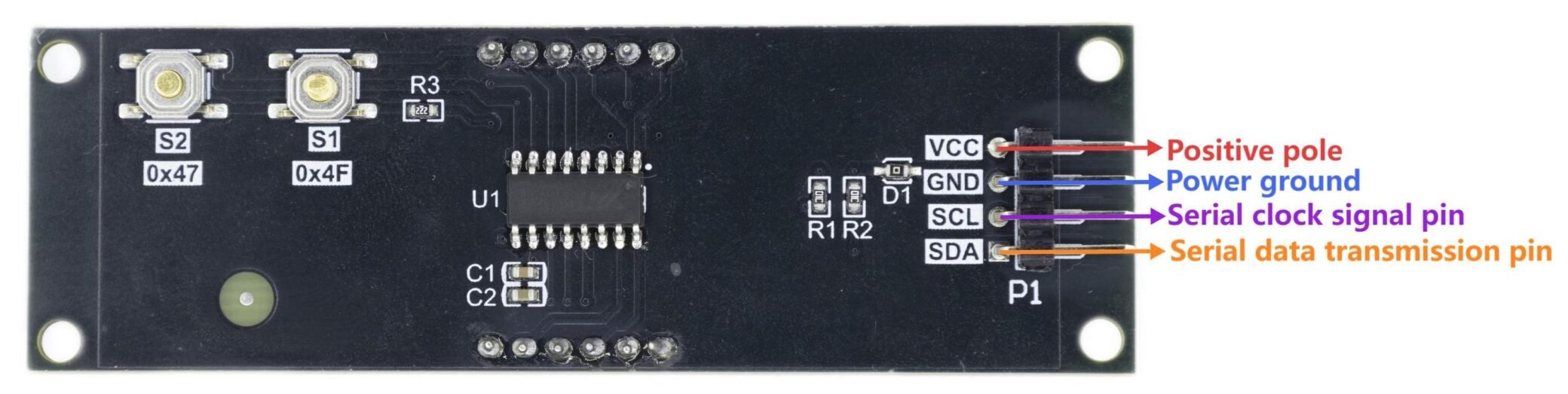
| Pin | definition |
|---|---|
| VCC | Positive pole |
| GND | Power ground |
| SCL | Serial clock signal pin |
| SDA | serial data transmission pin |
How to Implement the Driver for TM1650
1.Common Cathode Digital Tube Display Driver
- The main controller sends the “display mode command” (such as 0x03 = 8 segments 4-bit display) via SCL/SDA.
- Send the “brightness command” (for example, 0x87 = maximum brightness);
- Send “address command + segment code data” in sequence (for example, address 0x60 corresponds to the 1st position, and segment code 0x3F = the digit “0”);
- After the chip stores the data, the hardware automatically scans the bit selection and outputs the segment code current, driving the digital tube to display stably.
2.7×4 Matrix Key Scan Driver
- 1.The chip automatically outputs high-level scanning signals cyclically to DIG1 to DIG4 (row pins).
- By detecting the level changes through KI1 to KI7 (column pins), when a key is pressed, the corresponding row/column becomes conductive, and the column pins detect a high level.
3.The chip encodes and stores the key row/column information, and simultaneously outputs a low-level signal through the DP/KP pins.
4.After the main control detects the flag, it sends a read command to read the code, and then decodes to identify the specific key.
Module Feature
1.2-wire serial communication (CLK/DAT), easy to drive with Arduino.
- Supports 4-digit 7/8-segment display.
- 7×4 key scan + 8-level brightness adjustment.
4.3.3V-5V wide voltage, built-in reset/oscillation circuit.
5.High current drive (segment 25mA + bit 150mA), stable anti-interference.
TM1650 Arduino Example
| TM1650 | Arduino | Arduino | Buzzer |
|---|---|---|---|
| VCC | 5V | Pin8 | IO |
| GND | GND | ||
| SCL | A5 | ||
| SDA | A4 |
Arduino Code
					#include <Wire.h>
#include <TM1650.h>

TM1650 d;

// Time variables
int beijingHour = 11;       // Initial time 11:59
int beijingMinute = 59;
int beijingSecond = 0;
unsigned long lastUpdateTime = 0;
unsigned long lastBlinkTime = 0;
unsigned long lastSecondDisplayTime = 0;
bool colonState = true;     // Colon status
bool showingSeconds = false; // Whether to display seconds
unsigned long secondDisplayStartTime = 0;

// Buzzer configuration
#define BUZZER_PIN 8
bool buzzerEnabled = true;
unsigned long lastKeyTime = 0;
byte lastKey = 0;
bool minuteIncrementFlag = false;
unsigned long lastBeepTime = 0;

// Display configuration
#define SECOND_DISPLAY_TIME 5000      // Seconds display time (5 seconds)
#define SECOND_DISPLAY_INTERVAL 5000  // Seconds display interval (5 seconds)

void setup()
{
  Wire.begin(); // Initialize I2C

  Serial.begin(9600);
  Serial.println("TM1650 Time Display System - Full Function Version");

  // Initialize buzzer
  pinMode(BUZZER_PIN, OUTPUT);
  digitalWrite(BUZZER_PIN, LOW);

  // Initialize TM1650
  d.init();
  d.displayOn();
  d.setBrightness(7); // Set maximum brightness

  // Startup sound
  beep(200);
  delay(300);
  beep(200);

  Serial.println("Function Description:");
  Serial.println("S1 Key: Decrease minute by one");
  Serial.println("S2 Key: Increase minute by one");
  Serial.println("Display seconds for 5 seconds every 5 seconds");
  Serial.println("Hourly Chime: Alert when minutes reach 60");
  Serial.println("Time Adjustment: Seconds automatically reset to zero");
  Serial.println("Initial Time: 11:59");
  Serial.println("Colon Status: Blinks once per second");

  // Display initial time
  updateDisplay();
  lastUpdateTime = millis();
  lastBlinkTime = millis();
  lastSecondDisplayTime = millis();

  Serial.println("System Ready");
}

void loop()
{
  unsigned long currentTime = millis();

  // Update time every second
  if (currentTime - lastUpdateTime >= 1000) {
    updateTime();
    lastUpdateTime = currentTime;
  }

  // Colon blink control: blink once per second
  if (currentTime - lastBlinkTime >= 500) {
    colonState = !colonState;
    lastBlinkTime = currentTime;
  }

  // Auto seconds display logic: display seconds for 5 seconds every 5 seconds
  if (!showingSeconds && currentTime - lastSecondDisplayTime >= SECOND_DISPLAY_INTERVAL) {
    showingSeconds = true;
    secondDisplayStartTime = currentTime;
    Serial.println("=== Displaying Seconds for 5 Seconds ===");
  }

  if (showingSeconds && currentTime - secondDisplayStartTime >= SECOND_DISPLAY_TIME) {
    showingSeconds = false;
    lastSecondDisplayTime = currentTime;
    Serial.println("Return to Time Display");
  }

  // Handle key press
  byte currentKey = readTM1650Key();
  handleKey(currentKey);

  // Buzzer chime
  handleBuzzer();

  // Update display
  updateDisplay();

  delay(100);
}

// Update time
void updateTime() {
  int oldMinute = beijingMinute; // Save old minute value

  beijingSecond++;

  if (beijingSecond >= 60) {
    beijingSecond = 0;
    beijingMinute++;

    if (beijingMinute >= 60) {
      beijingMinute = 0;
      beijingHour++;
      if (beijingHour >= 24) beijingHour = 0;

      // Hourly chime: minutes change from 59 to 00
      if (oldMinute == 59) {
        Serial.println("Hourly Chime: Minutes changed from 59 to 00");
        minuteIncrementFlag = true;
      }
    }
  }

  // Serial output
  static unsigned long lastSerialOutput = 0;
  if (millis() - lastSerialOutput >= 1000) {
    if (showingSeconds) {
      Serial.print("Seconds Display: ");
      Serial.println(beijingSecond);
    } else {
      Serial.print("Time Display: ");
      Serial.print(beijingHour < 10 ? "0" : "");
      Serial.print(beijingHour);
      Serial.print(":");
      Serial.print(beijingMinute < 10 ? "0" : "");
      Serial.print(beijingMinute);
      Serial.print(":");
      Serial.print(beijingSecond < 10 ? "0" : "");
      Serial.println(beijingSecond);
    }
    lastSerialOutput = millis();
  }
}

// Update display
void updateDisplay() {
  if (showingSeconds) {
    // Seconds display mode (5 seconds)
    char secondStr[5];
    sprintf(secondStr, "  %02d", beijingSecond);
    d.displayString(secondStr);
    d.setDot(1, false); // Turn off colon when displaying seconds
  } else {
    // Time display mode (HH:MM)
    char timeStr[5];
    sprintf(timeStr, "%02d%02d", beijingHour, beijingMinute);
    d.displayString(timeStr);
    d.setDot(1, colonState); // Colon blinks when displaying time
  }
}

// Buzzer control
void handleBuzzer() {
  if (!buzzerEnabled) return;

  unsigned long currentTime = millis();

  // Hourly chime (when minutes reach 60)
  if (minuteIncrementFlag) {
    if (currentTime - lastBeepTime > 100) {
      Serial.println("Hourly Chime Alert Sound");
      playHourlySound();
      minuteIncrementFlag = false;
    }
  }
}

// Play hourly chime sound
void playHourlySound() {
  if (!buzzerEnabled) return;

  // Long chime sound
  beep(800);
  lastBeepTime = millis();
}

void beep(unsigned int duration) {
  if (!buzzerEnabled) return;

  for (int i = 0; i < duration / 2; i++) {
    digitalWrite(BUZZER_PIN, HIGH);
    delayMicroseconds(500);
    digitalWrite(BUZZER_PIN, LOW);
    delayMicroseconds(500);
  }
}

// Read key press
byte readTM1650Key() {
  byte keyData = 0;
  Wire.beginTransmission(0x24);
  Wire.requestFrom(0x24, 1);
  if (Wire.available()) {
    keyData = Wire.read();
  }
  Wire.endTransmission();

  return keyData;
}

// Handle key press
void handleKey(byte key) {
  unsigned long currentTime = millis();

  // Key debounce
  if (currentTime - lastKeyTime < 200) {
    return;
  }

  if (key != 0 && key != lastKey) {
    lastKeyTime = currentTime;

    Serial.print("Key Value: 0x");
    Serial.println(key, HEX);

    // Try all possible key values
    if (key == 0x4F || key == 0x47 || key == 0x5F || key == 0x57 || key == 0x0F) {
      if (key == 0x4F || key == 0x5F) { // S1 Key
        Serial.println("S1 Key - Decrease minute by one");
        beep(50); // Key press sound
        decreaseMinute();
      }
      else if (key == 0x47 || key == 0x57) { // S2 Key
        Serial.println("S2 Key - Increase minute by one");
        beep(50); // Key press sound
        increaseMinute();
      }
      else { // Other keys
        Serial.println("Other Key - Toggle Buzzer");
        toggleBuzzer();
      }
    }
  }

  lastKey = key;
}

// Toggle buzzer on/off
void toggleBuzzer() {
  buzzerEnabled = !buzzerEnabled;
  if (buzzerEnabled) {
    Serial.println("Buzzer Enabled");
    beep(100);
    delay(100);
    beep(100);
  } else {
    Serial.println("Buzzer Disabled");
  }
}

// Increase minute by one function
void increaseMinute() {
  Serial.println("Execute: Increase minute by one");

  // Wait for key release
  delay(300);

  // Increase minute by one
  beijingMinute++;
  if (beijingMinute >= 60) {
    beijingMinute = 0;
    beijingHour = (beijingHour + 1) % 24;
    Serial.println("Minutes reached 60, hour automatically increased by 1");
    minuteIncrementFlag = true; // Trigger hourly chime
  }

  // Reset seconds to zero when adjusting minutes
  beijingSecond = 0;
  resetDisplay();
  printCurrentTime();
}

// Decrease minute by one function
void decreaseMinute() {
  Serial.println("Execute: Decrease minute by one");

  // Wait for key release
  delay(300);

  // Decrease minute by one
  beijingMinute--;
  if (beijingMinute < 0) {
    beijingMinute = 59;
    beijingHour--;
    if (beijingHour < 0) beijingHour = 23;
    Serial.println("Minutes decreased to 59, hour automatically decreased by 1");
  }

  // Reset seconds to zero when adjusting minutes
  beijingSecond = 0;
  resetDisplay();
  printCurrentTime();
}

// Reset display timing
void resetDisplay() {
  lastSecondDisplayTime = millis();
  showingSeconds = false;
  Serial.println("Seconds reset to zero");
}

// Print current time
void printCurrentTime() {
  Serial.print("Current Time: ");
  Serial.print(beijingHour < 10 ? "0" : "");
  Serial.print(beijingHour);
  Serial.print(":");
  Serial.print(beijingMinute < 10 ? "0" : "");
  Serial.println(beijingMinute);
}

// Test function: Verify all functions
void testAllFunctions() {
  Serial.println("=== Start Function Test ===");

  // Test 1: Key function
  Serial.println("Test 1: Key Function");
  Serial.println("Please press S1 key (decrease minute) and S2 key (increase minute) to test");
  delay(5000);

  // Test 2: Seconds display
  Serial.println("Test 2: Seconds Display Function");
  showingSeconds = true;
  secondDisplayStartTime = millis();
  for(int i = 0; i < 5; i++) {
    updateDisplay();
    delay(1000);
  }
  showingSeconds = false;

  // Test 3: Hourly chime
  Serial.println("Test 3: Hourly Chime Function");
  beijingHour = 11;
  beijingMinute = 59;
  beijingSecond = 58;
  for(int i = 0; i < 3; i++) {
    updateTime();
    delay(1000);
  }

  // Restore initial time
  beijingHour = 11;
  beijingMinute = 59;
  beijingSecond = 0;
  resetDisplay();

  Serial.println("=== Function Test Complete ===");
}
Effect Demonstration
Application Scenarios
It is widely used in household appliances, such as microwave ovens and air conditioners, for time display; in medical devices, such as blood pressure monitors and thermometers, for display of time and temperature information; in industrial instruments, for displaying various measurement data; and in smart terminals, such as smart watches and calculators, for display interfaces.
Related Resource
TM1650-0.8-inch Four-digit Digital Tube Display Module Blue
TM1650-0.8-inch Four-digit Digital Tube Display Module White
TM1650-0.8-inch Four-digit Digital Tube Display Module Green
FAQ
1.Why choose the TM1650?
With “low power consumption + high integration + easy operation” as the core, while balancing cost and stability, it perfectly meets the display requirements of various digital tubes, ranging from novice DIY to mass production.
2.What scenarios can the TM1650 be the preferred choice for?
- Essential for smart wearables / handheld devices
- Battery-powered project
- Portable outdoor instrument
3.How to adjust the brightness of TM1650?
The brightness control command for TM1650 consists of an 8-bit data. Here:
The most significant bit (bit7) is an address bit and is fixed at 0; bits 6 to 4 are used to specify the operation mode, and the mode corresponding to brightness adjustment is 100. Bits 3 to 0 are used to define the brightness level, ranging from 0000 (lowest brightness) to 1111 (highest brightness); based on the above information, the complete brightness setting command byte can be expressed as: 0100BBBB, whereBBBB represents the brightness level value.