

Blog
YwRobot Big Speaker Module for Arduino: Wiring, Code, and Projects
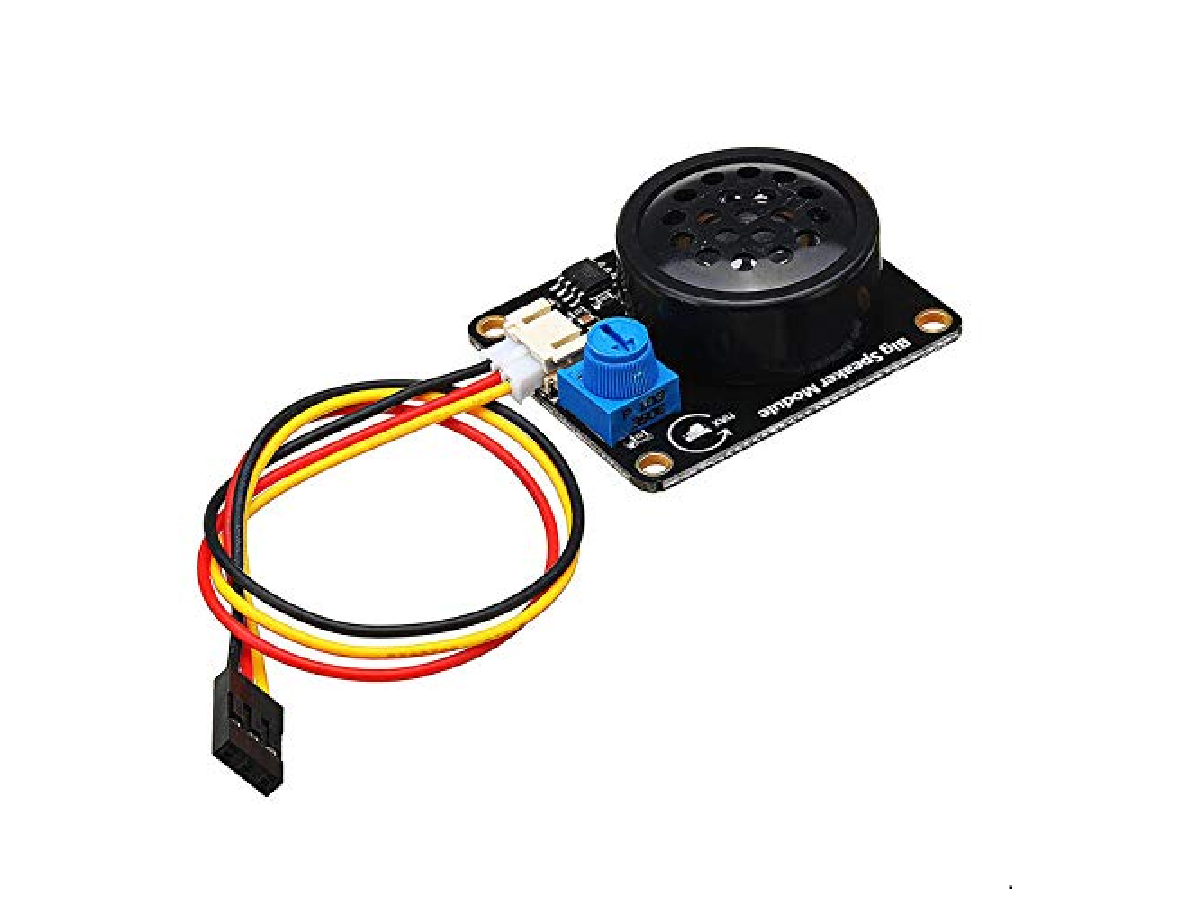
YwRobot big speaker module
The YwRobot Big Speaker Module is a small, amplified speaker module from YwRobot, designed for various electronic DIY projects. Unlike a regular speaker, it has a built-in driver circuit, allowing it to be connected directly to a microcontroller and driven by its IO pins. Additionally, it can be used as a mini speaker by connecting to the headphone jack of a phone or computer via its 3.5mm audio interface.
The difference between it and passive/active buzzers.
| TYPE | CAN PLAY MUSIC | CONTROL METHOD | INTERNAL STRUCTURE | SOUND VOLUME |
|---|---|---|---|---|
| Active Buzzer | Cannot | High level → sound | Built-in oscillator | Loud |
| Passive Buzzer | Can play simple melodies | Requires PWM frequency control | Coil + metal diaphragm | Medium |
| YwRobot Big Speaker Module | Can play complex melodies | PWM / tone() / custom waveforms | Small speaker + driver amplifier | Louder and fuller sound |
Specifications
| Size | 41 x 32mm |
| Fixed Hole | 3mm |
| Loudspeaker Power | 0.5W / 8Ω |
| Speaker Diameter | 29.3mm |
| Power Amplifier Chip | NS8002 |
| Voltage | 2–5V |
| Port | Digital |
| Platform | Arduino, MCU |
Applications and Use Cases
Educational Projects
The YwRobot Big Speaker Module is a great tool for educational projects where students can learn about sound generation, audio synthesis, and basic electronics. It can be integrated with various sensors or interactive elements.
Sound Effects in DIY Projects
For DIY projects like alarms, robots, or interactive toys, the speaker module provides a simple solution for adding sound effects. It can be used to generate beeps, warnings, or any other custom audio output.
IoT Projects
In IoT projects, the YwRobot Big Speaker Module can be used to provide audio feedback or alerts. For example, a smart home system could use this module to sound an alert when a security sensor is triggered.
There are two ways to use the YwRobot big speaker module.
| PIN | FULL NAME | FUNCTION |
|---|---|---|
| G | GND | Ground |
| V | VCC | Power Supply (typically 5V) |
| S | Signal | Audio/Buzzer Signal Input |
Method 1: As an External Speaker
It can be used as an external speaker. Use a 3.5mm audio input cable to connect the ‘S’ and ‘G’ interfaces, then plug it into the headphone jack of a phone or computer. Supply 5V DC power to the ‘VCC’ pin, and you can use it as an external speaker.
Method 2: Using the Arduino tone() Function
Use the Arduino tone() function to send square waves of different frequencies to the ‘SIG’ pin. This will allow you to play your pre-programmed music.
Arduino tone() Function Overview
tone(pin, frequency, duration);
| PARAMETER NAME | TYPE | DESCRIPTION |
|---|---|---|
| pin | int | Arduino pin for outputting sound (e.g., D2, D3, D5, D6, D9, D10, etc.) |
| frequency | unsigned int | Sound frequency (unit: Hz), for example, 440Hz = A4 note |
| duration (optional) | unsigned long | Playback duration (unit: milliseconds ms) |
tone(6, 1000, 200);
Play a 1kHz tone for 200ms.
Example Code
| Pin | Full Name | ARDUINO |
|---|---|---|
| G | GND | GND |
| V | VCC | Power Supply (typically 5V) |
| S | Signal | 8 |
					#define NOTE_B0  31
#define NOTE_C1  33
#define NOTE_CS1 35
#define NOTE_D1  37
#define NOTE_DS1 39
#define NOTE_E1  41
#define NOTE_F1  44
#define NOTE_FS1 46
#define NOTE_G1  49
#define NOTE_GS1 52
#define NOTE_A1  55
#define NOTE_AS1 58
#define NOTE_B1  62
#define NOTE_C2  65
#define NOTE_CS2 69
#define NOTE_D2  73
#define NOTE_DS2 78
#define NOTE_E2  82
#define NOTE_F2  87
#define NOTE_FS2 93
#define NOTE_G2  98
#define NOTE_GS2 104
#define NOTE_A2  110
#define NOTE_AS2 117
#define NOTE_B2  123
#define NOTE_C3  131
#define NOTE_CS3 139
#define NOTE_D3  147
#define NOTE_DS3 156
#define NOTE_E3  165
#define NOTE_F3  175
#define NOTE_FS3 185
#define NOTE_G3  196
#define NOTE_GS3 208
#define NOTE_A3  220
#define NOTE_AS3 233
#define NOTE_B3  247
#define NOTE_C4  262
#define NOTE_CS4 277
#define NOTE_D4  294
#define NOTE_DS4 311
#define NOTE_E4  330
#define NOTE_F4  349
#define NOTE_FS4 370
#define NOTE_G4  392
#define NOTE_GS4 415
#define NOTE_A4  440
#define NOTE_AS4 466
#define NOTE_B4  494
#define NOTE_C5  523
#define NOTE_CS5 554
#define NOTE_D5  587
#define NOTE_DS5 622
#define NOTE_E5  659
#define NOTE_F5  698
#define NOTE_FS5 740
#define NOTE_G5  784
#define NOTE_GS5 831
#define NOTE_A5  880
#define NOTE_AS5 932
#define NOTE_B5  988
#define NOTE_C6  1047
#define NOTE_CS6 1109
#define NOTE_D6  1175
#define NOTE_DS6 1245
#define NOTE_E6  1319
#define NOTE_F6  1397
#define NOTE_FS6 1480
#define NOTE_G6  1568
#define NOTE_GS6 1661
#define NOTE_A6  1760
#define NOTE_AS6 1865
#define NOTE_B6  1976
#define NOTE_C7  2093
#define NOTE_CS7 2217
#define NOTE_D7  2349
#define NOTE_DS7 2489
#define NOTE_E7  2637
#define NOTE_F7  2794
#define NOTE_FS7 2960
#define NOTE_G7  3136
#define NOTE_GS7 3322
#define NOTE_A7  3520
#define NOTE_AS7 3729
#define NOTE_B7  3951
#define NOTE_C8  4186
#define NOTE_CS8 4435
#define NOTE_D8  4699
#define NOTE_DS8 4978


int melody[] = {
NOTE_E4, NOTE_E4, NOTE_E4, NOTE_C4, NOTE_E4, NOTE_G4, NOTE_G3,
NOTE_C4, NOTE_G3, NOTE_E3, NOTE_A3, NOTE_B3, NOTE_AS3, NOTE_A3, NOTE_G3, NOTE_E4, NOTE_G4, NOTE_A4, NOTE_F4, NOTE_G4, NOTE_E4, NOTE_C4, NOTE_D4, NOTE_B3,
NOTE_C4, NOTE_G3, NOTE_E3, NOTE_A3, NOTE_B3, NOTE_AS3, NOTE_A3, NOTE_G3, NOTE_E4, NOTE_G4, NOTE_A4, NOTE_F4, NOTE_G4, NOTE_E4, NOTE_C4, NOTE_D4, NOTE_B3,
NOTE_G4, NOTE_FS4, NOTE_E4, NOTE_DS4, NOTE_E4, NOTE_GS3, NOTE_A3, NOTE_C4, NOTE_A3, NOTE_C4, NOTE_D4, NOTE_G4, NOTE_FS4, NOTE_E4, NOTE_DS4, NOTE_E4, NOTE_C5, NOTE_C5, NOTE_C5,
NOTE_G4, NOTE_FS4, NOTE_E4, NOTE_DS4, NOTE_E4, NOTE_GS3, NOTE_A3, NOTE_C4, NOTE_A3, NOTE_C4, NOTE_D4, NOTE_DS4, NOTE_D4, NOTE_C4,
NOTE_C4, NOTE_C4, NOTE_C4, NOTE_C4, NOTE_D4, NOTE_E4, NOTE_C4, NOTE_A3, NOTE_G3, NOTE_C4, NOTE_C4, NOTE_C4, NOTE_C4, NOTE_D4, NOTE_E4,
NOTE_C4, NOTE_C4, NOTE_C4, NOTE_C4, NOTE_D4, NOTE_E4, NOTE_C4, NOTE_A3, NOTE_G3
};


int noteDurations[] = {
8,4,4,8,4,2,2,
3,3,3,4,4,8,4,8,8,8,4,8,4,3,8,8,3,
3,3,3,4,4,8,4,8,8,8,4,8,4,3,8,8,2,
8,8,8,4,4,8,8,4,8,8,3,8,8,8,4,4,4,8,2,
8,8,8,4,4,8,8,4,8,8,3,3,3,1,
8,4,4,8,4,8,4,8,2,8,4,4,8,4,1,
8,4,4,8,4,8,4,8,2
};

void setup() {
}

void loop() {
  for (int thisNote = 0; thisNote < 98; thisNote++) {
    int noteDuration = 800/noteDurations[thisNote];
    tone(8, melody[thisNote],noteDuration);
    int pauseBetweenNotes = noteDuration * 1.30;
    delay(pauseBetweenNotes);
    noTone(8);
  }
}
Troubleshooting and Tips
No Sound Output
- Check the wiring: Ensure all connections (VCC, GND, SIGNAL) are correctly made.
- Check the power supply: The module requires a 5V power source. Ensure that your power supply is adequate.
Low Sound Output
- Adjust the potentiometer to increase the volume.
- Ensure the module is properly powered and connected.